# Geile Camp
## Introduction
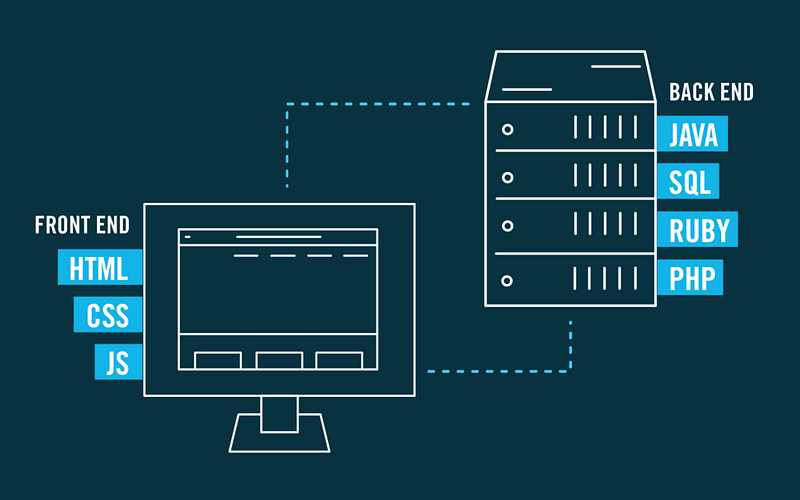
### 前端 vs 後端
### HTML vs CSS vs JavaScript

### Development Environment Setup(開發環境安裝)
Download [Visual Studio Code](https://code.visualstudio.com/) and install, for Web Design we will want to install a plugin [Live Server](https://marketplace.visualstudio.com/items?itemName=ritwickdey.LiveServer).
### Web Development Process
*Event Special! (No handouts for this, so listen carefully!)*
## HTML

### Structure 基本結構
> 由 html 標籤包起所有內容
```htmlmixed=
<!DOCTYPE HTML>
<html>
<head>
...網頁設定
</head>
<body>
...網頁內容
</body>
</html>
```
### Common Tag
#### Paragraph 段落
> 可以將文字段落放進這個標籤內。
```htmlmixed=
<p>
Lorem ipsum dolor sit amet, consectetur adipiscing elit, sed do eiusmod tempor incididunt ut labore et dolore magna aliqua. Ut enim ad minim veniam, quis nostrud exercitation ullamco laboris nisi ut aliquip ex ea commodo consequat. Duis aute irure dolor in reprehenderit in voluptate velit esse cillum dolore eu fugiat nulla pariatur. Excepteur sint occaecat cupidatat non proident, sunt in culpa qui officia deserunt mollit anim id est laborum.
</p>
```
---
*Example*
<p>
Lorem ipsum dolor sit amet, consectetur adipiscing elit, sed do eiusmod tempor incididunt ut labore et dolore magna aliqua. Ut enim ad minim veniam, quis nostrud exercitation ullamco laboris nisi ut aliquip ex ea commodo consequat. Duis aute irure dolor in reprehenderit in voluptate velit esse cillum dolore eu fugiat nulla pariatur. Excepteur sint occaecat cupidatat non proident, sunt in culpa qui officia deserunt mollit anim id est laborum.
</p>
---
#### Image 圖片
> 顯示指定路徑的圖片。
```htmlmixed=
<img src="./photo.jpg" />
```
---
*Example*
<img src="https://www.dailydot.com/wp-content/uploads/35e/22/393eb24911279909-e1487860475605.jpg" />
---
#### Anchor Link 錨點/連結
> 可點擊的超文本(Hypertext)文字
```htmlmixed=
<a href="https://google.com">Go to google</a>
```
---
*Example*
<a href="https://google.com">Go to google</a>
---
#### List 列表
```htmlmixed=
<!-- ordered list -->
<ol>
<li>1</li>
<li>2</li>
</ol>
<!-- unordered list -->
<ul>
<li>dot dot dot</li>
<li>dot2 dot2 dot2</li>
</ul>
```
---
*Example*
> ordered list
<ol>
<li>1</li>
<li>2</li>
</ol>
> unordered list
<ul>
<li>dot dot dot</li>
<li>dot2 dot2 dot2</li>
</ul>
---
#### Table 表格
```htmlmixed=
<table>
<thead>
<th>lorem</th>
<th>dolor</th>
</thead>
<tbody>
<tr>
<td>ksdfj</td>
<td>fkds</td>
</tr>
<tr>
<td>dewr</td>
<td>dskl</td>
</tr>
</tbody>
</table>
```
---
*Example*
<table>
<thead>
<th>lorem</th>
<th>dolor</th>
</thead>
<tbody>
<tr>
<td>ksdfj</td>
<td>fkds</td>
</tr>
<tr>
<td>dewr</td>
<td>dskl</td>
</tr>
</tbody>
</table>
---
#### Division Element 分隔元素
```htmlmixed=
<div style="background-color: red; padding: 5px;">
<div style="background-color: yellow;">
<p>Some thing</p>
</div>
<div style="background-color: green;">
<p>Anothor thing </p>
</div>
</div>
<div style="background-color: cyan;">
<p>Anothor anothor thing </p>
</div>
```
---
*Example*
<div style="background-color: red; padding: 5px;">
<div style="background-color: yellow;">
<p>Some thing</p>
</div>
<div style="background-color: green;">
<p>Anothor thing </p>
</div>
</div>
<div style="background-color: cyan;">
<p>Anothor anothor thing </p>
</div>
---
#### Form
```htmlmixed=
<form>
<label for="username">Username:</label>
<input id="username" type="text">
<label for="password">Password:</label>
<input id="password" type="password">
<input value="Submit" type="submit">
</form>
```
---
*Example*
> QQ Markdown 擋掉 form tag, 只能貼圖了

---
## CSS
> 通常是一種用來描述網頁樣式的語言,一個CSS文件基本上由各個規則組成,並且每個規則由
> 1. 選擇器(Selector):多個選擇器可以半形逗號(,)隔開。
> 2. 屬性(property):CSS1、CSS2、CSS3規定了許多的屬性,目的在控制選擇器的樣式。
> 3. 值(value):指屬性接受的設定值,多個關鍵字時大都以空格隔開。
>
> 來組成。
### StyleSheet
```htmlmixed=
<!DOCTYPE html>
<html>
<head>
<style>
div { /* 選擇器:選取 HTML 所有的 div 標籤。 */
font-size: 20px; /* 屬性:值 */
}
/* 規則一 */
#main { /* 選擇器:選取名叫“main”的ID。 */
background-color: red;
height: 100%;
}
/* 規則二 */
.box { /* 選擇器:選取名叫“box”的所有class。 */
width: 640px;
height: 180px;
}
/* 規則三 */
.blackBox {
background-color: #000;
}
</style>
</head>
<body>
<div id="main">
<div class="box blackBox">
<p>You can't see me</p>
</div>
</div>
</body>
</html>
```
### Styles
#### color
```css=
p {
/* 內建顏色 */
color: red;
/* hex Code */
color: #fff;
/* rgb Code */
color: rgb(0, 0, 0);
}
```
---
*Example*
<p style="color: red">我是紅色</p>
---
#### font
Units:
px: pixels (1px = 0.2646mm)
em: Relative to the font-size of the element
```css=
p {
font-size: 30px;
font-family: "Courier New";
}
```
---
*Example*
<p style="font-size: 30px; font-family: 'Courier New'">I'm 30px Courier New</p>
---
#### height & weight
```css=
img {
width: 50%;
height: 150px;
}
```
---
*Example*
> width: 50%; height: 150px
<img style="width: 50%; height: 150px" src="https://scontent-hkg4-1.xx.fbcdn.net/v/t1.0-9/119412176_3288268747888647_6333087122666605400_n.jpg?_nc_cat=106&_nc_sid=730e14&_nc_ohc=52zt7kxC86sAX-roFec&_nc_ht=scontent-hkg4-1.xx&oh=7a31020aacbad1cdafd74370e838400f&oe=5F8C7454" />
---
#### margin & border & padding

```css=
div {
margin: 4px;
border: 2px red solid;
padding: 20px;
}
```
---
**Example**
<div style="
margin: 4px;
border: 2px red solid;
padding: 20px;">
Content here
</div>
---
#### display
```css=
.box-1 {
display: block;
/* -外觀設定- */
background-color: red;
padding: 30px;
/* --------- */
}
.box-2 {
display: inline-block;
/* -外觀設定- */
background-color: blue;
padding: 30px;
/* --------- */
}
```
---
*Example*
<div class="fake-central-box" style="display: block;background-color: red;padding: 30px;">我是紅色盒盒</div>
<div class="fake-central-box" style="display: inline-block;background-color: blue;padding: 30px;">我是藍色盒盒</div>
---
#### position
```css=
.fake-central-box {
position: relative;
left: 50%;
/* -外觀設定- */
background-color: red;
display: inline-block;
padding: 30px;
/* --------- */
}
```
---
*Example*
<div class="fake-central-box" style="position: relative;left: 50%;background-color: red; padding: 30px; display: inline-block;">我是紅色盒盒</div>
---
#### transition
```css=
.little-animation {
position: relative;
left: 0;
/* -外觀設定- */
background-color: red;
display: inline-block;
padding: 30px;
/* --------- */
}
.little-animation:hover {
left: 10%
}
```
---
*Example*
<iframe src="https://codepen.io/cliffxzx/full/MWyzoMb"></iframe>
---
## RWD & Framework:Bootstrap
### Get Start
官方文件: https://getbootstrap.com/docs/
六角學院翻譯中文文件: https://bootstrap.hexschool.com/
Starter Template:
```htmlmixed=
<!doctype html>
<html lang="en">
<head>
<!-- Required meta tags -->
<meta charset="utf-8">
<meta name="viewport" content="width=device-width, initial-scale=1, shrink-to-fit=no">
<!-- Bootstrap CSS -->
<link rel="stylesheet" href="https://stackpath.bootstrapcdn.com/bootstrap/4.5.2/css/bootstrap.min.css" integrity="sha384-JcKb8q3iqJ61gNV9KGb8thSsNjpSL0n8PARn9HuZOnIxN0hoP+VmmDGMN5t9UJ0Z" crossorigin="anonymous">
<title>Hello, world!</title>
</head>
<body>
<h1>Hello, world!</h1>
<!-- Optional JavaScript -->
<!-- jQuery first, then Popper.js, then Bootstrap JS -->
<script src="https://code.jquery.com/jquery-3.5.1.slim.min.js" integrity="sha384-DfXdz2htPH0lsSSs5nCTpuj/zy4C+OGpamoFVy38MVBnE+IbbVYUew+OrCXaRkfj" crossorigin="anonymous"></script>
<script src="https://cdn.jsdelivr.net/npm/popper.js@1.16.1/dist/umd/popper.min.js" integrity="sha384-9/reFTGAW83EW2RDu2S0VKaIzap3H66lZH81PoYlFhbGU+6BZp6G7niu735Sk7lN" crossorigin="anonymous"></script>
<script src="https://stackpath.bootstrapcdn.com/bootstrap/4.5.2/js/bootstrap.min.js" integrity="sha384-B4gt1jrGC7Jh4AgTPSdUtOBvfO8shuf57BaghqFfPlYxofvL8/KUEfYiJOMMV+rV" crossorigin="anonymous"></script>
</body>
</html>
```
### Layout
#### Container
```htmlmixed=
<div class="container">
...Other Components here
</div>
<div class="container-fluid">
...Other Components here
</div>
```
#### Spacing
```htmlmixed=
<div class="mt-2 pb-3">
text here.
</div>
```
For more vist: https://getbootstrap.com/docs/4.0/utilities/spacing/
## JavaScript
### Syntax
#### Variable
```javascript=
var globalScopeVariable = 10;
let blockScopeVariable = "SomeText";
const constantBlockScopeVariable = 3.14159;
console.log(blockScopeVariable+"Hi");
```
---
*Example*
```
SomeTextHi
```
---
#### if statement
```javascript=
if( x === 10 ) {
console.log("It is 10.");
} else if (x !== 100) {
console.log("It is not 100.");
} else {
console.log("I have no idea what it is.");
}
```
#### Array
```javascript=
let fruits = ['Apple', 'Banana'];
console.log(fruits.length);
var first = fruits[0];
console.log(first)
fruits[0] = 'NotBanana';
console.log(fruits);
```
---
*Example*
```
2
Apple
['NotBanana', 'Banana']
```
---
#### for statement
```javascript=
// i++ is the same meaning of i += 1
for(let i = 0 ; i < 10 ; i++ ) {
console.log(i*i);
}
```
---
*Example*
```
0
1
4
9
16
25
36
49
64
81
```
---
#### Function
```javascript
function generateP(text) {
text = '<p>'+text+'</p>';
return text
}
function start() {
var element = document.getElementById('target');
element.innerHTML = gernerateP('Some thing happend');
}
```
### Global Variables
#### window
> Javascript 的執行環境不止有瀏覽器,在伺服器端還用一個熱門的 node.js ,而在不同的執行環境下,除了實作 ECMAscript 的標準語言規範外,各執行環境還可能提供一些函式或是變數,而 window 就是瀏覽器端提供的一個全域變數, node.js 則沒有此變數,取而代之的則是 global 變數。那為什麼瀏覽器要提供 window 變數呢?因為我們需要一些例如修改節點、或是一些瀏覽器需要用到的常用函式,例如等等會介紹的 document。
#### document (DOM)
```javascript=
var oneElement = document.getElementById("user_id");
var listOfElement = document.getElementsByClassName("classes");
```
| Properties | Explanation |
| ---------- | ----------- |
| element.classList | Get list of class, read only|
| element.innerHTML | Access inner HTML of element|
| element.style | Access style of element |
| element.clientWidth | Access width of element |
| element.clientHeight | Access height of element |
For more see [Web APIs in MDN](https://developer.mozilla.org/en-US/docs/Web/API/Element)
##### onclick event
```htmlmixed=
<button id="btn" onclick="someAction()">Click me</button>
<script>
function someAction() {
var element = document.getElementById('btn');
element.style.display = 'none';
}
</script>
```
## React & JSX

### Getting Start
Follow the [instruction](https://zh-hant.reactjs.org/docs/add-react-to-a-website.html) to add React into your html!
### Function and Props
```jsx=
function CustomizedComponent(props) {
return <h1>Hello, {props.name}</h1>;
}
function YourApp(props) {
return (
<div>
<CustomizedComponent name="Juicy" />
<CustomizedComponent name="Candy" />
</div>
);
}
```
### State and Life-Cycle

...Will be discuss in training!
## About the training
 Sign in with Wallet
Connect another wallet
Sign in with Wallet
Connect another wallet