# AICSIR --- CV
###### tags: `AICSIR`
[TOC]
::: info
**Goal :**
- [x] detect the green object. (tennis)
- [x] calculate the object's 3D coordinate with reference to camera.
- [x] publish the object's position to specific topic.
- [x] improve position estimation accuracy.
:::
## basic
### camera specs
* Logitech, Inc. Webcam C310.
* video resolution support:
```
* 640x480 * 752x416 * 1280x960
* 160x120 * 800x448
* 176x144 * 800x600
* 320x176 * 864x480
* 320x240 * 960x544
* 352x288 * 960x720
* 432x240 * 1024x576
* 544x288 * 1184x656
* 640x360 * 1280x720
```
### pinhole model
* The pinhole camera model describes the mathematical relationship between the coordinates of a point in three-dimensional space and its projection onto the image plane of an ideal pinhole camera. [Pinhole camera model wikipedia](https://en.wikipedia.org/wiki/Pinhole_camera_model)
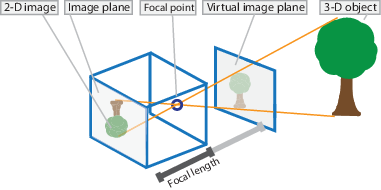
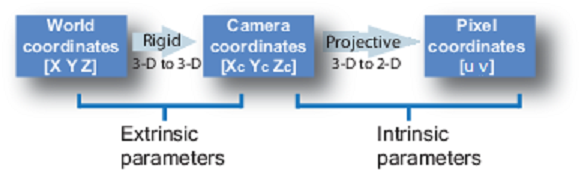
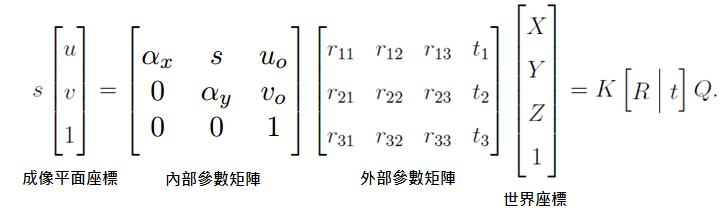
* In our case, we don't need to find out the extrinsic parameters because we just need the camera coordinate. World coordinate can be calculated by other ROS node.
* So we only concern about the intrinsic parameters
* $u_0$ means the center point along X-axis in a photo. in 640 x 480 case, $u_0\ = \frac{640}{2} = 320$. Another representation sign is $c_x$.
* $v_0$ means the center point along Y-axis in a photo. in 640 x 480 case, $v_0\ = \frac{480}{2} = 240$. Another representation sign is $c_y$.
* $s$ is skew parameter, to adjust pixels in a photo under a situation that u-axis doesn't perpendicular to v-axis. Usually $s$ is 0.
* $\sigma_x$ is focal length which camera project a point to X-axis of an image plane. Another representation sign is $f_x$. Unit is pixel.
* $\sigma_y$ is focal length which camera project a point to Y-axis of an image plane. Another representation sign is $f_y$. Unit is pixel
## computer vision
### camera calibration
* **method 1** :
1. measure the object's real width $W$(or height $H$) and the length between camera and object *D*.
2. take a picture of object and measure the object's pixels $P_x$(or $P_y$) in that photo.
3. use **triangle similarity therom** to calculate the camera intrinsic parameter $f_x$ and $f_y$.
4. formula : $\dfrac{f_x}{D} = \dfrac{P_x}{W}$ , $\dfrac{f_y}{D} = \dfrac{P_y}{H}$.

* **method 2** :
[NCRL相機校正筆記](https://sites.google.com/a/g2.nctu.edu.tw/ncrl-nctu/svo/攝影機校正?authuser=0)
### color tracking
1. take each frame of the video.
2. convert from BGR to HSV color-space. **In HSV, it is more easier to represent a color than RGB color-space**.
3. for example, we threshold the HSV image for a range of blue color.e
4. now extract the blue object alone, we can do whatever on that image we want.
* example :
```python3=1
import cv2
import numpy as np
cap = cv2.VideoCapture(0)
while(1):
# Take each frame
_, frame = cap.read()
# Convert BGR to HSV
hsv = cv2.cvtColor(frame, cv2.COLOR_BGR2HSV)
# define range of blue color in HSV
lower_blue = np.array([110,50,50])
upper_blue = np.array([130,255,255])
# Threshold the HSV image to get only blue colors
mask = cv2.inRange(hsv, lower_blue, upper_blue)
# Bitwise-AND mask and original image
res = cv2.bitwise_and(frame,frame, mask= mask)
cv2.imshow('frame',frame)
cv2.imshow('mask',mask)
cv2.imshow('res',res)
k = cv2.waitKey(5) & 0xFF
if k == 27:
break
cv2.destroyAllWindows()
```
* example result :

* Q : How to find HSV values to track?
A : using function cv2.cvtColor(). Instead of passing an image, you just pass the ==BGR== values you want. For example :
```python3
>>> green = np.uint8([[[0,255,0 ]]])
>>> hsv_green = cv2.cvtColor(green,cv2.COLOR_BGR2HSV)
>>> print(hsv_green)
[[[ 60 255 255]]]
```
then you can take ==[H-10, 100,100] and [H+10, 255, 255]== as lower bound and upper bound respectively.
### position estimation
* leverage the formula above in camera calibration $\dfrac{f_x}{D} = \dfrac{P_x}{W}$ and $\dfrac{f_y}{D} = \dfrac{P_y}{H}$.
* first, assume that you have detected the object and got its pixels in image. Then from the formula $D = \dfrac{f_x \cdot{W}}{P_x}$, we can estimate the Z-axis value.
* therefore, we slighly change the definition of $P_x$ and $W$ to the `object's offset against the Y-axis in image` and `object's offset against the Y-axis in real world (camera coordinate)`.
* then we can estimate the X-axis value by formula $W = \dfrac{P_x\cdot{D}}{f_x}$.
* we also change the definition of $P_y$ and $H$ to the `object's offset against the X-axis in image` and `object's offset against the X-axis in real world (camera coordinate)`.
* and so on, we can estimate the Y-axis value by formula $H = \dfrac{P_y\cdot{D}}{f_y}$.
## progress
* 2/3~2/7: use one webcam c310 to detect the blue object, and return its 3D relative coordinate with reference to camera.
* 2/10~2/14: corrected the intrinsic parameter of camera, returned at least 80% accuracy of object Z-axis position. Also, wrote a publisher to publish Point msg to "camara coordinate" topic.
* 2/17~2/21: corrected the X-axis and Y-axis position estimation method. And the new method yield position estimation difference less than 1cm in each axis.
## reference
* [demo參考影片](https://www.youtube.com/watch?v=idSvJ-RXhq0)
* [辨識參考影片](https://www.youtube.com/watch?v=hQ-bpfdWQh8)
* [台中一中-機器手臂與電腦視覺結合](https://activity.ntsec.gov.tw/activity/race-1/59/pdf/NPHSF2019-052311.pdf)
* OpenNI
* [OpenCV + OpenNi](https://docs.opencv.org/master/d7/d6f/tutorial_kinect_openni.html)
* [OpenNI 2.x 教學文章](https://kheresy.wordpress.com/index_of_openni_and_kinect/documents-of-openni-2-x/)
* [OpenNI2 header](https://github.com/OpenNI/OpenNI2/blob/master/Include/OpenNI.h)
* openCV
* [openCV tutorial](https://opencv-python-tutroals.readthedocs.io/en/latest/index.html)
* [openCV API document](https://docs.opencv.org/2.4/modules/highgui/doc/reading_and_writing_images_and_video.html?highlight=read#cv2.VideoCapture.read)
* [openCV contour教學](https://chtseng.wordpress.com/2016/12/05/opencv-contour%E8%BC%AA%E5%BB%93/)
* [openCV denoise教學](https://opencv-python-tutroals.readthedocs.io/en/latest/py_tutorials/py_imgproc/py_morphological_ops/py_morphological_ops.html)
* 座標轉換
* [pinhole model](https://en.wikipedia.org/wiki/Pinhole_camera_model)
* [針孔相機座標成像原理](http://silverwind1982.pixnet.net/blog/post/134551091-pinhole-camera%3A-%E7%9B%B8%E6%A9%9F%E5%BA%A7%E6%A8%99%E6%88%90%E5%83%8F%E5%8E%9F%E7%90%86)
* 相機校正
* [pinhole 相機校正](http://silverwind1982.pixnet.net/blog/post/153218861)
* [利用ros校正相機](http://wiki.ros.org/camera_calibration/Tutorials/MonocularCalibration)
* [NCRL相機校正筆記](https://sites.google.com/a/g2.nctu.edu.tw/ncrl-nctu/svo/she-ying-ji-xiao-zheng?fbclid=IwAR3RDtt_0bXg-6Bb-WV6wUsa1RQYbAtl9l0o-23asJLhQQaU_3qgNZE6ooY)
 Sign in via Google
 Sign in via Facebook
 Sign in via X(Twitter)
 Sign in via GitHub
 Sign in via Dropbox
 Sign in with Wallet
Connect another wallet
Sign in with Wallet
Connect another wallet