# 詞雲
- 在企業環境中,wordcloud 模組可以幫助完成以下工作用詞雲表達:
- 市場研究:分析社交媒體貼文或產品評論,了解消費者關注點。
- 客戶反饋分析:從客戶反饋中提取關鍵詞,幫助企業識別服務或產品的優勢和不足。
- 員工反饋:生成員工調查或反饋會議文字記錄的詞雲,洞察員工的主要關切。
- 內容策略:分析網站內容或臉書貼文,優化SEO和內容行銷策略。
- 品牌監控:監控品牌評論,評估大眾對品牌的看法。
- 安裝 `pip install wordcloud`
## 我的第一個詞雲程式
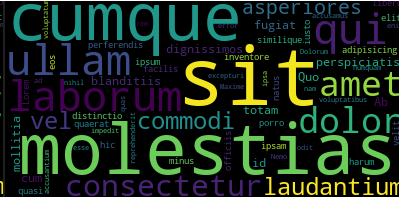
```python
from wordcloud import WordCloud
txt = "Lorem ipsum dolor sit amet consectetur adipisicing elit. Molestias similique quasi laudantium cumque perferendis, quis commodi, libero distinctio laborum qui porro hic harum vel a asperiores natus perspiciatis fugiat minus sit dignissimos ipsam. Quis cum dignissimos facilis quaerat totam at inventore velit eos laborum officiis. Ab a amet molestias mollitia iusto ullam voluptatibus. Quo id odit error, nam consectetur numquam! Vel, id esse ad reprehenderit accusantium dolor rem laborum ullam, molestias excepturi cumque. Maxime, ab? Dolorum perspiciatis blanditiis quas cumque enim sit! Asperiores, fugiat! Nemo accusamus commodi laudantium impedit ullam blanditiis nihil mollitia sit, cum totam ipsa quo at voluptatum."
wd = WordCloud().generate(txt) # 由txt文字產生WordCloud物件
imageCloud = wd.to_image() # 由WordCloud物件建立詞雲影像檔
imageCloud.show() # 顯示詞雲影像檔
```
## 建立含中文字的詞雲
- 需要安裝module `jieba` -> `pip install jieba`
- 去找中文字體
```python
import jieba
from wordcloud import WordCloud
import matplotlib.pyplot as plt
# 示例中文文本
txt = "Lorem ipsum 是假的文本,然而中文部分是有意義的。這是一個測試文本,用於展示如何生成中文詞雲。詞雲可以很好地展示文本中的關鍵詞。"
# 使用 jieba 進行中文分詞
word_list = jieba.cut(txt, cut_all=False)
word_space_split = " ".join(word_list)
# 生成詞雲
wd = WordCloud(font_path="../../../kaiu.ttf", width=800, height=400).generate(word_space_split)
imageCloud = wd.to_image()
imageCloud.show()
```

## 建立含圖片背景的詞雲
- 摳圖軟體:https://www.remove.bg/zh
```python
import jieba
from wordcloud import WordCloud
import matplotlib.pyplot as plt
import numpy as np
from PIL import Image
# 示例中文文本
txt = "Lorem ipsum 是假的文本,然而中文部分是有意義的。這是一個測試文本,用於展示如何生成中文詞雲。詞雲可以很好地展示文本中的關鍵詞。"
# 使用 jieba 進行中文分詞
word_list = jieba.cut(txt, cut_all=False)
word_space_split = " ".join(word_list)
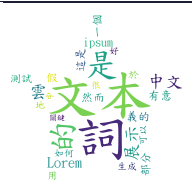
# 背景圖
bgimage = np.array(Image.open("../../../star.gif"))
# 生成詞雲
wd = WordCloud(
font_path="../../../kaiu.ttf",
background_color="white",
# width=800, height=400, # 不要設定長寬
mask=bgimage
).generate(word_space_split)
imageCloud = wd.to_image()
imageCloud.show()
```
# 傳送gmail
## 連線發送 Gmail郵件伺服器
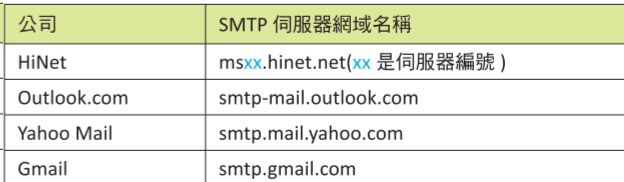
- SMTP協定:simple mail transfer protocal
### SMTP server
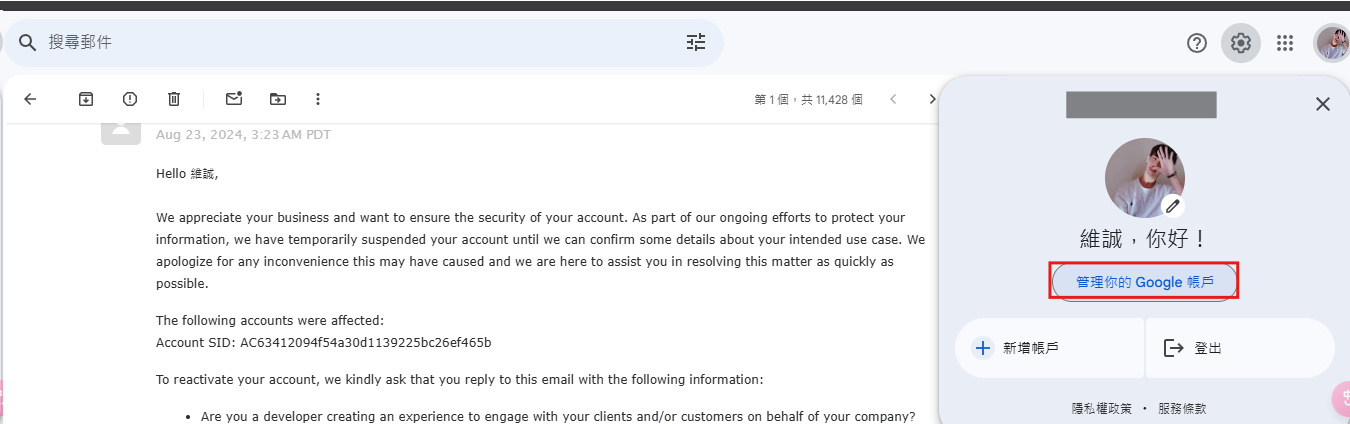
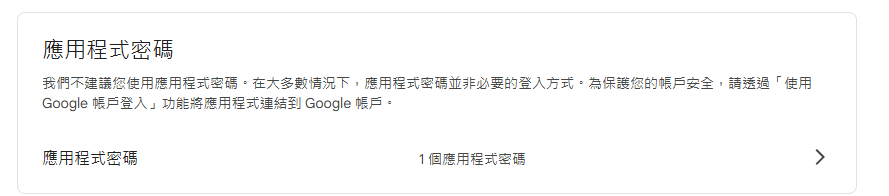
## 申請gmail應用程式密碼

## 基本與SMTP server對話過程
```python
import smtplib
# 連線到SMTP server
mySMTP = smtplib.SMTP("smtp.gmail.com", 587)
print(type(mySMTP)) # <class 'smtplib.SMTP'>
# 啟動與SMTP server對話
print(mySMTP.ehlo())
# (250, b'smtp.gmail.com at your service, [2001:288:7001:2562:5460:f4f3:7f46:e4a2]\nSIZE 35882577\n8BITMIME\nSTARTTLS\nENHANCEDSTATUSCODES\nPIPELINING\nCHUNKING\nSMTPUTF8')
# 250 代表成功,一定要看到這個數字
# 啟動TLS郵件加密
mySMTP.starttls()
# 登入信箱
print(mySMTP.login("【你的gmail】", "【你的gmail應用程式密碼】"))
# (235, b'2.7.0 Accepted')
# 結束跟SMTP server連線
print(mySMTP.quit())
# (221, b'2.0.0 closing connection 98e67ed59e1d1-2d613b1c996sm3707231a91.53 - gsmtp')
```
## 設計傳送電子郵件程式
- 一份信件包含3個東西
- 寄件人gmail
- 收件人gmail
- 信念標題與內容
```python
import smtplib
class CFG:
to_addr = "【收件人mail】"
from_addr = "【寄件人mail】"
msg = "Subject: test email\ntest email"
# 連線到SMTP server
mySMTP = smtplib.SMTP("smtp.gmail.com", 587)
print(type(mySMTP)) # <class 'smtplib.SMTP'>
# 啟動與SMTP server對話
print(mySMTP.ehlo())
# (250, b'smtp.gmail.com at your service, [2001:288:7001:2562:5460:f4f3:7f46:e4a2]\nSIZE 35882577\n8BITMIME\nSTARTTLS\nENHANCEDSTATUSCODES\nPIPELINING\nCHUNKING\nSMTPUTF8')
# 250 代表成功,一定要看到這個數字
# 啟動TLS郵件加密
mySMTP.starttls()
# 登入信箱
print(mySMTP.login("【你的gmail】", "【你的gmail應用程式密碼】"))
# (235, b'2.7.0 Accepted')
# 寄件
status = mySMTP.sendmail(CFG.from_addr, CFG.to_addr, CFG.msg)
if status == {}:
print("mail send succesful")
# 結束跟SMTP server連線
print(mySMTP.quit())
# (221, b'2.0.0 closing connection 98e67ed59e1d1-2d613b1c996sm3707231a91.53 - gsmtp')
```
## 發信給多個人 & 格式設定
- Subject:標題
- To:收件人名稱
- From:寄件人名稱
- Cc:發送副本,副本收件人指的是【我需要知道這封信內容,但我不需要回復】這樣
```python
import smtplib
class CFG:
to_addr = ["【收件人】", "【收件人】"] # 發信給多個人
from_addr = "【寄件人】"
msg = "Subject: Test Title\n\
To: Me\n\
From: You\n\
Cc: 87878787@gmail.com\n\
This is a test email."
# 連線到SMTP server
mySMTP = smtplib.SMTP("smtp.gmail.com", 587)
print(type(mySMTP)) # <class 'smtplib.SMTP'>
# 啟動與SMTP server對話
print(mySMTP.ehlo())
# (250, b'smtp.gmail.com at your service, [2001:288:7001:2562:5460:f4f3:7f46:e4a2]\nSIZE 35882577\n8BITMIME\nSTARTTLS\nENHANCEDSTATUSCODES\nPIPELINING\nCHUNKING\nSMTPUTF8')
# 250 代表成功,一定要看到這個數字
# 啟動TLS郵件加密
mySMTP.starttls()
# 登入信箱
print(mySMTP.login("【你的gmail】", "【你的gmail應用程式密碼】"))
# (235, b'2.7.0 Accepted')
# 寄件
status = mySMTP.sendmail(CFG.from_addr, CFG.to_addr, CFG.msg)
if status == {}:
print("mail send succesful")
# 結束跟SMTP server連線
print(mySMTP.quit())
# (221, b'2.0.0 closing connection 98e67ed59e1d1-2d613b1c996sm3707231a91.53 - gsmtp')
```
## MIME
- 支持中文
- 基本格式 `type/subtype`
- type格式:
- text
- image
- audio
- video
- subtype格式:
- application/octet-stream:任意二進位數據
- application/pdf:PDF文件
- application/msword:Microsoft Word 文件
- text/plain:純本文
- text/html:HTML 檔案
- image/gif:GIF 圖檔
- image/png:PNG圖檔
- image/jpeg:JPEG圖檔
- video/mp4:MP4影片檔
- video/ogg:OGG影片檔
- video/webm:WEBM 影片檔
```python
import smtplib
from email.mime.text import MIMEText
class CFG:
pwd = "【應用程式密碼】"
to_addr = ["33333333@gmail.com", ""] # 發信給多個人
from_addr = "@gmail.com"
msg = MIMEText("信件內容", "plain", "utf-8")
msg["Subject"]="Test Title"
msg["To"]="Me"
msg["Cc"]="87878787@gmail.com"
# 連線到SMTP server
mySMTP = smtplib.SMTP("smtp.gmail.com", 587)
print(type(mySMTP)) # <class 'smtplib.SMTP'>
# 啟動與SMTP server對話
print(mySMTP.ehlo())
# (250, b'smtp.gmail.com at your service, [2001:288:7001:2562:5460:f4f3:7f46:e4a2]\nSIZE 35882577\n8BITMIME\nSTARTTLS\nENHANCEDSTATUSCODES\nPIPELINING\nCHUNKING\nSMTPUTF8')
# 250 代表成功,一定要看到這個數字
# 啟動TLS郵件加密
mySMTP.starttls()
# 登入信箱
print(mySMTP.login("【你的gmail】", "【你的gmail應用程式密碼】"))
# (235, b'2.7.0 Accepted')
# 寄件
status = mySMTP.sendmail(CFG.from_addr, CFG.to_addr, CFG.msg.as_string())
if status == {}:
print("mail send succesful")
# 結束跟SMTP server連線
print(mySMTP.quit())
# (221, b'2.0.0 closing connection 98e67ed59e1d1-2d613b1c996sm3707231a91.53 - gsmtp')
```
### 傳送文本附件
```python
import smtplib
from email.mime.text import MIMEText
class CFG:
pwd = ""
to_addr = ["@gmail.com"] # 發信給多個人
from_addr = "@gmail.com"
# 讀取檔案
with open("./python小筆記.txt", mode="rb") as f:
mailContent = f.read()
msg = MIMEText(mailContent, "base64", "utf-8") # 文本附件要使用base64
msg['Content-Type'] = 'application/octet-stream'
msg['Content-Disposition'] = 'attachment; filename="data26.txt"'
msg["Subject"]="Test Title"
msg["To"]="Me"
msg["Cc"]="87878787@gmail.com"
# 連線到SMTP server
mySMTP = smtplib.SMTP("smtp.gmail.com", 587)
print(type(mySMTP)) # <class 'smtplib.SMTP'>
# 啟動與SMTP server對話
print(mySMTP.ehlo())
# (250, b'smtp.gmail.com at your service, [2001:288:7001:2562:5460:f4f3:7f46:e4a2]\nSIZE 35882577\n8BITMIME\nSTARTTLS\nENHANCEDSTATUSCODES\nPIPELINING\nCHUNKING\nSMTPUTF8')
# 250 代表成功,一定要看到這個數字
# 啟動TLS郵件加密
mySMTP.starttls()
# 登入信箱
print(mySMTP.login("3331363@gmail.com", CFG.pwd))
# print(mySMTP.login("【你的gmail】", "【你的gmail應用程式密碼】"))
# (235, b'2.7.0 Accepted')
# 寄件
status = mySMTP.sendmail(CFG.from_addr, CFG.to_addr, CFG.msg.as_string())
if status == {}:
print("mail send succesful")
# 結束跟SMTP server連線
print(mySMTP.quit())
# (221, b'2.0.0 closing connection 98e67ed59e1d1-2d613b1c996sm3707231a91.53 - gsmtp')
```
### 傳送圖片附件
```python
import smtplib
from email.mime.text import MIMEText
from email.mime.image import MIMEImage
class CFG:
pwd = ""
to_addr = ["@gmail.com"] # 發信給多個人
from_addr = "@gmail.com"
# 讀取檔案
with open("./fish.png", mode="rb") as f:
mailContent = f.read()
msg = MIMEImage(mailContent)
msg['Content-Type'] = 'application/octet-stream'
msg['Content-Disposition'] = 'attachment; filename="rushmore.jpg"'
msg["Subject"]="Test Title"
msg["To"]="Me"
msg["Cc"]="87878787@gmail.com"
# 連線到SMTP server
mySMTP = smtplib.SMTP("smtp.gmail.com", 587)
print(type(mySMTP)) # <class 'smtplib.SMTP'>
# 啟動與SMTP server對話
print(mySMTP.ehlo())
# (250, b'smtp.gmail.com at your service, [2001:288:7001:2562:5460:f4f3:7f46:e4a2]\nSIZE 35882577\n8BITMIME\nSTARTTLS\nENHANCEDSTATUSCODES\nPIPELINING\nCHUNKING\nSMTPUTF8')
# 250 代表成功,一定要看到這個數字
# 啟動TLS郵件加密
mySMTP.starttls()
# 登入信箱
print(mySMTP.login("【你的gmail】", "【你的gmail應用程式密碼】"))
# (235, b'2.7.0 Accepted')
# 寄件
status = mySMTP.sendmail(CFG.from_addr, CFG.to_addr, CFG.msg.as_string())
if status == {}:
print("mail send succesful")
# 結束跟SMTP server連線
print(mySMTP.quit())
# (221, b'2.0.0 closing connection 98e67ed59e1d1-2d613b1c996sm3707231a91.53 - gsmtp')
```
## 增加郵件異常處理
```python
import smtplib
from email.mime.text import MIMEText
from email.mime.image import MIMEImage
class CFG:
pwd = ""
to_addr = ["@gmail.com"] # 發信給多個人
from_addr = "@gmail.com"
# 讀取檔案
with open("./fish.png", mode="rb") as f:
mailContent = f.read()
msg = MIMEImage(mailContent)
msg['Content-Type'] = 'application/octet-stream'
msg['Content-Disposition'] = 'attachment; filename="rushmore.jpg"'
msg["Subject"]="Test Title"
msg["To"]="Me"
msg["Cc"]="87878787@gmail.com"
try:
mySMTP = smtplib.SMTP("smtp.gmail.com", 587) # 連線到SMTP server
mySMTP.ehlo() # 啟動與SMTP server對話 # 250 代表成功,一定要看到這個數字
mySMTP.starttls() # 啟動TLS郵件加密
mySMTP.login("@gmail.com", CFG.pwd) # 登入信箱
mySMTP.sendmail(CFG.from_addr, CFG.to_addr, CFG.msg.as_string())
print("mail send succesful")
mySMTP.quit() # 結束跟SMTP server連線
except:
print("send emamil error")
```
### 讀取CSV裡面的信箱發送資訊
```python
import csv
import smtplib
from email.mime.text import MIMEText
class CFG:
csvFile = 'out_csv.csv'
pwd = ""
to_addr = [] # 發信給多個人
from_addr = "@gmail.com"
def createCSVFile():
with open(CFG.csvFile,'w',newline='',encoding="utf-8") as csvFile: # 開啟csv檔案
csvWriter = csv.writer(csvFile) # 建立Writer物件
csvWriter.writerow(['姓名', '電子郵件', '會費'])
csvWriter.writerow(['TA', '@gmail.com', '已繳'])
def makeAddr():
with open(CFG.csvFile, mode="r",newline='',encoding="utf-8") as f:
reader = csv.DictReader(f)
for row in reader:
CFG.to_addr.append(row["電子郵件"])
def dealSMTPServer():
try:
mySMTP = smtplib.SMTP("smtp.gmail.com", 587) # 連線到SMTP server
mySMTP.ehlo() # 啟動與SMTP server對話 # 250 代表成功,一定要看到這個數字
mySMTP.starttls() # 啟動TLS郵件加密
mySMTP.login("@gmail.com", CFG.pwd) # 登入信箱
# #############
for i in CFG.to_addr:
msg = MIMEText("新年快樂", "plain", "utf-8")
msg["Subject"]="Test Title"
msg["To"]="Me"
msg["Cc"]="87878787@gmail.com"
mySMTP.sendmail(CFG.from_addr, CFG.to_addr, msg.as_string())
print("mail send succesful")
mySMTP.quit() # 結束跟SMTP server連線
except:
print("send emamil error")
if __name__ == "__main__":
createCSVFile()
makeAddr()
dealSMTPServer()
```
## 連線接收Gmail 郵件伺服器
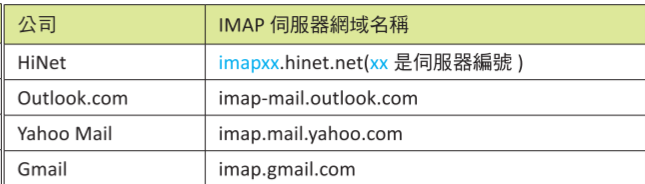
- IMAP協定:internet messenage access protocal,允許用戶從遠程讀取與管理郵件,而不需要將郵件下載到本地端
- IMAP server網域名稱
## Gmail 收件資料夾
- 安裝套件 `pip install imapclient`
```python
import imapclient
imap = imapclient.IMAPClient('imap.gmail.com',ssl=True) # 連接IMAP server
imap.login('@gmail.com', '') # login
print(*imap.list_folders(), sep="\n")
# ((b'\\HasNoChildren',), b'/', 'INBOX') 收件夾
# ((b'\\HasNoChildren',), b'/', 'Unwanted')
# ((b'\\HasChildren', b'\\Noselect'), b'/', '[Gmail]')
# ((b'\\All', b'\\HasNoChildren'), b'/', '[Gmail]/全部郵件')
# ((b'\\HasNoChildren', b'\\Trash'), b'/', '[Gmail]/垃圾桶')
# ((b'\\HasNoChildren', b'\\Junk'), b'/', '[Gmail]/垃圾郵件')
# ((b'\\HasNoChildren', b'\\Sent'), b'/', '[Gmail]/寄件備份')
# ((b'\\Flagged', b'\\HasNoChildren'), b'/', '[Gmail]/已加星號')
# ((b'\\Drafts', b'\\HasNoChildren'), b'/', '[Gmail]/草稿')
# ((b'\\HasNoChildren', b'\\Important'), b'/', '[Gmail]/重要郵件')
# ((b'\\HasNoChildren',), b'/', '廣告')
```
# SQlite
## SQLite 基本觀念
- python 3.x有內附SQlite
## 資料庫連線
```python
import sqlite3
conn = sqlite3.connect("sqlite_test.db") # 資料庫連線
conn.close() # 關閉資料庫連線
```
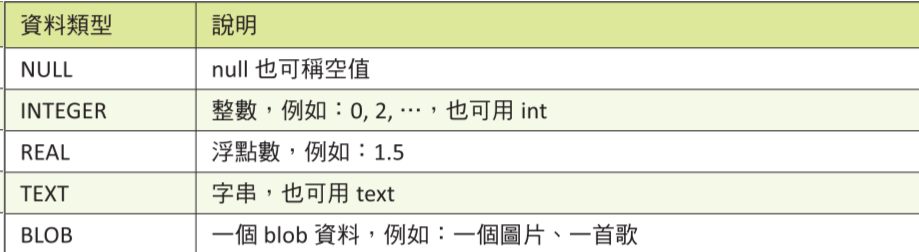
## SQLite 資料類型
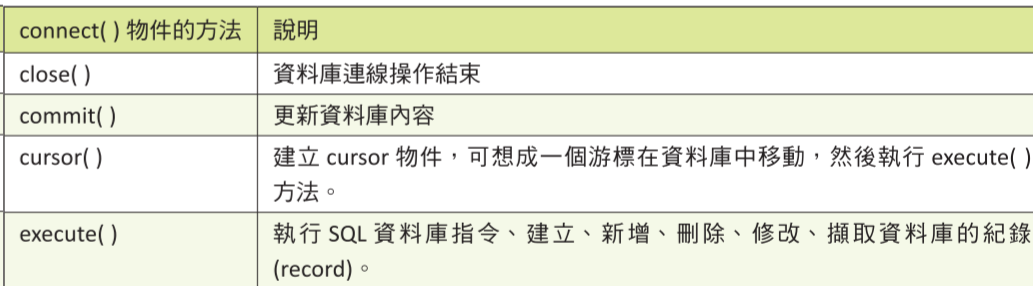
## 建立SQLite資料庫表單
```python
import sqlite3
# 建立資料庫
conn = sqlite3.connect("sqlite_test.db") # 資料庫連線
cursor = conn.cursor() # 建立cursor物件(操作佣)
sql = """CREATE TABLE students (
id INTEGER PRIMARY KEY AUTOINCREMENT,
name TEXT,
gender TEXT
)"""
cursor.execute(sql)
cursor.close() # 關閉cursor物件
conn.close() # 關閉資料庫連線
```
## 增加 SQLite 資料庫表單紀錄
- 增加一筆資料
```python
import sqlite3
# 新增資料
name = "TA1"
gender = "male"
conn = sqlite3.connect("sqlite_test.db") # 資料庫連線
cursor = conn.cursor() # 建立cursor物件(操作佣)
sql = """INSERT INTO students (name, gender) VALUES(?, ?)"""
cursor.execute(sql, (name, gender))
conn.commit() # 更新資料庫內容
cursor.close() # 關閉cursor物件
conn.close() # 關閉資料庫連線
```
- 增加多筆資料
```python
import sqlite3
# 新增資料
TAs = [
("TA1", "male"),
("TA2", "male"),
("TA3", "famele")
]
conn = sqlite3.connect("sqlite_test.db") # 資料庫連線
cursor = conn.cursor() # 建立cursor物件(操作佣)
sql = """INSERT INTO students (name, gender) VALUES(?, ?)"""
# cursor.execute(sql, (name, gender))
cursor.executemany(sql, TAs)
conn.commit() # 更新資料庫內容
cursor.close() # 關閉cursor物件
conn.close() # 關閉資料庫連線
```
## 查詢SQLite資料庫表單--查詢所有資料
```python
import sqlite3
# 查詢資料
conn = sqlite3.connect("sqlite_test.db") # 資料庫連線
cursor = conn.cursor() # 建立cursor物件(操作佣)
sql = """SELECT * FROM students"""
# 查找全部
results1 = cursor.execute(sql).fetchall()
print(*results1)
# 擷取特定筆數
results2 = cursor.execute(sql).fetchmany(2)
print(*results2)
# 擷取一筆
results3 = cursor.execute(sql).fetchone()
print(*results3)
cursor.close() # 關閉cursor物件
conn.close() # 關閉資料庫連線
```
## 查詢SQLite資料庫表單--使用WHERE
```python
import sqlite3
# 查詢資料
conn = sqlite3.connect("sqlite_test.db") # 資料庫連線
cursor = conn.cursor() # 建立cursor物件(操作佣)
sql = """SELECT * FROM students WHERE name LIKE 'TA%'"""
# output (1, 'TA1', 'male') (2, 'TA2', 'male') (3, 'TA3', 'famele')
sql = """SELECT * FROM students WHERE id >= 2 """
# (2, 'TA2', 'male') (3, 'TA3', 'famele')
sql = """SELECT * FROM students WHERE id == 2 OR id == 1"""
# (1, 'TA1', 'male') (2, 'TA2', 'male')
sql = """SELECT * FROM students WHERE id == 2 OR id == 1 ORDER BY id DESC"""
# (2, 'TA2', 'male') (1, 'TA1', 'male')
sql = """SELECT * FROM students LIMIT 2""" # 限制輸出兩筆
# (2, 'TA2', 'male') (1, 'TA1', 'male')
results1 = cursor.execute(sql).fetchall()
print(*results1)
cursor.close() # 關閉cursor物件
conn.close() # 關閉資料庫連線
```
## 更新SQLite 資料庫表單紀錄
```python
import sqlite3
# 更新資料
name = "TA1"
gender = "female"
conn = sqlite3.connect("sqlite_test.db") # 資料庫連線
cursor = conn.cursor() # 建立cursor物件(操作佣)
sql = """UPDATE students SET gender = ? WHERE name = ?"""
cursor.execute(sql, (gender, name))
conn.commit() # 更新資料庫內容
cursor.close() # 關閉cursor物件
conn.close() # 關閉資料庫連線
```
## 刪除SQLite 資料庫表單紀錄
```python
import sqlite3
# 刪除資料
conn = sqlite3.connect("sqlite_test.db") # 資料庫連線
cursor = conn.cursor() # 建立cursor物件(操作佣)
sql = """DELETE FROM students;"""
cursor.execute(sql)
conn.commit() # 更新資料庫內容
cursor.close() # 關閉cursor物件
conn.close() # 關閉資料庫連線
```
## 刪掉整張表
```python
import sqlite3
# 刪除整張表
conn = sqlite3.connect("sqlite_test.db") # 資料庫連線
cursor = conn.cursor() # 建立cursor物件(操作佣)
sql = """DROP TABLE students"""
cursor.execute(sql)
conn.commit() # 更新資料庫內容
cursor.close() # 關閉cursor物件
conn.close() # 關閉資料庫連線
```
---
# 看freecode
 Sign in with Wallet
Connect another wallet
Sign in with Wallet
Connect another wallet