# 請按照組別坐喔😉
---
# 網路爬蟲
<font size=5>
人工智慧與數位人文
莊昊耘 2023.5.11
<font size=5>
---
## 什麼是網路爬蟲?
----
## 為什麼要寫爬蟲?
---
## 在那之前...先來個小複習
----
## 什麼是 `html`? 什麼是 `CSS`?

----
### 一份 `html` 檔分成哪三個部分?
##### 如果要在網頁中顯示你放的文字、圖片<br>要修改三個部分的哪一部分?
----
### 什麼是 `class`? 什麼是 `href`?<br>
<font size=500>
```htmlembedded=
<p class="header1" href="www.google.com">我是一個p標籤</p>
```
</font>
<style>
.pre {
font-size: 50;
}
</style>
---
## 讓我們多認識網頁一點
----
### 靜態網頁 vs 動態網頁
----
### [靜態網頁](http://abehiroshi.la.coocan.jp)
----
### [動態網頁](https://www.facebook.com)
----
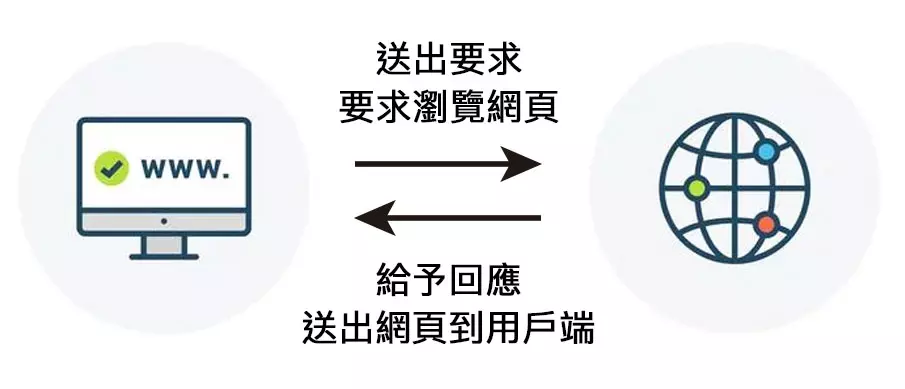
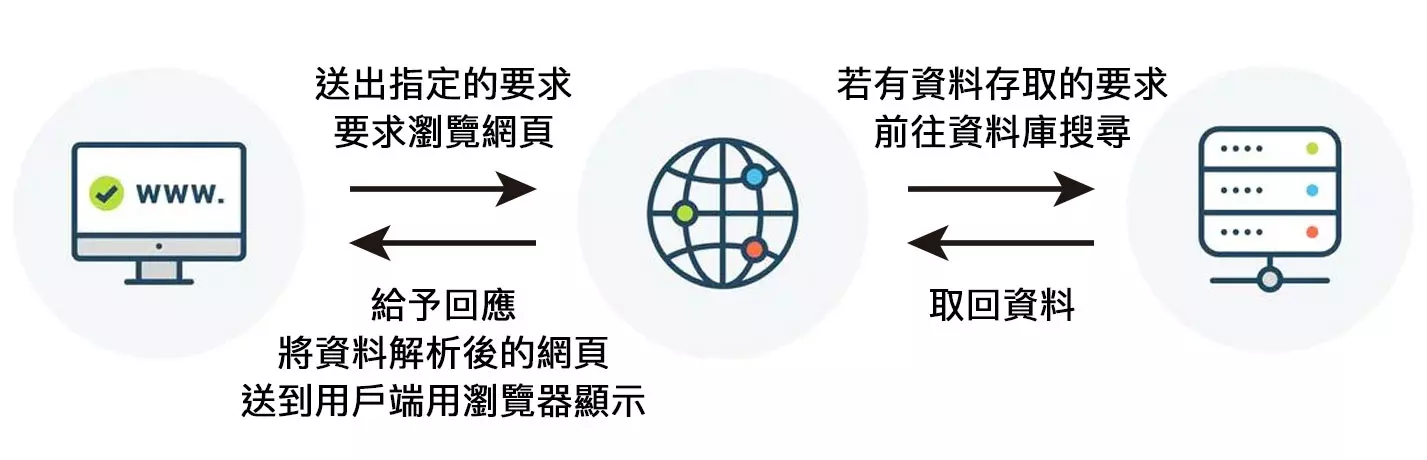
## Request & Response
----
| 方法 | 解釋 |
| -------- | -------- |
| GET | 我跟對方伺服器拿取資料 |
| POST | 我提供資料給對方伺服器進行後續處理 |
|[More](https://notfalse.net/43/http-request-method)||
----

----
### 來認識新的資料型態:`dict`
----
<font size=500>
```python=
example = {
"Course": "人工智慧與數位人文",
"Weekday": 4,
"instructer": "張瑜芸",
"TA": ["標云", "莊昊耘"],
}
```
</font>
<br>
<font size=6>
| Course | Weekday | instructer |TA |
| -------- | -------- | -------- |-------- |
| 人工智慧與數位人文 | 4 | 張瑜芸 |???|
</font>
----
```python=
print(example['Course'])
print(example['TA'])
```
----
### :bulb: 小試身手
寫一個有關你組員的 dictionary 且不得重複
內容必須包含姓名、學號、系級<br>這學期修的通識課、你的其他組員有誰<br>並且命名為 `my_data`
---
# 開始寫爬蟲囉!
----
# 最終目標<br>
爬取 [Yahoo!電影網](https://movies.yahoo.com.tw/movie_intheaters.html) 所有上映中電影的資料
小目標:所有上映中的電影名稱,以及單一電影頁面的網址
----
<span style = "font-size: 500em;">
```python=
!pip install beautifulsoup4
```
</span>
----
## 先來看看網頁的樣子
<img src="https://i.imgur.com/mTuqNml.png" width="750">
----
```python=
import requests
from bs4 import BeautifulSoup as bs
url = 'https://movies.yahoo.com.tw/movie_intheaters.html'
response = requests.get(url=url)
soup = bs(response.text, 'lxml')
print(soup)
```
----
有兩種方式可以幫助定位標籤
1. CSS path
2. html tag
----
### CSS Path
右鍵 → 檢查 (檢閱元件/inspect) → <br>(找到目標資料) → 右鍵 → 複製selector
----
### CSS Path
```python=
soup.select(<你的 CSS path>)
```
----
## 小試身手
1. 隨便按進去一部電影
2. 找到電影名稱、上映日期、片長、發行公司、IMDB 分數 的 CSS path
3. 列印(`print()`)出以上各個項目<br> (不要看到奇怪的標籤)
----

---
#### 如果今天目的是要抓目錄頁上的所有電影資料,用CSS會有什麼問題?
----
### html tag
<img src="https://i.imgur.com/orpYicF.png" width="750">
----
#### 試跑下面兩個指令,告訴我差別在哪裡<br><br>
```python=
print(soup.find('div', 'release_info'))
```
```python=
print(soup.find_all('div', 'release_info'))
```
----
### 想到`list`,就要想到 `for` 迴圈
透過 `for` 迴圈來調整你的程式碼
----

----
### Let's start from here.
```python=
example_list = []
for item in info_items:
name = item.find()
url = item.find()
resultDICT = {
"Name": name,
"url": url
}
example_list.append(resultDICT)
print(resultDICT)
```
----
## 小試身手
1. 用同樣方法,透過 `for` 迴圈<br>找到「電影英文名稱」
2. 將找到的資料加到 `dict` 裡
----
```python=
for item in info_items:
name = item.find()
level = item.find()
url = item.find()
```
----
你可以用一個 `list` 把所有的網址包起來
----
```python=
url_list = []
for item in info_items:
name = item.find()
english_name = item.find()
level = item.find()
url = item.find()
url_list.append(url)
```
---
# 還差什麼?
----

----
```python=
index_list = []
BASE_URL = "https://movies.yahoo.com.tw/movie_intheaters.html?page="
for page_num in range(1, :
page_url = BASE_URL+page_num
index_list.append(page_url)
index_list
```
X = ?; Y = ?
----
## 該如何將資料存起來呢?
----
```python=
import json
with open("result.json", "w") as f:
json.dump(<存了很多 dictionary 的 list>, f, ensure_ascii=False, indent=4)
```
----
### 如果網站結構不如預期怎麼辦?
----
[AIR](https://movies.yahoo.com.tw/movieinfo_main/AIR-air-14824)

----
# `try`...`except`
----
```python=
a = input('輸入數字:')
print(a + 1)
```
----
```python=
try: # 使用 try,測試內容是否正確
a = input('輸入數字:')
print(a + 1)
except: # 如果 try 的內容發生錯誤,就執行 except 裡的內容
print('發生錯誤')
```
---
# 輪到你了
----
# 今日目標
1. 找到總共九頁的上映中電影的所有網址
2. 找到 **上映日期**、**片長**、**發行公司**、**IMDB分數**的位置
3. 去除標籤跟空白後,加到`dict`
4. 將所有電影的`dict加到`list`裡,透過前面的`function`把資料存起來。
----
<img src="https://i.imgur.com/Dy7LwpW.png" width="500">
----
# HINT
1. 可以從[前面](https://hackmd.io/@milanochuang/BJyeCKLEh#/6/2)的 `index_list` 開始
2. 看到 `list` 就要[想到什麼](https://hackmd.io/@milanochuang/BJyeCKLEh#/5/3)?
3. 想[辦法](https://hackmd.io/@milanochuang/BJyeCKLEh#/5/9)找到每一頁的每一部電影的 url
----
4. 利用每一部電影的 url<br>以及在[這裡](https://hackmd.io/@milanochuang/BJyeCKLEh#/4/8)找到的資料位置
5. 用在[這裡](https://hackmd.io/@milanochuang/BJyeCKLEh#/5/5)教的方式將資料存到`dict`<br>再將`dict`加到 `list` 裡 <br>(記得 `try...except`)
:bulb: 每一個新頁面都會需要 request
6. 把這份 `list` 放到[`dump function`](https://hackmd.io/@milanochuang/BJyeCKLEh#/6/3)的<>的位置 (`<>`記得刪掉)
---
#### Reference:
1. [爬蟲概論](https://hackmd.io/@HYf-5-EHRqOYghm0W2OB8Q/rJtQ_MMLf)
2. [STEAM 教育學習網](https://steam.oxxostudio.tw/category/python/spider/about-spider.html)
{"metaMigratedAt":"2023-06-18T03:43:09.004Z","metaMigratedFrom":"YAML","title":"Python crawler_student","breaks":true,"slideOptions":"{\"theme\":\"white\",\"spotlight\":{\"enabled\":false},\"transition\":\"slide\",\"slideNumber\":true}","contributors":"[{\"id\":\"be042d37-8e4a-4b8c-b371-835cf33fe97b\",\"add\":7064,\"del\":1685}]"}