# Binary GUI Project
Turning your binary maths python into libraries and using them in a GUI.
Note:
- It's always good to separate your logic and your interface if you can
- It means you can test the logic on it's own
- I have sent you a link to this slideshow and the code in TEAMS
---
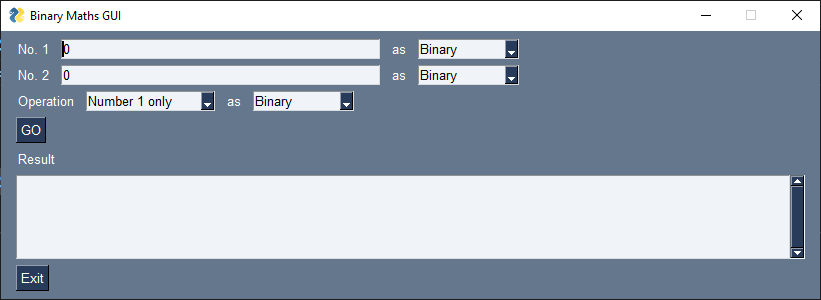
The GUI will work by :
- Turning 2 numbers into binary from whatever number format we select
- Doing an operation we select
- Converting the result into the selected format
---
## Task 1 : Make your own binary maths libraries
- Open your old binary maths files
- My code looks like this yours will be different the `if __name__ == "__main__":` and identing is the important bit
```python
if __name__ == "__main__":
binary1 = input("Please input first binary number")
print(bin2hex(binary1))
```
Note:
- Make your old code only ask for input if you are running that file directly.
- This mean the functions are still defined and tested but they wont ask for input when you use the defintion in other files
---
## Task 2 : Imports
```python
import py_compile
import PySimpleGUI as sg
# python.exe -m pip install pysimplegui
# https://www.pysimplegui.org/en/latest/
from binary_stuff import *
```
- Make sure all your binary maths files are in the same folder (and don't have spaces in their name)
- In your `binary_gui.py`. Import your library files instead of `binary_stuff`
---
## Lists we will need
```python
NUMBER_FORMATS = ['Binary', 'Hexadecimal', 'Denary', 'Decimal']
OPERATIONS = ['Number 1 only', 'Number 2 only', 'Binary Addition', 'Left Shift', 'Right Shift']
```
---
## Task 3 : toBinary()
- In your `binary_gui.py`. Make this calls your convertors from your binary maths files
```python
def toBinary(num, format):
print("toBinary", num, format)
if format=="Binary":
return num
if format=="Denary" or format=="Decimal":
return denary2binary(int(num))
if format=="Hexadecimal":
return hex2bin(num)
```
---
## Task 4 : fromBinary()
- In your `binary_gui.py`. Make this calls your convertors from your binary maths files.
- The`try:` and `except NameError as err:` work together stop it crashing if you do not have a convertor set up
```python
def fromBinary(num, format):
print("fromBinary", num, format)
try :
if format=="Binary":
return num
if format=="Denary" or format=="Decimal":
return bin2dec(num)
if format=="Hexadecimal":
return bin2hex(num)
except NameError as err:
print("function or variable with ", err)
```
---
## The layout
```python
layout = [
[
sg.T('No. 1'), sg.I(0, key="-NUM1-"), sg.T('as'),
sg.Drop(NUMBER_FORMATS, key="-FORMAT1-", default_value="Binary"),
],
[
sg.T('No. 2'), sg.Input(0, key="-NUM2-"), sg.T('as'),
sg.Drop(NUMBER_FORMATS, key="-FORMAT2-", default_value="Binary"),
],
[
sg.T('Operation'),
sg.Drop(OPERATIONS, key="-OPERATION-", default_value=OPERATIONS[0]),
sg.T('as'),
sg.Drop(NUMBER_FORMATS, key="-RESULT_FORMAT-", default_value="Binary"),
],
[sg.B('GO', bind_return_key=True)],
[
sg.T("Result"),
sg.T("", key="-RESULT-"),
],
[sg.Output(size=(110, 5), font=('Helvetica 10'))],
[sg.Exit()]
]
```
---
## The event loop
```python
window = sg.Window('ASCII Convertor', layout)
while True: # The Event Loop
event, values = window.read()
if event in (None, 'EXIT'): # quit if exit button or X
break
```
---
## Getting the inputs as binary
```python
binary1 = toBinary(values["-NUM1-"], values["-FORMAT1-"])
binary2 = toBinary(values["-NUM2-"], values["-FORMAT2-"])
```
---
## Task 5 : Do the Operations
- Use your operation names from your library files
```python
resultBinary = ""
if values["-OPERATION-"] == 'Number 1 only':
resultBinary = binary1
if values["-OPERATION-"] == 'Number 2 only':
resultBinary = binary2
if values["-OPERATION-"] == 'Binary Addition':
(resultBinary, overflowError) = binaryAdd(binary1, binary2)
if(overflowError):
print(binary1, "+", binary2, "produced an overflow error.")
```
---
## Task 6 : Write any conversions / operations you do not have
- Write (including tests) any conversion you don't yet have to make all the options in the gui work
- There are built in methods you can look up some some of the conversions. Below are 2
```python
def bin2dec(a):
return str(int(a,2))
def dec2hex(a):
return f'{int(a):X}'
assert bin2dec("0") == "0"
assert bin2dec("1") == "1"
assert bin2dec("1001") == "9"
assert bin2dec("1010") == "10"
assert dec2hex("0") == "0"
assert dec2hex("1") == "1"
assert dec2hex("9") == "9"
assert dec2hex("10") == "A"
assert dec2hex("17") == "11"
```
---
## Display the result
```python
window["-RESULT-"].update(fromBinary(resultBinary, values["-RESULT_FORMAT-"]))
```
---
## Tasks
- **1** : Make your own binary maths libraries
- **2** : Import your library files instead of `binary_stuff`
- **3 & 4** : toBinary() & fromBinary()
- Make them call your convertors from your binary maths files.
- **5** : Use your operation names from your library files
- **6** : Write any conversions / operations you do not have
{"metaMigratedAt":"2023-06-17T15:03:20.641Z","metaMigratedFrom":"Content","title":"Binary GUI Project","breaks":false,"contributors":"[{\"id\":\"22f4987a-98b9-414a-8e5e-c431e6ce34f4\",\"add\":6471,\"del\":982}]"}