---
tags: fellows
---
# Tica Lin
**Department:** Computer Science
**Project:** realityLab
## Projects
### Unity Virtual Gallery Examples & Tutorial (complete)
* Created a virtual gallery template that can easily take any images and text to be shown in an interactive virtual gallery tour in Unity.
* Created a tutorial introducing the basics of Unity and how-to set up the virtual gallery example project for the beginner.
* [Slides](https://docs.google.com/presentation/d/1KF3giG94M3bvd54hdqesugrsnMmX1VkIfQkW9lD_yUQ/edit#slide=id.p) are on Google Slides
* Showcased in a show-and-tell session on 20211022
- Tica shared a virtual gallery that she created. The desire was to create a place that students could share their artwork pretty quickly and easily. The hope is that students can just input an artwork and description and it can populate into the gallery.
- Benefits include:
- Can use Tica's template to get people started quickly using Unity
- For courses can quickly spin up a gallery of students work
- You can record a show and tell/gallery walkthrough to present your work
* Made the tutorial with codebase available on Github
* Link - https://github.com/ticahere/ll_virtual_gallery
### DataVis workshop (ongoing)
* Discussed and planned the data vis lab activities as well as materials with Zane for the "augmenting-space cluster" weekly meeting.
* Led a couple of workshop on visualization design introduction, and hands-on design process
### SEAS Visualization Project (ongoing)
* Collaborated with SEAS communication director on designing interactive visualization on the web to demonstrate faculty and department collaboration
* Summary:
- Eliza Grinnell is working with Prof. Hanspeter Pfister on a set of three interactive visualizations that represent faculty teaching, research, and collaboration at SEAS. These visualizations are intended to serve as 1) course support tools for Hanspeter’s dataviz classes; 2) reference for undergraduates interested in research opportunities; 3) reference for current/future grad students; 4) new faculty orientation; 4) a guide for potential academic collaborators at Harvard; 5) a tool for industry partners. They are already partially developed, but they need additional conceptualization and development and time in order to reach their potential and be ready for public launch.
* Weekly meeting for brainstorming, progress check-in, development discussion
* links -
* https://github.com/ticahere/SEASVis.github.io
* [Project Proposal](https://docs.google.com/document/d/1vFqCUo2oLfNSgmHIz5CJ6UsPfugY8jr4DdLbu2KhLtI/edit#)
- [Existing visualizations are here](https://seasvis.github.io/)
* 1. Faculty-Faculty Collaborations
* 2. Faculty + initiatives and connections to other schools -- good for administrators and new faculty
* 3. Research interests comparison tool -- prospective grads, trying to figure out which faculty member would be best as a PI
### AR/VR development (ongoing)
* Experimented on the AR apps development with Unity Mars framework, AR Foundations and AR Kit
* Tested a virtual Harvard campus model rendered from Google Map through blenders in VR
* Experimenting on the API to connect with AirTable
* Planning on the augmented Learning Lab AR app to showcase LL projects
### Spring Projects
* Prepare for the next workshops for Datavis lab (Unity or Tableau)
* Complete a design prototype for SEAS faculty collaboration project
* Complete a functional pipeline from Airtable to Unity through API, potentially even to an AR app
## Notes
### Initial plans
* AR Tools anyone can use:
* [Unity MARS](https://unity.com/products/unity-mars)
* ripping 3d models from Google
* build a workflow
* students can explore the environment at a high level initially
* then jump into AR to jump into the data
Marlon met with Tica, MDF for Computer Science, to brainstorm activities for this year's realityLab (which is all about AR/VR):
* let's think of an array of activities and projects for the Fall term
* it would be great if interested undergraduates could proceed through an array of 4-7 activities that "level up" their skills in tools like Unity, Blender, etc. over the course of the term
* they are, in a sense "testing" the tutorials you might create for a course
* they are ALSO learning to contribute assets to your projects (and maybe even code in certain circumstances)
* great ideas for deliverables include
* proofs of concept of things we can imagine a Harvard course wanting
* AR-enriched experiences of Harvard's campus (where we encounter location-specific stories, images, 3d models that align with a given discipline's content (like History))
* prototypes of things we can imagine doing in museums (virtual tours, AR maps overlain on top of the physical museum, annotations on top of artifacts and paintings)
* examples of potential student AR assignments. If I, as a student were to MAKE an AR installation or world for a course, what might this look like and what would the steps be?
* projects that make the LL Studio better in any way
* AR data on top of LL walls that tells the story of LL projects and people
* the ability to show the results of students' 3D work in the physical studio (i.e. if we run a Blender workshop, how quickly can we get their work "visible" in the physical space)
* game mechanics in the physical space
### Show and tell, 20211022
- **Virtual Gallery project**
- Tica shared a virtual gallery that she created. The desire was to create a place that students could share their artwork pretty quickly and easily. The hope is that students can just input an artwork and description and it can populate into the gallery.
- Benefits include:
- Can use Tica's template to get people started quickly using Unity
- For courses can quickly spin up a gallery of students work
- You can record a show and tell/gallery walkthrough to present your work
- If anyone is interested in learning more about this, get in touch with Marlon! We have models of the Learning Lab studio that you can play around with.
- Also here is the open-sourced repository to the VR gallery project! https://github.com/ticahere/ll_virtual_gallery
- **Intro to Unity tutorial**
- General outline ([Slides](https://docs.google.com/presentation/d/1KF3giG94M3bvd54hdqesugrsnMmX1VkIfQkW9lD_yUQ/edit#slide=id.p))
- 1. Create an empty scene
- 2. Create an object
- 3. Create a plane
- 4. 3D objects have meshes, materials, textures, shaders
- 5. Apply physics, rigidbody
- 6. Add a first person character
- VFX apps vs. Game engines = VFX applications allow you to create really complex physics simulations, etc. but it takes hours or days to render a scene (like for The Avengers). Game engines do similar things but you have to render in 60 frames per second, so the models, textures, and simultions have to be *much* less complex. This is why The Avengers looks so much better than The Sims.
- It would be really cool to do a workflow together from Airtable to VR/AR.
- UnityMARS
- 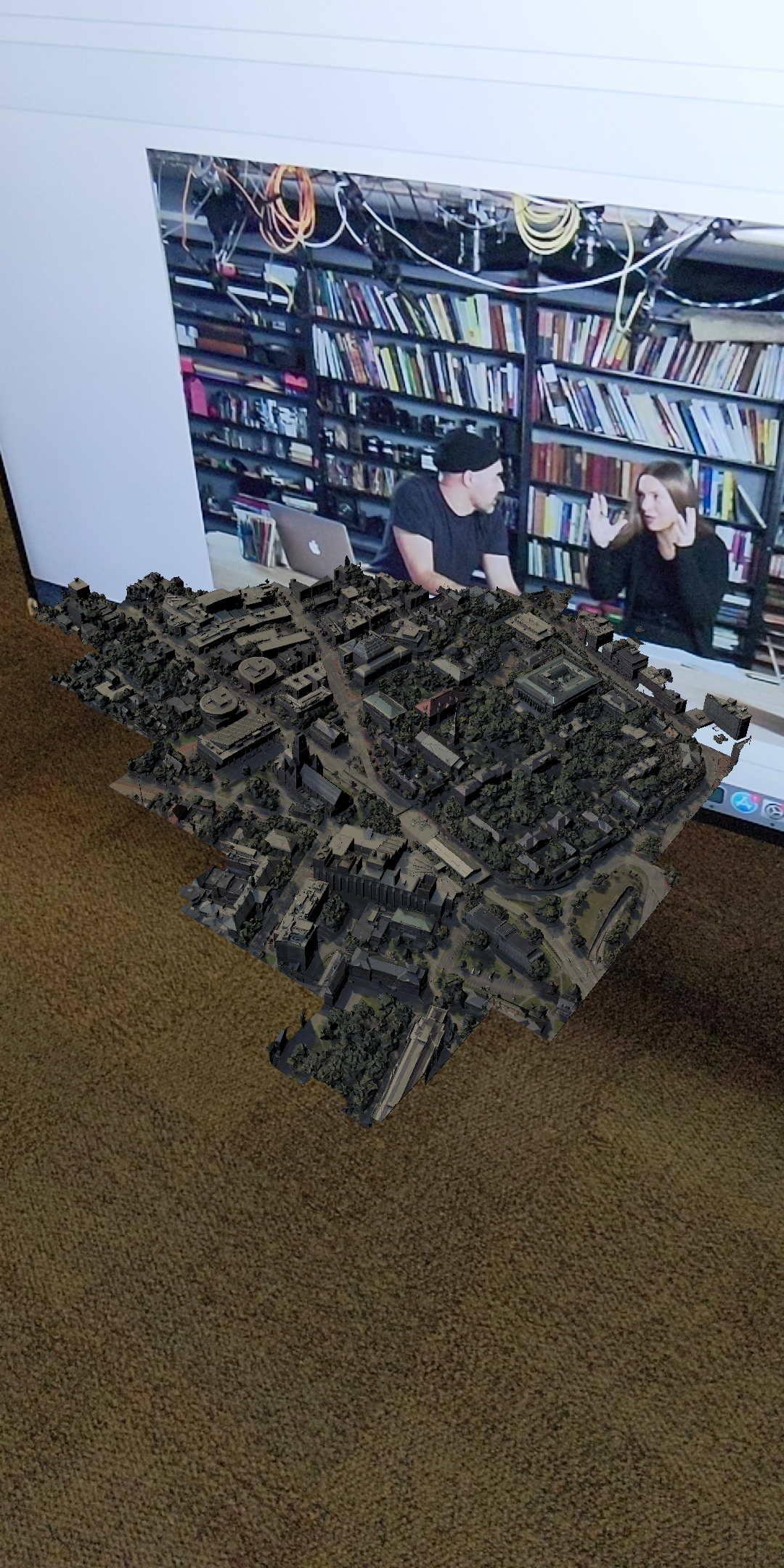
- This image is a screenshot showing how you can pin 3D models to images in AR. Tica has pinned a model of Harvard's campus that will appear any time Marlon is on screen.
- **SEAS Datavis Project**
- [Project Proposal](https://docs.google.com/document/d/1vFqCUo2oLfNSgmHIz5CJ6UsPfugY8jr4DdLbu2KhLtI/edit#)
- Summary:
- Eliza Grinnell is working with Prof. Hanspeter Pfister on a set of three interactive visualizations that represent faculty teaching, research, and collaboration at SEAS. These visualizations are intended to serve as 1) course support tools for Hanspeter’s dataviz classes; 2) reference for undergraduates interested in research opportunities; 3) reference for current/future grad students; 4) new faculty orientation; 4) a guide for potential academic collaborators at Harvard; 5) a tool for industry partners. They are already partially developed, but they need additional conceptualization and development and time in order to reach their potential and be ready for public launch.
- CHECK OUT THE VISUALIZATIONS HERE: https://seasvis.github.io/
* 1. Faculty-Faculty Collaborations
* 2. Faculty + initiatives and connections to other schools -- good for administrators and new faculty
* 3. Research interests comparison tool -- prospective grads, trying to figure out which faculty member would be best as a PI
 Sign in with Wallet
Connect another wallet
Sign in with Wallet
Connect another wallet