# Steps to take a Backup from cStor
{% hint style="note" %}
If you are deploying databases using operators, you need to find a way to actively modify the entire deployment through the operator. This ensures that you control and manage changes effectively within the operator-driven database deployment.
{% endhint %}
## Step 1: Backup from cStor Cluster
Currently, we have a cStor cluster as the source, with a clustered MongoDB running as a StatefulSet using cStor volumes.
{% tabs %}
{% tab title="Command" %}
```text
kubectl get pods
```
{% endtab %}
{% tab title="Output" %}
```text
NAME READY STATUS RESTARTS AGE
mongo-client-758ddd54cc-h2gwl 1/1 Running 0 47m
mongod-0 1/1 Running 0 47m
mongod-1 1/1 Running 0 44m
mongod-2 1/1 Running 0 42m
ycsb-775fc86c4b-kj5vv 1/1 Running 0 47m
```
{% endtab %}
{% endtabs %}
{% tabs %}
{% tab title="Command" %}
```text
kubectl get pvc
```
{% endtab %}
{% tab title="Output" %}
```text
NAME STATUS VOLUME CAPACITY ACCESS MODES STORAGECLASS AGE
mongodb-persistent-storage-claim-mongod-0 Bound pvc-cb115a0b-07f4-4912-b686-e160e8a0690d 3Gi RWO cstor-csi-disk 54m
mongodb-persistent-storage-claim-mongod-1 Bound pvc-c9214764-7670-4cda-87e3-82f0bc59d8c7 3Gi RWO cstor-csi-disk 52m
mongodb-persistent-storage-claim-mongod-2 Bound pvc-fc1f7ed7-d99e-40c7-a9b7-8d6244403a3e 3Gi RWO cstor-csi-disk 50m
```
{% endtab %}
{% endtabs %}
{% tabs %}
{% tab title="Command" %}
```text
kubectl get cvc -n openebs
```
{% endtab %}
{% tab title="Output" %}
```text
NAME CAPACITY STATUS AGE
pvc-c9214764-7670-4cda-87e3-82f0bc59d8c7 3Gi Bound 53m
pvc-cb115a0b-07f4-4912-b686-e160e8a0690d 3Gi Bound 55m
pvc-fc1f7ed7-d99e-40c7-a9b7-8d6244403a3e 3Gi Bound 50m
```
{% endtab %}
{% endtabs %}
## Step 2: Install Velero
{% hint style="note" %}
For the prerequisites, refer to the [overview](Add link here) section.
{% endhint %}
Run the following command to install Velero:
{% tabs %}
{% tab title="Command" %}
```text
velero install --use-node-agent --provider gcp --plugins velero/velero-plugin-for-gcp:v1.6.0 --bucket velero-backup-datacore --secret-file ./credentials-velero --uploader-type restic
```
{% endtab %}
{% tab title="Output" %}
```text
[Installation progress output]
```
{% endtab %}
{% endtabs %}
Verify the Velero namespace for Node Agent and Velero pods:
{% tabs %}
{% tab title="Command" %}
```text
kubectl get pods -n velero
```
{% endtab %}
{% tab title="Output" %}
```text
NAME READY STATUS RESTARTS AGE
node-agent-cwkrn 1/1 Running 0 43s
node-agent-qg6hd 1/1 Running 0 43s
node-agent-v6xbk 1/1 Running 0 43s
velero-56c45f5c64-4hzn7 1/1 Running 0 43s
```
{% endtab %}
{% endtabs %}
## Step 3: Data Validation
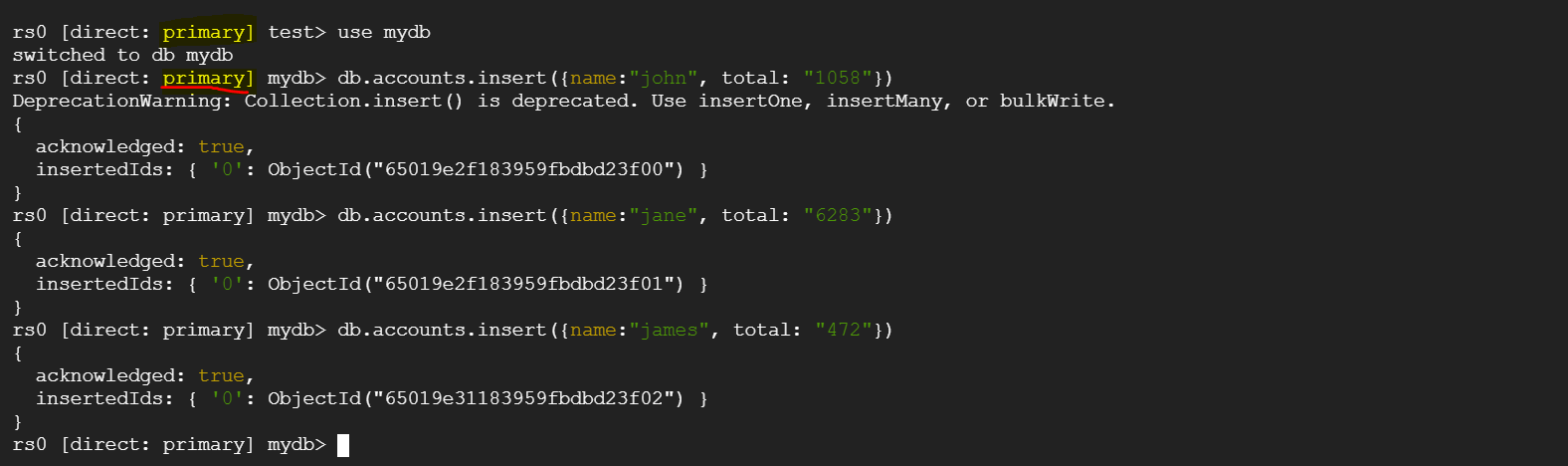
On the Primary Database (mongo-0) you can see some sample data.
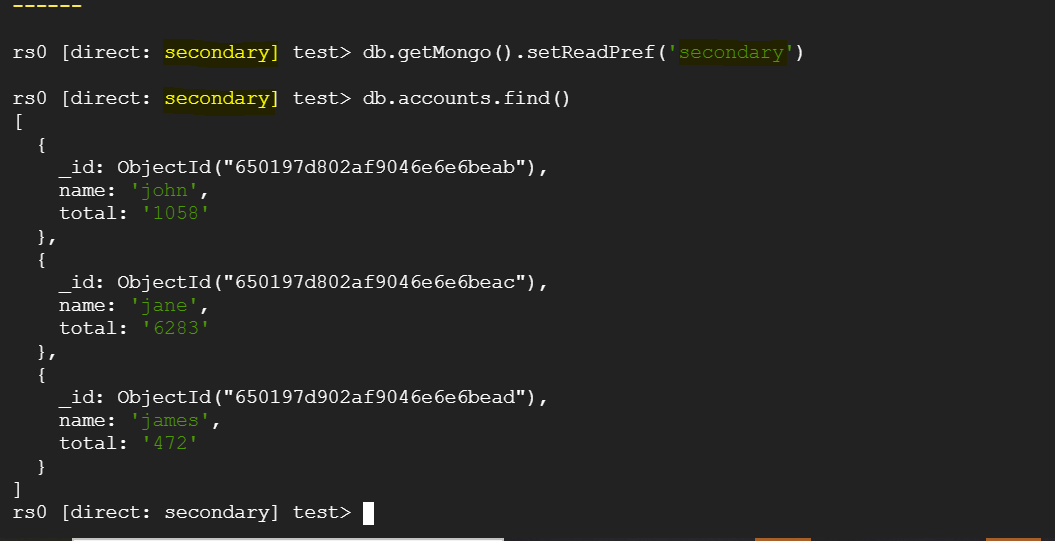
You can also see the data available on the replicated secondary databases.
## Step 4: Take Velero Backup
MongoDB uses replication, and data partitioning (sharding) for high availability and scalability. Taking a backup of the primary database is enough as the data gets replicated to the secondary databases. Restoring both primary and secondary at the same time can cause data corruption.
For reference: [MongoDB Backup and Restore Error Using Velero](https://www.mongodb.com/community/forums/t/mongodb-backup-and-restore-error-using-velero-and-minio-on-premise-kubernetes-cluster/223683/3)
Velero supports two approaches for discovering pod volumes to be backed up using FSB:
1. **Opt-in approach**: Annotate pods containing volumes to be backed up.
2. **Opt-out approach**: Backup all pod volumes with the ability to opt-out specific volumes.
### Opt-In for Primary MongoDB Pod:
To ensure that our primary MongoDB pod, which receives writes and replicates data to secondary pods, is included in the backup, we need to annotate it as follows:
```
kubectl annotate pod/mongod-0 backup.velero.io/backup-volumes=mongodb-persistent-storage-claim
```
### Opt-Out for Secondary MongoDB Pods and PVCs:
To exclude secondary MongoDB pods and their associated Persistent Volume Claims (PVCs) from the backup, we can label them as follows:
```
kubectl label pod mongod-1 velero.io/exclude-from-backup=true
pod/mongod-1 labeled
```
```
kubectl label pod mongod-2 velero.io/exclude-from-backup=true
pod/mongod-2 labeled
```
```
kubectl label pvc mongodb-persistent-storage-claim-mongod-1 velero.io/exclude-from-backup=true
persistentvolumeclaim/mongodb-persistent-storage-claim-mongod-1 labeled
```
```
kubectl label pvc mongodb-persistent-storage-claim-mongod-2 velero.io/exclude-from-backup=true
persistentvolumeclaim/mongodb-persistent-storage-claim-mongod-2 labeled
```
### Backup Execution:
Create a backup of the entire namespace. If any other applications run in the same namespace as MongoDB, we can exclude them from the backup using labels or flags from the Velero CLI:
{% tabs %}
{% tab title="Command" %}
```text
velero backup create mongo-backup-13-09-23 --include-namespaces default --default-volumes-to-fs-backup --wait
```
{% endtab %}
{% tab title="Output" %}
```text
Backup request "mongo-backup-13-09-23" submitted successfully.
Waiting for backup to complete. You may safely press ctrl-c to stop waiting - your backup will continue in the background.
...........
Backup completed with status: Completed. You may check for more information using the commands `velero backup describe mongo-backup-13-09-23` and `velero backup logs mongo-backup-13-09-23`.
```
{% endtab %}
{% endtabs %}
### Backup Verification:
To check the status of the backup using the Velero CLI, you can use the following command. If the backup fails for any reason, you can inspect the logs with the velero backup logs command:
{% tabs %}
{% tab title="Command" %}
```text
velero get backup | grep 13-09-23
```
{% endtab %}
{% tab title="Output" %}
```text
mongo-backup-13-09-23 Completed 0 0 2023-09-13 13:15:32 +0000 UTC 29d default <none>
```
{% endtab %}
{% endtabs %}
 Sign in with Wallet
Connect another wallet
Sign in with Wallet
Connect another wallet