*[NASA]: National Aeronautics and Space Administation
*[OSF]: OpenStack Foundation
*[CNCF]: Cloud Native Computing
*[CERN]: European Organization for Nuclear Research
*[INFN]: National Institute for Nuclear Physics (Italy)
*[OICR]: Ontario Institute for Cancer Research
*[HPC]: High Peformance Computation
*[SIG]: Special Interest Group
*[TripleO]: OpenStack on OpenStack
# TripleO
:::warning
For nchu_nfv.
:::
[TOC]
:::success
Images in green frames are svgs.
View them in another tab for higher resolutions.
:::
## Introduction
:::info
Some terms in the following paragraphs might seem confusing to readers unfamiliar with the Cloud.
See the [Cloud](#Cloud) and [Architecture](#Architecture) section for clarification.
:::
OpenStack is the main project under the ++O++pen++S++tack ++F++oundation (OSF).
It's the primary, and probably the only, choice when it comes to open source clouds.
Direct quotes from the [official website](https://www.openstack.org/foundation/):
> OpenStack is one of the top 3 most active open source projects and manages 10 million compute cores
> OpenStack is an open source software project for creating private and public clouds, powering 60 public cloud data centers and thousands of private clouds at a scale of more than 10 million physical cores worldwide.
As of the time of writing, the [latest stable release](https://releases.openstack.org/) is Ussuri.
Recent stable releases listed chronologically: Pike, Queens, Rocky, Stein, Train, Ussuri.
[Notable adopters](https://www.openstack.org/user-stories/) of OpenStack includes:
[NASA](https://www.nasa.gov/offices/oct/40-years-of-nasa-spinoff/openstack-cloud-computing-platform),
[CERN](https://clouddocs.web.cern.ch/),
[INFN](https://superuser.openstack.org/articles/openstack-user-story-the-italian-institute-for-nuclear-physics-infn/?_ga=2.143702197.1819905344.1596167882-1160491652.1595304607),
[OICR](https://superuser.openstack.org/articles/vancouver-superuser-award-nominee-ontario-institute-for-cancer-research-oicr/?_ga=2.211465365.1819905344.1596167882-1160491652.1595304607),
[Cambridge University](https://superuser.openstack.org/articles/cambridge-openstack/?_ga=2.143702197.1819905344.1596167882-1160491652.1595304607),
[Rackspace](https://www.rackspace.com/openstack),
[PayPal](https://superuser.openstack.org/articles/case-study-paypal-agility-with-stability/?_ga=2.258210058.1819905344.1596167882-1160491652.1595304607),
[GoDaddy](https://www.godaddy.com/garage/building-open-cloud-openstack/),
[China Mobile](openstack.org/videos/summits/barcelona-2016/architecture-and-optimization-on-1000-nodes-cluster-in-china-mobile),
[Blizzard](https://www.openstack.org/videos/summits/denver-2019/how-blizzard-entertainment-uses-autoscaling-with-overwatch),
[Rakuten](https://www.openstack.org/videos/summits/denver-2019/building-blocks-of-rakuten-mobile-telco-cloud).
For further stories, see [this](https://superuser.openstack.org/section/user-stories/).
The Blizzard [talk](https://www.openstack.org/videos/summits/denver-2019/how-blizzard-entertainment-uses-autoscaling-with-overwatch) on autoscaling overwatch with OpenStack and the [unveiling](https://www.openstack.org/videos/summits/tokio-2015/unveiling-cern-cloud-architecture) of CERN's cloud architecture are particularly interesting.
The preceding list of big-names include a few scientific institutions which leverages OpenStack for ++h++igh ++p++erformance ++c++omputation (HPC).
This is possible due to the design of OpenStack as a generic cloud; there is an affiliated ++s++pecial ++i++nterest ++g++roup (SIG) -- [Scientific SIG](https://wiki.openstack.org/wiki/Scientific_SIG) -- dedicated to HPC.
**(Short history)**
The original in-house cloud solutions of Rackspace and NASA are gradually deemed unsustainable for maintenance and scaling by internal engineers of respective companies.[^history-nasa]
This culminated in the collaboration of both companies in early 2010 on the open source project OpenStack.[^history-nasa][^history-openstack][^history-wired]
In 2012, OSF was founded (a phenomenal milestone) due to the pivotal intentions of Rackspace.[^history-wired]
Then, comes the great OpenStack movement.
[^history-nasa]: https://spinoff.nasa.gov/Spinoff2012/it_2.html
[^history-openstack]: https://docs.openstack.org/project-team-guide/introduction.html
[^history-wired]: https://www.wired.com/insights/2012/04/openstack/
See also: [Understanding OpenStack](https://www.redhat.com/en/topics/openstack)
by RedHat.
# Cloud
# Architecture
:::success
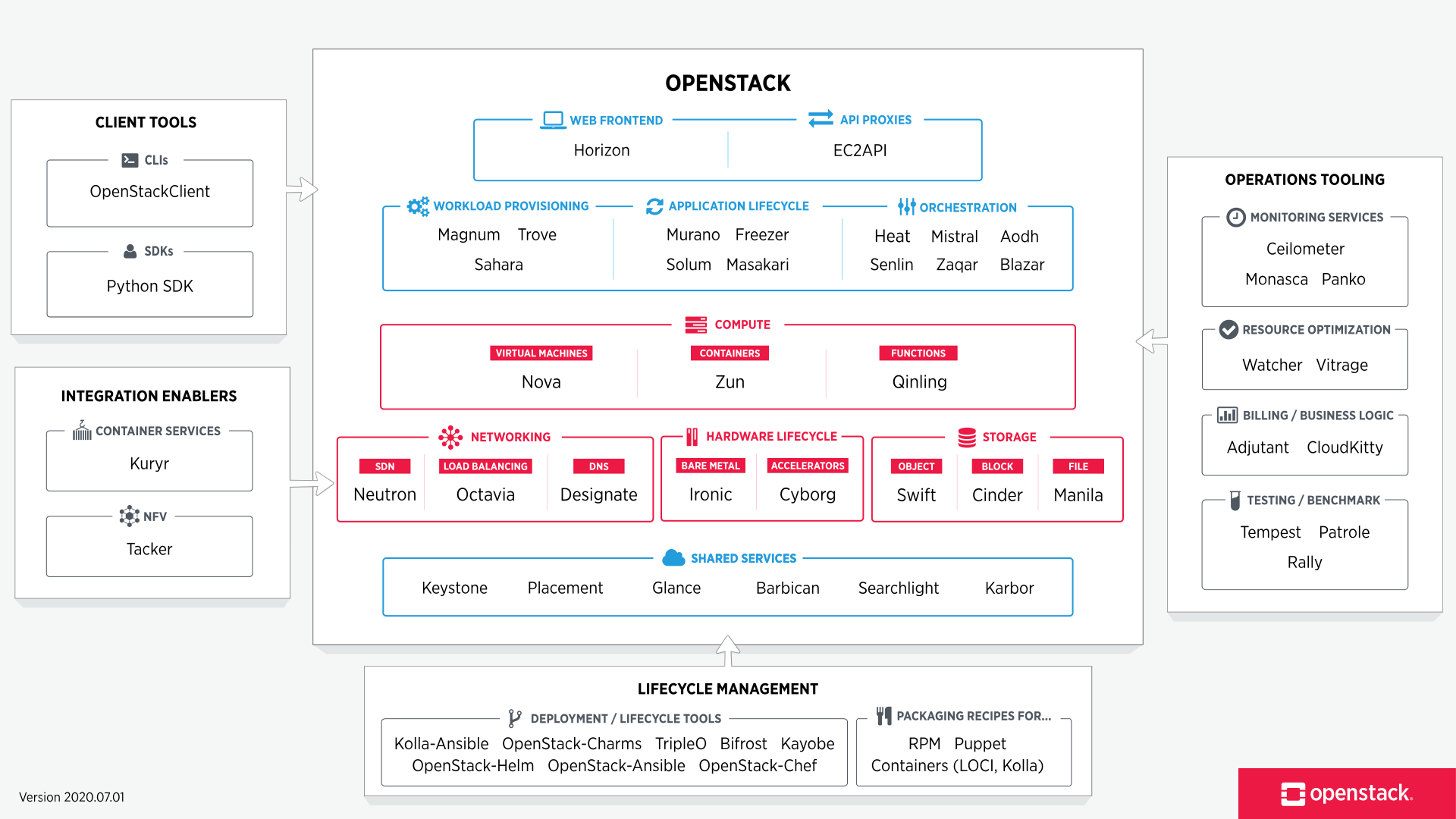
:::
# Deployment
Several choices are [listed](https://www.openstack.org/software/project-navigator/deployment-tools) in the official OpenStack website.
This document only covers [TripleO](https://docs.openstack.org/tripleo-docs/latest/) and [Kolla-Ansible](https://docs.openstack.org/kolla-ansible/latest/).
## TripleO
TripleO stands for ++O++penStack ++o++n ++O++penStack -- a stable way to deploy an OpenStack *overcloud* with a single node OpenStack *undercloud*.
### CentOS 7
Run everything in `screen`.
The `vt102` emulation of `screen` is so much better.
```
virt-install \
--name Undercloud \
--memory 16384 \
--vcpus 8 \
--os-variant centos7.0 \
--disk /dev/sdb10,cache=none,io=native,bus=virtio \
--disk vol=default/CentOS-7-x86_64-NetInstall-2003.iso,device=cdrom \
--graphics none \
--boot hd,cdrom,useserial=on \
--network bridge=virbr1,model=virtio \
--network bridge=virbr2,model=virtio \
```
1. Press `TAB` on boot menu, and enter `console=ttyS0`.
2. Configure network.
3. NTP: `tw.pool.ntp.org`.
4. Mirror: `http://centos.cs.nctu.edu.tw/7/os/x86_64/`.
5. Use `LVM`.
6. Don't set `root` password.
```
umount /dev/mapper/centos_undercloud-home
lvremove /dev/mapper/centos_undercloud-home
lvresize /dev/mapper/centos_undercloud-root /dev/vda2
xfs_growfs /dev/mapper/centos_undercloud-root
sed -i '/\/home/d' /etc/fstab
```
### CentOS 8 Stream
```
virt-install \
--name UnderCloud\
--memory 16384\
--vcpus 8\
--os-variant centos-stream8\
--disk size=60,cache=none,io=native,bus=virtio\
--disk vol=iso/stream8.iso,device=cdrom\
--graphics none\
--boot hd,cdrom,useserial=on\
--network network=pfSense,model=virtio\
--autostart
```
### Copy Disk File
```
dd if=/dev/mapper/virt_default-UnderCloud of=/dev/mapper/virt_default-UnderCloud_back bs=4096 status=progress
```
### Install `virtualbmc`
```
pip3 install --upgrade --user pip
pip install --user virtualbmc
```
```
https://trunk.rdoproject.org/centos7/current/
```
```
sudo hostnamectl set-hostname undercloud.cloud
sudo hostnamectl set-hostname --transient undercloud.cloud
sudo sed '1{s/$/undercloud.cloud undercloud/}' /etc/hosts
sudo yum install https://trunk.rdoproject.org/centos7/current/python2-tripleo-repos-0.0.1-0.20200409224957.8bac392.el7.noarch.rpm
sudo -E tripleo-repos -b train -d centos7 current
sudo yum install -y python-tripleoclient
cp /usr/share/python-tripleoclient/undercloud.conf.sample ~/undercloud.conf
openstack undercloud install
export DIB_YUM_REPO_CONF="/etc/yum.repos.d/delorean*"
openstack overcloud image build
openstack overcloud image upload
```
[a
ip to bridge](https://unix.stackexchange.com/questions/66725/assigning-ip-to-a-bridged-interfaces/66726)
[using virtualbmc](https://www.ajg.id.au/2018/08/14/red-hat-openstack-13-on-a-kvm-hypervisor-part-2/),
[another](http://markelov.blogspot.com/2017/05/how-to-configure-openstack-tripleo.html),
[tripleo](http://markelov.blogspot.com/2017/05/how-to-configure-openstack-tripleo.html),
[golinux-tripleo](https://www.golinuxhub.com/2018/08/openstack-tripleo-architecture-step-guide-install-undercloud-overcloud-heat-template/),
[linuxtechi](https://www.linuxtechi.com/deploy-tripleo-overcloud-controller-computes-centos-7/),
[infrared](https://infrared.readthedocs.io/en/stable/tripleo-overcloud.html)
```
ip link add name bmc type bridge
ip link set bmc up
ip addr add 192.168.1.101/32 brd + dev bmc
vbmc add vm1 \
--address 192.168.1.101 \
--port 6230 \
--username admin \
--password password \
--libvirt-uri='qemu+ssh://cloud/session?socket=$XDG_RUNTIME_DIR/libvirt/libvirt-sock'
vbmc start vm1
ipmitool -I lanplus \
-H 192.168.1.101 \
-p 6230 \
-U admin \
-P password \
power status
```
```
openstack overcloud node discover \
--range 192.168.1.0/24 \
--port 6230 \
--credentials admin:password
openstack overcloud node introspect \
--all-manageable \
--provide
```
[vlan](http://www.tuxfixer.com/openstack-pike-tripleo-overcloud-deployment-using-vlan-based-network-isolation/)
based tripleo,
[contrail](https://contrail-tripleo.readthedocs.io/en/latest/index.html),
[juniper](https://www.juniper.net/documentation/en_US/contrail19/topics/topic-map/setting-up-contrail-rhosp-overcloud.html),
[iDRAC](https://www.stackhpc.com/ironic-idrac-ztp.html)
### CentOS 8 Ussuri Undercloud
:::warning
:warning: [**Warning**](https://docs.openstack.org/install-guide/environment-packages-rdo.html)
Starting with the Ussuri release, you will need to use either CentOS8 or RHEL 8. Previous OpenStack releases will need to use either CentOS7 or RHEL 7. Instructions are included for both distributions and versions where different.
:::
```
virt-install \
--name undercloud \
--memory 16384 \
--vcpus 8 \
--os-variant centos8 \
--disk /dev/sdb10,cache=none,io=native,bus=virtio \
--disk vol=default/CentOS-8.2.2004-x86_64-minimal.iso,device=cdrom \
--graphics none \
--boot hd,cdrom,useserial=on \
--network bridge=virbr1,model=virtio \
--network bridge=virbr2,model=virtio
```
1. Press `TAB` on boot menu, and enter `console=ttyS0`.
2. Configure network.
3. NTP: `tw.pool.ntp.org`.
4. Repository: `closest server`.
5. Use `LVM`.
6. Set `root` password but don't add user.
After installation, login as `root`, and resize `/`.
```
umount /dev/mapper/cl-home
lvremove /dev/mapper/cl-home
lvresize /dev/mapper/cl-root /dev/vda2
xfs_growfs /dev/mapper/cl-root
sed -i '/\/home/d' /etc/fstab
```
Edit `resolv.conf`.
```
sed -i '1{s/$/ undercloud.cloud undercloud/}' /etc/hosts
```
Then, add user `stack`.
```
useradd stack
passwd stack # specify a password
echo "stack ALL=(root) NOPASSWD:ALL" | sudo tee -a /etc/sudoers.d/stack
chmod 0440 /etc/sudoers.d/stack
su - stack
```
Further operations are done with user stack.
For future logins, login as root then `su - stack`.
```
sudo hostnamectl set-hostname undercloud.cloud
sudo hostnamectl set-hostname --transient undercloud.cloud
sudo yum install -y https://trunk.rdoproject.org/centos8/component/tripleo/current/python3-tripleo-repos-0.1.1-0.20200702223938.f18928a.el8.noarch.rpm
sudo -E tripleo-repos -b ussuri current ceph
sudo yum install -y python3-openstackclient
openstack tripleo container image prepare default \
--local-push-destination \
--output-env-file ~/containers-prepare-parameter.yaml
cp /usr/share/python-tripleoclient/undercloud.conf.sample ~/undercloud.conf
echo "container_images_file = $HOME/containers-prepare-parameter.yaml" >> undercloud.conf
echo "local_interfacec = enp2s0"
openstack undercloud install
echo 'export OS_YAML="/usr/share/openstack-tripleo-common/image-yaml/overcloud-images-centos8.yaml"' >> stackrc
echo 'DIB_YUM_REPO_CONF="/etc/yum.repos.d/delorean* /etc/yum.repos.d/tripleo-centos-*"' >> stackrc
. stack
openstack overcloud image build --config-file /usr/share/openstack-tripleo-common/image-yaml/overcloud-images-python3.yaml --config-file $OS_YAML
```
```
vbmc add vm1 \
--address 192.168.10.101 \
--port 6230 \
--libvirt-uri=qemu:///session
ipmitool -I lanplus \
-H 192.168.10.101 \
-p 6230 \
-U admin \
-P password \
power status
sudo firewall-cmd --permanent --zone=libvirt --add-port=6230/udp
sudo firewall-cmd --reload
```
## CentOS 8 Victoria
[Reference](https://docs.openstack.org/project-deploy-guide/tripleo-docs/latest/deployment/install_undercloud.html)
[CentOS 8 mirror](http://ftp.twaren.net/Linux/CentOS/8/BaseOS/x86_64/os/) (National Center for High-Perf Computing)
Start a `tmux` session.
Setup non-root user with all privileges that bypasses password checks:
```
sudo useradd stack
sudo passwd stack # specify a password
echo "stack ALL=(root) NOPASSWD:ALL" | sudo tee -a /etc/sudoers.d/stack
sudo chmod 0440 /etc/sudoers.d/stack
su - stack
```
### Undercloud Deployment
Install repos and undercloud packages:
```
sudo dnf install -y https://trunk.rdoproject.org/centos8/component/tripleo/current/python3-tripleo-repos-0.1.1-0.20210118183911.2cfaa48.el8.noarch.rpm
sudo -E tripleo-repos -b victoria current
sudo dnf install -y python3-tripleoclient
```
Edit `undercloud.conf` and perform preparations:
```
cp /usr/share/python-tripleoclient/undercloud.conf.sample ~/undercloud.conf
openstack tripleo container image prepare default \
--local-push-destination \
--output-env-file ~/containers-prepare-parameter.yaml
sudo firewall-cmd --zone=public --add-port=8787/tcp
sudo firewall-cmd --runtime-to-permanent
```
For `undercloud.conf`:
```
container_images_file = $HOME/containers-prepare-parameter.yaml
undercloud_hostname = undercloud.example
local_interface = <metal_man interface> # interface for ironic bare_metal pxe/dhcp
#local_ip = 192.168.123.17/28 # baremetal dhcp ip
```
For `/etc/hosts`:
```
127.0.0.1 undercloud.example undercloud
```
Install undercloud:
```
openstack undercloud install
```
### Overcloud Deployment
```
. stackrc
export OS_YAML="/usr/share/openstack-tripleo-common/image-yaml/overcloud-images-centos8.yaml"
sudo dnf install -y https://trunk.rdoproject.org/centos8/component/tripleo/current/python3-tripleo-repos-0.1.1-0.20210118183911.2cfaa48.el8.noarch.rpm
sudo -E tripleo-repos -b victoria current
export DIB_YUM_REPO_CONF="/etc/yum.repos.d/delorean* /etc/yum.repos.d/tripleo-centos-*"
export STABLE_RELEASE="victoria"
openstack overcloud image build --config-file /usr/share/openstack-tripleo-common/image-yaml/overcloud-images-python3.yaml --config-file $OS_YAML
openstack overcloud image upload
```
On the host (CentOS 7), install virtualbmc: [libvirt details](https://hackmd.io/@mcnlab538/libvirt)
```
echo 'uri_default = "qemu:///system"' >> ~/.config/libvirt/libvirt.conf
sudo yum install -y libvirt-devel libvirt-python
python3.6m -m venv venv
. venv/bin/activate
pip install --upgrade pip
pip install virtualbmc
vbmcd # start daemon
```
### Observing DHCP Actions in the Undercloud
Find the network namespace where dnsmasq lies:
```
ip netns
```
Run `tcpdump` in the namespace:
```
sudo ip netns exec <netns> tcpdump -vvv -nn -e
```
Check the ironic log:
```
sudo journalctl -l -u openstack-ironic-inspector -u openstack-ironic-inspector-dnsmasq -u openstack-ironic-conductor -f
```
 Sign in with Wallet
Connect another wallet
Sign in with Wallet
Connect another wallet