# Technique behind git
[](https://hackmd.io/g_nUlDmLRzqGWcLhlF_HmA)
###### tags: `tech-note` `Andes`
:::info
參考資料
* [Git 原理入門](https://ithelp.ithome.com.tw/articles/10190453)
* 介紹的非常好,可以直接看這篇也無所謂
* [Write yourself a Git!](https://wyag.thb.lt/)
* 有介紹如何產生 hash value,以及實作了一個並不完整的 git
* [Git Tip of the Week: Objects and Packfiles](http://alblue.bandlem.com/2011/09/git-tip-of-week-objects-and-packfiles.html)
:::
git 是一個非常簡單暴力的東西,git 就是一棵樹,跟一堆指標的集合體,與其說他是版本控制的軟體,他像是一個簡易的「檔案系統」,你使用的所有檔案,都是從 .git 資料夾中的資訊還原出來的
首先我們初始化一個專案,會看到 .git 資料夾下有如下資料夾,但如果是要了解 git 如何運作,我們只需要關注 objects 跟 refs 這兩個資料夾即可
* objects: 儲存 git objects
* refs: 儲存 remote / local branch 的資訊
```shell
demonic@demonic-All-Series[09:40 暮]~/testgit> git init
Initialized empty Git repository in /home/demonic/testgit/.git/
demonic@demonic-All-Series[09:40 暮]~/testgit> ls .git/
branches config description HEAD hooks info objects refs
demonic@demonic-All-Series[09:40 暮]~/testgit> ls .git/objects/
info pack
```
## git objects
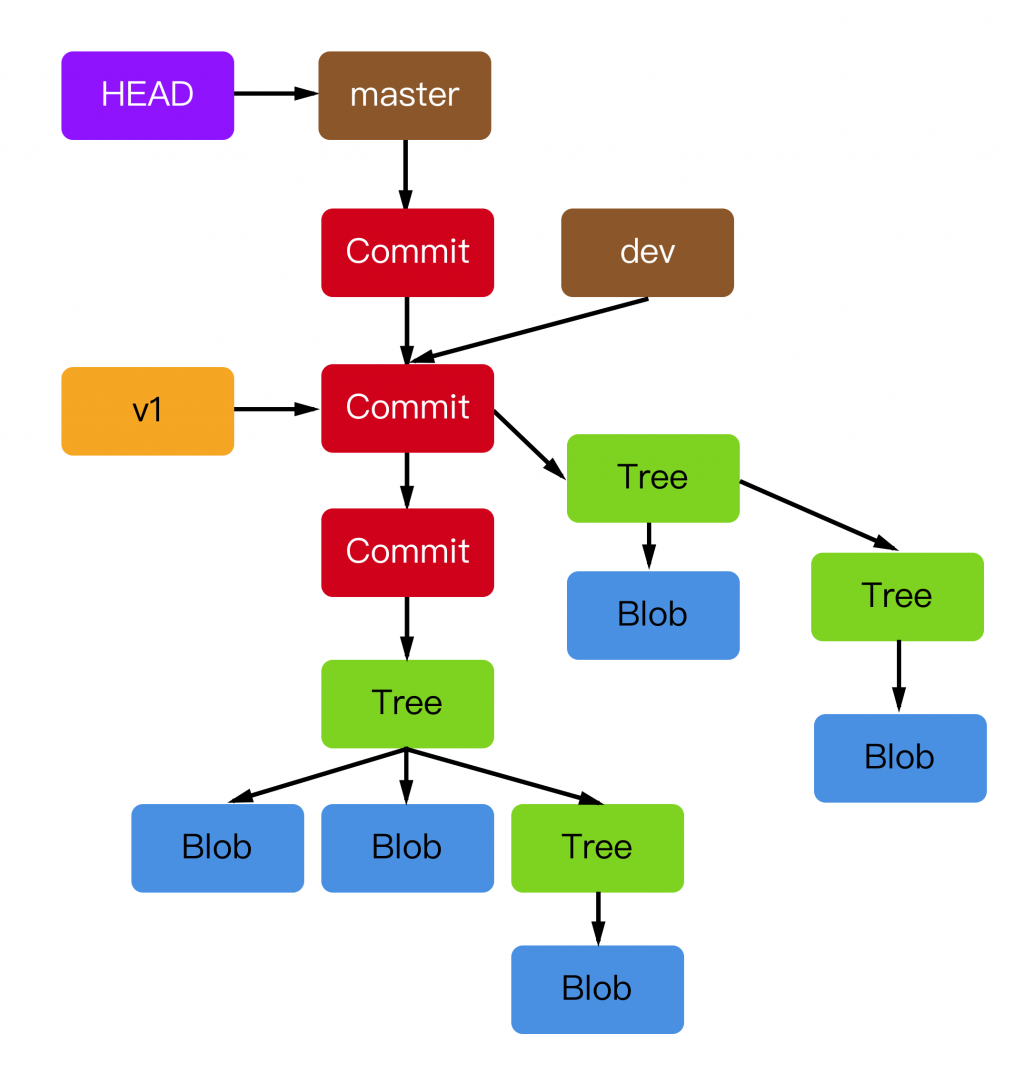
在 git 的術語中,我們會有四種不同的 git objects 他們的資料結構及意義都稍有不同
* Blob: 對應到一個檔案,所有的檔案資料,都會被存成這個格式
* Tree: 對應到一個資料夾,並指向資料夾底下的資料,也就是指向 Blob
* Commit(branch): 存放 Commit 資訊,且指向一顆 Tree,而第一顆 Tree 指的就是我們作業的 root 資料夾
* Tags: 一個固定不動的指標,常用來做 release 的 commit 定位
而我們的檔案系統,就是由以上四種 object 為基礎,會去組成一顆 working tree,如下圖一般
(下圖引用自 [Git 原理入門](https://ithelp.ithome.com.tw/articles/10190453))
讓我們繼續操作我們剛剛所新增的專案,來理解這顆樹到底是什麼玩意
```shell
demonic@demonic-All-Series[09:40 暮]~/testgit> ls .git/objects/
info pack
demonic@demonic-All-Series[09:40 暮]~/testgit> echo "Hello" > string.txt
demonic@demonic-All-Series[09:47 暮]~/testgit> cat string.txt
Hello
demonic@demonic-All-Series[09:47 暮]~/testgit> ls .git/objects/
info pack
demonic@demonic-All-Series[09:47 暮]~/testgit> git add string.txt
demonic@demonic-All-Series[09:47 暮]~/testgit> ls .git/objects/
e9 info pack
demonic@demonic-All-Series[09:47 暮]~/testgit> ls .git/objects/e9/
65047ad7c57865823c7d992b1d046ea66edf78
```
我們新增了一個檔案,但這個時候還沒有作 commit,只是把他 add 進來,就發現 objects 的資料夾已經多了一個資料夾,且儲存了一串 hash 值,這資料夾的名稱及 hash 值,其實就是拿這個檔案的內容去作 SHA 而得的,這會取前兩個字元作為資料夾名稱,我們並沒有要實作一個 git,這部份的演算法不用太過琢磨
但光這樣說恐怕還是不太明白,讓我們使用 git cat-file 來看看這個檔案裡到底儲存了什麼,會發現只是一個單純的 Hello 字串,而這就是一個典型的 blob 的 git object
```shell
demonic@demonic-All-Series[09:49 暮]~/testgit> git cat-file -p e965
Hello
```
而當我們把他加到 commit 中之後,會發現 objects 中又多了兩個資料夾,我們可以根據他們的 hash 值一個一個拿出來看,最後會知道這就是 tree 以及 commit git object
```shell
demonic@demonic-All-Series[09:51 暮]~/testgit> git commit -m "add hello"
[master (root-commit) 38d6d56] add hello
1 file changed, 1 insertion(+)
create mode 100644 string.txt
demonic@demonic-All-Series[09:51 暮]~/testgit (master)> ls .git/objects/
38 ab e9 info pack
demonic@demonic-All-Series[09:51 暮]~/testgit (master)> git cat-file -p e965
Hello
demonic@demonic-All-Series[09:51 暮]~/testgit (master)> git log --oneline
38d6d56 (HEAD -> master) add hello
demonic@demonic-All-Series[09:52 暮]~/testgit (master)> git cat-file -p 38d6
tree abc0fa8606702a03eec14cda420c40288a65f8a6
author demonic <ian910297@gmail.com> 1589550697 +0800
committer demonic <ian910297@gmail.com> 1589550697 +0800
add hello
demonic@demonic-All-Series[09:52 暮]~/testgit (master)> git cat-file -p abc0
100644 blob e965047ad7c57865823c7d992b1d046ea66edf78 string.txt
```
如果把上述的操作對應到原本那張 working tree,他們所在的位置就會長這樣,只是我沒有開那麼多個資料夾以及檔案,也沒下那麼多 commit,所以現在只能表示到第一個 commit 的位置

我們接下來嘗試對原本的 git object 作修改,再次 commit,卻發現他並不是針對原本的 blob 檔案作修改,而是又新增了一個全新的 blob 檔案,來儲存字串的資訊
```shell
demonic@demonic-All-Series[09:55 暮]~/testgit (master)> echo ", World" >> string.txt
demonic@demonic-All-Series[10:04 暮]~/testgit (master)> cat string.txt
Hello
, World
demonic@demonic-All-Series[10:04 暮]~/testgit (master)> git add .
demonic@demonic-All-Series[10:04 暮]~/testgit (master)> git commit -m "add world"
[master 8398b1e] add world
1 file changed, 1 insertion(+)
demonic@demonic-All-Series[10:04 暮]~/testgit (master)> git cat-file -p 8398
tree f1884295ba39a447d2de1adfa02bf5421838005f
parent 38d6d5613f892d8771c231648c689191e9f9baeb
author demonic <ian910297@gmail.com> 1589551488 +0800
committer demonic <ian910297@gmail.com> 1589551488 +0800
add world
demonic@demonic-All-Series[10:05 暮]~/testgit (master)> git cat-file -p f188
100644 blob c797a227050cf7befb554b432e2301d1b1df2145 string.txt
demonic@demonic-All-Series[10:05 暮]~/testgit (master)> git cat-file -p c797
Hello
, World
```
對應到圖會長這樣

這樣的機制會導致一個問題,會有大量的小型 blob 檔案出現,所以 git 有一個 gc 指令,會把 git objects 壓縮成兩個檔案,分別是 .idx 以及 .pack,.idx: 用作查找 .pack 檔案的索引,會記錄每個 object 在 .pack 中的長度以及 offset,如下指令就把 objects 壓縮了
```shell
demonic@demonic-All-Series[10:05 暮]~/testgit (master)> ls .git/objects/
38 83 ab c7 e9 f1 info pack
demonic@demonic-All-Series[10:11 暮]~/testgit (master)> git gc
Counting objects: 6, done.
Delta compression using up to 4 threads.
Compressing objects: 100% (2/2), done.
Writing objects: 100% (6/6), done.
Total 6 (delta 0), reused 0 (delta 0)
demonic@demonic-All-Series[10:11 暮]~/testgit (master)> ls .git/objects/
info pack
demonic@demonic-All-Series[10:11 暮]~/testgit (master)> ls .git/objects/pack/
pack-ade866cad626ae442179508a693b12a9a5ee5d97.idx
pack-ade866cad626ae442179508a693b12a9a5ee5d97.pack
```
壓縮後並不影響我們查找,因為會去找 .idx 來要資訊~~
最後我們終於可以介紹 Branch 跟 Tag 是什麼玩意了,這兩個東西都是一個指向 Commit object 的指標,但 tag 不會動,branch 會一直往下走,這相關的資訊儲存在 refs 資料夾,可以自行去 cat 其中檔案資訊出來看,會儲存對應的 commit hash value
總之,從以上資訊,我們應該已經對 git 如何作版本控管有一定了解
:::danger
問題討論
1. git add 是如何作檔案差異比較
我們推測是由 string diff 的程式著手,一行一行進行比較,而不是針對整棵 working tree 去作比較,因為比較兩顆樹的演算法,通常都過於複雜,但比較字串,他算是被簡化成一個 LCS(Longest Common Sequence) 問題
2. git 是區塊鏈嗎
git 雖然是由不同的 hash 值一個串一個而成,雖然不好偽造,但如一開始所說,他比較像是一個檔案系統,你偽造他有啥意義嗎@@ 而且這也沒有 PoW 相關機制
不過真的有人把 git porting 到區塊鏈上,變成一種應用,如:[Mango: Git completely decentralised](https://medium.com/@alexberegszaszi/mango-git-completely-decentralised-7aef8bcbcfe6),這是把資料存到 IPFS 上,這樣就不需要額外架設一個 git server 了
:::
 Sign in via Google
 Sign in via Facebook
 Sign in via X(Twitter)
 Sign in via GitHub
 Sign in via Dropbox
 Sign in with Wallet
Connect another wallet
Sign in with Wallet
Connect another wallet