# [瀏覽器] 公司專案無法從 local 環境登入的問題
###### tags: `前端筆記` `瀏覽器` `Cookie`
## 問題說明
使用 local 啟動 OMS 專案時都無法使用 Chrome 瀏覽器登入,查看原因發現是每次請求都沒帶 `cookies`,所以即便登入成功後,進入首頁後再次訪問相關 API 後都會被認作未登入(因為請求沒帶登入後從後端拿的 `cookies`)。
### 使用測試站登入

(登入成功後確實有在 `response header` 內取得 `Set-Cookie`)

(訪問請求有在 `request header` 帶入 `Cookie` 供後端確認身份)
### 使用 local 登入

(確實有登入成功 + `response header` 內取得 `Set-Cookie`)

(但是在接下來的訪問請求就沒有在 `request header` 中帶入 `Cookie`)

(後端自然也無法判斷訪問者身份)
## 問題排查
### 錯誤的方向
1. 不是專案 webpack 設定問題
2. 不是 node 版本相關問題
### 為什麼只有 Chrome 不行?
> Chrome 預計在 2 月推出 80 版,屆時尚未聲明 SameSite 值的 Cookie 就會被視為 `SameSite=Lax` Cookie。只有設有 `SameSite=None`; Secure 的 Cookie 可供外部資源透過安全連線進行存取。[`SameSite=None`](https://chromestatus.com/feature/5088147346030592) 和 [Secure](https://chromestatus.com/feature/5633521622188032) 的 Chrome Platform Status 追蹤工具會持續更新,提供最新版本的發布資訊。
> *[ref. 準備好迎接全新的 Cookie 設定:SameSite=None; Secure
](https://developers.google.com/search/blog/2020/01/get-ready-for-new-samesitenone-secure?hl=zh-tw)*
因為在 2020/02 月開始 Chrome 規範當發起訪問者及被訪問者的來源不同時(也就是 Cookie 同源政策 - Cookie Same Origin Policy),瀏覽器不會在訪問請求中帶入 `Cookie`:
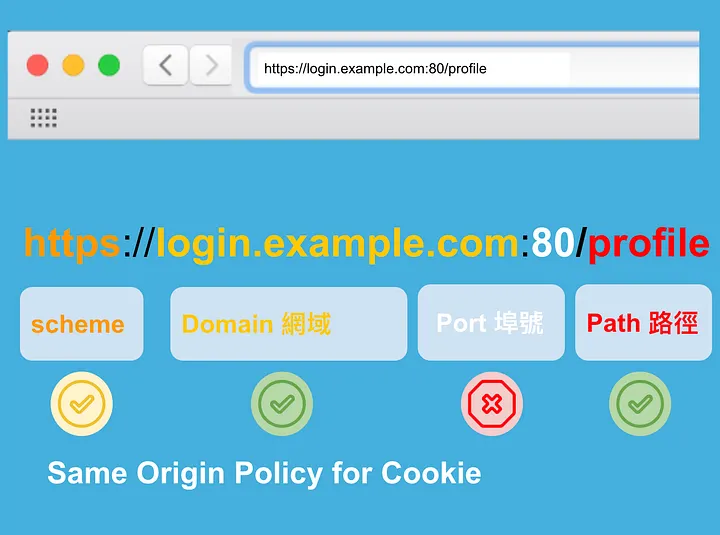
(Cookie 的同源政策 (Same Origin Policy) 示意圖 - *[ref. 網站安全🔒 再探同源政策,談 SameSite 設定對 Cookie 的影響與注意事項](https://medium.com/%E7%A8%8B%E5%BC%8F%E7%8C%BF%E5%90%83%E9%A6%99%E8%95%89/%E5%86%8D%E6%8E%A2%E5%90%8C%E6%BA%90%E6%94%BF%E7%AD%96-%E8%AB%87-samesite-%E8%A8%AD%E5%AE%9A%E5%B0%8D-cookie-%E7%9A%84%E5%BD%B1%E9%9F%BF%E8%88%87%E6%B3%A8%E6%84%8F%E4%BA%8B%E9%A0%85-6195d10d4441)*)
#### 所以什麼是同源?
1. 只要訪問者及被訪問者的 `Domain` 跟 `Path` 與 `Cookie` 一致,就會被認作同源,所以在發起請求時 `Cookie` 就會被送出

(可以發現 `Cookie` 的 `Domain`: `api-oms.boxeexuat.info`, `Path`: `/`,而當前訪問者的網址為 `https://oms.boxeexuat.info/#/dashboard`,所以發起的訪問會帶 `Cookie`)
2. 如果 `Cookie` 中有設定 `secure` 這個屬性,那麼瀏覽器還會額外多判斷 Scheme 是不是`https`,是的話才會送出 `Cookie`
#### 因為不符合 Cookie 同源政策,所以無法在 local 端發送訪問時帶入 `Cookie`
因為使用 chrome local 發起訪問時,當前的網址就會是 `http://127.0.0.1:8888/#/login`,與被訪問者的 `Domain` 明顯不同,所以自然無法帶入 `Cookie`。

### 那為什麼 Firefox 可以?
因為目前 Firefox 尚未跟上 Chrome 的腳步,所以沒有 Cookie 同源政策。
## 除了瀏覽器的把關,前端還需要做什麼設定嗎?
要的,以使用 `axios` 發出請求為例,必須多設定 `withCredentials: true`:
```javascript=
// ref.[Make Axios send cookies in its requests automatically](https://stackoverflow.com/questions/43002444/make-axios-send-cookies-in-its-requests-automatically)
// 每次都帶入
axios.get(BASE_URL + '/todos', { withCredentials: true });
// 每個訪問都帶入
axios.defaults.withCredentials = true
// 用實例的方式處理
const instance = axios.create({
withCredentials: true,
baseURL: BASE_URL
})
instance.get('/todos')
```
接下來前端就沒有什麼事情了...
## 後端需要協助的部份
處理基本的同源設定的 `respone header` 外(`Access-Control-Allow-Origin`, `Access-Control-Allow-Methods` 以及 `Access-Control-Allow-Headers`),還需要 `Access-Control-Allow-Credentials: true` 才可以讓 `response header` 中設定的 `Set-Cookie` 起到效果(這樣子 `request header` 才會帶入 `Cookie`)。
另外 `Set-Cookie` 還需要多設定成:
```javascript=
// SameSite=None; Secure -> cookie 在不同來源訪問時帶入,只有這個辦法才可以確保 https + 不同來源訪問時會帶入 Cookie
Set-Cookie: <cookie-name>=<cookie-value>; SameSite=None; Secure
```
## 除了 `SameSite=None; Secure` 外,還可以怎麼設定?
:::info
共有三種:`SameSite=None; Secure`, `SameSite=Lax`, `SameSite=Strict`。
:::
1. `SameSite=Strict` 最嚴格的模式:
> Means that the browser sends the cookie only for same-site requests, that is, requests originating from the same site that set the cookie. If a request originates from a different domain or scheme (even with the same domain), no cookies with the `SameSite=Strict` attribute are sent.
訪問與結果必須是相同的 domain 以及相同的 scheme 時,瀏覽器才會帶入 `Cookie`。
2. `SameSite=Lax` 較為寬鬆的模式:
> Means that the cookie is not sent on cross-site requests, such as on requests to load images or frames, but is sent when a user is navigating to the origin site from an external site (for example, when following a link). This is the default behavior if the `SameSite` attribute is not specified.
1. `Cookie` 無法在不同的網址的訪問中帶入
2. 不過接受訪問者「有限度地」帶入 `Cookie`
3. 如果沒有特別設定 `SameSite` 的屬性為何,那麼 `SameSite=Lax` 就是預設值

(基本上只有使用 `<a></a>` 比較常用,*[ref. Cookie 的 SameSite 属性](https://www.ruanyifeng.com/blog/2019/09/cookie-samesite.html)*)
## Recap
1. 目前在 Chrome 中,cookie 的來源必須與訪問方同源,才可以在訪問攜帶 cookie(這也是為什麼在本地開發時無法登入,但是在測試及正式站可以登入)
2. 基本上這部分需要後端協助多設定 `response header`
## 參考資料
1. [Set-Cookie](https://developer.mozilla.org/en-US/docs/Web/HTTP/Headers/Set-Cookie)
2. [CORS 跨域 AJAX 與 Cookie 請求](https://scar.tw/article/2019/01/22/cors-ajax-and-cookie-request/)
3. [網站安全🔒 再探同源政策,談 SameSite 設定對 Cookie 的影響與注意事項](https://medium.com/%E7%A8%8B%E5%BC%8F%E7%8C%BF%E5%90%83%E9%A6%99%E8%95%89/%E5%86%8D%E6%8E%A2%E5%90%8C%E6%BA%90%E6%94%BF%E7%AD%96-%E8%AB%87-samesite-%E8%A8%AD%E5%AE%9A%E5%B0%8D-cookie-%E7%9A%84%E5%BD%B1%E9%9F%BF%E8%88%87%E6%B3%A8%E6%84%8F%E4%BA%8B%E9%A0%85-6195d10d4441)
4. [零基礎資安系列(三)-網站安全三本柱(Secure & SameSite & HttpOnly)](https://tech-blog.cymetrics.io/posts/jo/zerobased-secure-samesite-httponly/)
 Sign in with Wallet
Connect another wallet
Sign in with Wallet
Connect another wallet