# [Udemy - Angular] Angular - The Complete Guide (2022 Edition)
###### tags: `Udemy 課程筆記` `Angular` `前端筆記`
## Assignment 1: Practicing Components
### Angular 中的 component 需要各自的家(folder)
與 Vue 不同,在 Angular 中建立 component 是以一個 folder 為單位,而每個 folder 則由 `style`, `HTML`, `ts` 及測試檔案組成(共四個,但有時候可以刪除測試檔沒關係)。
### 檔案的命名習慣(multi-word)
一般來說都是以「小寫」+ 用「- 減號」區分兩個單詞來命名 folder 及其檔案。另外,除了檔名 multi-word,在最後還需寫 `.component.fileType`。
### component `export` 需要變成大寫駝峰式(StudlCaps)+ `Component`
建立完 component 記得要 `export` 讓 root / main 可以讀取,但是就要變成大寫駝峰式(StudlCaps)+ Component。
所以實際建立一個 component 大概會是這樣:
```javascript=
// app/success-alert
// app/success-alert/success-alert.component.css -> for style
div {
background-color: Green;
}
div p {
padding: 1rem;
}
// app/success-alert/success-alert.component.HTML -> template
<div>
<p>This is the success alert!</p>
</div>
// app/success-alert/success-alert.component.ts -> logic
import { Component } from '@angular/core';
@Component({
// selector 是該 component 的 tag name
selector: 'app-success-alert',
templateUrl: './success-alert.component.HTML',
styleUrls: ['./success-alert.component.css']
})
export class SuccessAlertComponent {}
```
另外,Angular 目前不支援 functional component,只有 class component
> Angular is a somewhat strict framework and you need to follow it's rules, the components are implemented with classes and that is that, there's not way around that.
> *[ref.: Functional Programming in Angular?](https://stackoverflow.com/questions/65446061/functional-programming-in-angular)*
建立完要記得「註冊」,這樣子 Angular 才可以使用 components:
```javascript=
// app/app.module.ts -> Angular 中集合 component 的地方,可以想成註冊 component 讓 Angular 可以使用剛剛建立的 component
import { BrowserModule } from '@angular/platform-browser';
import { NgModule } from '@angular/core';
import { FormsModule } from '@angular/forms';
import { AppComponent } from './app.component';
import { SuccessAlertComponent } from './success-alert/success-alert.component';
@NgModule({
// 註冊 components
declarations: [
AppComponent,
SuccessAlertComponent,
],
imports: [
BrowserModule,
FormsModule,
],
providers: [],
bootstrap: [AppComponent]
})
export class AppModule { }
```
### 如果嫌手動輸入太麻煩,可以用 `ng generate component component-name` or `ng g c component-name` 快速生成 component
但要記得在 Vim 下指令 `:NvimTreeRefresh` 讓 nvim-tree 刷新,才可以在檔案列表看到新增的 folder。
## 29. Property Binding vs String Interpolation
### 基本綁定語法:
基本上透過 `[]`(brackets),就可以告知 Angular 是哪個 HTML property 要被綁定,後面的 `""`(double quote)內則是被視為 expression(表達式):
```javascript=
<HTML tag [HTMLAttributeName]="expression">
```
在 Angular 中開發者同樣可以像 Vue 一樣在 `template` 中動態地綁定 HTML 元素的 property,讓 template 可以拿取 component 的資料:
```htmlmixed=
<!-- 綁定 button disable 屬性 -->
<button [disabled]="isDisabled">我是按鈕</button>
<!-- 綁定 img src 屬性 -->
<img [src]="imageUrl" />
```
### 沒有 `[]`(brackets)會被視為未綁定,所以 `""`(double quote)就會被當作一般的字串(string)
```htmlmixed=
<!-- "" 被當作一般的字串 -->
<img src="imageUrl" />
```
### 在 template 中想要把 component 的資料當作 HTML 元素內的文字就使用 `{{ }}`
使用雙花括號 `{{}}`(double curly braces)在 HTML 元素的文字區塊,Angular 會把 `{{}}`(double curly braces)視為 expression(表達式),最後編譯後 HTML 元素內的文字就是 `{{}}` 執行的結果:
```htmlmixed=
// in .ts
currentName: string = "LUN";
<!-- in template -->
<h1>
My name is {{ currentName }}
</h1>
<!-- 編譯後會在 DOM 變成 -->
<h1>
My name is LUN
</h1>
```
但也可以綁定元素的 `innerText` property:
```htmlmixed=
currentName: string = "LUN";
<!-- in template -->
<h1 [innerText]></h1>
<!-- 編譯後會在 DOM 變成 -->
<h1>
LUN
</h1>
```
## 30. Event Binding
綁定事件的語法:
1. `()` 放事件的名字(e.g. `click`, `input`, `resize` ...)
2. `""` 一樣會被 Angular 視為 expression,但是記得要加 `()`
3. 如果需要知道事件物件,就需要用 `$event` 取得事件物件
```javascript=
<HTMLElement (eventName)="onEventFunction($event)" />
```
### 取得事件物件記得 TypeScript 要在 parameter 定義 `event: Event` 以及完整告訴 TypeScript 這是一個 HTML 元素的事件物件 `(<HTMLCertainTypeElement>event.target).value`
記得在 TypeScript 為事件函式中的事件物件 parameter 建立 type `: Event`,以及讓 TypeScript 充分了解這是一個 HTML 元素的事件物件:
```typescript=
onTestClick(event: Event):void {
console.log((<HTMLButtonElement>event.target));
// 如果想要得到 event.target.value
console.log((<HTMLButtonElement>event.target).value);
}
```
## 34. Two-Way-Databinding
就像 Vue 中的 `v-model` 語法糖,可以直接雙向綁定(event + value),在 Angular 中也有雙向綁定的語法糖 `[(ngModel}]="bindData"`:
> 要使用 `ngModel` 的雙向綁定語法糖必須在 app.module.ts(也就是 root module)中引入 Angular 的套件 `import { FormsModule } from '@angular/forms';`
> 引入之後還要記得在 `Ngmodule` 中的 `imports` 將其方法寫入,才可以讓其他 component 可以使用 `ngModel` 的語法糖 ->`imports: [BrowserModule, FormsModule]`
### `ngModule` 就是 `[value]="data"` + `(event)="eventFunc($evnet)"` 的語法糖
如果不用 `ngModel`,就要回歸一般的綁定 property `[value]="data"` 加上改變值的事件 `(event)="eventFunc($event)"`:
> 切記 property binding / event binding 的 ""(double quote)都是 expression
```htmlmixed=
<!-- property binding -> [] -->
<!-- event binding -> () -->
<input type="text" [value]="myName" (input)="myName = $event.target.value" />
<p>{{ myName }}</p>
```
其實也可以把 `ngModel` 拆成兩個步驟:`[ngModel]="data"` + `(ngModelChange)="data = $event"`:
```htmlmixed=
<!-- property binding -> [] -->
<!-- event binding -> () -->
<input type="text" [ngModel]="myName" (ngModelChange)="myName = $event" />
<p>{{ myName }}</p>
```
使用語法糖:
```htmlmixed=
<!-- [()] property binding + event binding -->
<input type="text" [(ngModel)]="myName" />
<p>{{ myName }}</p>
```
> 1 Interpolation: {{ value }}
> 2 Property binding: [property]=”value”
> 3 Event binding: (event)=”function”
> 4 Two-way data binding: [(ngModel)]=”value”
==4 = 2 + 3==
*[ref.: What is behind Two-way data binding in Angular.](https://javascript.plainenglish.io/what-is-behind-two-way-data-binding-in-angular-36dfe310b539)*
## 38. Using ngIf to Output Data Conditionally & 39. Enhancing ngIf with an Else Condition
Angular 有內建結構(structural)的及屬性(attribute)的 directives:
> 兩種 directive 的 `""`(double quote)都代表 expression
### 1. 屬性(attribute)的 directive:
attribute directive 用來綁定 HTML 元素的 property,最常的用途就是改變 HTML 元素的 style 或者是 class。
##### `[ngClass]` 綁定 HTML 元素的 class
`[ngClass]="{ className: condition = true }"` 只有 condition 為 `true` 才會新增該 class:
```htmlmixed=
<!-- [] -> 綁定 HTML property -->
<div [ngClass]="{ className: condition = true }"></div>
<!-- 等價於 -->
<div class ="className"></div>
```
如果有數個 class 要綁定,也可以用 method,在 typescript 處理邏輯後回傳 class 的 object:
```typescript=
// src/app/app.component.ts
// ref. :https://angular.io/guide/built-in-directives#built-in-structural-directives
<div [ngStyle]="currentStyles">
This div is initially italic, normal weight, and extra large (24px).
</div>
```
```htmlmixed=
<!-- src/app/app.component.html -->
<div [ngClass]="currentClasses">This div is initially saveable, unchanged, and special.</div>
```
#### `[ngStyle]` 綁定 HTML 元素的 inline style
`[ngStyle]"{ backgroundColor: condition = true }"` 只有 condition 為 `true` 才會新增 inline style:
```htmlmixed=
<div [ngStyle]="{ backgroundColor: condition = true }"></div>
<!-- 等價於 -->
<div style="background-color: ...;"></div>
```
如果有數個 inline style 要綁定,也可以用 method,在 typescript 處理邏輯後回傳 inline style 的 object:
```typescript=
// src/app/app.component.ts
// ref.: https://angular.io/guide/built-in-directives#built-in-structural-directives
currentStyles: Record<string, string> = {};
/* . . . */
setCurrentStyles() {
// CSS styles: set per current state of component properties
this.currentStyles = {
'font-style': this.canSave ? 'italic' : 'normal',
'font-weight': !this.isUnchanged ? 'bold' : 'normal',
'font-size': this.isSpecial ? '24px' : '12px'
};
}
```
```htmlmixed=
<!-- src/app/app.component.html -->
<div [ngStyle]="currentStyles">
This div is initially italic, normal weight, and extra large (24px).
</div>
```
### 2. 結構(structural)的 directive:
structural directive 則是在 template 控管 HTML 元素的「存在」:
> structural directive 多有 `*` 前綴,也沒有 `[]`
#### `*ngIf="condition"` 就像是 `if()` 達成條件才會顯示 template
```htmlmixed=
<div *ngIf="isActive"></div>
```
如果想要使用 `else` 就會比較麻煩:
```htmlmixed=
<div *ngIf="isActive; else isNotActive"></div>
<ng-template #isNotActive>
<p>
沒滿足上面的 ngIf 才會出現,道理就跟 if...else... 相同
</p>
</ng-template>
```
#### `*ngFor="let item of items; let i = index"` 執行迴圈取得 value 及 index
`*ngFor` 可以跑 array 的 value,道理就跟 javascript 的 `for...of...` 相同,如果想要得到 index,就要在陣列後再擴展 `; let variable = index` 取得 index。
> 就像 function scope,HTML 項目(`span`)可以讀取容器(`li`)的變數
```htmlmixed=
<ul>
<li *ngFor="let item of items">
<span>{{ item.name }}</span>
</li>
</ul>
<!-- 在 DOM 會得到 -->
<ul>
<li>
<span>hello</span>
</li>
</ul>
```
```typescript=
items: {name: string}[] = [{ name: 'hello' }];
```
但是 Angular 不支援 object destructuring:
*[ref.: [FR] Object destructuring in *ngFor](https://github.com/angular/angular/issues/8709)*
```htmlmixed=
<!-- 會報錯 -->
<ul>
<li *ngFor="let { name } of items">
<span>{{ name }}</span>
</li>
</ul>
```
## 67. Binding to Custom Properties
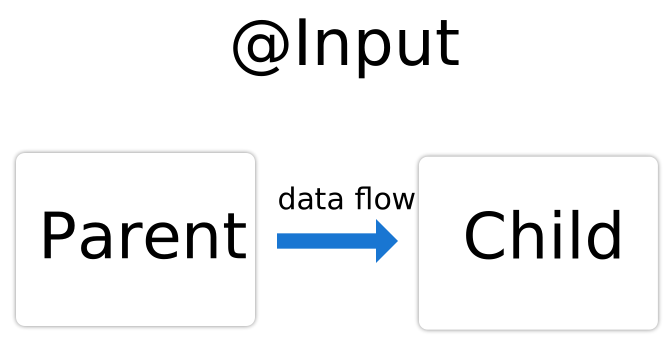
將 parent component 的資料傳遞給 child component 就需要在 child component 中匯入 Angular 的 `@Input()` decorator:
> 就像是 Vue 的 `props`,從 parent 串給 child 的概念(但是 Angular 的語法比較麻煩)
(*[ref.: Sharing data between child and parent directives and components](https://angular.io/guide/inputs-outputs)*)
### `@Input()` 必須在 child component 先被引入且需要定義 / 初始賦值
1. 必須把 `@Input` 從 `@angular/core` 引入至 child component
2. `@Input()` 後的 property 就是從 parent 拿到的值,為了讓 typescript 知道該 property 的型別,可以用
- 定義型別(:)`@Input() item!: string`
- 注意:在 property 後面加上一個 `!` 可以逃過 typescript 2.7 ++ 以後都會自動檢查全部的 properties 都有被 `constructor(){}` 初始化(initialization),或者是有給值。但是 `@Input()` 的 property 其實是接 parent component 的 data,因此不需要透過 `constructor(){}` 初始化,所以加上 `!` 可以逃過 typescript 的檢查。==但是建議不要這樣子使用==(*ref.: [Property '...' has no initializer and is not definitely assigned in the constructor](https://stackoverflow.com/questions/49699067/property-has-no-initializer-and-is-not-definitely-assigned-in-the-construc)*)
- `!` 確保這個值不是 `undefined` 或者是 `null`,代表這個 property 一定是有值,所以 typescript 就會放過它
- 初始賦值(=)`@Input() item = ''`
- typescript 會自動依照一開始 property 的 type 默認該 property 就是屬於該 type
```typescript=
// src/app/item-detail/item-detail.component.ts
// ref.: https://angular.io/guide/inputs-outputs
import { Component, Input } from '@angular/core'; // First, import Input
export class ItemDetailComponent {
@Input() item = ''; // decorate the property with @Input()
}
```
### `{{ }}` 在 child component 的 template 取得從 parent 得到的資料
```htmlmixed=
<!-- src/app/item-detail/item-detail.component.html -->
<!-- ref. https://angular.io/guide/inputs-outputs -->
<p>
Today's item: {{item}}
</p>
```
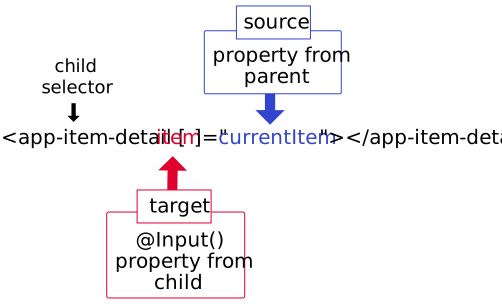
### 在 parent component 的 template 需要綁定 child 的 `@Input()` property 才可把資料傳給 child component
1. 在 parent component 的 template 中,插入 child component template tag,並綁定 property `[]`
- 透過 template parent 可以傳 data 給 child
- template 的解構決定 parent 及 child 的關係
2. `[]=""` double quote 為 expression,把要傳遞給 child component 的 data 寫在 `""` 中
- `[childInputProperty]="parentData"`
```htmlmixed=
<!-- src/app/app.component.html -->
<app-child-component [item]="currentItem"></app-child-component>
```
```typescript=
<!-- src/app/app.component.ts -->
export class AppComponent {
currentItem = 'Television';
}
```
整個流程就差不多像是這樣:
(*[ref.: Sharing data between child and parent directives and components](https://angular.io/guide/inputs-outputs)*)
### 在 template 用 `*ngFor` 得出的 value 不可跟 `@Input()` 綁定的 property 有相同的名稱
以課程的範例程式碼為例:
```htmlmixed=
<div class="row">
<div class="col-xs-12">
<!-- NOTE: ngFor 中的變數不可與 [傳給 child component] 的變數同名... -->
<!-- NOTE: 要不然就會報錯-->
<app-panel
*ngFor="let serverElementItem of serverElements"
[element]="serverElementItem"
></app-panel>
<!-- NOTE: 不可以 [serverElementItem]="serverElementItem"
</div>
</div>
```
在 template 並不會有錯誤提示,但是不管怎麼 complie 都會失敗,要記得 template 上的命名問題。
## 69. Binding to Custom Events
(*[ref.: Sharing data between child and parent directives and components](https://angular.io/guide/inputs-outputs)*)
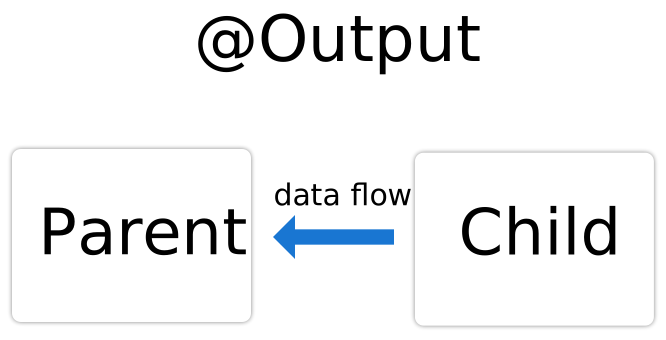
`@Output` 讓 child 有方法可以像 parent 向上傳遞資料
- 比方來說可以修改從 parent `@Input` 取得的值
- 或者是單純新增一筆資料進 parent array 內
### 使用 `@Output` 前必須在 child component 先引入 `Output` 及 `EventEmitter`
```typescript=
// src/app/child/child-component.ts
import { Output, EventEmitter } from '@angular/core';
...
```
引入完後就像是 `@Input` 一樣,需要在 component `class` 中使用:
- 宣告一個發射到 parent 得 event function
- `@Ouput() emittedFunctionName = new EventEmitter<value to parent: type>();`
- `EventEmitter` 是 Angular 內提供的 type,代表這個是一個 event function
```typescript=
// src/app/child/child-component.ts
@Output() newItemEvent = new EventEmitter<string>();
```
需要 child component 執行 event,再從該 event 中發射函式到 parent:
```typescript=
// src/app/child/child-component.ts
onAddItemName(): void {
// 函式發射到 parent 了,還帶一個 parameter
this.newItemEvent.emit(this.itemName)
}
```
```htmlmixed=
<!-- src/app/child/child-component.html -->
<button (click)="onAddItemName()">
Add new item name
</button>
```
### 在 parent component 中寫宣告,執行收到值後的任務,並透過 template 呼叫
parent template 中使用 `$event` 就可以得到 child 串過來的資料:
- parent 自己也要寫一個函式處理拿到值之後的任務
```typescript=
// src/app/parent/parent-component.ts
// 透過 function + parameter 接收 child 回傳的值
onItemNameAdded(newItemName: string): void {
// 收到值後要做什麼任務...
this.itemName = newItemName;
}
```
```htmlmixed=
<!-- src/app/parent/parent-component.html -->
...
<app-child (newItemEvent)="onItemNameAdded($event)"></app-child>
```
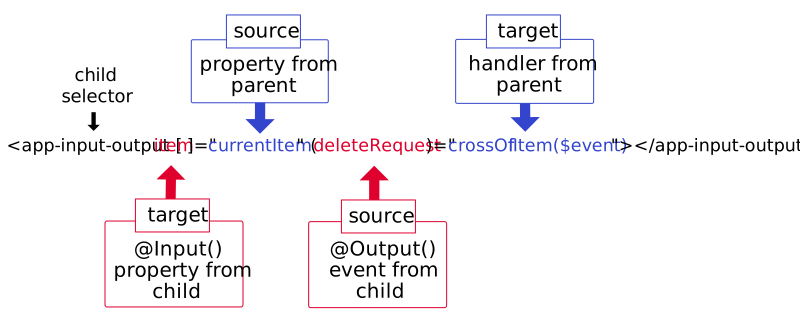
### 同時使用 `@Input` 及 `@Output` -> 從 parent 拿值後再 child 改值並告知 parent 要更新該值
(*[ref.: Sharing data between child and parent directives and components](https://angular.io/guide/inputs-outputs)*)
要記得 `[]` 是綁定 property,`[child @Input 定義的 keyName]="parent 傳給 child 值的 keyName"`
`()` 則是綁定 event,`(emittedEventFunction in child)="fun($event -> data from child)"`
## Sec. 9: Using Services & Dependency Injection

超過兩層的傳遞,或者需要有一個 central repository(中央的資料管理庫),就可以使用 `service`,跳脫需要多層的 `@Input, @Output` 傳遞。
### 108. Injecting the Logging Service into Components
1. `Service` 也是一個 class
2. Angular 負責建立每個 component(component 也是 class)的 instance,依賴注入(Dependency Injection)借用 class 的 `constructor` 的執行特性(負責初始化該 class),在 `constructor` 告訴 Angular 需要哪一個 class 的 instance
- syntax: `constructor(private/public propertyName: anotherClassAsType){}`
- 這時候該 component 就擁有需要的 class 的 instance 了
### 109. Creating a Data Service
`Service` 也是 class,透過依賴注入(Dependency Injection)可以把該 class 的資料分給其他 compoennts,達到資料單一控管,如果有更改的話就從 component 寫觸發更改的條件 / 事件,再呼叫 `Service` 的更改資料的 methods。
```typescript=
// app/steps.services.ts
// 同一管理 steps 資料
export class StepService {
step: number = 0;
onIncreaseStep(): void {
this.number ++;
}
}
```
```typescript=
// app/app.component.ts
import { StepService } from './step.service';
import { Component, DoCheck, OnInit } from '@angular/core';
// 不透過 @Input / @Output 直接依賴注入取得 StepService 的 instance
@Component({
selector: 'app-root',
templateUrl: './app.component.html',
styleUrls: ['./app.component.css']
})
export class AppComponent {
constructor(public step: StepService) {}
}
```
所以 `app.component.ts` 其實是得到一個 `StepService` class 的 instance:
> 1. `class` 只是建造 instance(物件實例)的藍圖
> 2. instance 簡單來說就是擁有 `class` 所有 properties / methods 的物件
```javascript=
{
step: 0,
onIncreaseStep: () {
this.step ++;
}
}
```
以圖像化來看,就可以清楚地看到透過依賴注入(Dependency Injection),每個告知(使用 `constructor`)Angular 需要 `StepService` 的 component,如沒有「自行」在 component 內取得(使用 `providers:[]`),就會獲得相同的 reference 的 instance,達到單一儲存 data,再發送給需要的 component。

### 110. Understanding the Hierarchical Injector
依賴注入獲得的 instance 會自動往子 component 延伸,除非子 compoennt 內有自行 `providers:[]` 取得自己的 instance,要不然子 component 取得的 instance 與上層的 component 相同。
> Providers basically tells angular to give us the instance of the class.

#### `Angular 6+` 以上用 `ng generate service` 會自動變成 Module side 的 service
代表該 module 內的所有 components 要使用的該 service 時,就只會獲得「同一個」instance。
If you're using Angular 6+ (check your package.json to find out), you can provide application-wide services in a different way.
Instead of adding a service class to the `providers[]` array in AppModule , you can set the following config in `@Injectable()`:
```typescript=
@Injectable({providedIn: 'root'})
export class MyService { ... }
```
This is exactly the same as:
```typescript=
export class MyService { ... }
```
and
```typescript=
import { MyService } from './path/to/my.service';
@NgModule({
...
providers: [MyService]
})
export class AppModule { ... }
```
Using this syntax is completely optional, the traditional syntax (using `providers[]` ) will also work.
The "new syntax" does offer one advantage though: Services can be loaded lazily by Angular (behind the scenes) and redundant code can be removed automatically. This can lead to a better performance and loading speed - though this really only kicks in for bigger services and apps in general.
#### 如果沒有用 cli 建立 service,就要自己控管 service instance 在 component 之間的傳遞

1. 手動新增至 Module side:
- 在 `app.module.ts` 自行透過 `providers:[]` 引入,讓該 module 內的 class 都可獲得相同的 instance

2. 新增至 App component:
- 在 app component 內透過 `providers:[]` 引入,這時有在 app component 中寫入的 template(Angular 會在內部抓取對應的 class,並實例化)都會有相同的 instance

3. 在任意一個 component:
- 任意一個 component 自行 `providers:[]` 引入,這是該 component 會得到另一個 instance,且其 instance 也會自動延伸至其 component 的子 components
- 即便父層也是 `providers:[]` 相同的 service class,但是子 component 自己用 `providers:[]` 也得到另一個 instance,==雖然同個 class,但是是不同 reference 的 instance==。
> 為了避免 APP 日後擴大難以維護,還是都用 CLI 建立 Service,自動建立 Module side 的 Service。
## 119. Using a Service for Cross-Component Communication
`Service` 也可以當作儲存資料的數據機,再需要多層次的 `@Input/@Output` 時可以省下很多麻煩,但是如果 `Service` 保存的資料為 primitive type,且遵循規則在每個 component `ngOnInit` 時初始化 component 的資料,該如何同步更新 component 的資料?
```typescript=
// src/app/services/shopping-list.service.ts
import { Injectable } from '@angular/core';
@Injectable({
providedIn: 'root',
})
export class ShoppingListService {
name: 'Lun';
// 變更 service 數據機的資料就寫在 service 內,盡量不要直接在 component 變更
nameChanged(): void {
console.log(this.name);
this.name = 'LIU';
console.log(this.name);
}
}
```
```typescript=
// src/app/child-component/child-component.component.ts
import { Component, OnInit } from '@angular/core';
import { ShoppingListService } from '../services/shopping-list.service';
@Component({
selector: 'app-child-component',
templateUrl: './child-component.component.html',
styleUrls: ['./child-component.component.css'],
})
export class ChildComponentComponent implements OnInit {
name: string = '';
constructor(private shoppingListService: ShoppingListService) {}
ngOnInit(): void {
// init 的時候初始化 component 需要的資料
this.name = this.shoppingListService.name;
}
onChangeName(): void {
this.shoppingListService.nameChanged();
}
}
```

(即便點擊按鈕觸發更改 `service` 內的資料,因為 primitive type 的緣故,所以更新後就直接拿新的 reference)
用 `EventEmitter` + `subscribe` 在 component init 的時候就訂閱資料改動,即便是 primitive type,也可以在 init 之後持續取得更新的資料:
> 1. `EventEmitter.subscribe()` 的概念就像是為 `EventEmitter.emit()` 新增一個事件,當 `emit()` 叫用後就會呼叫 `subscribe()` 內的 hanlder(也就是 callback)。
> 2. 因為 hanlder 內再次更新 component 的資料,所以才可以達到 component 內 primitive type 再次更新。
> 3. 如果是物件也建議另寫函式深拷貝物件,透過 `subscribe()` 同步更新 component 內的資料,避免數據機的資料在不經意低情況中被更改。
```typescript=
// src/app/services/shopping-list.service.ts
import { EventEmitter, Injectable } from '@angular/core';
@Injectable({
providedIn: 'root',
})
export class ShoppingListService {
nameChangedService: EventEmitter<string> = new EventEmitter();
name: 'Lun'
nameChanged(): void {
console.log(this.name);
this.name = 'LIU';
this.nameChangedService.emit(this.name);
console.log(this.name);
}
}
```
```typescript=
// src/app/child-component/child-component.component.ts
import { Component, OnInit } from '@angular/core';
import { ShoppingListService } from '../services/shopping-list.service';
@Component({
selector: 'app-child-component',
templateUrl: './child-component.component.html',
styleUrls: ['./child-component.component.css'],
})
export class ChildComponentComponent implements OnInit {
name: string = '';
constructor(private shoppingListService: ShoppingListService) {}
ngOnInit(): void {
this.name = this.shoppingListService.name;
// init 的時候訂閱,因為 EventEmitter 其實也是 observable,所以除了 emit() 外,還有 observable 的訂閱 subscribe()
// subscribe() 會監聽 emit(),只要 emit() 有觸發就會一併觸發 subscribe()
this.shoppingListService.nameChangedService.subscribe(name => {
this.name = name;
});
}
onChangeName(): void {
this.shoppingListService.nameChanged();
}
}
```

(不僅 `service` 數據機內的資料變更,component 也因為 `subscribe` 的緣故監聽 `emit()`,也會同步呼叫 `subscribe()`)
### 此章節內助教大略說明 `subscribe()` 的概念
Observables, observers, subscribers, subjects, pipes, operators...all these things are definitely not easy to understand if you haven't spent much time using them. I haven't met anyone yet who found these concepts easy to grasp when first working with them.
Max covers these in Section 13 if you'd like to take a look there.
As a very brief overview, subscribe is a method that is used to run some code when something happens (basically). In the case of sharing data using services, we can use some code that will emit some data; basically send something out. This usually happens in response to something else happening, like the user adding data using a form.
Other components that want to be notified about such data being available will subscribe to these data updates. They are said to subscribe to an observable. Observable is so named because it can be observed. ==Subscribing is just another way of saying, "Hey, I'm interested in being told if you have any data changes."==
It similar to subscribing to a YouTube channel. Anyone can subscribe to someone's channel (most of the time). The person creating the videos on YouTube doesn't even have to know who their subscribers are. When they post up a new video, we may receive notification about it. In a sense, they are very much like a service and we'd be a component that is subscribing to their updates.
In the subscribe method, we may get some data passed to us, like this:
this.youtubeService.newVideoUploaded
.subscribe(videoData => // do something with the video data);
In this case, videoData is some data that gets passed in as a payload. The ES6 arrow function inside subscribe() can then do something with that data.
If this is a bit confusing still, I wouldn't worry too much about it. If you work with it for some more time throughout the course, it will become quite clear without even really trying :)
## 178. Subjects
- Use Subject to communicate across components through services.
- EventEmitter in connection with @Output() and event binding in direct child/parent communication.
> 所以不要用 `EventEmitter` 使 `service` 跨元件傳遞資料,而是用 `Subject`,讓 `EventEmitter` 回歸它主要的任務:==元件上下層的溝通==。

## 243. Parametrizing Pipes
`pipe` 的道理就跟打 command line 的 pipe 一樣,前一個指令的結果被帶入後一個指令的 input。
`pipe` 可以給 parameter,讓 `pipe` 可以參照給的 parameter 顯示不同的結果(有什麼 parameter 可以用就要看文件):
```htmlembedded!
<!-- value | pipeName: parameter -->
<!-- 所以 myBirthday 的值會被帶入到 data,成為 data 的 input,但我有給 paramter,所以會呈現 data pipe 的 shortDate 的結果 -->
<p>
{{ myBirthday | date: 'shortDate' }}
</p>
```
## 247. Parametrizing a Custom Pipe
如果 `pipe` 接收多個 parameters 時要怎麼在 template 給?
每個 paramter 不是用 `,`(逗號)區隔,而是用 `:`(冒號)區隔:
```htmlembedded!
{{ myData | date:'fullDate' | myPipe:'arg1':'arg2':'arg3' }}
```
## 249. Pure and Impure Pipes (or: How to "fix" the Filter Pipe)

pipe 預設不會因為 data 改變再次叫用,但是可以給 config 改變預設(`@Pipe({..., pure: false})`。但因為效能的問題,所以不要把 filter 或者 sort 的邏輯寫在 `pipe` 內,直接改動 template 顯示的 output,還是建議寫在 component 內,或者 service(如果有數個 component 都可以套用相同的 filter 邏輯),直接改變 template data 才是好的方式。
## 課程
[Angular - The Complete Guide (2022 Edition)](https://www.udemy.com/course/the-complete-guide-to-angular-2/)
 Sign in with Wallet
Connect another wallet
Sign in with Wallet
Connect another wallet