###### tags: `TA Stuff 2021` `Pycom` `ESP32`
# Tutorial 4: LoRa and SigFox
In this tutorial, we'll be focusing on connecting your device to two kinds of networks: **LoRa** (**Lo**ng **Ra**nge) or **SigFox**. The choice between these networks is mainly determined by which network has the best [coverage](#Coverage-maps) in your area.
Down below are tutorials for the different networks. We present two LoRa alternatives: The Things Network and Helium. As for SigFox there is only one alternative, which is the SigFox Network itself.
---
:::danger
**⚠️ Important ⚠️ Make sure the LoRa antenna is connected properly before running any LoRa or Sigfox code on your device. Not doing so might break your device.** You can find how to properly connect the antenna [here](#Connect-the-antenna).
:::
---
## Table of Contents
[TOC]
## Getting started
[//]: <> (AP: Mohammad)
### Coverage maps
Please make sure you have coverage the first thing you do. Here are the maps to the 3 different networks:
* LoRa
* [TTN (The Things Network)](https://www.thethingsnetwork.org/map)
* [Helium](https://explorer.helium.com/coverage#2.9/57.36/31.54)
* [SigFox](https://www.sigfox.com/en/coverage)
[//]: <> (insert länkar till täckningskartor)
### Connect the antenna
If using the **LoPy4**:
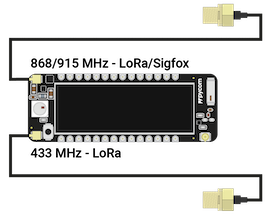
Or if you got the **The FiPy**:

In general to avoid confusion always use the **868/915 MHz** antenna port on the **Lopy/Fipy** since this one works for both **Sigfox and LoRa**. You still have to configure the correct frequency (Check the examples under LoRa in the next steps).
#### More details:
For **LoRa** if you live in **North America or Australia** you should use the **915 MHz** band and connect the antenna accordingly. If you live in **Europe** you can choose either **433 MHz** band or the **868 Mhz** band. Altough both are license-free, we recommend going with the **868 MHz** since it has less interference.
As for **Sigfox** you should similarly use the same band **(915 MHz)** in **North America and Australia**. The same also applies to **Europe** but you are limited to the **868 MHz** band since the **433 MHz** band does **NOT** work for **Sigfox**.
**❗Remember, you can always ask a TA if you are not sure**.
## LoRa
#### LoRa OTAA
LoRa has 2 main methods of authentication. One is **ABP** and the other is **OTAA**. We will mostly be going through the **OTAA** method of connecting to LoRaWAN since it is the easier and the simpler of the two.
You can find more info about working with LoRa OTAA with pycom devices on: [LoRaWAN with OTAA](https://docs.pycom.io/tutorials/networks/lora/lorawan-otaa/)
In the link you can see that there are code examples for connecting to- and using lora. In the examples you will also see 3 different types of keys/identifiers that you need to provide: **app_eui**, **app_key** and **dev_eui**
The **APP_EUI** is what identifies the application you will be creating on whichever platform you choose in the next step.
The **APP_KEY** is the encryption key that will be used to encrypt all the data you will be sending to the gateway. This is a private key that should be kept secure. Otherwise others will be able to send data to your application.
Lastly the **DEV_EUI** is a unique key that identifies your end device (a LOPY or a similar device). Usually the MAC of the LOPY is used if nothing is provided by the network you are using.
### Alternative 1: The Things Network (TTN)
[//]: <> (AP: David M)
[The Things Network](https://www.thethingsnetwork.org/) is a LoRa Network that consists of a few hotspots. The tutorial for how to use TTN can be found [**here**](https://hackmd.io/5RbTAtCxTPu-hRi3k4p3dQ?view).
### Alternative 2: Helium
[//]: <> (AP: Christoffer Eid, Erik B, Love L)
[Helium](https://www.helium.com/) is, much like TTN, a global LoRa network that uses many hotspots around the world. The tutorial can be found [**here**](https://hackmd.io/ikBVVe3zQymcUxo6rbIdlQ).
[//]: <> (See if you've got coverage in your area using Heliums coverage map https://explorer.helium.com/coverage#2.9/57.36/31.54)
## SigFox
A full year of [Sigfox](https://www.sigfox.com/en) is included with your Pycom device (worth 149 SEK). Here's how you can use it.
**In this tutorial** you will:
* Register your device for Sigfox
* Send data
* Visualize data on Pybytes
Tutorial can be found [**here**](https://hackmd.io/@lnu-iot/SyUxJU7pu).
<style>
.markdown-body img{
display: block;
margin-left: auto;
margin-right: auto;
}
</style>
:::info
**Credit**
Written by Abdulsalam Aldahir, Erik Karlsson, David Mozart, Erik Brink, Christoffer Eid, Mohammad Qasem
:::
 Sign in with Wallet
Connect another wallet
Sign in with Wallet
Connect another wallet