# Part 2: Extra Sensor Connection for Pysense
###### tags: `TA Stuff ESP32` `PyCom` `ESP32`
This tutorial is for those with a **Pysense 2.0** expansion board. There are five different sensors on this expansion board including **Accelerometer**, **Light Sensor**, **Pressure Sensor**, **Temperature**, and **Humidity Sensor**. You can find the complete datasheet [**here**](https://docs.pycom.io/datasheets/expansionboards/pysense2/) and the pinout of it [**here**](https://docs.pycom.io/gitbook/assets/pysense2-pinout.pdf) and you find the image of how your Pysens looks like below.
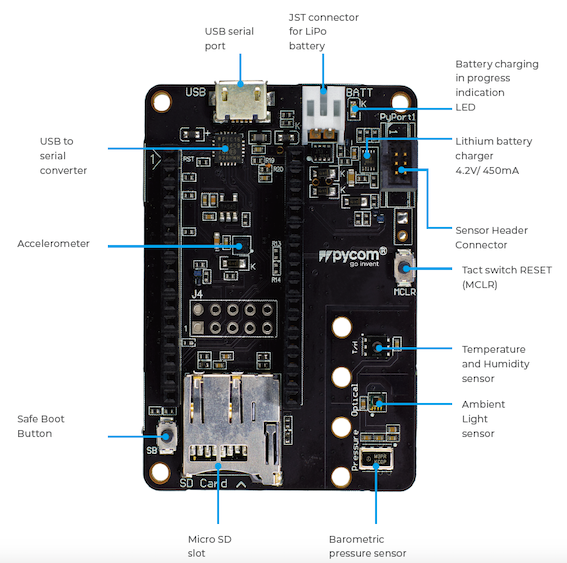
Depending on the project you choose to do if mentioned five sensors are enough and you do not need to connect any extra sensors then you are good to go and do not need to follow this tutorial, however, you can take a look at the sample code from [**PyCom (here)**](https://docs.pycom.io/tutorials/expansionboards/sensing/). On the other hand, to connect extra sensors we need to expose more pins to be able to use them and you need to do the following steps.
+ **Step 1:** Disconnect your **FiPy** from **Pysense 2.0**.
+ **Step 2:** Connect the **FiPy** to the breadboard like this:

<br>
+ **Step 3:** You need to connect the following pins from your **FiPy** to your **Pysense**:
<span style="color:red">5V <-----------------> 5V</span>.
<span style="color:blue">GND <---------------> GND</span>.
<span style="color:#F9EB12">UART_Rx <---------------> UART_Rx</span>.
<span style="color:orange">UART_Tx <---------------> UART_Tx</span>.
<span style="color:green">SDA <---------------> SDA</span>.
<span style="color:purple">SCL <---------------> SCL</span>.
The port connection should look like the following:
<br>

<br>
:::danger
**Please double and triple check the pin connection and compare it to the above schemas before connecting the USB cable.**
:::
+ **Step 4:** Now you can connect the USB cable and use the pins on **FiPy** for extra sensor connections. You can find a pinout for [**FiPy (here)**](https://docs.pycom.io/gitbook/assets/fipy-pinout.pdf).
:::info
When you disconnect your **FiPy** from **Pysense** to use pins for other sensors then you do not have access to those five **Pysense** built-in sensors.
:::
[Pysense sensor code](https://github.com/pycom/pycom-libraries/)
 Sign in via Google
 Sign in via Facebook
 Sign in via X(Twitter)
 Sign in via GitHub
 Sign in via Dropbox
 Sign in with Wallet
Connect another wallet
Sign in with Wallet
Connect another wallet