---
tags: resources, [Logic Pro X], [Garageband], [Podcast], [Music], [Audio], [MIDI], [Effects]
author: Dézhawn Dumornay
---
# Logic / Garageband: Effects
Logic Pro X and Garageband have a collection of effects available to enhance productions.
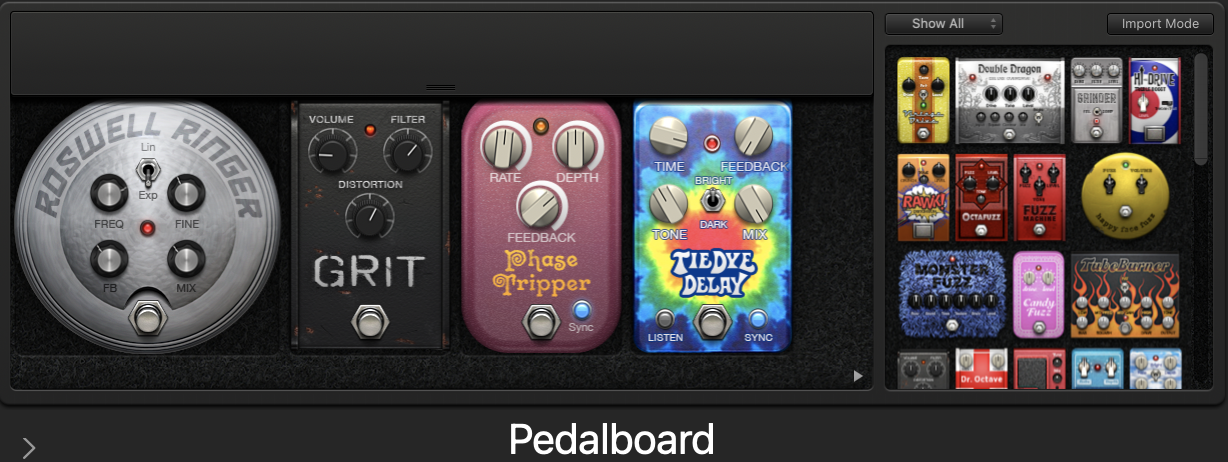
### **[Amps](https://support.apple.com/guide/logicpro/amplifier-controls-lgcef14a361a/mac) & [Pedals](https://support.apple.com/guide/logicpro/use-the-pedal-browser-lgcef14a2e5e/10.7.3/mac/11.0)**
Logic Pro X and Garageband both have multiple emulations of vintage and modern amps and pedal boards. These effects are meant for guitar and organ but can be used as an effect on any track.
### **[Delay](https://support.apple.com/guide/logicpro/delay-effects-overview-lgcec7e3312c/10.7.3/mac/11.0)**
- **[Delay Designer](https://support.apple.com/guide/logicpro/delay-designer-overview-lgcef18b8dc5/10.7.3/mac/11.0)** - Multi-tap delay, useful for a more complex delay effect
- **[Echo](https://support.apple.com/guide/logicpro/echo-controls-lgcef18b92b0/10.7.3/mac/11.0)** - Simple echo that synchronizes to project tempo.
- **[Sample Delay](https://support.apple.com/guide/logicpro/sample-delay-controls-lgcef18b8738/10.7.3/mac/11.0)** - Useful in correcting timing issues.
- **[Stereo Delay](https://support.apple.com/guide/logicpro/stereo-delay-controls-lgcef18b892f/10.7.3/mac/11.0)** - Delay with ability to adjust left and right channel parameters separately.
- **[Tape Delay](https://support.apple.com/guide/logicpro/tape-delay-controls-lgcef18b8994/10.7.3/mac/11.0)** - Simulates the sound of vintage tape echo machines.
### **[Distortion](https://support.apple.com/guide/logicpro/distortion-effects-overview-lgce28151a55/10.7.3/mac/11.0)**
- **[Bitcrusher](https://support.apple.com/guide/logicpro/bitcrusher-controls-lgcef1a8f27c/10.7.3/mac/11.0)** - Low-resolution digital distortion effect, 8-bit video game sound.
- **[Clip Distortion](https://support.apple.com/guide/logicpro/clip-distortion-controls-lgcef1a8f334/10.7.3/mac/11.0)** - Unique and inconsistent distortion, great on deep sounds.
- **[Distortion](https://support.apple.com/guide/logicpro/distortion-effect-controls-lgcef1a8f484/10.7.3/mac/11.0)** - Low-fidelity distortion, highly overdriven amplifier.
- **[Distortion 2](https://support.apple.com/guide/logicpro/distortion-ii-controls-lgcef1a8f53c/10.7.3/mac/11.0)** - Emulates the distortion circuit of a Hammond B3 organ.
- **[Overdrive](https://support.apple.com/guide/logicpro/overdrive-controls-lgcef1a8f10b/10.7.3/mac/11.0)** - Generates a warm-sounding distortion.
- **[Phase Distortion](https://support.apple.com/guide/logicpro/phase-distortion-controls-lgcef1a8f3ed/10.7.3/mac/11.0)** - The incoming signal modulates its own phase position.
### **[Dynamics](https://support.apple.com/guide/logicpro/dynamics-processors-overview-lgcef1bee254/10.7.3/mac/11.0)**
- **[Adaptive Limiter](https://support.apple.com/guide/logicpro/adaptive-limiter-controls-lgcef1becbb8/10.7.3/mac/11.0)** - Creates a louder-sounding by normalizing the signal.
- **[Compressor](https://support.apple.com/guide/logicpro/use-compressor-lgcef1bec9f3/10.7.3/mac/11.0)** - Reduces sounds that exceed the set threshold level, bringing desired audio into focus and boosting the perceived loudness.
- **[DeEsser 2](https://support.apple.com/guide/logicpro/deesser-2-controls-lgcef1bec850/10.7.3/mac/11.0)** - Fast dynamics compressor, often used for reducing harsh and unwanted *'S'* and *'T'* sounds (sibilance) from vocal recordings.
- **[Enveloper](https://support.apple.com/guide/logicpro/enveloper-controls-lgcef1bec322/10.7.3/mac/11.0)** - Shapes the transients of a signal (e.g., adding attack to percussive sounds or removing reverb from prerecorded material).
- **[Expander](https://support.apple.com/guide/logicpro/expander-controls-lgcef1bee3e7/10.7.3/mac/11.0)** - Livens audio signals by increasing dynamic range.
- **[Limiter](https://support.apple.com/guide/logicpro/limiter-controls-lgcef1becd08/10.7.3/mac/11.0)** - Dynamic range compression used to increase the perceived loudness of an audio recording while preventing clipping. Apply Limiter as the final process in the signal chain to raise the overall volume of the signal to 0 dB.
- **[Multipressor (*Multiband Compressor*)](https://support.apple.com/guide/logicpro/use-multipressor-lgcef1bed6ed/10.7.3/mac/11.0)** - Enables independent compression of up to 4 frequency bands.
- **[Noise Gate](https://support.apple.com/guide/logicpro/use-noise-gate-lgcef1bec259/10.7.3/mac/11.0)** - Used to suppress unwanted background noise.
### **[Equalizer](/IPh1nfrjSBOZrvqLm_UiTQ)**
- **[Channel EQ](https://support.apple.com/guide/logicpro/channel-eq-use-tips-lgcef1edc27f/10.7.3/mac/11.0)** - 8-band equalizer featuring an analyzer showing real time changes on the frequency spectrum. Used to shape sounds.
- **[Linear Phase EQ](https://support.apple.com/guide/logicpro/linear-phase-eq-use-tips-lgcef1edc8da/10.7.3/mac/11.0)** - Similar to Channel EQ but preserves the phase of the audio signal and creates additional latency.
- **[Match EQ](https://support.apple.com/guide/logicpro/use-match-eq-lgcef1edc5c5/10.7.3/mac/11.0)** - A learning EQ that analyzes the frequency spectrum of an audio signal to then be stored as a template and used on other audio.
- **[Single Band EQ](https://support.apple.com/guide/logicpro/single-band-eq-controls-lgcef1edd13d/10.7.3/mac/11.0)** - Used for simple EQ work.
- **[Vintage Console EQ](https://support.apple.com/guide/logicpro/vintage-console-eq-controls-lgcp2d56e64b/10.7.3/mac/11.0)** - Emulates the EQ section of a Neve 1073 console, noted for its tonal color, warmth, smooth top end, and mid-forward presence.
- **[Vintage Graphic EQ](https://support.apple.com/guide/logicpro/vintage-graphic-eq-controls-lgcp75436181/10.7.3/mac/11.0)** - Emulates the Proportional Q design of the API 560 console, widening filter bandwidth at lower cut/boost levels and narrowing at higher levels.
- **[Vintage Tube EQ](https://support.apple.com/guide/logicpro/vintage-tube-eq-controls-lgcp137f13da/10.7.3/mac/11.0)** - Emulates a combination of the Pultec EQP-1A and the MEQ-5 valve equalizers.
 Sign in with Wallet
Connect another wallet
Sign in with Wallet
Connect another wallet