---
tags: resource
---
# Portuguese Filmmaking Resource

This resource is for students in Portuguese courses who are making a range of different video projects. Below, we've included some reflections on genre (i.e., how these different films communicate with their audiences), as well as links to editing tutorials.
## Camera Work
* [Compositing using a greenscreen](https://hackmd.io/A6_VuI7MSYOwfp9N48sPyg?view)
* [Minimizing lens distortion when filming with your phone](/ElWgsbw3TeSDopl7pJTrtw)
* [A few quick composition tips for filming with your phone](https://hackmd.io/@lluf-23-24/BJluw2AK6)
* [Tutorial for Cinematic Interview-style shots on a budget](https://www.youtube.com/watch?v=pqk9dY9mYjE)
* [Ultimate guide to camera movement](https://www.youtube.com/watch?time_continue=1&v=IiyBo-qLDeM)
## Lighting and Composition
* [Guide for Filming Objects](https://hackmd.io/n73xLb0ZTTyu3qEOAdl0Yg)
* [Lighting for Filmmaking Tips and Tricks](https://hackmd.io/kG_HV4YrQC2wZiGz2mj7eg)
* [Lighting Guide for Filming Objects](/n73xLb0ZTTyu3qEOAdl0Yg)
## Editing: Premiere vs. iMovie vs. Canva
The different video editing software that is readily accessible to students each have different advantages and disadvantages. Choosing the right software will save you time and effort.
### Subtitling
There is no automated way to subtitle or caption videos in iMovie. You must caption by hand. Canva and Premiere both offer AI-assisted captioning. If you use these features, you'll want to double-check that the captions are correct, especially if you would like the captions to be in Portuguese.
## Editing software tutorials
### Premiere Pro
* [Tips and tricks for using Adobe Premiere video editing software](https://hackmd.io/iGjCA5_4SqO9C6qhdZOYGA?view)
* [Adobe Premiere video tutorials](https://www.adobe.com/learn/premiere-pro)
### iMovie
* [Apple iMovie video tutorials](https://support.apple.com/guide/imovie/welcome/mac)
* [iMovie for beginners tutorial](https://www.youtube.com/watch?v=jhGG7ypIW_w)
### Canva
* [editing video using Canva Youtube video tutorial](https://www.youtube.com/watch?v=AlrC-XaKwew)
* [Step by step guide to editing animations and video in Canva](https://hackmd.io/@ll-25-26/rk7eUuTnel)
* [Pre-made example Canva project](https://www.canva.com/design/DAG0wHbV9GY/SZsklmnLPsMBtS-0PrnAoA/edit)
### LinkedIn Learning (free with Harvard ID or library access)
- [Learning Premiere Pro – Ashley Kennedy](https://www.linkedin.com/learning/topics/premiere-pro)
- [Final Cut Pro X Essential Training – Ashley Kennedy](https://www.linkedin.com/learning/final-cut-pro-x-10-4-essential-training)
- [DaVinci Resolve 18 Essential Training – Patrick Inhofer](https://www.linkedin.com/learning/davinci-resolve-18-essential-training)
## Tech Lending at Harvard
You really can capture great video and audio using the tools you already have, like your phone (if it's equipped with a camera and mic)! But there are also great resources at Harvard that you can draw on.
* [Lamont Library offers a/v tech loan and has computers equipped with video editing software](https://library.harvard.edu/libraries/lamont)
* [Cabot Library offers tech loan and has bookable studio space](https://library.harvard.edu/libraries/cabot)
* [Downloading Adobe Premiere video editing software from HUIT](https://hackmd.io/gwYg4xWdT6yLcSBF0eXBKg)
* [Choosing the right microphone from Lamont or Cabot](https://guides.library.harvard.edu/multimedia_production/microphones)
## Considering Different Film Genres
What do different film genres enable us to communicate and how do these "machines" work? Here are some ideas to help you think about what types of shots you might want to get for your project and how they tie into broader genre conventions. Note: you likely don't need to do **all** of these shots for a single project - they're more meant to give you some ideas for shot types!
### SNL-Style Sketches
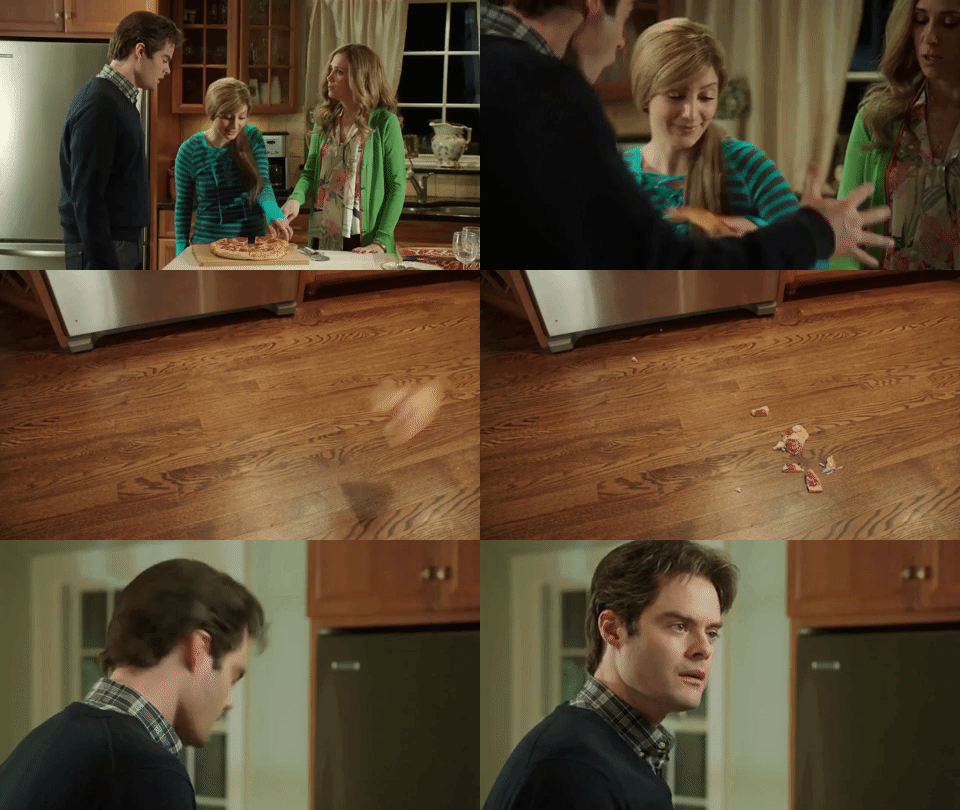
- You build comedy by setting up a recognizable frame (everyday life, talk show, PSA, game show) and then breaking its rules.
- You exaggerate characters through performance: tone of voice, gestures, costumes, facial expressions.
- You structure tension by balancing “straight” roles (anchors, hosts, authority figures) against “wild card” characters who disrupt them.
- You play with escalation: each new beat raises the stakes, whether through repetition, absurd logic, or musical surprise.
- You use editing (reaction shots, timing of cuts, sudden music cues) to shape how the audience experiences the joke.
- You create contrast between formal delivery (serious voice, structured format) and collapsing or absurd content.
- You can insert spectacle by shifting suddenly into a new mode—like a musical number that overwhelms an ordinary scene.
---
### News Segments
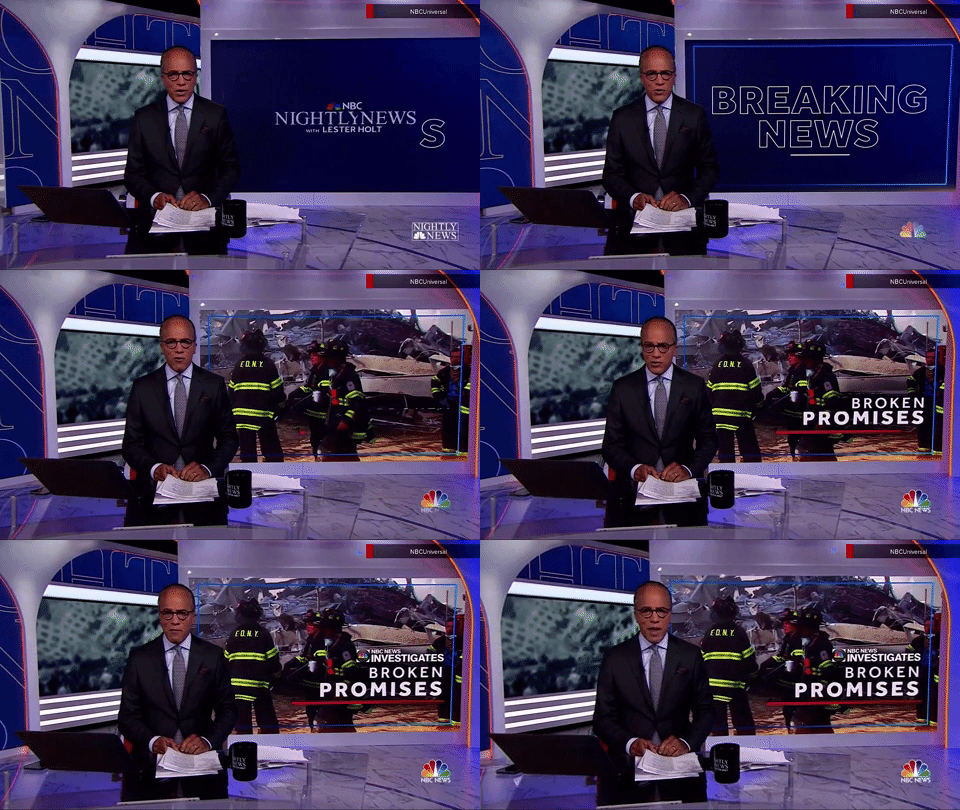
- You organize your video into clear blocks: opening, main story, secondary story, weather/update, closing.
- You establish credibility with visual framing: anchor at a desk, reporter on location, interviewee in a mid-shot.
- You layer audio and visuals: voiceover narration, captions, b-roll footage, and on-screen graphics.
- You use tone and delivery—calm voice, steady camera, clear diction—to match the professional “news” style.
- You mark transitions with pacing, editing, and tonal shifts (serious → lighter → sign-off).
---
### Advertisement

- You compress your message into a short, punchy sequence with a clear beginning, middle, and end.
- You grab attention in the first seconds with bold visuals, surprising sounds, or a fast cut.
- You make ideas memorable by repeating images, words, or sounds and by pairing them with logos or slogans.
- You combine visual branding (colors, text, packaging) with aural branding (music, jingles, slogans).
- You rely on rhythm—quick cuts, close-ups, and energetic pacing—to persuade and entertain.
- You end with a strong call to action, visually reinforced by a final shot or freeze frame.
---
### Reflection Videos

- You use first-person address (talking directly to the camera) to create intimacy with the viewer.
- You combine narration with supporting visuals—text on screen, images, or clips—to illustrate your progress.
- You create contrast between past and present footage (early attempts vs. current skills) to show development.
- You use reflective voiceover layered with visual evidence (notes, practice moments, recordings).
- You balance informal authenticity (mistakes, behind-the-scenes) with formal structuring (clear beginning, middle, end).
- You shift tone between vulnerability and confidence, letting the form itself show how you’re growing.
#### Interviews/Exposés
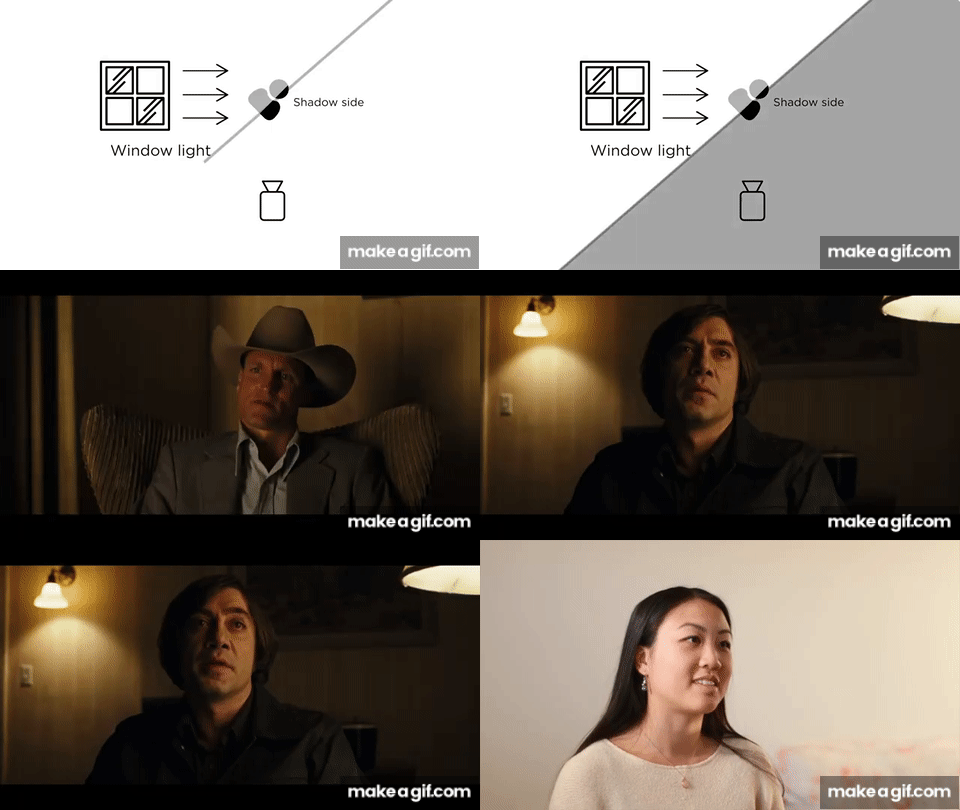
- Consider including inverview-style shots in a reflection video to convey specific information.
- You use a variety of frontal, 3/4, and side shots and speak to the side of the camera to give a confessional feeling, or a sense of expert commentary.
- You create a space away from the main action for reflection or extra context.
- Interview shots can be long and contemplative, or quick and punchy to emphasize a point
- You can use interview audio to you cut in and out of a faster-paced scene to keep audiences thinking objectively/from a distance.
---
### Recreating the "moves" of different genres
* [How are comedy sketches, news segments, or advertisements structured? How can I recreate them?](https://hackmd.io/CJUe-z5vTWaAKuXuXqDROA)
 Sign in with Wallet
Connect another wallet
Sign in with Wallet
Connect another wallet