# 00 - Why Vibe Coding?
## Video
<iframe width="720" height="406" src="https://www.youtube.com/embed/ZbkZwnD43qg?si=rJSU04MmaILsRx-x" title="YouTube video player" frameborder="0" allow="accelerometer; autoplay; clipboard-write; encrypted-media; gyroscope; picture-in-picture; web-share" referrerpolicy="strict-origin-when-cross-origin" allowfullscreen></iframe>
---
## What Are We Doing Here?
This is an introduction to **vibe coding** in a slightly humanistic context. We're going to work our way towards creating large-scale interpretation machines that can interpret large quantities of literary works and create high-quality output in a variety of structures—including web-based infographics and printed Pokemon cards.
Today we're doing the very first step: creating a little **encyclopedia of birds in famous poems**.
The reason we're doing this encyclopedia activity is to give you some intuitions quite quickly for why you would want to use code to work with LLMs instead of just typing things into ChatGPT or Gemini. One of the key things is going to have to do with **scale**. Ultimately it will also have to do with the quality of output, but we'll get to that later.
---
## Why "Vibe Coding"?
I want to say one quick thing because this runs counter to something we were saying a lot last year: that LLMs are great for experts because experts can judge the quality of the output, but they're dangerous for people that are learning because you short-circuit the learning process if you get LLMs to generate everything for you.
That is still true. It's still totally true.
But what has been very apparent over the past year—and really ramping up recently with things like Claude Code—is that humans are going to be working with a large amount of intelligence (or products of intelligence) that is not human intelligence and frequently goes beyond what human intelligence can easily absorb.
Every one of us now is producing more text and code than we can ever read in a single day. And sometimes it's too complex for you to understand—sometimes for any human to understand, potentially.
So what do we do? Should we just say no, stop doing that?
That is one temptation, and in a lot of contexts that's probably the appropriate thing to do for people that are just learning. But there's also this **meta thing** we want to learn across this assignment sequence: precisely how to cope with a situation where you are generating things with an LLM that go beyond your current level of understanding.
The reason this is important is that humans for the rest of our lives are about to encounter an environment—in teaching, learning, and knowledge work in our daily lives—where we are dealing with the products of somewhat alien intelligence that we don't fully understand, or at least don't have the time to fully understand. We want to start developing systems, intuitions, and virtues that will help us cope with that environment.
> **Vibe coding is kind of the tip of the spear—the first place where this is happening. But it's going to be happening everywhere.**
So it's a great place for us to start investigating how students can learn those meta skills.
---
## What We're Building: The Encyclopedia
Our goal is to create an encyclopedia (or you can think of it as Pokemon-style cards) where we have a whole bunch of records—like rows in a spreadsheet—that all have cells filled in with values in the right format.
For each poem, we want:
- The title
- The author
- What bird appears in the poem
- The bird's significance/interpretation
- An image prompt for generating artwork
This is like an interpretation and data clean-up operation. If we were sending off to the "encyclopedia printer" or "Pokemon card printer," we need to make sure every single entry has a name, a description, an image—all the right size and format. To create something like an encyclopedia or a deck of cards, **you have to have uniformity**.
We're going to teach you how to get that out of OpenAI.
---
## One-Shot It in Gemini
One thing you could do if you were just starting out—and this is kind of like the ultimate vibe coding—would be to not even think too hard about it, but just **one-shot it with Gemini**.
"One-shot" means instead of prompting with multiple steps or prompting multiple times recursively, we might just ask: "Hey, just give me this thing," and see how the LLM does.
Gemini is the tool that all Harvard students have available. You could paste in a prompt like:
> "I want to make an encyclopedia of birds in famous poems. Can you create me the Python code for looping through an array of poems that are Markdown files in some kind of folder and sending them to the OpenAI API for structured data identifying: (1) whether there's a bird in the poem or not, (2) what type of bird it is, (3) what the bird's significance in the poem is, and (4) what a good image prompt for the poem's bird might be. Then once we have all of that data, we're going to generate an image for each of them, and then generate one big long Markdown file for the encyclopedia."
Hit enter and it's going to churn away. It's going to give you the Python code—maybe 30 lines, maybe 60-70 lines.
If you're new to code, this might just look like a **confusing mess**.
Our goal here is to help you understand what's in this confusing mess bit by bit. We're going to take you through a series of notebooks that unpack some of the core elements of Python. We want to help you identify what the big chunks are, how they fit together—and that's going to make you better at remixing this to do your own encyclopedia and debugging it.
---
## The Key Move: Use the LLM to Teach You
Even while you're in Gemini, I want to teach you one key vibe coding move that you should do throughout the entire set of tutorials:
**If there's something you don't understand, copy and paste it back in and say, "Hey, teach me this thing."**
If you don't understand why the code is importing `os` for instance, or what `from` means, copy that section and say:
> "I'm new to coding—what does this do?"
Paste that stuff in, and Gemini will give you an answer. It might say something like: "These are import statements. Think of Python like a toolbox that comes with some tools like addition and subtraction, but for specialized jobs you'll need to import specialized kits from the warehouse."
That's a really cool metaphor! Now you understand: at the beginning of the file, you have to bring in all the tools you need to perform whatever you want to do later on.
> **One of the core skills we want to teach you is to get in the habit of turning the LLM as much into a teacher as a producer.**
For sure it's going to produce some code for you. But what you want to do is deeply internalize what you're meant to be learning. It's this act of continually asking until you get it—until you feel like you can explain it to someone else, even if the LLM wasn't there.
If you just do that recursively, if that's your habit, you're going to be in great shape throughout the rest of these tutorials. In fact, **that's probably the only thing you need to learn**: get the LLM to do something and then try to understand it to the point where you could explain it to someone else.
---
## Why Colab?
You could very easily run code within Gemini. If you go to **Tools > Canvas** and say "create Python code that finds word frequency in a famous sonnet," it'll create a little environment where you can see Python code and actually run it right there within Gemini.
That's already pretty cool. And for some courses, that's enough—students simply vibe-code something within the Gemini interface, take a picture of the output, and send that in. That's a totally legit workflow.
But what we're going to do is work in a Python notebook that we open up in something called **Google Colab**.
### Why move to Colab?
1. **Persistence**: Once things get more complex, we might want to be working with them somewhere a little more permanent
2. **OpenAI Integration**: You can't actually talk to OpenAI from within Gemini—that's a limitation that makes us go somewhere else
3. **More Control**: Colab gives us more flexibility for complex projects
What's cool about Gemini is there's a button called **"Export to Colab"** so if you build something in Gemini, you can immediately click that and pop over to Google Colab to edit it in more detail, or to add things that don't work within the Gemini environment—like that OpenAI connection.
---
## Getting Started with the Notebooks
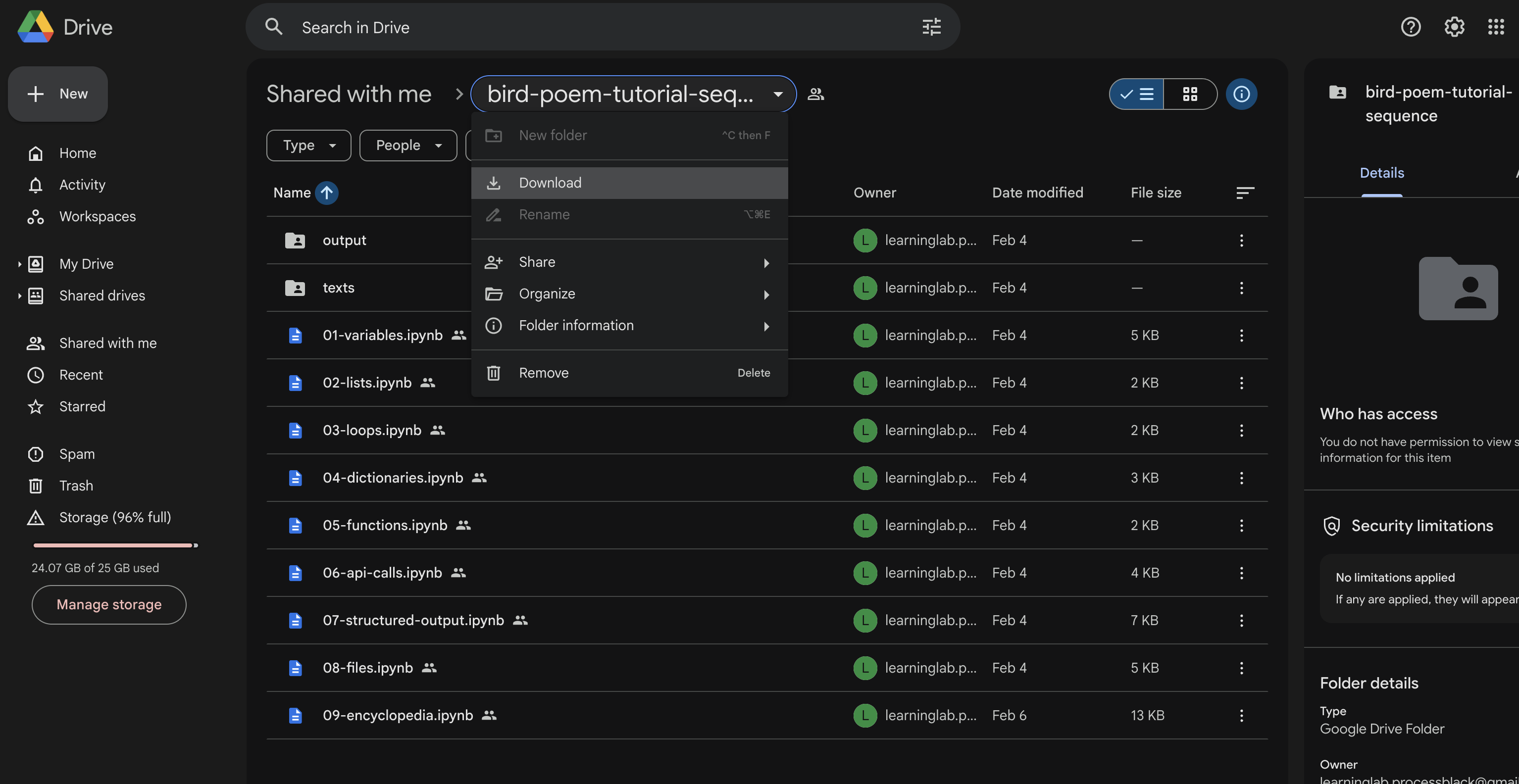
The Python notebooks you're going to be working with are in the [link](https://drive.google.com/drive/folders/1vFrwpTvzGxarHhPkJXyv2O7kH4CXMaf0) you have. What you're going to do is:
!!! NOTE: SIGN IN TO CHROME IN INCOGNITO AS **YOU** before proceeding!
1. **Download** that folder as a zip file
2. **Unzip** it
3. **Upload** it to your own Google Drive so you'll have your own copies to work on
When you do, you'll have a folder with:
- A number of numbered notebooks (01-09)
- A folder of texts (the poems)
- A folder for output (that we'll create down the line)
We're going to walk through these one by one, starting with variables.
---
## What You'll Learn
By the end of this tutorial sequence, you'll understand:
- **Variables** - storing values
- **Lists** - holding multiple items
- **Loops** - doing things at scale
- **Dictionaries** - complex data structures
- **Functions** - reusable code
- **API Calls** - talking to OpenAI
- **Structured Output** - getting predictable data back
- **Files** - reading and writing to Google Drive
- **The Encyclopedia** - putting it all together
The logic doesn't get any harder than the first five notebooks. If you take your time to understand what's going on in those, you understand all you need to know conceptually to get the logical structure of everything we're going to do.
> **Once you can loop through a large list of stuff—like a giant list of poems—and do something complex with every single element in that list... well then you kind of have superpowers.**
Let's get started!
 Sign in with Wallet
Connect another wallet
Sign in with Wallet
Connect another wallet