# openai-distillation
Model distillation
==================
Improve smaller models with distillation techniques.
Model Distillation allows you to leverage the outputs of a large model to [fine-tune](/docs/guides/fine-tuning) a smaller model, enabling it to achieve similar performance on a specific task. This process can significantly reduce both cost and latency, as smaller models are typically more efficient.
Here's how it works:
1. Store high-quality outputs of a large model using the [`store`](/docs/api-reference/chat/create#chat-create-store) parameter in the Chat Completions API to store them.
2. [Evaluate](/docs/guides/evals) the stored completions with both the large and the small model to establish a baseline.
3. Select the stored completions that you'd like to use to for distillation and use them to [fine-tune](/docs/guides/fine-tuning) the smaller model.
4. [Evaluate](/docs/guides/evals) the performance of the fine-tuned model to see how it compares to the large model.
Let's go through these steps to see how it's done.
Store high-quality outputs of a large model
-------------------------------------------
The first step in the distillation process is to generate good results with a large model like `o1-preview` or `gpt-4o` that meet your bar. As you generate these results, you can store them using the `store: true` option in the [Chat Completions API](/docs/api-reference/chat/create#chat-create-store). We also recommend you use the [metadata](/docs/api-reference/chat/create#chat-create-metadata) property to tag these completions for easy filtering later.
These stored completion can then be viewed and filtered in the [dashboard](/chat-completions).
Store high-quality outputs of a large model
```javascript
import OpenAI from "openai";
const openai = new OpenAI();
const response = await openai.chat.completions.create({
model: "gpt-4.1",
messages: [
{ role: "system", content: "You are a corporate IT support expert." },
{ role: "user", content: "How can I hide the dock on my Mac?"},
],
store: true,
metadata: {
role: "manager",
department: "accounting",
source: "homepage"
}
});
console.log(response.choices[0]);
```
When using the `store: true` option, completions are stored for 30 days. Your completions may contain sensitive information and so, you may want to consider creating a new [Project](https://help.openai.com/en/articles/9186755-managing-your-work-in-the-api-platform-with-projects) with limited access to store these completions.
Evaluate to establish a baseline
--------------------------------
You can use your stored completions to evaluate the performance of both the larger model and a smaller model on your task to establish a baseline. This can be done using the [evals](/docs/guides/evals) product.
Typically, the large model will outperform the smaller model on your evaluations. Establishing this baseline allows you to measure the improvements gained through the distillation / fine-tuning process.
Create training dataset to fine-tune smaller model
--------------------------------------------------
Next you can select a subset of your stored completions to use as training data for fine-tuning a smaller model like `gpt-4o-mini`. [Filter your stored completions](/chat-completions) to those that you would like to use to train the small model, and click the "Distill" button. A few hundred samples might be sufficient, but sometimes a more diverse range of thousands of samples can yield better results.
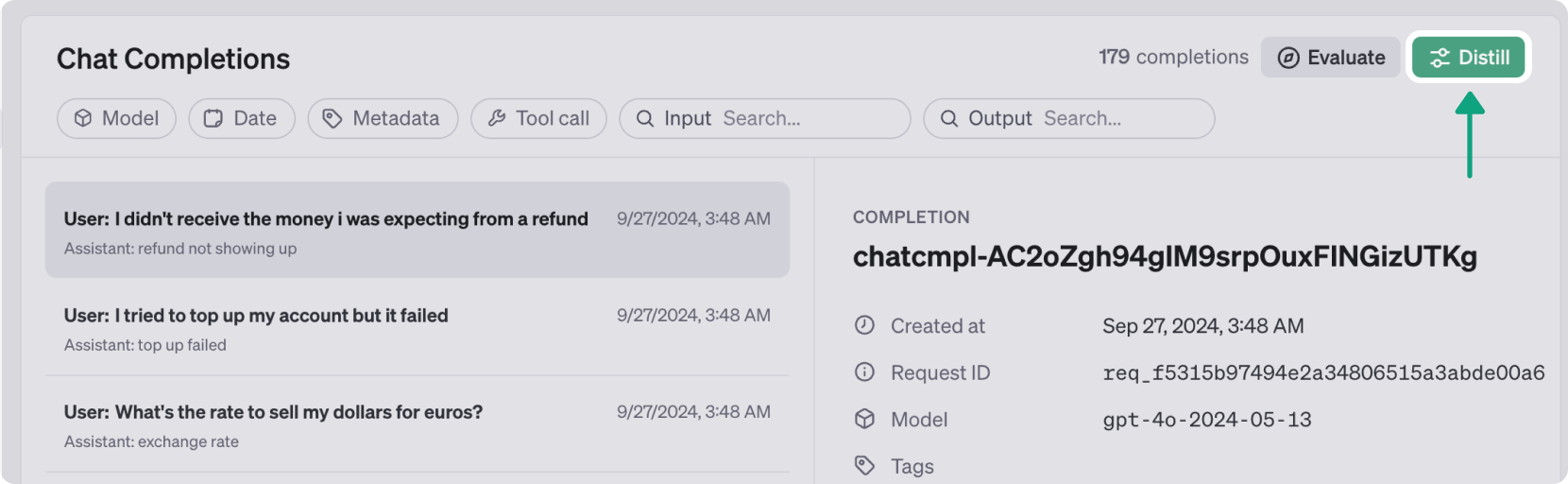
This action will open a dialog to begin a [fine-tuning job](/docs/guides/fine-tuning), with your selected completions as the training dataset. Configure the parameters as needed, choosing the base model you wish to fine-tune. In this example, we're going to choose the [latest snapshot of GPT-4o-mini](/docs/models#gpt-4o-mini).
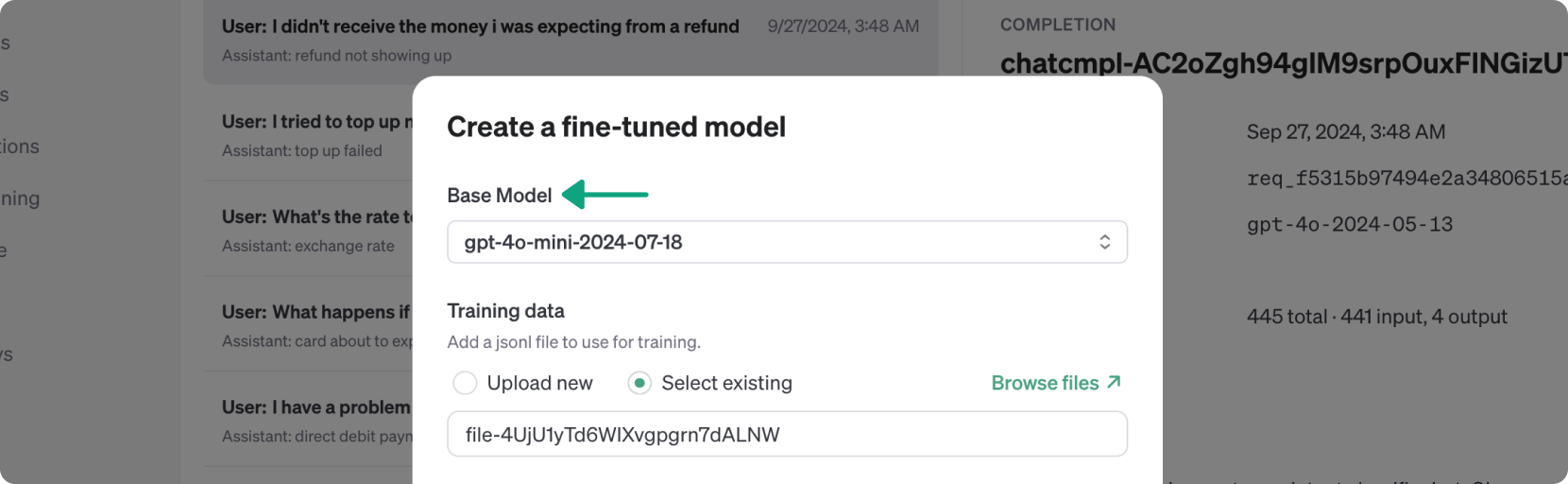
After configuring, click "Run" to start the fine-tuning job. The process may take 15 minutes or longer, depending on the size of your training dataset.
Evaluate the fine-tuned small model
-----------------------------------
When your fine-tuning job is complete, you can run evals against it to see how it stacks up against the base small and large models. You can select fine-tuned models in the [Evals](/evaluations) product to generate new completions with the fine-tuned small model.
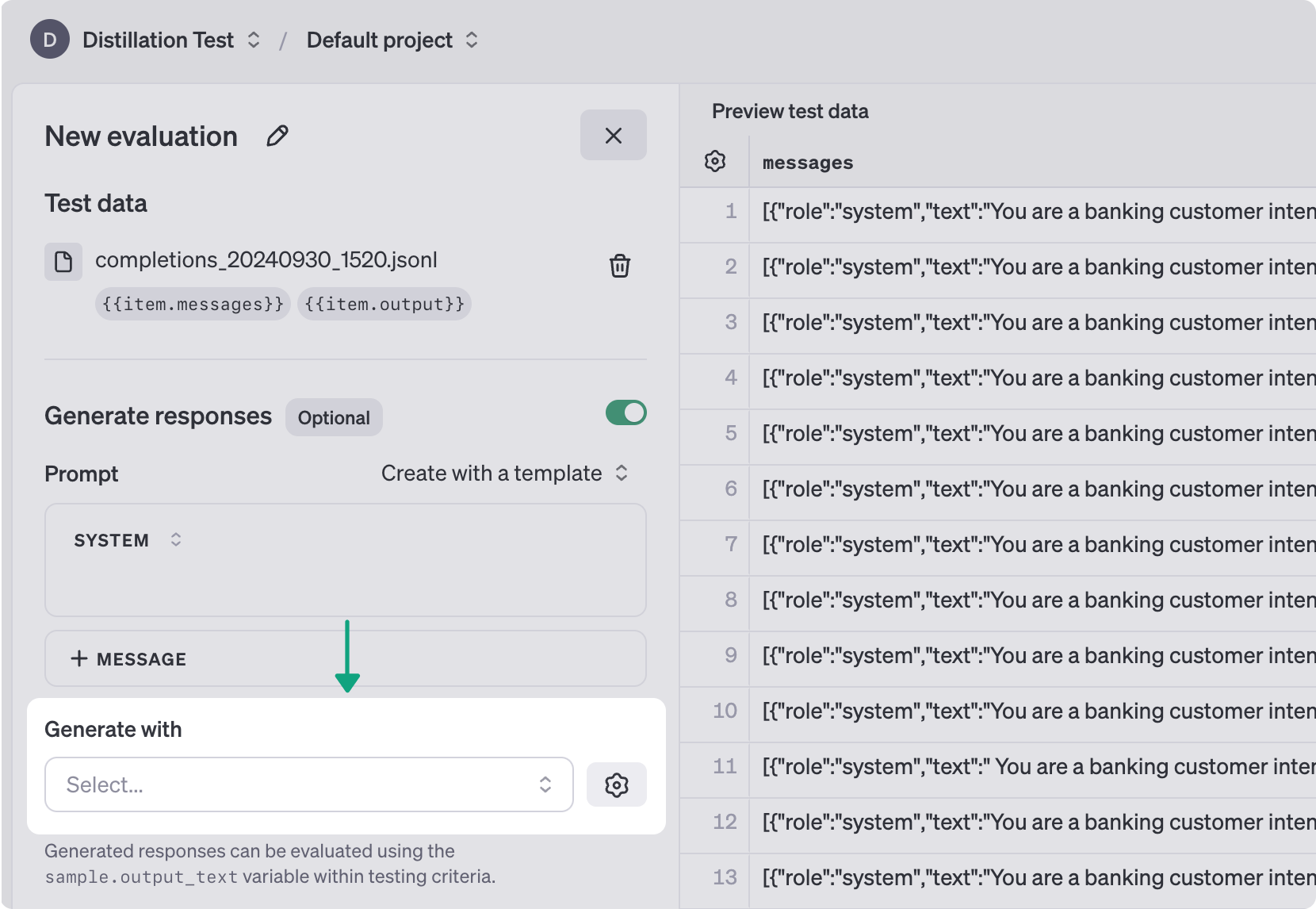
Alternately, you could also store [new Chat Completions](\(/docs/guides/distillation#send-fine-tuned\)) generated by the fine-tuned model, and use them to evaluate performance. By continually tweaking and improving:
* The diversity of the training data
* Your prompts and outputs on the large model
* The accuracy of your eval graders
You can bring the performance of the smaller model up to the same levels as the large model, for a specific subset of tasks.
Next steps
----------
Distilling large model results to a small model is one powerful way to improve the results you generate from your models, but not the only one. Check out these resources to learn more about optimizing your outputs.
[
Fine-tuning
Improve a model's ability to generate responses tailored to your use case.
](/docs/guides/fine-tuning)[
Evals
Run tests on your model outputs to ensure you're getting the right results.
](/docs/guides/evals)
 Sign in with Wallet
Connect another wallet
Sign in with Wallet
Connect another wallet