---
tags: resource
---
# EDST 135 Multimodal Assignment Options Resource
This resource will help you think about how different multimodal forms (e.g., video essays, podcasts, blog) will enable you to communicate your research about education.
All multimodal forms have different "affordances"--different capacities for expression, different ways of addressing and connecting with an audience, different media components, and so forth.
The key is making **an intentional choice** about the media form you'll use, ensuring that it **aligns** with your goals for your project and **the story about education that you want to tell**.
## audio/visual assignments
Audio and visual assignments, like podcasts, short documentary films, and video essays, share certain capacities. Both are well-suited for:
* projects where interviews have been conducted and the first-hand voice/perspective of the interview subject is desirable
* projects where you want to tell a story (about a particular social issue, about your experience coming to explore that issue, etc.)
* projects where some element of personal experience informs the analysis
* projects that seek to take a more academic approach, bringing in many experts on a given topic or integrating many different types of sources to make a well-informed claim (similar to an essay)
* projects where the unfolding of a particular temporal sequence is crucial to the way that story is told (i.e., the argument unfolds in time and is ideally experienced in a sequence determined by the maker)
* projects that are addressed to a public or otherwise broad audience of non-specialists
Each of these forms has unique affordances, too.
## podcasts
Podcasts transform an argument into an oral form and can address a broad audience, especially if they take a more informal, conversational style. The podcast is a unique way to **tell stories** and is frequently superior to other modes at **making these stories intimate, moving, understandable-to-a-lay-audience, and dramatic,** to name only a few characteristics. Podcasts can integrate **a range of sounds** to develop an immersive sonic experience for the listener, leading them through the story by way of different types of sounds (e.g., voiceover, sound effects, ethnographic sounds, music) and different audio qualities.
<iframe width="560" height="315" src="https://www.youtube.com/embed/qrJaonJt1QU?si=jo5UoQDvcNpVV8kg" title="YouTube video player" frameborder="0" allow="accelerometer; autoplay; clipboard-write; encrypted-media; gyroscope; picture-in-picture; web-share" referrerpolicy="strict-origin-when-cross-origin" allowfullscreen></iframe>
#### The Prompt:
1. Just listen to the first 60 seconds of this podcast and reflect on what you are hearing, and what that evokes.
2. Listen again...
3. And again.
4. As you begin to identify the different elements, start mapping them out. How many elements can you hear? How do they interact/intersect? What functional roles are they playing to support the content?
## video essays
<iframe width="560" height="315" src="https://www.youtube.com/embed/_V10kWLh71U?si=-ncholR5CZXqeiGj" title="YouTube video player" frameborder="0" allow="accelerometer; autoplay; clipboard-write; encrypted-media; gyroscope; picture-in-picture; web-share" referrerpolicy="strict-origin-when-cross-origin" allowfullscreen></iframe>
Video essays deploy visuals, audio, and sometimes text in order to make an argument or convey key data to an audience. Like academic essays, video essays advance original claims and incorporate evidence to support those claims.
The Vox "explainer"-style video about a chair featured on multiple album covers exemplifies some of the key moves that video essays can make:
* many, many examples of visual evidence that support the video essay's central claim
* using juxtaposition to establish contrasts and relationships between visuals and the ideas they represent
* adding visual layers, like highlighting, animations, and graphics, that draw your viewer's attention to especially salient features or that give key context to an image (like the name of a musician, in the example below)
* a huge range of visual evidence to set the object of analysis in its context and give a rich accounting of it
* interpretive claims that become arguable by way of strategic use of visuals and the narrator's voiceover
* a score that structures the viewer's emotional experience and that builds as the argument itself builds in complexity
### consider your visual assets
Think about the visual assets--images, photographs, clips, graphics, etc.--that you'll want to source or create for your video. These visuals are the core of your video essay and should be considered in terms of what they'll contribute and in what progression they'll appear. As you select these assets, consider the timing and purpose of each image—what you want the viewer to understand or notice when it appears on screen. Equally important is planning what the viewer will hear as these visuals appear: What will your narration say? What aspects of your topic will these visuals enable you to discuss?
## some tips for your interview projects
News organizations like NPR emphasize "pre-interviewing" as a key component of **preparing for recorded interviews**. It's a way of getting information from the interview subject and acclimating them to the interview format prior to recording.
Some of the techniques to keep in mind when interviewing:
* preparing for the interview:
* choose guests intentionally
* research them in advance
* have a bio and introduce them
* consider why and how will the interviewee connect with the intended audience
* the interview questions:
* avoid ask yes/no questions
* or leading questions ("and so would you say that's what made the class so awesome")---give them freedom
* aim for "how" and "why" questions
* ask for elaboration---it's OK to be confused and to want to know (remember: you are the listener's proxy in the room)
* the interview is a story, think about story-order (rather than order of coolness or importance)
* ask one question at a time
* don't talk over them
* listen actively to their answers (don't just wait for your turn to talk again)
* send the questions in advance if you intend to ask questions that the interviewee should prepare for
* make time for a pre-interview orienting conversation if possible
* find an interviewer you really like and pay attention to their process the next time you listen to one of their interviews.
### Some Interview Prep Resources
From NPR's internal training guides:
* [story structure](https://training.npr.org/2016/03/02/understanding-story-structure-in-4-drawings/)
* [the show editor's checklist](https://training.npr.org/2021/03/04/the-show-editors-interview-checklist/)
* [casting, coaching an interview](https://training.npr.org/2018/03/05/casting-coaching-and-cutting-a-producers-guide-to-unmoderated-conversations/)
Other resources:
* [the art of the pre-interview](https://transom.org/2016/art-pre-interview/)
#### Ira Glass on Storytelling
<iframe width="560" height="315" src="https://www.youtube.com/embed/f6ezU57J8YI?si=UJmDyZ6jmmztCHjK" title="YouTube video player" frameborder="0" allow="accelerometer; autoplay; clipboard-write; encrypted-media; gyroscope; picture-in-picture; web-share" referrerpolicy="strict-origin-when-cross-origin" allowfullscreen></iframe>
## pamphlets and blogs/web-based multimedia essays
Pamphlets and blogs combine written analysis with multimedia elements. They use visuals (photographs, video, etc.), sounds, text, and other media elements to share complex ideas with a public audience. You can also hyperlink your text to lead readers to other articles, datasets, or external studies to give your readers access to additional context.
## Audio Recording Tips
Here are general podcasting tips, including recording and editing, from our [podcasting site](https://sites.google.com/g.harvard.edu/ll-podcasting).
### Microphone placement:
In order to guarantee the highest quality of audio in your recording, it is important to pay attention to the proximity between your microphone and your subject. When recording a group discussion it is important to arrange the participants so that they are equidistant from the recording device, and if possible, try to avoid areas with a lot of background noise (fan, laptop, open window or other groups of people). Choosing a location with a quiet atmosphere can also help to make sure you have a clear capture of everyone’s voice. However, some background noise is okay - you also want to keep the conversation feeling natural and not too staged - as long as you can hear all of the participants in the conversation. Other tips for increasing the quality of an audio recording are to remove your phone from its case, and limiting movement of your phone or other objects around it (for example, papers on a table).
### Test your recording:
You may not be able to monitor your audio while recording, so it is important to test your recording prior to capturing anything that you plan to use later. Wear headphones while listening to playback to ensure the best quality while you are monitoring your test recording. Listen for things like background noise (HVAC, traffic, other people’s conversations) and to make sure that your microphone is picking up your subject at an appropriate level.
### Start early, stop late:
Make sure to begin your recording prior to the start of a discussion, and allow it to run even when the discussion seems to be slowing down or has stopped. It is hard to know exactly which segment of a discussion will stand out as “the best” part, but you can ensure you don’t miss it by capturing everything.
### Name your recording:
Even if you don’t have a lot of audio files stored on your phone, make sure to name your recordings after you have finished. This will help keep files organized throughout the uploading and transcription process, and can help you to make sure nothing gets deleted by accident.
## Video Editing Tutorials
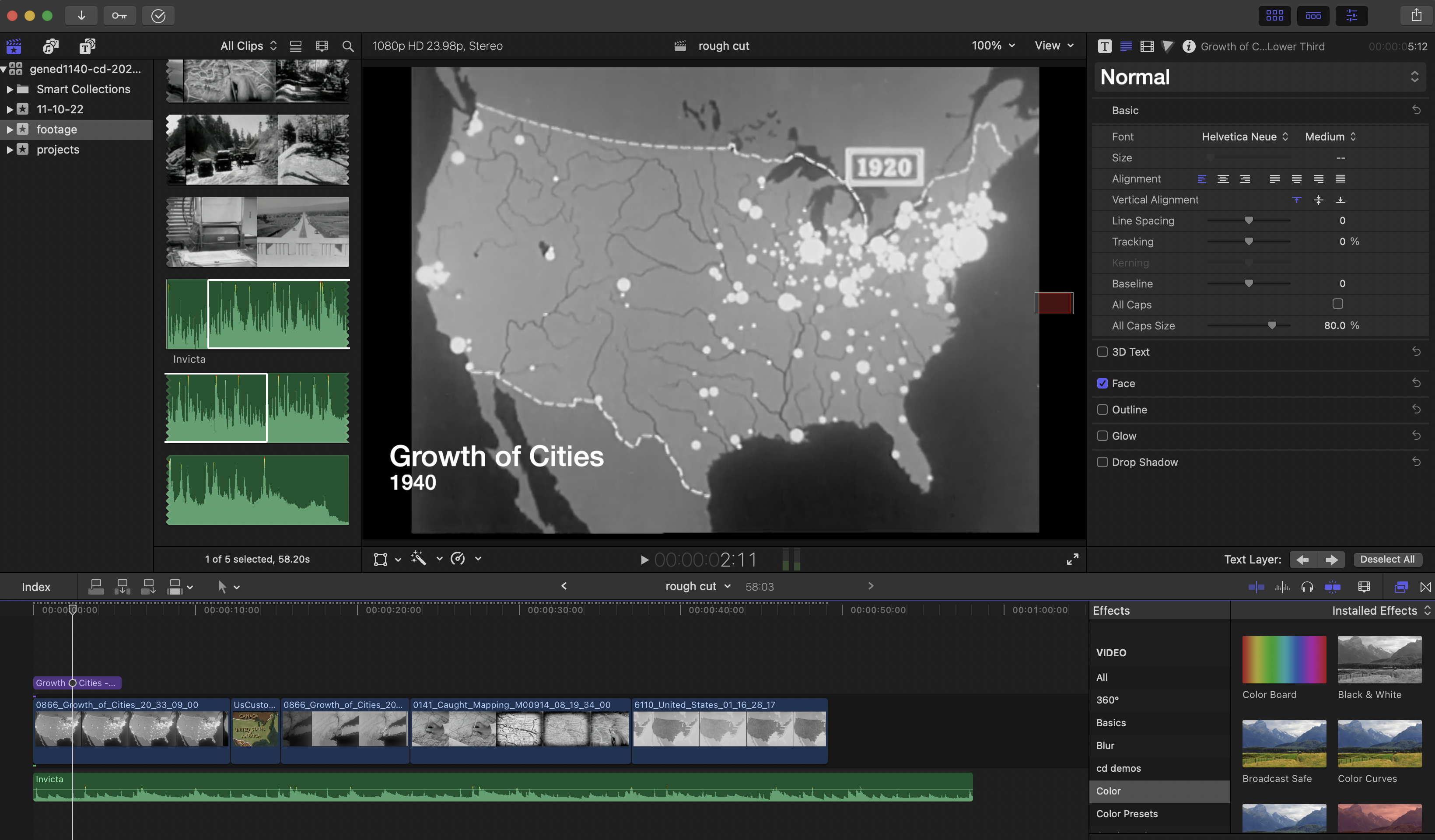
[A Quick Guide to Post Production Resources](https://resources.learninglab.xyz/simple/projects/HDS-FilmFest/post-production)
### For iMovie:
* [Getting Started with iMovie](https://support.apple.com/en-us/HT212059)
### For Davinci Resolve:
* [Getting Started with Davinci Resolve](https://resources.learninglab.xyz/simple/people/casey-c/Resolve-getStarted)
### For Final Cut Pro:
* [Getting Started with Final Cut Pro](https://resources.learninglab.xyz/simple/people/casey-c/FCPX-getStarted)
### For Adobe Premiere:
* [Guide to Adobe Premiere Pro](/s2Pph8GJSZSvUv5ENuXqiQ)
* [Getting Started with Adobe Premiere](https://resources.learninglab.xyz/simple/people/casey-c/Premiere-getStarted)
### Sourcing Video:
* [Prelinger Archives](https://archive.org/details/prelinger)
* [A resource about downloading video clips](http://resources.learninglab.xyz/simple/projects/SOCIOL1142/Found-and-archival-footage)
### Some Recording Tips
* [A resource about recording video with your phone](https://hackmd.io/xD2-fRD1RbigxRQPRUc8PQ?view)
## On Campus Resources
* [Lamont Library](https://library.harvard.edu/libraries/lamont)
* A 24-hour space with post-production software that you can use to edit your multimedia projects
* [Cabot Library](https://library.harvard.edu/libraries/cabot)
* A 24-hour space for student collaboration and study, with studios for media production
 Sign in with Wallet
Connect another wallet
Sign in with Wallet
Connect another wallet