---
tags: resource
---
# Stable Diffusion and ControlNet Resource
## Stable Diffusion and ControlNet: A Quick Overview
Stable Diffusion started as a latent diffusion model that generates AI images from text. It has since expanded out to a series of interconnected tools for creating image-to-image, text-to-video, and even video-to-video. At the moment, video outputs are still highly complex and frequently ineffective, so in this guide, we'll focus on image outputs only.
Stable diffusion works by taking a field of static noise and pulling an image out of the noise. This is why when you generate a number of images, they'll all be fundamentally similar, but end up quite different -- because no field of static is exactly the same as another.
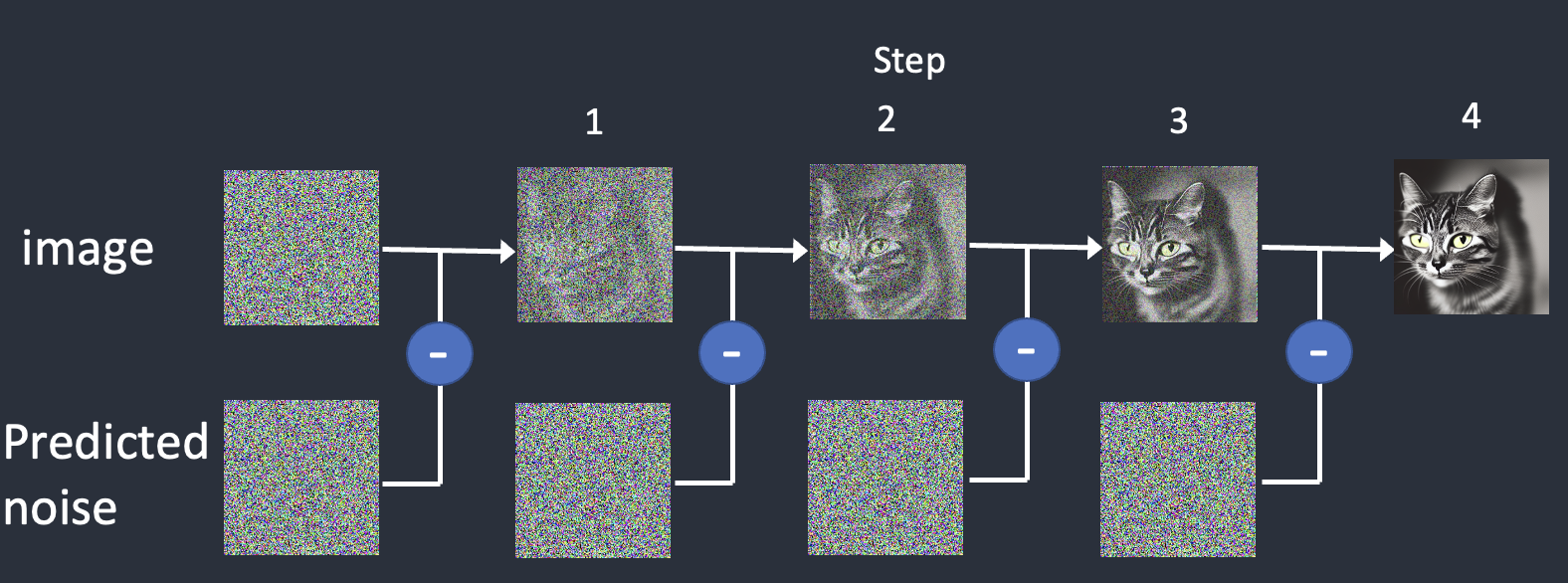
There are two main functions that we want to use, **Image interpretation** and **Image generation**. The interpretation process will use a tool call **Controlnet** and the generation process will be determined by the **Checkpoint Model**.
### [Controlnet](https://stable-diffusion-art.com/controlnet/)
Controlnet functions by taking in an image, interpreting specific elements of that image, and then passing that control information on to the checkpoint model.
<img src="https://stable-diffusion-art.com/wp-content/uploads/2023/02/openpose_overlay_person.png" alt="drawing" width="300"/>
In the case of the OpenPose tool, it interprets human poses and generates new characters in exactly those poses.
With the Segmentation tool, it breaks foreground, middle ground and background into unique sections. So below, you'll find the original image, it's interpretation and its output.
<img src="https://stable-diffusion-art.com/wp-content/uploads/2023/05/jezael-melgoza-KbR06h9dNQw-unsplash.jpg" alt="drawing" width="300"/>
<img src="https://stable-diffusion-art.com/wp-content/uploads/2023/05/image-137.png" alt="drawing" width="300"/>
<img src="https://stable-diffusion-art.com/wp-content/uploads/2023/05/image-141.png)" alt="drawing" width="300"/>
### [Checkpoint Models](https://softwarekeep.com/help-center/best-stable-diffusion-models-to-try)
Your Checkpoint Model will determine the style and occasionally the content of your output. It is important to note that there is no built-in censor on Stable Diffusion, so be careful when prompting, as you may generate unintended images.
## How should I use Stable Diffusion + ControlNet?
While the setup of Stable Diffusion and ControlNet can be changed to better suit your needs, you also need to take something into consideration: your computer.
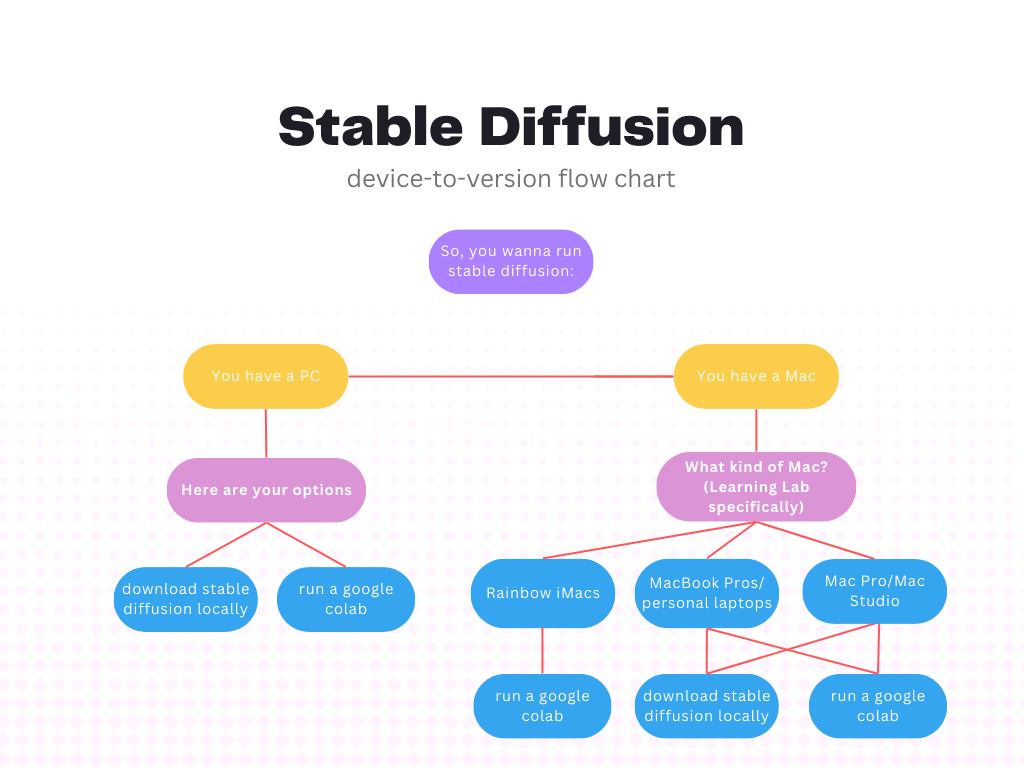
Depending on the model of your computer, we suggest two different approaches for downloading and using Stable Diffusion. Downloading Stable Diffusion locally is a lengthy but rewarding process that ultimate gives you the most control over your creations. However, it is more complex, requires more computing power (especially GPUs and CPUs), and takes up a large chunk of local storage (a full Stable Diffusion webui with a range of controlnet models and checkpoint models can exceed 40GB).
Running Stable Diffusion from a google colab is much easier, but requires being logged into a google account with Colab Pro. However, this may be your only choice if your computer doesn't have the computer power to run models and render images.
The flowchart below can help you visualize this.
### We have built resources for the following methods:
* [Local Stable Diffusion for Mac](/zBj0s6EpR42mSkP8mtvEWA)
* [Colab Stable Diffusion](https://hackmd.io/x_i8LJrYRsGDqnTf9GOS2g?view)
 Sign in via Google
 Sign in via Facebook
 Sign in via X(Twitter)
 Sign in via GitHub
 Sign in via Dropbox
 Sign in with Wallet
Connect another wallet
Sign in with Wallet
Connect another wallet