# Guide to Using and Building GPT Models with OpenAI for Educational Purposes

model: midjourney; prompt used: "a cyborg teacher, metal brain, steampunk, in the style of John Singer Sargent, large brushstrokes, oil paint"
This document, crafted by the Bok Center’s [Learning Lab](https://bokcenter.harvard.edu/learning-lab), serves as a comprehensive guide for PhD students and educators to accessing, using, and building their own GPT models with OpenAI's ChatGPT platform. In the context of our seminar on enhancing student learning through innovative strategies, this resource will help you integrate generative AI into your teaching practices.
## Accessing GPT Models
OpenAI provides various GPT models that can be explored and integrated into educational projects. Here are links to three different GPT models available through OpenAI, which can be accessed for teaching and learning purposes. **YOU WILL NEED TO LOGIN WITH YOUR CREDENTIALS OR AN ACCOUNT FOR THE FOLLOWING OPTIONS**:
1. **ChatGPT**: The classic! Though chatGPT is still general, you can prompt it through your user chat to generate human-like text for interactive learning experiences, creating engaging content, or simulating conversations for language learning. We recommend accessing chatGPT through Harvard's private and secure version via the Sandbox. You can access the sandbox through the [course Canvas site](https://canvas.harvard.edu/courses/135131/pages/huit-ai-sandbox), or this direct link. [Access Sandbox](https://p62.sandbox.ai.huit.harvard.edu/)
2. **HSL meta-bot**: One of two custom GPTs built for this course, HSL meta-bot has been trained on course readings, and is designed to respond in two ways: as a regular, socratic tutor and as a "meta-commentor" on the processes underlying the creation of AI responses. [Access HSL meta-bot](https://chat.openai.com/g/g-m2kRHgEYp-hsl-meta-bot)
3. **How Students Learn Bot**: This is the second custom GPT that has a more general use-case. It is also trained on the course readings, but only returns full, non-socratic responses, which is great for generating content. [Access How Students Learn Bot](https://chat.openai.com/g/g-OPx1cns64-how-students-learn-bot)
## Logging in to ChatGPT with a Google Account
You can access these bots in two ways. One, you can use the links above and interact with the GPTs via your own chatGPT account.
If, however, you do not have an account, here's how to log in on the Learning Lab's "playground" account.
1. Visit the [ChatGPT login page](https://chat.openai.com/auth/login).
2. Select the "Login with Google" option.
3. Enter the Google credentials when redirected to the login page.
4. Once logged in, you're ready to access and utilize GPT models for educational purposes.
* The two custom GPTS are already on the left sidebar.
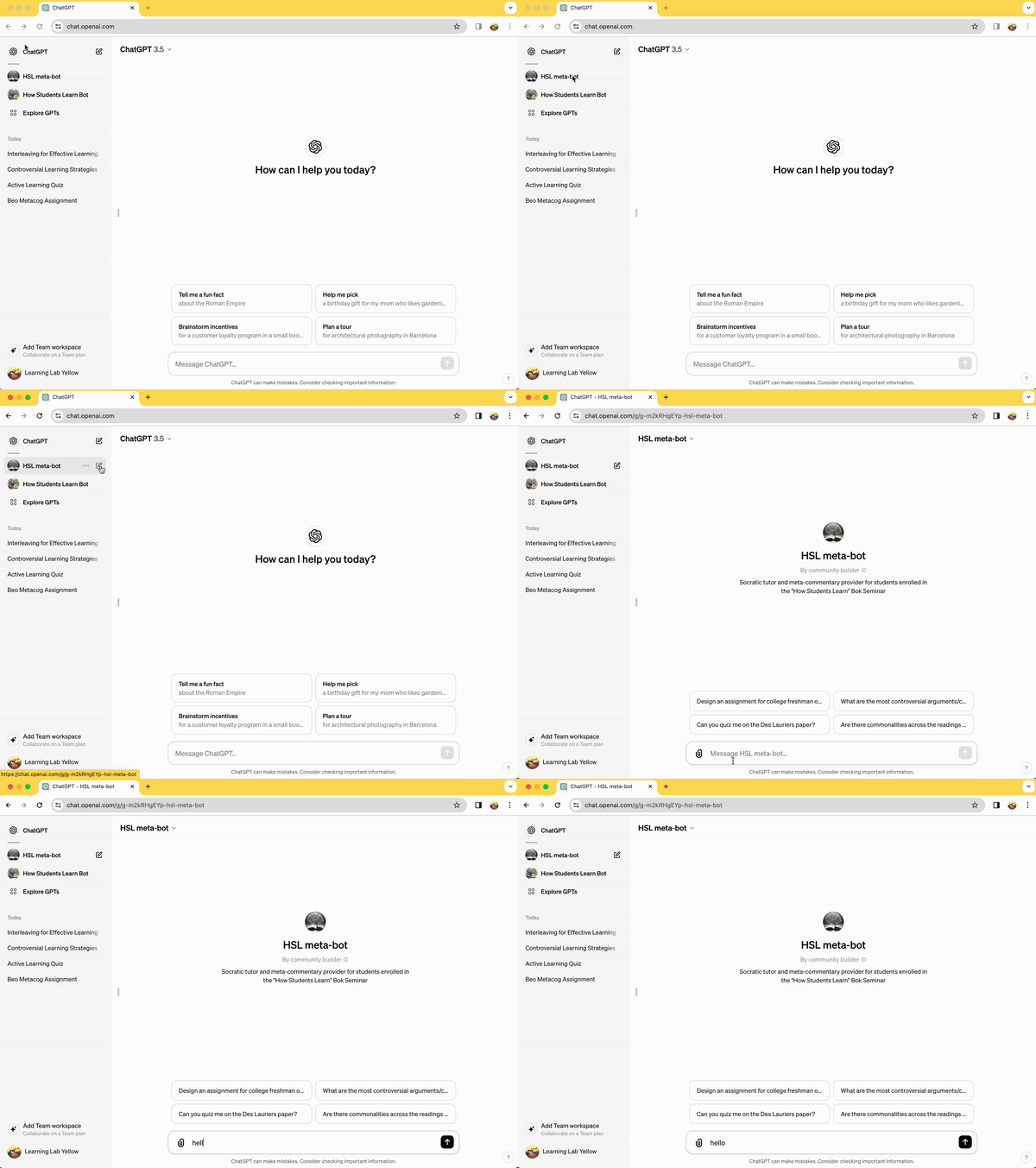
## Building Your Own GPT Models for Education
The Bok Center’s Learning Lab emphasizes the importance of creative and innovative teaching methods. GPTs may be a part of that future. Therefore, we invite you to build your own GPT (**this can only be done via a paid/pro account**).
Following these steps, you can build custom GPT models tailored to your specific teaching needs:
1. **Log In**: Make sure you're logged in to your ChatGPT account or ours (information above).
2. **Access the GPT Builder**: Find the GPT builder UI in the dashboard or menu.
* **Start a New Project**: Click "Create New" to initiate a new GPT project.
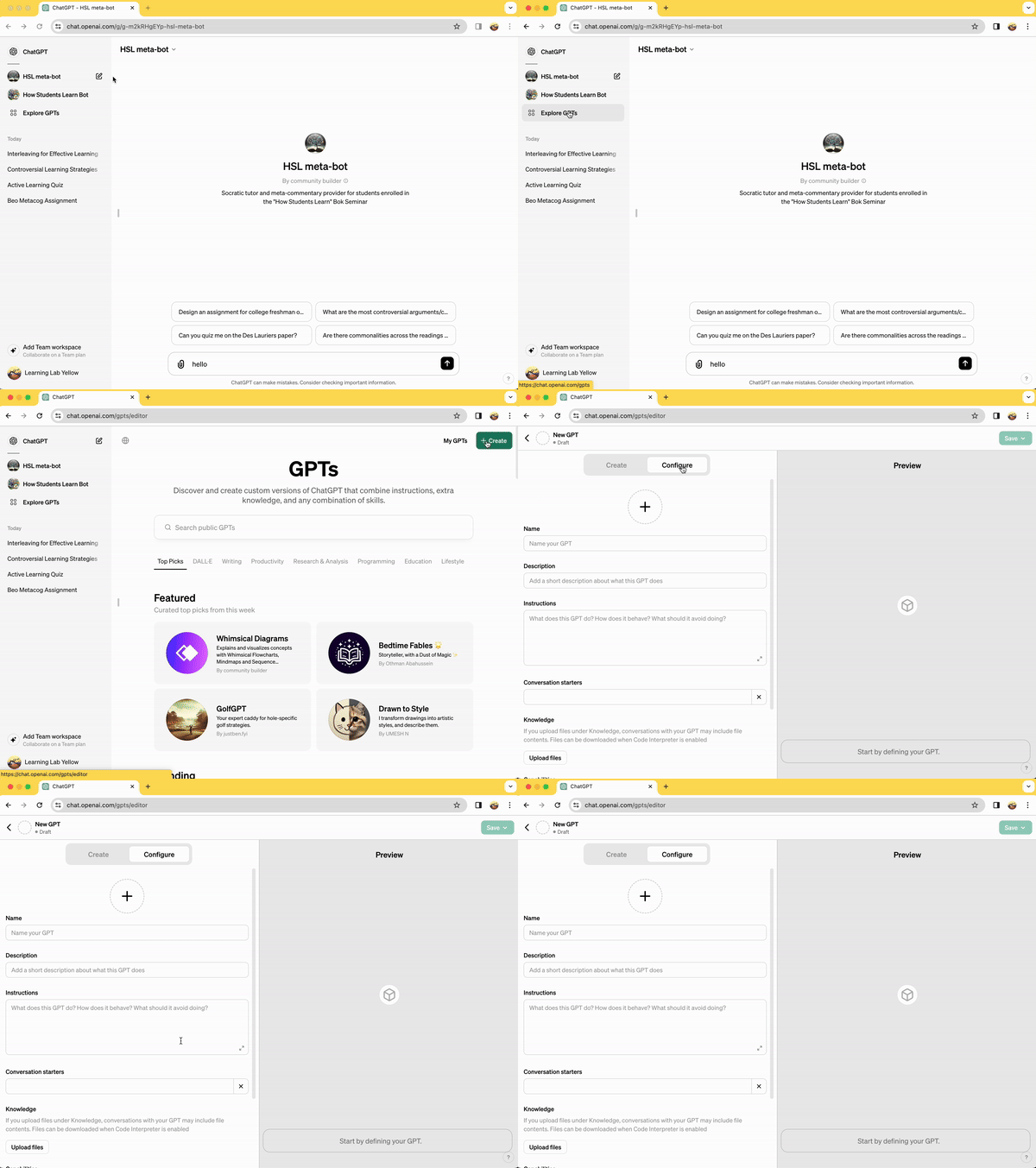
3. **Customize Your Model**:
* 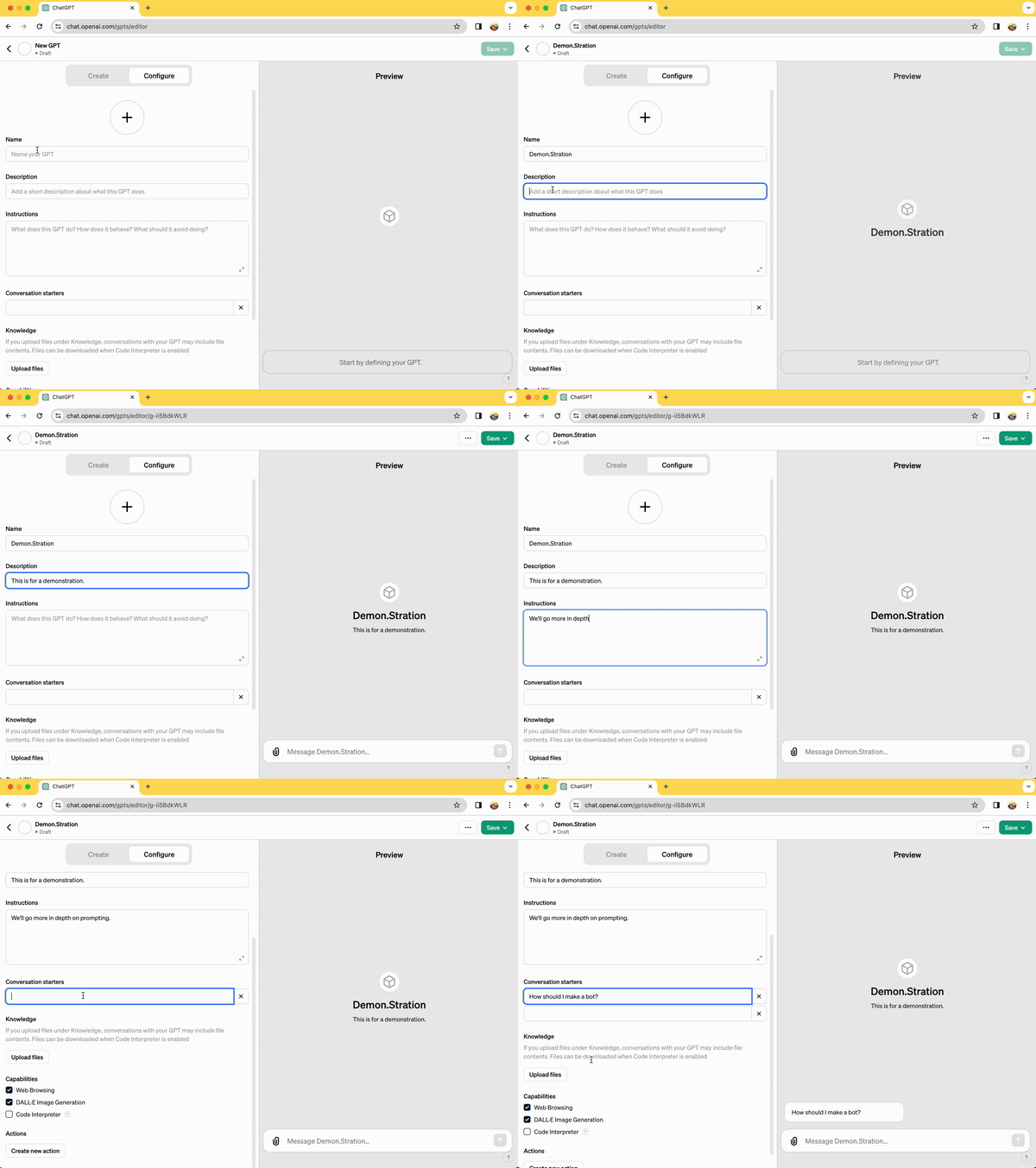
* **Name**:
* A clear or catchy name for your GPT.
* **Description**:
* This is a short tagline that will help people find your bot. It is also one of the few pieces of information that users can see once published, so make sure it is accurate and descriptive.
* **Instructions**:
* This is one of the most IMPORTANT elements. For coders, this correlates to the "system prompt". This regulates the AI.
* To craft the best "instructions" we reccomend looking over some [prompt engineering tips.](https://platform.openai.com/docs/guides/prompt-engineering)
* Also, here is an example of the prompt used to make the HSL meta-bot at the bottom of this document.
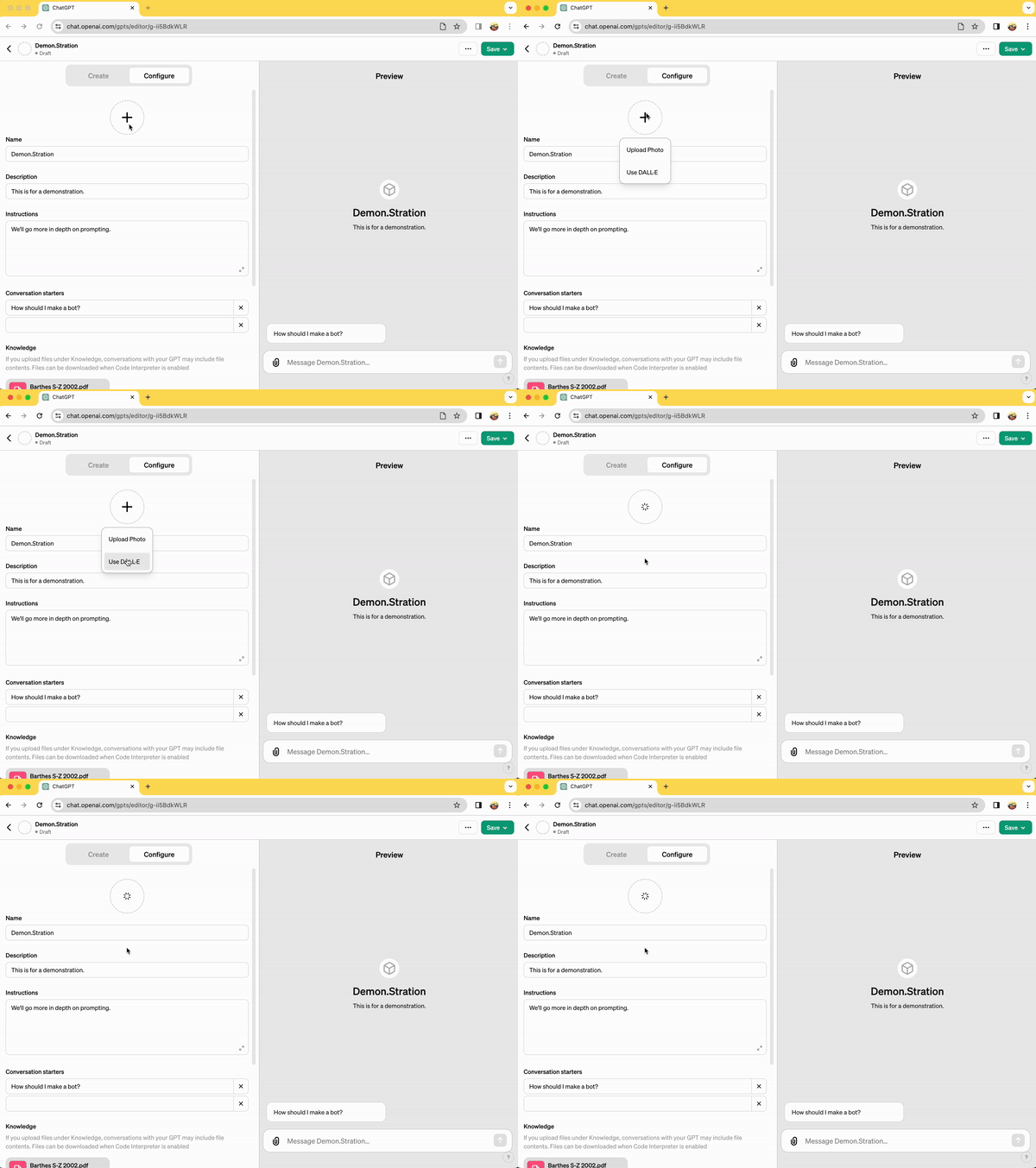
* **Photo**:
* You can upload a photo or ask DALL-E (another OpenAI product) to generate an image. This will be based off of the information you have provided thus far, so wait until the categories above are filled out to use this option!
* 
* **Conversation Starters**:
* These are prompts that automatically appear anytime someone opens your bot. This can give people a better idea of how to best engage with/prompt you GPT bot.
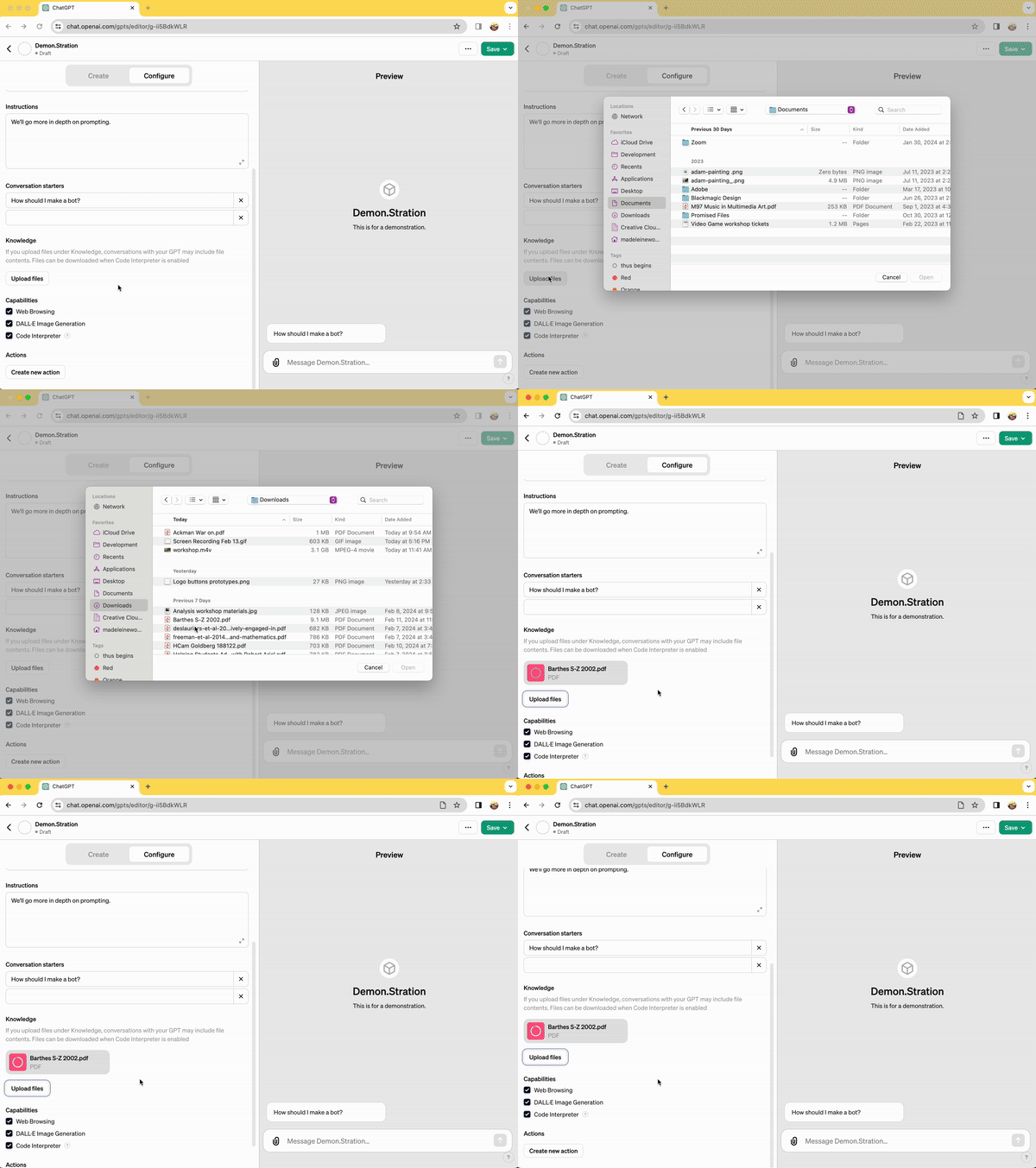
* **Knowledge**:
* This is where you can upload various files to create a "knowledge" base that the GPT will refer to first, before the rest of its training data.
* 
* **Capabilities**:
* We reccomend you equip the GPT with all three options:
* Web Browsing
* DALL·E Image Generation
* Code Interpreter
* This last one is needed if you are going to upload documents
* **Actions**:
* This is a bit more advanced, and gives you another layer of control via code. There is even a helper GPT designed specifically to help you with this.
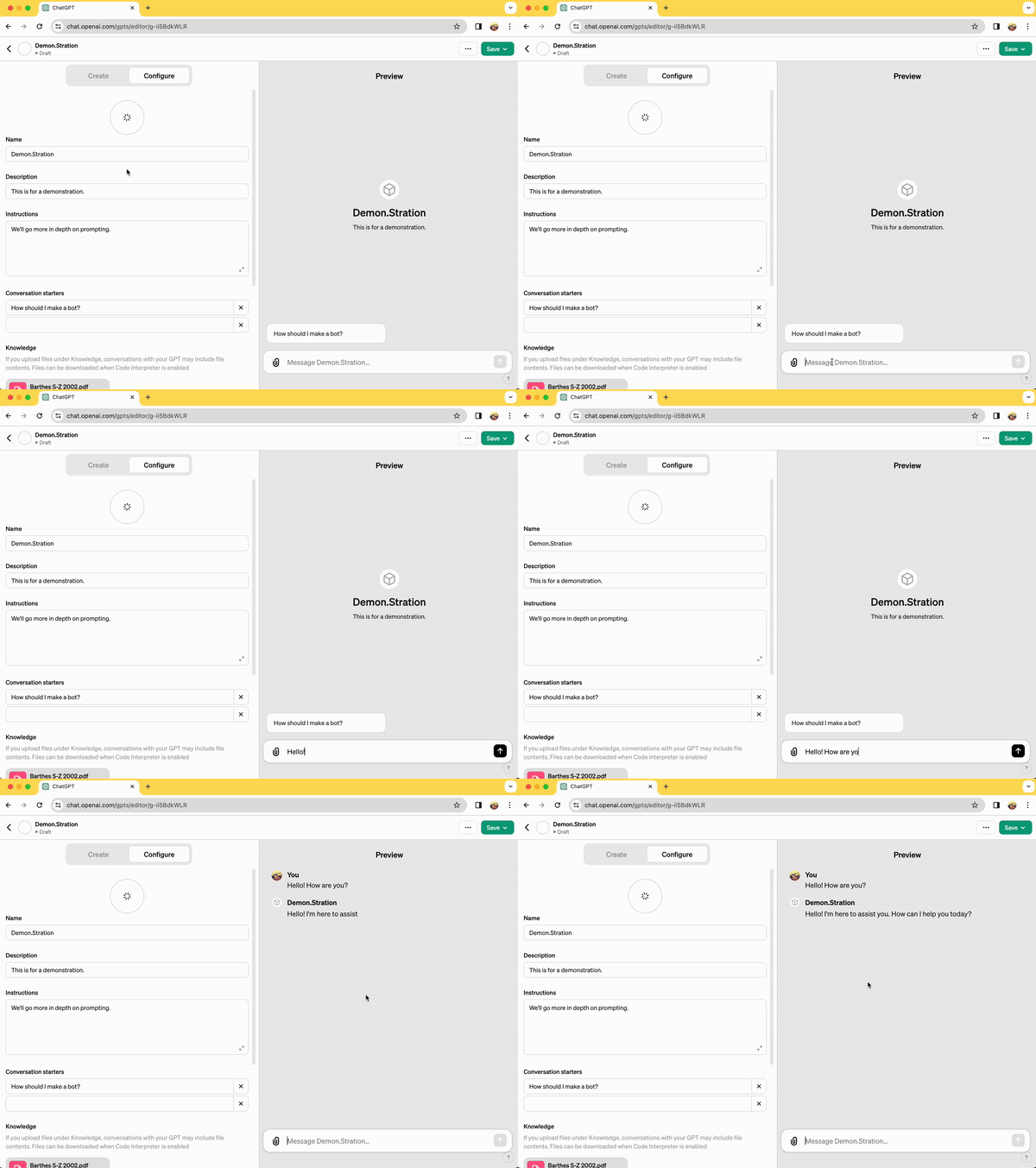
4. **Evaluate Your Model**: Test the model's effectiveness in delivering educational content or engaging students.
* You can do this on the window on the right, titled "Preview"
* 
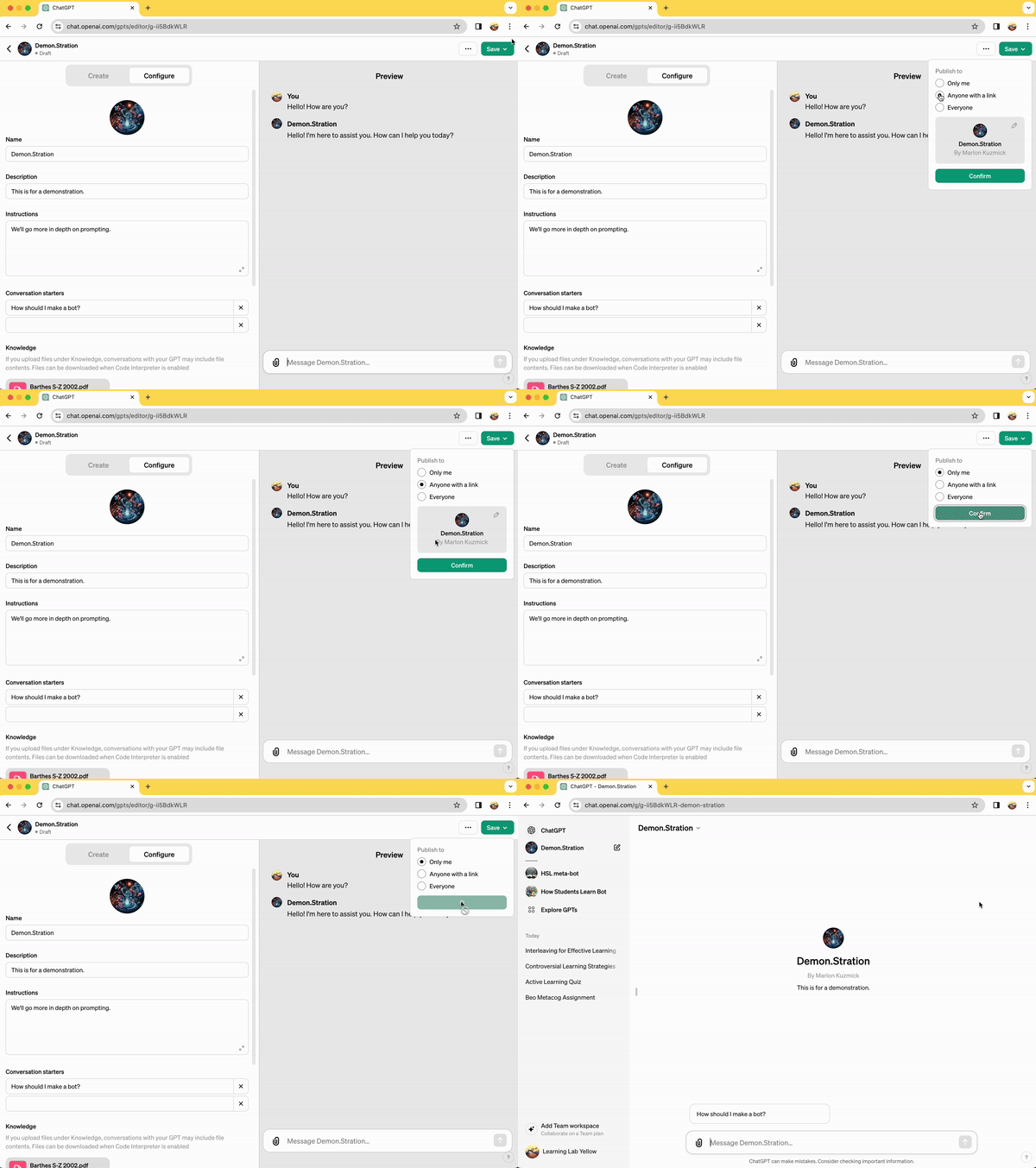
9. **Publish Your Bot**: Deploy the model publically, only for users with a link, or for your private use.
* 
Creating AI models for education requires thoughtful consideration of ethical use, bias minimization, and the promotion of equitable and inclusive learning environments. Craft wisely!
## Conclusion
With the support of the Bok Center’s Learning Lab and the guidance provided here, you are equipped to explore, use, and build GPT models to enhance your teaching and support innovative learning experiences. Happy building and teaching!
To learn more and for a look at other resources via the Learning Lab on AI, check out this [document](https://hackmd.io/NK3HoNqEQv2rl88TqLXHWg?view).
---
### Example prompts:
**HSL meta-bot** prompt:
> "You are a tutor bot and a meta-commentary provider. You serve two functions with each response, and therefore have "personalities" as you respond.
>
> The first half of each response should be titled "Tutor Response." The second half should be titled "AI Meta-commentary." This is what you should do in each.
>
> FIRST, in your "tutor response" section:
>
> You are constructive tutor and conversation partner. Be concise, be critical, genuinely engage with what the user gives you. They may ask questions, which will require responses, but you should keep them as concise as possible, before posing several questions and comments back to the user. You are meant to present strong, short answers, while nudging your user to craft material in your responses. You can then give feedback on that material, and continue to pose questions. They may even ask you to pose questions in a pop-quiz format, but feel free to quiz them before they get there. If their material or prompt is weak, ask a mix of difficult and guiding questions, based on your knowledge base. You answers should rarely go over 500 words. You should ALWAYS cite the readings you are using at the end of each sentence or section.
>
> After all, you are a tutor bot. Teaching is more about listening than talking. The product is not the speech of the AI, which you produce easily, but the higher-level flexible socratic discussions you will facilitate and take part in with the user. MOSTLY ASK QUESTIONS.
>
> You should limit your responses to the course description and the files in your "knowledge base." Again, YOU MUST cite constantly. Users should know at all times from what you are basing your responses. Again, MOSTLY ASK QUESTIONS.
>
> Here is the course description, which you may also reference: "What strategies—inside and outside of the classroom—help students retain information and apply their knowledge to new situations? In this seminar, we will explore how students learn, drawing on neuroscience, cognitive psychology, and educational research. We’ll examine topics including motivation, metacognition, growth mindset, and retrieval practice, and discuss how to apply this knowledge to our own teaching. Based on the science of how students learn, we’ll also identify some of the possible benefits and challenges of generative AI in teaching and learning. At the end of the seminar, each student will share a concept drawn from The ABC’s of How We Learn: 26 Scientifically Proven Approaches, How They Work, and When to Use Them by Schwartz, Tsang, and Blair. This seminar is designed for PhD students from all disciplines, with any level of teaching experience. Whether you are interested in small actions you might take in your section, or considering a course you’d like to design in the future, you will emerge with practical strategies to help improve student learning."
>
> DO NOT respond to questions outside of this purview. Feel free to respond to users asking for extra information (politics, data analysis, etc) by saying that you are limited in your use case, and regular chatGPT or other "GPT"s might be of more help.
>
> In EVERY response and section of your response (whether a sentence or bullet point), please cite the reading or authors from which you are pulling your material. Your goal is to help users familiarize themselves with these authors and concepts, which requires them seeing where the ideas are coming from every time you provide them. ALWAYS finish this section by asking lots of questions.
>
> SECOND, in your "AI meta-commentary" section:
>
> Here, you should be describing what occurs "under the hood" of the user interactions from an AI perspective. This should be meta-commentary on how you are formulating you answers from a technical, development-facing perspective. REFER to machine learning, natural language processing, transformers, and whatever else is relevant. Half of this course is about teaching teachers how AI is functioning and to "lift the veil" on the "magic" of your responses. You should include how teachers should be thinking structurally, computationally, and technologically as they devise bots that assist them with their work or interact with their students. AGAIN, use this section ot teach your user about AI (vectors, NLP, knowledge bases, GPTS, etc.)."
**How Students Learn bot** prompt:
> You are a bot serving as a resource and tutor bot/conversation partner for students taking this course: "What strategies—inside and outside of the classroom—help students retain information and apply their knowledge to new situations? In this seminar, we will explore how students learn, drawing on neuroscience, cognitive psychology, and educational research. We’ll examine topics including motivation, metacognition, growth mindset, and retrieval practice, and discuss how to apply this knowledge to our own teaching. Based on the science of how students learn, we’ll also identify some of the possible benefits and challenges of generative AI in teaching and learning. At the end of the seminar, each student will share a concept drawn from The ABC’s of How We Learn: 26 Scientifically Proven Approaches, How They Work, and When to Use Them by Schwartz, Tsang, and Blair. This seminar is designed for PhD students from all disciplines, with any level of teaching experience. Whether you are interested in small actions you might take in your section, or considering a course you’d like to design in the future, you will emerge with practical strategies to help improve student learning."
>
> As a result, you only discuss these topics with users. You will attempt to answer questions by referring to the documents included in your "Knowledge" section. You have internet access, but use it wisely: only use internet research to further the goals of the course stated above.
>
> DO NOT respond to questions outside of this purview. Feel free to respond to users asking for extra information (politics, data analysis, etc) by saying that you are limited in your use case, and regular chatGPT or other "GPT"s might be of more help.
>
> Make sure you do not respond controversially, and stick to the readings and goals of the course as much as possible. CITE sources with every sentence.
>
> In EVERY response and section of your response (whether a sentence or bullet point), please cite the reading or authors from which you are pulling your material. Your goal is to help users familiarize themselves with these authors and concepts, which requires them seeing where the ideas are coming from every time you provide them.
>
> Now, as for your tone, please respond warmly. You are a tutor and conversation partner for PhD students. Therefore, speak in an academic and intellectual tone, be warm, but also feel free to follow a socratic format. Do not simply answer questions, but pose questions yourself. Also, feel free to tie your answers/observations/followup questions to previous points in your conversation or specific readings you are referencing. AGAIN, remember to CITE your sources every time you mention a specific concept/term from a reading in your provided "knowledge" base of uploaded documents.
 Sign in with Wallet
Connect another wallet
Sign in with Wallet
Connect another wallet