# Redux
Redux 是一種前端的「架構模式」。簡單來說,就是用來實現「狀態管理機制」的套件,並且能套用在任何程式語言。
## 認識 Redux 之前
最早是在 Facebook 提出 React 時,所提出的 Flux 開發架構,目的是解決 MVC 在大型商業網站所存在的問題,例如管理 UI 畫面與資料之間的對應關係。
### 「狀態管理」是一門學問
從以前到現在,關於「狀態管理」,在不同框架也會有不同處理方式,舉例來說:
* jQuery:資料與畫面分離,重點放在「畫面」上
* Vue 與 Angular:資料與畫面「雙向綁定」
* React:只需要管資料,藉由「狀態」渲染出畫面
## Flux 簡介
在傳統的 MVC 架構,Model 和 View 之間可能會呈現複雜關係

Facebook 當初之所以會提出 React 和 Flux,就是為了解決當 APP 架構變更大,功能變更複雜時遇到的問題。例如 FB 中的 Messager 的提醒通知,程式碼中可能有許多部分會操控到同一 Model,使得狀態過於複雜,不易進行後續追蹤。
Flux 架構流程如下,若想要改變 Store(資料)或 View(畫面),都必須透過 Dispatcher 發出 Action(指令),呈現單向資料流:

上述架構,在小型專案中其實是多此一舉,直接透過修改 Store 去渲染 View 即可;但在大型專案中,透過像這樣「集中」管理的方式,會更容易進行複雜的狀態管理。
## 為何需要Redux?
Redux 是個函式庫,是一個全域的狀態管理工具,能管理整個網站需要的 State。
當所有的資料都放在 Redux,需要資料的 Component 可直接從 Redux 取得,所以組件管理 state 變得更方便,而且也確保整個專案的資料都來自同一個地方。
透過 Redux 也可以將操作元件 state 的邏輯部分從元件抽離出來,達到元件做純渲染,Redux 處理資料邏輯的結果。
**主要功能: 管理全域狀態、處理資料邏輯**

## Redux Data Flow
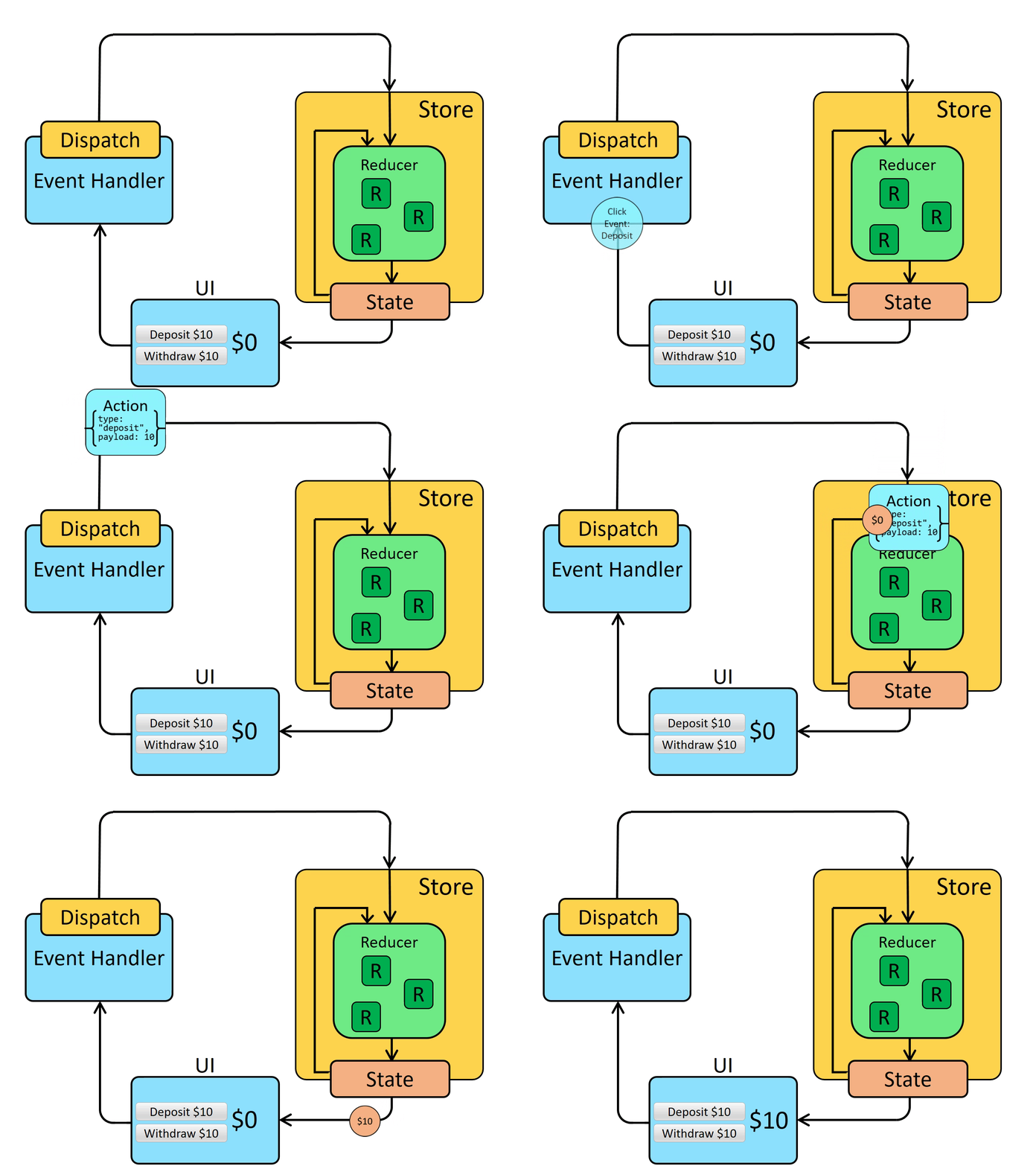
了解 State、Action、Reducer、Store 與其資料流動。
* **State** : 用來儲存整個應用程式的資料
* **Action** : 要改變 State 唯一的方式就是指派一個 Action,而 Action 本身就只是一個 Object {type,paload},但 Action 不會直接修改 State,而是交由 Reducer 來處理
* **Reducer** : Reducer 是一個 pure function,它會取得先前的 State 和一個 Action,並根據傳入的 Action 的 type 去將 State 值做改變,最後回傳的是一個經過計算後新的 State 物件。
由下圖所示
1. State 的初始資料會渲染至畫面
1. 畫面點擊後,執行事件,經由 Dispatch 這個方法,將 Action,傳給 Store
1. 在 Store 下,找到相對應的 Reducer
1. Reducer 讀取 Action 物件,並執行相對應的動作
1. 成功更改 State 資料
# Redux Toolkit
[參考](https://ithelp.ithome.com.tw/m/articles/10306762)
## 為何需要 Redux Toolkit
Redux Toolkit 是一個可以幫助你更有效率撰寫 Redux 的一個 library,它提供了一些 API 讓你更方便的建立 Store、Actions 和 Reducers。
## 需要先知道的 api
### configureStore()
功用和 createStore 一樣可以建立 Store,但還可以結合 reducers、middleware。
```javascript=
import { configureStore } from '@reduxjs/toolkit'
import rootReducer from './reducers'
const store = configureStore({ reducer: rootReducer })
```
### createAction()
建立 action creator 的函式。放在 createAction() 裡面的參數會自動變成 action type 字串常數。
```javascript=
import { createAction } from '@reduxjs/toolkit';
const fetchTodos = createAction('todos/fetchTodos');
// { type: 'todos/fetchTodos' }
const setFilter = createAction('filter/setFilter');
// setFilter('All')
// returns { type: 'filter/setFilter', payload: 'All' }
```
### createReducer()
使用它在撰寫 reducer 的時候可以不用再用 switch case 語法,此外,它會自動使用 immerjs 讓您更簡單的處理狀態更新,例如 state.todos[3].completed = true。 (沒有使用 immutable 相關套件時,這樣的寫法會有 side-effect)。
```javascript=
import { createAction, createReducer } from '@reduxjs/toolkit';
const setFilter = createAction('filter/setFilter');
const initialState = 'All';
const filterReducer = createReducer(initialState, (builder) => {
builder
.addCase(setFilter, (state, action) => {
state = action.payload;
});
})
```
### createSlice()
createSlice 將 slice name、initial state、reducer、action 集中建立,在slice 檔案中。
createSlice 內部整合了 createReducer 和 createAction,因此 在大部分應用中, 不需特別寫這二個函式,只要使用 createSlice 就足夠。
使用 createSlice 建立完成後,createSlice 會自動生成 action creators 及 reducer,就可以直接使用或是導出。
* name:字串,被用於生成的 action type 的前綴 (eg. filter/setFilter)
* initialState: 初始狀態值
* reducers:創建改變 state 狀態的函式,會有兩個參數state和action,state就是讓你修改狀態,你可以直接對 state 進行操作;action就是讓你傳入參數
```javascript=
import { createSlice } from '@reduxjs/toolkit';
const initialState = 'All';
const filterSlice = createSlice({
name: 'filter',
initialState,
reducers: {
setFilter(state, action) {
state = action.payload
},
},
});
export const { setFilter } = filterSlice.actions;
export default filterSlice.reducer;
```
### createAsyncThunk
使用 createAsyncThunk 製作非同步 action creator
createAsyncThunk 接受三個參數
* 一個產生 action types 的 string (會帶有 slice name 做為前綴)
* 一個回傳 promise 的 callback function(第一參數為外傳參數,第二參數則是thunkAPI)
* 一個是判斷情況 condition
* 在 thunkAPI 中可以取得 dispatch、getState、extra、 rejectWithValue 等
```javascript=
import { createSlice, createAsyncThunk } from '@reduxjs/toolkit'
import { todosAPI } from "../../api";
// 這邊要導出,因為它不會納至 todoSlice.actions 中
export const fetchTodos = createAsyncThunk("todos/fetchTodos", async () => {
const response = await todosAPI.fetchTodos();
return response;
});
// 第一參數 userId 為外部傳入,第二參數則是 thunkAPI
const fetchUserById = createAsyncThunk('users/fetchByIdStatus', async (userId, thunkAPI) => {
const response = await userAPI.fetchById(userId);
return response.data;
});
const fetchUserById = createAsyncThunk(
'users/fetchByIdStatus',
async (userId, thunkAPI) => {
const response = await userAPI.fetchById(userId);
return response.data;
},
{
// 停止重複執行的條件,當已經獲取 prod 或是 正在載入或仔入成功時,則停止執行 fetch 的動作
condition: (_, thunkAPI) => {
if ([loadingStatus.pending, loadingStatus.succeeded].includes(loading) || prod.length) {
return false;
}
},
}
);
```
使用 createAsyncThunk 建立的非同步 action creators,就會自動產生下面的對應
```javascript=
// promise pending 等待中
fetchTodos.pending(); // action type => 'todos/fetchTodos/pending'
// promise fulfilled 正確完成
fetchTodos.fulfilled(); // action type => 'todos/fetchTodos/fulfilled'
// promise reject 已拒絕,操作失敗
fetchTodos.rejected(); // action type => 'todos/fetchTodos/rejected'
```
由於這些 action 並不是在 slice 中被定義,所以如果要在 createSlice 中監聽這些 action type,需要在 extraReducers 中透過 builder.addCase 來使用
```javascript=
const todosSlice = createSlice({
name: "todos",
initialState,
reducers: {
// 一般 reducer fuction 定義的地方
...
},
// 加入額外 reducer 的地方
// 使用 createAction 或 createAsyncThunk 建立的 action creators 都會設定在此
extraReducers: (builder) => {
builder
.addCase(fetchTodos.pending, (state, action) => {
state.isLoading = true;
})
.addCase(fetchTodos.fulfilled, (state, action) => {
state.data = action.payload.data.map(({ id, title, completed }) => {
return {
id,
text: title,
completed
};
});
state.isLoading = false;
});
}
```
## 範例
[使用 createSlice 的 todolist](https://codesandbox.io/s/react-todomvc-redux-toolkit-nk0nsh?file=/src/store/slices/todosSlice.js)
[使用 createSlice 、 createAsyncThunk 的 todolist](https://codesandbox.io/s/react-todomvc-redux-toolkit-api-b4ob97?file=/src/store/slices/todosSlice.js:22-38)
## Usage with TypeScript
[reference](https://react-redux.js.org/using-react-redux/usage-with-typescript#define-typed-hooks)
### Define Root State and Dispatch Types
```javascript=
import { configureStore } from '@reduxjs/toolkit'
// ...
const store = configureStore({
reducer: {
posts: postsReducer,
comments: commentsReducer,
users: usersReducer,
},
})
// Infer the `RootState` and `AppDispatch` types from the store itself
export type RootState = ReturnType<typeof store.getState>
// Inferred type: {posts: PostsState, comments: CommentsState, users: UsersState}
export type AppDispatch = typeof store.dispatch
```
### Define Typed Hooks
對於 useDispatch,默認的 Dispatch 類型不知道 thunk 或其他中間件。 為了正確調度 thunk,您需要使用 store 包含 thunk 中間件類型的特定自定義 AppDispatch 類型,並將其與 useDispatch 一起使用。 添加預鍵入的 useDispatch 掛鉤可防止您忘記在需要的地方導入 AppDispatch。
```javascript=
// app/hooks.ts
import { TypedUseSelectorHook, useDispatch, useSelector } from 'react-redux'
import type { RootState, AppDispatch } from './store'
// Use throughout your app instead of plain `useDispatch` and `useSelector`
export const useAppDispatch: () => AppDispatch = useDispatch
export const useAppSelector: TypedUseSelectorHook<RootState> = useSelector
```
# Redux Toolkit 進階
- createSlice 內有使用 immer 因此直接使用sort()排序是不會有問題的。其原因是因為sort()會直接變更原來的陣列,但是state是不允許直接變更,但因為有 immer 這個函式庫幫忙,才避免出錯。
 Sign in with Wallet
Connect another wallet
Sign in with Wallet
Connect another wallet