# POSIX Thread 介紹
POSIX Threads 是一套符合 [POSIX 標準](https://zh.wikipedia.org/zh-tw/%E5%8F%AF%E7%A7%BB%E6%A4%8D%E6%93%8D%E4%BD%9C%E7%B3%BB%E7%BB%9F%E6%8E%A5%E5%8F%A3)的 API ,方便開發者設計出 User-level 的多執行緒程式。
## 開始之前
先了解執行緒的記憶體分配有助於多執行緒程式的開發。
### thread 空間分配
在同一個 Program 中,多個 Thread 會共用同一個位址空間,每個 Thread 都會分配到一塊空間作為自己的 Stack ,而指向這些空間起始點的指標就被稱為 `Stack pointer` 。
> 呼叫函式和一般的跳躍不同,在呼叫結束後必須回到原本呼叫的地方,原本執行中的位址被叫做「回傳位址」(return address)。如果說呼叫只會發生一次的話,隨便找一個暫存器存回傳位址就好了;但是函式呼叫可以一層一層呼叫下去,所以必須把回傳位址存在記憶體裡。實務上,回傳位址被存在記憶體中的堆疊(stack)裡。
堆疊,被實作成只能使用堆疊空間最上方位址所存的一個變數。而這個紀錄堆疊最上方的紀錄空間被稱為「堆疊指標」(stack pointer)。x86-64 中,為了方便寫呼叫函式的程式,提供了堆疊指標專用的暫存器,和使用這個暫存器的指令。往堆疊上堆資料的操作是「push」,而取出堆疊資料的操作是「pop」。
-- [C編譯器入門~想懂低階系統從自幹編譯器開始~](https://koshizuow.gitbook.io/compilerbook/machine_code_assembler/c_assembly/kansuu_yobidashi)
當執行緒呼叫其他函式時, stack pointer 便會向下移動,這讓我們可以有更多空間去存放參數以及局部變數。
當函式執行完畢並返回時, stack pointer 便會移動到原先的位址。
> 舊的 stack pointer 紀錄的地址也會被存放在 Stack 中,這也是函式可以快速返回的原因。

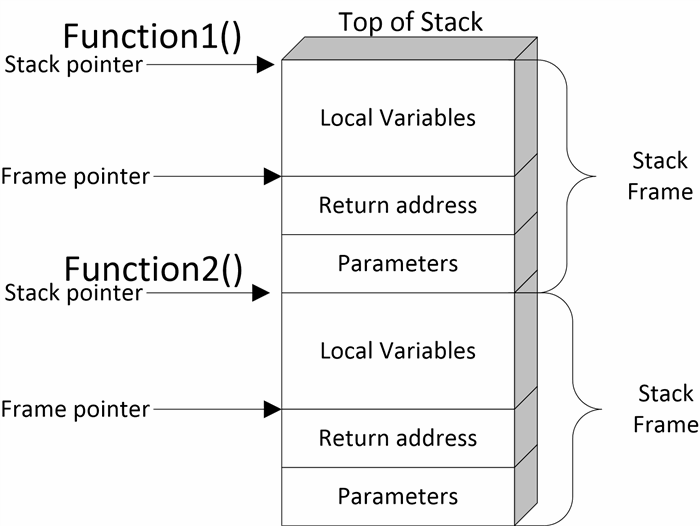
> [ref](https://www.codeproject.com/Articles/5256936/Pointers)
對於函式的流程控制,這部[The Call Stack](https://www.youtube.com/watch?v=Q2sFmqvpBe0)影片有詳細的解說。
## 進入正題
Pthreads API 中大致共有 100 個函數調用,全都以 **pthread_** 開頭,並可以分為四類:
- 執行緒管理,例如創建執行緒,等待 ( join ) 執行緒,查詢執行緒狀態等。
- 互斥鎖(Mutex):創建、摧毀、鎖定、解鎖、設置屬性等操作
- 條件變量(Condition Variable):創建、摧毀、等待、通知、設置與查詢屬性等操作
- 使用了互斥鎖的執行緒間的同步管理
> POSIX 的 Semaphore API 可以和 Pthreads 協同工作,但這並不是 Pthreads 的標準。因而這部分API是以 **sem_** 打頭,而非 **pthread_**。
> -- [wikipedia](https://zh.wikipedia.org/wiki/POSIX%E7%BA%BF%E7%A8%8B)
而本篇文章要介紹的是第一項: 執行緒管理的部分。
### 創建新的執行緒
我們可以利用 POSIX Thread 創建具有一個執行緒以上的 Process ,第一個 Thread 會負責運行 `main()` 中的程式碼。若要創建一個以上的執行緒,我們可以使用 `pthread_create` :
```c=
int pthread_create(pthread_t *thread, const pthread_attr_t *attr,
void *(*start_routine) (void *), void *arg);
```
其中 `void *(*start_routine) (void *)` 用語言表達的話,可以解釋成:
> 一個指標它帶有一個指向 void 型態資料的指標,並且,它會返回指向 void 型態資料的指標。
> 如果仍無法理解上述的程式碼,建議讀者可以去複習[重拾 C 語言::函式指標](https://hackmd.io/@learnc/B1E2HEmz_)。
看完 `posix_create` 的定義以後,可以看看以下範例:
```c=
#include <stdio.h>
#include <pthread.h>
void *busy(void *ptr) {
// ptr will point to "Hi"
puts("Hello World");
return NULL;
}
int main() {
pthread_t id;
pthread_create(&id, NULL, busy, "Hi");
while (1) {} // Loop forever
}
```
### 等待執行緒完成工作
如果要等待我們創建的執行緒完成工作,需要使用 `pthread_join` :
```c=
int pthread_join(pthread_t thread, void **retval);
```
查看定義後,進一步改寫原本的程式碼:
```c=
#include <stdio.h>
#include <pthread.h>
void *busy(void *ptr) {
// ptr will point to "Hi"
puts("Hello World");
return NULL;
}
int main() {
void *result;
pthread_t id;
pthread_create(&id, NULL, busy, "Hi");
pthread_join(id, &result);
}
```
除了上面的範例,我們可以用 `pthread_exit()` 再做一次改寫:
```c=
#include <stdio.h>
#include <pthread.h>
void *busy(void *ptr) {
// ptr will point to "Hi"
puts("Hello World");
pthread_exit(NULL);
}
int main() {
pthread_t id;
pthread_create(&id, NULL, busy, "Hi");
pthread_join(id, NULL);
}
```
若工作流程用圖表呈現,大概是這樣:
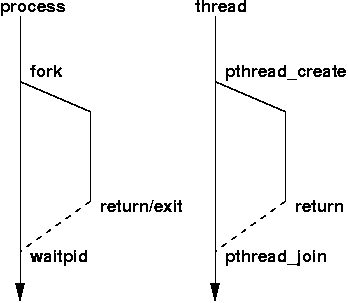
> 上圖取自該[網站](https://www.cs.fsu.edu/~baker/opsys/notes/pthreads.html)。
### Compile your code!
本系列都是採用 gcc 作為 C 語言的編譯器,若使用到 Pthread 必須在編譯時添加參數: `-lpthread` 。
```
gcc source.c -lpthread -o source
```
編譯完成後,便可以啟動可執行檔。
```
./source
```
### 取消執行緒
PThread 提供了 API ,讓我們可以取消已建立的 POSIX Thread 。
```c=
int pthread_cancel(pthread_t thread);
```
> 想知道更多細節可以參考[該連結](https://blog.csdn.net/gswjj1/article/details/23302919)。
### exit 和 pthread_exit 的差異
`pthread_exit()` 如果放在 `main()` 函式,是用來確保所有用 POSIX Thread API 創建的執行緒已經完成。
```c=
int main() {
pthread_t tid1, tid2;
pthread_create(&tid1, NULL, myfunc, "Jabberwocky");
pthread_create(&tid2, NULL, myfunc, "Vorpel");
pthread_exit(NULL);
// No code is run after pthread_exit
// However process will continue to exist until both threads have finished
}
```
如果不使用 `pthread_exit()` 或是 `pthread_join()` 而直接使用 `exit()` ,你的 Process 會在一派發完執行緒後結束(也就是執行緒根本還沒開始處理任務):
```c=
int main() {
pthread_t tid1, tid2;
pthread_create(&tid1, NULL, myfunc, "Jabberwocky");
pthread_create(&tid2, NULL, myfunc, "Vorpel");
exit(42); //or return 42;
// No code is run after exit
}
```
> 如果還有疑問,也可以參考 [stackoverflow](https://stackoverflow.com/questions/3559463/is-it-ok-to-call-pthread-exit-from-main) 上的問答串。
## 總結
最後,筆者統整一下本篇介紹的 POSIX Thread API 的重要知識點:
### 如何終止 Thread
終止 Thread 有 4 個方法:
- 等到 Thread 指派的任務 Return 。
- 用 `pthread_cancel` 呼叫指定的執行緒。
- 使用 `pthread_exit()` 。
- 終止 Process 。
### 如果不使用 `pthread_join` 會有什麼後果呢?
空閒的執行緒會繼續占用資源,直到 Process 結束為止。
換言之,如果是在長期不會結束的應用(像是伺服器),那錯誤的設計便會造成多餘的資源浪費。
### 我該用 `pthread_join()` 還是 `pthread_exit()` 阿?
答案是都可以,只是差在 `pthread_exit()` 會在執行緒完成任務後退出,讓你沒有機會執行其他程式。
### 我可以在執行緒中傳送 Stack pointer 到另一個執行緒嗎?
可以,但要注意函式的生命週期,考慮以下程式碼:
```c=
pthread_t start_threads() {
int start = 42;
pthread_t tid;
pthread_create(&tid, 0, myfunc, &start); // ERROR!
return tid;
}
```
等到 `myfunc` 開始執行時, `start_threads()` 的生命早就走到盡頭了!這樣一來,我們根本無法確定原先存放 start 變數內容的記憶體現在存放什麼東西。
為了避免這個情況發生,我們可以用 `pthread_join` 改寫範例程式:
```c=
void start_threads() {
int start = 42;
void *result;
pthread_t tid;
pthread_create(&tid, 0, myfunc, &start); // OK - start will be valid!
pthread_join(tid, &result);
}
```
這樣一來, `start_thread()` 的生命週期就會被延後到 `myfunc()` 執行完成才結束。
## Reference
- [C 語言 pthread 多執行緒平行化程式設計入門教學與範例](https://blog.gtwang.org/programming/pthread-multithreading-programming-in-c-tutorial/)
- [SystemProgramming](https://github.com/angrave/SystemProgramming/wiki/Pthreads%2C-Part-1%3A-Introduction)
- 維基百科
 Sign in via Facebook
 Sign in via X(Twitter)
 Sign in via GitHub
 Sign in via Dropbox
 Sign in with Wallet
Connect another wallet
Sign in with Wallet
Connect another wallet