# 2016q3 Homework 1 (compute-pi)
contributed by <`carolc0708`>
[作業說明A03: compute-pi](https://hackmd.io/JwdgZmCGBsDGCmBaAzPWAGRAWWtqOABNkAORESAVnUqzACMxkx0g#a03-compute-pi)
## 學習目標
- [ ]學習透過離散微積分求圓周率
* [Leibniz formula for π](https://en.wikipedia.org/wiki/Leibniz_formula_for_%CF%80)
* [積分計算圓周率π](http://book.51cto.com/art/201506/480985.htm)
* [Function](http://www.csie.ntnu.edu.tw/~u91029/Function2.html)
- [ ]著手透過 SIMD 指令作效能最佳化
## 程式執行結果
### 學習使用 gnuplot 製圖
在 `runtime.gp` 中編輯繪圖語法:
```
reset
set ylabel 'Time(sec)'
set xlabel 'N'
set style fill solid
set title 'wall clock time - using clock_gettime()'
set term png enhanced font 'Verdana,10'
set output 'runtime.png'
set logscale x 10
set datafile separator ","
plot [64:35000][0:] 'result_clock_gettime.csv' using 1:2 smooth csplines lw 2 title 'baseline', \
'' using 1:3 smooth csplines lw 2 title 'omp_2', \
'' using 1:4 smooth csplines lw 2 title 'omp_4', \
'' using 1:5 smooth csplines lw 2 title 'avx', \
'' using 1:6 smooth csplines lw 2 title 'avxunroll', \
```
在 `Makefile` 中定義製圖的 rule
```
plot: gencsv
gnuplot runtime.gp
```
執行 `$ make plot` 後會發現檔案多出一個 `runtime.png`, 再使用 `$ eog runtime.png` 即可看到圖像
### 不同的時間量測方式
* 參考 [作業說明](https://hackmd.io/s/rJARexQT) 當中的解說,首先須了解 Wall-clock time 和 CPU time 的差別
* Wall-clock time: 掛鐘時間,真實世界所經過的時間。可能會和 NTP 伺服器、時區、日光節約時間同步或使用者自己調整。
* CPU time: 程序在 CPU 上面運行消耗 (佔用) 的時間
* real time : 也就是 Wall-clock time,當然若有其他程式同時在執行,必定會影響到。
* user time : 表示程式在 user mode 佔用所有的 CPU time 總和。
* sys time : 表示程式在 kernel mode 佔用所有的 CPU time 總和 ( 直接或間接的系統呼叫 )。
* 在單一處理器的情況下,可以使用 `real - (user + sys)` 來計算 Wall-clock time 與 CPU time 的差異。可以理解「所有」可以延遲程式的因子的總和。在 SMP 底下可以近似成 `(real * 處理器數目) - (user + sys)`。
* clock()
* the sum of user and system time
* clock_gettime()
參考 [Linux man page](https://linux.die.net/man/3/clock_gettime),該函式可根據想要取得的 clock 值去做定義,有以下幾種:
* **CLOCK_REALTIME**: System-wide realtime clock. Setting this clock requires appropriate privileges.
* **CLOCK_MONOTONIC**: Clock that cannot be set and represents monotonic time since some unspecified starting point.
* **CLOCK_PROCESS_CPUTIME_ID**: High-resolution per-process timer from the CPU.
* **CLOCK_THREAD_CPUTIME_ID**: Thread-specific CPU-time clock.
在 `benchmark_clock_gettime.c` 中, `clock_gettime(CLOCK_ID, &end)` ,其中 `CLOCK_ID` define 為 `CLOCK_MONOTONIC_RAW`
* [資料](http://stackoverflow.com/questions/14270300/what-is-the-difference-between-clock-monotonic-clock-monotonic-raw) 中提到,`CLOCK_MONOTONIC` 和 `CLOCK_MONOTONIC_RAW` 的不同:
* `CLOCK_MONOTONIC` never experiences discontinuities due to NTP time adjustments, but it does change in frequency as NTP learns what error exists between the local oscillator and the upstream servers.
* `CLOCK_MONOTONIC_RAW` is simply the local oscillator, not disciplined by NTP.

## 以不同方式計算圓周率
### baseline 版本
* pi 的公式:

* 黎曼積分原理:
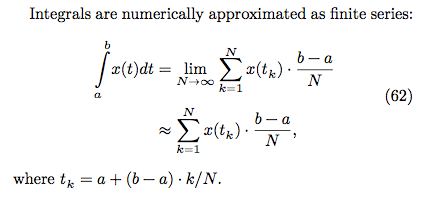
N 越大代表切得越細,數值越精確
* 程式碼:
```C
double compute_pi_baseline(size_t N)
{
double pi = 0.0;
double dt = 1.0 / N; // dt = (b-a)/N, b = 1, a = 0
for (size_t i = 0; i < N; i++) {
double x = (double) i / N; // x = ti = a+(b-a)*i/N = i/N
pi += dt / (1.0 + x * x); // integrate 1/(1+x^2), i = 0....N
}
return pi * 4.0;
}
```
### Leibniz formula for π
* pi 的公式:

* [證明](https://en.wikipedia.org/wiki/Leibniz_formula_for_%CF%80)
* 程式碼:
一開始指數的部分使用 `pow()` 來做,必須另外 `#include <math.h>`,並且在 `Makefile` 中編譯的 rule 最後放加上 `-lm`
```C
double compute_pi_leibniz(size_t N)
{
double pi = 0.0;
for(int i=0; i<N; i++)
pi += pow(-1,i) / (2*i+1);
return pi * 4.0;
}
```
* 執行結果如下:

leibniz 版本的時間和原本的差了非常多。
後來改為以下作法:
```C
double compute_pi_leibniz(size_t N)
{
double pi = 0.0;
for(int i=0; i<N; i++)
{
int numerator = (i % 2 == 0 ? 1 : -1);
pi += numerator / (double)(2*i+1);
}
return pi * 4.0;
}
```
* 執行結果如下:

leibniz 變快了很多。
>為什麼使用 pow() 和不使用會差那麼多??
### Euler
* pi 的公式:

* 程式碼:
```C
double compute_pi_euler(size_t N)
{
double pi = 0.0;
for(int i=0; i<N; i++)
pi += (double)(1 / pow(i, 2));
pi *= 6;
return sqrt(pi);
}
```
這個程式測試之後無法確定結果是否正確,因為 `sqrt(pi)` 因為太長而回傳 `inf`。
解決方法參考 [這裡](http://stackoverflow.com/questions/4866511/sqrt-returning-inf),必須改為用 `sqrtl(pi)` 去運算,這樣回傳 `long double` 才裝得下結果。印出結果時也須改為 `%Lf`。
>現在印出來 pi = 0.000 且因為是用 long double,速度變更慢了,再找別的方式實作看看...
* 執行結果如下:

可能是又用到數學運算函式的關係,執行時間非常久
* 參考 [許元杰的共筆](https://embedded2015.hackpad.com/-Ext1-Week-1-5rm31U3BOmh) 改用另一種方式實作 Euler
* 利用 pi 的公式:

>這個公式為何是這樣?
>
>參考 [pi formulas](http://mathworld.wolfram.com/PiFormulas.html) 一連串 pi 公式的推導,發現這兩個公式其實都是由他人提出,Euler 再進而推導成比較簡單的數學公式,它們兩個並非源自於同一個公式
* 程式碼:
```C
double compute_pi_euler(size_t n)
{
double tmp, ntmp;
double pi = 0.0;
double i = n;
pi = i / (2 * i + 1);
for(i= n - 1; i > 1 ;){
tmp = pi;
i--;
ntmp = i / (2 * i + 1);
pi = (2 + tmp)*ntmp;
}
return pi + 2;
}
```
* 執行結果如下:

相較之前快了許多,執行時間還比 baseline 版本快一點點,且結果正確,不會有算出無限小數的問題。
## 優化各實作版本
### Leibniz formula for π
* 參考 [baseline 版本優化以及說明](http://book.51cto.com/art/201506/480985.htm)
#### OpenMP
```C=
double compute_pi_leibniz_openmp(size_t N, int threads)
{
double pi = 0.0;
#pragma omp parallel num_threads(threads)
{
#pragma omp for reduction(+:pi)
for(int i=0; i<N; i++)
{
int numerator = (i % 2 == 0 ? 1 : -1);
pi += numerator / (double)(2*i+1);
}
}
return pi * 4.0;
}
```
參考作業說明:
:::info
**迴圈中 `pi += numerator / (double)(2*i+1);` 每次迭代都會讀取 pi 值並更新 pi 值,不同次的迴圈中並不相互獨立,因此需額外做以下處理:**
`reduction(<op>:<variable>)`它讓各個執行緒針對指定的變數擁有一份有起始值的複本。平行化計算時,以各自複本做運算,等到最後再以指定的運算元,將各執行緒的複本合在一起。
:::
#### AVX
```C=
double compute_pi_leibniz_avx(size_t N)
{
double pi = 0.0;
register __m256d ymm0, ymm1, ymm2, ymm3, ymm4;
ymm0 = _mm256_set_pd(1.0,-1.0,1.0,-1.0);
ymm1 = _mm256_set1_pd(1.0);
ymm2 = _mm256_set1_pd(2.0);
ymm3 = _mm256_setzero_pd();
for(int i=0; i<=N-4; i+=4)
{
ymm4 = _mm256_set_pd(i, i+1.0, i+2.0, i+3.0);//i to i+4
ymm4 = _mm256_mul_pd(ymm4,ymm2); // 2*i
ymm4 = _mm256_add_pd(ymm4,ymm1);//2*i+1
ymm4 = _mm256_div_pd(ymm0,ymm4);//pow(-1,i) / (2*i+1)
ymm3 = _mm256_add_pd(ymm3,ymm4);//pi += pow(-1,i) / (2*i+1)
}
double tmp[4] __attribute__((aligned(32)));
_mm256_store_pd(tmp,ymm3);
pi += tmp[0]+tmp[1]+tmp[2]+tmp[3];
return pi * 4.0;
}
```
當中 `double tmp[4] __attribute__((aligned(32)));` 目的是將 32 byte 的數值對齊 4 個 double 組成的 array,這樣一來即可將 256 bit 暫存器連續儲存的 4 個 double 數值切開。詳細使用範例可參考 [Attribute 的用法](https://gcc.gnu.org/onlinedocs/gcc-3.2/gcc/Variable-Attributes.html)。
#### AVX + loop unrolling
將一次迭代執行四個改為執行 16 個。
參考作業說明:
:::info
**為何 AVX SIMD 的版本沒辦法達到預期 4x 效能提昇呢?**
因為浮點 scalar 除法和 vector 除法的延遲,導致沒辦法有效率的執行。考慮到填充 vector instruction 的 pipeline 未能充分使用,我們可以預先展開迴圈,以便使用更多的 scalar 暫存器,從而減少資料相依性。
:::
* 執行結果如下:
所有版本一起比較

leibniz 以及優化版本的比較

## error rate 的量測
 Sign in via Google
 Sign in via Facebook
 Sign in via X(Twitter)
 Sign in via GitHub
 Sign in via Dropbox
 Sign in with Wallet
Connect another wallet
Sign in with Wallet
Connect another wallet