# Microservices Authentication and Authorization Using API Gateway
## Introduction
In today's complex microservices architecture, ensuring robust authentication and authorization is a critical challenge. This challenge arises because services operate independently, making it hard to set consistent rules for verifying users across different parts of the system. For example, making sure users can access various services like managing accounts or processing payments requires careful attention to ensure a smooth and secure system.
In this tutorial, we'll dig into the details of microservices, highlighting their need for strong security. We'll guide you through setting up microservices in Golang and creating an API Gateway for improved security. After that, we'll discuss the best practices to keep your microservices safe.
**What we'll cover in this tutorial:**
- Understanding the challenges of authentication and authorization in a microservices architecture.
- Gaining a good understanding of the role and benefits of an API Gateway in microservices architecture.
- Setting up microservices in Golang (UserService and ProductService) as the foundation of our application.
- Implementing an API Gateway in Golang to centrally manage access, authentication, and request routing.
- Exploring authentication mechanics using JSON Web Tokens (JWT) and establishing authorization checks.
- Running a practical example to observe the interaction between microservices and the API Gateway.
- Highlighting best practices and considerations for a resilient microservices security strategy.
Let's start with Microservices Security.
## Security in Microservices
Microservices are a modern software design approach where applications are divided into small, independent services, resembling a puzzle where each piece handles a specific task. Communication between microservices over networks adds another layer of complexity, potentially exposing vulnerabilities. Without a centralized control point, ensuring consistent and robust authentication and authorization becomes critical.

Each microservice requires its security measures, analogous to giving team members their access cards. This ensures only authorized services communicate, preventing unauthorized access. Considering microservices often handle sensitive data, securing communication channels is crucial. It's like ensuring team members share information through a secure, encrypted channel, akin to a secret code language.
## Different Ways of Access Management in Microservices
When it comes to managing access in the microservices world, there are various strategies. Let's explore two main approaches: one involves each service managing its access, while the other utilizes an API Gateway as the central authority.
### Individual Service Access Management
In this approach, each microservice acts as its own gatekeeper. Just like different rooms in a club with their bouncers, each service has its own way of checking IDs and ensuring only authorized users gain entry. This decentralized method gives autonomy to each service but can be challenging to coordinate, especially as the application grows.
### API Gateway for Access Management
Now, imagine having a seasoned chief bouncer, an API Gateway, overseeing the entire club's access. The API Gateway becomes the central authority, handling authentication and authorization for all services. It's like having a VIP list where the chief bouncer checks credentials at the entrance, directing guests to the right rooms.
### **Benefits of Using API Gateway**
Some of the benefits of API Gateway are:
- **Centralized Control:** With an API Gateway, you have a single point of control for access management, simplifying the overall security strategy.
- **Consistent Policies:** The API Gateway ensures that access policies are consistent across all services, like making sure everyone adheres to the same rules.
- **Efficient Monitoring:** The API Gateway can monitor and log access attempts, helping identify and address potential security issues efficiently.


## Authentication and Authorization in API Gateways
Let's dive into the mechanics of how an API Gateway manages the authentication and authorization – in the microservices realm.
### Authentication
Authentication is like the gatekeeper validating IDs at the entrance. When a request knocks on the microservices door, the API Gateway confirms the credentials, ensuring it's a legitimate and allowed visitor.
In this context, JSON Web Tokens (JWT) play a crucial role. [JSON Web Tokens (JWTs)](https://jwt.io/) are commonly used for authentication in microservices architectures. These compact, URL-safe means of representing claims between two parties can be securely transmitted as part of the request. The API Gateway validates these tokens, ensuring the legitimacy of the user and granting access accordingly.
### Authorization
Once the API Gateway confirms the visitor's legitimacy, it shifts to authorization. This is where the orchestration occurs – similar to our gatekeeper guiding visitors to the correct locations. The API Gateway, utilizing information from the JWT, checks if the authenticated user possesses the necessary permissions to enter specific microservices. It guarantees everyone heads to their designated areas without intruding on private spaces.
This process maintains a secure and orderly flow within your microservices architecture, similar to a well-managed entry point.
Now that we know the vital role of authentication and authorization in API Gateways, let's transition into implementing these principles in our microservices architecture.
## Setting Up Microservices in Golang
Creating microservices involves building small, independent services that collectively contribute to the functionality of your application. In this example, we'll set up two simple microservices in Golang: `UserService` and `ProductService`. These microservices will serve as the backbone of our application, each handling a specific domain.
**UserService (`microservices/UserService/main.go`):**
```go
// main.go
package main
import (
"fmt"
"net/http"
)
func main() {
http.HandleFunc("/user", getUser)
fmt.Println("UserService is running on :8081")
http.ListenAndServe(":8081", nil)
}
func getUser(w http.ResponseWriter, r *http.Request) {
fmt.Fprintln(w, "User data")
}
```
The `UserService` is a straightforward Golang HTTP server that listens for requests on the `/user` endpoint. When a request is received, it responds with mock user data.
**ProductService (`microservices/ProductService/main.go`):**
```go
// main.go
package main
import (
"fmt"
"net/http"
)
func main() {
http.HandleFunc("/product", getProduct)
fmt.Println("ProductService is running on :8082")
http.ListenAndServe(":8082", nil)
}
func getProduct(w http.ResponseWriter, r *http.Request) {
fmt.Fprintln(w, "Product data")
}
```
Similarly, the `ProductService` sets up an HTTP server, responding to requests on the `/product` endpoint with mock product data.
In these microservices, we've intentionally kept the logic simple for demonstration purposes. In a real-world scenario, these microservices would perform more complex tasks, such as interacting with databases, processing business logic, or integrating with external services.
**Code Explanation:**
1. **`main` Function:**
The `main` function in each microservice sets up an HTTP server, defines an endpoint (`/user` for `UserService` and `/product` for `ProductService`), and specifies a handler function for processing requests.
2. **Handler Functions:**
The `getUser` and `getProduct` functions are the handlers for their respective endpoints. They respond to incoming requests with mock data, simulating the behavior of more complex services.
3. **`ListenAndServe`:**
The `ListenAndServe` function starts the HTTP server, making the microservices accessible on specific ports (8081 for `UserService` and 8082 for `ProductService`).
These microservices form the foundation of our application, and we'll enhance them further by adding an API Gateway for centralized access management and authentication.
### Creating an API Gateway
Now that we have our foundational microservices – `UserService` and `ProductService` – let's introduce an `ApiGateway`. The API Gateway will serve as a central hub for managing access, handling authentication, and routing requests to the appropriate microservices.
```go
// main.go
package main
import (
"fmt"
"html/template"
"log"
"net/http"
"io"
"github.com/gorilla/mux"
)
// Demo credentials
const (
username = "demo"
password = "password"
)
func main() {
router := mux.NewRouter()
// Define routes
router.HandleFunc("/login", loginPage).Methods("GET")
router.HandleFunc("/login", loginHandler).Methods("POST")
router.HandleFunc("/user", authenticate(proxy("/user", "http://localhost:8081"))).Methods("GET")
router.HandleFunc("/product", authenticate(proxy("/product", "http://localhost:8082"))).Methods("GET")
fmt.Println("API Gateway is running on :8080")
log.Fatal(http.ListenAndServe(":8080", router))
}
func loginPage(w http.ResponseWriter, r *http.Request) {
loginTemplate.Execute(w, nil)
}
func loginHandler(w http.ResponseWriter, r *http.Request) {
r.ParseForm()
user := r.FormValue("username")
pass := r.FormValue("password")
if user == username && pass == password {
http.SetCookie(w, &http.Cookie{
Name: "auth",
Value: "true",
})
http.Redirect(w, r, "/user", http.StatusSeeOther)
} else {
w.WriteHeader(http.StatusUnauthorized)
fmt.Fprintln(w, "Invalid credentials")
}
}
func authenticate(next http.HandlerFunc) http.HandlerFunc {
return func(w http.ResponseWriter, r *http.Request) {
cookie, err := r.Cookie("auth")
if err != nil || cookie.Value != "true" {
http.Redirect(w, r, "/login", http.StatusSeeOther)
return
}
next(w, r)
}
}
func proxy(path, target string) http.HandlerFunc {
return func(w http.ResponseWriter, r *http.Request) {
targetURL := target + r.URL.Path
req, err := http.NewRequest(r.Method, targetURL, r.Body)
if err != nil {
http.Error(w, err.Error(), http.StatusBadGateway)
return
}
req.Header = r.Header
client := &http.Client{}
resp, err := client.Do(req)
if err != nil {
http.Error(w, err.Error(), http.StatusBadGateway)
return
}
defer resp.Body.Close()
for key, values := range resp.Header {
for _, value := range values {
w.Header().Add(key, value)
}
}
w.WriteHeader(resp.StatusCode)
// Copy the response body to the client
_, err = io.Copy(w, resp.Body)
if err != nil {
http.Error(w, err.Error(), http.StatusBadGateway)
return
}
}
}
var loginTemplate = template.Must(template.New("login").Parse(`
<!DOCTYPE html>
<html>
<head>
<title>Login Page</title>
</head>
<body>
<h2>Login</h2>
<form action="/login" method="post">
<label for="username">Username:</label>
<input type="text" id="username" name="username" required><br>
<label for="password">Password:</label>
<input type="password" id="password" name="password" required><br>
<input type="submit" value="Login">
</form>
</body>
</html>
`))
```
In this `ApiGateway` implementation, we've employed the [Gorilla Mux router](https://github.com/gorilla/mux) for enhanced route handling. Let's break down the key components:
1. **Demo Credentials:**
We've set up demo credentials (`username` and `password`) for simplicity in this example. In a real-world scenario, robust authentication mechanisms should be implemented.
2. **Login Page Template:**
The HTML template provides a basic login form for user authentication. Users will interact with this form to gain access to the protected endpoints.
3. **Router Setup:**
The `mux.NewRouter()` initializes the router. We then define routes for login, user requests, and product requests using `router.HandleFunc`.
4. **Login Handling:**
- `loginPage` renders the login form when accessed via the `/login` endpoint.
- `loginHandler` processes form submissions. If credentials match the demo values, it sets an authentication cookie and redirects the user to the `/user` endpoint.
5. **Authentication Middleware:**
The `authenticate` middleware ensures that only authenticated users can access the microservices. It checks for a valid authentication cookie and redirects unauthenticated users to the login page.
6. **Proxy Function:**
The `proxy` function acts as a reverse proxy, forwarding requests to the corresponding microservices (`UserService` or `ProductService`). It maintains headers for smooth data flow.
### Running the Example
To observe the interaction between our microservices and the `ApiGateway`, follow these steps:
1. **Start Microservices:**
Open terminals for `UserService` and `ProductService` directories and run the following commands:
```bash
go run main.go
```
This initializes the `UserService` on [http://localhost:8081](http://localhost:8081/) and the `ProductService` on [http://localhost:8082](http://localhost:8082/).
2. **Start API Gateway:**
Open a terminal for the `ApiGateway` directory and run:
```bash
go run main.go
```
The `ApiGateway` will be accessible at [http://localhost:8080](http://localhost:8080/).
3. **Access the Login Page:**
Open a web browser and navigate to http://localhost:8080/login. You'll encounter a simple login form.
4. **Authenticate:**
Use the demo credentials (username: "demo", password: "password") to log in. Upon successful authentication, you'll be redirected to the "/user" endpoint.
5. **Explore Endpoints:**
After logging in, you can access the protected microservices endpoints at http://localhost:8080/user and http://localhost:8080/product.
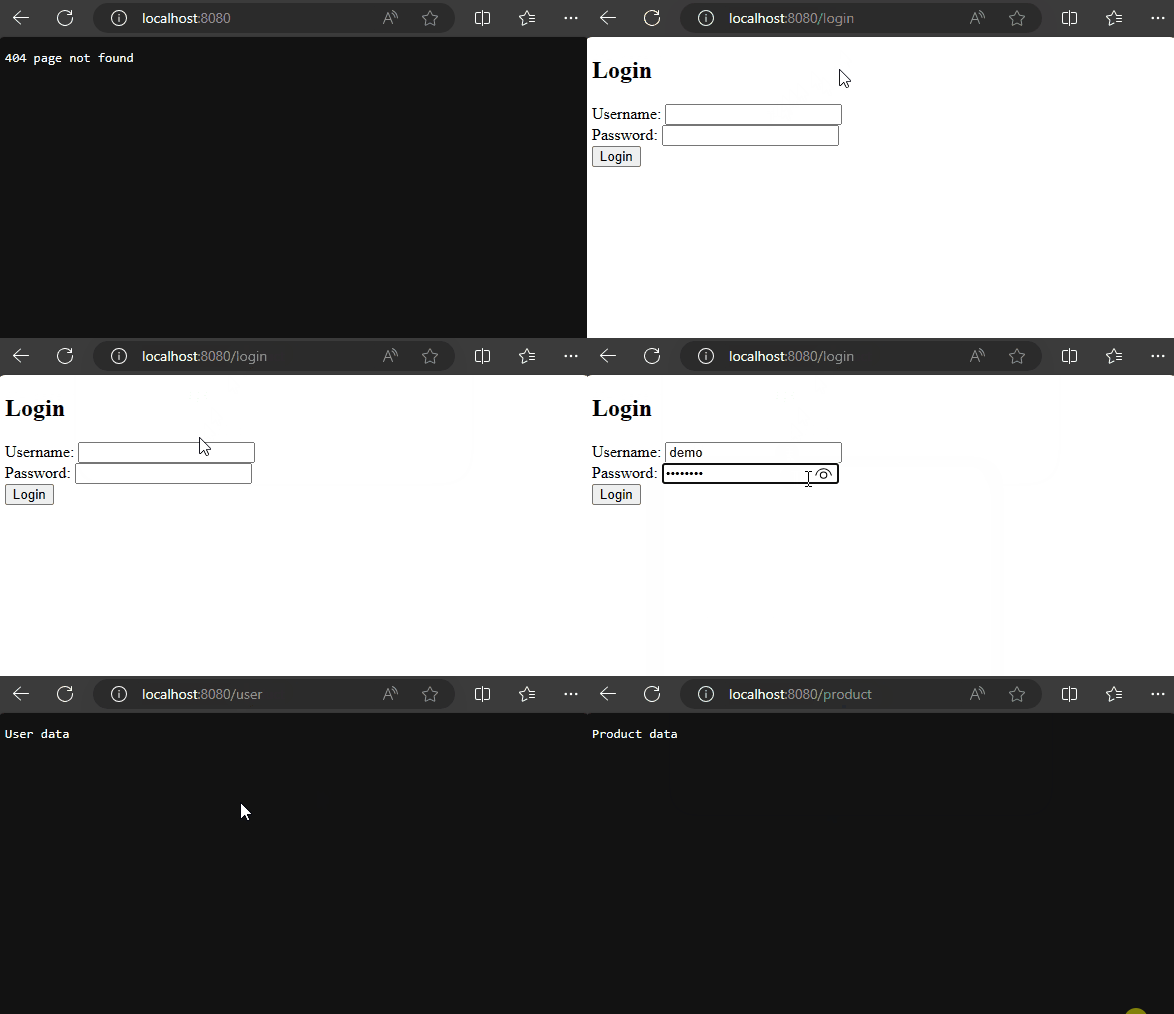
Please note that this example is for demonstration purposes, and a production application would require additional steps, such as securing communication channels and enhancing user authentication mechanisms.
Key considerations include implementing HTTPS for secure communication, utilizing JSON Web Tokens (JWT) or OAuth for authentication.
## Best Practices and Considerations
As we navigate the microservices security landscape, let's shine a light on some best practices – the guiding principles that ensure your security fortress stays resilient and effective.
### 1. Regular Access Policy Updates
Just like renovating your home to keep it secure, regularly update your access policies. As your application evolves, so should your security measures. Periodic reviews and adjustments to access rules ensure that your security strategy remains aligned with your evolving microservices landscape.
### 2. Token-Based Authentication for Secure Communication
Implementing this approach adds an extra layer of security, ensuring that only those with the right credentials can access your microservices. It's like having a special key to open specific doors within your application.
### 3. Industry-standard Protocols: OAuth and Others
Consider using industry-standard protocols like OAuth. These are like universally accepted languages spoken in the security community. Adhering to such standards not only streamlines integration with external systems but also ensures compatibility and familiarity, making your security measures more robust.
### 4. Access Monitoring and Logging
Imagine installing security cameras in your home – monitoring and logging access attempts serve a similar purpose in your microservices world. Keeping a watchful eye on who attempts to access your services helps detect potential security threats early. Detailed logs provide valuable insights for effective incident response and continuous improvement.
In essence, these best practices form the foundation of a resilient microservices security strategy. Regular updates, standardized protocols, vigilant monitoring, and a balance between security and performance create a secure environment for your microservices architecture to flourish.
## Conclusion
To wrap up, learning about Microservices Authentication and Authorization with an API Gateway is crucial for keeping your applications safe and scalable. By grasping how authentication and authorization work, along with the role of an API Gateway, you can control who accesses your microservices. Always prioritize security and stick to best practices to keep your applications running smoothly.
You can find the complete code used in the tutorial in [this GitHub repo](https://github.com/Imranalam28/Microservices-Authentication-and-Authorization-Using-API-Gateway).
 Sign in via Google
 Sign in via Facebook
 Sign in via X(Twitter)
 Sign in via GitHub
 Sign in via Dropbox
 Sign in with Wallet
Connect another wallet
Sign in with Wallet
Connect another wallet