###### tags: 'homework'
# Homework 1: Flags and Cool Images
**Due: ____________**
## Setup and Handin
### Setup
* Go to code.pyret.org; this requires logging in with any Google account.
* Make a new file in code.pyret.org called hw1-code.arr.
* Do not put your name anywhere in the file.
### Handin
* Download your file (File > Download) and make sure it is called hw1-code.arr for part One.
* A file titled program-steps.pdf that only contains your written action items from part Two. Do not include your image in this pdf.
* The image you select for part two titled program-image
* Hand in your work on Google Classroom.
* You may submit as many times as you want before the deadline. Only your latest submission will be graded.
### Collaboration Policy
For this assignment, you are welcome to work as much as you want with other students. The whole point of this assignment is to make sure everyone is able to use Pyret, write simple programs, and submit assignments.
## Helpful Resources
### Documentation
This [guide](https://hackmd.io/@jpg-cs/H1gh9asRq) will help you get started with Pyret!
The [Pyret Documentation](https://www.pyret.org/docs/latest/) is accessible from the Pirate button in the top left corner of code.pyret.org.
For this assignment, you will find the [image documentation](https://www.pyret.org/docs/latest/image.html) useful. We recommend briefly browsing this documentation before working on these problems!
### What we will look for when grading
* We want accuracy in the shapes that are present, their general locations, sizes, and orientations.
* We do not care about exact positioning, size ratios, borders, or angles.
* We do not care about specific color shades. For example, you can use "green" even though it produces a much brighter green than on some of these flags. If you want to be accurate, a comprehensive list of color names can be found [here](https://www.pyret.org/docs/latest/image-structs.html#%28part._s~3acolor-constants%29).
* We will not be grading for style on this assignment. (In fact, most of the style guide won’t even make sense until later in class.)
## The Assignment
<div class="alert alert-info part">
<p>Learning Goals:</p>
<ul>
<li>Navigate Pyret documentation</li>
<li>Work with Pyret image operators to compose expressions</li>
<li>Practice program planning</li>
</ul>
</div>
## Part One: Generating Flags
**Task:** Write code to generate four flags for this assignment:
1. Madagascar
2. Turkey
3. Saint Lucia
4. Greenland
<div class="alert alert-warning part">
Set up your code so that <b>the four flags are output on the right hand side when we press the run button.</b> Make sure nothing else is output (no sub-images, numbers, strings, or otherwise).
</div>
### The Flags
Madagascar
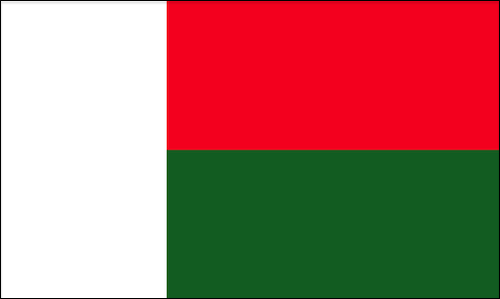
<details class="part" data-startline="75" data-endline="79" data-position="3431" data-size="154" data-original-title="" title="" aria-describedby="popover57969"><summary>Having trouble identifying colors in image?</summary>
<div class="alert alert-info" data-position="3486" data-size="99">
<p data-position="3494" data-size="0"><span data-position="3495" data-size="24">Left rectangle is white.</span><br>
<span data-position="3521" data-size="27">Top right rectangle is red.</span><br>
<span data-position="3549" data-size="31">Bottom left rectangle is green.</span></p>
</div>
<div class="popover selection-popover top in" id="popover57969" style="white-space: nowrap; top: 2823.89px; left: 90.1873px; display: block;"><div class="arrow" style="left: 50%;"></div><div class="popover-inner"><div class="popover-content"><i class="fa fa-commenting"></i> Comment</div></div></div></details>
<br />
Turkey
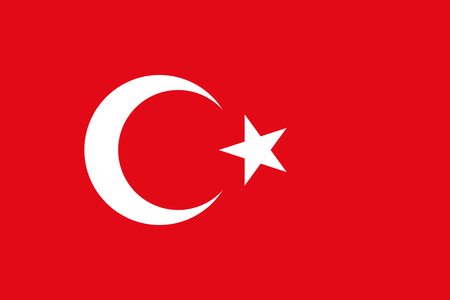
<details class="part" data-startline="88" data-endline="91" data-position="3697" data-size="116" ><summary>Having trouble identifying colors in image?</summary>
<div class="alert alert-info" data-position="3752" data-size="61">
<p data-position="3760" data-size="0"><span data-position="3761" data-size="28">Crescent and star are white.</span><br>
<span data-position="3790" data-size="18">Background is red.</span></p>
</div>
</details>
<br />
Saint Lucia

<details class="part" data-startline="99" data-endline="104" data-position="3896" data-size="192"><summary>Having trouble identifying colors in image?</summary>
<div class="alert alert-info" data-position="3952" data-size="136">
<p data-position="3960" data-size="0"><span data-position="3961" data-size="30">Foreground triangle is yellow.</span><br>
<span data-position="3993" data-size="25">Middle triangle is black.</span><br>
<span data-position="4020" data-size="32">Back triangle (border) is white.</span><br>
<span data-position="4053" data-size="30">Flag background is light blue.</span></p>
</div>
</details>
<br />
Greenland

<details class="part" data-startline="112" data-endline="115" data-position="4208" data-size="165"><summary>Having trouble identifying colors in image?</summary>
<div class="alert alert-info" data-position="4264" data-size="109">
<p data-position="4272" data-size="0"><span data-position="4273" data-size="47">Bottom rectangle and upper half-cricle are red.</span><br>
<span data-position="4321" data-size="47">Top rectangle and bottom half-circle are white.</span></p>
</div>
</details>
<br />
<div class="alert alert-danger part">
Make sure to use the solid color white to fill shapes where appropriate. Do not depend on the Pyret website’s background to fill in white areas of your image.
</div>
## Part Two: Practicing Program Planning
Most of the time, producing successful code requires thorough outlining and planning. Program planning is a skill that can help you deconstruct a problem in a way that allows you to avoid potential bugs. We now want to practice the process of outlining code prior to coding.
**Task:** Having better familiarized yourself with Pyret, pick or draw an Image that can be reproduced using similar techniques used in Part One.
**Task:** Without coding the selected image, write a list of steps and action items that describe, in words, how to recreate your image.
<div class="alert alert-warning part">
There is no lower or upper limit to how many steps you need to write. Try to make your instructions good enough so that someone could replicate your image without having seen it.
</div>
**Task:** Submit a file titled `program-steps.pdf` that includes **only** your written steps, and a **seperate** file of your selected image titled program-image.
 Sign in with Wallet
Connect another wallet
Sign in with Wallet
Connect another wallet