# HTTP/2
##### NCU 計算機網路 TED Talk
> 中央資工三A [卓鈺翔](https://fb.me/jonz94)
<small>2017/01/02</small>
---
# 大綱
* 名詞與一些概念解釋
* HTTP 的歷史
* HTTP/1.x 的問題
* HTTP/2 的特色
* 如何使用 HTTP/2
* 使用 HTTP/2 的好處
* 意料之外的小趣聞
* DEMO
* Q & A
---
# 名詞解釋
----
# h2
* 是 HTTP/2 的另外一個稱呼
> 在架設 HTTP/2 網站的時候
> 使用的套件名稱有時候叫作 `h2`
> 等等提到的 h2 都是在指 HTTP/2
----
## HTTP Header
## &
## HTTP Body
> 指的是 HTTP 封包的標頭和資料
> 與 HTML 裡面的 head 和 body 不同
---
# HTTP 的歷史
----
<!-- .slide: data-background="#EEEEEE" -->
<img src="https://image.slidesharecdn.com/http2-151207122955-lva1-app6891/95/http2-4-638.jpg?cb=1449491524" style="width:100vw" />
---
# HTTP/1.x 的問題
----
# 其實 HTTP/1.x
# 本質上沒什麼問題
----
# 但是
----
# WEB 經過多年
# 已經大幅改變
----
# 在很久很久以前...
* http://asm.sourceforge.net/
----
# 現在...
----
* 社群網站 (i.e. [臉書](https://fb.com/))
* 即時聊天室 (i.e. [Messenger](https://www.messenger.com/))
* 即時共同編輯 (i.e. [Google 文件](https://docs.google.com/document/))
----
# HTTP/1.x 在<span style="color:red">效能</span>上
# 已經不符合現代需求
----
# Solution?
----
# 你需要
# HTTP/2
---
# HTTP/2 的特色
* Single TLS encrypt TCP connection
* HPACK 壓縮 HTTP 標頭
* HTTP SERVER PUSH
> 都是為了解決效能問題
----
# Single TLS encrypt TCP connection
* 單一?
* TLS 加密?
* TCP 連線?
----
> HTTP persistent connection
> over TLS
----
<!-- .slide: data-background="#EEEEEE" -->
<img src="http://upload.wikimedia.org/wikipedia/commons/thumb/d/d5/HTTP_persistent_connection.svg/600px-HTTP_persistent_connection.svg.png" style="width:100vw" />
----
# 封包設計
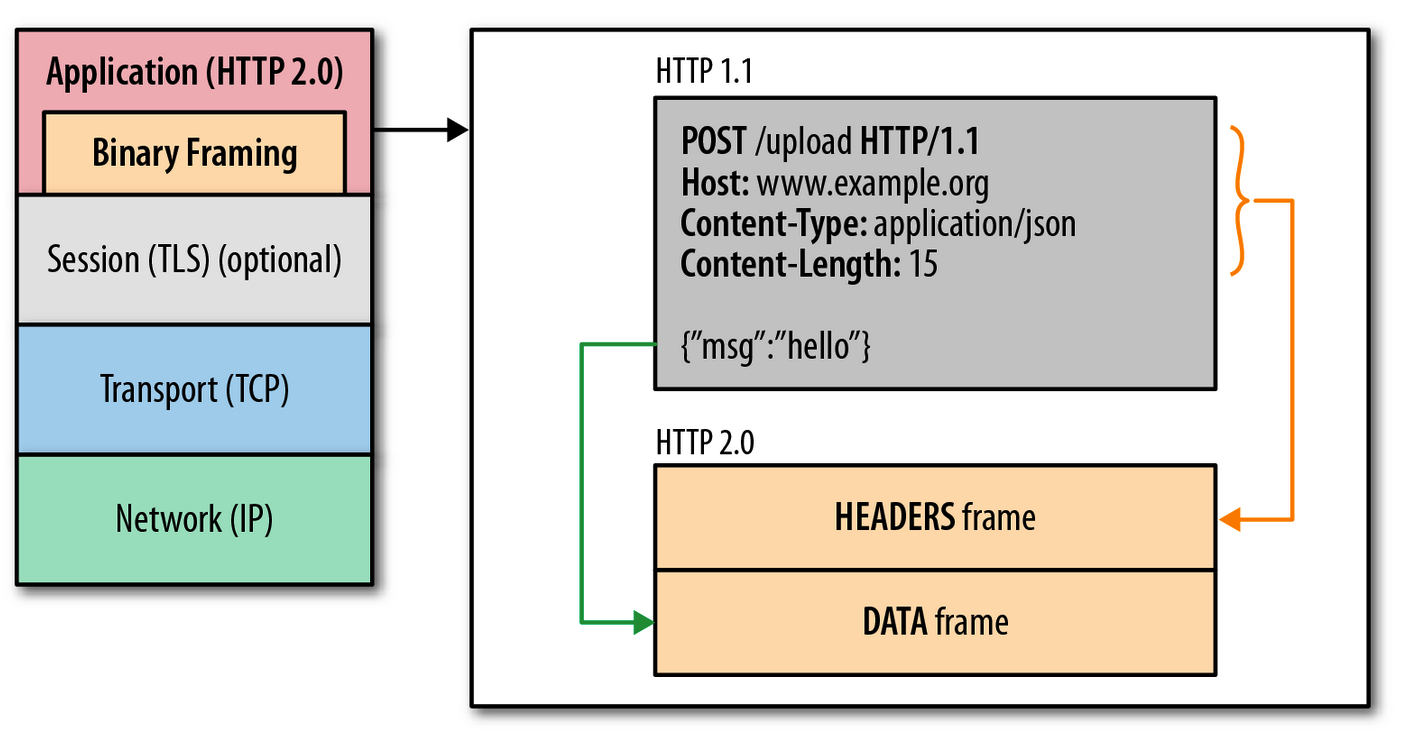
----
* Stream & Multiplexing
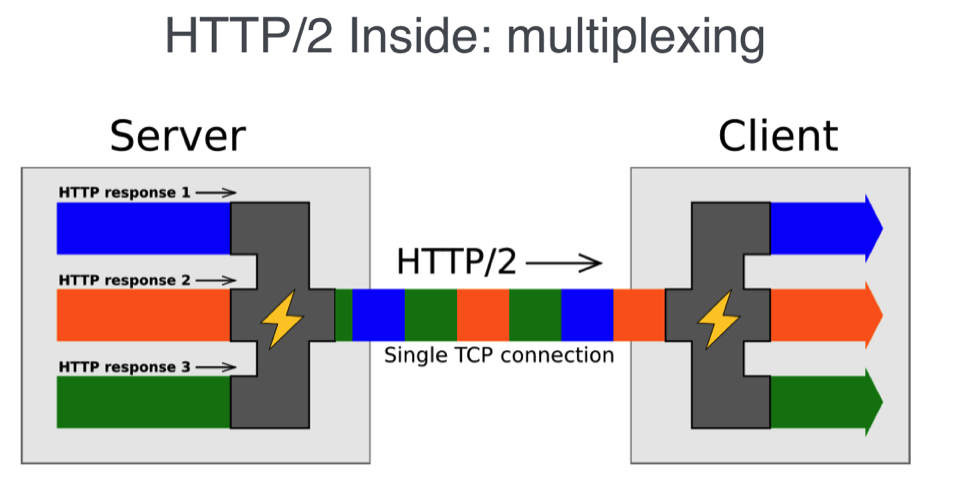
* 單一連線可以視為一個串流(Stream)
* 一個 stream 可以用來傳輸多個 frame
----
# HPACK
* 壓縮 HTTP 標頭
----
# 關於壓縮這件事
* HTTP body 的壓縮已經行之有年
* 採用 gzip 等等方式壓縮
* HTTP/1.x 只支援 HTTP body 的壓縮
----
# 難道這樣
# 還不滿足嗎
# ???
----
# OF COURSE~
# 我們來看看
# [臉書](https://fb.com)
----
# 問題出在這
* 上百筆的傳輸資料
* 都需要傳送相同的 Header
> 就像是每次講話
> 都先自我介紹一遍
> 才開始講話
----
# 也太冗了吧
----
# HPACK
> 提升傳遞資訊的效率
----
# HPACK 的技術
* 使用 [Huffman coding](https://zh.wikipedia.org/wiki/%E9%9C%8D%E5%A4%AB%E6%9B%BC%E7%BC%96%E7%A0%81) 來壓縮

----
<img src="http://www.amphinicy.com/upload/filemanager/Slike/Blog/HTTP2_design_and_goals/compression.png" style="width:100vw">
----
### HTTP SERVER PUSH [圖片來源](http://blog.kazuhooku.com/2015/12/optimizing-performance-of-multi-tiered.html)
<img alt="HTTP with and without PUSH" src="http://1.bp.blogspot.com/-Rlisemt6ouM/Vl9XAuB6I9I/AAAAAAAABVQ/dvGXhvWgvfs/s1600/%25E3%2582%25B9%25E3%2582%25AF%25E3%2583%25AA%25E3%2583%25BC%25E3%2583%25B3%25E3%2582%25B7%25E3%2583%25A7%25E3%2583%2583%25E3%2583%2588%2B2015-12-03%2B5.09.33.png" style="height:50vh" />
---
# 如何使用 HTTP/2
* 需要滿足某些條件
----
## 1. 使用者使用 [支援 h2 的瀏覽器](https://caniuse.com/#feat=http2)
[Can I use HTTP/2?](https://caniuse.com/#search=http2)
----
## 2. 網站管理員
## 使用 HTTPS 加密網站的連線
## 使用支援 h2 的伺服器端技術
> https://github.com/http2/http2-spec/wiki/Implementations
---
# 使用 HTTP/2 的好處
----
# 最大優勢
# 傳輸效率高
----
## 速度相比 HTTP/1.x
## 通常會變快
----
# 開發網頁會更輕鬆
* 怎麼說???
----
> 在傳統 HTTP/1.x 下的瀏覽器
> 最多可以同時進行
> **6 個 HTTP request/respone**
----
# 以前為了效能...
* 讓每個頁面載入時最多傳送 1 + 6 請求
* 1 for `.html` file
* 6 for other files like `.css`, `.js`, pictures, etc.
----
* 把多個 `.css` 合成單一 `.css`
* 把多個 `.js` 合成單一 `.js`
* 以此類推...
> 只為了讓請求數不大於 1 + 6
> 這樣的技術稱為 bundle
----
* bundle 設定看起來像這樣
```javascript
// 以 gulp 這個 bundle 工具作為例子
gulp.task('bower', ['bower-install'], () => {
gulp.src([
'./bower_components/leaflet/dist/leaflet.css'
])
.pipe(cssmin())
.pipe(concat('plugins.min.css'))
.pipe(gulp.dest('./public/css/'))
gulp.src([
'./bower_components/leaflet/dist/leaflet.js'
])
.pipe(uglify())
.pipe(concat('plugins.min.js'))
.pipe(gulp.dest('./public/js/'))
})
```
<style>
.reveal pre code {max-height: 90vh !important}
</style>
----
# 有了 HTTP/2
* 一般網頁不再特別為了效能做 bundle
> 如果使用會做 bundle 的前端框架
> 可以使用 [unbundle](https://gitlab.com/sebdeckers/unbundle) 工具
---
# 意料之外的小趣聞
----
# 雖然在 h2
# TLS 加密是可選的
----
# 不加密的 h2 連線
# 稱做 h2c
----
# 但是主流的瀏覽器
# 都不支援 h2c XDrz
> 幫 h2c QQ
----
# 造成的結果
----
# 要使用 h2
# 就必須先用 TLS 加密
----
## 加速了 HTTPS 的使用
## 加速了 Web 的安全性
---
# DEMO
* HTTP/2 server without HTTP PUSH
> https://jonz94.csie.ncu.edu.tw
> HTTP PUSH 沒成功... QAQ
---
# 參考資料
* HTTP/2 官方:https://http2.github.io/
* HTTP/2 101 (Chrome Dev Summit 2015) https://youtu.be/r5oT_2ndjms
----
## 實用工具
* 網頁開發人員工具
* 在瀏覽器中按 `F12`
* [Nginx](https://nginx.org/en/)
* lightweight web server / reverse proxy server
* [Let's Encrypt](https://letsencrypt.org/)
* 免費、自動、開放的第三方 SSL/TLS 認證機構
* [CertBot](https://certbot.eff.org/)
* 自動認證 SSL/TLS 機器人
> Slide powered by [HackMD](https://hackmd.io/)
---
# Q & A
---
# 感謝聆聽
Hope you learn something XD
---
###### tags: `http2` `slide` `ncu`
{"metaMigratedAt":"2023-06-14T15:19:26.344Z","metaMigratedFrom":"Content","title":"HTTP/2","breaks":true,"contributors":"[{\"id\":\"811002e0-99c6-4c0e-bcdd-7debd118c9ea\",\"add\":50,\"del\":91}]"}