###### tags: `PL/SQL`
# PL/SQL 補充資料, Demo 及 Q&A
## HR Schema

## SQL and PL/SQL Language references
- [Database PL/SQL Language Reference, 12.2](https://docs.oracle.com/en/database/oracle/oracle-database/12.2/lnpls/index.html)
- [Database SQL Language Reference, 12.2](https://docs.oracle.com/en/database/oracle/oracle-database/12.2/sqlrf/index.html)
- [Predefined Exceptions 12.2](https://docs.oracle.com/en/database/oracle/oracle-database/12.2/lnpls/plsql-error-handling.html#GUID-8C327B4A-71FA-4CFB-8BC9-4550A23734D6)
## Fund Lesson 02
### Differences among DATE, TIMESTAMP, and INTERVAL
See [Working with Dates in PL/SQL by Steven Feuerstein ](https://blogs.oracle.com/oraclemagazine/post/working-with-dates-in-plsql)
## Fund Lesson 03
### Q: ' := ' 它在plsql中是和程式中賦值的含義一樣嗎?
`:=` 為指派運算子. `a:=1` 表示將 1 指派到變數 a
### Q: interval " 1 " year 中 “ year ” 可以改成 “ month ”嗎?
Interval literal 的語法參考:

Ref: https://docs.oracle.com/database/121/SQLRF/sql_elements003.htm#SQLRF00221
## Fund Lesson 04 Writing Executable Statements
### `decode()` cannot be used in the procedural statement
```sql=
select * from regions;
-- SQL statememt
-- Use decode function
-- Decode syntax (https://docs.oracle.com/cd/B19306_01/server.102/b14200/functions040.htm)
select decode(r.region_id, 1, 'Europe', 2,'Americas', 3, 'Asia',
4, 'Middle East and Africa') as "Region Names"
from regions r;
-- PL/SQL Block
declare
v_region_id regions.region_id%type;
v_region_name regions.region_name%type;
begin
v_region_id := 1;
-- Decode function is not available in the procedure statement.
-- Cause PLS-00204: function or pseudo-column 'DECODE' may be used inside a SQL statement only
v_region_name := decode(v_region_id, 1, 'Europe', 2,'Americas', 3, 'Asia',
4, 'Middle East and Africa') ;
DBMS_OUTPUT.PUT_LINE(v_region_name);
end;
/
```
### Check the default session nls_date_format
```sql=
select parameter, value from nls_session_parameters
where parameter = upper('nls_date_format');
set serveroutput on
-- the default date format is DD-MON-RR
declare
v_cur_date date default current_date;
v_date_1 date default '01-Mar-2020';
v_date_2 date default '01-Mar-20';
-- Cause compile error
-- 01861. 00000 - "literal does not match format string"
v_date_3 date default '2020-03-01';
begin
-- months_between https://docs.oracle.com/cd/B28359_01/server.111/b28286/functions094.htm#SQLRF00669
dbms_output.put_line(months_between(v_cur_date, v_date_1));
dbms_output.put_line(months_between(v_cur_date, v_date_2));
dbms_output.put_line(months_between(v_cur_date, v_date_3));
end;
/
```
The default date format for an Oracle DATE value is specified by the initialization parameter NLS_DATE_FORMAT. This example date format includes a two-digit number for the day of the month, an abbreviation of the month name, the last two digits of the year, and a 24-hour time designation.
Ref: https://docs.oracle.com/cd/B19306_01/server.102/b14200/sql_elements003.htm#BABGIGCJ
### 自動轉換 date literal 到 date 時, 為何出現 "not a valid month"
```sql=
declare
v_date_3 date default '19-MAR-2020';
begin
dbms_output.put_line(v_date_3);
end;
Error report -
ORA-01843: not a valid month
ORA-06512: at line 2
01843. 00000 - "not a valid month"
```
The reason is that the Date literal does not match with the NLS_DATE_LANGUAGE parameter. We need to change the NLS_DATE_LANGUAGE parameter of the current session.
```sql
-- Change the NLS_DATE_LANGUAGE parameter to AMERICAN
alter session set nls_date_language='AMERICAN';
-- The Oracle can parse the date literal using the session default format string
declare
v_date_3 date default '19-MAR-2020';
begin
dbms_output.put_line(v_date_3);
end;
/
```
Output
```
Session altered.
19-MAR-20
PL/SQL procedure successfully completed.
```
### Block 的語法結構

Ref: https://docs.oracle.com/en/database/oracle/oracle-database/12.2/lnpls/block.html#GUID-9ACEB9ED-567E-4E1A-A16A-B8B35214FC9D
### Nested blocks (Demo)
```sql=
set serveroutput on
<<outer>>
declare
v_var1 number default 1;
begin
DECLARE
v_var1 number default 2;
begin
DBMS_OUTPUT.PUT_LINE('Hello ' || v_var1);
DBMS_OUTPUT.PUT_LINE('Hello ' || outer.v_var1);
end;
end;
/
```
Outputs:
>Hello 2
Hello 1
PL/SQL procedure successfully completed.
#### References for the NESTED BLOCK
- [PL/SQL Nested Blocks](https://www.oracle-world.com/plsql-advanced/pl-sql-nested-blocks/)
### bind variable
~~SP2-0552: Bind variable "B" not declared.~~
```
variable b_emp_salary number
-- list all bind variable
variable
begin
select salary
into :b_emp_salary
from employees
where employee_id = 100;
end;
/
print b_emp_salary
```
### Bind (host) variable 和 PL variable 的差別?
Oracle Processes and the SGA
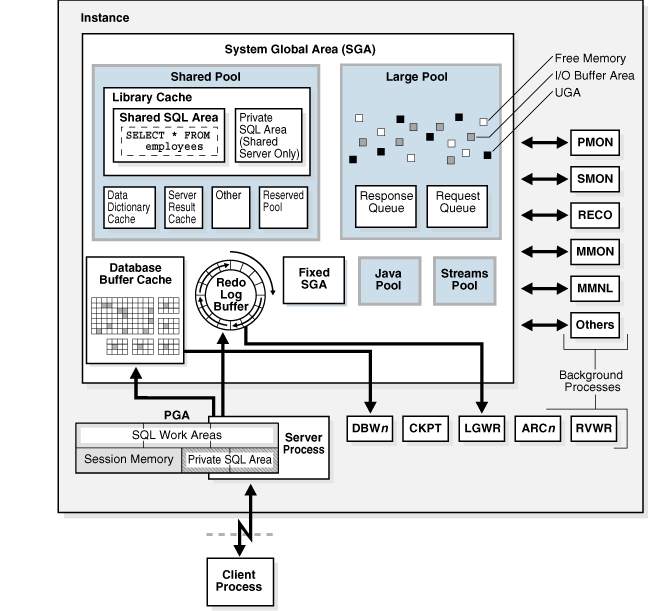
Figure Source: https://docs.oracle.com/cd/E25054_01/server.1111/e25789/process.htm
### 什麼是「鐵道圖」?

Oracle 採用的鐵道圖(railroad diagram)是一種圖形式語法表示式, 說明語法的結構。SQLDeveloper 在背景會檢查輸入語法是否正確, 檢查的依據即是該敘述的鐵道圖。
讀取鐵道圖示,請按照箭頭所示方向從左到右閱讀。命令(command)或者關鍵字(keyword)在方框中大寫表示; 參數在橢圓形框中小寫表示; 標點(punctuation),運算字(operator),定界符(delimiter)和終止符(terminators)在圓圈內表示。
如果是必要的關鍵字及參數, 他們出現在鐵道的主要路徑上:

假如在主要路徑上出現垂直式的清單, 則必須從中選擇一個:

如果是選項的關鍵字及參數, 他們會出現在主要路徑的旁支:

更多詳細的介紹, 參考: [Graphic Syntax Diagrams | Oracle 10gR2](https://docs.oracle.com/cd/B19306_01/server.102/b14200/ap_syntx001.htm)
## Fund Lesson 05 在 PL/SQL 中撰寫 SQL 敘述
### SELECT statement is the Exact Fetch (Select 敘述為精確查詢)
Case: No data found
```sql=
DECLARE
v_fname VARCHAR2(25);
BEGIN
SELECT first_name INTO v_fname
FROM employees WHERE employee_id=99;
DBMS_OUTPUT.PUT_LINE(' First Name is : '||v_fname);
END;
/
```
Compile error message:
```
Error report -
ORA-01403: no data found
ORA-06512: at line 4
01403. 00000 - "no data found"
*Cause: No data was found from the objects.
*Action: There was no data from the objects which may be due to end of fetch.
```
Case: Return too many rows
```sql=
set serveroutput on
DECLARE
v_fname VARCHAR2(25);
BEGIN
SELECT first_name INTO v_fname
FROM employees WHERE first_name like '%a';
DBMS_OUTPUT.PUT_LINE(' First Name is : '||v_fname);
END;
/
```
Error Report:
```
ORA-01422: exact fetch returns more than requested number of rows
ORA-06512: at line 4
01422. 00000 - "exact fetch returns more than requested number of rows"
*Cause: The number specified in exact fetch is less than the rows returned.
*Action: Rewrite the query or change number of rows requested
```
### Merge Statement
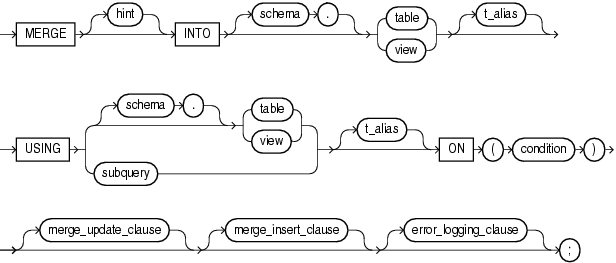
[Merge Statement](https://docs.oracle.com/en/database/oracle/oracle-database/20/sqlrf/MERGE.html#GUID-5692CCB7-24D9-4C0E-81A7-A22436DC968F)
merge::=
merge_update_clause::=
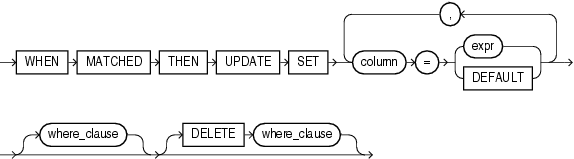
**DELETE where_clause**
Specify the DELETE where_clause to clean up data in a table while populating or updating it. The only rows affected by this clause are those rows in the destination table that are updated by the merge operation.
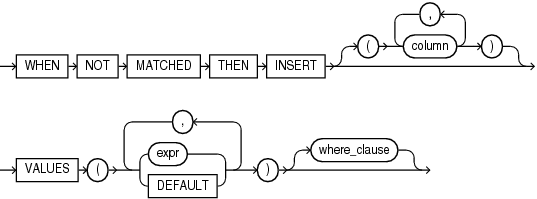
merge_insert_clause::=
範例
人力資源經理決定對部門編號 80 中, 薪水為8000美元或以下的員工應獲得獎金。
那些有進行銷售的人獲得的奬金為 預設 bouns + 其薪水1%。預設的 bouns 為 100.
沒有進行銷售的人將獲得其薪水的 1% 作為獎金。
有進行銷售的員工可從 oe.orders 表格的 sales_rep_id 欄位取得。
建立一個 bounses 表格, 將有銷售的員工的資料加入此表格並預設其奬金為 100.
請用 merge 指令, 產生出員工的獎勵金清單。
```sql=
CREATE TABLE bonuses (employee_id NUMBER, bonus NUMBER DEFAULT 100);
INSERT INTO bonuses(employee_id)
(SELECT e.employee_id FROM employees e, oe.orders o
WHERE e.employee_id = o.sales_rep_id
GROUP BY e.employee_id);
SELECT * FROM bonuses ORDER BY employee_id;
MERGE INTO bonuses D
USING (SELECT employee_id, salary, department_id FROM employees
WHERE department_id = 80) S
ON (D.employee_id = S.employee_id)
WHEN MATCHED THEN UPDATE SET D.bonus = D.bonus + S.salary*.01
DELETE WHERE (S.salary > 8000)
WHEN NOT MATCHED THEN INSERT (D.employee_id, D.bonus)
VALUES (S.employee_id, S.salary*.01)
WHERE (S.salary <= 8000);
```
## Fund Lesson 06 流程控制
### Expression 與 Statement 的差別
Expression
- 運算完成後會傳回一個值
- 不能獨自使用, 必須在 statement 中使用
```sql=
set serveroutput on
declare
v_value number;
begin
dbms_output.put_line('This is statement');
-- Use the expression in the statement
v_value := to_number('10');
-- to_number('10'); -- incorrectly use the expression
dbms_output.put_line('This is value ' || v_value);
end;
/
```
### Simple Case expression 與 Search Case expression
Ref: [Simple Case Expression](https://docs.oracle.com/cd/B19306_01/server.102/b14200/expressions004.htm)
語法:


陷阱:
- Short-circuit evaluation
- 囘傳值的資料形態要一致, 否則會自動轉型成指派符號的左手邊的型態. For both simple and searched CASE expressions, all of the `return_exprs` must either have the same datatype (CHAR, VARCHAR2, NCHAR, or NVARCHAR2, NUMBER, BINARY_FLOAT, or BINARY_DOUBLE) or must all have a numeric datatype.
```sql=
DECLARE
grade CHAR(1);
v_result number;
BEGIN
grade := 'A';
v_result := CASE grade
WHEN 'A' then 'Good' -- 回傳文字被轉換成數字, 轉換失敗
when 'B' then 10 -- 第一個 case 成立后, 其餘的 case 不會評算
ELSE 0
END;
dbms_output.put_line(v_result);
END;
/
```
```
ORA-06502: PL/SQL: numeric or value error: character to number conversion error
ORA-06512: at line 8
```
### Search Case Statement
Ref: https://docs.oracle.com/en/database/oracle/oracle-database/12.2/lnpls/plsql-control-statements.html#GUID-C7CBBE66-5E51-444E-BE92-C23ED662FE4D
```sql=
DECLARE
grade CHAR(1);
BEGIN
grade := 'B';
CASE
WHEN grade = 'A' THEN DBMS_OUTPUT.PUT_LINE('Excellent');
WHEN grade = 'B' THEN
DBMS_OUTPUT.PUT_LINE('You are'); -- THEN 子句后可以放多個 statement.
DBMS_OUTPUT.PUT_LINE('Very Good');
WHEN grade = 'C' THEN DBMS_OUTPUT.PUT_LINE('Good');
WHEN grade = 'D' THEN DBMS_OUTPUT.PUT_LINE('Fair');
WHEN grade = 'F' THEN DBMS_OUTPUT.PUT_LINE('Poor');
ELSE DBMS_OUTPUT.PUT_LINE('No such grade');
END CASE; -- 以 END CASE 結尾
END;
/
```
### For-Loop 的陷阱
In Example 4-18, the FOR LOOP statement tries to change the value of its index, causing an error.
[Example 4-18 FOR LOOP Statement Tries to Change Index Value](https://docs.oracle.com/en/database/oracle/oracle-database/12.2/lnpls/plsql-control-statements.html#GUID-7E1AC17C-83EB-422C-98F4-2F13D9B694F4)
In Example 4-19, a statement outside the FOR LOOP statement references the loop index, causing an error.
[Example 4-19 Outside Statement References FOR LOOP Statement Index](https://docs.oracle.com/en/database/oracle/oracle-database/12.2/lnpls/plsql-control-statements.html#GUID-7E1AC17C-83EB-422C-98F4-2F13D9B694F4)
lower bound 或者 upper bound 不能為 null, 會產生型態轉換失敗
```sql=
BEGIN
FOR i IN 1..null LOOP -- null in the upper bound
DBMS_OUTPUT.PUT_LINE ('Inside loop, i is ' || TO_CHAR(i));
END LOOP;
END;
/
```
Result:
```
ORA-06502: PL/SQL: numeric or value error
ORA-06512: at line 2
06502. 00000 - "PL/SQL: numeric or value error%s"
*Cause: An arithmetic, numeric, string, conversion, or constraint error
occurred. For example, this error occurs if an attempt is made to
assign the value NULL to a variable declared NOT NULL, or if an
attempt is made to assign an integer larger than 99 to a variable
declared NUMBER(2).
```
### Exit statement
```sql=
-- Fund P6-33 Continue statement
set serveroutput on
BEGIN
<<outer_loop>>
FOR outer_counter IN 1..9 LOOP
DBMS_OUTPUT.PUT('outer: ' || outer_counter || ' inner: ');
<<inner_loop>>
for inner_counter in 1..9 loop
DBMS_OUTPUT.PUT (inner_counter || ' ');
exit when inner_counter > outer_counter; -- exit the current (inner) loop
exit outer_loop when inner_counter >= 8; -- exit the outer loop
end loop inner_loop;
dbms_output.put_line('');
END LOOP outer_loop;
END;
/
```
Result:
```
outer: 1 inner: 1 2
outer: 2 inner: 1 2 3
outer: 3 inner: 1 2 3 4
outer: 4 inner: 1 2 3 4 5
outer: 5 inner: 1 2 3 4 5 6
outer: 6 inner: 1 2 3 4 5 6 7
outer: 7 inner: 1 2 3 4 5 6 7 8
```
### Continue statement
Example: continue the current loop
```sql=
-- Fund P6-33 Continue statement
begin
for i in 1..10 loop
DBMS_OUTPUT.PUT_LINE( 'i: ' || i || ' before ' );
continue when i > 5;
DBMS_OUTPUT.PUT_LINE( 'i: ' || i || ' after ' );
end loop;
end;
/
```
Outputs:
```
i: 1 before
i: 1 after
i: 2 before
i: 2 after
i: 3 before
i: 3 after
i: 4 before
i: 4 after
i: 5 before
i: 5 after
i: 6 before
i: 7 before
i: 8 before
i: 9 before
i: 10 before
```
Example: Continue to the outer loop
```sql=
begin
<<beforeTopLoop>>
for outer_counter in 1..10 loop
DBMS_OUTPUT.PUT_LINE('');
DBMS_OUTPUT.PUT( 'outer: ' || outer_counter || ' j: ' );
for inner_counter in 1..10 loop
-- continue the next iteration of the outer loop
continue beforeTopLoop when outer_counter + inner_counter > 5;
DBMS_OUTPUT.PUT( inner_counter || ' ' ); -- skip the statement when i+j > 5
end loop;
end loop;
end;
/
```
Outputs:
```
i: 1 j: 1 2 3 4
i: 2 j: 1 2 3
i: 3 j: 1 2
i: 4 j: 1
i: 5 j:
i: 6 j:
i: 7 j:
i: 8 j:
i: 9 j:
```
### Continue 與 Exit statement 的差異

### 如何在 PL/SQL 中使用 NVL()
NVL 函數可以在 SQL Statement 中使用, 也可以在 PL statement 中使用.
在 SQL Statement 中使用:
```sql=
declare
v_commision number ;
begin
-- employee_id, salary, commission_pct
-- 100, 3137, null
select nvl(salary * commission_pct, 0)
into v_commision
from employees
where employee_id = 100;
dbms_output.put_line(v_commision);
end;
/
```
在 PL statement 中:
```sql=
declare
v_value varchar(20) default null;
begin
v_value := nvl(v_value, '-');
dbms_output.put_line(v_value);
end;
/
```
## Fund Lesson 07 Composite Structure
### Example codes in P7-14
```sql=
SET VERIFY OFF
DROP TABLE retired_emps;
CREATE TABLE retired_emps
(EMPNO NUMBER(4),
ENAME VARCHAR2(10),
JOB VARCHAR2(9),
MGR NUMBER(4),
HIREDATE DATE,
LEAVEDATE DATE,
SAL NUMBER(7,2),
COMM NUMBER(7,2),
DEPTNO NUMBER(2))
/
DECLARE
v_employee_number number:= 124;
v_emp_rec employees%ROWTYPE;
BEGIN
SELECT * INTO v_emp_rec FROM employees
WHERE employee_id = v_employee_number;
INSERT INTO retired_emps(empno, ename, job, mgr, hiredate,
leavedate, sal, comm, deptno)
VALUES (v_emp_rec.employee_id, v_emp_rec.last_name,
v_emp_rec.job_id, v_emp_rec.manager_id, v_emp_rec.hire_date, SYSDATE,
v_emp_rec.salary, v_emp_rec.commission_pct, v_emp_rec.department_id);
END;
/
SELECT * FROM retired_emps;
/
```
使用 `%rowtype` 簡化程式碼
1. 參考 `retired_emp` 表格的記錄結構宣告 RECORD 變數
2. 將查詢欄位放入 RECORD 變數中的欄位
3. 在 INSERT statement 中使用 RECORD 變數
```sql=
--- 改寫
DECLARE
v_employee_number number:= 124;
--- #1
v_ret_emp_rec retired_emps%rowtype;
BEGIN
--- #2 將欄位資料放入 RECORD 變數的欄位中
SELECT EMPLOYEE_ID, LAST_NAME, JOB_ID, MANAGER_ID, HIRE_DATE, HIRE_DATE, SALARY, COMMISSION_PCT, DEPARTMENT_ID
INTO v_ret_emp_rec
FROM employees
WHERE employee_id = v_employee_number;
-- #3
-- 注意: Into 後不可放 (column list); 若使用 column list 會強迫使用非 record 變數的方式執行 insert
--- 因而產生 PL/SQL: ORA-00947: not enough values 的錯誤
INSERT INTO retired_emps
VALUES v_ret_emp_rec;
END;
/
```
### Record structue 在 Select, Insert, Update statement 中的使用

### 使用 FOR Loop 遍歷 Associate Array 中的元素
```sql=
set serveroutput on
declare
type emp_tab_type is table of employees%rowtype
index by pls_integer;
-- declare a variable
emp_tab emp_tab_type;
begin
-- 如何將資料放入 associated array
for emp_id in 100..110 loop
select * into emp_tab(emp_id)
from employees
where employee_id = emp_id;
end loop;
-- Print out emp_id and salary
for emp_id in emp_tab.first..emp_tab.last loop
dbms_output.put_line( emp_tab(emp_id).employee_id || ' ' || emp_tab(emp_id).salary );
end loop;
end;
/
```
### 一個 select statement 查詢多筆記錄並放到 Collection 中 bulk collect into
`Select` 敘述中(statement) 使用 `bulk collect into` 子句可將多筆查詢結果放置 table 型態的變數中,Associated Array 或者 Nested Table 皆可。

Source: [[6]](#r06)
使用 `bulk collect into` 時, Associated Array 的 key 值或者 Nested Table 的索引值為連號。
```plsql=
declare
type sel_emp_table is table of employees%rowtype
index by pls_integer;
v_sel_emp_table sel_emp_table;
begin
-- Select qualified employees
select *
bulk collect into v_sel_emp_table
from employees e
where e.salary <= round((select avg(salary) from employees), 1)
and employee_id <=120;
-- Print out the number of records
dbms_output.put_line('# of records ' || v_sel_emp_table.count);
-- Print the employee id and the salary
for i in v_sel_emp_table.first..v_sel_emp_table.last loop
dbms_output.put_line(v_sel_emp_table(i).employee_id || ' '
|| v_sel_emp_table(i).salary);
end loop;
end;
/
```
### 如何遍歷 Associate Array, 其 key 值為 varchar2
使用 WHILE Loop ; 配合使用 Associated Array 的 `first` 及 `next(current_key)` 方法.
```plsql=
set serveroutput on
declare
type country_tab_type is table of countries%rowtype
index by varchar2(2);
country_tab country_tab_type;
v_idx varchar2(2);
begin
for country_rec in (select country_id, country_name, region_id from countries) loop
country_tab(country_rec.country_id) := country_rec;
end loop;
v_idx := country_tab.first;
while (v_idx is not null) loop
dbms_output.put_line(country_tab(v_idx).country_name);
v_idx := country_tab.next(v_idx);
end loop;
end;
/
```
### Demo codes Chapter 7
```sql=
-- Create a table
drop table emp_leave_rec;
create table emp_leave(
emp_id number,
hire_date date,
leave_date date
);
declare
-- Define a variable with the record type of emp_leave
emp_leave_rec emp_leave%rowtype;
begin
-- select columns to a record variable
select employee_id, hire_date, null
into emp_leave_rec
from EMPLOYEES
where EMPLOYEE_ID = 100;
-- Modify the leave date for the employee
emp_leave_rec.leave_date := SYSDATE();
-- Inser the row the table emp_leave
insert into emp_leave values emp_leave_rec;
commit;
end;
/
select * from emp_leave;
-- Demo: update with the record type variable
declare
-- Define a variable with the record type of emp_leave
emp_leave_rec emp_leave%rowtype;
begin
-- select a row from the table
select *
into emp_leave_rec
from emp_leave
where emp_id = 100;
-- Modify the leave date
emp_leave_rec.leave_date := ADD_MONTHS(sysdate() /*DATE*/,
5 /*INTEGER*/);
-- Update the row to table.
update emp_leave
set row = emp_leave_rec;
commit;
end;
/
select * from emp_leave;
-- Clear the table EMP_LEAVE
truncate table emp_leave;
-- Populate rows into emp_leave table
insert into emp_leave
select employee_id, hire_date, null
from EMPLOYEES
where employee_id <= 150;
select * from EMP_LEAVE;
commit;
-- Associated Array (table)
declare
-- Define an ass. table type.
type type_emp_leave_tab is TABLE OF emp_leave%rowtype
index by PLS_INTEGER;
-- declare variable
emp_leave_tab type_emp_leave_tab;
l_key PLS_INTEGER;
begin
-- Populate rows to table.
for l_id in 100..150 loop
select *
into emp_leave_tab(l_id)
from emp_leave
where emp_id = l_id;
end loop;
-- Output number elements
DBMS_OUTPUT.PUT_LINE(A => '# of elements ' || emp_leave_tab.count /*IN VARCHAR2*/);
-- iterate the table
-- l_key := emp_leave_tab.first;
-- while l_key is not null loop
-- dbms_output.PUT_LINE( emp_leave_tab(l_key).emp_id || ' ' || emp_leave_tab(l_key).hire_date || ' ' || emp_leave_tab(l_key).leave_date);
-- l_key := emp_leave_tab.next(l_key);
-- end loop;
-- Use for loop to iterate the Ass table more easily.
for l_auto_key in emp_leave_tab.first..emp_leave_tab.last loop
dbms_output.PUT_LINE( emp_leave_tab(l_auto_key).emp_id || ' ' || emp_leave_tab(l_auto_key).hire_date || ' ' || emp_leave_tab(l_auto_key).leave_date);
end loop;
end;
/
```
### Nested Table 範例
```sql=!
/**
Demo the nested table. Use it in the schema and PL/SQL blocks
2017/4/9
hychen39@gm.cyut.edu.tw
*/
--
/* Delete the table and its nested table */
drop table stud_scores;
/* Drop the nested table type */
drop type Scores_type;
-- Create a nested table type
create or replace type scores_type as table of number;
/ /* Need to add a forward slash after the line */
-- Create a table with a nested table
-- You need to specify the table name for the nested table using
-- "nested table store as" clause.
-- The name for the nested table is scores_tab
-- You can find the nested table name from DBA_NESTED_TABLES.
-- Yon need the sys privilege to view DBA_NESTED_TABLES.
create table student_scores (s_id number, scores scores_type)
nested table scores store as scores_tab;
/
--
select * from student_scores;
-- Insert values
-- Use the type name as the constructor to create scores_type instances and store them
-- in the scores_tab table
insert into student_scores values (10, scores_type(100, 100));
-- Update
update student_scores
set scores = scores_type(90,100);
commit;
/* A PL/SQL block to calculate the average score*/
set SERVEROUTPUT ON
declare
score_rec student_scores%rowtype;
avg_score number :=0; /* Initialize to 0 to avoid null. */
begin
select * into score_rec from STUDENT_SCORES where S_ID = 10;
/* Use collection methods to iterate the nested table*/
for i in score_rec.scores.first..score_rec.scores.last
loop
avg_score := avg_score + score_rec.scores(i);
end loop;
avg_score := round(avg_score/score_rec.scores.count, 0);
dbms_output.put_line('Avg Score: ' || avg_score);
end;
/
```
### 使用 Nested Table 及 VARRAY type 於 table column 的範例
```sql=
create or replace type t_scores_type as table of number;
create or replace type a_scores_type as varray(10) of number;
drop table student_score ;
create table student_score(s_id number, scores t_scores_type, scores_2 a_scores_type)
nested table scores store as scores_tab;
select * from student_score;
insert into student_score values (1, t_scores_type(100, 90, 80), a_scores_type(100, 100, 90));
rollback;
```
## Fund Lesson 08 Using explicit cursors
### 什麼是 CURSOR
> A cursor is a pointer to a private SQL area that stores information about the processing of a SELECT or data manipulation language (DML) statement (INSERT, UPDATE, DELETE, or MERGE).
Ref: https://blogs.oracle.com/connect/post/working-with-cursors
### 使用 CURSOR FOR Loop 進行 Update
```sql=
-- Demo: 使用 CURSOR FOR Loop 進行 Update
-- 建立測試的表格
drop table emp01;
create table emp01 as
select * from employees;
alter table emp01 add (new_salary number default 0);
select * from emp01 where department_id = 30;
-- 使用 cursor 進行表格資料更新
declare
-- 宣告 cursor
cursor c_emp_cursor(p_dep_id number) is
select * from emp01
where department_id = p_dep_id
for update;
begin
-- 使用 cursor 進行更新
for emp_rec in c_emp_cursor(30) loop
update emp01
set new_salary = salary * 1.05
where current of c_emp_cursor;
end loop;
end;
/
select * from emp01 where department_id = 30;
ROLLBACK;
```
### WHERE CURRENT OF cursor_name 子句範例
```sql=
DECLARE
-- define the cursor
-- use the for update clause to lock rows for updating
cursor c_emp(dept_id number) is
select ...
for update;
v_emp_rec c_emp%rowtype;
v_new_salary employees.salary%type;
BEGIN
-- open cursor with parameter
open c_emp(60);
-- A loop to fetch rows
loop
-- fetch to variable
fetch c_emp into v_emp_rec;
-- Exit condition
exit when c_emp%notfound;
-- Do something
-- update with the current cursor.
-- Cursor 宣告時必須加入 for update 子句
update emp_08 e
...
where current of c_emp;
end loop;
-- close the cursor
close c_emp;
END;
```
## Fund_Lesson 09 Handling Exceptions
[Oracle Database Error Message 11g ](https://docs.oracle.com/cd/E11882_01/server.112/e17766/toc.htm)
[Database Error Messages ORA-00910 to ORA-01497, 11gR2](https://docs.oracle.com/cd/E11882_01/server.112/e17766/e900.htm#sthref454)
### Pragma 編譯控制定向
在電腦科學中,一個編譯控制定向(Pragma)是由程式師嵌入於原始程式碼的資料,以告知編譯器當**如何**編譯。
Ref: https://zh.wikipedia.org/wiki/%E7%B7%A8%E8%AD%AF%E7%A8%8B%E5%BC%8F%E5%AE%9A%E5%90%91
### 不可直接使用 SQLCODE 及 SQLERRM 函數於 SQL 敘述中
You cannot use SQLCODE or SQLERRM directly in a SQL statement
在 PL 敘述中用 SQLCODE 及 SQLERRM:
```sql=
set serveroutput on
DECLARE
err_num NUMBER;
err_msg VARCHAR2(300);
l_a number;
BEGIN
l_a := 1/0;
EXCEPTION
WHEN OTHERS THEN
dbms_output.put_line(SQLCODE ||' ' || SQLERRM);
--INSERT INTO errors VALUES (err_num, err_msg);
END;
/
```
執行結果:
```
PL/SQL procedure successfully completed.
-1476 ORA-01476: divisor is equal to zero
```
建立 `errors` 表格
```sql=
create table errors (err_num number, err_msg varchar2(300));
```
嘗試在 SQL 敘述中使用 SQLCODE 及 SQLERRM 函數
```sql=
DECLARE
l_a number;
BEGIN
l_a := 1/0;
EXCEPTION
WHEN OTHERS THEN
dbms_output.put_line(SQLCODE ||' ' || SQLERRM);
INSERT INTO errors VALUES (sqlcode, sqlerrm);
END;
/
```
執行結果
```
Error report -
ORA-06550: line 8, column 41:
PL/SQL: ORA-00984: column not allowed here
```
SQL Engine 把 `sqlcode`, `sqlerrm` 視為 pseudo column 而報錯。
## PU Lesson 2: Creating Procedures
### The first procedure
`PROCEDURE HELLO_PROCEDURE(p_name VARCHAR2)` 為 subprogram 的規格(Specification)
`begin..end` 為 subprogram 的實作(或者 body)
```sql
create or replace PROCEDURE HELLO_PROCEDURE(p_name VARCHAR2) AS
BEGIN
dbms_output.put_line(q'[Hello ]' || p_name || q'[, I'm from DB.]');
END HELLO_PROCEDURE;
```
Call the procedure from the anonymous block
```sql
set serveroutput on
begin
hello_procedure('John');
end;
```
Executing outputs:
```
Hello John, I'm from DB.
PL/SQL procedure successfully completed.
```
### Example: 在匿名區塊的 declare 節段定義一個 procedure
該程序只能在此匿名區塊中使用。
```sql=
set serveroutput on
declare
v_count number := 0;
procedure print_message(p_count in out number) is
begin
p_count := p_count + 1;
dbms_output.put_line('Print counting ' || v_count );
end;
begin
for i in 1..5 loop
print_message(v_count);
end loop;
end;
/
```
Executing outputs:
```
Print counting 0
Print counting 1
Print counting 2
Print counting 3
Print counting 4
```
### Example: A parameter with IN mode is read only.
```sql=
-- parameter IN mode
create or replace procedure proc1(p_1 number) is
begin
p_1 := P_1 + 10;
dbms_output.put_line('The value of p_1 is : ' || p_1);
end;
/
set serveroutput on
exec proc1(10);
```
Outputs:
```
LINE/COL ERROR
--------- -------------------------------------------------------------
3/5 PL/SQL: Statement ignored
3/5 PLS-00363: expression 'P_1' cannot be used as an assignment target
Errors: check compiler log
```
### Example: The actual parameter for the formal parameter with IN or IN OUT mode should be a variable
```sql=
create or replace procedure square(p_1 number, p_2 out number) is
BEGIN
p_2 := p_1 * p_1;
end;
/
set serveroutput on
declare
v_2 number;
begin
square(10, 'a');
dbms_output.put_line('The value for the v_2 is: ' || v_2);
end;
/
```
Outputs
執行期錯誤
```
Error report -
ORA-06550: line 4, column 18:
PLS-00363: expression 'TO_CHAR' cannot be used as an assignment target
```
### Demo: Use host variables as the actural parameters
```sql=
CREATE OR REPLACE PROCEDURE query_emp
(p_id IN employees.employee_id%TYPE,
p_name OUT employees.last_name%TYPE,
p_salary OUT employees.salary%TYPE) IS
BEGIN
SELECT last_name, salary INTO p_name, p_salary
FROM employees
WHERE employee_id = p_id;
END query_emp;
/
```
```sql=
variable b_name varchar2(25)
variable b_salary number
exec query_emp(171,:b_name, :b_salary);
print b_name b_salary
```
Outputs
```
B_NAME
--------------------------------------------------------------------------------
Smith
B_SALARY
----------
7400
```
### subprogram 的參數預設值使用的例子
```sql
APEX_DEBUG.INFO (
p_message IN VARCHAR2,
p0 IN VARCHAR2 DEFAULT NULL,
p1 IN VARCHAR2 DEFAULT NULL,
p2 IN VARCHAR2 DEFAULT NULL,
p3 IN VARCHAR2 DEFAULT NULL,
p4 IN VARCHAR2 DEFAULT NULL,
p5 IN VARCHAR2 DEFAULT NULL,
p6 IN VARCHAR2 DEFAULT NULL,
p7 IN VARCHAR2 DEFAULT NULL,
p8 IN VARCHAR2 DEFAULT NULL,
p9 IN VARCHAR2 DEFAULT NULL,
p_max_length IN PLS_INTEGER DEFAULT 1000 );
```
呼叫時,只有傳入非預設值的引數即可,例如:
```sql
apex_debug.info('Important: %s', 'fnord');
```
上述例子只傳入了 `p_message` 及 `p0` 兩個參數的引數值。其餘的參數皆使用預設值。
ref: https://docs.oracle.com/en/database/oracle/apex/22.1/aeapi/INFO-Procedure.html#GUID-C8E6E25E-8211-49F8-9110-33F074E68927
### Demo: handling exceptions in the procedure
```sql=
create or replace procedure square (p_1 number, p_2 out number) is
e_invalid_p1 exception;
begin
if (p_1 > 0) then
p_2 := p_1 * p_1;
else
raise e_invalid_p1;
end if;
exception
when others then
dbms_output.put_line('p_1 is not a valid number');
end;
/
declare
v_1 number := 0;
begin
square(5, v_1);
dbms_output.put_line ('Value of v_1: ' || v_1);
square(-1, v_1);
dbms_output.put_line ('Value of v_1: ' || v_1);
square(10, v_1);
dbms_output.put_line ('Value of v_1: ' || v_1);
exception
when others then
dbms_output.put_line('Invalid p1 occurred');
end;
```
Outputs
```
Value of v_1: 25
p_1 is not a valid number
Value of v_1:
Value of v_1: 100
```
### 專有名詞
formal parameter 形式參數, 在 spec 中宣告的參數
actual parameter 實際參數, 呼叫 subprogram 時, 實際提供的參數值。
## PU Lesson 03: Creating Functions 建立預儲函數
### 預儲函數的副作用(side-effects)
預儲函數可以在 SQL statement 中使用, 但有其規範, 不得違反以下規則:
#### 違反 1: 當預儲函數在 select 敘述中被呼叫時,該函數執行 DML 操作
建立以下的函數:
```sql=
create or replace function update_salary(p_emp_id employees.employee_id%type)
return number is
v_rand_salary number;
begin
v_rand_salary := round(dbms_random.value * 10000, 0);
update employees
set salary = v_rand_salary
where employee_id = p_emp_id;
return v_rand_salary;
end update_salary;
```
執行以下的 SQL statement
```sql
select last_name, salary, update_salary(100) "Update"
from employees
```
錯誤訊息:
```
ORA-14551: cannot perform a DML operation inside a query
ORA-06512: at "HR.UPDATE_SALARY", line 6
14551. 00000 - "cannot perform a DML operation inside a query "
*Cause: DML operation like insert, update, delete or select-for-update
cannot be performed inside a query or under a PDML slave.
*Action: Ensure that the offending DML operation is not performed or
use an autonomous transaction to perform the DML operation within
the query or PDML slave.
```
#### 違反 2: 在 DML 敘述中呼叫預儲函數時,此函數不能查詢此 DML 敘述正在使用的表格 T, 也不能對 T 執行 DML
An UPDATE or DELETE statement on a table T cannot query or contain DML on the same table T
建立以下函數:
```sql=
create or replace function max_dept_salary (p_dept_id departments.department_id%type)
return number is
v_max_salary number;
begin
select max(salary) into v_max_salary
from employees
where department_id = p_dept_id;
return v_max_salary;
end max_dept_salary;
```
執行以下的敘述
```sql=
update employees
set salary = max_dept_salary(80)
where employee_id = 100;
```
1. DML 敘述更新 employees 表格。
2. 函數 max_dept_salary 不能同時查詢 employees 表格。
錯誤訊息:
```
Error report -
ORA-04091: table HR.EMPLOYEES is mutating, trigger/function may not see it
ORA-06512: at "HR.MAX_DEPT_SALARY", line 5
```
#### 違反 3: 被呼叫的預儲函數終止交易
建立以下的函數
```sql=
create or replace FUNCTION create_msg_table
RETURN NUMBER
AS
BEGIN
DECLARE
v_count NUMBER;
BEGIN
SELECT COUNT(*) INTO v_count FROM user_tables WHERE table_name = 'MSGTABLE';
IF v_count > 0 THEN
-- 執行 DDL,終止目前交易,產生一新的交易
EXECUTE IMMEDIATE 'drop table MSGTABLE';
END IF;
END;
-- 執行 DDL,終止目前交易,產生一新的交易
EXECUTE immediate 'create table MSGTABLE (id integer, msg varchar2(255))';
RETURN 1;
END CREATEMSGTABLE;
```
執行 SQL 敘述:
```sql=
select last_name, salary, create_msg_table from employees;
```
錯誤訊息:
```
ORA-14552: cannot perform a DDL, commit or rollback inside a query or DML
ORA-06512: at "HR.CREATEMSGTABLE", line 10
14552. 00000 - "cannot perform a DDL, commit or rollback inside a query or DML "
*Cause: DDL operations like creation tables, views etc. and transaction
control statements such as commit/rollback cannot be performed
inside a query or a DML statement.
*Action: Ensure that the offending operation is not performed or
use autonomous transactions to perform the operation within
the query/DML operation.
```
#### 違反 4: 函數回傳型態不屬於 SQL Engine 內的型態
建立以下的函數
```sql
create or replace function is_manager(p_emp_id number) return boolean
is
v_is_manager number;
begin
select 1
into v_is_manager
from employees
where employee_id in (select manager_id from employees) and employee_id = p_emp_id;
case v_is_manager
when 1 then return true;
else return false;
end case;
end;
/
```
- `boolean` 型態只能於用 PL Enging.
執行 SQL:
```sql
select employee_id, is_manager(employee_id)
from employees;
```
錯誤訊息:
```
ORA-06552: PL/SQL: Statement ignored
ORA-06553: PLS-382: expression is of wrong type
```
## PU Lesson 04 Packages
### Database PL/SQL Packages and Types Reference
[UTL_MAIL](https://docs.oracle.com/en/database/oracle/oracle-database/12.2/arpls/UTL_MAIL.html): a utility for managing email which includes commonly used email features, such as attachments, CC, and BCC.
### 套件內變內數有效範圍(Scope)

Src: P4-8 in Prog Unit 1
### Demo: packaged cursor remains open until you close it or you disconnect from the session.
```sql=
CREATE or replace PACKAGE emp_stuff AS
-- Declare cursor spec
CURSOR c1 RETURN employees%ROWTYPE;
END emp_stuff;
/
CREATE or replace PACKAGE BODY emp_stuff AS
CURSOR c1 RETURN employees%ROWTYPE
IS
-- Define cursor body
SELECT * FROM employees WHERE salary > 2500;
END emp_stuff;
/
set serveroutput on
DECLARE
emp_rec employees%ROWTYPE;
BEGIN
if not emp_stuff.c1%isopen then
OPEN emp_stuff.c1;
end if;
FETCH emp_stuff.c1 INTO emp_rec;
DBMS_OUTPUT.PUT_LINE (emp_rec.employee_id || ' ' || emp_rec.salary);
END;
/
```
### Package Cursor
[Define and use cursors in a package](/BMmYSHQcSs-Z62qeeoFTnA)
## PU Lesson 05: Using Packages
### Illegal Procedure Reference
程序 `calc_rating` 未宣告即使用, 產生編譯錯誤訊息 `not declared in this scope`:

```sql=
create or replace PACKAGE BODY comm_pkg as
pv_max_comm number;
-- private function
function validate (p_comm number) return boolean is
begin
select max(commission_pct) into pv_max_comm
from employees;
-- illegal procedure reference
calc_rating;
return (p_comm between 0 and pv_max_comm);
end;
PROCEDURE rest_comm AS
BEGIN
-- TODO: Implementation required for PROCEDURE COMM_PKG.rest_comm
NULL;
END rest_comm;
procedure calc_rating is
begin
null;
end calc_rating;
end comm_pkg;
```
使用 Forward Declaration解決此問題.
### P5-19 ~ 5-21 Demo Codes
```sql=
-- Demo codes @ Program Unit P5-19
-- Curs_Pkg
create or replace package curs_pkg is
-- open cursor
procedure open_cur;
-- Fetch records and print out their results.
-- p_n: 一次要抓回的筆數
function next_recs(p_n number := 1) return boolean;
-- close the cursor
procedure close_cur;
end curs_pkg;
/
create or replace package body curs_pkg is
-- Define the private cursor
cursor cur_c is
select employee_id from employees;
-- open cursor
procedure open_cur is
begin
if not cur_c%isopen then
open cur_c;
end if;
end open_cur;
-- Fetch next record
function next_recs(p_n number := 1) return boolean is
v_emp_id employees.employee_id%type;
begin
for i in 1..p_n loop
fetch cur_c into v_emp_id;
exit when cur_c%notfound;
dbms_output.put_line('Id: ' || v_emp_id );
end loop;
return cur_c%found;
end next_recs;
-- close the cursor
procedure close_cur
is begin
if cur_c%isopen then
close cur_c;
end if;
end close_cur;
end curs_pkg;
/
-- Demo the Package State Persistency
set SERVEROUTPUT ON
exec curs_pkg.open_cur;
declare
v_more boolean := curs_pkg.next_recs(3);
begin
if not v_more then
curs_pkg.close_cur;
end if;
null;
end;
/
```
## 其它資源
[解決ORA-00054資源正忙的問題](https://www.796t.com/content/1553194576.html)
查看那些用戶產生了鎖
```sql=
select username,sid,serial#,logon_time from v$locked_object,v$session where v$locked_object.session_id=v$session.sid;
```
根據 SID 查看SQL語句
```sql=
select sql_text
from v$session, v$sqltext_with_newlines
where
decode(v$session.sql_hash_value, 0, prev_hash_value, sql_hash_value)
= v$sqltext_with_newlines.hash_value
and
v$session.sid=&sid
order by piece;
```
Kill session:
```sql=
--- 'sid, serial#'
alter system kill session '228,574';
```
 Sign in via Google
 Sign in via Facebook
 Sign in via X(Twitter)
 Sign in via GitHub
 Sign in via Dropbox
 Sign in with Wallet
Connect another wallet
Sign in with Wallet
Connect another wallet