# 林納斯 Project 2 Cheatsheat
{%hackmd /vgoFfe-PQTioGuCz7JDuJA %}
## Cache Table
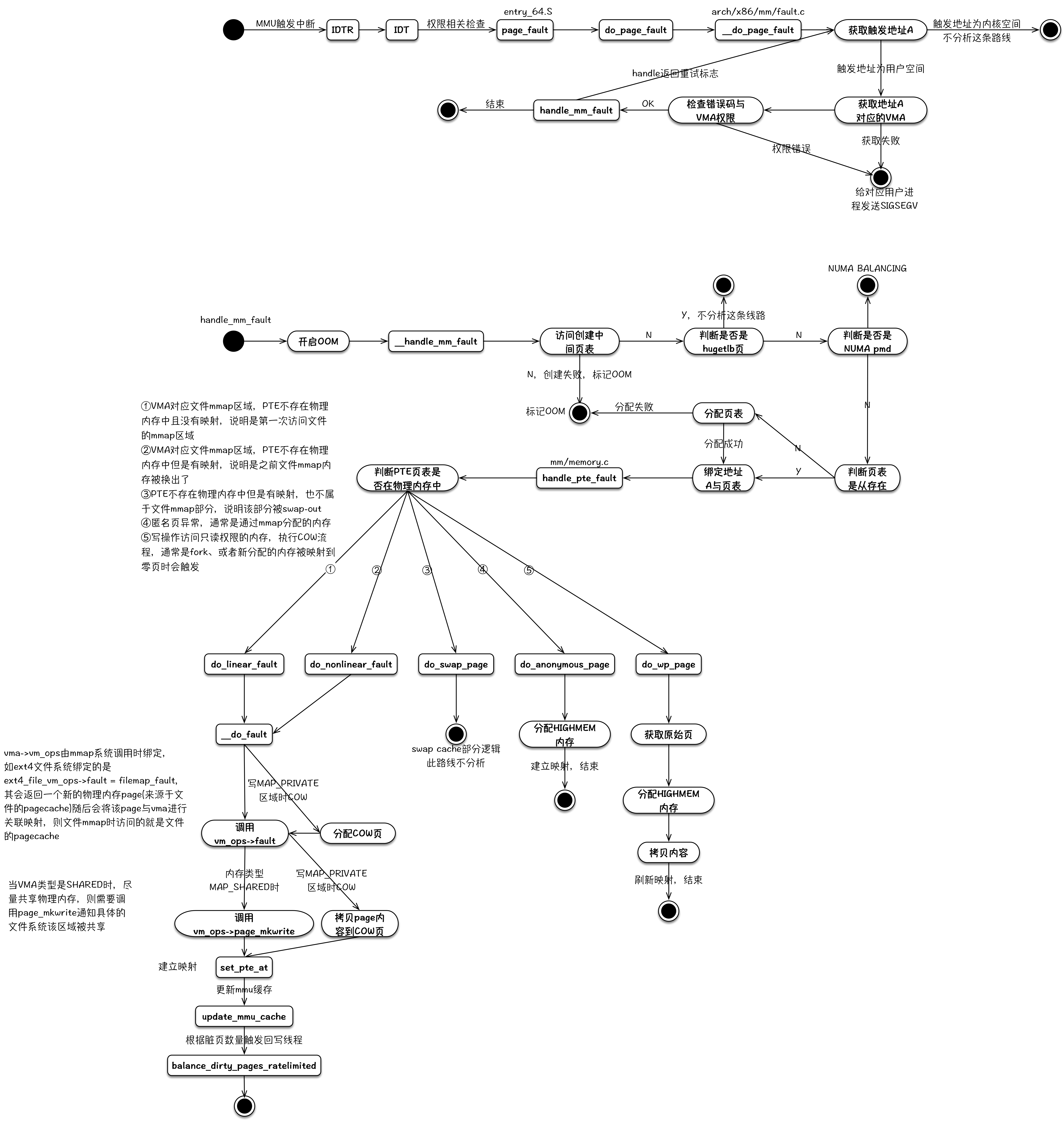
**page fault 3 situations**
> https://elixir.bootlin.com/linux/v3.10.104/source/arch/x86/mm/fault.c#L999
> 
> https://cloud.tencent.com/developer/article/1459526
> 當 process 在 cache / memory 中的 page table 找不到想要的 page fault 就會發出 page fault
> 找不到的原因:
> 1. 地址非法(`find_vma(mm, address) == NULL`)
> -> invalid: segmentation fault (SIGSEGV)
> 2. 沒有存取權限
> -> invalid: segmentation fault (SIGSEGV)
> 3. 該地址對應的物理位置還未分配
> (`handle_mm_fault()`, [`handle_pte_fault()`](https://elixir.bootlin.com/linux/v3.10.104/source/mm/memory.c#L3716))
> ```python=
> # pte_present(): PTE 不存在在實體記憶體
> # pte_none(): PTE 未映射、未訪問過
> # vma->vm_ops: VMA 已文件映射 == !vma_is_anonymous()
> # pte_file(): PTE 為文件映射
> # pte_numa(): NUMA
> # flags & FAULT_FLAG_WRITE: 寫操作
> # pte_write(): PTE 有寫權限
>
> if !pte_present(entry):
> if pte_none(entry):
> if vma->vm_ops: return do_linear_fault()
> else: return do_anonymous_page()
> else:
> if pte_file(entry): return do_nonlinear_fault()
> else: return do_swap_page()
> elif pte_numa(entry): return do_numa_page()
> elif flags & FAULT_FLAG_WRITE:
> if !pte_write(entry): return do_wp_page()
> else entry = pte_mkdirty(entry)
> ```
> 1. `do_linear_fault()`:第一次訪問文件映射頁 (minor)
> 2. `do_anonymous_page()`:第一次訪問匿名頁 (minor)
> 3. `do_nonlinear_fault()`:文件映射頁已被換出 (major)
> 4. `do_swap_page()`:匿名頁已被換出 (major)
> 5. `do_wp_page()`:COW (minor)
<!-- > 1. PTE 不存在(have not mapped) (`pte_none()`)
> - Anon page - lazy allocation
> Minor(soft) page fault (`do_anonymous_page()`)
> - Shared page
> Minor(soft) page fault
> - (not anon) Page cache - swapped out
> Major(hard) page fault
> 2. PTE 存在
> - Anon page - swapped out
> Major(hard) page fault (`do_swap_page()`) -->
**mm_struct**
> https://elixir.bootlin.com/linux/v3.10.104/source/include/linux/mm_types.h#L325
> https://ithelp.ithome.com.tw/articles/10274922
> 每個 process 都獨立擁有一個 mm_struct (called `mm` on task_struct)
> `mmap` : 行程裡面所有的 VMA (virtual memory area) 會形成一個單向的鏈表,mmap是這個鏈表的 head。
> `pgd` :指向行程的第一層頁表 (see `page`)。
> `mm_users` :紀錄正在使用該行程地址空間的行程數目、
> `mm_count` : mm_struct 有多少個行程正在使用,像是 fork()後,子行程會與父行程共用位址,當 `mm_user` 為 0 ,`exit_map()` 會刪除所有 mapping 並且把所有 page table 消除;mm_count 確保 mm_struct 能夠在沒有任何 reference 情況下安全刪除。
> `mm_rb` : VMA紅黑樹的根節點。
> `get_unmapped_area` :判斷虛擬記憶體是否還有足夠的空間,這個函數會返回一段未使用過的空間的起始位址。
> `mmap_base` : 指向mmap區域的起始地址。
> `mmap_sem` :用來保護行程地址空間VMA的一個鎖。
> `mmlist` : 所有 mm_struct會連結的一個雙向鏈表,該鏈表的頭是 init_mm。
> `start_code`、`end_code` : 程式段的起始地址與結束地址。
> `start_data` `end_data`: 資料段的起始地址與結束地址。
> `start_brk`, `brk`:目前heap的起始位址與結束位址(VMA)。
> `total_vm` : 已經使用的行程空間的總和。
**fork: how many page table were added**
> it depends on how many memory the parent process has allocated
> during the fork invocation, it will copy the entire paging tree.
> Once the child attempts to write to any page, it will trigger a page fault and OS will allocate a page frame. (:cow:)
> sidenote 1: `vfork` 相比 `fork` 省去了 copy page table 的動作
> sidenote 2: https://dl.acm.org/doi/10.1145/3447786.3456258 proposed a lazy-loading approach of ***fork***
<img id="fork" src="https://raw.githubusercontent.com/JCxYIS/fork/main/%EF%BD%86%EF%BD%8F%EF%BD%92%EF%BD%8B.png" />
**sleep**
> https://man7.org/linux/man-pages/man3/sleep.3.html
> On Linux, `sleep()` is implemented via `nanosleep(2)`.
> `sleep()` causes the calling thread to sleep:
> 1. until the number of real-time seconds specified in seconds have elapsed
> 2. until a signal arrives which is not ignored.
> `SIGCHLD`: Child send this to parent when child stop or terminate (state change). Parent ignored in default.
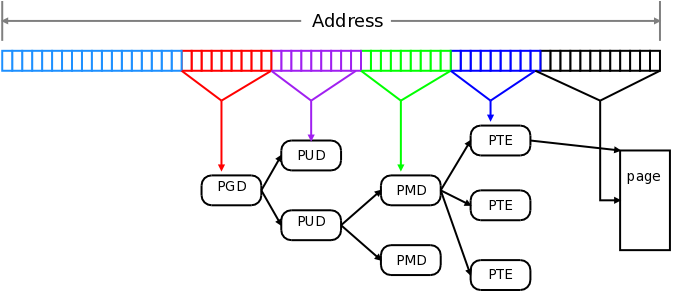
**page**
> :blue_book:
> 記憶體管理的最小單位page,在Linux當中是 4 KB (`getconf PAGE_SIZE`)。
**signal**
> https://b8807053.pixnet.net/blog/post/30943435-linux-%E4%BF%A1%E8%99%9Fsignal%E8%99%95%E7%90%86%E6%A9%9F%E5%88%B6
> 用來通知進程發生了非同步事件,可以是between process或kernel&process
> https://man7.org/linux/man-pages/man2/signal.2.html
> `signal()` sets the disposition of the signal `signum` to `handler`, which is either `SIG_IGN`, `SIG_DFL`, or the address of a programmer-defined function (a "signal handler").
> If the signal `signum` is delivered to the process, then one of the following happens:
> * If the disposition is set to `SIG_IGN`, then the signal is ignored.
> * If the disposition is set to `SIG_DFL`, then the default action associated with the signal (see signal(7)) occurs.
> * If the disposition is set to a function, then first either the disposition is reset to `SIG_DF`L, or the signal is blocked (see Portability below), and then handler is called with argument `signum`. If invocation of the handler caused the signal to be blocked, then the signal is unblocked upon return from the handler.
> The signals `SIGKILL` and `SIGSTOP` cannot be caught or ignored.
> sidenote:
> The effects of `signal()` in a multithreaded process are unspecified.
> According to POSIX, the behavior of a process is undefined after it ignores a `SIGFPE`, `SIGILL`, or `SIGSEGV` signal that was not generated by `kill(2)` or `raise(3)`. Integer division by zero has undefined result. On some architectures it will generate a `SIGFPE` signal. (Also dividing the most negative integer by -1 may generate `SIGFPE`.) Ignoring this signal might lead to an endless loop.
**:cow: Copy On Write :cow:**
> https://hackmd.io/@linD026/Linux-kernel-COW-Copy-on-Write
> If a resource is duplicated but not modified, it is not necessary to create a new resource; the resource can be shared between the copy and the original. Modifications must still create a copy
> COW機制:實作上多個 process 使用相同資料時,在一開始只會 loading 一份資料,並且被標記成 read-only 。當有 process 要寫入時則會對 kernel 觸發 page fault ,進而使得 page fault handler 處理 copy on write 的操作,page fault handler會copy唯讀資料並更新process的PTE。


---
:::info
## BSQTAA
:::
<!--------------------------------------------------->
<style>
.markdown-body
{
max-width: 1024px !important;
}
#fork {
animation: fork 1s infinite linear;
/* position: absolute; */
margin: auto;
max-width: 40%;
max-height: 40%;
z-index: 100;
/* width: 50%; */
translate: 48.763%;
top: 20%;
left: 0;
right: 0;
background-color: transparent
}
@keyframes fork {
0% {
transform: rotate(0) scale(0.7);
filter: drop-shadow(16px 16px 20px red) blur(0);
/* translate: 0%; */
}
50% {
transform: rotate(180deg) scale(1.48763);
filter: drop-shadow(16px 16px 20px blue) blur(3px) invert(70%);
}
100% {
transform: rotate(360deg) scale(0.7);
filter: drop-shadow(16px 16px 20px red) blur(0);
/* translate: 0%; */
}
}
</style>
 Sign in via Google
 Sign in via Facebook
 Sign in via X(Twitter)
 Sign in via GitHub
 Sign in via Dropbox
 Sign in with Wallet
Connect another wallet
Sign in with Wallet
Connect another wallet