---
tags: Kermadec Class, Machine Learning, Numpy Broadcast, Numpy Reshape, Assert, Random Seed, kwargs, REGEX, Python Decorator, Big-O Notation, Time Complexity, Recursion, OOP, Oriented-Object Programming, Class, SQLite
---
Machine Learning Week 2
=
# Day 1:
## 1. Faster way to create lists or dictionaries:
Faster in performance.
Use comprehension syntax:

**This way does not work for tuple** because creating generator use the same syntax.

## 2. Global vs Local variable:
`i` in the loop is a local variable if `i` was declared as a global variable before the loop.
## 3. Generator object:
**Generator** is an object in Python, is used to create a **list with huge number of elements**. The list won't be created at once, the list will only be created when it is triggered in a function or command.
**Similar to:**
* **range()**: but type(range()) is **range**
* **get random numbers**: the computer won't create a list of random numbers before hand, it will only generate a random nummber based on a random number generator algo.
Creating a list requires **memory**.
**Generator object** does not run until the object is in a function or command, so that it **won't require much memory**.
Put `yield` in a function, it will become a generator.


`yield`: add a value in a generator and return the value only when the function containing `yield` is called in `loop`.
`yield` must be in a function, similar to `return`.
`next()`: give out the next element then delete the element from the "list" in the generator objiect.
`loop`: handle `StopIteration:` error, that is how a `loop` know when/where to stop.
## 4. Assert:
Similar to `try except`, but only includes comparing the result from function with the desired result.
If the output of function is wrong, return error message.
`asser <function or anything>, "<message>"`
**Purpose:** Test function with multiple output with loop. Usually use print and human eyeball to compare the output and desired output.
## 5. Random:
`random.seed()`: This ensures we get the same results every time when random.random() run.
Random number in python is generated based on a seed number, each unix second will hold a "random" number based on a formula (algo).
## 6. Function arguments:
```
def f(*args, **kwargs):
print('args = ', args)
print('kargs = ', kwargs)
result = []
for name in args:
result.append('Hi ' + name)
for key in kwargs:
print(key, kwargs[key])
return result
```
`*args`: store arguments as **a tuple**, "args" is only a variable name, it can be *x, *y, *z...
`**kwargs`: **keyword arguments**, store arguments as **a dictionary**, "kwargs" is only a variable name, it can be **x, **y, **z...
```
1,2,3 => args = [1,2,3]
"coder" = True, "school"=False => kwargs = {"coder":True, "school":False}
```
***The asterisk (\*)*** performs argument unpacking in a tuple, which uses the elements of pairs as individual arguments to zip.
***The double asterisk (\*)*** performs argument unpacking in a dictionary.
## 7. Assign a part of a list into a variable:
* `c` will store the rest of the list

* output of tuple and list is the same

## 8. How not to change the original list/dict after a function/command:
Use `.copy()`

**Explaination:**
List, Dictionary are passed in a function by their address value (addressed block of memory)!
Passing List, Dictionary in a function, then the original List, Dictionary will be changed after the function run.
## 9. Regular expression - REGEX:
Use `re` library in python to use REGEX function:
* re.search()
* re.match()
* re.sub()
* re.findall(): find all matched groups
* ...
|Character classes|Meaning
|--- |--- |
|.|any character except newline
|\w \d \s|word, digit, whitespace
|\W \D \S|not word, digit, whitespace
|[abc]|any of a, b, or c
|[^abc]|not a, b, or c
|[a-g]|character between a & g|
|Anchors|Meaning|
|--- |--- |
|^abc$|start / end of the string
|\b|word boundary
|Escaped characters|Meaning|
|--- |--- |
|\. \* \\|\ is used to escape special chars. \* matches *|
|\t \n \r|tab, linefeed, carriage return|
|Quantifiers & Alternation|Meaning|
|--- |--- |
|a* a+ a?|0 or more a, 1 or more a, 0 or 1 a|
|a{5} a{2,}|exactly five, two or more|
|a{1,3}|between one & three|
|a+? a{2,}?|match as few as possible (non-greedy)|
|[cat\|dog]|match 'cat' or 'dog'|
| Character | Description | Example |
|------------|-----------|------------|
| ? | Match zero or one repetitions of preceding | "ab?" matches "a" or "ab" |
| * | Match zero or more repetitions of preceding | "ab*" matches "a", "ab", "abb", "abbb"... |
| + | Match one or more repetitions of preceding | "ab+" matches "ab", "abb", "abbb"... but not "a" |
| {n} | Match n repetitions of preceding | "ab{2}" matches "abb" |
| {m,n} | Match between m and n repetitions of preceding | "ab{2,3}" matches "abb" or "abbb" |
## Bonus: Python Decorators
```
import functools
def my_decorator(func):
@functools.wraps(func) # wrap around the function `func`. Function `wrapper` will run with the function `func` even though only function `func` was called.
def wrapper(*args, **kwargs):
print("Something is happening before the function is called.")
func(*args, **kwargs)
print("Something is happening after the function is called.")
return wrapper
@my_decorator
def greeting(name):
"""The docstring of greeting"""
print("Hi", name)
greeting('Minh')
```
`@functools.wraps(func)`: wrap around the function `func`. Function `wrapper` will run with the function `func` even though only function `func` was called.
Decorator là một hàm nhận tham số đầu vào là một hàm khác và mở rộng tính năng cho hàm đó mà không thay đổi nội dung của nó.
Đây cũng được gọi là metaprogramming - siêu lập trình, hiểu đơn giản là "Code sinh ra code", nghĩa là mình viết một chương trình và chương trình này sẽ sinh ra, điều khiển các chương trình khác hoặc làm một phần công việc ngay tại thời điểm biên dịch.
# Day 2
## 1. Big-O Notation - Time Complexity:
Measure performance of the code: Running Speed.
* Constant time: $O(1)$: Running Speed does not depend on the number of input/data size.
* Linear time: $O(n)$: List search (compare 1 by 1)
* Quadratic: $O(n^2)$: Loop in loop
* Exponential: $O(2^n)$
* Logarithmic: $O(log(n))$: List search with breaking the list in half ~ Binary Search.
* Linearithmic: $O(nlog(n))$
`loop` makes things slow -> Use `loop` wisely.
The larger the input/data size, the slower the speed might be.
**Example:**
* Dictionary has **Constant speed**.
a = {1:'a',
2:'b',
...
99: 'asvasa'
100:'abbaaas'
}
* List has **Linear speed**.
a = [1, 2, 3, 4,..., 99, 100]
Basically, in math it is a "lim" (limit) thing with n -> $\infty$.

## 2. Recursion:
Like a for/while loop running until at least 1 loop return a **solid value** (which is the end of the loop, the **base end**), then revert the loop to the start using the value returned in the "next" loop.

**Must have a base end** (a case that the function will return a value), or else the loop will be infinity loop.
**WARNING!**: Recursion might be very **slow** (can go up to 0(2^n) or more) because
* **1 value might be re-calculated** multiple time in the Recursion loop;
* And the loop must **go through all occurences**.
### Trick to make Recursion fast:
**Dynamic Programming**
Use dictionary to store the calculated values in loops.
## 3. Helper functions:
* timer
* debug
```
import functools
import time
import random
def timer(func):
"""Print the runtime of the decorated function"""
@functools.wraps(func)
def wrapper_timer(*args, **kwargs):
start_time = time.perf_counter() # 1
value = func(*args, **kwargs)
end_time = time.perf_counter() # 2
run_time = end_time - start_time # 3
print(f"Finished {func.__name__!r} in {run_time:.6f} secs")
return value
return wrapper_timer
def debug(func):
"""Print the function signature and return value"""
@functools.wraps(func)
def wrapper_debug(*args, **kwargs):
args_repr = [repr(a) for a in args] # 1
kwargs_repr = [f"{k}={v!r}" for k, v in kwargs.items()] # 2
signature = ", ".join(args_repr + kwargs_repr) # 3
print(f"Calling {func.__name__}({signature})")
value = func(*args, **kwargs)
print(f"{func.__name__!r} returned {value!r}") # 4
return value
return wrapper_debug
@timer
def waste_some_time(num_times):
for _ in range(num_times):
sum([i**2 for i in range(10000)])
```
## 4. Basic algorithm:
Animation describing basic algorithm.
`sorted()` use Quick Sort algo.
https://visualgo.net/en/sorting

## 5. OOP (Object-Oriented Programming):
A **Class** must have `def __init__(self, *args):`, except for children Class.
A function inside a Class is called "method".
Every method inside a Class must have `self` as an argument. First argument of all methods is pointing at `self`.
**`self` is only a variable name.**

```
# The most simple example of OOP
class Animal:
def __init__(self, name, age):
# magic method
# attribute: name and age
self.name = name
self.age = age
# Every method inside a Class must have `self` as an argument
def make_noise(self,sound):
# regular method: make_noise
print(sound)
def __repr__(self):
return f"Hi, my name is {self.name} and I am {self.age} year(s) old"
```
```
a = Animal('kiki',3)
b = Animal('lulu',5)
# a, b object created from Class Animal
```
aka a, b = `self` in `def __init__(self, *args):`
### Method:
#### Magic Method:
Magic method is pre-defined functions in python.
Only a list of magic function can be used: https://rszalski.github.io/magicmethods/
`dir(<Class name>)` to list all magic method can be used in the class.
`a = Animal.__init__('kiki',3)`
No need to do the above because `__init__` is a magic function. Python treat magic function differently.
Any function name that have "__" in front and back will be magic function.
#### Class Method vs Regular Method:
**Class Method** `@classmethod`: class method does not need an object to run. No "self" needed in inside the method, but still need "self" in the argument list.
**Regular method** is normal method that need object to run. Other names: "instance method".
```
@classmethod # class method does not need an object to run.
# No need to mention "self" in inside the method, but still need "self" in the argument list.
def is_mammal(cls): # first argument will always point to the object.
return True
# =======================================================
# Magic methods
def __repr__(self):
return f"Hi, my name is {self.name} at age of {self.age}"
def __eq__(self, other): # "=="
return self.age == other.age
def __add__(self, other): # "+"
return self.age + other.age
def __gt__(self, other): # ">"
return self.age > other.age
def __lt__(self, other): # "<"
return self.age < other.age
# Magic methods
# =======================================================
def is_smaller(self, other):
# Regular method, aka normal function in a Class
return self.age < other.age
```
### Class inheritance:
A children class can inherit from a parent class, which mean a children class can use everything from a parent class and append/extend it.
`class children_class(parent_class):`
```
class Dog(Animal):
def __init__(self, name, age, weight):
super().__init__(name, age) # Animal(name, age): re-use attribute from class Animal
self.weight = weight # New attribute for class Dog
def make_noise(self):
print("Gau Gau")
def __repr__(self):
return super().__repr__() + " and I am a dog"
# update __repr__
class Cat(Animal):
def __init__(self, name, age, weight):
super().__init__(name, age)
self.weight = weight
def make_noise(self):
print("Meo Meo")
@classmethod
def number_of_lives(self):
return 9
```
**Dog** class can call any method from **Animal** class, **Animal** class cannot call any method in **Dog** class.
In a children class, when want to update a magic method, must use super().<magic method> inside the method in children class
`super().<magic method>` only call the class from the nearest upper class.
`super().super().<magic method>` only call the class from the second nearest upper class.
# Day 3
## Numpy
NumPy is constrained to arrays that all contain **the same type**. If types do not match, NumPy will upcast if possible (here, integers are up-cast to floating point)
All data in numpy is stored in 1 big memory block. List store each element in different memory block.
### Tensor:
Tensor is a collection of values:
* Scalar: has no dimention.
* Vector
* Matrix
* 3D Tensor
* ...

### Basic methods:
`np.array().shape` = (number of element in the first dimension, number of element in the second dimension, number of element in the third dimension, number of element in the fourth dimension...)
**Numpy shape convention**: dimension sequence go from the most outside list to the most inside list.
Each library has different convention in shape.
**Bonus**: Each pixel in an impage contain 3 layer of color: Red, Green, Blue. Each layer data contains a number number from 0 to 255.
### Indexing:

`x[[0, -1], :, :,...]` get fist and last row.
`x[[0,1,2], [0,2,1], [...], ...]` get a list of value at exact position.
`x[x > 2]` get a vector (list) with values that satisfy the condition. Always return a vector, cannot restore or keep the matrix shape.
### Arithmetic:
2 matrixes with different shape -> cannot do element-wise add/subtract/multiply/divide 2 matrixes, but we can do slicing to make 2 matrixes having the same shape.
Element-wise multiplication <> Matrix-wise multiplication (dot product).
Can get index of min/max element with numpy
### Broadcast:
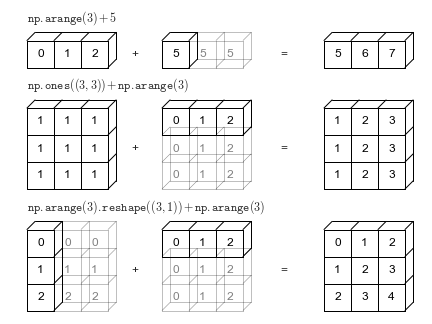
**Rules:**
Broadcasting in NumPy follows a strict set of rules to determine the interaction between the two arrays:
When operating on two arrays, NumPy compares their shapes element-wise.
- Step 1: If the two arrays differ in their number of dimensions, the shape of the one with fewer dimensions is padded with ones on its leading (left) side.
- Step 2: We **starts with the trailing (most right) dimensions and works its way to the left**. Two dimensions are compatible when
- they are equal, or
- one of them is 1
**Example:**
|Name|Type|Shape|Transform|
|--|--|--|--|
|A|2d array|3x4|
|B|1d array|4| => 1x4 => 3x4
|Result|2d array|3x4|
|steps|axis 0|axis 1|
|--|--|--|
|step 0|3|4|
|step 1|1|4|
|step 2|one of them is 1 -> checked|they are equal -> checked|
-> All conditions checked -> A + B is possible
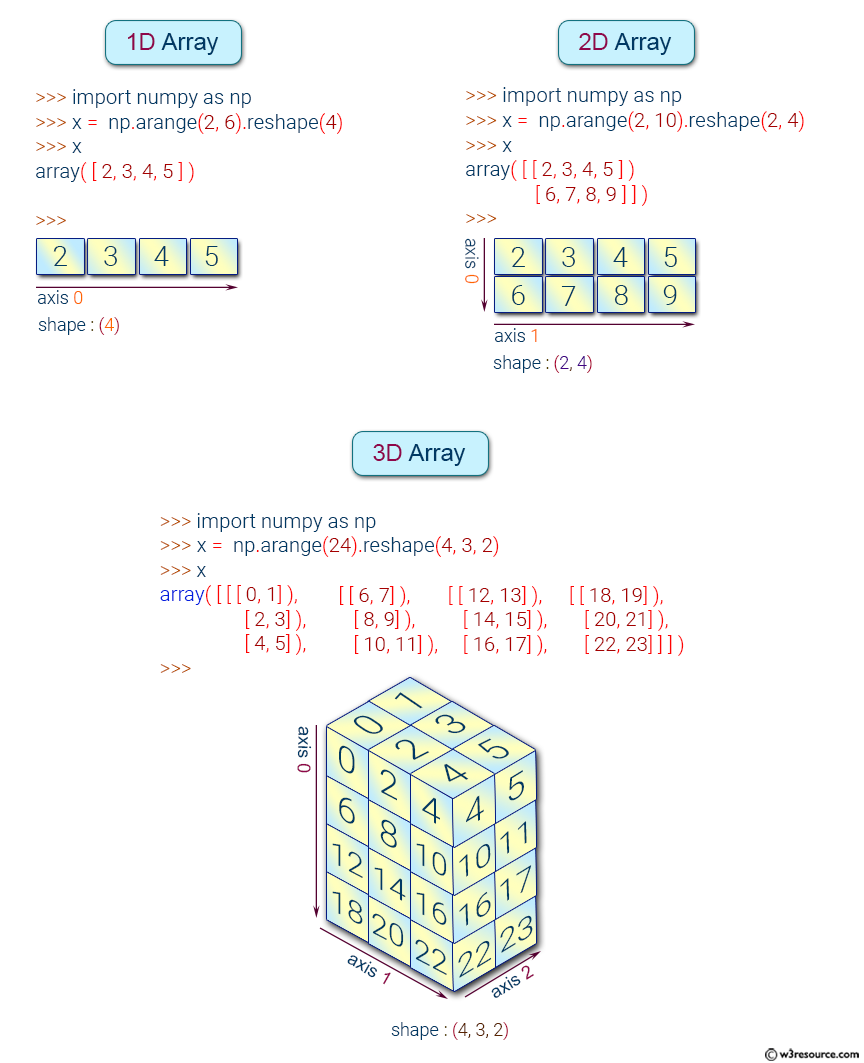
### Axis:
### Transpose:
Only transpose the rows and columns in the most outside matrix.
**A 3D array is a group of 2D arrays.**
The order of the axis (dimension) of `(0th axis, 1st axis, 2nd axis)` is reversed like `(2nd axis, 1st axis, 0th axis)`.
### Reshape:
**size = shape multiplication**
total number of elements = multiplication of axis
[1, 2, 3, 4] 1x4=4 can only to shape that has multiplication=4
`np.reshape(y, (1, -1))`: -1 is the possible axis that is associated with the determined axis.
### Adding/Removing Dimensions:
`expand_dims`: Adding with specified dimension position to be added.
`squeeze`: Removing with specified dimension position to be removed.
By adding/removing "brackets" at specified position.
### Memory Size:
`itemsize` memeory size of each element inside, unit is byte.
`nbytes` memory size of the whole array (tensor) in byte.
# Day 4
## SQL
### Primary Key
All tables must have at least 1 primary key column.
If 1 table has multiple primary keys, the combination of those (primary keys) columns must be unique.
Typically, there are only 1 or 2 primary keys in a table.
### ENTITY RELATIONSHIP DIAGRAM (ERD):
Different types of entity relationships are:
- **One-to-One Relationships**: Capital vs country example. 1 capital per country.
- One-to-Many Relationships
- Many-to-One Relationships
- **Many-to-Many Relationships**: No real life application because it duplicates records from both end tables (playlist example).
Each end can be mandatory or optional.
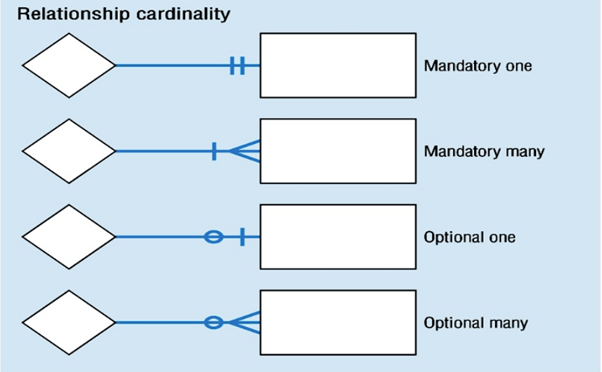
Opional Many to Mandatory One: 1 customer can have many invoices or no invoice (optional). 1 invoice can only belong 1 customer (mandatory).
## sqlite3
sqlite3 is a library in python to connect to databases.
SQL in pandas is not case sensitive.
### Date Functions:
`strftime`: get parts of time and return string
https://www.tutorialspoint.com/sqlite/sqlite_date_time.htm
### Show Index of Table:
`PRAGMA index_list('<table_name>')`
https://www.sqlitetutorial.net/sqlite-index/

### Database Creation:
**Step 1**: Create a Connection
```
import sqlite3
conn = sqlite3.connect('example.db')
```
Create a database.
**Step 2**: Create Tables
Remember to `.commit()` to save what have been done to the database table
**Step 3**: Insert Rows to Tables
Remember to `.commit()` to save what have been done to the database table
Be careful with inserting/updating the table. It is troublesome to delete records in the table.
**Practice SQL** https://sqlbolt.com/lesson/inserting_rows
# Day 5
 Sign in with Wallet
Connect another wallet
Sign in with Wallet
Connect another wallet