---
tags: Kermadec Class, Machine Learning, Image Augmentation
---
Machine Learning Week 8
=
# Day 1:
## Image Augmentation:
https://www.beautiful.ai/player/-MH9KVBrwQrGSd7PeS25/FTMLE_Image-Augmentation
Beware of the risk of changing objects that does not fit the label:
- Cropping the object out of the image.
- Try not to change the color when the purpose of the model is color detection or bases heavily on color to define the objects (traffic light, food...).
Augmentation in Tensorflow: Random image generator; random everytime.
**ImageDataGenerator** will provide **Onehot encoding** label (a scalar, not an array of label [0, 1, 0]).
-> Use categorical_crossentropy instead of sparsed_categorical_crossentropy
ImageDataGenerator return the **same number** of output image as the number of input image **for each epoc**. -> **Infinite number** of images will be generated.
## Unfreeze transfer learning layers to hit better preformance.
## Tensorflow Board:
Summary of logs of model training.
Use a callback `tf.keras.callbacks.TensorBoard` to save the logs
```
# Load the TensorBoard notebook extension
%load_ext tensorboard
%tensorboard --logdir ./logs/ --host 0.0.0.0
```
Can use customized callback log via OOP
`class CollectBatchStats(tf.keras.callbacks.Callback):`
# Day 2
## CNN
In 1 picture, each pixel is a feature.
- **Dense Layer**: Each neuron of the layer detect 1 feauture.
- **CNN Layer**: Each filter of layer capture a number of feautures (1 to ifinity): vertical, horizontal features... by highlighting/enchancing the feautures.
Number of parameters of CNN layer is way smaller than Dense layer -> CNN run faster.
### Filter:
Convolutional operation for filters:
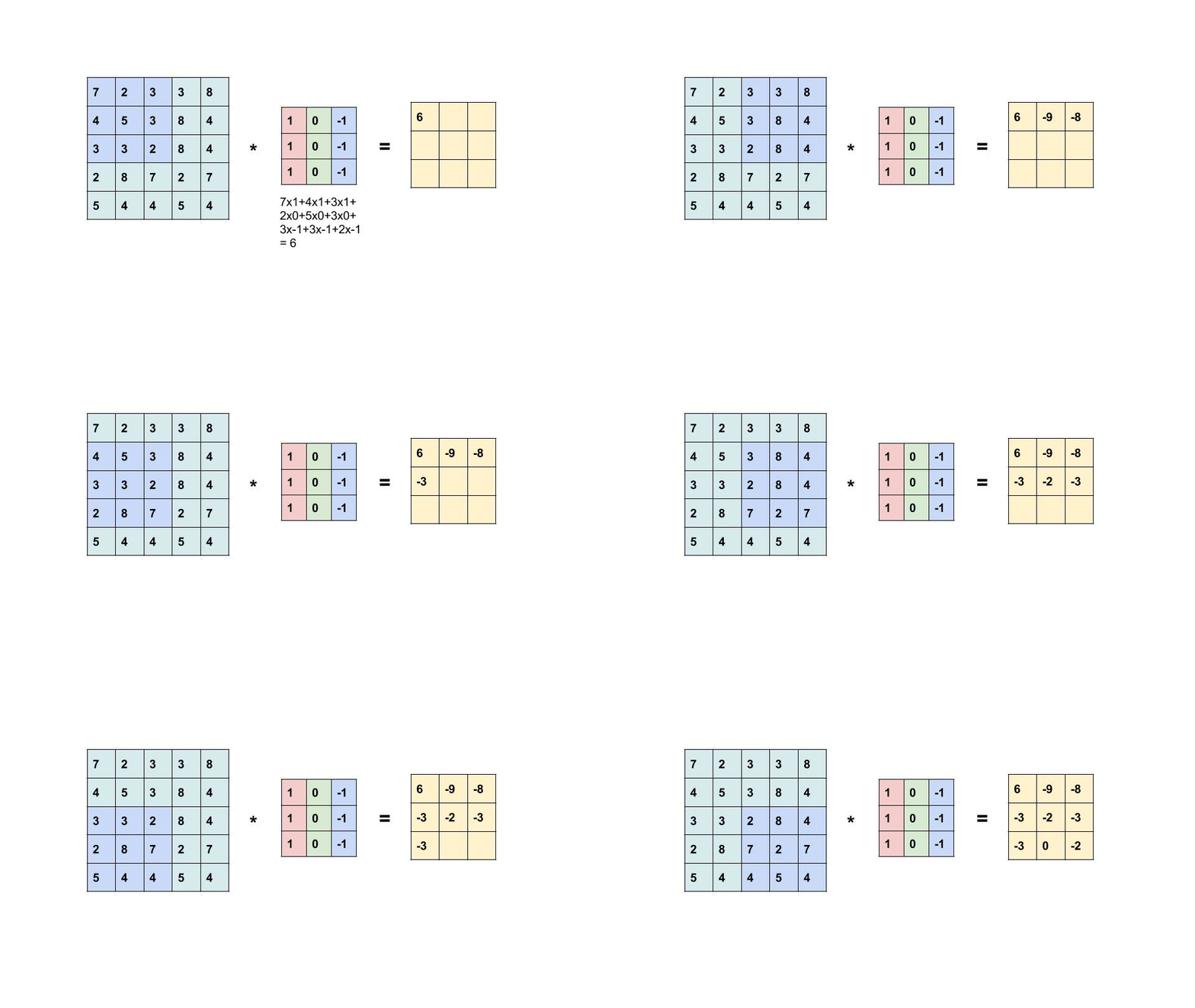
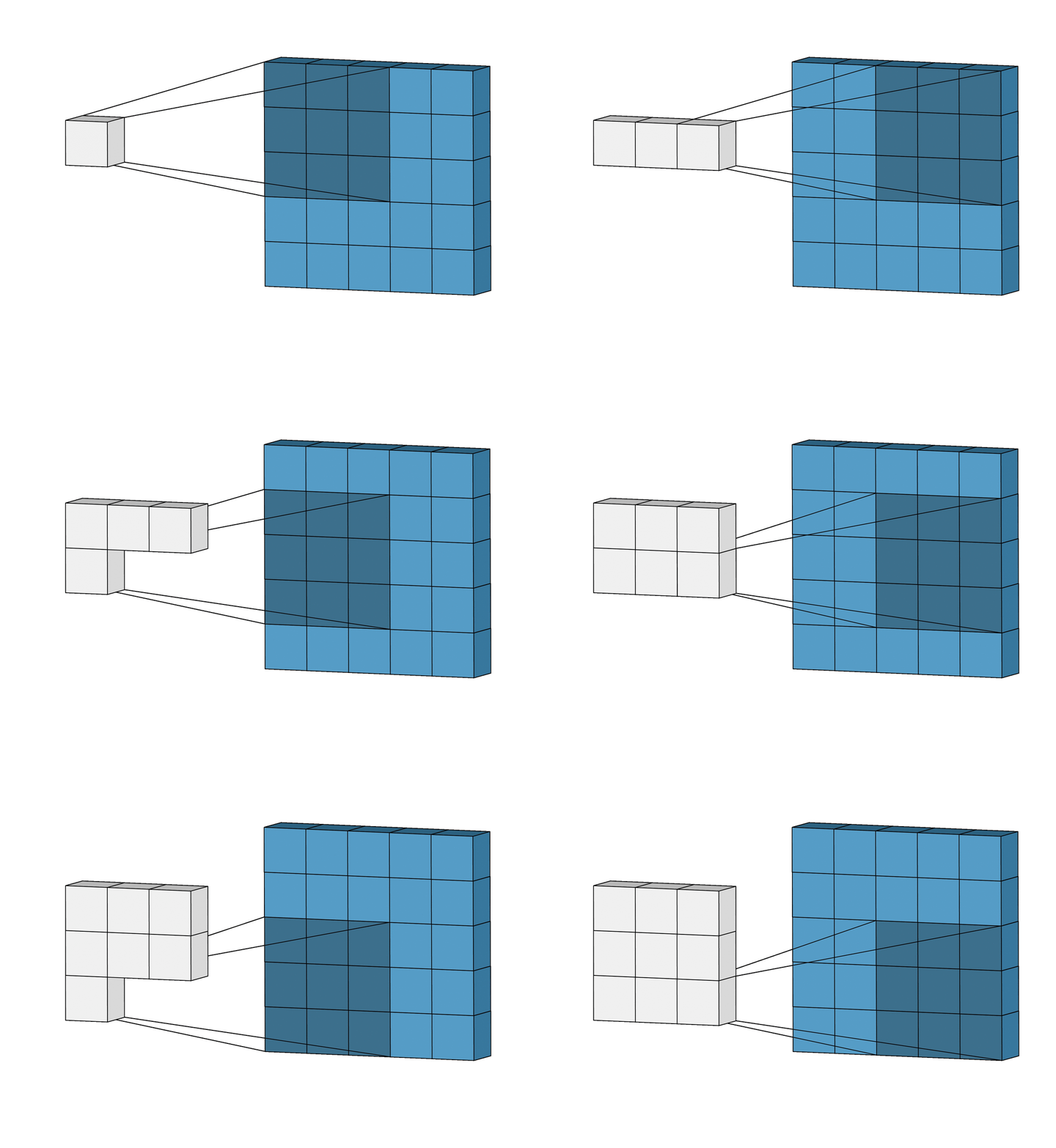
Instead of use fix numbers for the filter, CNN layer use weights as the number for the filter. The weights will be determined by machine learning model (forward, backward, update, activation function).
To detect multiple feautures, need multiple filters.
1 filter can only detect 1 feauture.
### [Padding](http://yann.lecun.com/exdb/lenet/index.html)
Purpose:
- Allow pixels at the edge to be scanned more times.
- Make output shape = input shape.
### Input Multiple Channels:
Input with multiple channels -> filter must have the same number of channels.
### Pooling vs Global Pooling:
- **Pooling** keep the channels. Pooling is **good for the shallow (first) layers** to reduce noise.
- **Global Pooling** does not keep the channels, similar to Flatten layer. Global Pooling is good for last layers


- **Max Pooling**: Keep the most obivious/important data. Good for the shallow layer to reduce noise.
**Average Pooling**: Barely used right now because it barely extracts any important features.
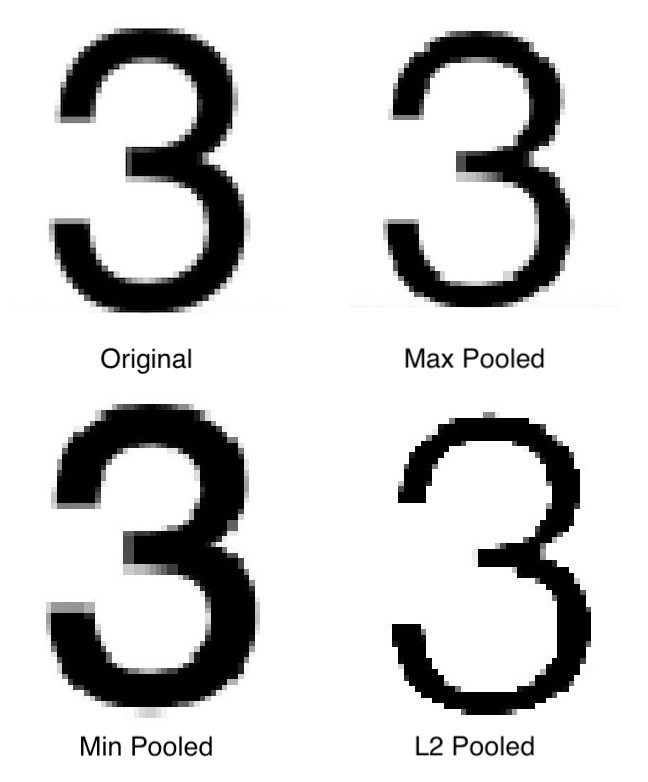
- **Average Global Pooling**: At the last layers, all feautures are important, get the average of the most important feautures.
**Max Global Pooling**: Only get the most of the most important features.

## Localization:
Input: labelled localized pictured. Human manually draw a box around the object.
Model will predict where the box should be.
Loss fuction:
- MSE (between the four points of predicted box and the true box)
- IOU
## Batch Normalization: Avoid Gradient Vanishing in CNN.
<img src="https://charlesmartin14.files.wordpress.com/2017/06/batchnorm2-e1497643748774.png?w=409" alt="drawing" width="400"/>
<img src="https://d3i71xaburhd42.cloudfront.net/521ebc310afd88a2672f0af5f77dd4e6ec5c994f/4-Figure2-1.png" alt="drawing" width="800"/>
# Day 3
## Bootstrap (CSS):
Bootstrap (CSS) is a CSS library that contains preset standard styles.
https://getbootstrap.com/docs/4.5/getting-started/introduction/
# Day 4
## Flask:
Framwork for Python to build websites.
### Routing/Endpoint/API:
Different URL trigger different function in the backend, aka different routing.
### Method:
**GET**: for small data (short texts), unsecured, infromation appear in URL
**POST**: for large data (images, complete form, videos...), secured, information not appear in URL.
### Jinja:
Jinja allows writing python code in HTML to replace partly javascript.
Can do for-loop, if-else...
Beware that there are some different in syntax.
 Sign in with Wallet
Connect another wallet
Sign in with Wallet
Connect another wallet