---
tags: 單晶片
---
# Arduino講義:Serial Communication (I2C)
---
<!-- > **重點 or 縮寫** 請標**黑粗** 且 英文記得空格ㄚㄚㄚㄚ -->
<!-- > -->
<!-- > [name=YuanHaoHo][color=#c8ff05] -->
## Introduction of I2C
* I2C bus 為 Inter-Integrated Circuit Bus 的縮寫,中文叫做積體電路匯流排,其功用為提供 IC 之間的連接與通訊。
* 目的:減少MCU與周邊晶片之間的腳位數
* 只有兩條訊號線,<font color="red">SCL(Serial CLock Line) 負責傳時脈,SDA(Serial Data line)負責傳資料</font>。
* **I2C** : <font color="red"> 半雙工、串列、同步</font>
* 以匯流排型介接允許有多個master以及slave。

* 由上圖可知,所有I2C裝置皆並接(Wired-AND)在SCL及SDA兩條線路上
* 須接<font color="red">上拉電阻(Rp)</font>,將浮接狀態( float )轉變為邏輯高準位( High )狀態。
## I2C Bus協定
* 閒置( idle )時兩者皆為高電位。

* START condition:<font color="red">SCL為 HIGH時,SDA發生下緣</font>
* 先傳地址( slave address,決定跟哪個 slave 溝通),再傳資料。地址有 7bit跟 10bit兩種。
* 7bit:最大可以有 128個 slave (但實際上有16個系統擴充位址是保留的)。
* 10bit:最大可以有 1024個 slave 。(但很少見,不是所有使用 I2C 的裝置都支援 10bit mode)。
* 地址:由於地址為 7bit,因此在傳第一個 byte的時候,前 7bit(MSB 為 address,最後的 bit 為 R/W bit,指定要"讀"或"寫"資料(0:write,1:Read)。
* 只在 <font color="red">SCL 為 HIGH 時,才會對 SDA 取樣。 SCL 為 LOW 時,不會取樣,但可改變資料</font>。
* STOP condition:<font color="red">SCL為 HIGH時,SDA發生上緣</font>
## ACK/NACK機制
* 發送端在每組(8bits)訊號送出後,需讀去接收端所回應的一個ACK bit(Acknowledge bit)
<font color="red">(注意:發送端不一定是master,ex:讀取資料時,發送端為slave)</font>
## 實際傳輸的狀況
* 寫入:

* R/W為0時,代表 slave 端要讀取master端資料,此時 slave 會發出一個 ==acknowledge bit==(就是由 slave 把 SDA 拉低),讓 master 確認 slave 是否有收到資料。
* 讀取:

* R/W 為1時,代表 master 端要讀取 slave 端資料,此時 master 為 Receiver,slave 為 transmiter,因此 acknowledge bit 會是由 master 進行發送。
:::info
note:傳地址後的 acknowledge bit 必為 slave 傳送給 master;傳送 Data 後的 acknowledge bit 則須視前面 R/W 的值而定。
:::
* 當 master 讀到 ACK 回應, 即可以繼續傳輸下一個 Byte。
* 當 master 讀到 NACK 回應, 意思是 **slave 無回應**,此時 master 應送出 (結束) 訊號放棄該命令。
* 參考資料:
* [資料來源1](http://i2c.info/i2c-bus-specification)
* [資料來源2](http://magicjackting.pixnet.net/blog/post/173061691-i2c-bus-%E7%B0%A1%E4%BB%8B-(inter-integrated-circuit-b))
---
#### Wire函數:
| 函數 | 作用 |
| --- | --- |
| begin()| 啟動 Wire 作為 master 或是 slave |
| beginTransmission(address)| 開始對 address 的連線 |
| endTransmission() |關閉之前的連線 |
| write(data) | 在連線上送出 一個 byte 的資料 |
|read() | 讀取連線上的一個 byte 的資料 |
|available() | 檢查連線上是否有可接收的資料 |
|onReceive(function) | 設定用來接收資料的函數 |
:::info
note:在無(address)時,Arduino 是作為I2C的 master;有(address)時,是作為 I2C 的 slave 。
:::
<!-- :::info
note: Arduino 沒有 I2C ,只有**2 wire serial interface(TWI)** ,但是這個TWI**相容於飛利浦的I2C協定**。詳見 [ATmega328P datasheet](http://ww1.microchip.com/downloads/en/DeviceDoc/Atmel-42735-8-bit-AVR-Microcontroller-ATmega328-328P_Datasheet.pdf) p.260。
::: -->
## LAB1
* 實驗目標:利用I2C進行Arduino間通訊
* schematic:
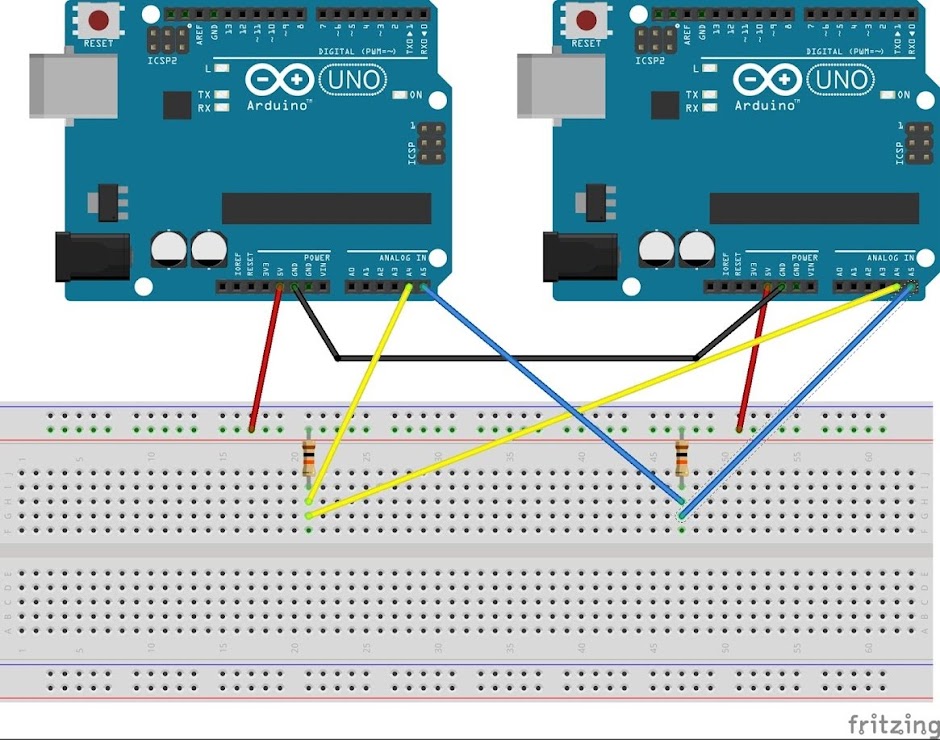
* master 把串口收到的資料,發送給 slave:

* slave 端直接處理接收回來的資料:

:::warning
若使用的 Arduino IDE 版本不能同時開兩個 Serial Monitor,請[點此](http://ttssh2.osdn.jp/)下載Tera Term後,點選設定做為第二個Serial Monitor。
使用方法:開啟Tera Term後,點選**設定** -->**連接埠** -->**更改端口與鮑率**
:::
# Arduino講義:LCD
## LCD介紹
* 目前市面上的 LCD 模組可分文字型及繪圖型兩種。文字型 LCD 模組常見的規格有16 字x1 行,20 字x1 行,40 字x1 行,16 字x2 行,20 字x2 行,40 字x2行等多種。
* 文字型 LCD 顯示器內部具有字元產生器,因此可以接受 ASCII 字元碼,並將字元顯示在 LCD 上。
## LCD架構
* LCD 模組的結構如圖所示,由 LCD 控制器、LCD 驅動器及 LCD 顯示器所組成。目前市售 LCD 模組所採用的 LCD 控制器都相容,使用方法也相同,因此幾乎所有的 LCD 模組都具有相同的控制方法。
## I2C 16x2 LCD介紹

* SDA – 接 Arduino 的 Analog Pin 4 (Arduino Mega 為 Pin 20)
* SCL – 接 Arduino 的 Analog Pin 5 (Arduino Mega 為 Pin 21)
* GND – 接 GND
* VCC – 接 +5V
## LCD接法

## 學習使用LCD貼出字串
* LCD I2C Libraries下載:[here](https://drive.google.com/file/d/11hV6xfWycVe5Hg2bahq_UgWgoPMLBCK9/view?usp=sharing)
* Keypad Libraries下載:[here](https://drive.google.com/file/d/1mnzf--VuktjYytxyOUm0J5sxz0J_YV6g/view?usp=sharing)
--> 解壓縮後將資料夾放進Arduino libraries當中
* code:

## LAB2
* 實驗目標:將上面的字串改成自己的學號,使其以如下影片的跑馬燈方式繞行。
* #### LiquidCrystal_I2C:
| 函數 | 作用 |
| --- | --- |
| lcd.begin(cols, rows); | 定義LCD的長寬(n列×n行) |
| lcd.clear() | 清空LCD |
| lcd.setCursor(col, row); | 設定輸入值起始位置 |
| lcd.print(data); | 在螢幕上顯示資料 |
| lcd.scrollDisplayRight(); | 將畫面向右捲動 |
| lcd.scrollDisplayLeft(); | 將畫面向左捲動 |
* 參考影片:
<iframe width="800" height="600" src="https://www.youtube.com/embed/5w0y1xAFMtc" frameborder="0" allow="accelerometer; autoplay; encrypted-media; gyroscope; picture-in-picture" allowfullscreen></iframe>
## LAB3
### 簡易計算機
* 實驗目標:利用薄膜鍵盤與LCD實現簡易計算機
* 實驗要求:
* A 鍵為加號、B 鍵為減號、C 為乘號、D 為除號、# 為等於、* 為清除鍵。
* 由薄膜鍵盤輸入數字後,LCD 第一列顯示運算式,第二列顯示等號與運算結果。
* 示範影片:
<iframe width="800" height="600" src="https://www.youtube.com/embed/-bGQgrrkhio" frameborder="0" allow="accelerometer; autoplay; encrypted-media; gyroscope; picture-in-picture" allowfullscreen></iframe>
## LAB4
### 四則運算計算機
* 實驗目標:加強計算機的功能,使其能進行四則運算
* 示範影片:
<iframe width="800" height="600" src="https://www.youtube.com/embed/6is9SvDOb7o" frameborder="0" allow="accelerometer; autoplay; encrypted-media; gyroscope; picture-in-picture" allowfullscreen></iframe>
### 加分LAB1
- 實驗目的:在LAB4電算機加上括號以及累加的功能,使其更完整
- 實驗要求:
* A 鍵為加號、B 鍵為乘號、C 為左括號、D 為右括號、# 為等於、* 為清除鍵。
* 增加累加功能
- 示範影片:<iframe width="956" height="538" src="https://www.youtube.com/embed/CLHd56h99rY" frameborder="0" allow="accelerometer; autoplay; encrypted-media; gyroscope; picture-in-picture" allowfullscreen></iframe>
### 加分LAB2
- 實驗目的:以I2C實現master端與兩個slave端的溝通
- 實驗目標:在master端設定讀取鍵盤並將訊號傳至LCD以及另一台arduino以顯示在Serial monitor上。
- Schematic:請參照I2C與GPIO講義自行接腳。
* 參考:
<iframe width="600" height="400" src="https://www.youtube.com/embed/BRSA_OBHWZI" frameborder="0" allow="accelerometer; autoplay; encrypted-media; gyroscope; picture-in-picture" allowfullscreen></iframe>
* master


* Slave

## 課後問題
:::info
Q1.簡述 I2C 如何藉由 SCL 與 SDA 傳送資料 ?
Q2.上課的時候提到可以有多個master,請問若同時有兩個以上的master送出訊號會發生什麼事?並且描述該如何解決。
Q3.電算機為何總和超過 32767 時字串會溢位?如何解決 ?
:::
 Sign in via Google
 Sign in via Facebook
 Sign in via X(Twitter)
 Sign in via GitHub
 Sign in via Dropbox
 Sign in with Wallet
Connect another wallet
Sign in with Wallet
Connect another wallet