# Rust Tech Book Club 1
* TechBookClub Google Drive
https://drive.google.com/drive/folders/1TnM6C5Pv2i33Mkwkj1c3yLjq2KzmKAL-?usp=sharing
* Cargo 官方文件 [!https://rust-lang.tw/book-tw/ch01-02-hello-world.html]
## Installation
1. Install Rust
```
curl --proto '=https' --tlsv1.2 -sSf https://sh.rustup.rs | sh
```
1. Install VScode plugin: Rust analyzer
1. Validate installation
```
rustc --version
cargo --version
```
## Running and Compiling
- rustc
- rustc filename.rs: 編譯一個 Rust 檔案。預設情況下,會產生一個可執行檔
- cargo
- cargo new PROJECT_NAME 建立專案資料夾
- cargo init 能把當前資料夾轉成專案
- cargo build 能建置您的專案
- cargo check 不build只檢查有沒有問題,較快
- cargo run 能執行您的專案
- cargo test 能測試您的專案
- cargo doc 能為您的專案產生技術文件
- cargo publish 能將函式庫發佈到 crates.io
- rustup
- rustup update 使用 Rustup 來更新 Rust 工具鏈,包括 rustc、cargo 等
## 常見問題
### 遇到 cargo build 錯誤問題
解法
macOS 需要使用以下指令安裝 C Compiler
`$ xcode-select --install`
ref:
https://stackoverflow.com/questions/28124221/error-linking-with-cc-failed-exit-code-1
```rust
brianchou:hello_cargo $cargo build
Compiling hello_cargo v0.1.0 (/Users/brianchou/rust/hello_cargo)
error: linking with `cc` failed: exit status: 1
...
= note: LC_ALL="C" PATH="/Users/brianchou/.rustup/toolchains/stable-
= note: xcrun: error: invalid active developer path (/Library/Developer/CommandLineTools), missing xcrun at: /Library/Developer/CommandLineTools/usr/bin/xcrun
error: could not compile `hello_cargo` (bin "hello_cargo") due to previous error
```
# Rust Tech Book Club 2
## 課程大綱
### 影片8
1. //
2. /*
3. println! & print!
4. print int & 厲害的噴錯(?
5. println! & print!的差異
6. \n, \t, \r(移動游標到最前)
7. \ 倒斜的用途
8. 指定使用第幾個變數({2})
9. 直接在列印時賦值給變數
10. 直接在列印時作數值運算
### 影片9
1. 變數寫法(int, float)
- IDE可能不會幫你加上型別(?待確認)
2. 使變數可重新賦值 (mut)
3. 變數名稱規則
1. 只能用字母數字與底線
2. 變數名稱開頭只能為字母與底線
3. Case sensitive (ex. x 與 X視為不同變數)
4. 變數賦值時可先運算
5. scalar type
1. int
2. float
3. bool
4. character
6. int - 8, 16, 32, 64,有i (signed)與 u(unsigned)
7. std = standard library
8. float - 32, 64
9. 不同型別不可同時運算
10. {:?} ->同時塞入多個變數
11. bool變數也可直接運算
12. char變數裡就算是數字也不可與int運算
## 課程討論
1. 印值時使用{}與{數字}交互使用會如何?
Ex.1
```
Ans.
fn main() {
println!("{1} {}", "first", "second");
}
------
>> second first
```
Ex.2
```
Ans.
println!("{} {2} {}", "first", "second", "third")
====
>> first third second
```
2. 如果f重新賦值 之前的print function是否會顯示更動後得值?
```
Ans.
let mut u:f32;
u = 3.0;
println!("u is: {}",u);
u = 4.0;
====
>> u is: 3
```
3. \r後蓋前是否會延續前字串?
```
Ans.
println!("Hello, world!\rHello, fuck");
// 不要動不動就提人老木?
====
>> Hello, fuckd!
```
# Rust Tech Book Club 3
# Rust Tech Book Club 4
### 影片12
#### &str and String
&str 固定長度, String 可以動態增長
```rust
fn main() {
let some_string = "Fixed length string";
let mut growable_string = String::from("This string will grow");
println!("The string is: \"{}\" ", growable_string);
growable_string.push('s');
println!("The string is: \"{}\"", growable_string);
growable_string.pop();
println!("The string is: \"{}\" ", growable_string);
growable_string.push_str(" which i will use");
println!("The string is \"{}\" ", growable_string);
println!(
"Basic functions on Strings,
is_emtpy(): {},
length(): {},
Bytes(): {},
Contains use: {},",
growable_string.is_empty(),
growable_string.len(),
growable_string.capacity(),
growable_string.contains("use")
);
growable_string.push_str(" ");
let str_len = growable_string.trim().len();
let number = 6;
let num_str = number.to_string();
println!("Is the number a string: {}", number.to_string() == "6");
let some_char = 'a';
let char_str = some_char.to_string();
let my_name = "Nouman".to_string();
let empty_string = String::new();
println!("Length is: {}", empty_string.len());
let s_1 = "Nouman".to_string();
let s_2 = "Azam".to_string();
let s_3 = format!("My first name is {}, and my last name is {}", s_1, s_2);
println!("{}", s_3);
let concat = format!("{}{}", s_1, s_2);
}
```
#### Arrays
```rust
fn main() {
let mut number_array: [i32; 5] = [4, 5, 6, 8, 9];
println!("{}", number_array[0]);
println!("{:?}", number_array);
number_array[4] = 5;
println!("{:?}", number_array);
let array_with_same_elements = [0; 10];
println!("{:?}", array_with_same_elements);
let mut string_array_1 = ["apple", "tomato", "grapes"];
println!("{:?}", string_array_1);
let string_array_2 = ["Unknown"; 6];
println!("{:?}", string_array_2);
string_array_1[0] = "kamran azam";
println!("{:?}", string_array_1);
let check_index = string_array_1.get(2);
println!("{:?}", check_index);
}
```
#### vec
等同 c++ 的 Vector,可以看成動態增減的 Array
```rust
fn main() {
let vec_1: Vec<i32> = vec![4, 5, 6, 8, 9];
let num = vec_1[3];
}
```
#### Tuples
不可變的類型,且想要在一個類型放入多種資訊
```rust=
fn main() {
let nested_tuple = (4, 5.0, (3, 2), "Hello");
let element = (nested_tuple.2).0;
println!("The value of element is {}", element);
let test = (4, 5.0, "", "Hello");
let (a, b, c, d) = test;
println!("{}/{}/{}/{}", a, b, c, d);
}
```
#### unit
```rust=
fn main() {
let empty_tuple = ();
println!("{:?}", empty_tuple);
}
```
### 影片14
#### Function
就只是個 Function
```rust=
fn main() {
my_fn("a");
let str = "b";
my_fn(str);
let answer = multiplication(1, 2);
println!("{:?}", answer);
let (a, b, c) = basic_match();
println!("{}/{}/{}", a, b, c);
}
fn my_fn(s: &str) {
println!("{s}");
}
fn multiplication(num1: i32, num2: i32) -> i32 {
println!("我進來囉");
num1 * num2
}
fn basic_match() -> (i32, i32, i32) {
(1, 2, 3)
}
```
#### Blocks
可以把它當作隱匿 function,可直接指派這個 block 回傳的數值
```rust=
fn main() {
let full_name = {
let first_name = "Vincent";
let last_name = "Lin";
format!("My name is {first_name} {last_name}")
};
println!("{}", full_name);
}
```
```rust=
fn main() {
let t: fn() = test;
t();
let t2: fn() -> () = test;
t2();
let t3:fn(i32) -> i32 = |x :i32| {
let c = x + 10;
return c;
};
println!("{}", t3(1));
}
fn test() {
println!("test");
}
---
// test
// test
// 11
```
### 影片16 補充
#### IF / ELSE
可以把 if else block 當成 closure 來用, man = if / else 判斷完之後回傳的值,下面範例 man = `ordinary person`
```rust
fn if_else_case() {
let appearance = 54088;
let man = if appearance == i32::MAX {
"handsome thomas"
} else if appearance >= 100 && appearance < i32::MAX {
"ordinary person"
} else {
"..."
};
println!("{man}");
}
```
#### MATCH
##### if/else => match
將上面 if/else 範例改寫成 match,看起來舒服多了(?)
```rust
fn match_case_1() {
let appearance = 54088;
match appearance {
x if x == i32::MAX => println!("handsome thomas"),
x if x >= 100 && x < i32::MAX => println!("ordinary person"),
_ => println!("..."),
}
}
```
##### 常見 Match 用法
enum 能將有關連的東西組織在一起,用 match 來處理不同 case
```rust
fn match_case_2() {
enum Size {
Small,
Medium,
Large,
}
let size: Size = Size::Large;
match size {
Size::Small => println!("small"),
Size::Medium => println!("medium"),
Size::Large => println!("large"),
}
}
```
##### 處理 Option`<T>`
1. rust 沒有 null,假如有變數是 null,compiler會教你做人(?)
2. rust 用 Option 來處理 null,Option 也是一種 enum,有 `Some(T)` 跟 `None` 2種 variants
```rust
fn match_case_3(x: Option<i32>) {
match x {
Some(value) => println!("value is {value}"),
None => println!("none"),
}
}
```
##### 階層式 Match, e.g. Option`<T>` + Size
將 Option`<T>` 與 Size 摻在一起做撒尿牛丸
```rust
enum Size {
Small,
Medium,
Large,
}
fn xxx() -> Option<Size> {
if ... {
Some(Size::Large)
} else {
None
}
}
fn match_case_4() {
let optional_size: Option<Size> = xxx();
match optional_size {
Some(size) => {
match size {
Size::Small => println!("small"),
Size::Medium => println!("medium"),
_ => println!("large"),
}
}
None => {
println!("none")
}
}
}
```
##### 實際你可能會用的狀況
透過預先定義好的 enum 來處理複雜的狀況
```rust
fn match_case_5() {
enum Thomas {
NormalThomas(i32),
HandsomeThomas(f32),
AlmightyHandsomeThomas { number: i32, float: f32 },
}
let x = Thomas::NormalThomas(5);
// let x = Thomas::HandsomeThomas(3.14);
// let x = Thomas::AlmightyHandsomeThomas { number: 5, float: 3.14 };
match x {
Thomas::NormalThomas(n) if n < 10 => println!("{n}"),
Thomas::NormalThomas(other_num) => println!("{other_num}"),
Thomas::HandsomeThomas(x) => println!("{x} is float"),
Thomas::AlmightyHandsomeThomas { number: 5, float: 3.14 } => println!("5 and 3.14"),
Thomas::AlmightyHandsomeThomas { number: _, float: 9.8 } => println!("any number except 5 and 9.8"),
Thomas::AlmightyHandsomeThomas { number: other_num, float: other_float} => println!("{other_num} and {other_float}"),
}
}
```
# Rust Tech Book Club 5
## 影片 17. Control Flow
### Practice on Conditionals and Control Flow
#### General Loop
```rust=
loop{
println!("simple loop");
break;
}
```
#### Nesting and Labels Loop
```rust=
'outer: loop{
println!("outer loop");
'inner: loop{ // complier warning: unused label
println!("inner loop");
break 'outer;
}
println!("never be here"); // complier warning: unreachable statement
}
println!("exit outer loop");
```
#### Returning from loop
```rust=
let mut c = 0;
let result = loop {
c += 1;
if c == 10 {
break c * 2;
}
};
assert_eq!(result, 20);
```
#### for and range
The for in construct can be used to iterate through an Iterator.
https://doc.rust-lang.org/rust-by-example/flow_control/for.html
##### for loop 寫法1
```rust=
// n = 1, 2, ..., 10
for n in 1..11 {
if n % 2 == 0 {
println!("cowbell");
} else if n % 3 == 0 {
println!("bar");
} else if n % 5 == 0 {
println!("foo");
}
}
```
##### for loop 寫法2
```rust=
// n = 1, 2, ..., 10
for n in 1..=10 {
// @TODO ...
}
```
#### loop foreach
```rust=
let names = vec!["Billing", "Zone-v2", "G8e04"];
for i in names{
println!("{i}");
}
```
#### while 用法
```rust=
let mut n = 1;
while n < 10 {
if n % 2 == 0 {
println!("cowbell");
} else if n % 3 == 0 {
println!("bar");
} else if n % 5 == 0 {
println!("foo");
}
n += 1;
}
```
##### 練習題1(題目)
```
/*
Write a program to find the difference between the square of the sum and the sum of the squares of the first N numbers.
N will be a user-defined input that your program will take.
For example, if the user enters the number 5, you should compute the square of the sum as (1 + 2 + 3 + 4 + 5)^2 = 225.
Next, compute the sum of the squares as (1^2 + 2^2 + 3^2 + 4^2 + 5^2) = (1 + 4 + 9 + 16 + 25) = 55.
Finally, calculate the difference as 225 - 55 = 170.
*/
```
##### 練習題1(答案)
```rust=
fn main() {
let mut n = String::new();
std::io::stdin()
.read_line(&mut n)
.expect("failed to read input.");
let n: i32 = n.trim().parse().expect("invalid input");
let mut square_of_sum = 0;
let mut sum_of_squares = 0;
/* Complete the code after this line */
let mut sum = 0;
let mut i = 1;
loop{
sum += i;
sum_of_squares += i * i;
if i == n {
break;
}
i+=1;
}
square_of_sum = sum * sum;
println!("difference: {}", square_of_sum - sum_of_squares);
}
```
## 影片 19. Comments, Prints Commands, Input
### Comments
太簡單了自己看
### Prints Commands
#### Escape sequences
```
\n Newline
\r Carriage return
\t Tab
\\ Backslash
\0 Null
```
```rust=
let x = 5;
let y = 10;
println!("x = {x} and y + 2 = {}", y + 2);
println!(
"argument_1: {1}, argument_0: {0}, argument_2: {2}",
"000000", "11111", "222222"
);
println!(
"{language} is a system programminng language which is cool to {activity} in.",
activity = "GGGG",
language = "Rust"
);
```
### Input
```rust=
let mut n = String::new();
std::io::stdin()
.read_line(&mut n)
.expect("failed to read input.");
let n: f64 = n.trim().parse().expect("invalid input");
println!("{n}");
```
### Const and Static
```rust=
const PI: f32 = 3.14;
let _a = PI;
let _b = PI;
static WELCOME: &str = "Welcome static variable";
let _c = WELCOME;
let _d = WELCOME;
println!("_a addr: {:p}", &_a);
println!("_b_addr: {:p}", &_b);
println!("_c addr: {:p}", _c);
println!("_d_addr: {:p}", _d);
/**
_a addr: 0x7ffe67fb2520
_b_addr: 0x7ffe67fb2524
_c addr: 0x7ffe67fb2528
_d_addr: 0x7ffe67fb2538
**/
```
## 21, 22 ownership
### Vector

### Rust feature
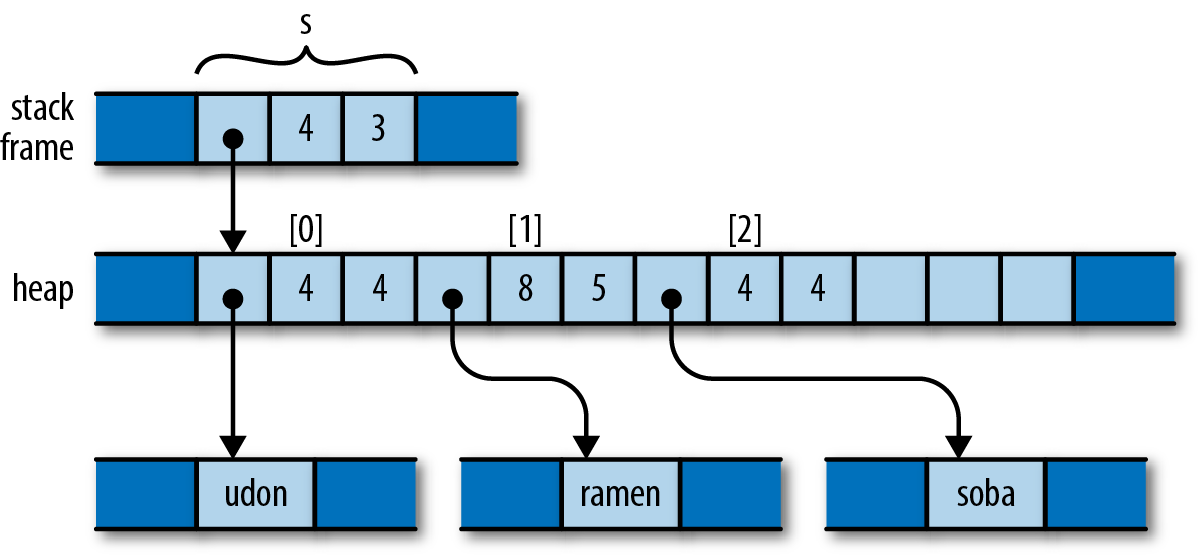
> your program will never use a pointer to an object after it has been freed.
> https://www.oreilly.com/library/view/programming-rust/9781491927274/ch04.html
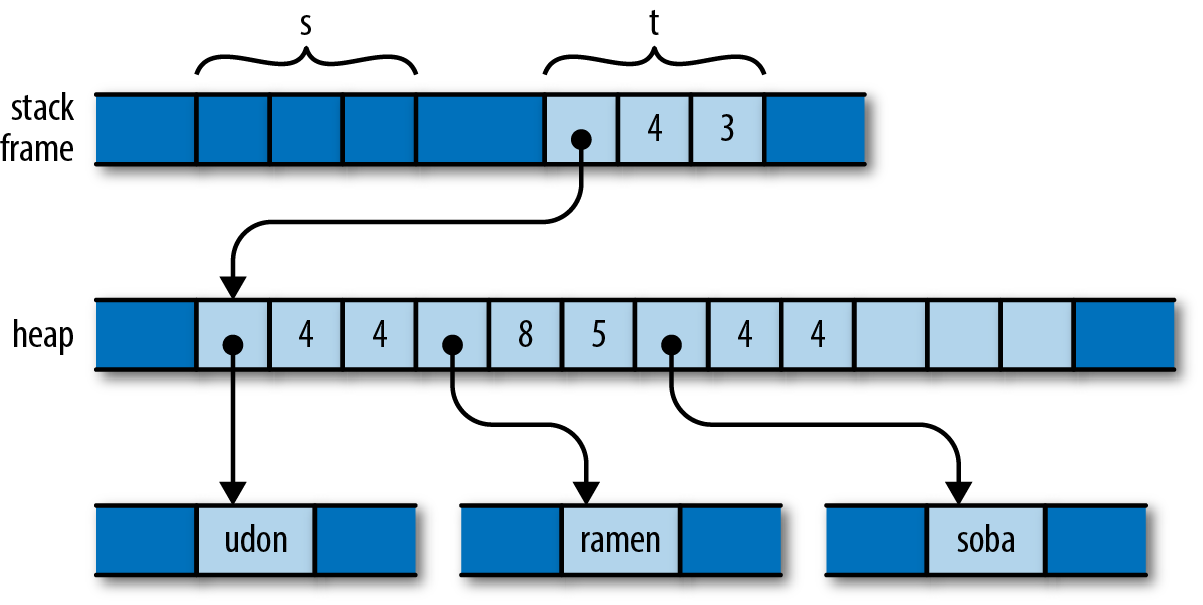
### Move
> When doing **assignments** (let x = y) or **passing** function arguments **by value** (foo(x)), the ownership of the resources is **transferred**.
> https://doc.rust-lang.org/rust-by-example/scope/move.html
https://www.oreilly.com/library/view/programming-rust/9781491927274/ch04.html#:~:text=So%20what%20would%20the%20analogous%20program%20do%20in%20Rust%3F%20Here%E2%80%99s%20the%20code%3A
---
### official doc
https://doc.rust-lang.org/rust-by-example/scope/move.html
# Rust Tech Book Club 6
### 影片 23 - 25
// -------------------------------------------
// References Rules
// - One mutable reference in a scope
// - Many immutable references
// - Mutable and immutable can not coexist
// - Scope of a reference
// - Data should not change when immutable references are in scope
// -------------------------------------------
```
fn main() {
/*
let mut heap_num = vec![4, 5, 6];
let ref1 = &mut heap_num;
let ref2 = &mut heap_num;
println!("ref1 {:?}, ref2 {:?}", ref1, ref2);
*/
/*
let mut heap_num = vec![4, 5, 6];
let ref1 = &heap_num;
let ref2 = &heap_num;
println!("ref1 {:?}, ref2 {:?}", ref1, ref2);
*/
/*
let mut heap_num = vec![4, 5, 6];
let ref1 = &heap_num;
let ref2 = &heap_num;
let ref3 = &mut heap_num;
println!("ref1 {:?}, ref2 {:?}, ref3 {:?}", ref1, ref2, ref3);
*/
/*
let mut heap_num = vec![4, 5, 6];
let ref3: &mut Vec<i32>;
let ref1 = &heap_num;
let ref2 = &heap_num;
println!("ref1 {:?}, ref2 {:?}", ref1, ref2);
let ref3 = &mut heap_num;
*/
let mut heap_num = vec![4, 5, 6];
heap_num.push(68);
let ref1 = &heap_num;
let ref2 = &heap_num;
println!("ref1 {:?}, ref2 {:?}", ref1, ref2);
heap_num.push(86);
}
```
// Problem 1: Fix the code below
fn main() {
let mut some_vec = vec![1, 2, 3];
let first = get_first_element(&some_vec);
some_vec.push(4);
println!("The first number is: {}", first);
}
fn get_first_element(num_vec: &Vec<i32>) -> &i32 {
&num_vec[0]
}
# Rust Tech Book Club 7
### 影片 27 - 28
我們使用 `struct` 關鍵字及名字來宣告結構體。 照慣例,`struct` 的命名用大寫開始,且使用駝峰式大小寫(camel case)規則:`PointInSpace`,而非 `Point_In_Space`。
我們可以透過 `let` 宣告我們 `struct` 的實體,但我們會使用 `key: value` 風格的語法去設定每一個欄位。 順序不需與原始宣告中的排序相同。
最後,因為欄位都有名字,我們可以透過點記號存取它們:`origin.x`。
跟 Rust 中的其他綁定一樣,`struct` 中的值預設是不可變的。 可以使用 `mut` 讓它成為可變的。
```rust
struct Point {
x: i32,
y: i32,
}
fn main() {
let mut point = Point { x: 0, y: 0 };
point.x = 5;
println!("The point is at ({}, {})", point.x, point.y);
}
```
Rust 不支援欄位的可變性,所以你不能寫成這樣:
```rust
struct Point {
mut x: i32,
y: i32,
}
```
### 結構體的記憶體排列
```rust
#[derive(Debug)]
struct File {
name: String,
data: Vec<u8>,
}
fn main() {
let f1 = File {
name: String::from("f1.txt"),
data: Vec::new(),
};
let f1_name = &f1.name;
let f1_length = &f1.data.len();
println!("{:?}", f1);
println!("{} is {} bytes long", f1_name, f1_length);
}
```
上面定義的File結構體在記憶體中的排列如下圖所示:

從圖中可以清楚地看出File結構體兩個字段name和data分別擁有底層兩個[u8]數組的所有權(String類型的底層也是[u8]數組),透過ptr指標指向底層數組的記憶體位址,這裡你可以把ptr指標理解為Rust 中的引用類型。
該圖片也側面印證了:**把結構體中具有所有權的字段轉移出去後,將無法再訪問該字段,但是可以正常訪問其它的字段**。
### 相關程式碼
這次範圍的code
```rust=
/***************
* struct *
***************/
#[derive(Debug)]
struct Rectangle {
width: u32,
height: u32,
//name: String,
}
struct Test {
name: String,
}
impl Rectangle {
// Methods are called using the dot operator
pub fn area(&self) -> u32 {
self.width * self.height
}
pub fn perimeter(&self) -> u32 {
2 * (self.width + self.height)
}
pub fn width(&self) -> u32 {
return self.width;
}
// Associated functions are called using double colons
// like constructor in C++
fn new(width:u32, height:u32) -> Rectangle {
Rectangle {
width,
height
}
}
fn new2(width:u32, height:u32) -> Self {
Self {width, height}
}
fn new3(width:u32, height:u32) -> Self {
Self {
width: width,
height: height
}
}
fn origin() -> Self {
Self {
width:100,
height: 200
}
}
}
// tuple struct
// 一種情況下多元組結構體非常有用,就是當他只有一個元素時。 我們稱它為「新型別」(newtype)模式,因為它允許你建立與內含的值有所區別的新型別,同時又表達出我們所想表達的語意
struct Position(i64, i32, i32);
struct Inches(i32);
// unit struct, 定義一個沒有任何成員的
struct Gamma;
fn struct_practise() {
let rect = Rectangle { width: 30, height: 50 };
println!(
"The area of the rectangle is {:?} square pixels.",
rect.area()
);
// https://doc.rust-lang.org/std/macro.dbg.html
dbg!(&rect);
let rect_2 = Rectangle { width: 3, ..rect };
let rect_3 = Rectangle { ..rect };
println!("rect_2 area: {}, perimeter: {}", rect_2.area(), rect_2.perimeter());
println!("rect_3 area: {}, perimeter: {}", rect_3.area(), rect_3.perimeter());
let rect2 = Rectangle::new(3,6);
println!("rect2 area: {}, perimeter: {}", rect2.area(), rect2.perimeter());
//println!("rect2 width: {}", rect2.width());
let rect3 = Rectangle::new2(8,9);
println!("rect3 area: {}, perimeter: {}", rect3.area(), rect3.perimeter());
let rect4 = Rectangle::new3(10,9);
println!("rect4 area: {}, perimeter: {}", rect4.area(), rect4.perimeter());
let rect5 = Rectangle::origin();
println!("rect5 area: {}, perimeter: {}", rect5.area(), rect5.perimeter());
// tuple struct
Position(0, 0, 0); // create a initial tuple struct
let c = Position;
let pos = c(5,6,7);
println!("index 0:{}, index 1:{} index 2:{}", pos.0, pos.1, pos.2);
let length = Inches(10);
let Inches(integer_length) = length;
println!("length is {} inches", length.0);
println!("length is {} inches", integer_length);
// unit struct
let my_gamma = Gamma;
let your_gamma = Gamma{};
}
/***************
* enum *
***************/
enum IpAddrKind {
V4,
V6,
}
struct IpAddr {
kind: IpAddrKind,
address: String,
}
// 我們直接將資料附加到枚舉的每個成員上,這樣就不需要一個額外的結構體了。
// 這裡也很容易看出枚舉工作的另一個細節:每一個我們定義的枚舉成員的名字也變成了一個建構枚舉的實例的函數。
// 我們直接將資料附加到列舉的每個成員上,這樣就不需要一個額外的結構體了
enum IpAddrKind2 {
V4(String),
V6(String),
}
fn enum_practise() {
let ipv4: IpAddrKind = IpAddrKind::V4;
let ipv6: IpAddrKind = IpAddrKind::V6;
fn route(ip_kind: IpAddrKind) {}
route(IpAddrKind::V4);
route(IpAddrKind::V6);
// no need
// route_v4(IpAddrKind::V4);
// route_v6(IpAddrKind::V6);
let home = IpAddr {
kind: IpAddrKind::V4,
address: String::from("127.0.0.1"),
};
let home2 = IpAddrKind2::V4(String::from("127.0.0.1"));
}
fn main() {
// struct
struct_practise();
// enum
enum_practise();
}
```
# Rust Tech Book Club 240308
### No. 88 RC Smart Pointer
1. 由於會牴觸到所有權原則,所以需使用RC pointer解決多人共享同一資料的問題
2. RC clone實作底層實際為增加一reference counter的計數與指向,故效率高
3. 記憶體釋放遵循後進先出原則,以範例而言c會先刪除再來依序為b, a,此時計數器為0,此RC所指
資料所佔用的記憶體才會被真正釋出
4. RC::strong_count會提供目前計數
5. String & Vector也是smart pointer
### No.90 RefCell Smart Pointer
1. 假如使用RefCell引用時發生可變與不可變同時存在,則runtime會發生panic
2. Runtime才做檢查的好處是可節省記憶體
3. 不可變引用: borrow,可變引用: borrow_mut
4. 但如果在可變變數與不可變變數之間先將任一種類型變數drop,則不會發生panic (或是將可變或不可變置放於不同的scope中也行)
5. 在借用(borrow)情形下,你無法用println印出被借用的變數(但不是compiler噴錯,而是印出的值會寫"borrowed")
6. 內部可變性!
* 意味著就算你宣告RefCell裡面的data為不可變,還是可以藉由borrow_mut的方式去更改其值
7. RefCell不支援trait,所以他無法解除引用
8. RC(給予你多個ownership)與RefCell(給予你內部數據的可變性)的混合讓你可以同時有很多變數引用,且每個都是可變變數意即都可更改其內的值
### No. 92 Bonus - Example of RefCell
* 為什麼這邊他算active_user的時候不秀一個直接使用strong_count - 1就好?
# Rust Tech Book Club 240419
### No. 105 Sized and Unsized Types
* 看得到Point這個struct的對齊大小
* size pointer的大小是1個ward,而一個ward大小端看你的機器而定 e.g.: 32bit: 1 word = 4 byte, 64bit: 1 word = 8 byte (4:36秒有語病)
### No. 106 References to Unsized Types
* size reference的大小是1個ward,而unsize的reference則是2個ward
* Rust有兩種pointer: fat & thin
### No. 107 Sized and Optionaly Sized Traits
* negative-impl套件
* 利用negative-impl來解除auto trait
### No. 108 Optionaly Sized and Generic Parameters
* unsized struct規則: 1. 只能有一個unsize field 2. Unsize field 必須是最後一個field
* 利用?sized解除rust對於固定大小的限制
# Rust Tech Book Club 240426
### No. 109 Unsized Coercion
強制把確定大小類型(sized type)轉為不確定大小類型(unsized type):類型強制轉換(type coercions)可以在幾種情況下發生但是主要發生在方法呼叫的函數參數上。
一個不確定大小強制轉換(unsized coercion)是一個確定大小類型(sized type)的T強制轉換為一個不確定大小類型(unsized type)的U,即,```T:Unsized<U>```,例如,```[i32;3]->[i32]```。
利用切片(slice)和 Rust 的自動類型強制轉換能夠讓我們寫出靈活的API
```rust
trait Trait {
fn method(&self) {}
}
impl Trait for str {
// can now call "method" on
// 1) str or
// 2) String since String: Deref<Target = str>
}
impl<T> Trait for [T] {
// can now call "method" on
// 1) any &[T]
// 2) any U where U: Deref<Target = [T]>, e.g. Vec<T>
// 3) [T; N] for any N, since [T; N]: Unsize<[T]>
}
fn slice_fun<T>(_s: &[T]) {}
fn main() {
let slice: &[i32] = &[1];
let three_array: [i32; 3] = [1, 2, 3];
let five_array: [i32; 5] = [1, 2, 3, 4, 5];
let vec: Vec<i32> = vec![1];
// function args
slice_fun(slice);
slice_fun(&vec); // deref coercion
slice_fun(&three_array); // unsized coercion
slice_fun(&five_array); // unsized coercion
// method calls
slice.method();
vec.method(); // deref coercion
three_array.method(); // unsized coercion
five_array.method(); // unsized coercion
}
```
### No. 110 Zero Sized Never Type
Zero Sized Type(ZST): 在執行時期,不佔用空間大小的型別,你可以用 ZST 來做一些反覆運算,Rust 編譯器有對 ZST 做最佳化
Never 類型:是一種特殊的類型,用來表示一個永遠不會回傳的函數或表達式。在處理 panic 或表示程式不會繼續執行時,使用 Never 類型可以清楚地表示函數的回傳情況。
在Rust中,函數是預設有回傳值的,但在某些特殊情況下,我們希望一個函數永遠不回傳。這時,我們可以使用 Never 類型來表示函數的回傳值。用來描述那些不會正常返回的情況。它的符號是!,也被稱為「感嘆號」類型。使用 Never 類型可以清楚地表明函數的傳回情況,避免混淆和誤解。
Never類型主要用於以下場景:
- 處理panic:
```rust
fn panic_and_never_return() -> ! {
panic!("Something went wrong!");
}
```
- 表示不會繼續執行: 在某些特殊情況下,我們可能需要表示程式不會繼續執行,例如在某個條件下直接終止程式。這時,可以將函數的傳回類型設為Never類型,以明確表示函數不會正常傳回。
```rust
fn exit_program() -> ! {
println!("Exiting the program...");
std::process::exit(0);
}
```
**注意事項**
1. 永遠不要返回Never類型:雖然Never類型可以用來表示永遠不會返回的情況,但在編寫程式碼時,永遠不要返回Never類型。
2. Never類型和其它類型的轉換:在Rust中,Never類型是一種底類型(bottom type),它可以隱式轉換為任何其它類型。
### No. 111 Zero sized Unit Type
不佔空間的 Unit 類型,單元類型()類似 c/c++ 語言的 void,當一個函數不需要回傳值的時候,c/c++ 中函數回傳 void,Rust 則回傳(),void 只是一個類型,這類型沒有任何值,但 unit type 是一個類型,同時也是該類型的值。
常見的 fn main() 就是一個 Unit 類型(),不能說 main 函數沒有回傳值,因為沒有回傳值的函數在 Rust 中有單獨的定義:發散函數(diverge function)。常見的 println!() 的回傳值也是 Unit 類型()。例如,可以用()作為 map 的值,表示我們不關注具體的值,只關注 key,當作一個值來佔位,但完全不佔用任何記憶體
這樣多儲存一個()會不會造成額外的儲存空間負擔?事實上,Unit type() 在 Rust 語言中是一種 Zero Sized Types,在編譯時期 Rust 會將 ZST 當作一種型別來操作,但真正輸出的機器碼中,ZST 並不會佔用任何運算空間。```Set = HashMap<T, ()>``` 完全體現了 Rust 零成本抽象的語言特性。
### No. 112 Zero sized Unit Structs
單元結構體(unit struct),不帶字段,在泛型中很有用,單元結構體適合用在當要實作一個特徵(trait)或某種型別,但沒有任何需要儲存在型別中的資料
```rust
struct AlwaysEqual;
let subject = AlwaysEqual;
```
單元結構最常作為標記。它們的大小為零字節,但與空枚舉不同,它們可以被實例化,從而使它們與單元類型同構()。當您需要在某些東西上實現特徵,但不需要在其中儲存任何資料時,單元結構非常有用。
### No. 113 Zero sized Phantom Structs
我們使用 PhantomData 來做這個,它是一個特殊的標記類型。PhantomData不消耗空間,但為了靜態分析的目的,模擬了一個給定類型的欄位。這被認為比明確告訴類型系統你想要的變數類型更不容易出錯,同時也提供了其他有用的東西,例如auto traits 和drop check 需要的資訊。
Iter 邏輯上包含一堆```&'a T```,所以這正是我們告訴PhantomData要模擬的。
```rust
use std::marker;
struct Iter<'a, T: 'a> {
ptr: *const T,
end: *const T,
_marker: marker::PhantomData<&'a T>,
}
```
就是這樣,生命週期將被限定,而你的迭代器將在```'a```和```T```上進行協變。所有的東西都是有效的。
PhantomData是告訴編譯器:請以PhantomData中泛型T的樣子來看我,儘管我內部的設計與實作並不符合對應類型的限制。
標準庫原始碼:
```rust
pub struct Unique<T: ?Sized> {
pointer: *const T,
// NOTE: this marker has no consequences for variance, but is necessary
// for dropck to understand that we logically own a `T`.
//
// For details, see:
// https://github.com/rust-lang/rfcs/blob/master/text/0769-sound-generic-drop.md#phantom-data
_marker: PhantomData<T>,
}
```
Unique很簡單,裡面就是包裝了一個指針。這裡的PhantomData就是告訴編譯器:我雖然內部是個指針,但請把我整體當作T本身來看。於是編輯器就明白了,它雖然只是一個T類型的指標但是擁有了T的所有權。
 Sign in with Wallet
Connect another wallet
Sign in with Wallet
Connect another wallet