# Becoming a Vara Testnet Validator
[TOC]
🚧 Content of this document is subject to change without prior notice. If you have any questions please contact [@btwiuse](https://t.me/btwiuse) for help
## Fetch node binary
First get the node binary from https://get.gear.rs and extract it to `/usr/bin/gear`
```
$ curl -sL https://get.gear.rs/vara-nightly-linux-x86_64.tar.xz | sudo tar -xvvJC /usr/bin/
-rwxr-xr-x root/root 50384720 2022-10-27 09:08 gear
```
## Launch node with a unique name
Then launch the node with a unique `--name` parameter, for example "⚙️Gearvara"
```
$ gear --telemetry-url "wss://telemetry.rs/submit 0" --name "⚙️Gearvara" --validator
2022-10-27 15:13:56 Gear Node
2022-10-27 15:13:56 ✌️ version 0.1.0-e0a629d860c
2022-10-27 15:13:56 ❤️ by Gear Technologies, 2021-2022
2022-10-27 15:13:56 📋 Chain specification: Vara Network
2022-10-27 15:13:56 🏷 Node name: ⚙️Gearvara
2022-10-27 15:13:56 👤 Role: AUTHORITY
2022-10-27 15:13:56 💾 Database: RocksDb at /root/.local/share/gear-node/chains/vara_network/db/full
2022-10-27 15:13:56 ⛓ Native runtime: vara-420 (vara-1.tx1.au1)
2022-10-27 15:14:52 Using default protocol ID "sup" because none is configured in the chain specs
2022-10-27 15:14:52 🏷 Local node identity is: 12D3KooWC1pRYi7smVS8aRyPTHMexprCit7XqyEsBoQH8KFaNYX9
2022-10-27 15:14:52 💻 Operating system: linux
2022-10-27 15:14:52 💻 CPU architecture: x86_64
2022-10-27 15:14:52 💻 Target environment: gnu
2022-10-27 15:14:52 💻 CPU: Intel(R) Xeon(R) CPU @ 2.20GHz
2022-10-27 15:14:52 💻 CPU cores: 16
2022-10-27 15:14:52 💻 Memory: 120868MB
2022-10-27 15:14:52 💻 Kernel: 4.19.0-21-cloud-amd64
2022-10-27 15:14:52 💻 Linux distribution: Arch Linux
2022-10-27 15:14:52 💻 Virtual machine: yes
2022-10-27 15:14:52 📦 Highest known block at #672910
2022-10-27 15:14:52 〽️ Prometheus exporter started at 127.0.0.1:9615
...
```
Once the node starts syncing, you will be able to see the progress on the [telemetry](https://telemetry.rs/#/0x186defe95770157dffc41ae90fa409410e172a40d52eb22459e889f7b7a838b4) dashboard
It will take about 1 hour at the time of writing.
You can continue with the next steps while the node is syncing.
## Create stash and controller account
Go to https://polkadot.js.org/apps/?rpc=wss://rpc.vara-network.io and create two accounts: __stash__ and __controller__
## Request testnet token airdrop
Send your __stash__ and __controller__ addresses to [@GearvaraBot](https://t.me/GearvaraBot), and wait for the airdrops to be approved
## Get a node session key
Execute this command to generate a session key:
```
$ curl -s -H "Content-Type: application/json" -d '{"id":1, "jsonrpc":"2.0", "method": "author_rotateKeys", "params":[]}' http://localhost:9933
```
The output should be a JSON string like this:
```
{"jsonrpc":"2.0","result":"...","id":1}
```
The `...` part is your session key, for example:
```
0x32124346af694a0845a56504a81164342bf7ea4f306f63cb3b777b93328b3b2f62ad48104fb00530220fd85774ac058fa47d0156ae8538932880cff3b958ba953a1a0ef8f7b4cf1e6600130f54712a09bd7826d443e455ac2476a5462f49254966cc5ef8b7ea8b1810c99e9a4ef2a6d2d24a3af3b40adb0ad9239695481b156c
```
Note: the example session key shall not be used directly, otherwise you get the `session.DuplicatedKey` error. You must generate your own keys by calling `author_rotateKey`.
#### Debug tips
<details>
<summary>
(click to expand): If you are not seeing the expected results, you can call other rpc methods to inspect the current state of the node.
</summary>
For convenience, define a bash function `call()` to help us send rpc requests.
It doesn't support sending requests with parameters, but most rpc calls don't require parameters, so for simple querying purposes it works perfectly.
```
# needs `curl` and `jq`
# please install them first if command is not found
function call() {
local rpc="${RPC:-http://localhost:9933}";
local method="${1:-rpc_methods}";
local body=$(printf '{"id":1, "jsonrpc":"2.0", "method": "%s", "params":[]}' "$method");
local result=$(curl -s -H "Content-Type: application/json" -d "$body" "$rpc" | jq .result);
echo "$method: $result"
}
```
Get a list of available rpc methods:
```
$ call
rpc_methods: {
"methods": [
...
"author_rotateKeys",
...
"system_chain",
"system_chainType",
...
"system_health",
"system_localListenAddresses",
"system_localPeerId",
"system_name",
"system_nodeRoles",
"system_peers",
"system_properties",
...
"system_syncState",
...
"system_version",
...
]
}
```
Call the listed methods:
```
$ call author_rotateKeys
author_rotateKeys: "0x32124346af694a0845a56504a81164342bf7ea4f306f63cb3b777b93328b3b2f62ad48104fb00530220fd85774ac058fa47d0156ae8538932880cff3b958ba953a1a0ef8f7b4cf1e6600130f54712a09bd7826d443e455ac2476a5462f49254966cc5ef8b7ea8b1810c99e9a4ef2a6d2d24a3af3b40adb0ad9239695481b156c"
$ call system_chain
system_chain: "Vara Network"
$ call system_chainType
system_chainType: "Live"
$ call system_health
system_health: {
"peers": 15,
"isSyncing": false,
"shouldHavePeers": true
}
$ call system_localListenAddresses
system_localListenAddresses: [
"/ip4/127.0.0.1/tcp/30333/p2p/12D3KooWMxj4JAtTce6xYAr6Tc6H6e9uq6HboC2Qbhi3u3WjWhaT",
"/ip4/172.29.209.143/tcp/30333/p2p/12D3KooWMxj4JAtTce6xYAr6Tc6H6e9uq6HboC2Qbhi3u3WjWhaT",
"/ip4/10.42.1.0/tcp/30333/p2p/12D3KooWMxj4JAtTce6xYAr6Tc6H6e9uq6HboC2Qbhi3u3WjWhaT",
"/ip4/10.42.1.1/tcp/30333/p2p/12D3KooWMxj4JAtTce6xYAr6Tc6H6e9uq6HboC2Qbhi3u3WjWhaT",
"/ip6/::1/tcp/30333/p2p/12D3KooWMxj4JAtTce6xYAr6Tc6H6e9uq6HboC2Qbhi3u3WjWhaT",
"/ip6/fe80::215:5dff:fe50:8507/tcp/30333/p2p/12D3KooWMxj4JAtTce6xYAr6Tc6H6e9uq6HboC2Qbhi3u3WjWhaT",
"/ip6/fe80::d439:a6ff:fe41:5d1c/tcp/30333/p2p/12D3KooWMxj4JAtTce6xYAr6Tc6H6e9uq6HboC2Qbhi3u3WjWhaT",
"/ip6/fe80::c451:c5ff:feee:17ff/tcp/30333/p2p/12D3KooWMxj4JAtTce6xYAr6Tc6H6e9uq6HboC2Qbhi3u3WjWhaT",
"/ip6/fe80::ac2b:e5ff:fe2f:b9e0/tcp/30333/p2p/12D3KooWMxj4JAtTce6xYAr6Tc6H6e9uq6HboC2Qbhi3u3WjWhaT",
"/ip6/fe80::a8a7:4dff:fe9e:54f8/tcp/30333/p2p/12D3KooWMxj4JAtTce6xYAr6Tc6H6e9uq6HboC2Qbhi3u3WjWhaT",
"/ip6/fe80::f0db:b6ff:fe99:9dc5/tcp/30333/p2p/12D3KooWMxj4JAtTce6xYAr6Tc6H6e9uq6HboC2Qbhi3u3WjWhaT",
"/ip6/fe80::54a0:a7ff:fe04:d95f/tcp/30333/p2p/12D3KooWMxj4JAtTce6xYAr6Tc6H6e9uq6HboC2Qbhi3u3WjWhaT"
]
$ call system_localPeerId
system_localPeerId: "12D3KooWMxj4JAtTce6xYAr6Tc6H6e9uq6HboC2Qbhi3u3WjWhaT"
$ call system_name
system_name: "Gear Node"
$ call system_nodeRoles
system_nodeRoles: [
"Authority"
]
$ call system_peers
system_peers: [
{
"peerId": "12D3KooWMNMaowUBTeaT5ynMsdKgsLY9g3KKVeN4RTsag2Mx7GHZ",
"roles": "AUTHORITY",
"bestHash": "0x1fa005e6e35c2e5107dcfe68d161fcccd242137b91f676faffa84b73d61d1776",
"bestNumber": 178971
},
{
"peerId": "12D3KooWKV616BQVKMQY2taSkiAnBP783cX2RdgoMKeAdTsUi9YT",
"roles": "FULL",
"bestHash": "0x00e2c2c3e4fd0f86beec869b72d660d5e7460cd31555c407ff0c297a91b7d9c2",
"bestNumber": 178972
},
{
"peerId": "12D3KooWN5chvRZgJeNwP55DeMGTUQ2PpB4B4QPNrcvztupQWLhJ",
"roles": "AUTHORITY",
"bestHash": "0x1fa005e6e35c2e5107dcfe68d161fcccd242137b91f676faffa84b73d61d1776",
"bestNumber": 178971
},
...
]
$ call system_properties
system_properties: {
"ss58format": 137,
"tokenDecimals": 12,
"tokenSymbol": "VARA"
}
$ call system_syncState
system_syncState: {
"startingBlock": 448,
"currentBlock": 178971,
"highestBlock": 178972
}
$ call system_version
system_version: "0.1.0-5007bf8c278"
```
</details>
## Set up validator
### TL;DR.gif
Here is a gif recording that demonstrates the entire setup process.

### Step by step breakdown
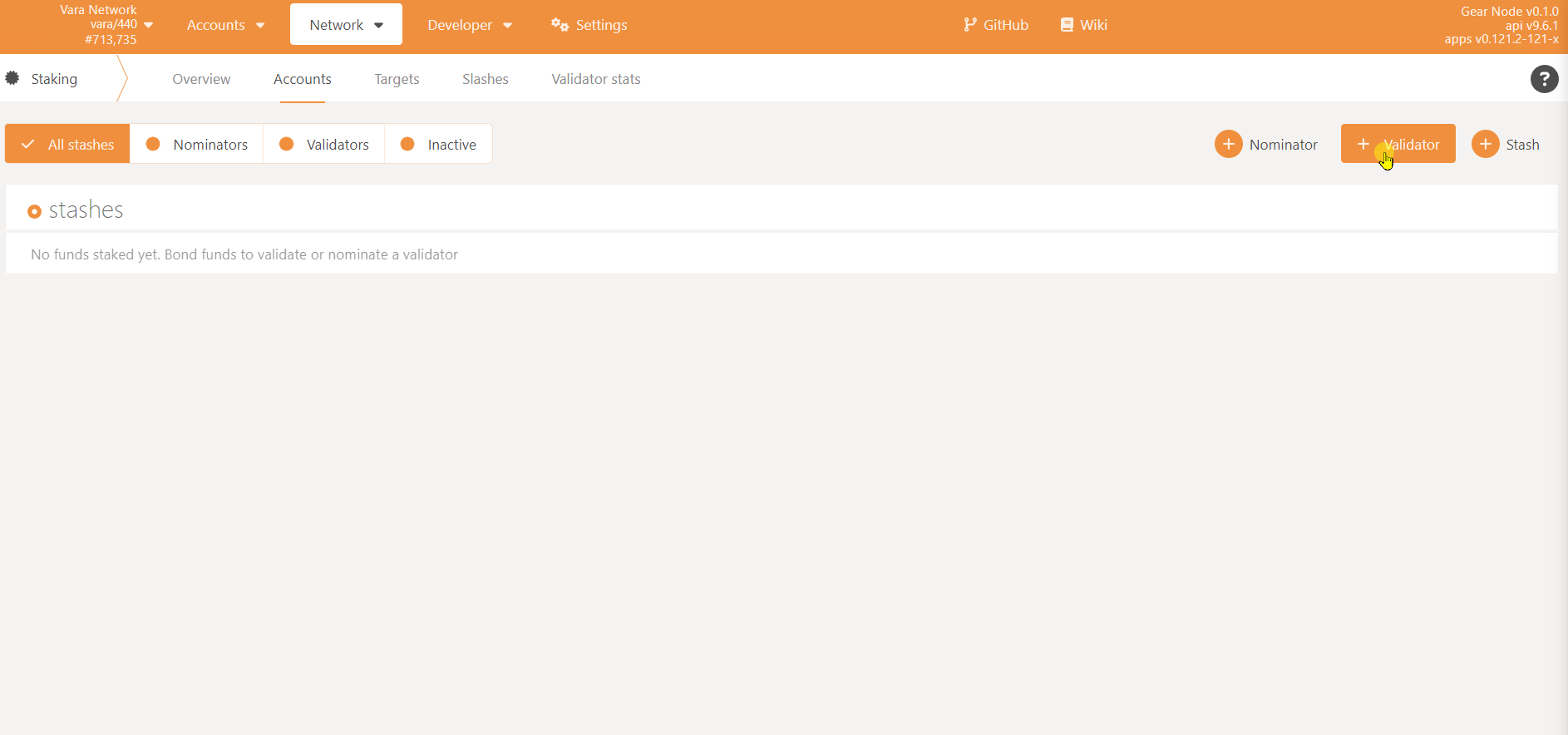
Navigate to https://polkadot.js.org/apps/?rpc=wss://rpc.vara-network.io#/staking/actions, click the "⊕ Validator" Button
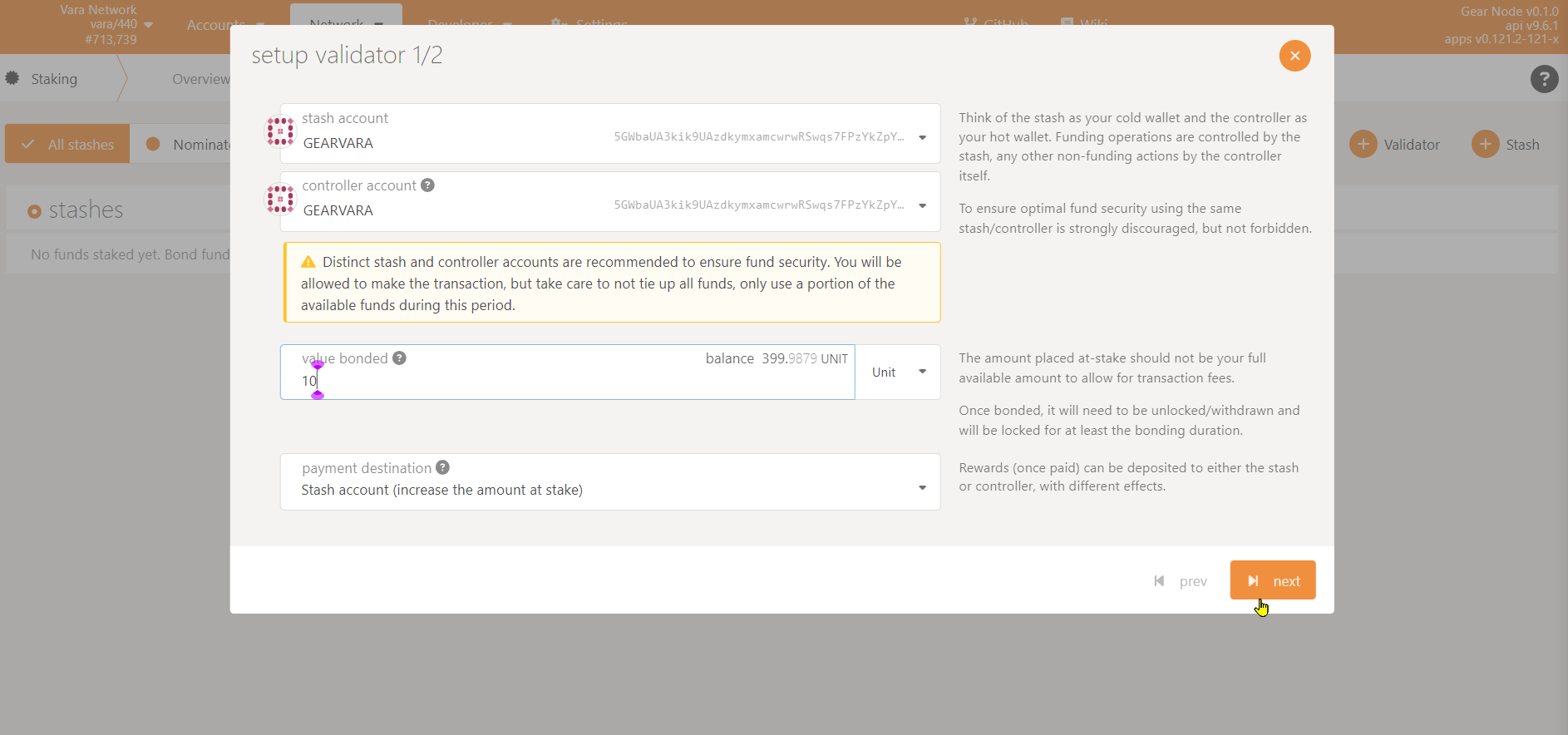
Select your __stash__ and __controller__ account that you created previously.
It is possible to use the same key as stash and controller account.
Enter the amount of token that you want to bond. Don't bond all of your tokens, you need some free balance for paying the transaction fee.
Click "Next".
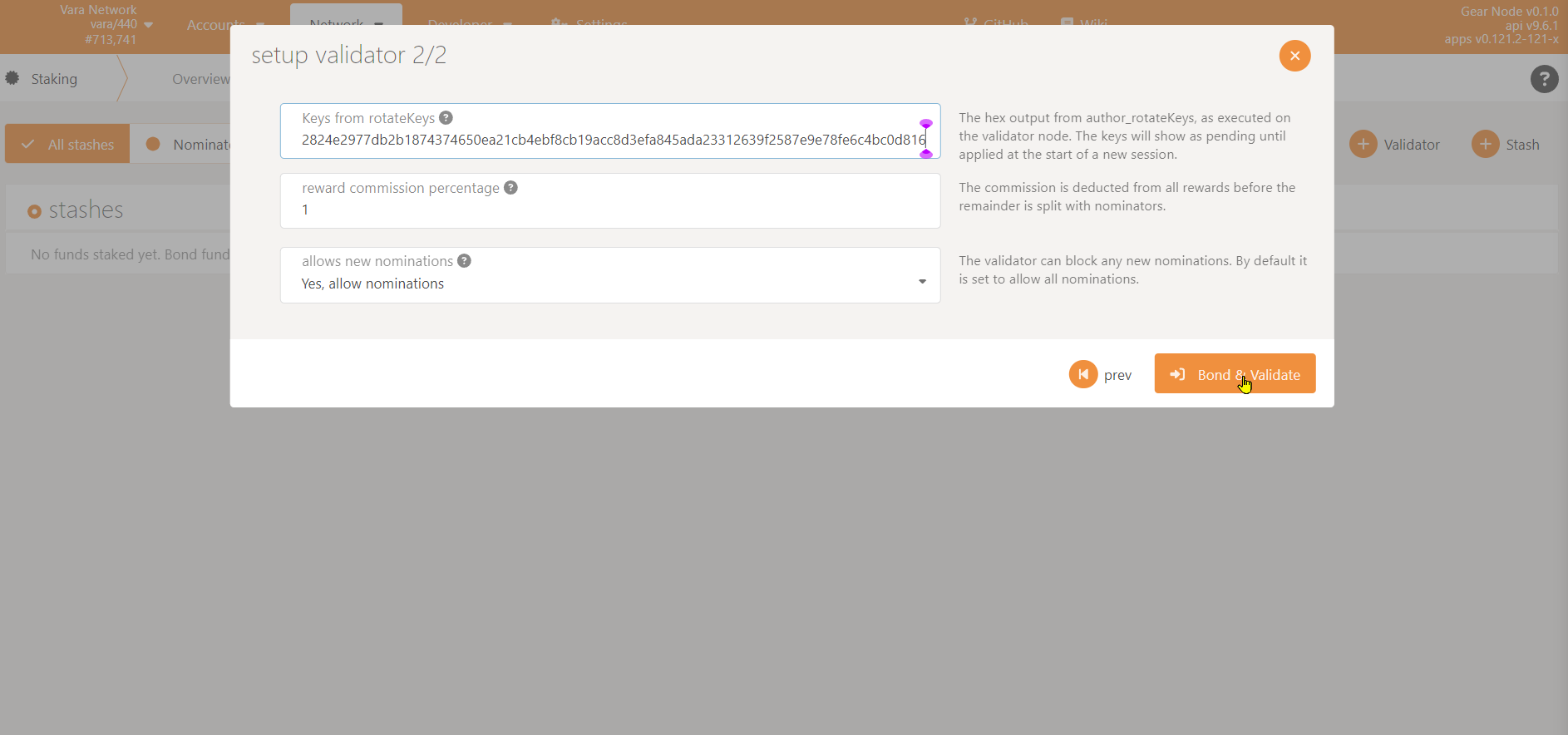
Fill your Session Key.
Confirm by clicking "Bond & Validate".
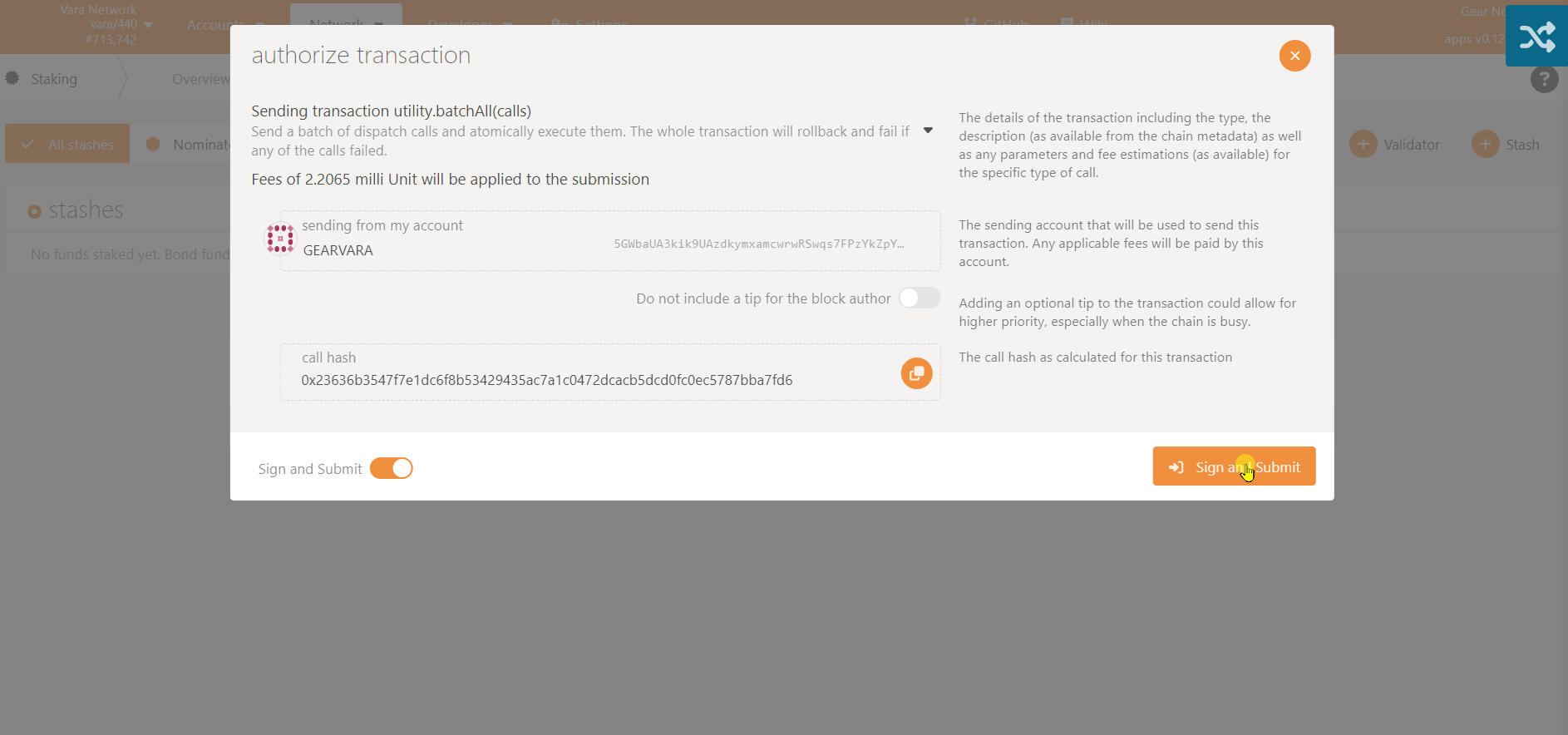
Confirm by clicking "Sign and Submit".
After a while, you can see your node in the waiting list.

You can verify that you have 10 UNIT bonded by click on your account name.

Now all you need to do is to wait for your node to be nominated.
📎To become a validator on Vara mainnet, you should refer to this guide after it's launched: https://wiki.vara-network.io/docs/validate/
📎There is also a guide on how to nominate existing nodes: https://wiki.vara-network.io/docs/nominate/. Read it if you want to be a nominator.
📎You may also want to confugure your node as a service by following this guide: https://wiki.gear-tech.io/docs/node/node-as-service.
**NOTE**: The `ExecStart=...` line in the example systemd-unit file should be modified to `ExecStart=/usr/bin/gear --telemetry-url "wss://telemetry.rs/submit 0" --name "NODE_NAME" --validator`, where `NODE_NAME` is the name of you node
# CHANGELOG
- 2022-12-22
- change binary path to `/usr/bin/gear`
- 2022-12-20
- add [#Debug-tips](#Debug-tips)
- 2022-12-19
- replace `vara.gear.rs` with `rpc.vara-network.io`
- update link to nomination guide
- add link to node-as-service guide
- 2022-11-04
- add missing `--validator` flag
- 2023-02-07
- add note: the example session key should not be used directly, otherwise you get the `session.DuplicatedKey` error. Use the result of `author_rotateKey` instead.
- 2023-08-15
- update session key length: now it contains also audi+imon in addition to babe+gran
 Sign in with Wallet
Connect another wallet
Sign in with Wallet
Connect another wallet