# PSA: Phishing on Discord
As Discord's phishing problem gets worse and phishers get more brazen and start using more accounts, it's useful to know what phishing groups do and how you can protect yourself. This document hopes to cover everything you need to know.
This document was written by **gdude2002**, Chief Fisherman™ at [the Quilt project](https://quiltmc.org/).
# Intro
Discord has been dealing with a huge wave of phishing bots for several months now. At Quilt, it's largely been easy to deal with the waves up until now, with [CrossLink](https://panleyent.com/crosslink/) and Cozy both providing on-server anti-phishing protection. However, as of a few days ago, the modus operandi of these phishing groups has changed.
Everyone says "I'm never gonna fall for that", but things are becoming more complex as time goes on. As it stands, phishing groups have hundreds of thousands of compromised accounts at their disposal - a number that grows significantly every day. Compromised accounts **are not used immediately**, and phishers have a habit of holding onto as many accounts as they can in order to create a large, coordinated wave of phishing messages and DMs at the same time. **This means that you may know someone that has a compromised account, and they will likely not know about it.**
For this reason, you need to be on the look out for several things:
* DMs from friends that you haven't talked to in a long time
* Friend requests from people you don't know
* Friends asking you to "try out" a game they're working on - especially if you don't know them to be a developer
* Messages containing links fashioned to look similar to Discord or Steam domains
* Messages containing QR codes that ask you to scan them with the Discord app, or sites that ask the same
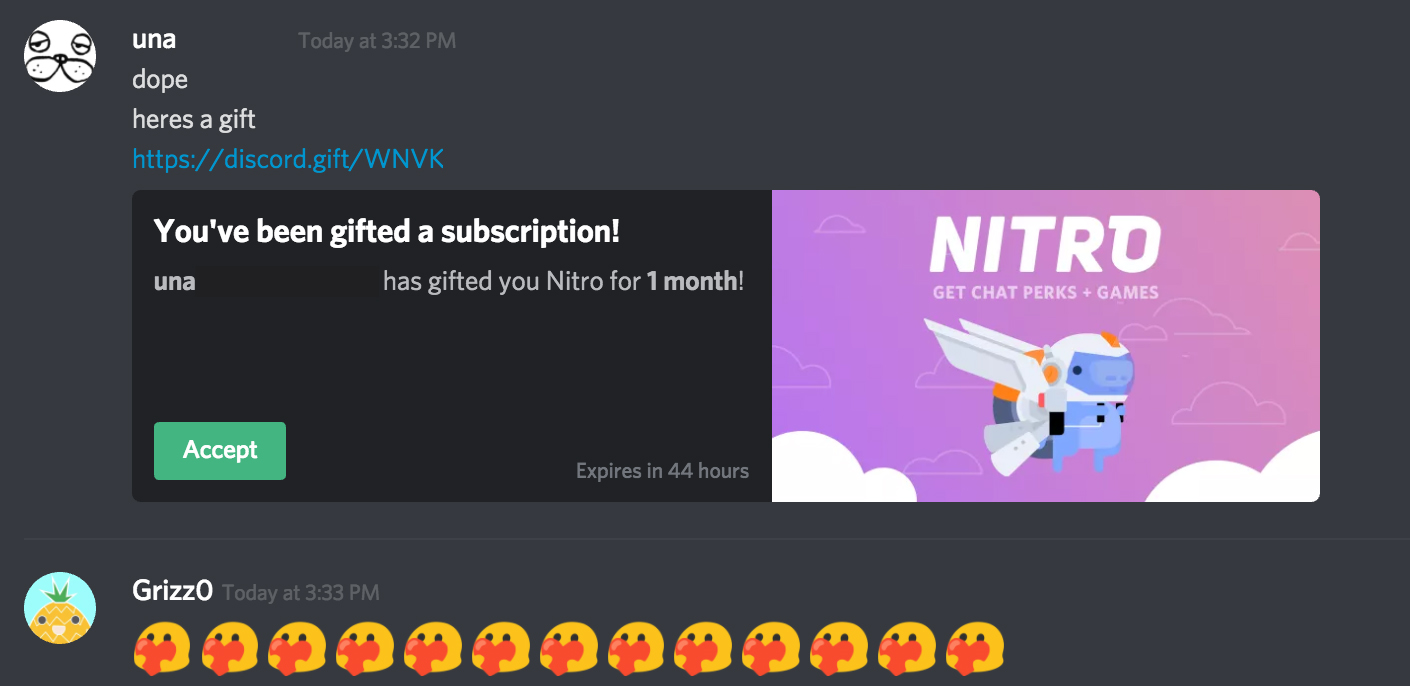
* Anyone claiming to offer you a gift that sends a link with a non-gift embed (see below for more)
I advise constant vigilance on this, as **every compromised account makes the problem worse**. As a user, it's extremely important that **you report any account that does this,** both to Discord and to the staff members of any servers you share with the account. This is part of your responsibility to help us make the problem solvable!
# What's a legitimate gift look like?
Legitimate Nitro gift links always use `discord.gift` as the domain. They do not embed like other links in chat, and have their own, special embed. One important thing to notice is the fact that **the embed contains the name of the person that sent the link, and an expiry time.** For an example of a legitimate Nitro gift embed, see below.
# Prepare yourself for the worst
I advise doing the following things if you feel that your account security isn't quite up to scratch:
* Set up two-factor authentication, and **disable SMS Backup Authentication**. While it can be kind of a pain, this is one of the strongest ways to protect your account in general. If you don't have an authenticator app on your phone, you can make use of Authy or Authenticator+ - remember to set up backup options if your app provides them, and keep your Discord recovery codes somewhere safe!
* Request a copy of your Discord data. You can do this in your user settings, under "Privacy & Safety". This will give you a backup copy of your friends list, among other information, which may be helpful when trying to recover your account.
* This is going to sound odd, but bear with me - go to <https://mee6.xyz/dashboard> and login with Discord. This is the official dashboard for the well-known MEE6 Discord bot - Once you're logged in, **make sure you do not clear your browser's cookies or cache if you can avoid it.**
If you click on yourself at the top right, on "Billing" and then on "Account Information", you'll notice that your email address and Discord ID are displayed. If you lose access to your account, **you will remain logged into the MEE6 dashboard, and you'll be able to see what your email address was changed to.** This may be helpful information for when you're trying to recover your account.
This is a bit of a hack, but it's a common tactic among elite Discord moderators.
# What do I do if I'm compromised?
If you've been compromised, you'll eventually notice one of two things:
**»** You've been logged out of your account and can no longer access it
**»** Messages have been sent that you don't remember sending, including phishing links
## If you can't get into your account...
The first thing you should do is submit a ticket with Discord. You can do this at <https://dis.gd/request>, selecting "Help & Support" in the first box, and "Hacked Account" in the third.
**Provide any information you think may allow you to get back into the account,** but try to limit it to things Discord can see without reading the contents of your messages. Some examples of useful data may be:
**»** Your email address (and the email the phisher replaced it with, if you used the MEE6 trick above)
**»** If you've been paying for Nitro, transaction information regarding renewals can be helpful - you'll get a "Discord payment succeeded" email with a payment ID every time your subscription renews
**»** People on your friends list, and people you've blocked
**»** Servers that you're staff on, or tend to be active on
It can take a while for Discord to get back to you. **Make sure you always reply to their first response,** as the first one is usually a canned response and replying quickly can help to escalate your ticket.
Additionally, if you were using the same password on any accounts on any other services, **you need to go and change those immediately.** Phishers will try your email and password on other websites, just to see if they can get into any other accounts.
## If you still have access to your account...
* **Immediately go to your Discord settings and change your password.** This will log you out of Discord in every other client, invalidating any tokens the phishers may be using to access your account.
* Run a thorough virus scan on your computer. Most antivirus products are fine for this, including Windows Defender - just make sure you do a full scan, not a "quick scan".
---
Ultimately, we all have a responsibility to not make this problem worse. If you're a member of the DMD server, or you run a large community or have a lot of badges on your profile (especially rate ones), you're likely to be a higher-risk target for phishing - so keep aware, and make sure you're careful out there.
Quilt is currently working with several other modding communities on an infraction-sharing system. We believe this is likely to help at least a little bit with the issue, as compromised accounts are likely to be on more than one of these servers. That said, if you're a moderator or you run a community, **remember that these accounts are all real accounts that were stolen**. For this reason, I recommend that you use temporary bans if you don't have an appeals system, or permanent bans with an explicit path to appeal, if you notice this problem in your communities.
Stay safe out there, keep an eye out and let your community's staff members know if you notice anything untoward.
 Sign in with Wallet
Connect another wallet
Sign in with Wallet
Connect another wallet