# Automation practices in Globally Distributed Software Engineering (GDSE)
> [name=This article is part of a series on microservices and automation. Click [here](https://hackmd.io/@gdse-4/deliverable/) to go to the series overview.]
Specifically in GDSE -- and [especially](https://hackmd.io/@gdse-4/deliverable-1) when using a microservice architecture -- automation is critical for creating and maintaining standardised processes across teams. But what does automation entail? What should we automate? What advantages does automation bring? What are the pitfalls? And how do we implement it?
This article provides answers to those questions. To start off, automation is rather broad, as there are many processes that can be automated. While we will touch upon some other useful ways of applying automations in GDSE, this article mainly focusses on the automation of the build, test, delivery and deployment logic, also known as Continuous Integration (CI) and Continuous Delivery / Continuous Deployment (CD). We clarify the advantages of implementing it in practice, but also what pitfalls, considerations and complications can arise along the way and how to mitigate these. We will also explore some best practices `TODO: from <name some sources>`, as well as recommend ways, tools and further reading for successfully implementing automation in practice, finishing off with a small tutorial on `TODO: Dexter, vul ff in wat de lezer in je tutorial gaat leren`
## What is Automation?
In any software project, especially when working globally distributed, much can be automated in order to achieve consistency, reliability and standardisation in the working processes of the developers. The most common and most important of these processes to automate are those for building, testing, delivering and deploying the software upon every commit to the centralised source code repository. However, we will also explore other ways to apply automation and how they can be useful, namely in source code generation and developer tooling.
### Continuous Integration (CI) + Continuous Delivery / Deployment (CD)
As Mathias Meyer, co-founder of the popular CI/CD platform [Travis CI](https://travis-ci.org/), puts it:
> In a continuous integration life cycle, when someone checks his or her revised code into the repository, an automated system picks up the change, checks out the code, and runs a set of commands to verify that the change is good and didn't break anything. This tool is meant to be the unbiased judge of whether a change works or not, thereby preventing the “it works on my machine” syndrome before the code hits production.
> [name=Mathias Meyer, 2014, "Continuous Integration and Its Tools," in IEEE Software[^meyer-ci]]
The importance of automated building, testing, delivery and deployment pipelines for GDSE lies in that they both enforce as well as provide the same standardised environment for all developers. Regardless of the developers' own technological environment or geographical location, their code must hold to the common standards set by your CI/CD. Such pipelines are (unlike people) always available, help to discover errors faster and ensure that the system is tested and releasable with minimal human effort. Thankfully, solutions like the aforementioned [Travis CI](https://travis-ci.org/), [Jenkins](https://www.jenkins.io/), [GitHub Actions](https://github.com/features/actions) and [Gitlab CI](https://about.gitlab.com/stages-devops-lifecycle/continuous-integration/) make implementing CI easy to achieve. Large Git hosting providers such as GitHub and especially GitLab also integrate with these tools closely, making it easy for developers to make it part of their workflow. See `TODO: insert reference to the Dexter's 'tutorial'`
### Source code generation
Source code generation can be especially useful in generating client libraries for API definitions that are written in a language-neutral data format. Michael Bryzak speaks about this in more detail in [his talk at InfoQ's QCon in 2018](https://www.infoq.com/presentations/microservices-arch-infrastructure-cd/). In short, suppose you have an API definition written in the language-neutral data format JSON. Automatically generating the code required to talk to this API, makes it much easier to implement applications that either produce the API or consume it. This is because developers then do not have to spend time writing the logic that translates between the object model in the application's language and the data exchange format anymore. Not only does it save time, but the source code generation can also be tested properly to ensure that the generated code is sound and it is even possible to test the API definition itself for consistency and correctness (using CI/CD).
Binary formats such as Google's [Protocol buffers](https://developers.google.com/protocol-buffers) and [gRPC](https://grpc.io/) inherently need to be compiled to usable source code for your application. As such they support the generation of client libraries in many different programming languages. However, there also exist source code generators for textual formats such as JSON (see [apibuilder](https://www.apibuilder.io/), also mentioned in Bryzak's talk) and GraphQL (see [graphql-code-generator](https://graphql-code-generator.com/)), just to name a few popular examples.
### Developer tooling
Another place where automation can be applied, also mentioned in [Bryzak's talk](https://www.infoq.com/presentations/microservices-arch-infrastructure-cd/), is in the area of developer tooling. Having the processes for e.g. creating and managing databases, setting up new deployments or editing an existing one be standardised in the form of code, such as a simple command-line tool, ensures that they always happen in the right way. Only the people developing the tool will need to know how the database should properly be set up, while the developers using the tool only need to learn how to utter a few commands.
<!-- ### Automatic performance / log monitoring tools? Auto-scaling? -->
<!-- CI/CD is vooral Dev, mss nog wat meer aspecten van automation toelichten die meer aan de Ops kant van DevOps staan? Bijv. Kubernetes, automatic log monitoring (met notifications voor de devs when shit hits the fan), auto-scaling, Prometheus (automatic performance monitoring voor Kubernetes) -->
<!-- TODO Dexter: best practices how to: in een tutorialtje met een voorbeeldservice uitleggen hoe je CI/CD het beste kan inrichten / implementeren -->
## Advantages of CI/CD in a GDSE context
One thing that must be understood is that CI/CD is not just a set of tools. It is part of a mindset. A way of working. It is best combined with an agile workflow.
If you're currently on a 6 month release cycle, getting the most out of CI/CD might be difficult.
+ When working in a GDSE context, communication is always a challenge. Constantly creating documentation is usually inefficient, but if you're using a good CI workflow each pull request is its own documentation. It's easy to see what changed, your tests passed so it actually works and you can see what was implemented by looking at the new tests. And since CI encourages merging often this can even be a form of handover between teams.
+ One of the big advantages of CI is that production and testing are fast and effectively free. Compiling and running tests is all done automatically, so a developer can focus on designing new features.
+ If you're using CD, rolling back your software after something breaks is actually quite simple. The change should be relatively small, and you can easily check which earlier version worked.
+ CI/CD enforces a common development environment. Every developer has at one point in their career heard the phrase 'it works on my machine'. Often as an excuse intended to shift responsibility for a fix to another developer. Since a good CI implementation also defines in which environment all tests are run, it's very easy to attribute problems. If CI succeeds, the problem is the software. If it works on CI but not on a developers machine, that machine should be updated to match the CI environment.
+ When using a workflow that includes CI, developers will write tests earlier and more often. This means bugs are found earlier.
## Pitfalls
Of course there are some risks involved with CI. In this section we'll list a few common pitfalls and how to mitigate them.
First and perhaps most importantly, implementing CI/CD is not free. Simply setting up a pipeline and calling it a day will not result in many improvements. It will take some time for developers to get used to the new workflow and the new tools. They will need to learn how the testing framework works, how to check if their builds succeed, and how to determine what went wrong if they did not. This might include debugging the pipeline itself, which requires knowledge of the CI system used.
This is especially important in a GDSE context. The team that sets up the CI/CD server might be located at one site, while some of the users are at a different site. This means that knowledge on how the new system works needs to be shared among sites. So developers at the remote site will have more difficulty learning how to use the new systems. [^ericson-casestudy]
Another point of interest is that not every project is immediately suitable for automation. A complex project with a number of external or third party dependencies might be difficult to automate. How do we do versioning of dependencies? Can we automate this or does it require manual work?[^ericson-casestudy] An easy way to check this is to look at how your dependencies are tested and deployed. If they use CD it should be easy to automate. If they do not it might not be as simple and that's something to look at before deciding on using CI/CD yourself.
Projects that have a significant UI component might also be difficult to automate, because most UI problems can only really be detected by a human actually using the product.
CI requires that automated tests are written. For some developers this might lead to writing a test just to have a test. These tests might be meaningless.
When working in a GDSE context another important question is also where do you place the server, and who has access to it? If the physical server is at site A, but some of your developers are at site B any changes to the test environment could take a long time. A good way to solve this problem is to define the testing environment in a file that you commit into your version control. For example using a Dockerfile.[^jenkins-docker] This way new testing environments can be configured
One of the goals of using CI is to test often. This means that tests should be quick. If your CI/CD pipeline takes an hour, developers might decide to wait a few days before testing their work. So if your tests take too long, spend some time to make them faster.
It's also possible that test jobs end up queued because too many are run. An easy way to get around this is to use cloud computing, and to spawn a new instance for each build.
There is also a security risk to using CI/CD. In order to build and test your software, the CI/CD server needs full access to a number of systems. If everything is run inside your company this is easy enough. But if you're using cloud based systems this becomes a bit more difficult. Many security guidelines are available for CI/CD services and the details are outside the scope of this document.
## Continuous Delivery vs Continuous Deployment
Continuous _Delivery_ means automating your pipeline to the point where _Deploying_ your software is as easy as a push of a button[^ci-overview]. So your software is fully tested and probably lives on a staging server that acts as the final product would. Continuous Deployment simply takes away this need to push a button. From a development perspective there should ideally be no real difference between the two. `TODO: why?` For business or legal reasons it might be useful to delay deploying a feature. `TODO: why?`
<!-- Shall we move this section up into the "What is automation" section? - Bart -->
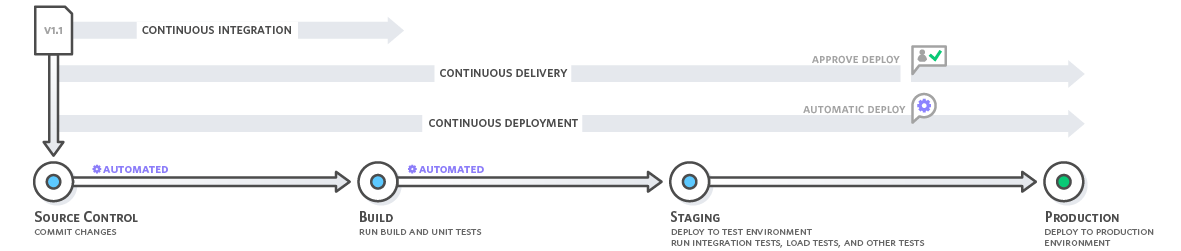
>[name=Source: https://aws.amazon.com/devops/continuous-integration/]
## Best Practices
It is important that the automated tests are run frequently, otherwise mistakes might still slip through resulting in difficulty integrating back into the main branch. As such, we recommend running the automated tests on every branch of the repository, and that developers push frequently to check if their build succeeds.
Keep documentation and comments up to date and accurate, so when a developer in another team encounters a failed test, they know what the code is supposed to do and how it’s supposed to do that. This makes fixing the error much easier.
## How to?
First, decide how rigorous you want your testing to be. Based on this decision, write an appropriate amount unit, integration, acceptance and, UI tests. Do keep in mind that some tests, especially UI tests, can take a while to execute, resulting in developers having to wait for feedback.
Second, you need a service to automatically run those tests, whenever changes are pushed. There are many of these services available, and which one you use is entirely up to you. However, there are a couple of things to keep in mind while picking such a service:
<!-- Ik moet hier nog iets meer uitleggen waarom -->
- What OS does your system run on?
- Does the service have the capacity and resources you need?
- Would you prefer running the service on-site or in the cloud?
Finally, keep adding tests when necessary. Without proper testing CI isn’t very effective, so whenever new code is added, bugs are fixed, or old code is refactored, write tests to make sure these changes are functioning properly, and keep functioning properly.
<!-- Voorbeeld 'tutorial' -->
## List of Services
<!-- Ik moet er nog meer bij zetten + korte beschrijving -->
- Jenkins
- circleci
- TeamCity
- Bamboo
- GitLab
<!-- - References to sources to help people further along when they run into problems implementing automation or just find more general info. - Iedereen. Als je wat tegenkomt, pleur t hierbij :)[^ci-overview] -->
<!-- Also contains some useful best practices -->
[^meyer-ci]: M. Meyer, "Continuous Integration and Its Tools," in IEEE Software, vol. 31, no. 3, pp. 14-16, May-June 2014, doi: 10.1109/MS.2014.58.
[^ci-overview]: M. Shahin, M. Ali Babar and L. Zhu, "Continuous Integration, Delivery and Deployment: A Systematic Review on Approaches, Tools, Challenges and Practices," in IEEE Access, vol. 5, pp. 3909-3943, 2017, doi: 10.1109/ACCESS.2017.2685629.
[^ericson-casestudy]: E. Laukkanen, M. Paasivaara and T. Arvonen, "Stakeholder Perceptions of the Adoption of Continuous Integration -- A Case Study," 2015 Agile Conference, Washington, DC, 2015, pp. 11-20, doi: 10.1109/Agile.2015.15.
[^jenkins-docker]: https://www.jenkins.io/doc/book/pipeline/docker/
 Sign in with Wallet
Connect another wallet
Sign in with Wallet
Connect another wallet