# Cloud Native
slides: https://hackmd.io/@gaeshi/cloud-native

---
## DX事業部セミナー
2019年10月31日(木)
I・SYSTEM(市ヶ谷)
Viktors Garkavijs
---
## Cloud Native Landscape overview
CNCF - Cloud Native Computing Foundation
---
14 trillion USD
1500兆円
---
https://landscape.cncf.io/images/landscape.png

---
## Let's take a look just at serverless...
---
https://landscape.cncf.io/images/serverless.png

---
## CNCF members
---
https://landscape.cncf.io/images/members.png

---
We can't become experts in all of this.
<span><!-- .element: class="fragment" data-fragment-index="1" -->But we can study the foundations.</span>
---
## Today's agenda
* Cloud
* DevOps
* CI/CD
* Microservices
---
# Cloud :cloud:
---
## Cloud
* Distributed systems
* Twelve-Factor App
* Service reliability
---
### Fallacies of distributed computing
http://nighthacks.com/jag/res/Fallacies.html
* The network is reliable
* Latency is zero
* Bandwidth is infinite
* The network is secure
* Topology doesn't change
* There is one administrator
* Transport cost is zero
* The network is homogeneous
*(P. Deutsch et al.)*
Note:
分散コンピューティングの落とし穴
* ネットワークは信頼できる
* レイテンシはゼロである
* 帯域幅は無限である
* ネットワークはセキュアである
* ネットワーク構成は変化せず一定である
* 管理者は1人である
* トランスポートコストはゼロである
* ネットワークは均質である
---
### Twelve-Factor App
https://12factor.net/
```
1 Codebase
2 Dependencies
3 Config
4 Backing services
5 Build, release, run
6 Processes
7 Port binding
8 Concurrency
9 Disposability
10 Dev/prod parity
11 Logs
12 Admin processes
```
----
### I. Codebase
One codebase tracked in revision control, many deploys
Note:
コードベース
バージョン管理されている1つのコードベースと複数のデプロイ
----
### II. Dependencies
Explicitly declare and isolate dependencies
Note:
依存関係を明示的に宣言し分離する
----
### III. Config
Store config in the environment
Note:
設定を環境変数に格納する
----
### IV. Backing services
Treat backing services as attached resources
Note:
バックエンドサービスをアタッチされたリソースとして扱う
----
### V. Build, release, run
Strictly separate build and run stages
Note:
ビルド、リリース、実行の3つのステージを厳密に分離する
----
### VI. Processes
Execute the app as one or more stateless processes
Note:
アプリケーションを1つもしくは複数のステートレスなプロセスとして実行する
----
### VII. Port binding
Export services via port binding
Note:
ポートバインディングを通してサービスを公開する
----
### VIII. Concurrency
Scale out via the process model
Note:
プロセスモデルによってスケールアウトする
----
### IX. Disposability
Maximize robustness with fast startup and graceful shutdown
Note:
高速な起動とグレースフルシャットダウンで堅牢性を最大化する
----
### X. Dev/prod parity
Keep development, staging, and production as similar as possible
Note:
開発/本番環境の一致
開発、ステージング、本番環境をできるだけ一致させた状態を保つ
----
### XI. Logs
Treat logs as event streams
Note:
ログをイベントストリームとして扱う
----
### XII. Admin processes
Run admin/management tasks as one-off processes
Note:
管理タスクを1回限りのプロセスとして実行する
---
## SRE
https://landing.google.com/sre/
***SRE**: Site Reliability Engineering*
---
### SLI, SLO, SLA
- <span><!-- .element: class="fragment" data-fragment-index="1" -->***SLI**: Service level **indicators**.*</span>
- <span><!-- .element: class="fragment" data-fragment-index="2" -->***SLO**: Service level **objectives**.*</span>
- <span><!-- .element: class="fragment" data-fragment-index="3" -->***SLA**: Service level **agreements**.*</span>
Note:
Indicators - A carefully defined quantitative measure of some aspect of the level of service that is provided. Most services consider request latency—how long it takes to return a response to a request—as a key SLI. Other common SLIs include the error rate, often expressed as a fraction of all requests received, and system throughput, typically measured in requests per second. The measurements are often aggregated: i.e., raw data is collected over a measurement window and then turned into a rate, average, or percentile. Ideally, the SLI directly measures a service level of interest, but sometimes only a proxy is available because the desired measure may be hard to obtain or interpret. For example, client-side latency is often the more user-relevant metric, but it might only be possible to measure latency at the server. Another kind of SLI important to SREs is availability, or the fraction of the time that a service is usable. It is often defined in terms of the fraction of well-formed requests that succeed, sometimes called yield. (Durability—the likelihood that data will be retained over a long period of time—is equally important for data storage systems.) Although 100% availability is impossible, near-100% availability is often readily achievable, and the industry commonly expresses high-availability values in terms of the number of "nines" in the availability percentage. For example, availabilities of 99% and 99.999% can be referred to as "2 nines" and "5 nines" availability, respectively, and the current published target for Google Compute Engine availability is "three and a half nines" - 99.95% availability.
Objectives - a target value or range of values for a service level that is measured by an SLI. A natural structure for SLOs is thus SLI ≤ target, or lower bound ≤ SLI ≤ upper bound. For example, we might decide that we will return Shakespeare search results "quickly," adopting an SLO that our average search request latency should be less than 100 milliseconds. Choosing an appropriate SLO is complex. To begin with, you don’t always get to choose its value! For incoming HTTP requests from the outside world to your service, the queries per second (QPS) metric is essentially determined by the desires of your users, and you can’t really set an SLO for that. On the other hand, you can say that you want the average latency per request to be under 100 milliseconds, and setting such a goal could in turn motivate you to write your frontend with low-latency behaviors of various kinds or to buy certain kinds of low-latency equipment. (100 milliseconds is obviously an arbitrary value, but in general lower latency numbers are good. There are excellent reasons to believe that fast is better than slow, and that user-experienced latency above certain values actually drives people away— see "Speed Matters" for more details.) Again, this is more subtle than it might at first appear, in that those two SLIs—QPS and latency—might be connected behind the scenes: higher QPS often leads to larger latencies, and it’s common for services to have a performance cliff beyond some load threshold. Choosing and publishing SLOs to users sets expectations about how a service will perform. This strategy can reduce unfounded complaints to service owners about, for example, the service being slow. Without an explicit SLO, users often develop their own beliefs about desired performance, which may be unrelated to the beliefs held by the people designing and operating the service. This dynamic can lead to both over-reliance on the service, when users incorrectly believe that a service will be more available than it actually is (as happened with Chubby: see The Global Chubby Planned Outage), and under-reliance, when prospective users believe a system is flakier and less reliable than it actually is.
Agreements - Finally, SLAs are service level agreements: an explicit or implicit contract with your users that includes consequences of meeting (or missing) the SLOs they contain. The consequences are most easily recognized when they are financial—a rebate or a penalty—but they can take other forms. An easy way to tell the difference between an SLO and an SLA is to ask "what happens if the SLOs aren’t met?": if there is no explicit consequence, then you are almost certainly looking at an SLO. SRE doesn’t typically get involved in constructing SLAs, because SLAs are closely tied to business and product decisions. SRE does, however, get involved in helping to avoid triggering the consequences of missed SLOs. They can also help to define the SLIs: there obviously needs to be an objective way to measure the SLOs in the agreement, or disagreements will arise. Google Search is an example of an important service that doesn’t have an SLA for the public: we want everyone to use Search as fluidly and efficiently as possible, but we haven’t signed a contract with the whole world. Even so, there are still consequences if Search isn’t available—unavailability results in a hit to our reputation, as well as a drop in advertising revenue. Many other Google services, such as Google for Work, do have explicit SLAs with their users. Whether or not a particular service has an SLA, it’s valuable to define SLIs and SLOs and use them to manage the service.
---
## The Four Golden Signals
---
### The Four Golden Signals
* Latency
* Traffic
* Errors
* Saturation
Note:
Latency - The time it takes to service a request. It’s important to distinguish between the latency of successful requests and the latency of failed requests. For example, an HTTP 500 error triggered due to loss of connection to a database or other critical backend might be served very quickly; however, as an HTTP 500 error indicates a failed request, factoring 500s into your overall latency might result in misleading calculations. On the other hand, a slow error is even worse than a fast error! Therefore, it’s important to track error latency, as opposed to just filtering out errors.
Traffic - a measure of how much demand is being placed on your system, measured in a high-level system-specific metric. For a web service, this measurement is usually HTTP requests per second, perhaps broken out by the nature of the requests (e.g., static versus dynamic content). For an audio streaming system, this measurement might focus on network I/O rate or concurrent sessions. For a key-value storage system, this measurement might be transactions and retrievals per second.
Errors - The rate of requests that fail, either explicitly (e.g., HTTP 500s), implicitly (for example, an HTTP 200 success response, but coupled with the wrong content), or by policy (for example, "If you committed to one-second response times, any request over one second is an error"). Where protocol response codes are insufficient to express all failure conditions, secondary (internal) protocols may be necessary to track partial failure modes. Monitoring these cases can be drastically different: catching HTTP 500s at your load balancer can do a decent job of catching all completely failed requests, while only end-to-end system tests can detect that you’re serving the wrong content.
Saturation - How "full" your service is. A measure of your system fraction, emphasizing the resources that are most constrained (e.g., in a memory-constrained system, show memory; in an I/O-constrained system, show I/O). Note that many systems degrade in performance before they achieve 100% utilization, so having a utilization target is essential. In complex systems, saturation can be supplemented with higher-level load measurement: can your service properly handle double the traffic, handle only 10% more traffic, or handle even less traffic than it currently receives? For very simple services that have no parameters that alter the complexity of the request (e.g., "Give me a nonce" or "I need a globally unique monotonic integer") that rarely change configuration, a static value from a load test might be adequate. As discussed in the previous paragraph, however, most services need to use indirect signals like CPU utilization or network bandwidth that have a known upper bound. Latency increases are often a leading indicator of saturation. Measuring your 99th percentile response time over some small window (e.g., one minute) can give a very early signal of saturation. Finally, saturation is also concerned with predictions of impending saturation, such as "It looks like your database will fill its hard drive in 4 hours."
If you measure all four golden signals and page a human when one signal is problematic (or, in the case of saturation, nearly problematic), your service will be at least decently covered by monitoring.
---
# DevOps :repeat:
---
## DevOps
What is DevOps?
* Automation
* Testing
* CI/CD
* Monitoring
* Configuration Management
---
## What is DevOps?
* Software development + IT operations
* Culture of collaboration
* Set of practices <span><!-- .element: class="fragment" data-fragment-index="1" -->(those 5 items from the previous slide)</span>
---
# DevOps topologies
https://web.devopstopologies.com/
---
## DevOps Anti-Types
----
<!-- .slide: data-background="#fff" -->
:::danger
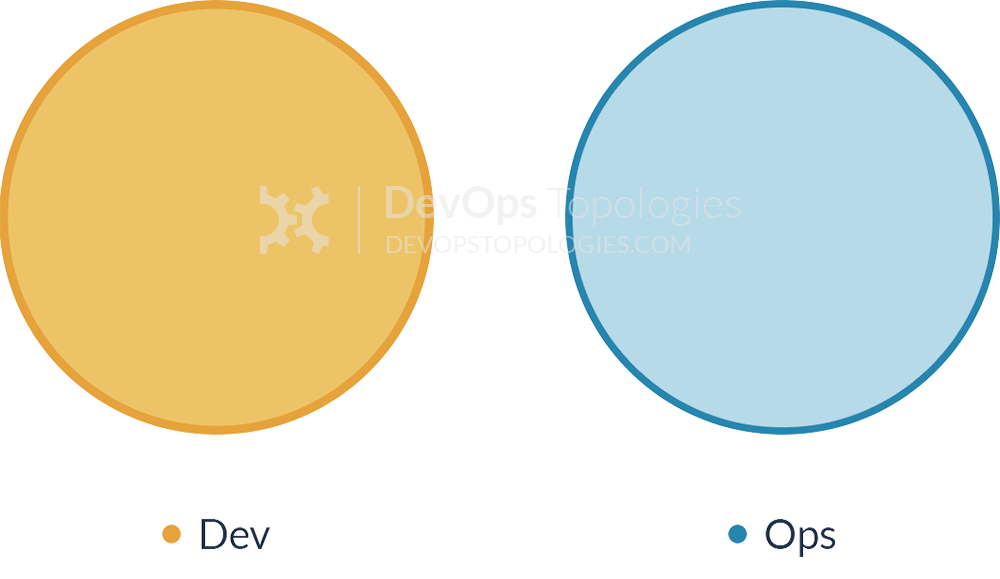
Anti-Type A: Dev and Ops Silos
:::
Note:
This is the classic ‘throw it over the wall’ split between Dev and Ops. It means that story points can be claimed early (DONE means ‘feature-complete’, but not working in Production), and software operability suffers because Devs do not have enough context for operational features and Ops folks do not have time or inclination to engage Devs in order to fix the problems before the software goes live.
We likely all know this topology is bad, but I think there are actually worse topologies; at least with Anti-Type A (Dev and Ops Silos), we know there is a problem.
----
<!-- .slide: data-background="#fff" -->
:::danger
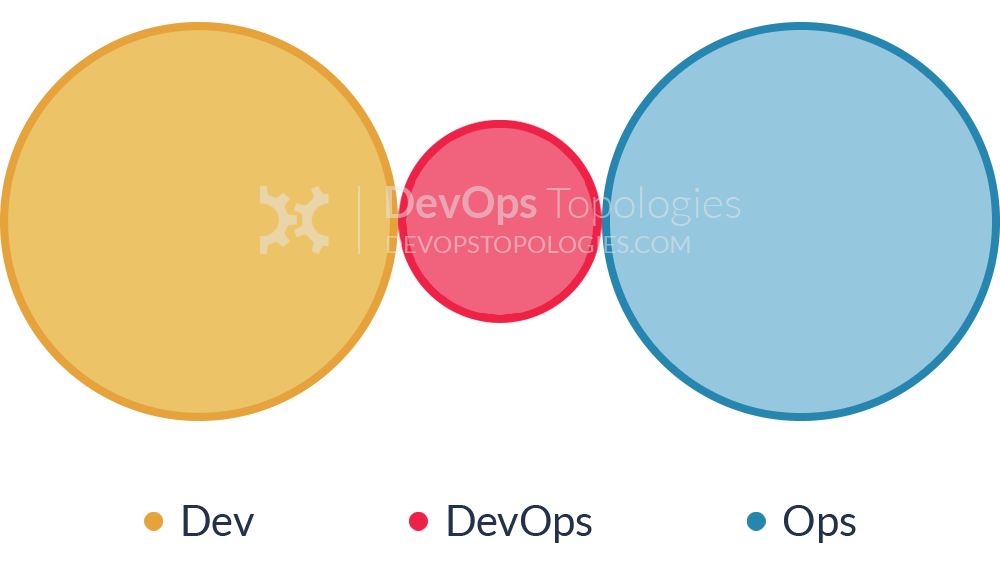
Anti-Type B: DevOps Team Silo
:::
Note:
The DevOps Team Silo (Anti-Type B) typically results from a manager or exec deciding that they “need a bit of this DevOps thing” and starting a ‘DevOps team’ (probably full of people known as ‘a DevOp‘). The members of the DevOps team quickly form another silo, keeping Dev and Ops further apart than ever as they defend their corner, skills, and toolset from the ‘clueless Devs’ and ‘dinosaur Ops’ people.
The only situation where a separate DevOps silo really makes sense is when the team is temporary, lasting less than (say) 12 or 18 months, with the express purpose of bringing Dev and Ops closer together, and with a clear mandate to make the DevOps team superfluous after that time; this becomes what I have called a Type 5 DevOps Topology.
----
<!-- .slide: data-background="#fff" -->
:::danger
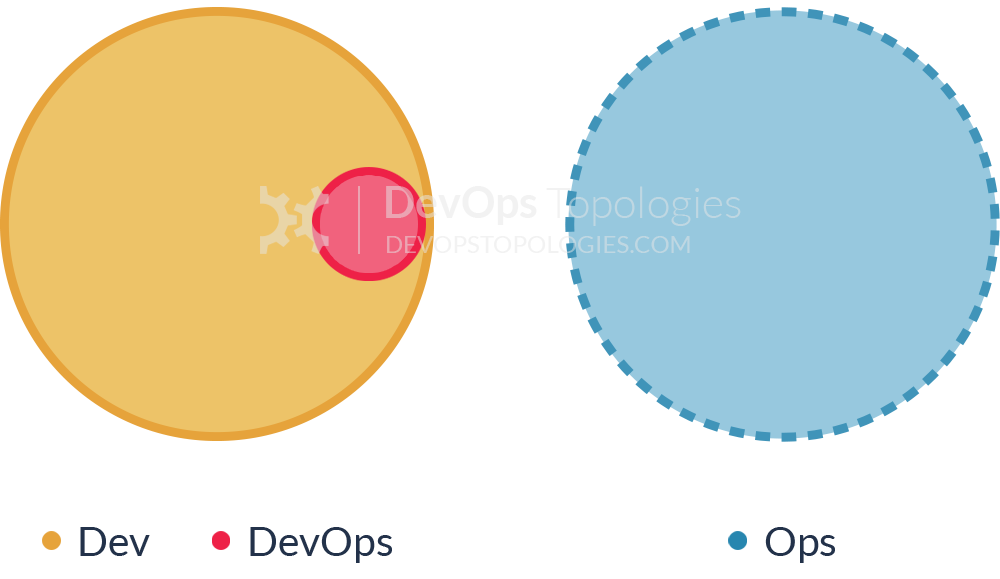
Anti-Type C: Dev Don't Need Ops
:::
Note:
This topology is borne of a combination of naivety and arrogance from developers and development managers, particularly when starting on new projects or systems. Assuming that Ops is now a thing of the past (“we have the Cloud now, right?”), the developers wildly underestimate the complexity and importance of operational skills and activities, and believe that they can do without them, or just cover them in spare hours.
Such an Anti-Type C DevOps topology will probably end up needing either a Type 3 (Ops as IaaS) or a Type 4 (DevOps-as-a-Service) topology when their software becomes more involved and operational activities start to swamp ‘development’ (aka coding) time. If only such teams recognised the importance of Operations as a discipline as important and valuable as software development, they would be able to avoid much pain and unnecessary (and quite basic) operational mistakes.
----
<!-- .slide: data-background="#fff" -->
:::danger
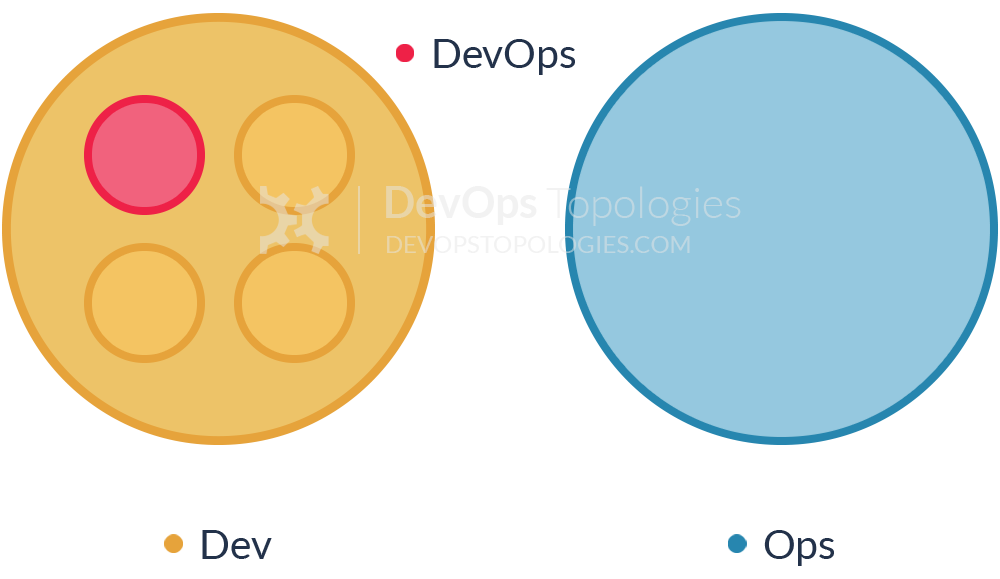
Anti-Type D: DevOps as Tools Team
:::
Note:
In order to "become DevOps" without losing current dev teams velocity (read delivery of functional stories), a DevOps team is set up to work on the tooling required for deployment pipelines, configuration management, environment management, etc. Meanwhile Ops folks continue to work in isolation and Dev teams continue to throw them applications "over the wall".
Although the outcomes of this dedicated team can be beneficial in terms of an improved tool chain, its impact is limited. The fundamental problem of lack of early Ops involvement and collaboration in the application development lifecycle remains unchanged.
----
<!-- .slide: data-background="#fff" -->
:::danger
Anti-Type E: Rebranded SysAdmin
:::
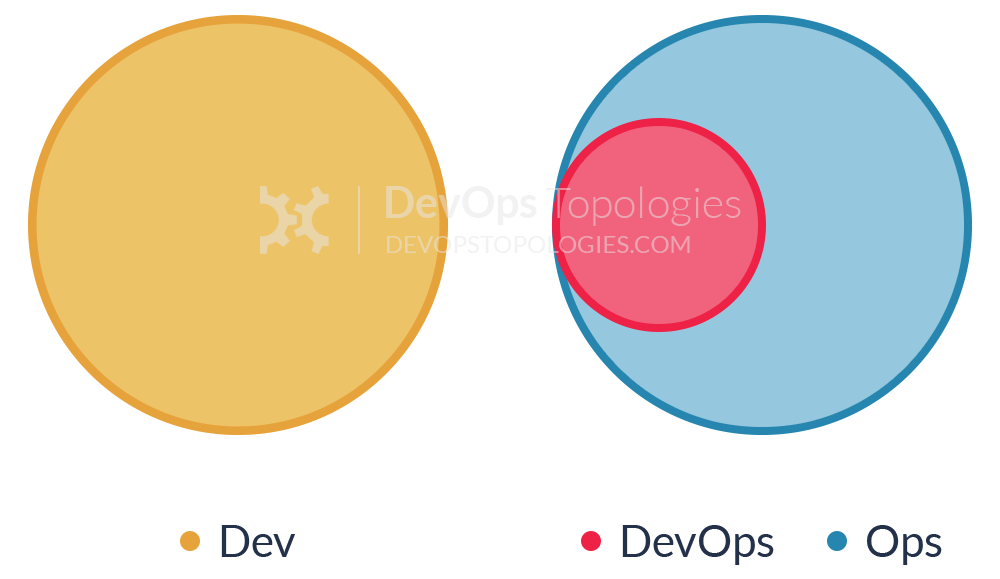
Note:
This anti-type is typical in organizations with low engineering maturity. They want to improve their practices and reduce costs, yet they fail to see IT as a core driver of the business. Because industry successes with DevOps are now evident, they want to "do DevOps" as well. Unfortunately, instead of reflecting on the gaps in the current structure and relationships, they take the elusive path of hiring "DevOps engineers" for their Ops team(s).
DevOps becomes just a rebranding of the role previously known as SysAdmin, with no real cultural/organizational change taking place. This anti-type is becoming more and more widespread as unscrupulous recruiters jump on the bandwagon searching for candidates with automation and tooling skills. Unfortunately, it's the human communication skills that can make DevOps thrive in an organization.
----
<!-- .slide: data-background="#fff" -->
:::danger
Anti-Type F: Ops Embedded in Dev Team
:::
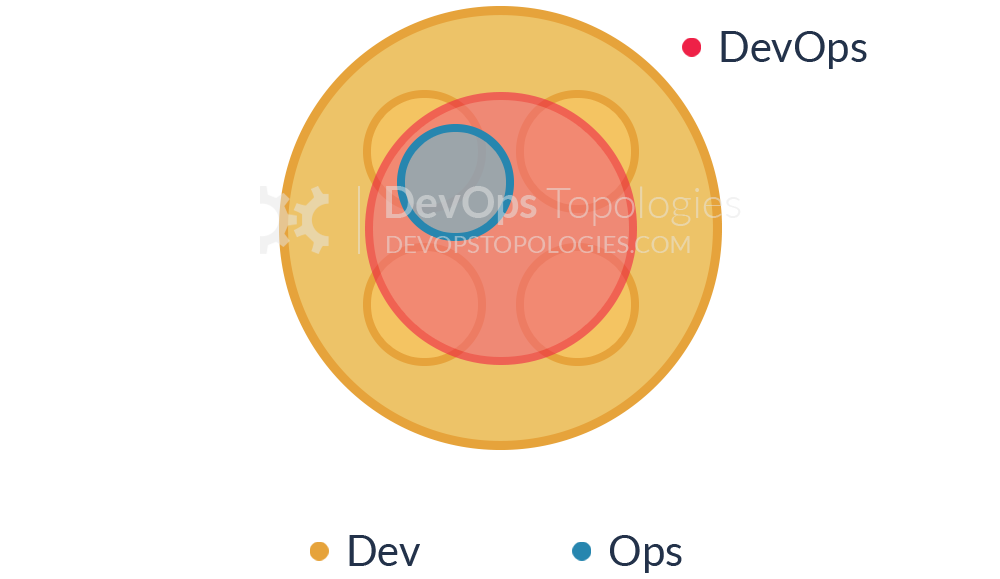
Note:
The organization does not want to keep a separate Ops team, so development teams take responsibility for infrastructure, managing environments, monitoring, etc. However, doing so in a project or product-driven way means those items are subject to resource constraints and re-prioritizations which lead to subpar approaches and half-baked solutions.
In this anti-type the organization shows lack of appreciation for the importance and skills required for effective IT operations. In particular, the value of Ops is diminished because it's treated as an annoyance for Devs (as Ops is managed by a single Dev team manager with other priorities).
----
<!-- .slide: data-background="#fff" -->
:::danger
Anti-Type G: Dev and DBA Silos
:::
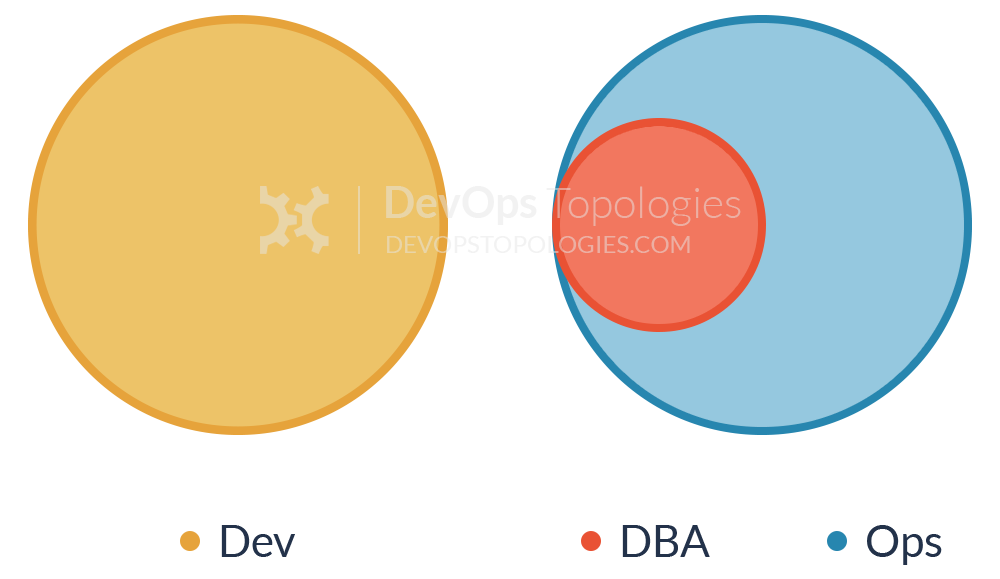
Note:
This is a form of Anti-Type A (Dev and Ops Silos) which is prominent in medium-to-large companies where multiple legacy systems depend on the same core set of data. Because these databases are so vital for the business, a dedicated DBA team, often under the Ops umbrella, is responsible for their maintenance, performance tuning and disaster recovery. That is understandable. The problem is when this team becomes a gate keeper for any and every database change, effectively becoming an obstacle to small and frequent deployments (a core tenet of DevOps and Continuous Delivery).
Furthermore, just like Ops in Anti-Type A, the DBA team is not involved early in the application development, thus data problems (migrations, performance, etc) are found late in the delivery cycle. Coupled with the overload of supporting multiple applications databases, the end result is constant firefighting and mounting pressure to deliver.
---
## DevOps Team Topologies
----
<!-- .slide: data-background="#fff" -->
:::success
Type 1: Dev and Ops Collaboration
:::
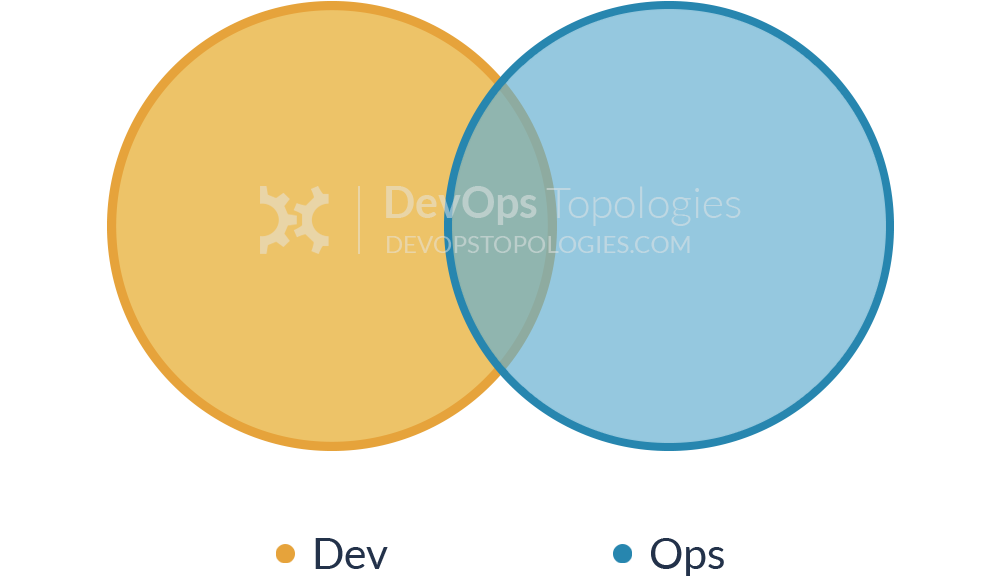
Note:
This is the ‘promised land’ of DevOps: smooth collaboration between Dev teams and Ops teams, each specialising where needed, but also sharing where needed. There are likely many separate Dev teams, each working on a separate or semi-separate product stack.
My sense is that this Type 1 model needs quite substantial organisational change to establish it, and a good degree of competence higher up in the technical management team. Dev and Ops must have a clearly expressed and demonstrably effective shared goal (‘Delivering Reliable, Frequent Changes’, or whatever). Ops folks must be comfortable pairing with Devs and get to grips with test-driven coding and Git, and Devs must take operational features seriously and seek out Ops people for input into logging implementations, and so on, all of which needs quite a culture change from the recent past.
Type 1 suitability: an organisation with strong technical leadership.
Potential effectiveness: HIGH
----
<!-- .slide: data-background="#fff" -->
:::success
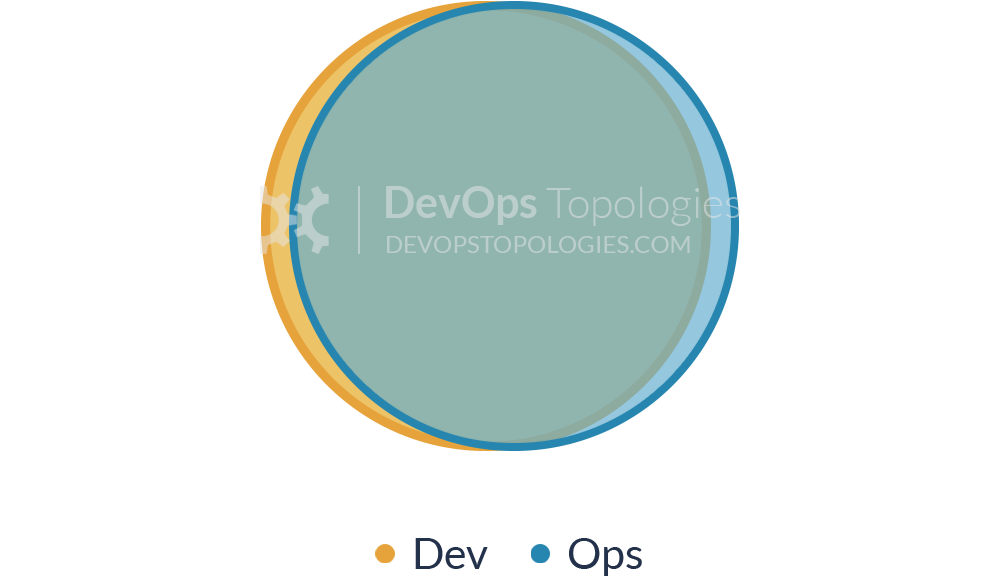
Type 2: Fully Shared Ops Responsibilities
:::
Note:
Where operations people have been integrated in product development teams, we see a Type 2 topology. There is so little separation between Dev and Ops that all people are highly focused on a shared purpose; this is arguable a form of Type 1 (Dev and Ops Collaboration), but it has some special features.
Organisations such as Netflix and Facebook with effectively a single web-based product have achieved this Type 2 topology, but I think it’s probably not hugely applicable outside a narrow product focus, because the budgetary constraints and context-switching typically present in an organisation with multiple product streams will probably force Dev and Ops further apart (say, back to a Type 1 model). This topology might also be called ‘NoOps‘, as there is no distinct or visible Operations team (although the Netflix NoOps might also be Type 3 (Ops as IaaS)).
Type 2 suitability: organisations with a single main web-based product or service.
Potential effectiveness: HIGH
----
<!-- .slide: data-background="#fff" -->
:::success
Type 3: Ops as Infrastructure-as-a-Service (Platform)
:::
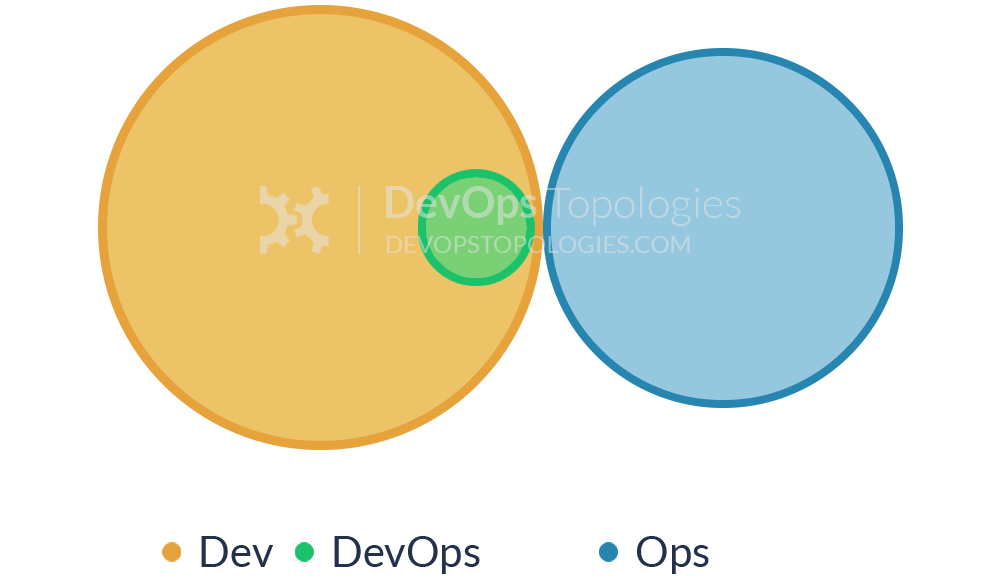
Note:
For organisations with a fairly traditional IT Operations department which cannot or will not change rapidly [enough], and for organisations who run all their applications in the public cloud (Amazon EC2, Rackspace, Azure, etc.), it probably helps to treat Operations as a team who simply provides the elastic infrastructure on which applications are deployed and run; the internal Ops team is thus directly equivalent to Amazon EC2, or Infrastructure-as-a-Service.
A team (perhaps a virtual team) within Dev then acts as a source of expertise about operational features, metrics, monitoring, server provisioning, etc., and probably does most of the communication with the IaaS team. This team is still a Dev team, however, following standard practices like TDD, CI, iterative development, coaching, etc.
The IaaS topology trades some potential effectiveness (losing direct collaboration with Ops people) for easier implementation, possibly deriving value more quickly than by trying for Type 1 (Dev and Ops Collaboration) which could be attempted at a later date.
Type 3 suitability: organisations with several different products and services, with a traditional Ops department, or whose applications run entirely in the public cloud.
Potential effectiveness: MEDIUM
----
<!-- .slide: data-background="#fff" -->
:::success
Type 4: DevOps as an External Service
:::
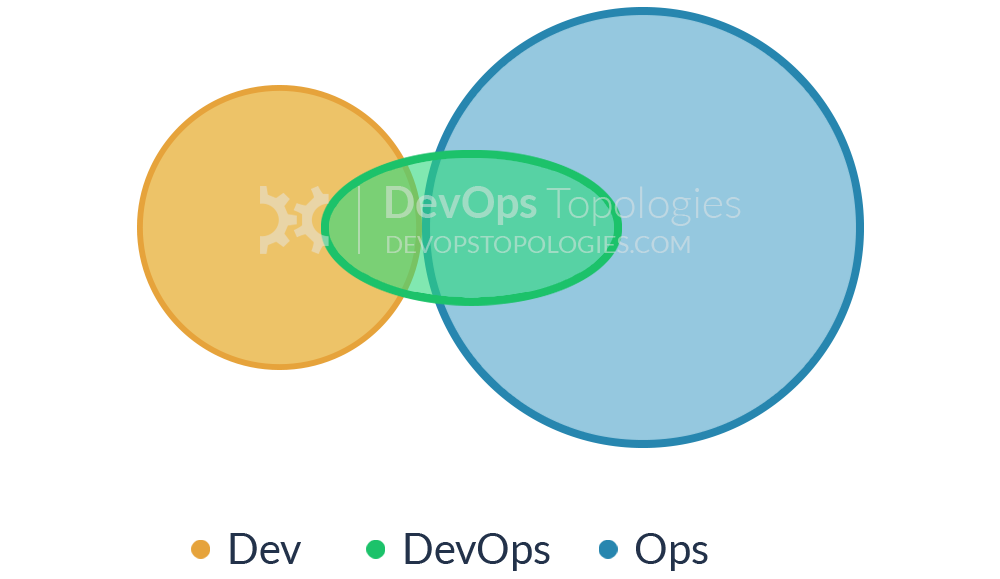
Note:
Some organisations, particularly smaller ones, might not have the finances, experience, or staff to take a lead on the operational aspects of the software they produce. The Dev team might then reach out to a service provider like Rackspace to help them build test environments and automate their infrastructure and monitoring, and advise them on the kinds of operational features to implement during the software development cycles.
What might be called DevOps-as-a-Service could be a useful and pragmatic way for a small organisation or team to learn about automation, monitoring, and configuration management, and then perhaps move towards a Type 3 (Ops as IaaS) or even Type 1 (Dev and Ops Collaboration) model as they grow and take on more staff with operational focus.
Type 4 suitability: smaller teams or organisations with limited experience of operational issues.
Potential effectiveness: MEDIUM
----
<!-- .slide: data-background="#fff" -->
:::success
Type 5: DevOps Team with an Expiry Date
:::
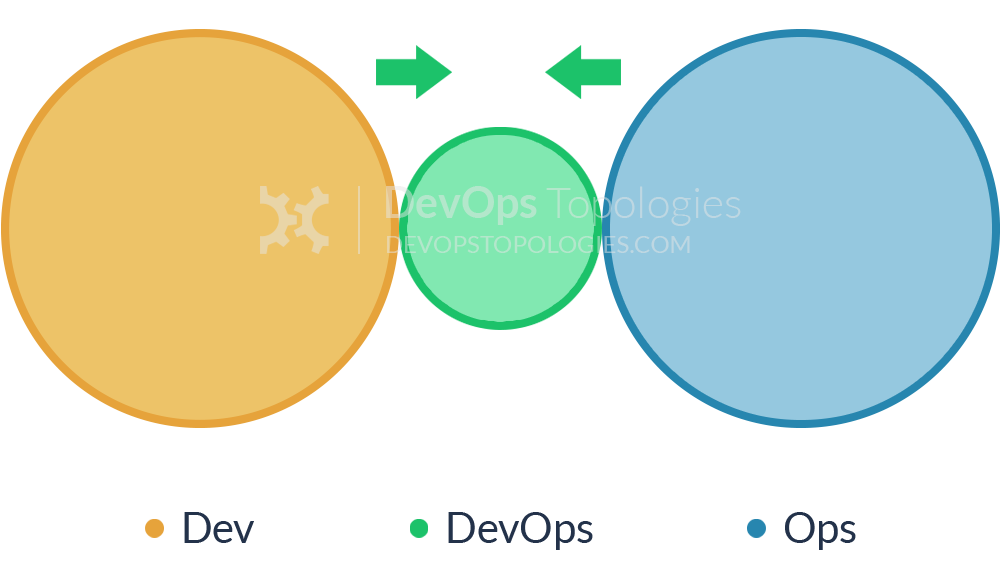
Note:
The DevOps Team with an Expiry Date (Type 5) looks substantially like Anti-Type B (DevOps Team Silo), but its intent and longevity are quite different. This temporary team has a mission to bring Dev and Ops closer together, ideally towards a Type 1 (Dev and Ops Collaboration) or Type 2 (Fully Shared Ops Responsibilities) model, and eventually make itself obsolete.
The members of the temporary team will ‘translate’ between Dev-speak and Ops-speak, introducing crazy ideas like stand-ups and Kanban for Ops teams, and thinking about dirty details like load-balancers, management NICs, and SSL offloading for Dev teams. If enough people start to see the value of bringing Dev and Ops together, then the temporary team has a real chance of achieving its aim; crucially, long-term responsibility for deployments and production diagnostics should not be given to the temporary team, otherwise it is likely to become a DevOps Team Silo (Anti-Type B).
Type 5 suitability: as a precursor to Type 1 topology, but beware the danger of Anti-Type B.
Potential effectiveness: LOW to HIGH
----
<!-- .slide: data-background="#fff" -->
:::success
Type 6: DevOps Advocacy Team
:::
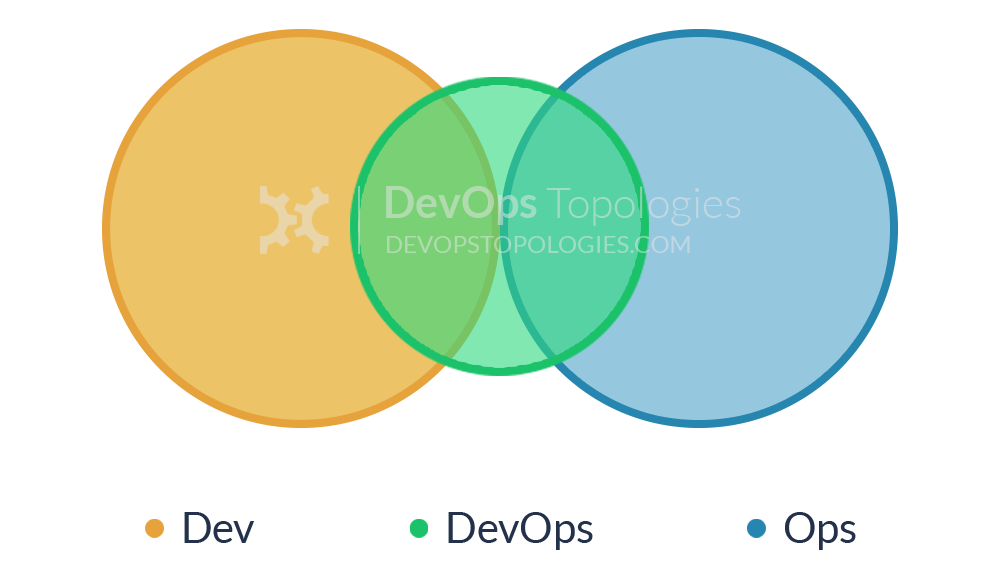
Note:
Within organisations that have a large gap between Dev and Ops (or the tendency towards a large gap), it can be effective to have a 'facilitating' DevOps team that keeps the Dev and Ops sides talking. This is a version of Type 5 (DevOps Team with an Expiry Date) but where the DevOps team exists on an ongoing basis with the specific remit of facilitating collaboration and cooperation between Dev and Ops teams. Members of this team are sometimes called 'DevOps Advocates', because they help to spread awareness of DevOps practices.
Type 6 suitability: organisations with a tendency for Dev and Ops to drift apart. Beware the danger of Anti-Type B.
Potential effectiveness: MEDIUM to HIGH
----
<!-- .slide: data-background="#fff" -->
:::success
Type 7: SRE Team (Google Model)
:::
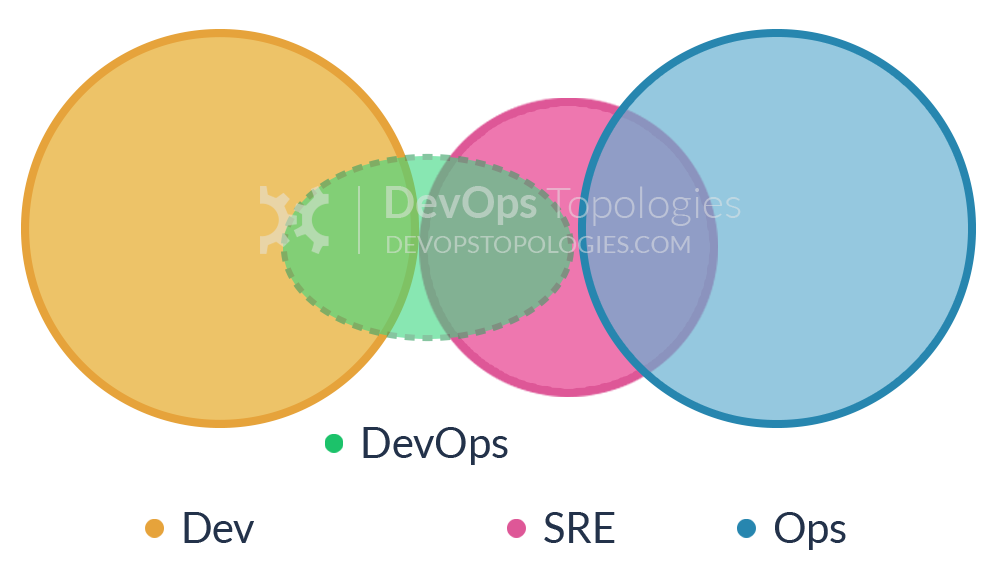
Note:
DevOps often recommends that Dev teams join the on-call rotation, but it's not essential. In fact, some organisations (including Google) run a different model, with an explicit 'hand-off' from Development to the team that runs the software, the Site Reliability Engineering (SRE) team. In this model, the Dev teams need to provide test evidence (logs, metrics, etc.) to the SRE team showing that their software is of a good enough standard to be supported by the SRE team.
Crucially, the SRE team can reject software that is operationally substandard, asking the Developers to improve the code before it is put into Production. Collaboration between Dev and SRE happens around operational criteria but once the SRE team is happy with the code, they (and not the Dev team) support it in Production.
Type 7 suitability: Type 7 is suitable only for organisations with a high degree of engineering and organisational maturity. Beware of a return to Anti-Type A if the SRE/Ops team is told to "JFDI" deploy.
Potential effectiveness: LOW to HIGH
----
<!-- .slide: data-background="#fff" -->
:::success
Type 8: Container-Driven Collaboration
:::
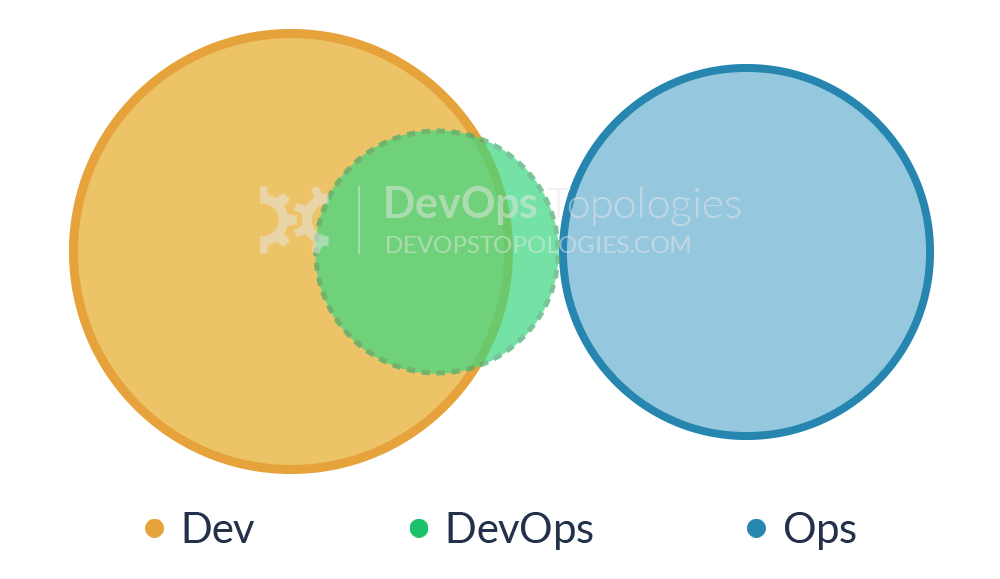
Note:
Containers remove the need for some kinds of collaboration between Dev and Ops by encapsulating the deployment and runtime requirements of an app into a container. In this way, the container acts as a boundary on the responsibilities of both Dev and Ops. With a sound engineering culture, the Container-Driven Collaboration model works well, but if Dev starts to ignore operational considerations this model can revert towards to an adversarial 'us and them'.
Type 8 suitability: Containers can work very well, but beware Anti-Type A, where the Ops team is expected to run anything that Dev throws at it.
Potential effectiveness: MEDIUM to HIGH
----
<!-- .slide: data-background="#fff" -->
:::success
Type 9: Dev and DBA Collaboration
:::
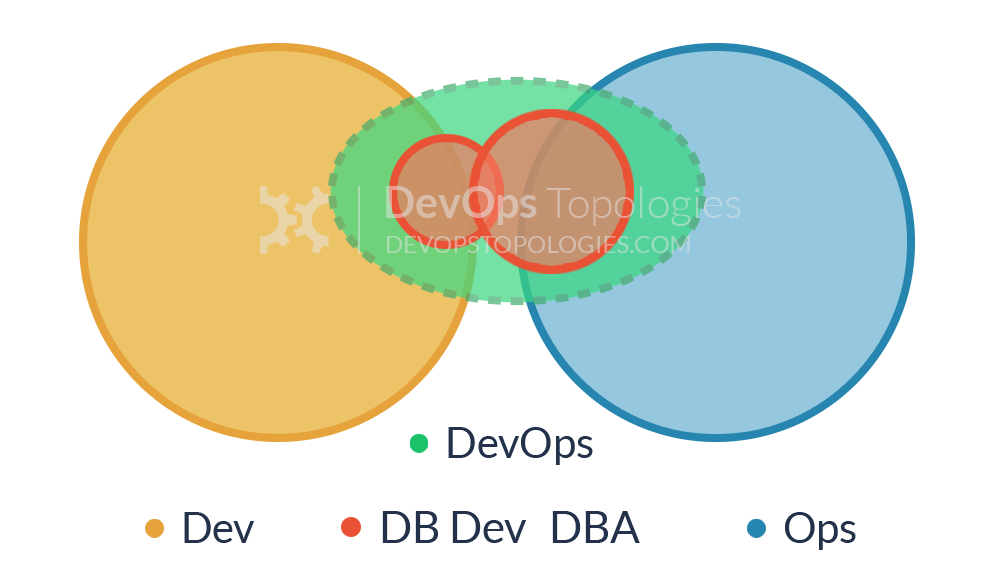
Note:
In order to bridge the Dev-DBA chasm, some organisations have experimented with something like Type 9, where a database capability from the DBA team is complimented with a database capability (or specialism) from the Dev team. This seems to help to translate between the Dev-centric view of databases (as essentially dumb persistence stores for apps) and the DBA-centric view of databases (smart, rich sources of business value).
Type 9 suitability: for organisations with one or more large, central databases with multiple connected applications.
Potential effectiveness: MEDIUM
---
## CI/CD
---
### CI/CD
* Continuous Integration
* Continuous Delivery
* Continuous Deployment
---
## Microservices
---
### Microservices
* Highly maintainable and testable
* Loosely coupled
* Independently deployable
* Organized around business capabilities
* Owned by a small team
---
## No silver bullet.
---
# Thank you!
{"metaMigratedAt":"2023-06-15T01:12:16.131Z","metaMigratedFrom":"YAML","title":"Cloud Native","breaks":true,"description":"Talk for Agility Design on October 31.","slideOptions":"{\"theme\":\"night\",\"transition\":\"fade\",\"progress\":true,\"allottedMinutes\":25}","contributors":"[{\"id\":\"5b80d48c-6880-4673-b8f7-16db233a96a0\",\"add\":39485,\"del\":11952}]"}