# Neo4j 學習筆記 - 基礎篇
###### tags: `技術備忘錄` `Neo4j`
---
資料參考
[W3Cschool教程](https://www.w3cschool.cn/neo4j/)
---
## 基礎概念
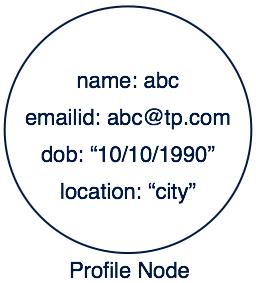
>節點及屬性
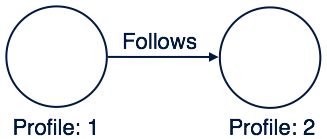
>關係圖
>結構

## 語法
### CREATE
#### Create Node
```sql
CREATE (
<node-name>:<label-name>
{
<Property1-name>:<Property1-Value>
........
<Propertyn-name>:<Propertyn-Value>
}
)
```
```sql
CREATE (emp:Employee{id:123,name:"Lokesh",sal:35000,deptno:10})
```
#### Create Relationship
```sql
CREATE (<node1-name>:<label1-name>)-
[(<relationship-name>:<relationship-label-name>)]
->(<node2-name>:<label2-name>)
```
關係連結也可加入屬性
```sql
[(
<relationship-name>:<relationship-label-name>
{
<Property1-name>:<Property1-Value>
........
<Propertyn-name>:<Propertyn-Value>
}
)]
```
```sql
CREATE (p1:Profile1)-[r1:LIKES]->(p2:Profile2)
```
### MATCH
```sql
MATCH
(
<node-name>:<label-name>
)
```
### WHERE
```sql
WHERE <condition> <boolean-operator> <condition>
```
> \<condition>
> `<property-name> <comparison-operator> <value>`
>
跟SQL的用法大同小異
### DELETE
```sql
DELETE <node1-name>,<node2-name>,<relationship-name>
```
跟SQL的用法大同小異,建議與Match一起使用
### SET & REMOVE
用來改 Node 跟 Relationship **屬性**和**標籤**的語法
```sql
SET <property-name-list>
REMOVE <property-name-list>
```
建議與Match一起使用
### ORDER BY
```sql
ORDER BY <property-name-list> [DESC]
```
跟SQL的用法大同小異,建議與Match一起使用
### Create & MERGE
MERGE 的語法基本上跟 Create 一樣
差別是 MERGE 不會重複新增資料
## Neo4j 安裝
官方安裝指令 [連結](https://debian.neo4j.com/?_ga=2.131133384.636924486.1589170866-1884466348.1587716682)
```bash
wget -O - https://debian.neo4j.com/neotechnology.gpg.key | sudo apt-key add -
echo 'deb https://debian.neo4j.com stable latest' | sudo tee /etc/apt/sources.list.d/neo4j.list
sudo apt-get update
```
> 我的 "wget -O - https://debian.neo4j.com/neotechnology.gpg.key | sudo apt-key add -"
> 會噴錯,所以我改用
> ```bash
> apt-key adv --fetch-keys https://debian.neo4j.com/neotechnology.gpg.key
> ```
```bash
apt list -a neo4j
```
[開啟外部IP連接](https://neo4j.com/developer/kb/how-do-i-enable-remote-https-access-with-neo4j-30x/)
## C# 串接
[官方範例](https://neo4j.com/developer/dotnet/)
環境 dotnet core 3.1
需安裝套件 [Neo4j.Driver](https://www.nuget.org/packages/Neo4j.Driver/4.0.1) on nuget
### Example code
:::warning
官方的 Example Code 已經跟 NuGet 上的版本不相容,所以我直接整份改掉了
:::
我的 Example Code
```csharp=1
class Program
{
static async Task Main(string[] args)
{
using var greeter = new HelloWorldExample("bolt://IP:7687", "User", "Password");
await greeter.PrintGreeting("hello, world");
}
}
public class HelloWorldExample : IDisposable
{
private readonly IDriver _driver;
public HelloWorldExample(string uri, string user, string password)
{
_driver = GraphDatabase.Driver(uri, AuthTokens.Basic(user, password));
}
public async Task PrintGreeting(string message)
{
var session = _driver.AsyncSession();
var greeting = await session.WriteTransactionAsync(tx =>
{
var result = tx.RunAsync("CREATE (a:Greeting) " +
"SET a.message = $message " +
"RETURN a.message + ', from node ' + id(a)",
new { message });
return result.Result.ConsumeAsync();
});
Console.WriteLine(greeting);
}
public void Dispose()
{
_driver?.Dispose();
}
}
```
## 下一篇
感覺後面會還有很多,所以先換篇
[Neo4j 學習筆記 - 進階篇 - 1](/-ICWq886St2Q-x1Y-nEeAQ)
 Sign in with Wallet
Connect another wallet
Sign in with Wallet
Connect another wallet