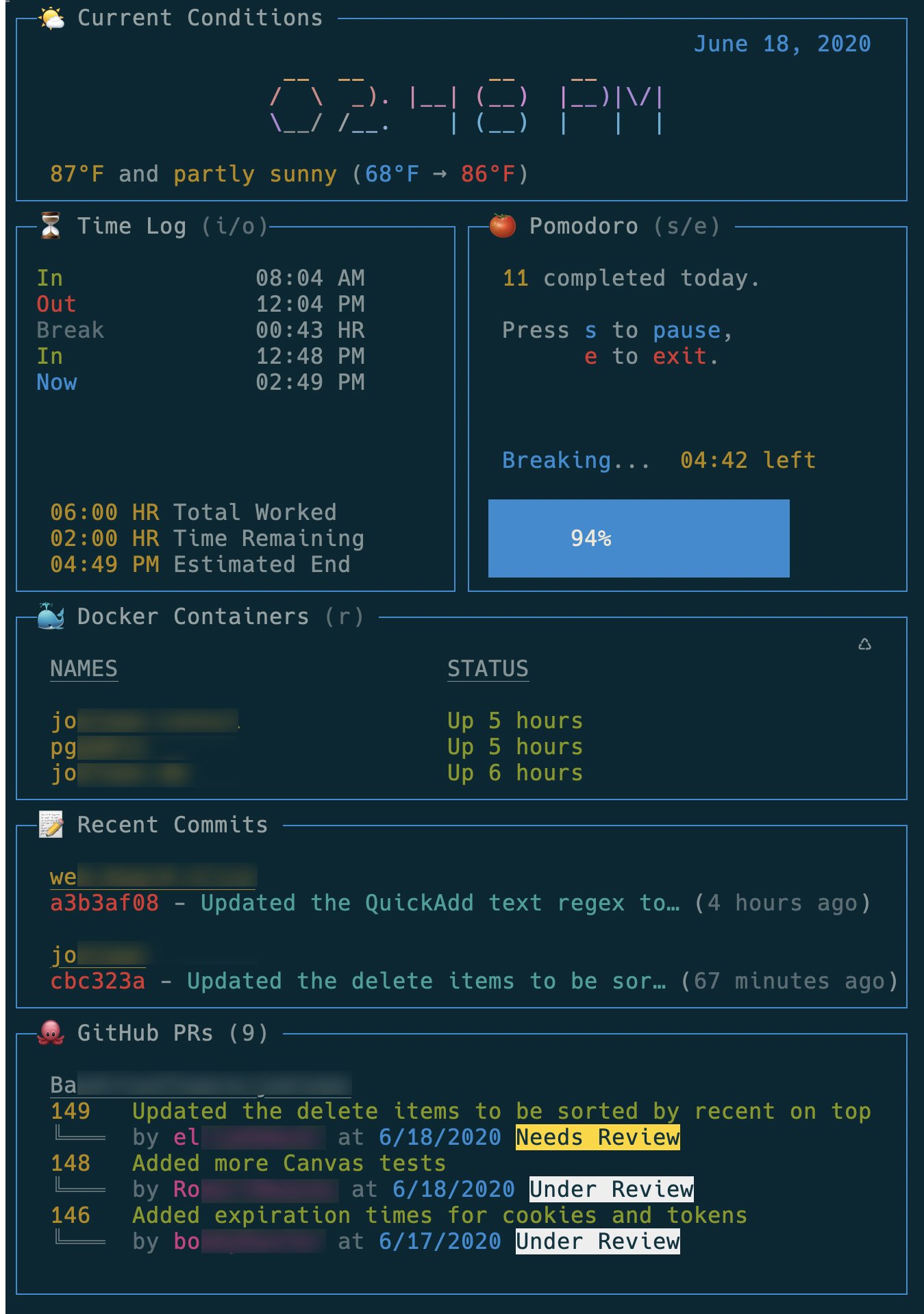
# Build a Terminal Dashboard with React
## Proposed Playlist Outline
1. Bootstrap a `react-blessed` Terminal Application
2. Change text font with `figlet` inside `react-blessed`
3. Change text color with `chalk` inside `react-blessed`
4. Add gradient colors to terminal text using `gradient-string`
5. Fetch the current weather with `weather-js` and display in `react-blessed`
6. Position text within a `react-blessed` box
7. Respond to keyboard events inside a `react-blessed` application
8. Make a percentage-based layout in `react-blessed` to create a dashboard
9. Use the `react-blessed-contrib` Grid component to make a dashboard layout
10. Statically size the layout of a `react-blessed` dashboard and resize via a keyboard event
11. Render a Pomodoro timer using the `react-blessed-contrib` Gauge component
12. Respond to a `react-blessed` button inside a terminal application
13. Create a modal dialog to accept text input within `react-blessed`
14. Use `node-notifer` to alert a user when a Pomodoros starts or finishes
15. Return a list of recent commits with the `shelljs` `exec` function
16. Format and render an array of commits with `react-blessed`
17. Return a list of running docker containers with the `shelljs` `exec` function
18. Format and render an array of running docker containers with `react-blessed`
19. Get a list of open GitHub Pull Requests from node using `github-api`
20. Format and render an array of GitHub Pull Requests with `react-blessed`
21. Display computer stats with the `react-blessed-contrib` Sparkline component
## Context
I tweeted the following and got a huge response of interest... https://twitter.com/elijahmanor/status/1273708161871089666?s=20
 Sign in via Google
 Sign in via Facebook
 Sign in via X(Twitter)
 Sign in via GitHub
 Sign in via Dropbox
 Sign in with Wallet
Connect another wallet
Sign in with Wallet
Connect another wallet