# Week 5 Database - Schemas and relationships
---
## What kinds of data relationships are there? - Amy
Sometimes we want to link two separate tables through a relationship, rather than creating one giant franken-table. There are names for each of the possible relationships.
---
One - to - One:
This is the least common form of relationship (that would be too convenient). One of the reasons is that there aren't many examples of one-to-one relationships in real life, and even those that are one-to-one become one-to-many over time.
Examples of one-to-one relationships:
1. UK marriage
2. Passports
3. Fingerprints
4. Capital cities
---
One - to - Many:
This is the most common type of relationship! This kind of relationship means that one row in a table (usually called the parent table) can have a relationship with many rows in another table (usually called child table).
Examples:
1. Authors and books
2. Customer purchases from a particular shop
---
Note: It is a good practice to keep the name of the referencing columns the same as in the referenced (parent) table. This makes it even simpler to understand the relationship.
---
There are also scenarios where the one-to-many relationship occurs between rows of the same table. This kind of one-to-many relationship is also called a hierarchical relationship; it’s used in many systems to represent tree-like structures, i.e. an organization chart, a file system structure, or a product and its component parts. That means we need to use a single table that references itself.
---
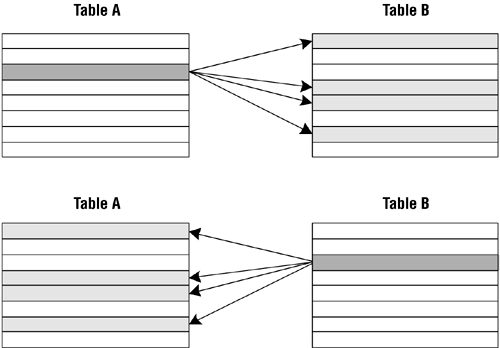
Many - to - Many:
Examples:
1. Facebook friends
2. University students and professors
3. Recipes and ingredients
4. Employees and tasks
5. Us and projects
---
---
The only way to deal with many to many relationships in SQL is to use two or more tables, along with one or more join tables.
Join tables can access fields and data across tables without having to create a separate relationship.
A join table creates two one-to-many relationships.
---
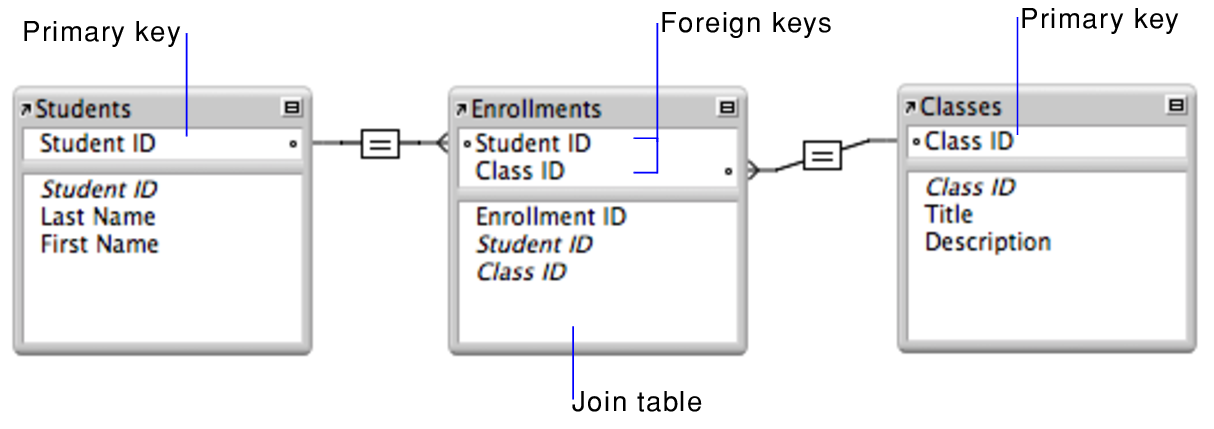
Foreign keys can be used to join tables.
---
## What’s a foreign key? - Chun
---
A foreign key is a column or a group of columns in a table that reference the primary key of another table.<!-- .element: class="fragment" data-fragment-index="1" -->
---
The table with the foreign key is called the **child table**, and the table with the primary key is called the **referenced** or **parent table**.<!-- .element: class="fragment" data-fragment-index="0" -->
---
A table can have multiple foreign keys depending on its relationships with other tables.
---

<!-- <img src="https://i.imgur.com/YBRHhWR.png" style="height: 500px;"> -->
---
In PostgreSQL, you define a foreign key using the foreign key constraint. It prevents invalid data from being inserted into the foreign key column, because it has to be one of the values contained in the parent table.
A foreign key constraint indicates that values in a column or a group of columns in the child table equal the values in a column or a group of columns of the parent table.
---
Foreign key syntax
```
[CONSTRAINT fk_name]
FOREIGN KEY(fk_columns)
REFERENCES parent_table(parent_key_columns)
[ON DELETE delete_action]
[ON UPDATE update_action]
```
---
## How does a schema describe a relational database? - Jo
---

Originates from the Greek word *skhēma*, which means form, figure, shape, or plan.
---
A **schema** is a representation of the different things in a database.
---
The schema describes the categories of information, how they are organised and the relationships between them.
---
It's like a map for finding your way round the database. :face_with_monocle:
---
A database schema can be represented with a visual diagram:
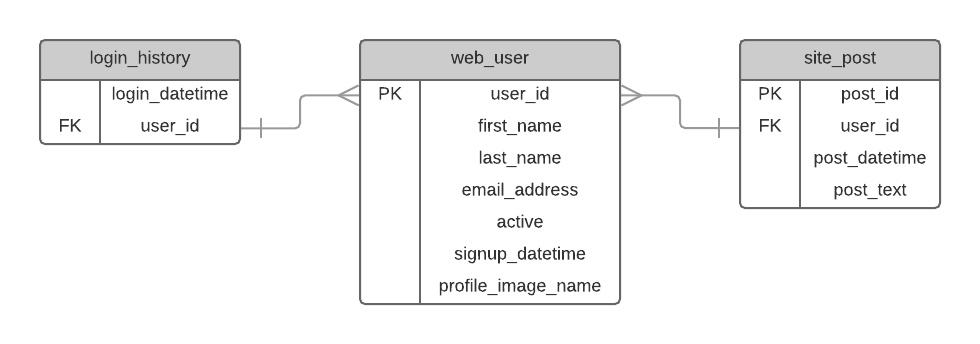
This is also known as an Entity Relationship Diagram, or ERD.
---
In some database systems, the schema and the database are basically the same thing.
Confusingly, in MySQL, "schema" is a synonym for "database".
`CREATE SCHEMA` <=> `CREATE DATABASE`
---
In PostgreSQL, a schema is also the namespace where data objects and tables are stored.
---
As well as tables, Postgres schemas contain other objects such as data types, functions, operators.
---
Postgres automatically creates a `public` schema, and every new object is placed here, unless you specify a different schema name:

---
These two statements are exactly the same:
`CREATE TABLE table_name(...);`
`CREATE TABLE public.table_name(...);`
---
### Why do you need to use schemas
- Schemas allow you to organize database objects e.g., tables into logical groups to make them more manageable.
- Schemas enable multiple users to use one database without interfering with each other.
---
To access an object in a schema, you need to qualify the object by using the following syntax:
`schema_name.object_name`
---
The same object name can be used in different schemas:
e.g. `sales` schema and `public` schema can both contain tables called `staff`.
You would have to make sure you refer to the correct staff table by writing:
`public.staff`
or
`sales.staff`
---
If you don't use the schema name when referring to a table, PostgreSQL will access the first matching table in the ***schema search path***.
The first schema in the search path is the *current schema* (and this is the schema that will be used by default when creating a new object).
---

but...

---
"The value for `search_path` has to be a comma-separated list of schema names. If one of the list items is the special value `$user`, then the
schema having the name returned by `SESSION_USER` is substituted, if there
is such a schema. (**If not, `$user` is ignored**.)
---
You can edit the search path:
`SET search_path TO sales, public;`
Now, if you create a new table named staff without specifying the schema name, PostgreSQL will put this staff table into the `sales` schema, rather than the `public` schema:
---
### Summary
---
Confusingly, a schema means a few different things, but broadly:
1. A collection of multiple tables and other database objects.
2. A description of a single table (including its relationships to others).
---
## How can foreign key help us design schemas with relational data?
-- Sevda --
---
- The process of database design involves defining entities.
- An entity represents a real world object, or a set of data that we want to model within our database;
- Referencal Integrity database feature system to ensure database consistency.
---

Wow, that's a lot of information all in one table!
There are other issues here as well, such as duplication of data.
---
Duplicating data in this way can lead to issues with data integrity.
---
How do we deal with this situation:question:
---
The answer is to split our data up across multiple different tables, and create relationships between them.
---

Now we have defined the entities we need, we can plan tables to store the data for each entity.
---
<!-- To better understand that relationship, Imagine for instance that we have two tables, one called colors and one called shapes. -->
<!-- The ``<color_id>`` column of the shapes table is a Foreign Key which references the id column of the colors table. -->
<img src="https://i.imgur.com/5aVCwQG.png" alt="" width="450">
In the diagram above, the 'Red' row of our colors table is associated with the 'Square' and 'Star' rows of our shapes table.'Orange' isn't currently associated with any row in the shapes table, but there is the potential to create such an association if we insert a row into shapes with a color_id of 3.
---
In other words, PostgreSQL won't allow you to add a value to the Foreign Key column of a table if the Primary Key column of the table it is referencing does not already contain that value which is the core concept of referential integrity
---
<!-- In another example here, -->
The Courses table's primary key is Course_ID. Its ==foreign key== is Teacher_ID:
<img src="https://i.imgur.com/bnkM6Op.png" alt="" width="400">
You can see that the foreign key in Courses matches a primary key in Teachers:
<img src="https://i.imgur.com/wRgM2fk.png" alt="" width="300">
We can say that the Teacher_ID foreign key has helped to establish a relationship between the Courses and the Teachers tables.
---
{"metaMigratedAt":"2023-06-15T23:08:27.271Z","metaMigratedFrom":"Content","title":"Week 5 Database - Schemas and relationships","breaks":true,"contributors":"[{\"id\":\"996ce3e0-9607-46ac-bff5-62ce759b859d\",\"add\":2304,\"del\":196},{\"id\":\"b3f692e6-790d-4bd7-b250-3be9fa544d3d\",\"add\":3764,\"del\":608},{\"id\":\"7a5548f0-da55-4d05-a75d-a38212f27c1c\",\"add\":3996,\"del\":1614},{\"id\":\"59db8470-95af-4fbf-9a40-43cf0b51d153\",\"add\":1944,\"del\":759}]"}