# Simulate AST2X00 and run OpenWrt via qemu
###### tags: `qemu` `OpenWrt` `OpenBMC`
## Environment
Motherboard: Lenovo Legion Y530-15ich
OS: Windows 10 Home Edition with Virtual Box running Ubuntu 22.04
Kernel: 6.5.0-26-generic
qemu version: 6.2.0
## WARNING
DO NOT USE "sudo -s, sudo su or root account" TO DO ANYTHING, IT MAY CAUSE FAIL WHEN WE BUILD OS IMAGE !!!!!!
## SOP of installing qemu
### Install qemu on Ubuntu 22.04
```bash=
sudo apt update
sudo apt dist-upgrade
sudo apt install qemu-system-arm
sudo apt install qemu-system-mips
```
### To check qemu environment is available
```bash=
# download debian vmlinuz (kernel) and initrd.gz (MBR ?)
wget http://ftp.debian.org/debian/dists/buster/main/installer-armhf/current/images/netboot/initrd.gz && wget http://ftp.debian.org/debian/dists/buster/main/installer-armhf/current/images/netboot/vmlinuz
# create a virtual disk file for qemu vm
qemu-img create -f qcow2 debian-armhf.qcow2 10G
# start vm
qemu-system-arm \
-M virt -cpu cortex-a15 -m 2G -nographic -no-reboot \
-kernel ./vmlinuz \
-initrd ./initrd.gz \
-device virtio-blk-device,drive=hd0 \
-drive if=none,file=debian-armhf.qcow2,id=hd0 \
-device virtio-net-device,netdev=vmnic \
-netdev user,id=vmnic
```
## SOP of building OpenWrt image and running on qemu
### OpenWrt OS building SOP
```bash=
# install dependencies and tools
sudo apt install \
bc \
bison \
build-essential \
bzr \
ccache \
cvs \
ecj \
fastjar \
file \
flex \
g++ \
gawk \
git-core \
libelf-dev \
libglib2.0-0 \
libglib2.0-bin \
libglib2.0-data \
libglib2.0-dev \
libglib2.0-doc \
libgtk-3-dev \
libncurses5-dev \
libncursesw5-dev \
libssl-dev \
libxml-parser-perl \
mercurial \
pkg-config \
python2.7-dev \
python3 \
python3-dev \
python3-setuptools \
quilt \
rsync \
subversion \
swig \
time \
unzip \
wget \
xsltproc \
zlib1g-dev
# install arm cross compiler toolkit
sudo apt install gcc-arm-none-eabi \
gcc-arm-linux-gnueabihf \
gcc-aarch64-linux-gnu
# feeds update and install all dependencies and tools
cd [path_of_openwrt_source_code]
./scripts/feeds update -a
./scripts/feeds install -a
# choose selection and create .config file
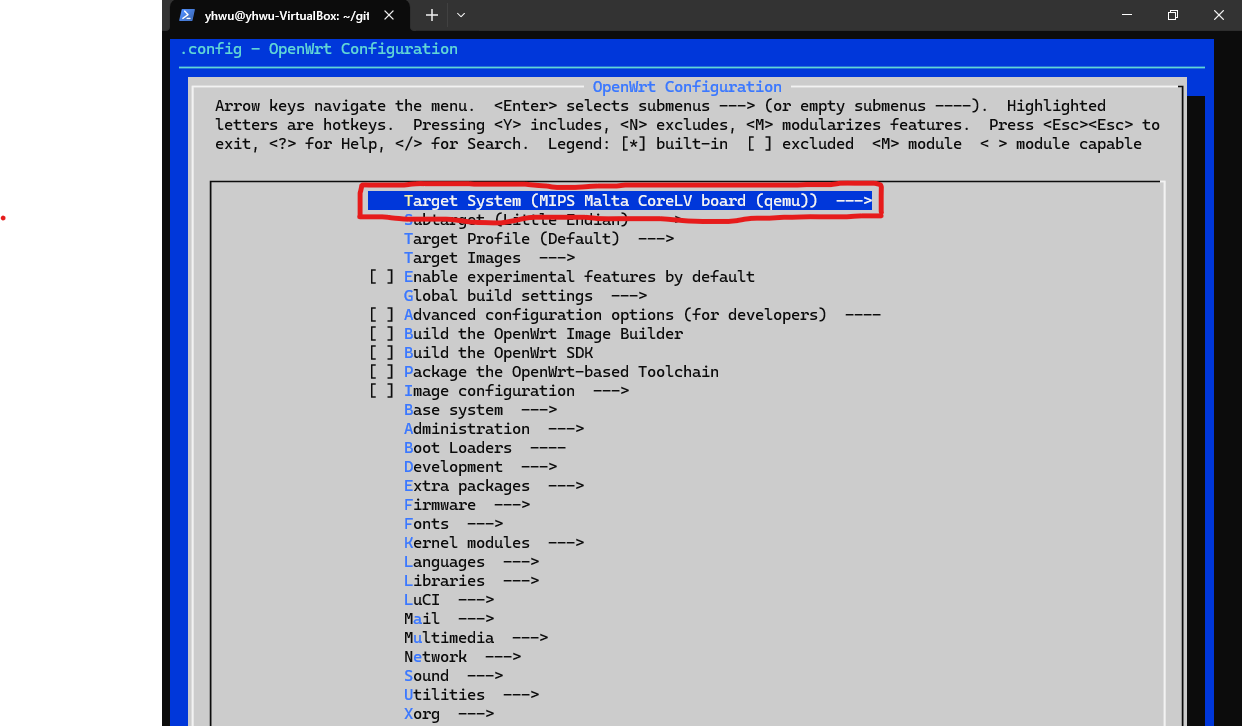
make menuconfig
# enter into menuconfig, Target System: MIPS Malta CoreLV board (qemu)
# build
make V=s # V=sc for more info on shell
# execute
cd ./bin/targets/malta/le
qemu-system-mipsel \
-M malta \
-hda openwrt-malta-le-rootfs-ext4.img \
-kernel openwrt-malta-le-vmlinux.elf \
-nographic \
-append "root=/dev/sda console-ttyS0"
```
### Running OpenWrt on qemu
```bash=
cd ./bin/targets/malta/le
qemu-system-mipsel \
-M malta \
-hda openwrt-malta-le-rootfs-ext4.img \
-kernel openwrt-malta-le-vmlinux.elf \
-nographic \
-append "root=/dev/sda console-ttyS0"
```
## SOP of building OpenBMC image and running on qemu
### OpenBMC OS building SOP
```bash=
git clone https://github.com/openbmc/openbmc.git
cd ./openbmc
# choosing model to build
. setup romulus
# make image
bitbake obmc-phosphor-image
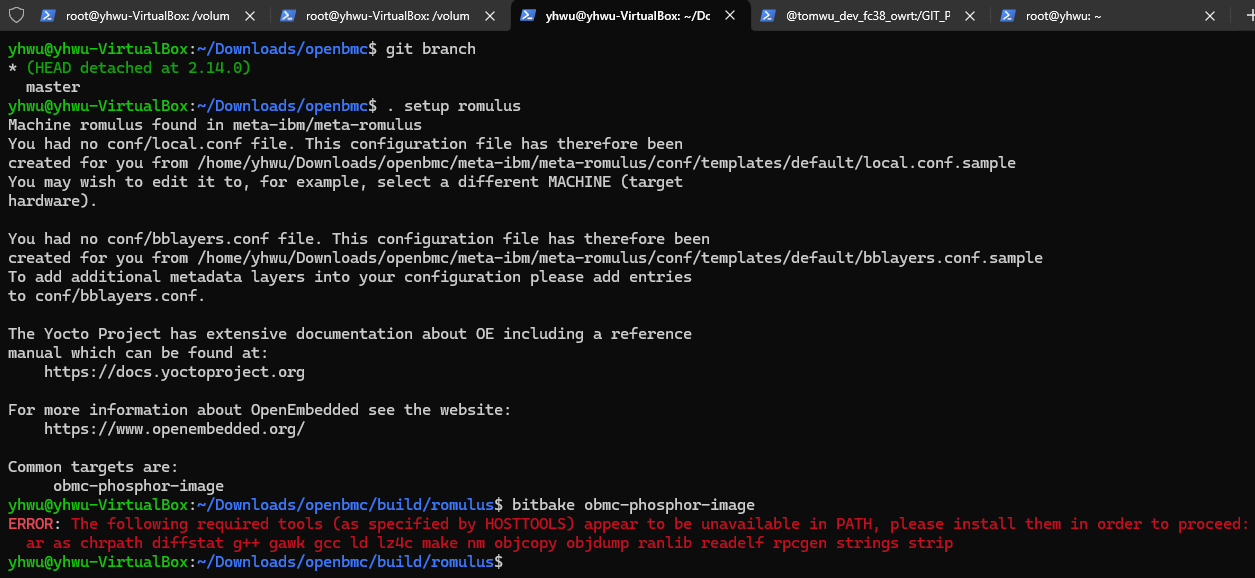
# there are many tools and libraries not installed,
# it shows after bitbake, refer to picture below
sudo apt install binutils \
cpio \
g++ \
gawk \
gcc \
libc-dev \
libelf-dev \
make \
patch \
perl \
pkg-config \
rsync \
sed \
tar \
zstd \
sudo apt install chrpath
sudo apt install diffstat
sudo apt install lz4
sudo apt install python3-dev
sudo apt install python3-pip
sudo pip3 install testresources
sudo pip3 install --upgrade --force-reinstall setuptools
sudo apt install file
sudo apt install wget
# make image
bitbake obmc-phosphor-image
```
Error message: lack of tools / libraries:
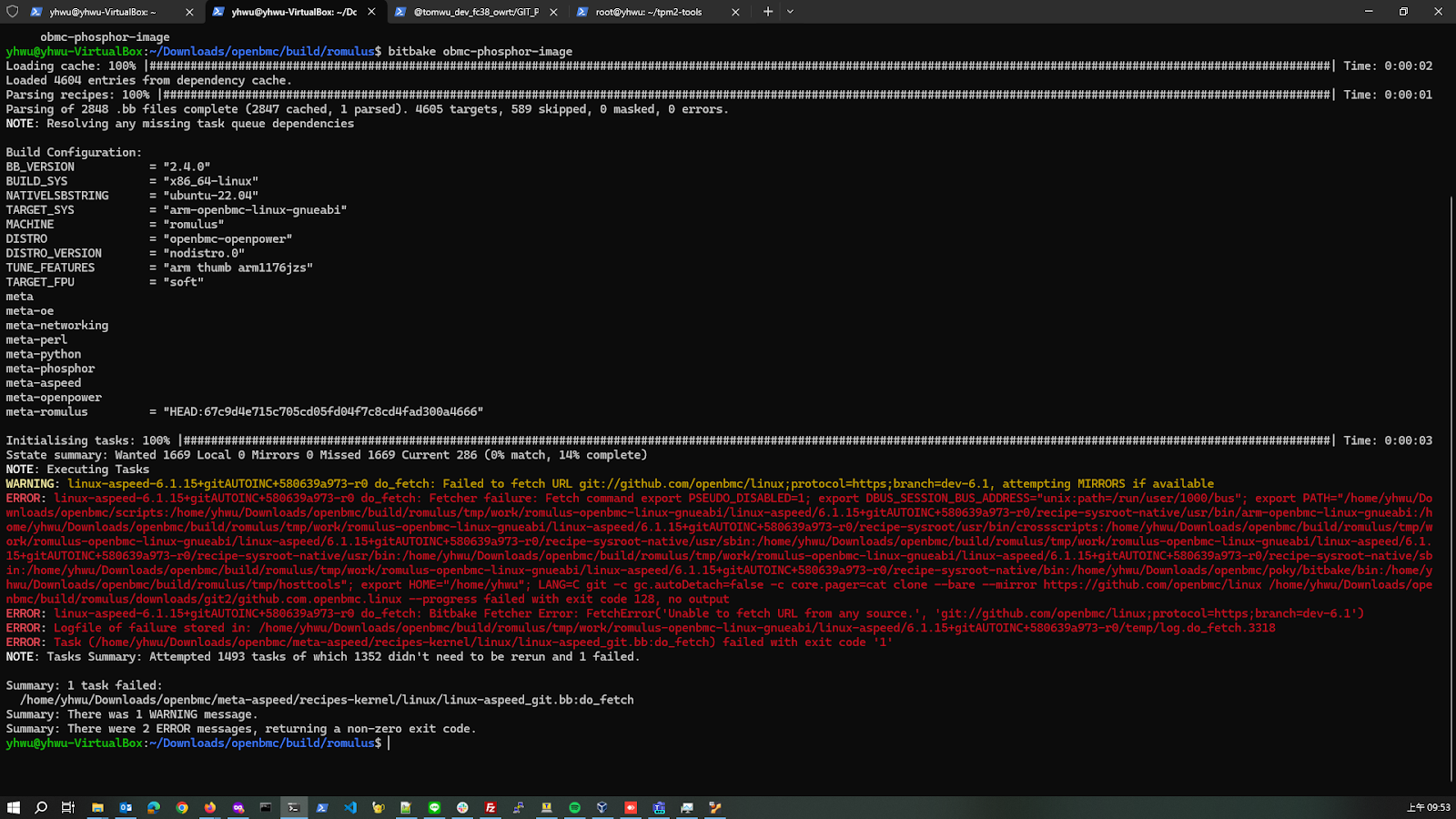
Error message: fetching code failed:
#### If there is a locale related issue
```bash=
locale -a
locale-gen en_US.UTF-8
apt install locales
locale-gen en_US.UTF-8
update-locale LANG=en_US.UTF-8
```
### Running OpenBMC on qemu
To do: https://jia.je/system/2023/08/11/openbmc-qemu/
```bash=
# install this for using qemu provided by openbmc
sudo apt install libfdt1 libpixman-1-0 libglib2.0-0 libslirp0 gawk bison
qemu-system-arm \
-m 256 \ # m: memory size
-M romulus-bmc \ # M: model
-nographic \ # -nographic: cli mode only
-drive file=./obmc-phosphor-image-romulus.static.mtd,format=raw,if=mtd \ # option of drive: file => image file, if => interface of storage (IDE, SATA...etc), mtd => interface for nand flash
-net nic \
-net user,hostfwd=:127.0.0.1:2222-:22,hostfwd=:127.0.0.1:2443-:443,hostfwd=udp:127.0.0.1:2623-:623,hostname=qemu
```
## Reference
https://medium.com/@ackerley19/%E9%80%8F%E9%81%8Edocker-qemu-debian%E6%A8%A1%E6%93%ACarm%E7%B3%BB%E7%B5%B1-7ebdb4ad1992
http://pominglee.blogspot.com/p/linux_9.html
http://pominglee.blogspot.com/p/linux.html
### OpenWrt related
https://openwrt.org/zh-tw/doc/howto/build
https://openwrt-nctu.gitbook.io/project/openwrt-compile-env/openwrt-cross-compiler
https://www.youtube.com/watch?v=JTfPjALI1vU&ab_channel=HamzaMeddeb
NCS JH的筆記 #19986
https://learn.arm.com/install-guides/gcc/cross/
### OpenBMC related
https://github.com/openbmc (openbmc official site)
https://github.com/openbmc/docs (documents of openbmc)
https://github.com/openbmc/openbmc/issues (issue list of openbmc)
https://gerrit.openbmc.org/q/status:open+-is:wip (another issue list of openbmc)
https://github.com/openbmc/openbmc/wiki/Current-Release-Content (release note of openbmc)
https://lists.ozlabs.org/pipermail/openbmc/ (another release note, with other related packages)
https://github.com/openbmc/openbmc/wiki (wiki of openbmc)
https://docs.yoctoproject.org/bitbake/singleindex.html (bitbake document)
 Sign in via Facebook
 Sign in via X(Twitter)
 Sign in via GitHub
 Sign in via Dropbox
 Sign in with Wallet
Connect another wallet
Sign in with Wallet
Connect another wallet