[](http://github.com/brianstorti) [](http://twitter.com/brianstorti) [](mailto:btstorti@gmail.com) [](http://linkedin.com/in/brianstorti) [](https://www.brianstorti.com/feed/atom.xml)
---
# TCP Flow Control
`TCP` is the protocol that guarantees we can have a reliable communication channel over an unreliable network. When we send data from a node to another, packets can be lost, they can arrive out of order, the network can be congested or the receiver node can be overloaded. When we are writing an application, though, we usually don't need to deal with this complexity, we just write some data to a socket and `TCP` makes sure the packets are delivered correctly to the receiver node. Another important service that `TCP` provides is what is called *Flow Control*. Let's talk about what that means and how `TCP` does its magic.
#### What is Flow Control (and what it's not)
Flow Control basically means that `TCP` will ensure that a sender is not overwhelming a receiver by sending packets faster than it can consume. It's pretty similar to what's normally called *Back pressure* in the Distributed Systems literature. The idea is that a node receiving data will send some kind of feedback to the node sending the data to let it know about its current condition.
It's important to understand that this is **not** the same as *Congestion Control*. Although there's some overlap between the mechanisms `TCP` uses to provide both services, they are distinct features. Congestion control is about preventing a node from overwhelming the network (i.e. the links between two nodes), while Flow Control is about the end-node.
#### How it works
When we need to send data over a network, this is normally what happens.
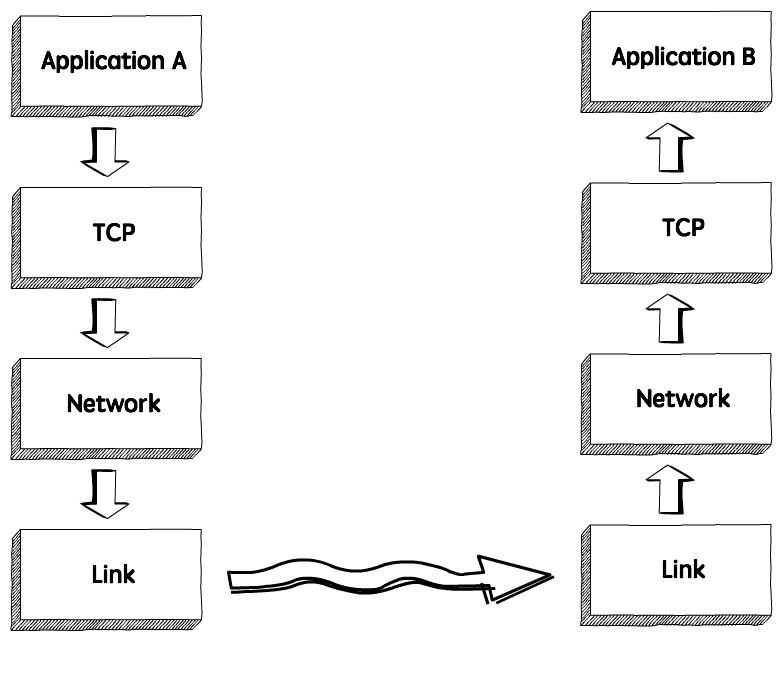
The sender application writes data to a socket, the transport layer (in our case, `TCP`) will wrap this data in a segment and hand it to the network layer (e.g. `IP`), that will somehow route this packet to the receiving node.
On the other side of this communication, the network layer will deliver this piece of data to `TCP`, that will make it available to the receiver application as an exact copy of the data sent, meaning if will not deliver packets out of order, and will wait for a retransmission in case it notices a gap in the byte stream.
If we zoom in, we will see something like this.
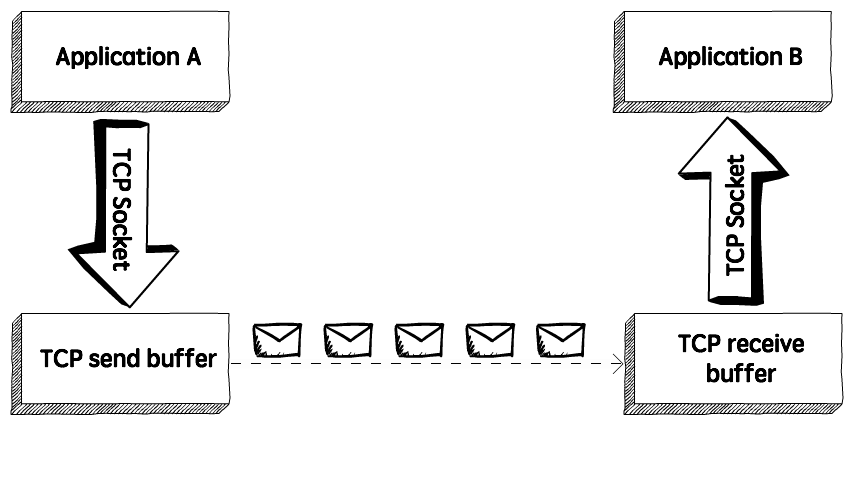
`TCP` stores the data it needs to send in the *send buffer*, and the data it receives in the *receive buffer*. When the application is ready, it will then read data from the receive buffer.
Flow Control is all about making sure we don't send more packets when the receive buffer is already full, as the receiver wouldn't be able to handle them and would need to drop these packets.
To control the amount of data that `TCP` can send, the receiver will advertise its *Receive Window (rwnd)*, that is, the spare room in the receive buffer.
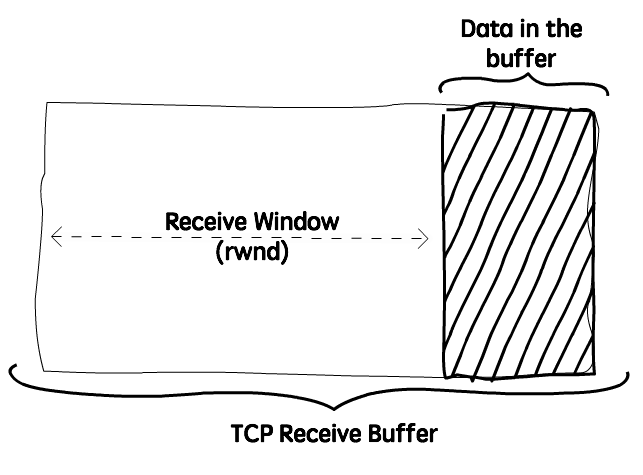
Every time `TCP` receives a packet, it needs to send an `ack` message to the sender, acknowledging it received that packet correctly, and with this `ack` message it sends the value of the current receive window, so the sender knows if it can keep sending data.
#### The sliding window
`TCP` uses a sliding window protocol to control the number of bytes in flight it can have. In other words, the number of bytes that were sent but not yet `ack`ed.
Let's say we want to send a 150000 bytes file from node A to node B. `TCP` could break this file down into 100 packets, 1500 bytes each. Now let's say that when the connection between node A and B is established, node B advertises a receive window of 45000 bytes, because it really wants to help us with our math here.
Seeing that, `TCP` knows it can send the first 30 packets (1500 * 30 = 45000) before it receives an acknowledgment. If it gets an `ack` message for the first 10 packets (meaning we now have only 20 packets in flight), and the receive window present in these `ack` messages is still 45000, it can send the next 10 packets, bringing the number of packets in flight back to 30, that is the limit defined by the receive window. In other words, at any given point in time it can have 30 packets in flight, that were sent but not yet `ack`ed.
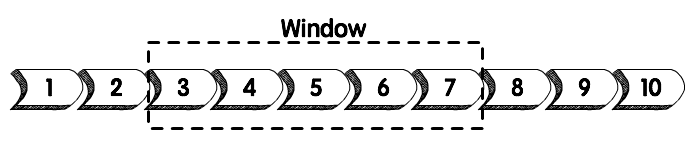
Example of a sliding window. As soon as packet 3 is acked, we can slide the window to the right and send the packet 8.
Now, if for some reason the application reading these packets in node B slows down, `TCP` will still `ack` the packets that were correctly received, but as these packets need to be stored in the receive buffer until the application decides to read them, the receive window will be smaller, so even if `TCP` receives the acknowledgment for the next 10 packets (meaning there are currently 20 packets, or 30000 bytes, in flight), but the receive window value received in this `ack` is now 30000 (instead of 45000), it will not send more packets, as the number of bytes in flight is already equal to the latest receive window advertised.
The sender will always keep this invariant:
``` text
LastByteSent - LastByteAcked <= ReceiveWindowAdvertised
```
#### Visualizing the Receive Window
Just to see this behavior in action, let's write a very simple application that reads data from a socket and watch how the receive window behaves when we make this application slower. We will use `Wireshark` to see these packets, `netcat` to send data to this application, and a `go` program to read data from the socket.
Here's the simple `go` program that reads and prints the data received:
``` text
package main
import (
"bufio"
"fmt"
"net"
)
func main() {
listener, _ := net.Listen("tcp", "localhost:3040")
conn, _ := listener.Accept()
for {
message, _ := bufio.NewReader(conn).ReadBytes('\n')
fmt.Println(string(message))
}
}
```
This program will simply listen to connections on port `3040` and print the string received.
We can then use `netcat` to send data to this application:
``` text
$ nc localhost 3040
```
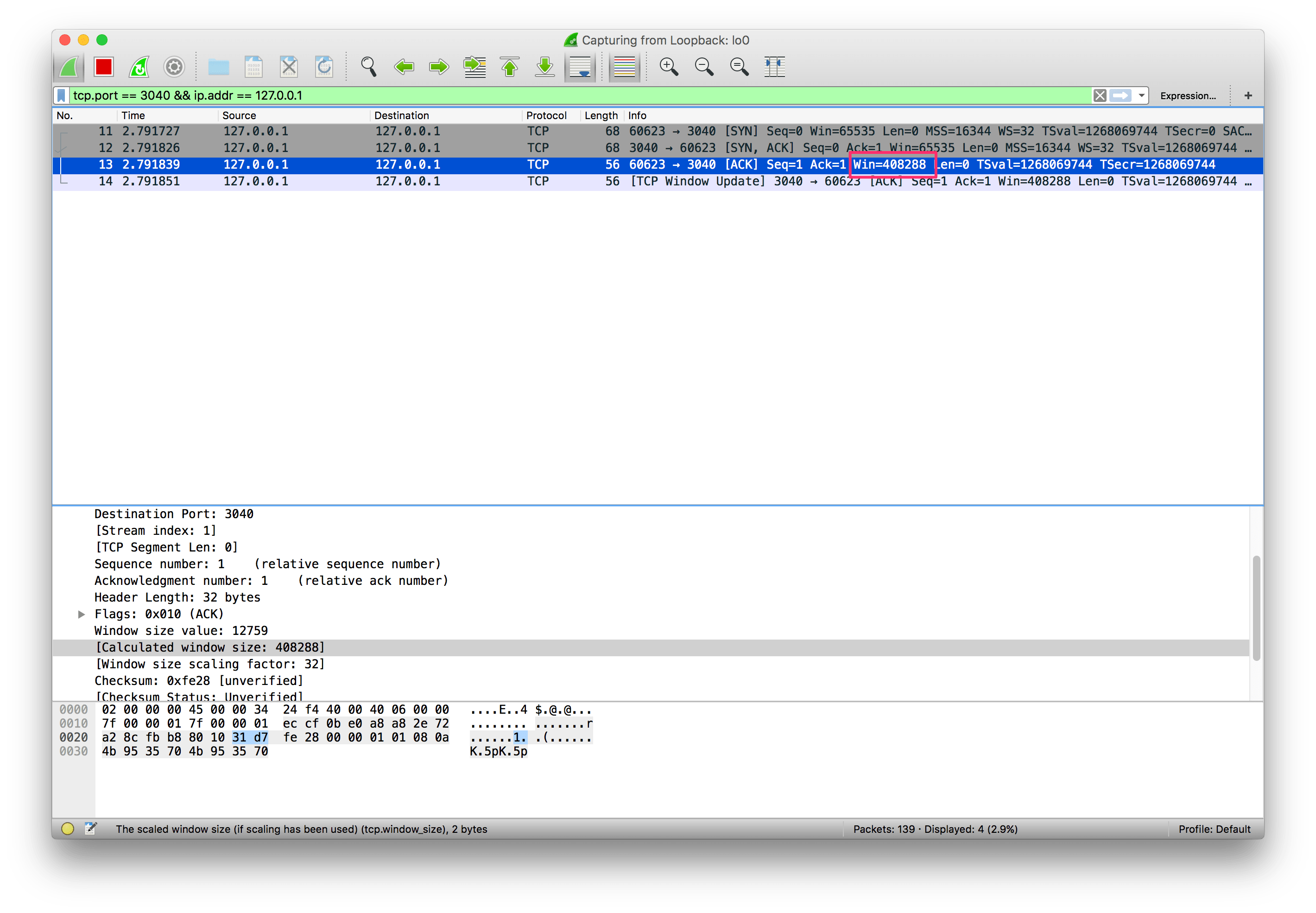
And we can see, using `Wireshark`, that the connection was established and a window size advertised:
[
](https://www.brianstorti.com/assets/images/tcp-flow-control/conn-established.png)
Click on the image to enlarge it.
Now let's run this command to create a stream of data. It will simply add the string "foo" to a file, that we will use to send to this application:
``` text
$ while true; do echo "foo" > stream.txt; done
```
And now let's send this data to the application:
``` text
tail -f stream.txt | nc localhost 3040
```
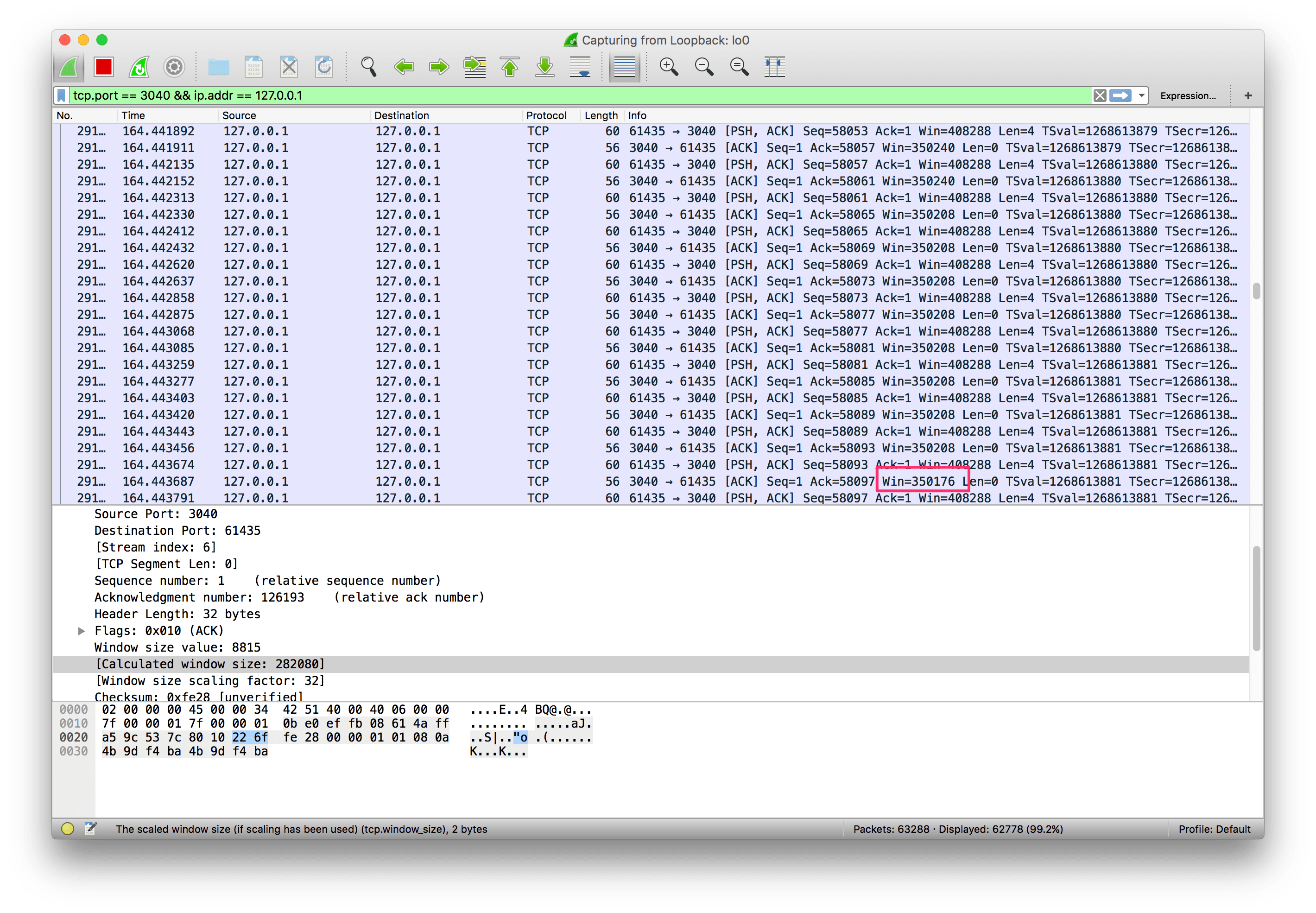
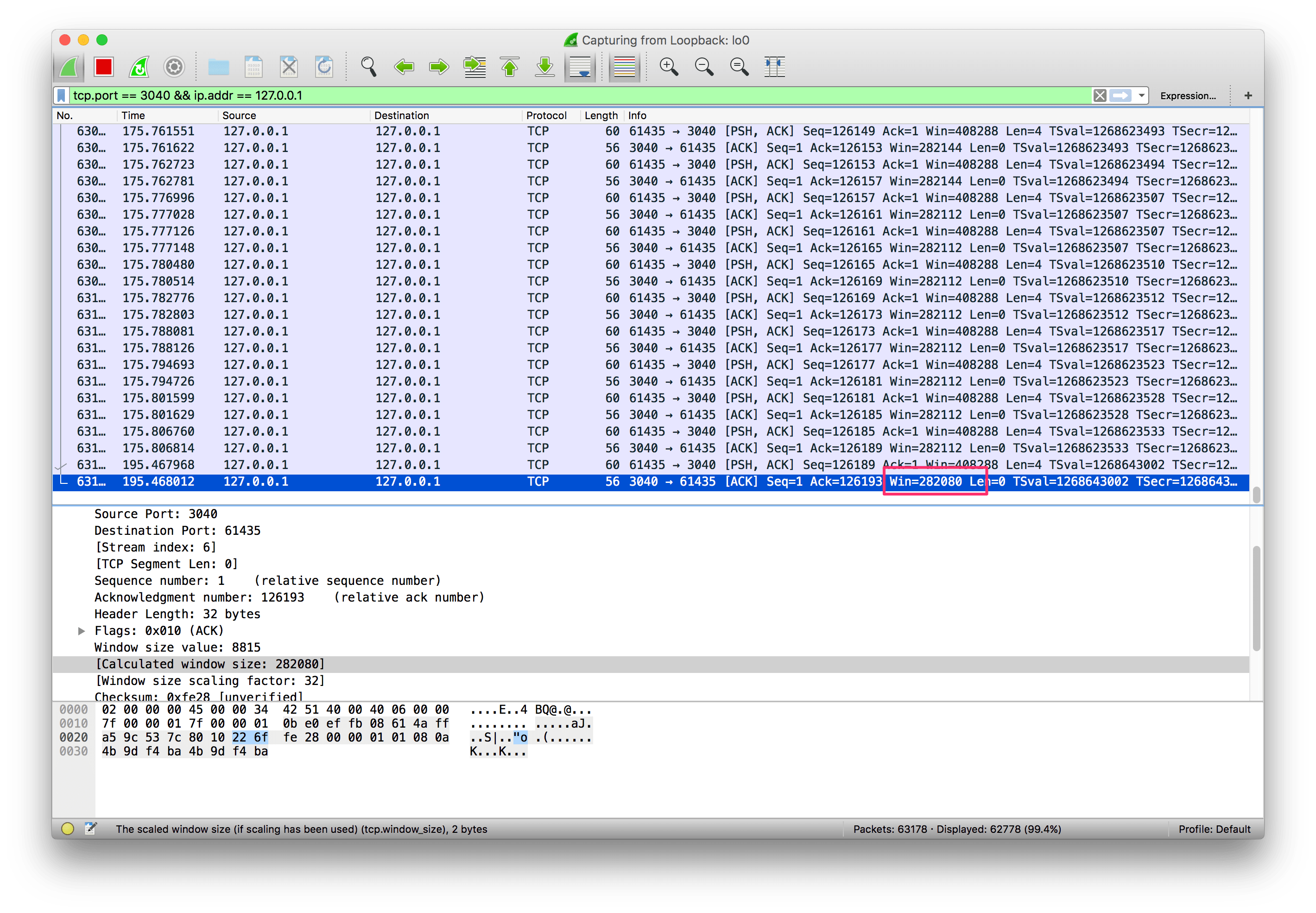
Now if we check `Wireshark` we will see a lot of packets being sent, and the receive window being updated:
[
](https://www.brianstorti.com/assets/images/tcp-flow-control/win-decreasing-1.png)
[
](https://www.brianstorti.com/assets/images/tcp-flow-control/win-decreasing-2.png)
The application is still fast enough to keep up with the work, though. So let's make it a bit slower to see what happens:
``` text
package main
import (
"bufio"
"fmt"
"net"
"time"
)
func main() {
listener, _ := net.Listen("tcp", "localhost:3040")
conn, _ := listener.Accept()
for {
message, _ := bufio.NewReader(conn).ReadBytes('\n')
fmt.Println(string(message))
+ time.Sleep(1 * time.Second)
}
}
```
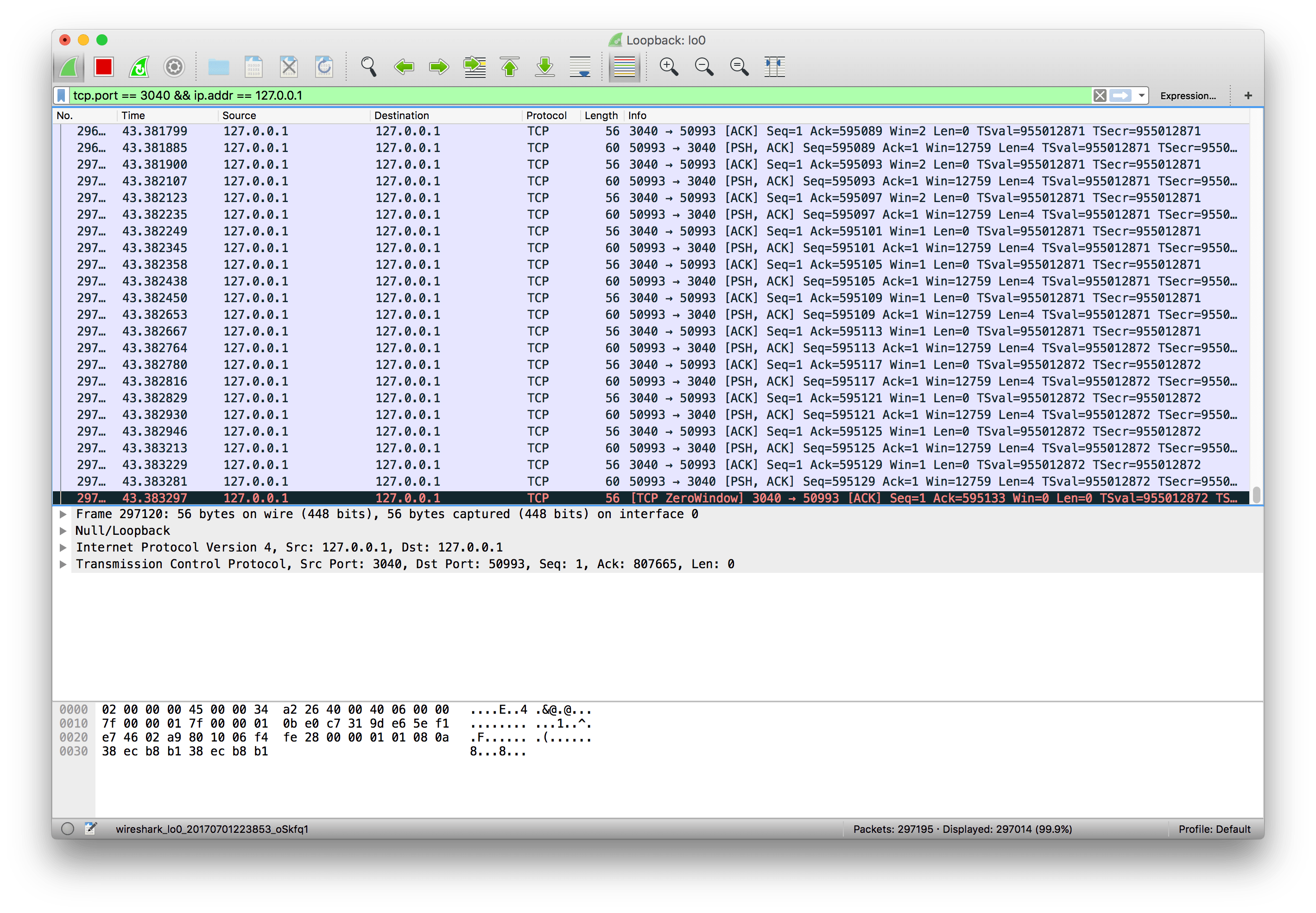
Now we are sleeping for 1 second before we read data from the receive buffer. If we run `netcat` again and observe `Wireshark`, it doesn't take long until the receive buffer is full and `TCP` starts advertising a 0 window size:
[
](https://www.brianstorti.com/assets/images/tcp-flow-control/zero-window.png)
At this moment `TCP` will stop transmitting data, as the receiver's buffer is full.
#### The persist timer
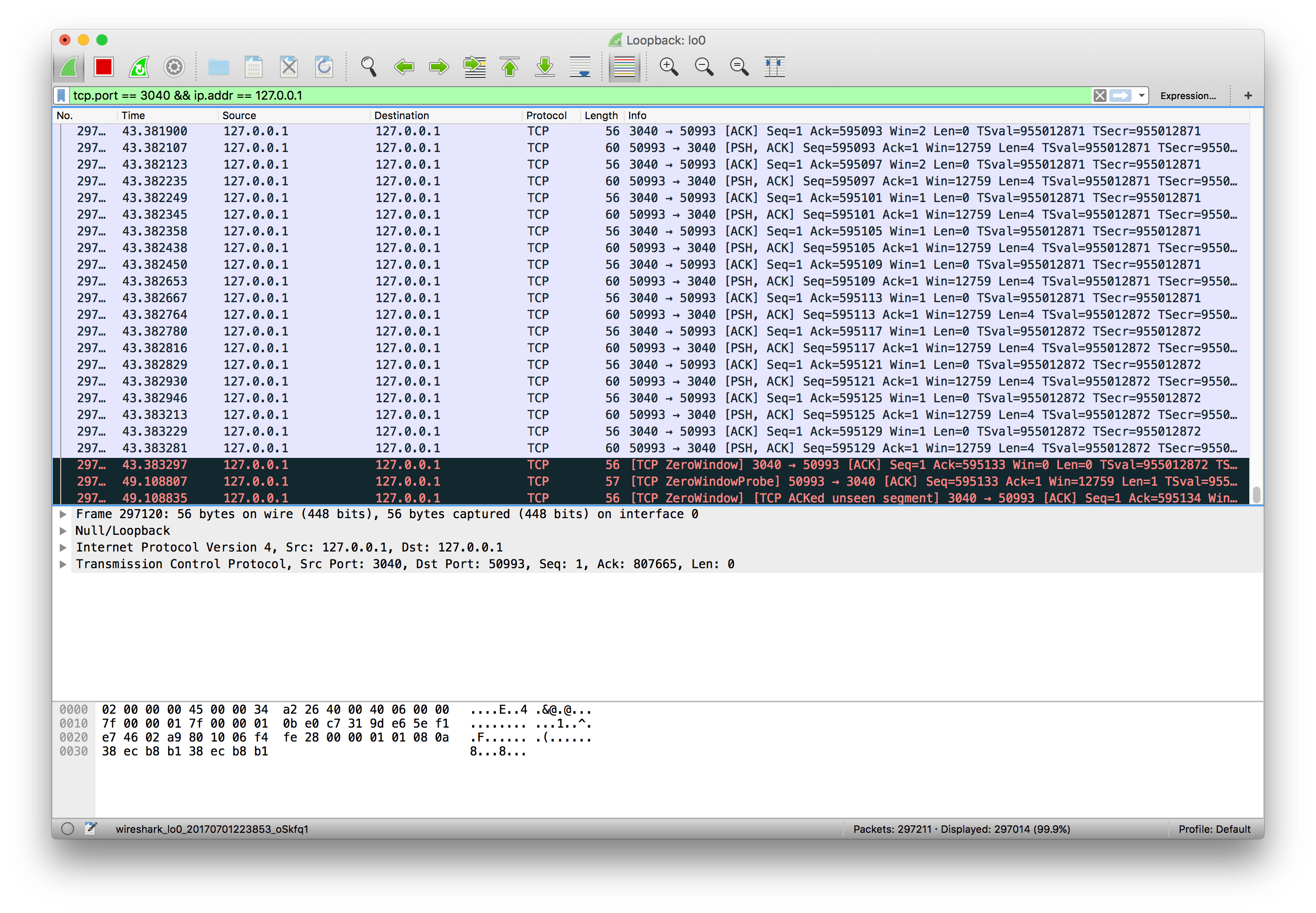
There's still one problem, though. After the receiver advertises a zero window, if it doesn't send any other `ack` message to the sender (or if the `ack` is lost), it will never know when it can start sending data again. We will have a deadlock situation, where the receiver is waiting for more data, and the sender is waiting for a message saying it can start sending data again.
To solve this problem, when `TCP` receives a zero-window message it starts the *persist timer*, that will periodically send a small packet to the receiver (usually called `WindowProbe`), so it has a chance to advertise a nonzero window size.
[
](https://www.brianstorti.com/assets/images/tcp-flow-control/window-probe.png)
When there's some spare space in the receiver's buffer again it can advertise a non-zero window size and the transmission can continue.
#### Recap
- `TCP`'s flow control is a mechanism to ensure the sender is not overwhelming the receiver with more data than it can handle;
- With every `ack` message the receiver advertises its current receive window;
- The receive window is the spare space in the receive buffer, that is, `rwnd = ReceiveBuffer - (LastByteReceived -- LastByteReadByApplication)`;
- `TCP` will use a sliding window protocol to make sure it never has more bytes in flight than the window advertised by the receiver;
- When the window size is 0, `TCP` will stop transmitting data and will start the persist timer;
- It will then periodically send a small `WindowProbe` message to the receiver to check if it can start receiving data again;
- When it receives a non-zero window size, it resumes the transmission.
[Get PDF](https://gum.co/tcp-flow-control)
#### Interested in learning Kubernetes?
I just published a new book called [Kubernetes in Practice](https://kubernetesinpractice.com/), you can use the discount code **blog** to get 10% off.
 Sign in with Wallet
Connect another wallet
Sign in with Wallet
Connect another wallet