# Client Server Communication part 2
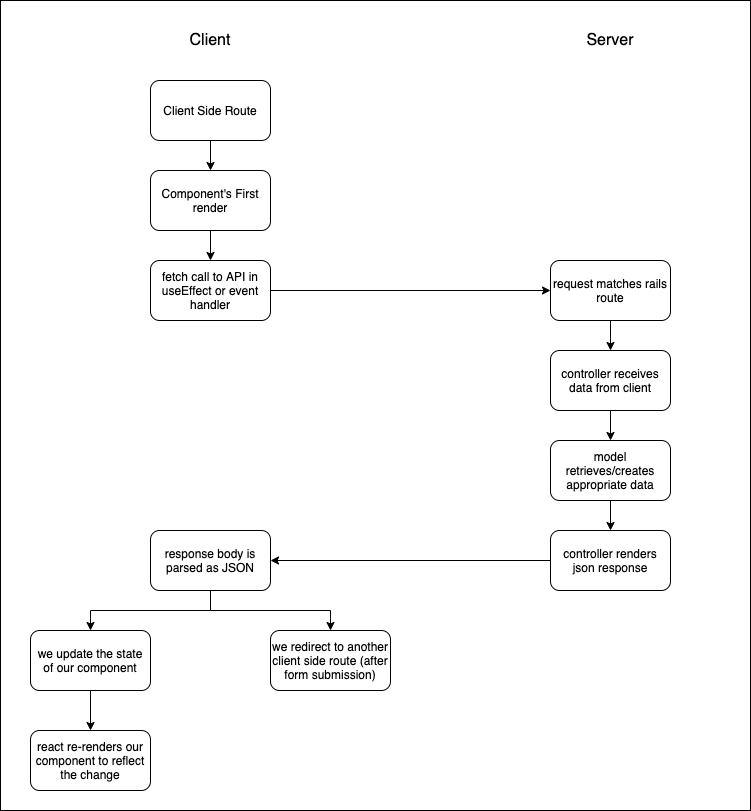
[GitHub Source Code](https://github.com/learn-co-students/central-051721/tree/main/phase-4/solutions/03-client-server-communication-part-2)
## Feature:
### What's my client side route?
### Which component does it render?
### Where should the useEffect/event handler send a request to?
### What controller#action does the server side route point to?
### What data is retrieved from/created in/deleted from the model layer?
### What should the server JSON response look like?
### After we parse response as JSON on the client side, what's the next step?
## Task 1 - Adding a Buy button
Let's review how to handle POST requests to create by adding a buy option to our items. In our case, buying an item will create an order.
- Add a Buy Button to the Item Card (that creates an order for that item)
- Add an Order show route (client side) that displays the `OrderCard` component
- fetches order data from the API
- Displays order
### What's my client side route?
We start at `'/'`
After we click we end up at `'/orders/:id'`
### Which component does it render?
`/` => `ItemContainer`
`/order/:id` => `OrderCard`
### Where should the useEffect/event handler send a request to?
Event Handler (onClick) for the buy button sends request to:
`POST '/orders'`
What's the body? Use some info from props to put in body of request. How do we know what should be in the body of the request?
### What controller#action does the server side route point to?
`OrdersController#create`
### What data is retrieved from/created in/deleted from the model layer?
```rb
def order_params
params.require(:order).permit(:user_id, :item_id)
end
```
```js
{
order: {
user_id: 2,
item_id: 1
}
}
```
### What should the server JSON response look like?
the newly created `Order`
### After we parse response as JSON on the client side, what's the next step?
client side redirect to `/orders/${apiOrder.id}`
We'll display order using the OrderCard component
Unhandled Rejection (TypeError): Cannot read property 'item_name' of undefined
```js
return (
<>
{order?<div key={order.id}>Item:{order.item.item_name} User:{order.user.user_name}</div>:null}
</>
)
```
You have a line number, and you're looking for the place on that line where item_name appears. This error is telling you that the expression before item_name returns undefined.
### Relevant Code Changes
```js
// src/App.js
// Import OrderCard component
// Add Route pointing to OrderCard component
<Navbar />
<Switch>
<Route path="/items/new">
<ItemForm items={items} setItems={setItems} />
</Route>
<Route exact path="/">
<ItemContainer items={items} setItems={setItems} />
</Route>
<Route exact path="/orders/:id">
<OrderCard />
</Route>
</Switch>
```
```js
// src/OrderCard.js
import { useParams } from "react-router-dom";
import React, { useState, useEffect } from 'react'
function OrderCard() {
const [order, setOrder] = useState(null);
const id = useParams().id
useEffect(() => {
async function fetchOrder(){
let res = await fetch(`http://localhost:3001/orders/${id}`)
let json = await res.json()
setOrder(json)
}
fetchOrder()
},[]);
return (
<>
{order?<div key={order.id}>Item:{order.item.item_name} User:{order.user.user_name}</div>:null}
</>
)
}
export default OrderCard;
```
```js
// src/ItemCard.js
import { Card, Image } from './styled';
import { useHistory } from 'react-router-dom'
function ItemCard({ item }) {
const history = useHistory();
async function handleClick(e) {
const res = await fetch(`http://localhost:3001/orders`, {
method: 'POST',
headers: {
'Content-Type': 'application/json'
},
body: JSON.stringify({
order: {
user_id: 2,
item_id: item.id
}
})
})
const json = await res.json()
history.push(`/orders/${json.id}`)
}
return (
<Card>
<Image src={item.image_url} />
<h2>{item.item_name}</h2>
<h2>{item.price}</h2>
<p>{item.description}</p>
<p>
<button onClick={handleClick }>Buy</button>
</p>
</Card>
);
}
export default ItemCard;
```
```js
// src/ItemContainer.js
```
```js
// src/ItemForm.js
```
```js
// src/Navbar.js
```
## Task 2 - Adding an edit Item feature
- Add an Item edit route (client side) that
- fetches item data from the API
- loads it into the controlled form
- handles submission by updating the Item on the backend
- redirects to the items index route (client side) where we should see the updated item info
### What's my client side route?
`/items/:id/edit` => `EditItemForm`
### Which component does it render?
### Where should the useEffect/event handler send a request to?
### What controller#action does the server side route point to?
### What data is retrieved from/created in/deleted from the model layer?
### What should the server JSON response look like?
### After we parse response as JSON on the client side, what's the next step?
### Relevant code changes
```js
// src/App.js
```
```js
// src/OrderCard.js
```
```js
// src/ItemCard.js
```
```js
// src/ItemContainer.js
```
```js
// src/ItemForm.js
```
```js
// src/Navbar.js
```
## Task 3 In breakouts - Adding a Delete Button to Item Card
- Add a Delete Item button to the Item Card
- When clicked the button should send a request to the API to delete the Item
- when we get a successful response we should remove the Item from the items index view
- should allow us to delete items even if they have associated orders.
### What's my client side route?
`'/'` is active and we won't redirect
### Which component does it render?
ItemContainer
### Where should the useEffect/event handler send a request to?
event handler should send request to: DELETE /items/:id
### What controller#action does the server side route point to?
items#destroy
### What data is retrieved from/created in/deleted from the model layer?
destroy the item in the database
### What should the server JSON response look like?
deleted item in JSON format
### After we parse response as JSON on the client side, what's the next step?
update our state in ItemContainer to remove the card for the deleted item
## Final Code
```js
// src/App.js
```
```js
// src/OrderCard.js
```
```js
// src/ItemCard.js
```
```js
// src/ItemContainer.js
```
```js
// src/ItemForm.js
```
```js
// src/Navbar.js
```
 Sign in with Wallet
Connect another wallet
Sign in with Wallet
Connect another wallet