```
Authors: Dhruv, Animesh
Message: Azure Training
```
# Cloud - 25<sup>th</sup> Aug '22
## What is Cloud?
* Types of services/ Types of cloud models
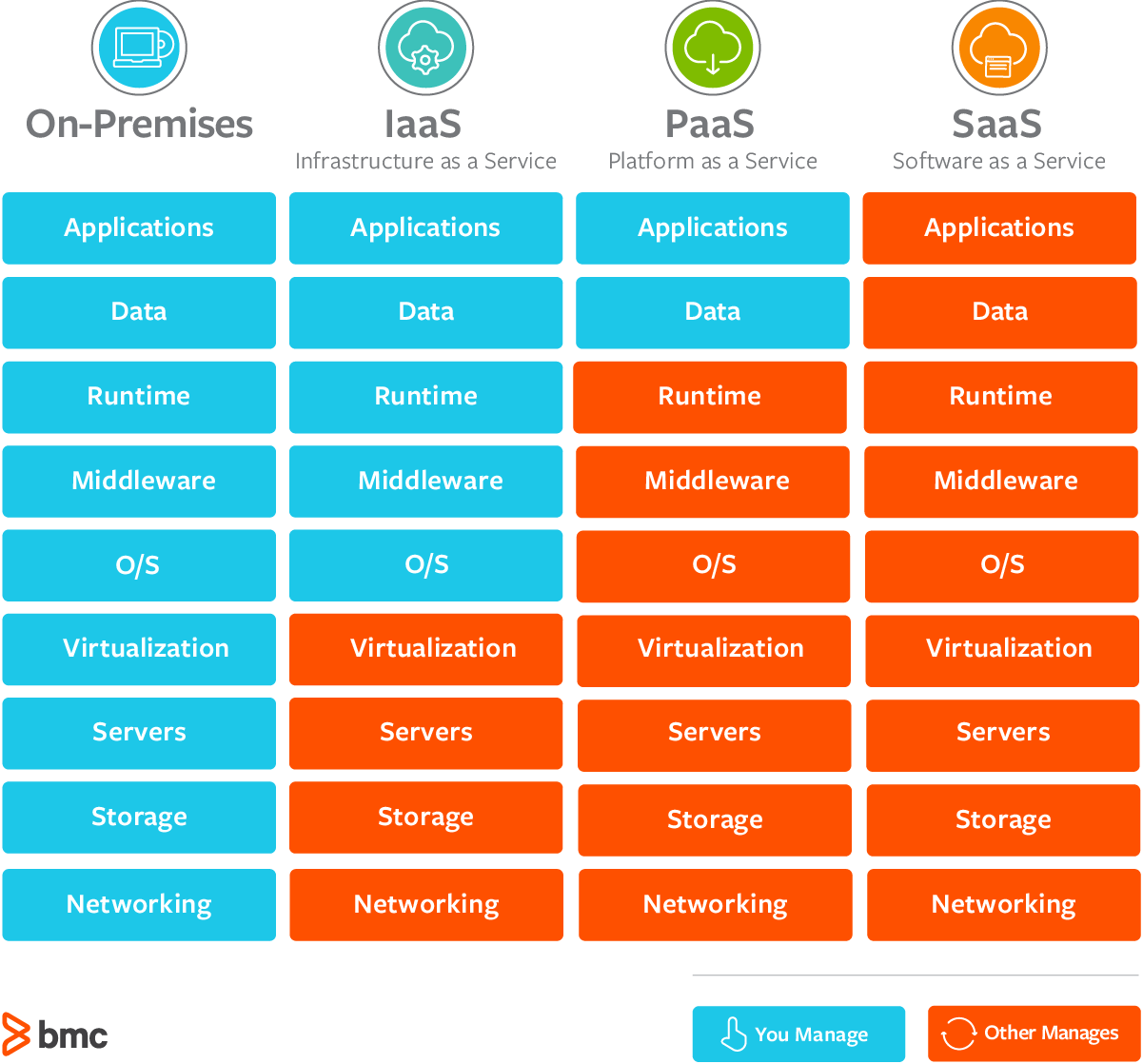
* On-premises
* You do everything
* IAAS
* Infrastructure as a Service
* build pay-as-you-go IT infrastructure by renting servers, virtual machines, storage and os from cloud provider.
* eg: AWS, Microsoft Azure
* PAAS
* Platform as a Service
* provides environment for building, testing and deploying software applications without focusing on managing underlying infrastructure.
* eg: AWS Elastic Beans, Google app Engine
* SAAS
* Software as a Service
* users connect to and use cloud-based apps over internet
* you do nothing
* eg: gmail, slack, wps, Adobe, office 365
* Cloud Models
* public, private and hybrid cloud
* choosing the best for you
* Cloud benefits and considerations
* benefits of the cloud
* cloud considerations
* Cloud Service
* IaaS,PaaS,SaaS
* Sharing responsiblity
## What is Cloud Computing?
It is the delivery of computing services over the internet, enabling faster innovation, flexible resources and economies of scale.
### Public Cloud
* owned by cloud services or hosting providers
* provides resources and services to multiple organizations and users
* Accessed via secure network connection (typically over the internet).
* example: MS Azure
### Private cloud
* organizations create a cloud environment in their data center.
* organization is responsible for operating the services they provide.
* ex. using company's own infrastructure
### Hybrid Cloud
* Combines public & private cloud to allow applications to run in the most appropriate locations.
### Benifits of Cloud
* High availability
* scalability
* elasticity
* agility
* disaster recovery
* Security
* Predictive Cost Consideration
* Fault Tolerance
* Global Reach
* Customer latency capabilities
### CapEx vs OpEx
* Capital Expenditure
* the upfront spending of money on physical infrastructure
* Costs from CapEx have a value that reduces over time.
* Operational expenditure
* spend on products and services as needed, **pay-as-you-go**.
* get billed immediately
### Consumption based model
Cloud service provides o... something ...
* better cost prediction
### Serverless Computing
with serverless computing applications the cloud service provider automatically provision, scales and manages the infrastructure required to run the code
```
RAID - Redundant Array of Inexpensive Disk
```
## MS Azure
### Contents
* cloud concepts
* cloud azure services
* core solutions and management tools
* general security and nerwork security
* identity, governance, privacy and compliance
* azure cost management and service level agreements
### Azure Architectural Components
* regions and availablity zones
* regions are made up of one or more datacenters in close proximity
* provide flexibility and scale to reduce customer latency
* preserve data residency with a comprehensive compliance offering
* automatic replication for some services
* pritortized region recovery in the event of outage
* Availablity Zones
* provide protection against downtime due to datacenter failure
* physically seperate datacenters within the same region
* Each datacenter is quipped with independent power cooling and networking
* Connected through private fiber optic networks
* subscriptions and resource groups
### Core Azure Resources
* compute
* networking
* storage
* databases
### Azure Resources
Azure resources are components like storage, virutal machines and networks that are available to build cloud solutions.
* Virtual machines
* Storage accounts
* Virtual networks
* App Services
* SQL Databases
* Functions
### Resource groups
A resource group is a container to manage and aggeregate resources in a single unit
* resources can exist in only one resource group.
* resources can exist in different regions.
* resources can be moved to different resource groups.
* Applications can utilize multiple resource groups.
### Azure Resource Manager (ARM)
The ARM provides a management layer that enables you to create, update and delete resources in your Azure subscription.

## Core Azure Workloads - Objective Domain
Describe the benefits and usage of
* virutal machines, azure app services, azure container instances, azure kuberneter services, and windows virtual desktop
* virtual networks, vpn gateway, virtual network peering and ExpressRoute
* Container (Blob) Storage, disk storage, file storage and storage tiers
* Cosmos DB, Azure SQL Database, Azure database for MYSQL, Azure database for postgre and SQL managed instance.
* Azure Marketplace
## Azure Storage
A service that you can use to store files, messages, tables and other types of information
* durable, secure scalable and accessible
* storage for virtual machines, unstructured data and structured data
* Two tiers: standard (HDD) and SSD
**Types:**
* Container storage (blob)
* Blob storage is optimized for storing massive amounts of unstructured data. Unstructured data is data that doesn't adhere to a particular data model or definition, such as text or binary data
* Disk storage
* Azure files
### Storage Services
* azure containers
* a massively scalable object store for text and binary data
* azure files
* managed dile shares for cloud or on-premises deployments
* Azure Tables
* tables ideal for storing structured, non relational data
* Azure Queues
* a messaging store for reliable messaging between application componenets
### Storage Accounts types
* blobstorage
* Storage (general purpose)
* StorageV2
* Block Blob(binary large object)
* file storage
### Replication Strategies
* locally redundant Storage (LRS)
* Data is replicated within a single facility in a single region
* Zone redundant Storage (ZRS)
* Data is replicated acriss multiple availablity zones within one region
* Geo Redundant Storage (GRS)
* Data is replicated three times within the primary region and replicated three times to the regions pair
* Read-access Geo redundant storage
* Data is replicated three times within the primary region and replicated with read-access to the region pair
* Geo zone redundant storage (GZRS)
* Data is replicated across three Availability Zones and replicated to the region pair
* Read access geo zone redundant storage (RA-GZRS)
* Data is replicated across three Availability Zones and replicated with read-access to the region pair
### Azure Container Services
Azure containers are light weight virtualized environment that does not require OS managemment and can respond to changes on demand.
<strong>Azure Container Instances</strong>: a PaaS offering that runs a container in Azure without the need to manage a virtual machine or additional services.
<strong>Azure Kubernetes Service</strong>: an orchestration service for containers wth distribured architectutes and large bolumes of containers.
PS: it's like docker.
### Azure Networking Services
* Azure Virtual Network
* connects azures resources with each other and the internet
* Virtual Private Network Gateway (VPN)
* sends encrypted traffic between on-premises and on-premises
* Azure Express Route
* extends on-premises network into the azure over the private connection that is facilitated by a connectivity provider.
### Azure Database Services
Azure Cosmos Database is globally distributed database service that elastically and independently scales throughout and storage
**Azure SQL Database**
It allows existing SQL Server customers to lift and shift their on premises applications to the cloud with minimal application and database chages
* fully managed and evergreen platform
* something more
**Azure Database for MySQL**
it is a fully managed MySQL database serice for app developers
**Azure Database for PostgreSQL**
It's a relational database service based on the open source Postgres database engine
## Azure SQL Managed Instance
Azure SQL Managed Instance allows existing SQL Server
customers to lift and shift their on-premises applications to
the cloud with minimal application and database changes.
* fully managed and evergreen platform as a service
* preserves all PaaS capabilties (automatic patching and version updates, automated backups and high availablity)
* exchange existing licenses for discounted rates on SQL Managed Instance using the Azure Hybrid Benefit
---
in module 4 beyond this line
---
## Azure Security Features
* security features
* security center and resource hygiene
* key vault Sentinel and dedicated hosts
* Azure network Security
* defense in depth
* Network Security Groups and firewalls
* DDoS protection
## Azure Security Center
Azure Security Center is a monitroing service that provides threat protection across both azure and on-premises datacenters.
* Provides securirty recommendations
* Detect & block malware
* Analyze and identify potential attacks
* Just-in-time access control for ports
### Capabilities
* policy compliance
* security alerts
* secure score
* resource security hygiene
* continuous assessments
* tailored recommendations
* threat protection
## Azure Sentinel
A tool that provides security analytics and threat intelligence.

Connector and Integrations:
* Office 365
* Azure Active Director
* centralise, store and protect the directory
* Azure Advanced Threat Protection
* Microsoft Cloud App Security
## Azure Key Vault
Azure Key Vault stores application secrets in a centralized cloud location in order to securely control access permissions and access logging.
* Secrets management.
* Key management.
* Certificate management.
* Storing secrets backed by hardware security modules (HSMs).
## Azure Dedicated Host
It provides physical servers that host one or mote Azure virtual machines that is dedicated to a single organization's workload.
**Benefits**
* hardware isolation at the server level
* control over maintainance event timing
* aligned with azure Hybrid Use Benefits
## Secure Network Connectivity
### Defence in depth
* a layered approach to securing computer systems
* provides multiple levels of protection
* attacks against one layer are isolated from subsequent layers.

### Shared Security
* migrating from customer controlled to cloud based datacenters shifts the responsiblity for security
* Security becomes a shared concern between cloud providers and customers.

### Network Security Groups
NSGs filter network traffic to and from azure resources on Azure Virtual Networks.
* Set inbound and outbound rules to filter by source and destination IP address, port, and protocol
* add multiple rules as needed within subscription limits
* azure applies default, baseline security tules to new NSGs
* Override default rules with new, higher priority rules.
### Azure Firewall
Basically checks the originating IP address and either grant or deny server access.
Also called **Firewall as a Service**
* Applies inbound and outbound traffic filtering rules
* Built-in high availability
* Unrestricted cloud scalability
* Uses Azure Monitor logging
Azure Application Gateway also provides a firewall, Web Application Firewall (WAF). WAF provides centralized, inbound protection for your web application.
### Azure Distributed Denial of Service (DDoS) protection
DDoS attacks overwhelm and exhaust network resources, making apps slow or unresponsive.
* Sanitizes unwanted network traffic before it impacts service availability.
* Basic service tier is automatically enabled in Azure.
* Standard service tier adds mitigation capabilities that are tuned to protect Azure Virtual Network resources.
### Defence in Depth Reviewed
Combining network security solutions
* NSGs with Azure firewall to achieve defense in depth
* perimeter layer protects your network boundaries with Azure DDoS protection and Azure firewall
* Networking layer only permits traffic to pass between netwoked resources with NSG inbound and outbound rules.
---
in module 5 beyond this line
___
## Core Azure Identity Services
### Authentication vs Authorization
**Authentication**
* identifies the person or service seeking access to a resource, by using credentials.
**Authorization**
* checks the level of access of an already authenticated person, basically defining what the particular user can see or cannot see.
### Azure Multi-factor Authentication
It is what it is, basically 2FA.
### Azure Active Directory
**Azure Active Directory** is Microsoft Azure's cloud based identity and access management service.
* Authentication
* Single sign-on
* Application management
* Bussiness to bussiness B2B
* Bussiness to Customer identity services
* Device management
### Role based Access Control
* fine grained access mangament
* segreagate duties within the team and grant only the amount of access to users that hey need to perform their jobs
* Enables access to the azure portal and controlling access to resources.
### Resource Locks
* protect your azure resources from accidental deletion or modification
* manage locks at subscription resource group or individual levels within Azure portal.
### Tags
* provides metadata(info about data) for your azure resources
* logically organizes reosuces into a taxonomy
* Consistes of a name-value pair
* very useful for rolling up billing information
### Azure Policy
Azure Policy helps to enforce organizational standards and to assess compliance at-scale. Provides governance and resource consistency with regulatory compliance, security, cost, and management.
* Evaluates and identifies Azure resources that do not comply with your policies.
* Provides built-in policy and initiative definitions, under categories such as Storage, Networking, Compute, Security Center, and Monitoring.
## Privacy, Compliance and data protection standards
* **Security** - Secure by design. With built in intelligent security, Microsoft helps to protect against known and unknown cyberthreats, using automation and artificial intelligence.
* **Privacy** - We are committed to ensuring the privacy of organizations through our contractual agreements, and by providing user control and transparency.
* **Compliance** - We respect local laws and regulations(because we are pussies) and provide comprehensive coverage of compliance offerings.
## Pricing
### Factors affecting the costs
* Resource type
* Costes are resource sprecific so the usage that a meter tracks and the number of meters associated with a resource, depend on the resource type.
* Service
* azure usage rates and billing perods can differ between enterprise, web direct and CSP customers.
* Location
* the azure infra is globally distributed and usage costs might vary between products, services and resources
* Bandwidth
* inbound transfers are usually free, for outbound pricing is based on the location
* Reserved Instances
* buy one to 3 year and get a discount
* Azure Hybrid Use Benefit
* already have software assurance? then you'll get discount.
### Pricing Calculator
It's a tool for estimating the cost. The basic configuration options include
* region
* tier
* billing options
* support options
* programs and offers
* dev/test pricing
### Minimizing Cost
* perform
* perform cost analysis
* Monitor
* monitor usage
* Use
* use spending limits option
* Use
* use **Azure reservations** and azure hybrid benefit
* Choose
* low cost locations and regions
* Keep
* keep in sync with latest offers
* Apply
* apply tags to identify cost owners
---
## AWS
### Tour of the AWS Console
**AWS has global Services**
* Identify and access management
* Route 53(DNS service)
* CloudFront (Content Delivery Network)
* WAF (Web Application Firewall)
**Most AWS services are Region-scoped**
* Amazon EC2 (IaaS)
* Elastic Beanstalk (Paas)
* Lambda (FaaS)
* Rekognition (SaaS)
### IAM (Identity Access Management)
* Root Account created by default shouldn't be used or shared
* Users are people within your organization and can be grouped
* Groups only contain users not other groups
### MFA
* using google authenticator
* using
### IAM Roles for Serivces
* Some AWS service will need to perform actions on your behalf
* permission are assigned to AWS services using IAM roles
* Common Roles
* EC2 Instance Roles
* Lambda Function Roles
* Roles for CloudFormation
### IAM Security Tools
* IAM Credentials Report (account-level)
* IAM Access Advisor (user-level)
### How can users access AWS?
* To access AWS you have three options
* AWS management console
* AWS CLI
* ye old command line interface
* AWS SDK
* manage and develop APIs
* Access keys are generated through the AWS Console
* Users manage their own access keys
* Access Key Id ~= username
* Secret Access Key ~= password
### EC2
* EC2 stands for Elastic Compute Cloud. EC2 is on-demand computing service on the AWS cloud platform.
* Under computing, it includes all the services a computing device can offer to you along with the flexibility of a virtual environment.
* It also allows the user to configure their instances as per their requirements i.e. allocate the RAM, ROM, and storage according to the need of the current task.
* Even the user can dismantle the virtual device once its task is completed and it is no more required.
* EC2 has **resizable** capacity. EC2 offers security, reliability, high-performance and cost-effective infrastructure so as to meet the demanding business needs.
* It mainly consists in the capablity of
* renting VM
* stroing data on virtual drives
* Sizing and configuration options
* OS
* how much compute power and cores
* RAM
* Storage Space
* Network Card
* Firewall Rules
* Bootstrap Scrip: EC2 User Data
* EC2 User Data
* It's possible to bootstrap our instances using and EC2 User data script
* Bootstrapping means launching commands when a machine starts
* That script is only run once at the instance first start
* EC2 user data is used to automate boot tasks such as:
* installing updates
* installing software
* downloading common files from the internet
* anything you can think of
* The EC2 User Data Script runs with the root user
### VM vs Physical Machine
The main advantages of virtual machines:
* Multiple OS environments can exist simultaneously on the same machine, isolated from each other
* Virtual machine can offer an instruction set architecture that differs from real computers
* Easy maintenance, application provisioning, availability and convenient recovery
* Easily managed backups and snapshots
* Reduction of operational costs due to reduced physical hardware requirements
* Combine a virtual terminal server with thin clients to reduce the hardware requirements for your staff
There are many reasons why your company might consider using virtual machines :
* VMs allow for reduced overhead, with multiple systems operating from the same console at the same time. VMs also provide a safety net for your data, as they can be used to enable rapid disaster recovery and automatic backups.
* They can also be useful for development and testing, as you can replicate the current state of machines, and quickly provision new machines. Adding new virtual machines for new staff can be done quickly and effectively.
* Staff or students working remotely from home could access the virtual machines from their existing laptops or desktops, reducing the required overheads for hardware in your organization or school.
### EC2 Instace Types - Memory Optimized
* fast performance for workloads that process large data sets in memory
* Use cases:
* high performance relational/non relational databases
* Distriburted web scale cache stores
* In-memory databases optimized for BI (Business Intelligence)
* Appps performing real-time processing of big unstructured data.
### EC2 Instace Types - Storage Optimized
## Security Groups
* Security Groups are the fundamental of network security in AWS
* They control how traffic is allowed into or out of our EC2 instances
* Security groups only contain *allow* rules.
* Security group rules can reference by IP or by security group.
* Security group are acting as a "firewall" on EC2 instance.
* They regulate:
* access to ports
* authorised ip ranges - ipv4 and ipv6
* control of inbound & outbound traffic
* can be attached to multiple instances
* locked
### Classic ports to know
* 22 = SSH - SECURE SHELL - Log into Linux instance
* 21 = FTP - file transfer protool - upload files into a file share
* 22 = SFTP - Secure file transfer Protocol - upload files using SSH
* 80 = HTTP - access unsecured websites
* 443 = HTTPS - access secured websites
* 3389 = RDP - remote desktop protocol - log into a Windows instance
 Sign in with Wallet
Connect another wallet
Sign in with Wallet
Connect another wallet