# A Practical Guide to Solana for Ethereum Devs
I've been trying to learn how to build on Solana but it's been a pain in the ass. I compiled everything I learned in these past few weeks to hopefully make things slightly easier for everyone after me.
This is a to-the-point, no BS guide that aims to provide Ethereum developers with a practical understanding of how things work on Solana through direct comparisons and hands-on code examples.
## The Fundamental Concept: Everything in Solana is an Account
Before diving into code, you need to understand the most important concept in Solana: **everything is an account**. This is radically different from Ethereum's model and understanding it is crucial to building on Solana.
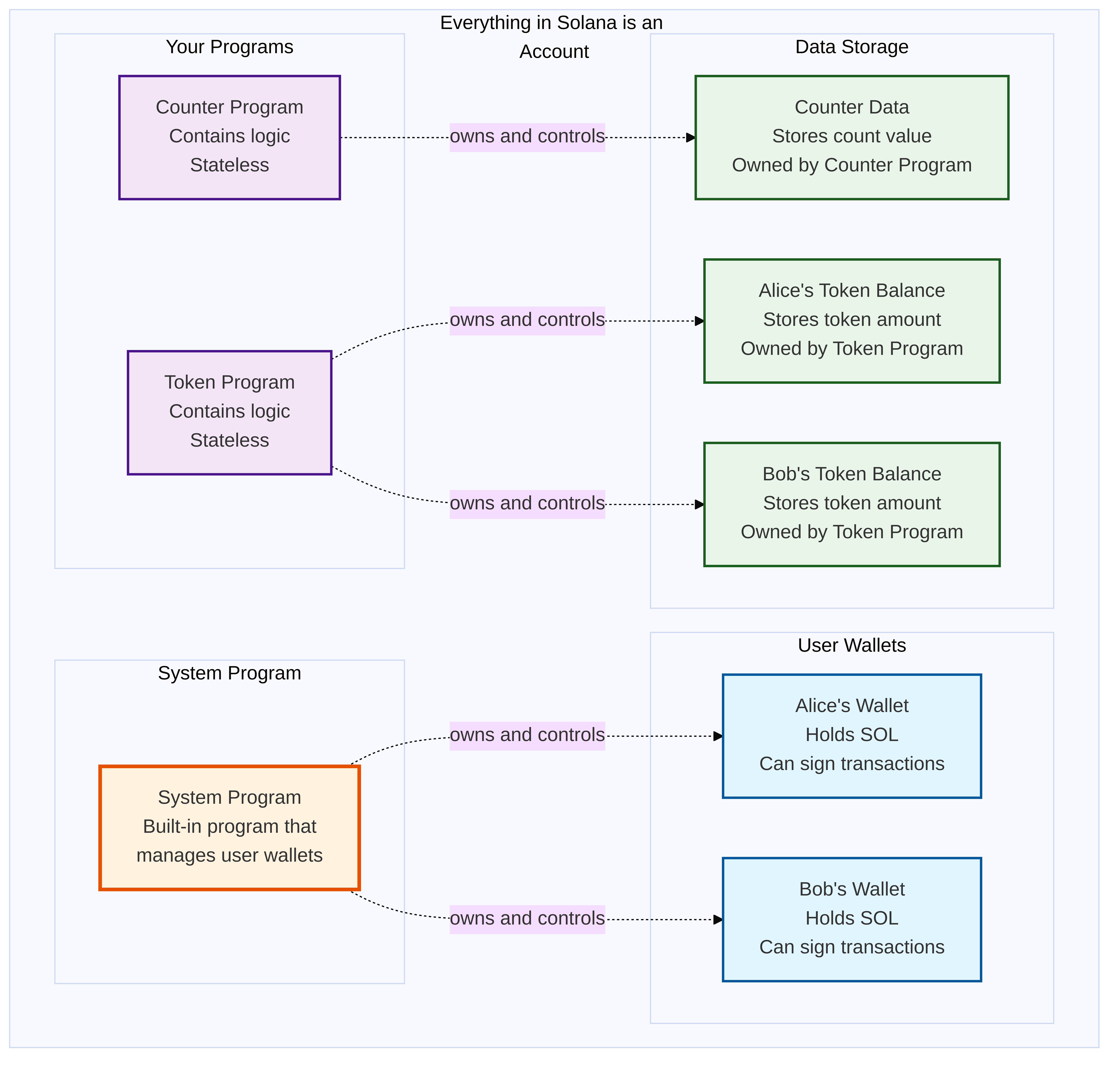
In Ethereum, you have two distinct types of entities:
- **Externally Owned Accounts (EOAs)**: Controlled by private keys, can send transactions
- **Contract Accounts**: Contain code and storage, cannot initiate transactions
Solana unifies everything under a single concept: **accounts**. Your wallet, programs (smart contracts), token balances, user data - everything is an account with the same basic structure but different properties.
### What Exactly is an Account?
An account in Solana is simply a data structure that contains:
```typescript
interface SolanaAccount {
publicKey: PublicKey; // Unique 32-byte address
lamports: number; // SOL balance (1 SOL = 1 billion lamports)
data: Buffer; // Raw data storage (can be empty)
owner: PublicKey; // Which program controls this account
executable: boolean; // Can this account be executed as a program?
rentEpoch: number; // Last time rent was collected
}
```
The magic is in the `owner` and `executable` fields. These determine what type of "thing" the account represents:
**Your Wallet (Ethereum EOA equivalent):**
```typescript
{
publicKey: "Alice123...",
lamports: 5000000000, // 5 SOL
data: Buffer.alloc(0), // Empty - no data stored
owner: SystemProgram.programId, // Owned by System Program
executable: false, // Cannot be executed
rentEpoch: 350
}
```
**A Program (Ethereum Contract equivalent):**
```typescript
{
publicKey: "CounterProg...",
lamports: 1000000, // Rent exemption amount
data: Buffer.from([...]), // Compiled bytecode
owner: BPF_LOADER_UPGRADEABLE_PROGRAM_ID, // Owned by BPF Loader Upgradeable
executable: true, // Can be executed!
rentEpoch: 350
}
```
**A Data Account (Ethereum Contract Storage equivalent):**
```typescript
{
publicKey: "Counter123...",
lamports: 2000000, // Rent exemption amount
data: Buffer.from([42]), // Contains count value
owner: CounterProgram.programId, // Owned by counter program
executable: false, // Cannot be executed
rentEpoch: 350
}
```
### How This Relates to Ethereum
Let's map this to what you know from Ethereum:
| Ethereum Concept | Solana Equivalent | Account Properties |
|------------------|-------------------|-------------------|
| Your EOA address | Your wallet account | `owner: SystemProgram`, `executable: false` |
| Contract address | Program account | `owner: BPFLoaderUpgradeable`, `executable: true` |
| Contract storage | Data accounts | `owner: YourProgram`, `executable: false` |
| ETH balance | Lamports in wallet account | Stored in `lamports` field |
| Contract state | Data in owned accounts | Stored in `data` field |
### The Owner Relationship: Who Controls What
The `owner` field is crucial. Only the owner program can modify an account's data. This creates a hierarchy:
- **System Program** owns user wallets and can transfer SOL between them
- **BPF Loader Upgradeable** owns program accounts and loads executable code
- **Your Program** owns data accounts it creates and can modify their data
- **Token Program** owns all token accounts and manages token transfers
Think of it like file permissions in an operating system. The System Program is like the OS kernel, your programs are like applications, and data accounts are like files that only specific applications can modify.
### Programs vs Smart Contracts: The Separation of Code and State
In Ethereum, a smart contract combines code and state in one entity:
```solidity
contract Counter {
uint256 public count = 0; // State and code together
function increment() public {
count += 1;
}
}
```
Solana completely separates these concerns. Programs contain only logic and are stateless:
```rust
use anchor_lang::prelude::*;
declare_id!("Fg6PaFpoGXkYsidMpWTK6W2BeZ7FEfcYkg476zPFsLnS");
#[program]
pub mod counter {
use super::*;
pub fn initialize(ctx: Context<Initialize>) -> Result<()> {
let counter = &mut ctx.accounts.counter;
counter.count = 0;
Ok(())
}
pub fn increment(ctx: Context<Increment>) -> Result<()> {
let counter = &mut ctx.accounts.counter;
counter.count += 1;
Ok(())
}
}
#[derive(Accounts)]
pub struct Initialize<'info> {
#[account(
init,
payer = user,
space = 8 + 8 // discriminator + u64
)]
pub counter: Account<'info, Counter>,
#[account(mut)]
pub user: Signer<'info>,
pub system_program: Program<'info, System>,
}
#[derive(Accounts)]
pub struct Increment<'info> {
#[account(mut)]
pub counter: Account<'info, Counter>,
}
#[account]
pub struct Counter {
pub count: u64,
}
```
Notice how the program defines the logic, but the actual count data lives in a separate `Counter` account. The program is stateless - it can operate on any `Counter` account passed to it.
### Why This Architecture Matters
This separation enables several powerful capabilities:
1. **Parallel Processing**: Since programs declare which accounts they'll access upfront, Solana can run multiple transactions in parallel if they don't conflict
2. **Composability**: Programs can easily interact with accounts owned by other programs, creating flexible composability patterns
3. **Efficiency**: Multiple users can share the same program code, reducing storage costs
4. **Flexibility**: You can have multiple instances of the same data structure (multiple counters) without deploying new code
### Account Lifecycle and Rent
Unlike Ethereum where storage is permanent once paid for, Solana accounts must pay "rent" to stay alive. However, if an account has enough SOL to cover about 2 years of rent, it becomes "rent-exempt" and effectively permanent.
When you create an account, Anchor automatically calculates the rent exemption amount:
```rust
#[derive(Accounts)]
pub struct CreateAccount<'info> {
#[account(
init,
payer = payer,
space = 8 + 1000 // Anchor calculates rent for 1008 bytes
)]
pub my_account: Account<'info, MyData>,
#[account(mut)]
pub payer: Signer<'info>,
pub system_program: Program<'info, System>,
}
```
The `payer` automatically funds the account with enough SOL to make it rent-exempt. Think of it like a security deposit that you get back if you close the account.
## Transaction Structure and Parallel Execution
Now that you understand accounts, let's see how transactions work. In Ethereum, transactions can dynamically access any storage:
```solidity
// Ethereum: Can access any storage during execution
function transfer(address to, uint256 amount) public {
balances[msg.sender] -= amount; // Dynamic storage access
balances[to] += amount;
}
```
Solana requires you to declare all accounts upfront:
```typescript
// Solana: Must declare all accounts before execution
await program.methods
.increment()
.accounts({
counter: counterAccount, // Must specify which counter
})
.rpc();
```
This upfront declaration enables Solana's Sealevel runtime to analyze transactions and run them in parallel. If two transactions don't share any writable accounts, they can execute simultaneously:
```typescript
// These can run in parallel - different accounts
const tx1 = program.methods.increment().accounts({ counter: counter1 });
const tx2 = program.methods.increment().accounts({ counter: counter2 });
// These must run sequentially - same account
const tx3 = program.methods.increment().accounts({ counter: counter1 });
```
## Working with SPL Tokens: A Completely Different Mental Model
This is where Solana differs most dramatically from Ethereum. Understanding SPL tokens requires completely rethinking how tokens work.
### Ethereum ERC-20: One Contract, Internal Mapping
In Ethereum, each token is its own smart contract with an internal mapping:
```solidity
contract MyToken {
mapping(address => uint256) private _balances; // All balances in one place
function transfer(address to, uint256 amount) public {
_balances[msg.sender] -= amount;
_balances[to] += amount;
}
function balanceOf(address account) public view returns (uint256) {
return _balances[account];
}
}
```
Every user's balance is stored inside the token contract. Your Ethereum address automatically has a balance (initially 0) in every ERC-20 contract.
### Solana SPL: Shared Program, Individual Accounts
Solana uses a completely different approach. There's **one shared SPL Token Program** that manages all tokens. Each token has:
1. **One Mint Account** - Defines the token properties (like the ERC-20 contract)
2. **Many Token Accounts** - Individual accounts for each user-token combination
Here's the mental model:
```
Ethereum ERC-20:
MyToken Contract (0x123...)
├── balances[Alice] = 100
├── balances[Bob] = 50
└── balances[Carol] = 25
Solana SPL Token:
SPL Token Program (shared)
├── MyToken Mint Account (defines token properties)
├── Alice's MyToken Account (balance: 100, mint: MyToken)
├── Bob's MyToken Account (balance: 50, mint: MyToken)
└── Carol's MyToken Account (balance: 25, mint: MyToken)
```
**Key Difference**: In Ethereum, your address automatically has a balance in every token. In Solana, you need a separate token account for each token you want to hold.
### Creating SPL Tokens
**Step 1: Create the Mint Account (like deploying an ERC-20)**
```rust
use anchor_spl::token::{Mint, Token};
#[derive(Accounts)]
pub struct CreateMint<'info> {
#[account(
init,
payer = payer,
mint::decimals = 6,
mint::authority = mint_authority,
)]
pub mint: Account<'info, Mint>,
/// CHECK: This is not dangerous because we don't read or write from this account
pub mint_authority: AccountInfo<'info>,
#[account(mut)]
pub payer: Signer<'info>,
pub token_program: Program<'info, Token>,
pub system_program: Program<'info, System>,
pub rent: Sysvar<'info, Rent>,
}
```
**Step 2: Create Token Accounts for Users**
```rust
use anchor_spl::token::{TokenAccount, Token, Mint};
#[derive(Accounts)]
pub struct CreateTokenAccount<'info> {
#[account(
init,
payer = payer,
token::mint = mint,
token::authority = owner,
)]
pub token_account: Account<'info, TokenAccount>,
pub mint: Account<'info, Mint>,
/// CHECK: This is not dangerous because we don't read or write from this account
pub owner: AccountInfo<'info>,
#[account(mut)]
pub payer: Signer<'info>,
pub token_program: Program<'info, Token>,
pub system_program: Program<'info, System>,
pub rent: Sysvar<'info, Rent>,
}
```
**Step 3: Transfer Tokens Between Accounts**
```rust
use anchor_spl::token::{self, TokenAccount, Token, Transfer};
#[derive(Accounts)]
pub struct TransferTokens<'info> {
#[account(mut)]
pub from: Account<'info, TokenAccount>,
#[account(mut)]
pub to: Account<'info, TokenAccount>,
pub authority: Signer<'info>,
pub token_program: Program<'info, Token>,
}
#[program]
pub mod token_transfer {
use super::*;
pub fn transfer_tokens(ctx: Context<TransferTokens>, amount: u64) -> Result<()> {
token::transfer(
CpiContext::new(
ctx.accounts.token_program.to_account_info(),
Transfer {
from: ctx.accounts.from.to_account_info(),
to: ctx.accounts.to.to_account_info(),
authority: ctx.accounts.authority.to_account_info(),
},
),
amount,
)?;
Ok(())
}
}
```
### Client-Side Token Operations
```typescript
import { getAssociatedTokenAddress } from '@solana/spl-token';
// Find token account addresses (deterministic based on owner + mint)
const aliceTokenAccount = await getAssociatedTokenAddress(
mintPublicKey,
alice.publicKey
);
const bobTokenAccount = await getAssociatedTokenAddress(
mintPublicKey,
bob.publicKey
);
// Transfer tokens
await program.methods
.transferTokens(new anchor.BN(100))
.accounts({
from: aliceTokenAccount,
to: bobTokenAccount,
authority: alice.publicKey,
tokenProgram: TOKEN_PROGRAM_ID,
})
.signers([alice])
.rpc();
```
## Program Derived Addresses: Solana's CREATE2
PDAs are deterministic addresses that programs can control without needing private keys. They're essential for creating program-controlled accounts:
```rust
#[derive(Accounts)]
pub struct InitializeVault<'info> {
#[account(
init,
payer = authority,
space = 8 + 32 + 8,
seeds = [b"vault", authority.key().as_ref()],
bump
)]
pub vault: Account<'info, Vault>,
#[account(mut)]
pub authority: Signer<'info>,
pub system_program: Program<'info, System>,
}
#[account]
pub struct Vault {
pub authority: Pubkey,
pub amount: u64,
}
```
The client can find this PDA deterministically:
```typescript
const [vaultPDA, bump] = await PublicKey.findProgramAddress(
[Buffer.from("vault"), wallet.publicKey.toBuffer()],
program.programId
);
// This address is deterministic and controlled by the program
console.log("Vault PDA:", vaultPDA.toString());
```
## Cross-Program Invocations: Composability
Programs can call other programs through Cross-Program Invocations (CPIs):
```rust
use anchor_spl::token::{self, Token, TokenAccount, Transfer};
#[program]
pub mod token_wrapper {
use super::*;
pub fn wrapped_transfer(ctx: Context<WrappedTransfer>, amount: u64) -> Result<()> {
// Call the SPL Token program to transfer tokens
token::transfer(
CpiContext::new(
ctx.accounts.token_program.to_account_info(),
Transfer {
from: ctx.accounts.from.to_account_info(),
to: ctx.accounts.to.to_account_info(),
authority: ctx.accounts.authority.to_account_info(),
},
),
amount,
)?;
msg!("Transferred {} tokens", amount);
Ok(())
}
}
#[derive(Accounts)]
pub struct WrappedTransfer<'info> {
#[account(mut)]
pub from: Account<'info, TokenAccount>,
#[account(mut)]
pub to: Account<'info, TokenAccount>,
pub authority: Signer<'info>,
pub token_program: Program<'info, Token>,
}
```
## Building a Complete Example: Simple Counter
Let's build a simple counter to demonstrate these concepts:
```rust
use anchor_lang::prelude::*;
declare_id!("Fg6PaFpoGXkYsidMpWTK6W2BeZ7FEfcYkg476zPFsLnS");
#[program]
pub mod simple_counter {
use super::*;
pub fn initialize(ctx: Context<Initialize>) -> Result<()> {
let counter = &mut ctx.accounts.counter;
counter.count = 0;
counter.authority = ctx.accounts.authority.key();
Ok(())
}
pub fn increment(ctx: Context<Increment>) -> Result<()> {
let counter = &mut ctx.accounts.counter;
counter.count += 1;
Ok(())
}
pub fn decrement(ctx: Context<Decrement>) -> Result<()> {
let counter = &mut ctx.accounts.counter;
counter.count -= 1;
Ok(())
}
pub fn reset(ctx: Context<Reset>) -> Result<()> {
let counter = &mut ctx.accounts.counter;
counter.count = 0;
Ok(())
}
}
#[derive(Accounts)]
pub struct Initialize<'info> {
#[account(
init,
payer = authority,
space = 8 + 8 + 32, // discriminator + u64 + pubkey
seeds = [b"counter", authority.key().as_ref()],
bump
)]
pub counter: Account<'info, Counter>,
#[account(mut)]
pub authority: Signer<'info>,
pub system_program: Program<'info, System>,
}
#[derive(Accounts)]
pub struct Increment<'info> {
#[account(
mut,
seeds = [b"counter", authority.key().as_ref()],
bump,
has_one = authority
)]
pub counter: Account<'info, Counter>,
pub authority: Signer<'info>,
}
#[derive(Accounts)]
pub struct Decrement<'info> {
#[account(
mut,
seeds = [b"counter", authority.key().as_ref()],
bump,
has_one = authority
)]
pub counter: Account<'info, Counter>,
pub authority: Signer<'info>,
}
#[derive(Accounts)]
pub struct Reset<'info> {
#[account(
mut,
seeds = [b"counter", authority.key().as_ref()],
bump,
has_one = authority
)]
pub counter: Account<'info, Counter>,
pub authority: Signer<'info>,
}
#[account]
pub struct Counter {
pub count: u64,
pub authority: Pubkey,
}
```
Client-side usage:
```typescript
import * as anchor from "@project-serum/anchor";
import { Program } from "@project-serum/anchor";
import { SimpleCounter } from "../target/types/simple_counter";
const program = anchor.workspace.SimpleCounter as Program<SimpleCounter>;
const provider = anchor.AnchorProvider.env();
anchor.setProvider(provider);
// Find counter PDA
const [counterPDA] = await anchor.web3.PublicKey.findProgramAddress(
[Buffer.from("counter"), provider.wallet.publicKey.toBuffer()],
program.programId
);
// Initialize counter
await program.methods
.initialize()
.accounts({
counter: counterPDA,
authority: provider.wallet.publicKey,
systemProgram: anchor.web3.SystemProgram.programId,
})
.rpc();
// Increment counter
await program.methods
.increment()
.accounts({
counter: counterPDA,
authority: provider.wallet.publicKey,
})
.rpc();
// Read counter value
const counterAccount = await program.account.counter.fetch(counterPDA);
console.log("Counter value:", counterAccount.count.toString());
// Decrement counter
await program.methods
.decrement()
.accounts({
counter: counterPDA,
authority: provider.wallet.publicKey,
})
.rpc();
// Reset counter
await program.methods
.reset()
.accounts({
counter: counterPDA,
authority: provider.wallet.publicKey,
})
.rpc();
```
## Development Tools and Testing
### Setting up Anchor
```bash
# Install Rust
curl --proto '=https' --tlsv1.2 -sSf https://sh.rustup.rs | sh
# Install Solana CLI
sh -c "$(curl -sSfL https://release.solana.com/v1.16.0/install)"
# Install Anchor
cargo install --git https://github.com/coral-xyz/anchor avm --locked --force
avm install latest
avm use latest
# Create new project
anchor init my-solana-project
cd my-solana-project
# Build and test
anchor build
anchor test
```
### Testing Patterns
```typescript
import * as anchor from "@project-serum/anchor";
import { expect } from "chai";
describe("simple-counter", () => {
const provider = anchor.AnchorProvider.env();
anchor.setProvider(provider);
const program = anchor.workspace.SimpleCounter;
let counterPDA: anchor.web3.PublicKey;
before(async () => {
[counterPDA] = await anchor.web3.PublicKey.findProgramAddress(
[Buffer.from("counter"), provider.wallet.publicKey.toBuffer()],
program.programId
);
});
it("Initializes the counter", async () => {
await program.methods
.initialize()
.accounts({
counter: counterPDA,
authority: provider.wallet.publicKey,
systemProgram: anchor.web3.SystemProgram.programId,
})
.rpc();
const counterAccount = await program.account.counter.fetch(counterPDA);
expect(counterAccount.count.toNumber()).to.equal(0);
expect(counterAccount.authority.toString()).to.equal(
provider.wallet.publicKey.toString()
);
});
it("Increments the counter", async () => {
await program.methods
.increment()
.accounts({
counter: counterPDA,
authority: provider.wallet.publicKey,
})
.rpc();
const counterAccount = await program.account.counter.fetch(counterPDA);
expect(counterAccount.count.toNumber()).to.equal(1);
});
it("Decrements the counter", async () => {
await program.methods
.decrement()
.accounts({
counter: counterPDA,
authority: provider.wallet.publicKey,
})
.rpc();
const counterAccount = await program.account.counter.fetch(counterPDA);
expect(counterAccount.count.toNumber()).to.equal(0);
});
it("Resets the counter", async () => {
// First increment to have something to reset
await program.methods
.increment()
.accounts({
counter: counterPDA,
authority: provider.wallet.publicKey,
})
.rpc();
await program.methods
.reset()
.accounts({
counter: counterPDA,
authority: provider.wallet.publicKey,
})
.rpc();
const counterAccount = await program.account.counter.fetch(counterPDA);
expect(counterAccount.count.toNumber()).to.equal(0);
});
});
```
## Quick Reference: Key Differences Summary
| Aspect | Ethereum | Solana |
|--------|----------|---------|
| **Development Framework** | Hardhat, Foundry | Anchor |
| **Language** | Solidity, Vyper | Rust (via Anchor) |
| **Virtual Machine** | EVM | SVM |
| **Account Types** | EOAs + Contracts | Unified account model |
| **State Storage** | Contract storage slots | Separate account data |
| **Execution** | Sequential EVM | Parallel Sealevel |
| **Gas Model** | Gas per operation | Rent + transaction fees |
| **Composability** | Contract calls | Cross-Program Invocations |
| **Token Standard** | ERC-20/721/1155 | SPL Token/NFT |
| **Block Times** | ~12 second blocks | ~400ms slots |
The fundamental shift from Ethereum to Solana requires rethinking how you structure applications around the unified account model. Once you understand that everything is an account with different properties, the rest of Solana's architecture becomes much clearer. Your wallet works just like an Ethereum EOA for signing transactions, but the underlying system treats it as just another account in a unified model.
Start with simple programs like this counter, then gradually work up to more complex applications. The patterns shown here form the foundation for most Solana applications.
 Sign in with Wallet
Connect another wallet
Sign in with Wallet
Connect another wallet