# 區塊鏈技術學習part2 ---solidity hello world
> [name=WU D.F]
> [time=Thu, Mar 26, 2020 10:21 AM]
###### tags: `tutorials` `blockchain` `ethereum` `smart contract` `solidity`
:::info
[TOC]
作者:ㄎㄎ笑derDF @dfder
> ↑ Markdown小廢物ㄎㄎ ~~我就爛~~ </br>
> 沒有part1 除非我哪天想到回去補
:::
---
### 1. 取得錢包
- [官方之錢包介紹頁面](https://ethereum.org/wallets/)
- 
- 何謂錢包
> What is an Ethereum wallet, and which one should I use?
>> Wallets are applications that make it easy to hold and send ETH, as well as interact with applications built on Ethereum.
- 目前最多人用的錢包似乎是 [MetaMask](https://metamask.io/)
- 支援平台多 方便
- 支援測試網路 (blockchain TESTNET)
- ~~google教學最多最方便~~
- 我使用的是MetaMask的ChromeExtension
- 
---
### 2. 測試網路
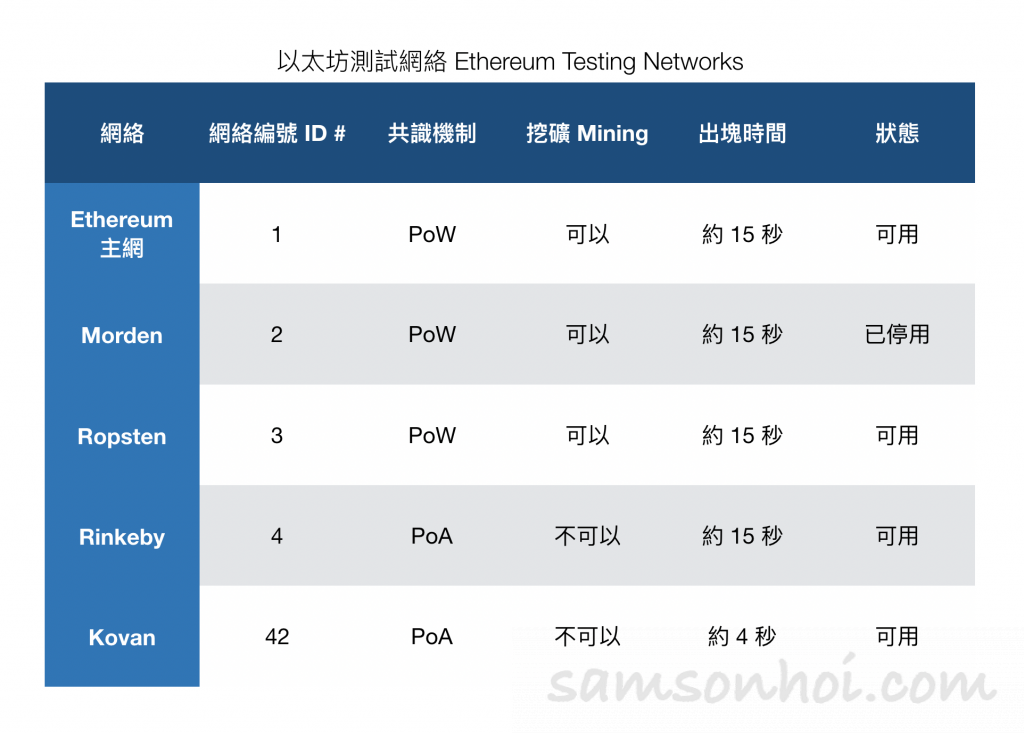
- [測試網路簡介](https://www.samsonhoi.com/677/blockchain-ethereum-testing-network)
>眾所周知,區塊鏈的其中一個特性是"不可篡改",所以在將智能合約(Smart Contract)上鏈前,需要確保智能合約沒有任何問題,但我當時就出現一個迷思:"如果我是一個區塊鏈的初學者,不可能第一次完美地就把智能合約寫好,肯定需要多次調試修改,如果直接上鏈,但又不能修改,怎麼辦?而且每次在以太坊上鏈都需要花費 Gas,完成一個智能合約豈不要浪費我很多錢,怎麼辦?" 放心,這些都能透過以太坊的測試網絡解決。
>>以太坊共有四個公開的測試網絡,目前仍在運行共有三個測試網絡(Testing Network,又簡稱 Testnets )予所有開發者進行開發及測試,而且在這些測試網絡上鏈所需要用到的 Token,都可以很容易地獲得,而不需花費真金白銀去購買。
-
- 
#### 我用的網路[Rinkeby](https://www.rinkeby.io/#stats)
>由以太坊官方提供的測試網絡,於2017年4月啟動,Rinkeby 這個名字是以斯德哥爾摩的地鐵站命名的,使用了PoA(Clique PoA)的共識機制。以太坊團隊提供了Rinkeby的PoA共識機制文檔,所以在理論上任何以太坊錢包都可以按照這個文檔,從而兼容 Rinkeby 測試網絡。
| 共識機制 | 出塊時間 |
| -------- | -------- |
| PoA(Clique PoA) | 約15秒 |
| 優點 | 缺點|
| -------- | -------- |
| 由於由可信的權威節點控制 Token 的供應,所以會對垃圾攻擊"免疫" | 只支援 geth |
</br>
[Explorer](https://rinkeby.etherscan.io/):找節點資料?~~trivago~~
[GitHub](https://github.com/ethereum/EIPs/issues/225):開源Repo
[Token 來源](https://faucet.rinkeby.io/):只能從這個網址(faucet)獲得貨幣
- 
- ~~介面炫炮~~
- 免費貨幣好拿(待會說明)
- 多個錢包直接支援
- 在MetaMask錢包中切換至測試網路
- 
---
### 3. 取得測試網路之以太幣
- 在rinkeby TESTNETS中 取得以太幣的方法相當簡單
- ***僅能使用FB或twitter之貼文取得***
1. 複製你的錢包Account address
2. 在twitter或FB發出一篇含有你Account address的**公開**貼文 
3. 複製該貼文的URL (Direct link)
4. [使用此網址](https://faucet.rinkeby.io/) 貼上
5. **BANG!** 
6. ~~讓子彈飛一會兒~~讓區塊練計算這筆交易一下
7. Magic!出現啦!~~我是有錢人啦~~ 
- 領貨幣有CD的喔 在Faucet頁面的取得按鈕即有說明多少貨幣有多少CD時間
---
### 4. Remix 簡介
- 準備開發環境吧!
- 以太坊非常佛心的提供了線上版的官方 IDE 叫 Remix。
- 除了 Remix 之外,也可以使用你習慣的 IDE 來開發,例如 VS Code、ATOM 等等。
- Remix
- 截至撰寫本筆記的時間為止,Remix已經有經過改版,本文將以新版的IDE介面為主
- 線上 IDE:http://remix.ethereum.org
- 線上 IDE alpha 版本:https://remix-alpha.ethereum.org
- Github:https://github.com/ethereum/remix-ide
- 文件:https://remix.readthedocs.io/en/latest/
- 
---
### 5.在Remix上撰寫solidity 之smart contract
- 在新版的IDE介面中,有很多功能已經被模組化且預設不載入了,初次使用的開發者需要自己啟用
- 在這裡說明如何啟用並且推薦三個必裝模組
1. 先點選左側Plugin 
2. 選擇欲用的模組
3. 推薦必裝之模組! 
4. 開始寫程式啦~
- 這邊提供兩個範例
> - 自創的helloworld
```javascript=1 //No solidity supported ,replacing by JS
pragma solidity ^0.6.2;
contract HelloWorld{
string str = "HelloWorld";
function getTheWorld() public view returns(string memory){
return str;
}
}
```
> - SimpleStorage
```javascript=1 //No solidity supported ,replacing by JS
pragma solidity ^0.6.2;
contract SimpleStorage {
uint storedData;
string storedString;
function set(uint x) public {
storedData = x
}
function setString(string memory x) public
{
storedString = x;
}
function get() public view returns (uint) {
return storedData;
}
function getString() public view returns (string memory)
{
return storedString;
}
}
```
5. 編譯
- 
6. 選擇inject web3並填入自己的錢包位址
- 
8. deploy~
- 
---
### 6. Smart Contract running 過程cost分析
- smart contract 的操作是需要代價的
- 在這裡的計量單位為gas簡單講就是計算代價的單位
- 會以加密貨幣的方式支付
- 在區塊鍊上儲存資料 部署smart contract需要代價
- 讀取 查詢交易記錄則不需要
- 撰文當下測試的cost
- 部署合約! 
- 儲存一個uint 5678 
- 儲存一個string "df 666"
- 儲存一個UUID 
- 儲存一個sha256 
- cost (unit: ETH)
| 部署合約 | 儲存一個uint 5678 |儲存一個string "df 666"! |儲存一個UUID|儲存一個sha256|
| -------- | -------- | -------- |-----|-----|
| 0.000248 | 0.000041 | 0.000043 | 0.000069| 0.000039
---
>Reference
>Smart Contract 開發
>https://ithelp.ithome.com.tw/articles/10200900
{"metaMigratedAt":"2023-06-15T05:35:21.184Z","metaMigratedFrom":"Content","title":"區塊鏈技術學習part2 ---solidity hello world","breaks":false,"contributors":"[{\"id\":\"119a87d8-5d41-4be1-80d9-0005b9921ffe\",\"add\":6270,\"del\":1316}]"}