# Introduction
- Huge thank to *@tr4c3datr4il* for giving me the opportunity to solve these challenges despite me not participating in the contest.
# Case Charlie

## Question 1
```!
[1]. What was the last time the suspect logged into the server? (UTC / 24 hours format)
Format: YYYY-MM-DD HH:MM:SS
==>
```
- Mounting the disk image gives us a Linux filesystem. A quick look in `/home` tells us that the user is `ubuntu`.
- To check the latest login time, we can check `/var/log/wtmp` - this file is used on Unix-like systems to keep track of all logins and logouts to the system. (Source: https://en.wikipedia.org/wiki/Utmp)
```shell!
$ utmpdump /var/log/wtmp
...
[7] [18760] [ts/2] [ubuntu ] [pts/2 ] [192.168.237.1 ] [192.168.237.1 ] [2025-11-08T04:32:56,723780+00:00]
...
```
Answer: `2025-11-08 04:32:56`
## Question 2
```!
[2]. The suspect used a chat application to communicate. What is the name of this application?
Format: chatapp. Example: whatsapp, telegram, Discord
==>
```
- A look inside `/home/ubuntu` gives us an IRC chatlog and a configuration directory for [Irssi](https://irssi.org/) - an IRC client.
```
$ ls -a
.
├── .irssi
└── irclogs
```
Answer: `irssi`
## Question 3
```
[3]. Identify the usernames (handles) of the suspect and their contact in the chat application. (Case Sensitive)
Format: uS3rNaME13, c0nT4cTn4m3
==>
```
- Now we need to check out the IRC chatlog inside `/home/ubuntu/irclogs/liberachat/the0nlymak3r1338.log`. Which reads:
```!
...
12:56 -!- Irssi: Starting query in liberachat with the0nlymak3r1338
...
--- Log opened Sat Nov 08 04:33:46 2025
04:33 <the0nlymak3r1338> have you read this
04:33 <the0nlymak3r1338> https://x.com/CryptoCyberia/status/1986547976555151447
04:34 <s3v3n_wOndEr113> yea, crazy right
04:34 <the0nlymak3r1338> yup
04:34 <the0nlymak3r1338> luckily, you have your own server
04:35 <s3v3n_wOndEr113> O_O
04:36 <s3v3n_wOndEr113> oh shit
04:36 <the0nlymak3r1338> what
```
- From this line: `Starting query in liberachat with the0nlymak3r1338`, we can safely say that our suspect is `s3v3n_wOndEr113` and their contact is `the0nlymak3r1338`.
Answer: `s3v3n_wOndEr113, the0nlymak3r1338`
## Question 4
```!
[4]. What was the last time the suspect sent a message to their contact? (UTC / 24 hours format)
Format: YYYY-MM-DD HH:MM
==>
```
- Rechecking the chatlog:
```
--- Log opened Sat Nov 08 04:33:46 2025
04:33 <the0nlymak3r1338> have you read this
04:33 <the0nlymak3r1338> https://x.com/CryptoCyberia/status/1986547976555151447
04:34 <s3v3n_wOndEr113> yea, crazy right
04:34 <the0nlymak3r1338> yup
04:34 <the0nlymak3r1338> luckily, you have your own server
04:35 <s3v3n_wOndEr113> O_O
04:36 <s3v3n_wOndEr113> oh shit
04:36 <the0nlymak3r1338> what
```
- We can see that the log was recorded on `Nov 08 2025`
- The last message the suspect sent to their contact was at `04:36`
Answer: `2025-11-08 04:36`
## Question 5
```!
[5]. What command did the suspect use to overwrite the current user's .bash_history file to cover their tracks?
==>
```
- Checking both `/home/ubuntu/.bash_history` and `/root/.bash_history` tells us that both files has been wiped. To remove `/root/.bash_history`, you would need **root permission**. Which we can trace with SystemD's journal.
- We can use `systemctl` or `go-journalctl`(Which doesn't require SystemD) to read the log stored in `/var/log/journal/3f430965a019473c8245e89118d5a257/user-1000.journal`
```shell!
$ ~/Lab/Source/External/go-journalctl/go-journalctl cat user-1000.journal | jq | grep CMDLINE
...
"_CMDLINE": "sudo shred -vfz /home/ubuntu/.bash_history",
"_CMDLINE": "sudo shred -vfz /home/ubuntu/.bash_history",
"_CMDLINE": "sudo shred -vfz /home/ubuntu/.bash_history",
"_CMDLINE": "sudo rm -f /home/ubuntu/.bash_history",
"_CMDLINE": "sudo rm -f /home/ubuntu/.bash_history",
"_CMDLINE": "sudo rm -f /home/ubuntu/.bash_history",
...
```
- Here, the suspect used `shred` to overwrite the file's data, making it impossible to recover.
Answer: `sudo shred -vfz /home/ubuntu/.bash_history`
## Question 6
```!
[6]. The suspect accidentally left behind an email address. What is the email address?
Format: name@domain. Example: this_Is_an_3xample_email1213@proton.me
==>
```
- Looking back at the chatlog, the suspect was building some sort of image.
```
--- Log opened Sat Nov 08 04:02:03 2025
04:02 -!- Irssi: Starting query in liberachat with the0nlymak3r1338
04:02 <s3v3n_wOndEr113> hi
04:02 <the0nlymak3r1338> yo i see you now
04:02 <the0nlymak3r1338> what happened
04:02 <s3v3n_wOndEr113> my nickname messed up
04:02 <the0nlymak3r1338> lol
04:03 <the0nlymak3r1338> anyway
04:03 <the0nlymak3r1338> ive built an image
04:03 <the0nlymak3r1338> somegroup5803945/jkfhskdf2314
04:03 <s3v3n_wOndEr113> cool bro
04:03 <s3v3n_wOndEr113> let me try it
04:03 <the0nlymak3r1338> yeah it just testing
04:03 <the0nlymak3r1338> use 'testing' to pull it
04:03 <s3v3n_wOndEr113> okay
04:04 <s3v3n_wOndEr113> old cred?
04:04 <the0nlymak3r1338> yeah same old cred mate
04:04 <the0nlymak3r1338> ^_^
04:04 <s3v3n_wOndEr113> i see
--- Log closed Sat Nov 08 04:09:33 2025
```
- `somegroup5803945/jkfhskdf2314` is believed to be a Docker Image from the artifacts in `/home/ubuntu`
```s
$ ls
.
├── ...
├── .docker
└── get-docker.sh
```
- To pull this image for inspection, we need the right credentials, which we can find in `/home/ubuntu/.docker/config.json`, which gives us a Gitlab Registry Token.
```json!
$ cat /home/ubuntu/.docker/config.json
{
"auths": {
"registry.gitlab.com": {
"auth": "YXNqZGtodWZoODMyOmdscGF0LXh3Z2hRYkRUc0piczFCMk11Ylhfekc4Nk1RcDFPbWx4T0hWekN3LjAxLjEyMHl2dHAyZg=="
}
}
}
```
- We can copy this file to our environment, which we can then pull the image.
- According to the suspect: `04:03 <the0nlymak3r1338> use 'testing' to pull it`, we have to pull the `testing` branch.
```
$ docker pull registry.gitlab.com/somegroup5803945/jkfhskdf2314:testing
testing: Pulling from somegroup5803945/jkfhskdf2314
sha256:10c5645d93f00835d09b6b78fad0a06b52b103ab7d26c549597a9a2c508c7482
Status: Downloaded newer image for registry.gitlab.com/somegroup5803945/jkfhskdf2314:testing
registry.gitlab.com/somegroup5803945/jkfhskdf2314:testing
```
- Now we will inspect the image.
```
$ docker history registry.gitlab.com/somegroup5803945/jkfhskdf2314:testing
IMAGE CREATED CREATED BY SIZE COMMENT
c2b85aaba122 2 weeks ago CMD ["nginx" "-g" "daemon off;"] 0B buildkit.dockerfile.v0
<missing> 2 weeks ago EXPOSE &{[{{11 0} {11 0}}] 0xc0019dbb00} 0B buildkit.dockerfile.v0
<missing> 2 weeks ago RUN /bin/sh -c rm -rf /src/web_src/ # buildk… 0B buildkit.dockerfile.v0
<missing> 2 weeks ago COPY web_src/*.html /usr/share/nginx/html/ #… 24.1kB buildkit.dockerfile.v0
<missing> 2 weeks ago ADD web_src/ /src/web_src/ # buildkit 68.5kB buildkit.dockerfile.v0
<missing> 2 weeks ago WORKDIR /src 0B buildkit.dockerfile.v0
<missing> 4 weeks ago RUN /bin/sh -c set -x && apkArch="$(cat … 40.3MB buildkit.dockerfile.v0
<missing> 4 weeks ago ENV NJS_RELEASE=1 0B buildkit.dockerfile.v0
<missing> 4 weeks ago ENV NJS_VERSION=0.9.4 0B buildkit.dockerfile.v0
<missing> 4 weeks ago CMD ["nginx" "-g" "daemon off;"] 0B buildkit.dockerfile.v0
<missing> 4 weeks ago STOPSIGNAL SIGQUIT 0B buildkit.dockerfile.v0
<missing> 4 weeks ago EXPOSE map[80/tcp:{}] 0B buildkit.dockerfile.v0
<missing> 4 weeks ago ENTRYPOINT ["/docker-entrypoint.sh"] 0B buildkit.dockerfile.v0
<missing> 4 weeks ago COPY 30-tune-worker-processes.sh /docker-ent… 4.62kB buildkit.dockerfile.v0
<missing> 4 weeks ago COPY 20-envsubst-on-templates.sh /docker-ent… 3.02kB buildkit.dockerfile.v0
<missing> 4 weeks ago COPY 15-local-resolvers.envsh /docker-entryp… 389B buildkit.dockerfile.v0
<missing> 4 weeks ago COPY 10-listen-on-ipv6-by-default.sh /docker… 2.12kB buildkit.dockerfile.v0
<missing> 4 weeks ago COPY docker-entrypoint.sh / # buildkit 1.62kB buildkit.dockerfile.v0
<missing> 4 weeks ago RUN /bin/sh -c set -x && addgroup -g 101… 4.21MB buildkit.dockerfile.v0
<missing> 4 weeks ago ENV DYNPKG_RELEASE=1 0B buildkit.dockerfile.v0
<missing> 4 weeks ago ENV PKG_RELEASE=1 0B buildkit.dockerfile.v0
<missing> 4 weeks ago ENV NGINX_VERSION=1.29.3 0B buildkit.dockerfile.v0
<missing> 4 weeks ago LABEL maintainer=NGINX Docker Maintainers <d… 0B buildkit.dockerfile.v0
<missing> 7 weeks ago CMD ["/bin/sh"] 0B buildkit.dockerfile.v0
<missing> 7 weeks ago ADD alpine-minirootfs-3.22.2-x86_64.tar.gz /… 8.32MB buildkit.dockerfile.v0
```
- From the history logs, we can see that the suspect added `/src/web_src` (likely from a git repository), then copy that to `/usr/share/nginx/html/`.
- - To inspect the image, we can use `dive` (https://github.com/wagoodman/dive).

- We can see the git repository before it was deleted.
- Now we have to save the Docker Image and inspect the git repo with `docker-layer-extract` (https://github.com/micahyoung/docker-layer-extract) and the ID: `e25ae0b9c3c3d3d16f1096c85e47222a1ca1c5db68d01c7f6fb8faf4765ea20f`.
```!
$ docker save registry.gitlab.com/somegroup5803945/jkfhskdf2314:testing -o image.tar
$ docker-layer-extract --imagefile image.tar extract --layerid e25ae0b9c3c3d3d16f1096c85e47222a1ca1c5db68d01c7f6fb8faf4765ea20f --layerfile layer.tar
$ tar -xf layer.tar
```
- Now we can extract the email address with `git log`
```
$ cd ./src/web_src
$ git log
commit c5d658cf17134c548bb161a0ea74faef94cea9b9
Author: jkahsd <phuchungh96@gmail.com>
Date: Fri Nov 7 19:08:43 2025 +0700
add src code
commit 56a1f5fa74d2d6625b54f774f5343c3e37755ec9
Author: Phuc Hung Huynh <phuchungh96@gmail.com>
Date: Fri Nov 7 12:03:43 2025 +0000
Initial commit
```
Answer: `phuchungh96@gmail.com`
## Conclusion
```
$ nc 127.0.0.1 1259
== proof-of-work: disabled ==
Welcome to Case Charlie! Answer 6/6 questions correctly to get the flag.
You will be timed out for increasing duration after every 5 wrong submissions.
[1]. What was the last time the suspect logged into the server? (UTC / 24 hours format)
Format: YYYY-MM-DD HH:MM:SS
==> 2025-11-08 04:32:56
CORRECT!
[2]. The suspect used a chat application to communicate. What is the name of this application?
Format: chatapp. Example: whatsapp, telegram, Discord
==> irssi
CORRECT!
[3]. Identify the usernames (handles) of the suspect and their contact in the chat application. (Case Sensitive)
Format: uS3rNaME13, c0nT4cTn4m3
==> s3v3n_wOndEr113, the0nlymak3r1338
CORRECT!
[4]. What was the last time the suspect sent a message to their contact? (UTC / 24 hours format)
Format: YYYY-MM-DD HH:MM
==> 2025-11-08 04:36
CORRECT!
[5]. What command did the suspect use to overwrite the current user's .bash_history file to cover their tracks?
==> sudo shred -vfz /home/ubuntu/.bash_history
CORRECT!
[6]. The suspect accidentally left behind an email address. What is the email address?
Format: name@domain. Example: this_Is_an_3xample_email1213@proton.me
==> phuchungh96@gmail.com
CORRECT!
Congrats! Here is your flag: CSCV{fakeflagnotrealflagiwasntinthechallenge:(}
```
# Case Beta

## Question 1
```!
[1]. The suspect used some chat applications. Provide the name of them in alphabetical order separated by comma.
Format: app1, app2, app3. Example: discord, telegram, whatsapp
==>
```
- Going into `C:\Users\windows\Downloads`, we can see several installers.
```
$ ls -a --tree --level 1
.
├── 7z2501-x64.exe
├── Bitwarden-Installer-2025.10.0.exe
├── ChromeSetup.exe
├── DeltaChat Installer.exe
├── desktop.ini
├── EGOPlayInstaller5.0.1.exe
├── Git-2.51.0-64-bit.exe
├── KeePass-2.59-Setup.exe
├── LegacyLauncher.exe
├── OfficeSetup(1).exe
├── OfficeSetup(2).exe
├── OfficeSetup.exe
├── revosetup.exe
├── SDelete
├── SDelete.zip
├── setup-qtox-x86_64-release.exe
├── SteamSetup.exe
└── VSCodeUserSetup-x64-1.104.1.exe
```
- Here we can see 2 chat applications, DeltaChat and qTox.
Answers: `DeltaChat, qTox`
## Question 2
```
[2]. In the first chat application in Q2, what is the username (handle) of the suspect and their contact? (Case Sensitive)
Format: uS3rNaME13, c0nT4cTn4m3
==>
```
- DeltaChat stores it's chatlogs under `C:\Users\windows\AppData\Local\Packages\merlinux.DeltaChat_v2ry5hvxhdhyy\LocalCache\Local\DeltaChat\accounts\a666df07-4a7c-4beb-8ba2-adb265dc53ec\dc.db`
- Inside the `chats` table, we can see that the suspect's contact is `theh1dd3n0ne`

- Inside the `messages` table, we can see the suspect's username is `weirdestasian1661`

Answer: `weirdestasian1661, theh1dd3n0ne`
## Question 3
```!
[3]. What was the first time the suspect received a message from their contact in Q2? (UTC / 24 hours format)
Format: YYYY-MM-DD HH:MM:SS
==>
```
- Inside the same chatlog, we can see the timestamp of the first message.

Answer: `2025-11-02 05:08:25`
## Question 4
```!
[4]. Two suspects were talking about a location to receive a package. Provide the address mentioned in the chat.
Format: full address. Example: 123 Example St, Example City, EX 12345
==>
```
- Inside the same chatlog, we can see the meetup location.

Answer: `Insert Coin Arcade, Rockford Hills`
## Question 5
```!
[5]. The suspect has an email address. What is the email address?
Format: name@domain. Example: user@example.com
==>
```
- Looking back at our Artifacts inside `Downloads`, we can see the suspect uses Bitwarden - a password manager that requires the user email to use as salt.
- Bitwarden stores it's data inside
`C:\Users\windows\AppData\Roaming\Bitwarden\data.json`, which contains the suspect's email.
```json
"global_loginEmail_storedEmail": "nvu960282@gmail.com",
```
Answer: `nvu960282@gmail.com`
## Question 6
```!
[6]. The suspect had a credential of a black market website. What is the credential?
Format: username:password
==>
```
- This requires us to know the pin to the Bitwarden's `data.json` hinted inside `app.log`:
```
[2025-11-10 00:46:06.501] [info] [Pin Service] deriving pin key took 527ms
[2025-11-10 00:46:06.520] [info] Vault unlocked 2025-11-10T08:46:06.535Z
[2025-11-10 00:46:07.111] [info] [Pin Service] deriving pin key took 555ms
[2025-11-10 00:46:07.489] [info] [LockComponent] Sync took 339ms
[2025-11-10 00:46:07.489] [info] [LockComponent] Private key regeneration took 0ms
[2025-11-10 00:46:07.549] [info] [CipherService]: decrypt complete took 1.9000000001396984 [ [ 'Items', 2 ] ]
[2025-11-10 00:46:07.603] [info] [SearchService]: index complete took 53.800000000046566 [ [ 'Items', 2 ] ]
```
- Searching inside `Documents` gives us a peculiar directory: `OneNote Notebooks`, which the suspect may have used to store the password somewhere.
- A quick search inside `C:\Users\windows\AppData\Local\Microsoft\OneNote\16.0\Memory` give us the OneNote cache.
```
$ ls
.
├── Media
│ ├── 3cef1454-ec03-4a8a-aa38-d7eb763106da.txt
│ ├── 42ae9eea-7e5d-44be-929c-faed43d8a81c.txt
│ └── 6fd231c0-9668-4d05-b9f7-f959f9926820.txt
├── notes.layoutsdk_0AE611EA-B5D5-46E4-91DB-16492B078740.db
├── notes.layoutsdk_local.db
├── notes.sdk_0AE611EA-B5D5-46E4-91DB-16492B078740.db
├── notes.sdk_local.db
├── windows_0AE611EA-B5D5-46E4-91DB-16492B078740.db
├── windows_0AE611EA-B5D5-46E4-91DB-16492B078740.db-journal
├── windows_local.db
└── windows_local.db-journal
```
- Inspecting `notes.sdk_0AE611EA-B5D5-46E4-91DB-16492B078740.db`, gives us this peculiar note.

```json
"Pw for bitwarden has 7 numbers."
```
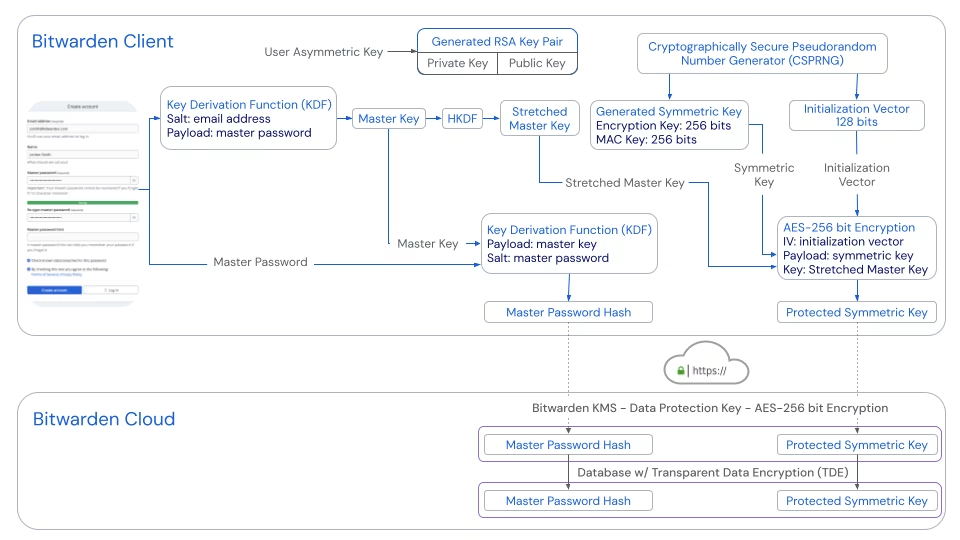
- From the given case documents, the suspect's password has consistenly begins with `632`, which gives us `10000` keys to bruteforce the Bitwarden Pin
- To bruteforce the pin, we need these info, which is stored inside `data.json`:
- The salt: `nvu960282@gmail.com`
- Iterations: `600000`
- Type: `PBKDF`
- IV: `2gns0HhVUYHnF8A9BoYLKg==`
- Ciphertext: `GTLyScLJ1V5lEezcLXkgRdLue3ojBWz2xpWxZPIgQGehOmUh9Tzdq4HtAtGDyGU/6feYmsyhET4FMlIS1S4T8hjAIKnvH7J8sxKLl5Da2Cc=`
- MAC: `T8mlSlySWk+Wl8RtT4ctklBvShK0VOdnhXcVOG8fuYw=`
:::info
**Note**: You can visit my [git repository](https://codeberg.org/devobass/this-bitchass-pin-bruteforcer-for-a-very-niche-project-that-i-will-never-use-again-hopefully) for an example pin bruteforcer made for this specific case.
:::
:::warning
**Warning**: Bruteforcing with 60000 iterations can quickly heat up your computer.
:::
```
$ ./bitwarden-pin
✔ PIN FOUND: 6328744
```
- We can decrypt the `data.json` with [BitwardenDecrypt.py](https://github.com/GurpreetKang/BitwardenDecrypt), albeit with a patch.
```bash !
# PATCHING
$ sed -i 's/_masterPassword_masterKeyEncryptedUserKey/_pinUnlock_pinKeyEncryptedUserKeyPersistent/' BitwardenDecrypt.py
$ BitwardenDecrypt.py
Enter Password (nvu960282@gmail.com): 6328744
```
- Which gives us the following results:
```json
{
"items": [
{
"id": "b295c6f3-7487-4ff6-9add-b391007d3b4f",
"organizationId": null,
"folderId": null,
"edit": true,
"viewPassword": true,
"permissions": {
"response": {
"delete": true,
"restore": true
},
"delete": true,
"restore": true
},
"organizationUseTotp": false,
"favorite": false,
"revisionDate": "2025-11-10T07:35:57.2733333Z",
"type": 1,
"name": "darkforums.st",
"notes": null,
"collectionIds": [],
"creationDate": "2025-11-10T07:35:57.2733333Z",
"deletedDate": null,
"archivedDate": null,
"reprompt": 0,
"key": null,
"login": {
"username": "harryth3p0ttErr1001",
"password": "eoCNohGAtdNpVVKkonq625x45oWaJRzp",
"passwordRevisionDate": null,
"totp": null,
"autofillOnPageLoad": null,
"uris": []
}
},
{
"id": "56173f3e-8a15-4faf-a9e4-b391007d5cec",
"organizationId": null,
"folderId": null,
"edit": true,
"viewPassword": true,
"permissions": {
"response": {
"delete": true,
"restore": true
},
"delete": true,
"restore": true
},
"organizationUseTotp": false,
"favorite": false,
"revisionDate": "2025-11-10T07:36:25.9566667Z",
"type": 1,
"name": "chat",
"notes": null,
"collectionIds": [],
"creationDate": "2025-11-10T07:36:25.9566667Z",
"deletedDate": null,
"archivedDate": null,
"reprompt": 0,
"key": null,
"login": {
"username": "some0n3umeE7",
"password": "h9lLZOFEkgk2F4MKL4v0pXBKTrT",
"passwordRevisionDate": null,
"totp": null,
"autofillOnPageLoad": null,
"uris": []
}
}
]
}
```
- We can see the credentials to `darkforums.st`
Answer: `harryth3p0ttErr1001:eoCNohGAtdNpVVKkonq625x45oWaJRzp`
## Question 7
```!
[7]. In the second chat application in Q2, what is the username (handle) of the suspect and their contact? (Case Sensitive)
Format: uS3rNaME13, c0nT4cTn4m3
==>
```
- Now we have to inspect qTox's database, which is stored in
`C:\Users\windows\AppData\Roaming\tox`.
- We can copy all of these files over to our environment with the credentials found in Question 6.
```json
"username": "some0n3umeE7",
"password": "h9lLZOFEkgk2F4MKL4v0pXBKTrT"
```
- Opening up qTox with our environment, we can see that the suspect's user name is `some0n3umeE7` and their contact is `gr4bf00d123`.

Answer: `some0n3umeE7, gr4bf00d123`
## Question 8
```!
[8]. What was the first time the suspect sent a message to their contact in Q7? (UTC / 24 hours format)
Format: YYYY-MM-DD HH:MM:SS
==>
```
- Looking inside the chatlog:

- We can see that the first time the suspect sent a message to their contact was at `2025-11-10 12:34:17`, which converting to UTC would be `2025-11-10 05:34:17`
Answer: `2025-11-10 05:34:17`
## Question 9
```
[9]. The suspect deleted crucial evidence from his computer using a specific executable file. What is the name of this file?
Format: filename.ext. Example: del.exe, remove.bat, erase.sh
==>
```
- Looking back at our Artifacts in `Downloads`, we see an executable for `SDelete`
- SDelete is a command line utility that takes a number of options. In any given use, it allows you to delete one or more files and/or directories, or to cleanse the free space on a logical disk. SDelete accepts wild card characters as part of the directory or file specifier. (https://learn.microsoft.com/en-us/sysinternals/downloads/sdelete)
- This requires the suspect to use the Terminal. Which we can read the logs inside `C:\Users\windows\AppData\Roaming\Microsoft\Windows\PowerShell\PSReadLine\ConsoleHost_history.txt`, which reads:
```
wmic shadowcopy call create Volume="C:\\"
clear
C:\Users\windows\Downloads\SDelete\sdelete.exe -s -r C:\Users\windows\Documents\data\idk\hehehehe\
C:\Users\windows\Downloads\SDelete\sdelete.exe -s -r C:\Users\windows\Documents\data\idk\hehehehe
clear
vssadmin delete shadows /all
clear
shutdown /s /t 0
```
Answer: `sdelete.exe`
## Question 10
```!
[10]. What was the folder or file deleted by the suspect using the executable in Q9? Provide full path.
Format: full path. Example: C:\Users\User\Documents\file.txt, C:\Program Files\App\Something
==>
```
- Reading the logs again, the suspect ran
```!
C:\Users\windows\Downloads\SDelete\sdelete.exe -s -r C:\Users\windows\Documents\data\idk\hehehehe
```
Answer: `C:\Users\windows\Documents\data\idk\hehehehe`
## Question 11
```!
[11]. The client (the company) needs to know what data did the suspect trying to sell. Provide the encryption key in the leaked environment config file.
Format: ranD0m_s7r!nG123
==>
```
- To get the leaked environment config file, we would need to inspect the `hehehehe` folder, which has been overwritten by `sdelete.exe`, but reading the logs again shows us *interesting* activities from the suspect.
```
wmic shadowcopy call create Volume="C:\\"
vssadmin delete shadows /all
```
- The suspect created a Shadow Copy before overwriting the directory, then delete it after. However, since it was deleted normally, the data is still recoverable.
- After a quick lookup online, I found this blog: https://nullsec.us/carving-for/, which says you can carve out the Shadow Copy from the Raw Disk Image.
- We will be using `vss_carver` (https://github.com/mnrkbys/vss_carver), for this job.
:::info
**Note**: You can find a quick installation script in my [git repository](https://codeberg.org/devobass/vss_carver_fork_that_i_deadass_had_to_make_because_the_original_one_did_not_work).
:::
- We will then carve out the Shadow Copy like the blog instructed.
```
$ python3 vss_carver.py -t raw -o 122683392 -i evidences.raw -c ./catalog -s ./store
vss_carver 20200312
```
- After that, we can mount the Shadow Copy Image with `vshadowmount.exe` from https://github.com/mnrkbys/libvshadow-vss_carver.
- This will require `dokan1.dll`, which you can get here: https://github.com/dokan-dev/dokany/releases/tag/v1.5.1.1000
```
$ vshadowmount.exe -o 122683392 -c .\catalog -s .\store .\evidences.raw H:\
```
- After that, we can load the Artifact `H:\VSS2` in FTK Imager to find the deleted `hehehehe` folder.

- The `conf.zip` is password-protected. And the password to it, `pw.txt`, is locked behind EFS (Encrypted File System).

- A quick look up gives us this blog: https://github.com/gentilkiwi/mimikatz/wiki/howto-%7E-decrypt-EFS-files.
- To decrypt it, we need the following:
- `SystemCertificates`, `Crypto` and `Protect` folders of the user. We can find these inside `C:\Users\windows\AppData\Roaming\Microsoft`
- The user password.
- To get the user's password, we can extract the NTML hash inside
`C:\Windows\System32\config` with `samdumpy` (https://github.com/vincd/samdumpy)
```!
$ python3 samdum.py 'C:\Windows\System32\config\SAM' 'C:\Windows\System32\SYSTEM'
windows
01001480d4000000e40000001400000044000000020030000200000002c014004400050101010000000000010000000002c01400ff070f00010100000000000507000000020090000400000000002400440002000105000000000005150000003961006be926432ecf1fe7fee9030000000038001b030200010a00000000000f0300000000040000dea22867213ed2af19ad5d79b0c107292756fc20d8ad66f610f268fadf2af80f00001800ff070f0001020000000000052000000020020000000014005b0302000101000000000001000000000102000000000005200000002002000001020000000000052000000020020000770069006e0064006f0077007300000001020000070000000200020000000000fdea606e1334c58b993830ba1012d09902000200100000007a13798605ee9e704943dc5304699cab940cab1a9617ff5c4ed44228dcca127898f55d7b48ae13161fc312f4e27579c40200020000000000617355284848fd52c27bd4b737b6b7cd0200020000000000cb7622f762e3e850c04ef0e87fb47709
2 268 24 0200020000000000fdea606e1334c58b993830ba1012d099
NT hash:
2 292 56 02000200100000007a13798605ee9e704943dc5304699cab940cab1a9617ff5c4ed44228dcca127898f55d7b48ae13161fc312f4e27579c4
NTLM hash: 110d0c51e144d36fb7e4f9e012fbb888
2 348 24 0200020000000000617355284848fd52c27bd4b737b6b7cd
NT hash history:
2 372 24 0200020000000000cb7622f762e3e850c04ef0e87fb47709
NTLM hash history:
```
- So our NTLM hash is `110d0c51e144d36fb7e4f9e012fbb888`
- Using this [site](https://hashes.com/en/decrypt/hash), we can look up the hash and get the original password.

- Our password is `hello123`
- Following the blog, we need to make our certificate from the Artifacts to decrypt `pw.txt`


- After that, we mount the Shadow Copy image with read-write permission to `D:/` so we can decrypt `pw.txt`

- So the password to the zip file is `x707iVDo9vB82XzQ1m6T89i3x76FpxIX`
- After unlocking the zip file, we are met with:
```
.
├── application_config.ini
├── production_config.yaml
├── production_credentials.json
├── production.env
└── server_config.xml
```
Inside `production.env`:
```conf
# Production Environment Variables
# CONFIDENTIAL - DevOps Team Only
# Last Updated: 2025-11-09
# Database Configuration
DB_HOST=db-prod-01.techvault.local
DB_PORT=5432
DB_NAME=techvault_prod
DB_USER=prod_admin
DB_PASSWORD=Pr0dAdm!n#SecurePass2025_12319872@@
# Redis Configuration
REDIS_HOST=redis-prod.techvault.local
REDIS_PORT=6379
REDIS_PASSWORD=R3d!sP@ss2024Secure
# API Keys
STRIPE_API_KEY=sk_live_WW5fQTZO4kgRyz3NLWU0RIQY
SENDGRID_API_KEY=SG.VlooaueECoc7q9sS6tJ11s
TWILIO_ACCOUNT_SID=ACba76a1172846d1cc8192d126ad93266d
TWILIO_AUTH_TOKEN=c0ebd304ea6016d1be9561417920efbe
# AWS Credentials
AWS_ACCESS_KEY_ID=AKIAQE43IP4T2EVHCRAO
AWS_SECRET_ACCESS_KEY=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
AWS_REGION=us-east-1
# JWT Secret
JWT_SECRET=jiDEY3hRxBpole9SrshjIXMtrFTha571OHpuhq1Q4xHcyFCDcF4B31eZ0PVyYSby
# Encryption Key
ENCRYPTION_KEY=ezNXLpkREd04OMRHck8Z0aDVIpWiuUpz
```
Answer: `ezNXLpkREd04OMRHck8Z0aDVIpWiuUpz`
## Question 12
```!
[12]. Following the Q10, provide the credential to access the database of the Manager.
Format: username:password
==>
```
- Reading `production_credentials.json`, we get our answer:
```json
{
"username": "sjohnson",
"password": "Secur3T3ch#2024",
"email": "sjohnson@techvault.com",
"role": "Manager"
},
```
Answer: `sjohnson:Secur3T3ch#2024`
## Conclusion
```
$ nc 127.0.0.1 1259
== proof-of-work: disabled ==
Welcome to Case Beta! Answer 12/12 questions correctly to get the flag.
You will be timed out for increasing duration after every 5 wrong submissions.
[1]. The suspect used some chat applications. Provide the name of them in alphabetical order separated by comma.
Format: app1, app2, app3. Example: discord, telegram, whatsapp
==> DeltaChat, qTox
CORRECT!
[2]. In the first chat application in Q2, what is the username (handle) of the suspect and their contact? (Case Sensitive)
Format: uS3rNaME13, c0nT4cTn4m3
==> weirdestasian1661, theh1dd3n0ne
CORRECT!
[3]. What was the first time the suspect received a message from their contact in Q2? (UTC / 24 hours format)
Format: YYYY-MM-DD HH:MM:SS
==> 2025-11-02 05:08:25
CORRECT!
[4]. Two suspects were talking about a location to receive a package. Provide the address mentioned in the chat.
Format: full address. Example: 123 Example St, Example City, EX 12345
==> Insert Coin Arcade, Rockford Hills
CORRECT!
[5]. The suspect has an email address. What is the email address?
Format: name@domain. Example: user@example.com
==> nvu960282@gmail.com
CORRECT!
[6]. The suspect had a credential of a black market website. What is the credential?
Format: username:password
==> harryth3p0ttErr1001:eoCNohGAtdNpVVKkonq625x45oWaJRzp
CORRECT!
[7]. In the second chat application in Q2, what is the username (handle) of the suspect and their contact? (Case Sensitive)
Format: uS3rNaME13, c0nT4cTn4m3
==> some0n3umeE7, gr4bf00d123
CORRECT!
[8]. What was the first time the suspect sent a message to their contact in Q7? (UTC / 24 hours format)
Format: YYYY-MM-DD HH:MM:SS
==> 2025-11-10 05:34:17
CORRECT!
[9]. The suspect deleted crucial evidence from his computer using a specific executable file. What is the name of this file?
Format: filename.ext. Example: del.exe, remove.bat, erase.sh
==> sdelete.exe
CORRECT!
[10]. What was the folder or file deleted by the suspect using the executable in Q9? Provide full path.
Format: full path. Example: C:\Users\User\Documents\file.txt, C:\Program Files\App\Something
==> C:\Users\windows\Documents\data\idk\hehehehe
CORRECT!
[11]. The client (the company) needs to know what data did the suspect trying to sell. Provide the encryption key in the leaked environment config file.
Format: ranD0m_s7r!nG123
==> ezNXLpkREd04OMRHck8Z0aDVIpWiuUpz
CORRECT!
[12]. Following the Q10, provide the credential to access the database of the Manager.
Format: username:password
==> sjohnson:Secur3T3ch#2024
CORRECT!
Congrats! Here is your flag: idk i forgor
```
 Sign in with Wallet
Connect another wallet
Sign in with Wallet
Connect another wallet