Kubernetes
===
###### tags: `Infra` `QCT` `IBM`
## Architecture

### kube-proxy
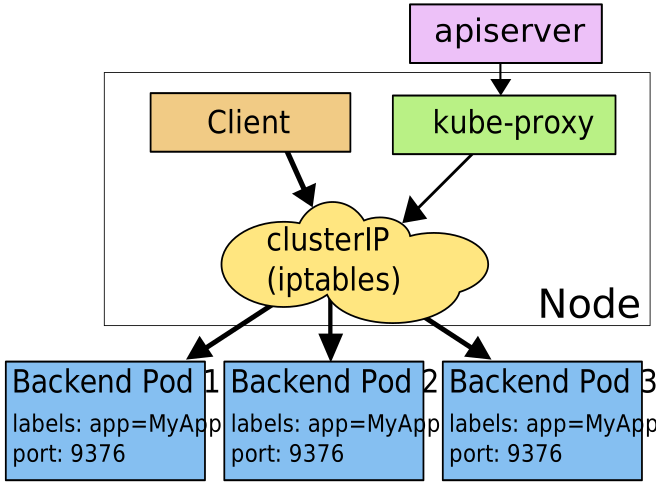
在Worker Node上,kube-proxy 會監視 Control Plane 對 Service 和 Endpoints 的添加和移除,以對每個 Service 配置 iptables 規則,使得該 Service 的 clusterIP:port 請求被重新定向到 Service 後端中的某個 Pod 上。
### kube-controller-manager
- [Replication Controller, Node Controller, ResourceQuota Controller, Namespace Controller, Endpoint Controller, Service Controller](https://www.huweihuang.com/article/kubernetes/core-principle/kubernetes-core-principle-controller-manager/)
---
## CRI, CSI, CNI
[Kubernetes中的开放接口CRI、CNI、CSI](https://zhuanlan.zhihu.com/p/33390023)

### CRI

* Kubernetes implements a Container Runtime Interface that permits pluggability of the container runtime.
* The container runtime is responsible for downloading images and running containers.
* Container Runtime
* Docker
* rkt
* CRI-O
---
## Namespace
* namespace = virtual cluster
* switch context
* [Subdividing your cluster using Kubernetes namespace](https://kubernetes.io/docs/tasks/administer-cluster/namespaces/#subdividing-your-cluster-using-kubernetes-namespaces)
* object counts in a namespace
```kubectl get all --namespace=<namespace>```
* Resource Quota
* [Requests vs. Limits](https://kubernetes.io/docs/concepts/policy/resource-quotas/#requests-vs-limits)
If the quota has a value specified for ```requests.cpu``` or ```requests.memory```, then it requires that every incoming container makes an explicit request for those resources. If the quota has a value specified for ```limits.cpu``` or ```limits.memory```, then it requires that every incoming container specifies an explicit limit for those resources.
* Delete namespace when stuck
```
kubectl proxy & kubectl get namespace NAMESPACE -o json | jq '.spec = {"finalizers":[]}' > temp.json
curl -k -H "Content-Type: application/json" -X PUT --data-binary @temp.json 127.0.0.1:8001/api/v1/namespaces/NAMESPACE/finalize
```
---
## Label & Label Selector
- [Kubernetes基本概念之Label](https://www.jianshu.com/p/cd6b4b4caaab)
---
## Resources
### Service
```
apiVersion: v1
kind: Namespace
metadata:
name: abby-ns
---
apiVersion: v1
kind: Pod
metadata:
name: my-nginx
namespace: abby-ns
labels:
app: my-nginx
spec:
containers:
- image: nginx
name: nginx
ports:
- containerPort: 80
restartPolicy: Always
---
apiVersion: v1
kind: Service
metadata:
name: my-service
namespace: abby-ns
spec:
type: NodePort
ports:
- protocol: TCP
nodePort: 30033
targetPort: 80
port: 1234
selector:
app: my-nginx
```
:::info
**spec.ports.targetPort** Pod的port number。
**spec.ports.port** Service的Cluster IP的port number。
**spec.ports.nodePort** Node的port number。
:::
---
### Ingress
- [Ingress控制器详解](https://www.cnblogs.com/along21/p/10333086.html)
- Ingress Controller
Ingress 本身並沒有提供負載平衡的功能,還需要透過Ingress Controller 來實現。
```
kubectl apply -f https://raw.githubusercontent.com/kubernetes/ingress-nginx/master/deploy/static/mandatory.yaml
kubectl apply -f https://raw.githubusercontent.com/kubernetes/ingress-nginx/master/deploy/static/provider/baremetal/service-nodeport.yaml
```

- Ingress Resource
Ingress resource為rule的集合。
```
apiVersion: v1
kind: Namespace
metadata:
name: abby-ns
---
apiVersion: v1
kind: Service
metadata:
name: my-service
namespace: abby-ns
spec:
selector:
app: my-app
ports:
- name: http
targetPort: 80
port: 80
---
apiVersion: apps/v1
kind: Deployment
metadata:
name: my-deployment
namespace: abby-ns
spec:
replicas: 3
selector:
matchLabels:
app: my-app
template:
metadata:
labels:
app: my-app
spec:
containers:
- name: my-app
image: ikubernetes/myapp:v2
ports:
- name: http
containerPort: 80
---
apiVersion: extensions/v1beta1
kind: Ingress
metadata:
name: my-ingress
namespace: abby-ns
spec:
rules:
- http:
paths:
- path: /
backend:
serviceName: my-service
servicePort: 80
```

---
### [ConfigMap vs. Secret](https://ithelp.ithome.com.tw/articles/10224066)
---
### [DaemonSet](https://ithelp.ithome.com.tw/articles/10251596)
---
### RBAC (Role-Based Access Control)
- [老闆!我可以做什麼:RBAC](https://ithelp.ithome.com.tw/articles/10195944)
---
## [Kubernetes kubectl run 命令详解](http://docs.kubernetes.org.cn/468.html)
* restart option
The restart policy for this Pod. Legal values [Always, OnFailure, Never]. If set to 'Always' a deployment is created, if set to 'OnFailure' a job is created, if set to 'Never', a regular pod is created. For the latter two --replicas must be 1. Default 'Always', for CronJobs Never.
---
## Create resources from scratch
You can easily get the basic skeleton of a Deployment, Job or Pod.
```kubectl create service clusterip foobar --tcp=80:80 -o yaml --dry-run```
```kubectl create service clusterip foobar --tcp=80:80 -o yaml --save-config```
**--save-config**
If true, the configuration of current object will be saved in its annotation. Otherwise, the annotation will be unchanged. This flag is useful when you want to perform kubectl apply on this object in the future.
---
## Change YAML of live objects
* [Imperative/Declarative and a Few `kubectl` tricks](https://medium.com/bitnami-perspectives/imperative-declarative-and-a-few-kubectl-tricks-9d6deabdde)
* Declarative management
* 若檔案無修改,就不會做更新
檔案來自annotation (kubectl.kubernetes.io/last-applied-configuration)
```kubectl apply -f <FILENAME>```
* Imperative management
To create and manage/modify using the CLI so that all operations are done on live objects.
* 若檔案無修改,就不會做更新
```kubectl edit <RESOURCE> <RESOURCE NAME>```
* 直接砍掉,重新產生Resource
```kubectl get <RESOURCE> <RESOURCE NAME> -o yaml --export > <FILENAME>```
```Kubectl replace --force -f <FILENAME>```\
---
## Helm Charts
- [Helm Quickstart Guide](https://helm.sh/docs/using_helm/)
- [Helm chart](https://jimmysong.io/kubernetes-handbook/practice/helm.html)是用来封装kubernetes原生应用程序的yaml文件
- [Kubeapps Hub](https://hub.kubeapps.com/)
- [Go template syntax](https://golang.org/pkg/text/template/)
- Upgrade
* [Helm Edit](https://github.com/mstrzele/helm-edit)
* Helm commands
```
helm upgrade -f ingress-controller/values.yml nginx-ingress stable/nginx-ingress
```
---
## Output Filter
* [JSONPath](https://kubernetes.io/docs/reference/kubectl/jsonpath/)
 Sign in with Wallet
Connect another wallet
Sign in with Wallet
Connect another wallet